Classification using *Fashion MNIST * dataset
In this blog, we will learn how to build our first deep learning classifier with TensorFlow 2.0 and Keras. We train a neural network on the Fashion MNIST dataset to sort clothing images into 10 categories.
TensorFlow 2.0 is Google's open-source deep learning framework, now powered by Keras as its high-level API. It brings eager execution, cleaner APIs, and faster iteration compared to TF 1.x.
Install with pip install tensorflow (or pip install tensorflow-gpu for GPU).
Fashion MNIST dataset
We are going to use the Fasion Mnist dataset. It consists of a training set of 60,000 examples and a test set of 10,000 examples. All the 70,000 images show individual articles of clothing at low resolution (28 by 28 pixels). The grayscale images are from 10 categories(T-shirt/top, Trouser, Pullover, Dress, Coat, Sandal, Shirt, Sneaker, Bag, Ankle boot) as seen here:
We can download the actual dataset from here.
The notebook uses the fashion_mnist dataset available directly in keras.
import tensorflow as tf
from tensorflow import kerasprint(tf.__version__)2.1.0import numpy as np
import pandas as pd
import matplotlib.pyplot as pltLoading the fashion_mnist dataset from keras:
mnist = keras.datasets.fashion_mnistThe dataset is downloaded in TFModuleWrapper.
type(mnist)moduleLoading the data into real variables using load_data(). It returns 2 tuples. The first tuple has the training data and the second tuple has the test data.
(X_train, y_train), (X_test, y_test) = mnist.load_data()Using shape we can see that it has 60,000 images for training and each image is of size 28x28 in X_train and a corresponding label for each image in y_train.
X_train.shape, y_train.shape((60000, 28, 28), (60000,))np.max() gives the maximum value. Hence the maximum value in X_train is 255. We can even see the minimum value using np.min(X_train). The minimum value will be 0.
np.max(X_train)255np.mean() gives the mean value. The mean value in X_train is 72.94
np.mean(X_train)72.94035223214286The images are divided into 10 categories. The 10 categories are encoded using a numerical value as shown below.
y_trainarray([9, 0, 0, ..., 3, 0, 5], dtype=uint8)These are all the class names in their proper order. top is encoded as 0, trouser is encoded as 1 and so on.
class_names = ['top', 'trouser', 'pullover', 'dress', 'coat', 'sandal', 'shirt', 'sneaker', 'bag', 'ankle boot']Data Exploration
X_train.shape(60000, 28, 28)The testing data set containes 10000 images of size 28x28.
X_test.shape(10000, 28, 28)The second image of the training set (index 1) is plotted below.
The plt.figure() function in pyplot module of matplotlib library is used to create a new figure. The plt.imshow() function in pyplot module of matplotlib library is used to display data as an image. plt.colorbar() displays the colour bar besides the image. The values are between 0 and 255.
plt.figure()
plt.imshow(X_train[1])
plt.colorbar()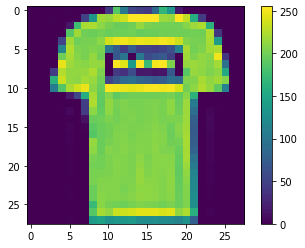
The image is a top and the value at index 1 of y_train also corresponds to the class name top.
y_trainarray([9, 0, 0, ..., 3, 0, 5], dtype=uint8)Neural Network models do not accept values greater than 1. All values need to fall between 0 and 1. Dividing by 255 (the maximum pixel value) handles this:
X_train = X_train/255.0
X_test = X_test/255.0
All values are now between 0 and 1.
plt.figure()
plt.imshow(X_train[1])
plt.colorbar()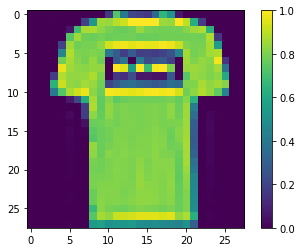
Build the model with TF 2.0
Import the necessary layers to build the model.
The Neural Network is constructed from 3 types of layers:
Input layer: initial data for the neural network.Hidden layers: intermediate layer between input and output layer and place where all the computation is done.Output layer: produce the result for given inputs.
from tensorflow.keras import Sequential
from tensorflow.keras.layers import Flatten, Dense
Flatten() is used as the input layer to convert the data into a 1-dimensional array for inputting it to the next layer. Our 2D image will be converted to a single 1D column. input_shape = (28,28) because the size of our input image is 28x28.
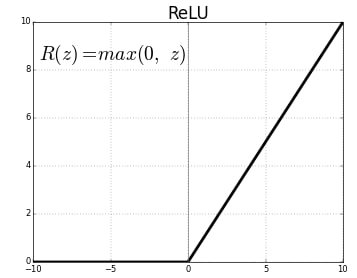
Dense() layer is the regular deeply connected neural network layer. It is most common and frequently used layer. We have a dense layer with 128 neurons with activation function relu. The rectified linear activation function or ReLU for short is a piecewise linear function that will output the input directly if it is positive, otherwise, it will output zero.
The output layer is a dense layer with 10 neurons because we have 10 classes. The activation function used is softmax. Softmax converts a real vector to a vector of categorical probabilities. The elements of the output vector are in range (0, 1) and sum to 1. Softmax is often used as the activation for the last layer of a classification network because the result could be interpreted as a probability distribution.
model = Sequential()
model.add(Flatten(input_shape = (28, 28)))
model.add(Dense(128, activation = 'relu'))
model.add(Dense(10, activation = 'softmax'))model.summary()Model: "sequential_1"
_________________________________________________________________
Layer (type) Output Shape Param #
=================================================================
flatten_1 (Flatten) (None, 784) 0
_________________________________________________________________
dense_2 (Dense) (None, 128) 100480
_________________________________________________________________
dense_3 (Dense) (None, 10) 1290
=================================================================
Total params: 101,770
Trainable params: 101,770
Non-trainable params: 0
_________________________________________________________________Model compilation
Loss Function: A loss function is used to optimize the parameter values in a neural network model. Loss functions map a set of parameter values for the network onto a scalar value that indicates how well those parameter accomplish the task the network is intended to do.Optimizer: Optimizers are algorithms or methods used to change the attributes of the neural network such as weights and learning rate in order to reduce the losses.Metrics: A metric is a function that is used to judge the performance of the model. Metric functions are similar to loss functions, except that the results from evaluating a metric are not used when training the model.
Compiling the model and fitting it to the training data with 10 epochs. An epoch is an iteration over the entire data provided.
model.compile(optimizer='adam', loss = 'sparse_categorical_crossentropy', metrics = ['accuracy'])
model.fit(X_train, y_train, epochs = 10)Train on 60000 samples
Epoch 9/10
60000/60000 [==============================] - 5s 79us/sample - loss: 0.2472 - accuracy: 0.9081
Epoch 10/10
60000/60000 [==============================] - 5s 80us/sample - loss: 0.2374 - accuracy: 0.9120Evaluating accuracy on the test data gives 88.41%.
test_loss, test_acc = model.evaluate(X_test, y_test)
print(test_acc)10000/10000 [==============================] - 1s 81us/sample - loss: 0.3312 - accuracy: 0.8841
0.8841Predictions can also be made using sklearn. Import accuracy_score from sklearn:
from sklearn.metrics import accuracy_scorepredict_classes generates class predictions for the input samples. Here we are giving X_test containing 10000 images as the input. In multilabel classification, accuracy_score computes subset accuracy: the set of labels predicted for a sample must exactly match the corresponding set of labels in y_test.
y_pred = model.predict_classes(X_test)
accuracy_score(y_test, y_pred)0.8841Using this model to perform predictions on an input image:
y_predarray([9, 2, 1, ..., 8, 1, 5], dtype=int64)predict() returns an array unlike predict_class() which returns categorical values. The array contains the confidence level for each of the class.
pred = model.predict(X_test)
predarray([[2.3493649e-07, 1.7336136e-09, 3.9774801e-09, ..., 1.7785656e-03,
3.6985359e-08, 9.9811894e-01],
[7.2894422e-06, 5.1075269e-15, 9.9772221e-01, ..., 2.2120526e-12,
6.0182694e-09, 2.4706193e-16],
[1.3015335e-07, 9.9999988e-01, 3.9984838e-12, ..., 1.3045939e-23,
3.1408490e-11, 2.1719039e-15],
...For the test image at index 0, predict returns this array. The value at index 9 is the greatest, so the model predicts class 9: ankle boot.
pred[0]array([2.3493649e-07, 1.7336136e-09, 3.9774801e-09, 1.0847069e-08,
2.9475926e-09, 1.0172284e-04, 3.8994517e-07, 1.7785656e-03,
3.6985359e-08, 9.9811894e-01], dtype=float32)argmax() returns the index of the maximum value. The predicted class is 9 since the maximum value is at index position 9.
np.argmax(pred[0])9For the second image in the test data (index 1) the predicted class is 2: pullover.
np.argmax(pred[1])2The model gives an accuracy of 91.2% on the training data and 88.41% on test data. This gap indicates overfitting. Overfitting happens when a model learns the detail and noise in the training data to the extent that it negatively impacts the performance of the model on new data. The noise or random fluctuations in the training data get picked up and learned as concepts by the model. These concepts do not apply to new data and negatively impact the model's ability to generalize. To avoid overfitting, consider using Convolutional Neural Networks.
Conclusion
In this blog, we built and trained a fully connected ANN in TensorFlow 2.0 to classify Fashion MNIST images into 10 clothing categories. After normalizing pixel values to the 0-1 range, a three-layer model (Flatten -> 128-neuron Dense -> 10-neuron softmax) trained for 10 epochs reached 91.2% training accuracy and 88.41% test accuracy.
Key takeaways:
- Dividing image pixel values by 255 is the simplest normalization strategy. It maps all inputs to [0, 1] without fitting a scaler, which is sufficient for standard grayscale image datasets.
- A gap between training accuracy (91.2%) and test accuracy (88.4%) is a sign of mild overfitting. Adding
Dropoutor switching to a CNN would close this gap. predict_classes()returns a single class index per sample;predict()returns the full softmax probability vector, which we can use withargmax()to get the same result.
Next steps:
- Replace the Dense layers with convolutional blocks in 2D CNN on CIFAR-10 to see how spatial feature learning improves accuracy.
- Build the same ANN from scratch on tabular data in Building Your First ANN with TensorFlow 2.0.
- Experiment with adding one or two
Dropout(0.3)layers between the Dense blocks to reduce the overfitting gap.