
For open-ended research tasks, a single agent struggles. Think of a multi-company financial analysis. The agent can quickly blow past its context window and drift off track. So we build a hierarchical multi-agent team instead. This lets us split the work. An Orchestrator plans the research. Background Researchers gather data on separate topics in parallel. An Editor then pulls the findings together.
In this blog, we implement an Orchestrator-Worker team with LangGraph and state-injected filesystem tools.
Hierarchical Multi-Agent Design
Our team uses three specialized agents:
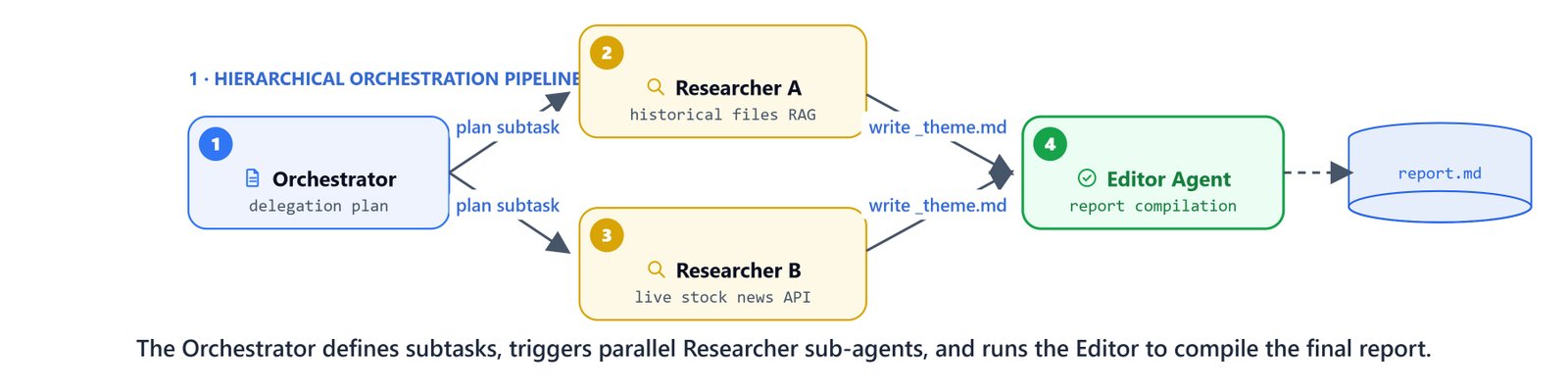
- Orchestrator agent: the only agent that talks to the user. It analyzes queries, creates a
research_plan.mdoutline, schedules parallel background tasks, and triggers the Editor. - Researcher agent: a background worker. It takes one specific question, runs several database searches, and writes its findings (
_theme.md) and sources (_sources.txt) to disk. - Editor agent: a synthesis worker. It reads the research plan and worker files to compile the final
report.md.
                    +-------------------+
                    |     Human User    |
                    +-------------------+
                              ^
                              |
                              v
                    +-------------------+
                    | ORCHESTRATOR AGENT| <---> Plan: research_plan.md
                    +-------------------+
                     /        |        \
         +----------+         |         +----------+
         |                    |                    |
         v                    v                    v
+------------------+ +------------------+ +------------------+
| RESEARCHER AGENT | | RESEARCHER AGENT | |   EDITOR AGENT   |
| (Theme 1 Research| | (Theme 2 Research| | (Synthesize Plan |
| -> theme1.md)    | | -> theme2.md)    | | -> report.md)    |
+------------------+ +------------------+ +------------------+Defining the Injected Filesystem State
To support many users at once, we isolate each workspace folder on disk with an injected state schema.
Define scripts/file_tools.py:
import os
import hashlib
from typing import Annotated
from langchain.agents import AgentState
from typing_extensions import NotRequired
from langchain_core.tools import tool, InjectedToolCallId
from langgraph.prebuilt import InjectedState
from langgraph.types import Command
from langchain_core.messages import ToolMessage

BASE_FILE_DIR = "agent_files"

class DeepAgentState(AgentState):
    user_id: NotRequired[str]
    thread_id: NotRequired[str]

def _thread_folder(state: DeepAgentState) -> str:
    user = state.get("user_id") or "default_user"
    thread = state.get("thread_id") or "default_thread"
    folder = os.path.join(BASE_FILE_DIR, user, thread)
    os.makedirs(folder, exist_ok=True)
    return folder

def _disk_path(state: DeepAgentState, file_path: str) -> str:
    folder = _thread_folder(state)
    safe_path = file_path.lstrip("/\\")
    full = os.path.join(folder, safe_path)
    os.makedirs(os.path.dirname(full), exist_ok=True)
    return full

@tool(parse_docstring=True)
def ls(state: Annotated[DeepAgentState, InjectedState], path: str = "") -> list[str]:
    """List available files for this user/thread."""
    folder = _thread_folder(state)
    if path:
        folder = os.path.join(folder, path.lstrip("/\\"))
    if not os.path.exists(folder):
        return []
    return sorted(os.listdir(folder))

@tool(parse_docstring=True)
def read_file(file_path: str, state: Annotated[DeepAgentState, InjectedState]) -> str:
    """Read file content with line numbers."""
    path = _disk_path(state, file_path)
    if not os.path.exists(path):
        return f"Error: File '{file_path}' does not exist."
    with open(path, "r", encoding="utf-8") as f:
        lines = f.read().splitlines()
    return "\n".join([f"{i+1:5d}  {line}" for i, line in enumerate(lines)])

@tool(parse_docstring=True)
def write_file(file_path: str, content: str, state: Annotated[DeepAgentState, InjectedState], tool_call_id: Annotated[str, InjectedToolCallId]) -> Command:
    """Write content to a file on disk."""
    path = _disk_path(state, file_path)
    with open(path, "w", encoding="utf-8") as f:
        f.write(content)
    return Command(update={"messages": [ToolMessage(f"[FILE WRITTEN] {file_path}", tool_call_id=tool_call_id)]})
Defining Orchestrator Tools for Worker Execution
The Orchestrator drives the workers with three tools: write_research_plan, run_researcher, and run_editor.
import sqlite3
from langgraph.checkpoint.sqlite import SqliteSaver
from scripts.rag_tools import hybrid_search, live_finance_researcher
from scripts.prompts import ORCHESTRATOR_PROMPT, RESEARCHER_PROMPT, EDITOR_PROMPT

llm = ChatGoogleGenerativeAI(model='gemini-3-pro-preview')
conn = sqlite3.connect("data/deep_finance_researcher.db", check_same_thread=False)
checkpointer = SqliteSaver(conn=conn)

# Initialize background worker agents
researcher_agent = create_agent(
    model=llm,
    tools=[ls, write_file, read_file, hybrid_search, live_finance_researcher],
    system_prompt=RESEARCHER_PROMPT,
    state_schema=DeepAgentState
)

editor_agent = create_agent(
    model=llm,
    tools=[ls, read_file, write_file],
    system_prompt=EDITOR_PROMPT,
    state_schema=DeepAgentState
)
Create the Orchestrator's coordination tools:
@tool
def write_research_plan(
    thematic_questions: list[str],
    state: Annotated[DeepAgentState, InjectedState],
    tool_call_id: Annotated[str, InjectedToolCallId]
) -> Command:
    """Write the high-level research plan with major thematic questions."""
    content = "# Research Plan\n\n## User Query\n" + state["messages"][-1].text + "\n\n## Thematic Questions\n\n"
    for i, question in enumerate(thematic_questions, 1):
        content += f"{i}. {question}\n"

    path = _disk_path(state, "research_plan.md")
    with open(path, "w", encoding="utf-8") as f:
        f.write(content)
    return Command(update={"messages": [ToolMessage(f"[PLAN WRITTEN] research_plan.md", tool_call_id=tool_call_id)]})

@tool
def run_researcher(
    theme_id: int,
    thematic_question: str,
    state: Annotated[DeepAgentState, InjectedState],
    max_retries: int = 2
) -> str:
    """Run a single Research agent for ONE thematic question."""
    file_hash = hashlib.md5(f"{theme_id}_{thematic_question}".encode()).hexdigest()[:6]
    ai_instruction = f"""[THEME {theme_id}] {thematic_question}
    Save findings to: researcher/{file_hash}_theme.md
    Save sources to: researcher/{file_hash}_sources.txt"""

    sub_state = {
        "messages": state["messages"] + [AIMessage(ai_instruction)],
        "user_id": state.get("user_id"),
        "thread_id": state.get("thread_id")
    }

    for attempt in range(max_retries + 1):
        try:
            researcher_agent.invoke(sub_state)
            return f"✓ Theme {theme_id} completed (hash: {file_hash})"
        except Exception as e:
            print(f"Researcher failed, retrying... ({e})")
    return f"✗ Theme {theme_id} failed"

@tool
def run_editor(state: Annotated[DeepAgentState, InjectedState]) -> str:
    """Run the Editor agent to synthesize all research into report.md."""
    sub_state = {
        "messages": [HumanMessage("Read research_plan.md and researcher/ folder, then write report.md.")],
        "user_id": state.get("user_id"),
        "thread_id": state.get("thread_id")
    }
    editor_agent.invoke(sub_state)
    return "Editor completed. Final report saved to report.md."
Compile the Orchestrator agent:
orchestrator_agent = create_agent(
    model=llm,
    tools=[write_research_plan, run_researcher, run_editor],
    system_prompt=ORCHESTRATOR_PROMPT,
    state_schema=DeepAgentState,
    checkpointer=checkpointer
)
Tracing Orchestration Execution Flows
Flow 1: Direct Reply (Simple Query)
For simple questions that need no research, the Orchestrator answers directly without triggering any tools:
from scripts.agent_utils import stream_agent_response

stream_agent_response(
    orchestrator_agent,
    "What is a 10-K report?",
    thread_id="session_1",
    user_id="user_1"
)A **10-K report** is a comprehensive annual document that all publicly traded companies in the United States are required by law to file with the **Securities and Exchange Commission (SEC)**. It details business operations, risk factors, and audited financial statements.Flow 2: Hierarchical Execution (Complex Query)
For complex research, the Orchestrator drives the worker agents:
stream_agent_response(
    orchestrator_agent,
    "Do a detailed analysis of Amazon's financial performance in 2023 and 2024",
    thread_id="session_2",
    user_id="user_1"
)
Step 1: Writing the Research Plan
The Orchestrator breaks down the request into five thematic questions:
  [Tool Triggered]: write_research_plan
   Arguments: {
     'thematic_questions': [
       "Overview of Amazon's overall financial performance and revenue growth in 2023 and 2024.",
       "Segment-level analysis: Performance of AWS, North America, and International segments.",
       "Profitability, operating margins, and net income trends for Amazon.",
       "Key growth drivers and strategic investments (AI, advertising, logistics).",
       "Future outlook, stock performance, and analyst expectations heading into 2025."
     ]
   }

  [Tool Completed]
Step 2: Running Researchers in Parallel
The Orchestrator triggers background researchers for each theme:
  [Tool Triggered]: run_researcher
   Arguments: {'thematic_question': "Overview of Amazon's overall financial performance...", 'theme_id': 1}

  [Tool Triggered]: run_researcher
   Arguments: {'thematic_question': 'Segment-level analysis: Performance of AWS...', 'theme_id': 2}

  ...

  [Tool Completed] (returned: ✓ Theme 1 completed (hash: a3f9c2))
  [Tool Completed] (returned: ✓ Theme 2 completed (hash: 7b8d1e))
  ...
Step 3: Synthesis and Editor Compilation
Once all research tasks are complete, the Orchestrator runs the Editor:
  [Tool Triggered]: run_editor
   Arguments: {}

  [Tool Completed] (returned: Editor completed. Final report saved to report.md.)

Research complete! The final synthesized analysis of Amazon's financial performance in 2023 and 2024 has been written to **`report.md`**.
This is how a hierarchical research team works. The Orchestrator wrote a plan. It launched Researchers in parallel to gather each theme. Then it ran the Editor to fold everything into one report. Each agent stayed small and focused, so the team handled a large task that a single agent could not.


