Sentiment analysis is one of the most practical applications of NLP. Businesses use it to process thousands of customer reviews automatically, without anyone having to read them one by one.
In this blog, we will build a sentiment classifier in Python using reviews from Yelp, Amazon, and IMDb. We process the text with spaCy's linguistic features and train a LinearSVC model inside a scikit-learn pipeline.
Prerequisites: Python 3.x, spaCy, scikit-learn, Pandas, displaCy.
Datasets used in this tutorial: Datasets for Sentiment Classification on GitHub
Natural Language Processing Concepts
Natural Language Processing (NLP) is the field of AI concerned with making computers understand human language. It started in the 1950s with rule-based translation and has grown into the systems that now run search engines, chatbots, and machine translation.
Applications of NLP
NLP is used across many domains to automate language understanding:
- Text Classification: Automatically sorting emails or documents into categories.
- Spam Filters: Detecting and blocking unsolicited messages.
- Voice Text Messaging: Transcribing spoken language into written text.
- Sentiment Analysis: Detecting opinion or emotion in a block of text.
- Spell or Grammar Check: Suggesting corrections for writing errors.
- Chatbots: Responding to users to answer questions or solve issues.
- Search Auto-suggestions and Autocorrect: Predicting and correcting search terms.
- Automatic Review Analysis: Parsing feedback to extract customer insights.
- Machine Translation: Converting text between languages.
Data Cleaning Techniques
Before feeding text into a machine learning model, raw strings need to be cleaned and converted to numerical features.
Common preprocessing steps include:
- Case Normalization: Converting all text to lowercase.
- Removing Stop Words: Filtering out common words with little semantic value (e.g., "the", "is", "at").
- Removing Punctuation or Special Symbols: Stripping noise like exclamation marks or brackets.
- Lemmatization or Stemming: Reducing words to their base form (e.g., "running" to "run").
- Parts of Speech Tagging: Identifying the grammatical category of each word.
- Entity Detection: Identifying proper nouns like names, dates, and locations.
Bag of Words and Word Embeddings
A Bag of Words (BoW) represents a document by counting how often each word appears. It ignores word order and grammar, focusing only on frequency.
The three documents below illustrate how this works:
doc1 = "I am high"
doc2 = "Yes I am high"
doc3 = "I am kidding"
The table below shows how BoW constructs a document-term matrix by counting each unique word across the documents:
TF-IDF Vectorization
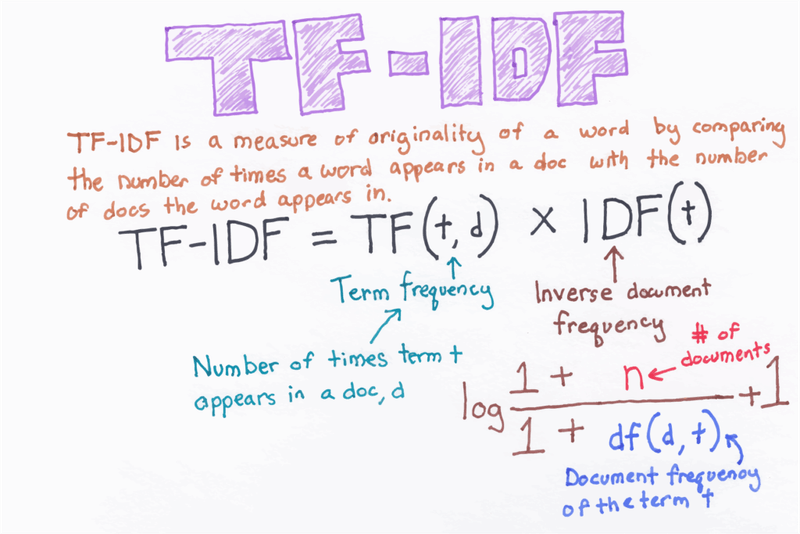
TF-IDF scores words by how common they are in one document versus across all documents. A word that appears often in one review but rarely elsewhere gets a high score. Common words like "the" score near zero.
The chart shows how TF-IDF filters out common words while amplifying distinctive terms:
spaCy Pipelines and Installation
Library Installation
Install spaCy and the small English language model (en_core_web_sm):
# pip install -U spacy
# pip install -U spacy-lookups-data
# python -m spacy download en_core_web_sm
Also install scikit-learn:
# pip install scikit-learnThe spaCy Processing Pipeline
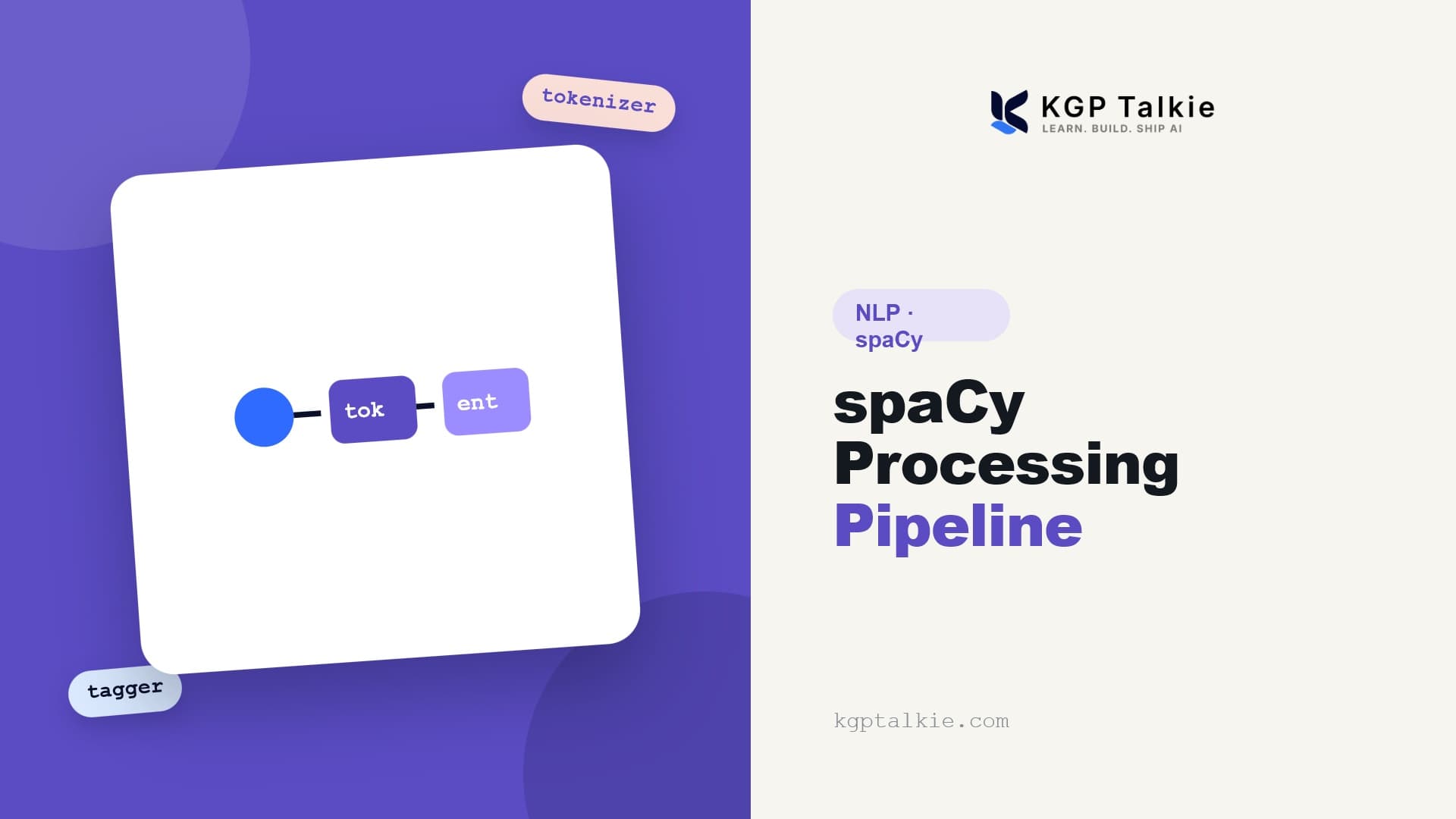
When spaCy's nlp object processes a string, it tokenizes the text into a Doc object, then runs it through a series of pipeline components that handle POS tagging, dependency parsing, and named entity recognition.
The diagram outlines the default pipeline flow:
Basic Text Processing with spaCy
Import spaCy and its visualization module, displaCy:
import spacy
from spacy import displacy
Load the English language model and process a sample sentence:
nlp = spacy.load('en_core_web_sm')
text = "Apple, This is first sentence. and Google this is another one. here 3rd one is"
doc = nlp(text)
doc
Output:
Apple, This is first sentence. and Google this is another one. here 3rd one isIterate through the document to inspect each token:
for token in doc:
print(token)Apple
,
This
is
first
sentence
.
and
Google
this
is
another
one
.
here
3rd
one
isSentence Segmentation
You can add custom components to spaCy's pipeline. The sentencizer handles rule-based sentence segmentation without running a full dependency parse. Add it before the parser component and print each sentence:
sent = nlp.create_pipe('sentencizer')
nlp.add_pipe(sent, before='parser')
doc = nlp(text)
for sent in doc.sents:
    print(sent)
Three sentences, segmented by spaCy's rules:
Apple, This is first sentence.
and Google this is another one.
here 3rd one is
Stop Words Filtering
Stop words are common words that carry little meaning on their own, like "the" or "is". Import spaCy's built-in English stop word list:
from spacy.lang.en.stop_words import STOP_WORDS
stopwords = list(STOP_WORDS)
print(stopwords)['move', 'again', 'during', 'herself', 'him', 'hereby', 'third', 'once', 'call', 'both', ''ll', 'doing', 'something', 'when', ''ll', 'unless', 'thereafter', 'before', 'so', 'is', 'will', 'toward', 'has', 'whom', 'it', 'who', 'what', 'his', ''s', 'towards', 'quite', 'below', 'alone', 'yourselves', 'which', 'does', 'ca', 'moreover', 'seems', 'or', 'first', 'here', 'various', "n't", 'very', 'why', 'beyond', 'mine', 'themselves', 'twenty', 'really', 'almost', 'indeed', 'amongst', 'until', 'empty', 'everyone', 'should', 'bottom', 'five', 'among', 'also', 'over', "'s", 'via', 'against', 'just', 'above', 'twelve', 'although', 'could', 'hence', 'are', 'than', 'being', 'however', 'front', 'eight', 'already', 'three', 'two', 'have', 'while', 'beforehand', 'myself', ''ve', 'much', 'rather', 'seemed', 'back', ''ve', 'from', 'every', 'other', 'between', 'of', 'serious', 'since', 'as', 'but', 'i', 'she', 'whoever', 'used', 'those', 'whatever', 'beside', 'someone', ''m', 'to', 'within', 'forty', 'sometimes', 'upon', 'by', 'into', 'regarding', 'hereupon', 'together', 'wherever', 'made', 'that', 'own', 'must', 'namely', 'had', 'hers', 'hereafter', 'perhaps', 'afterwards', 'part', 'another', 'next', 'across', 'nor', 'latter', 'get', 'this', 'our', 'whose', 'off', 'see', 'a', 'anyhow', 'former', "'ll", 'amount', 'becomes', 'same', 'full', 'himself', 'after', 'itself', 'they', 'how', 'using', "'re", 'somewhere', 'thus', 'somehow', 'too', 'because', 'still', 'us', 'ever', "n't", 'give', 'and', 'if', 'we', 'most', 'no', 'ours', 'became', 'for', 'may', 'fifty', 'everywhere', 'whenever', 'be', 'everything', 'an', 'whole', 'last', 'whether', ''s', ''d', 'besides', 'along', 'all', 'say', 'might', 'seeming', 'on', 'neither', 'these', 'anywhere', ''m', 'more', 'per', 'ourselves', 'otherwise', 'mostly', 'make', 'due', ''re', 'becoming', 'yours', 'each', 'thereby', 'any', 'onto', 'not', 'others', 'fifteen', 'were', 'many', 'would', 'though', 'either', 'keep', 'take', 'nevertheless', "'ve", 'about', 'you', 'therefore', 'thru', 'around', 'behind', 'else', 'he', 'its', 'throughout', 'four', 'further', 'herein', ''d', 're', 'am', 'where', 'do', 'well', "n't", 'side', 'whereupon', 'none', 'latterly', "'m", "'d", 'noone', 'at', 'whereas', 'even', 'anyone', 'nine', 'nowhere', 'down', 'did', 'them', 'name', 'thereupon', 'cannot', 'me', 'least', 'anyway', 'nothing', 'top', 'few', 'therein', 'yet', 'less', 'show', 'one', 'been', 'done', 'some', 'thence', 'her', 'up', 'can', 'put', 'whereafter', 'become', 'seem', 'nobody', 'only', 'enough', 'often', 'sometime', 'out', 'now', 'your', 'their', 'always', 'ten', 'under', 'please', 'six', 'yourself', 'then', 'wherein', 'except', 'eleven', 'meanwhile', 'whither', 'whereby', 'in', 'with', 'go', 'there', 'my', 'such', ''re', 'anything', 'hundred', 'the', 'whence', 'was', 'never', 'sixty', 'formerly', 'several', 'without', 'through', 'elsewhere']Check how many stop words there are:
len(stopwords)326Filter out stop words by checking the is_stop attribute on each token:
for token in doc:
    if token.is_stop == False:
        print(token)
After filtering, only non-stop tokens remain:
Apple
,
sentence
.
Google
.
3rd
Lemmatization
Lemmatization maps words back to their base form. "runs", "running", and "ran" all reduce to "run". Test this on a small string:
doc = nlp('run runs running runner')
for lem in doc:
    print(lem.text, lem.lemma_)
"runs" and "running" map back to "run", but "runner" stays as-is since it's a different word:
run run
runs run
running run
runner runner
Part-of-Speech (POS) Tagging
POS tagging assigns a grammatical category to each word: noun, verb, adjective, and so on. Run it on a short sentence:
doc = nlp('All is well at your end!')
for token in doc:
    print(token.text, token.pos_)
Each token appears alongside its POS tag:
All DET
is AUX
well ADJ
at ADP
your DET
end NOUN
! PUNCT
Use displaCy to visualize the dependency parse inside your notebook:
displacy.render(doc, style = 'dep')The raw layout output:
All DETis AUXwell ADJat ADPyour DETend! NOUNnsubjadvmodprepposspobj
Named Entity Recognition (NER)
NER finds proper nouns in text and labels them by type: person, location, date, money, and so on. Run it on a longer paragraph:
doc = nlp("New York City on Tuesday declared a public health emergency and ordered mandatory measles vaccinations amid an outbreak, becoming the latest national flash point over refusals to inoculate against dangerous diseases. At least 285 people have contracted measles in the city since September, mostly in Brooklyn's Williamsburg neighborhood. The order covers four Zip codes there, Mayor Bill de Blasio (D) said Tuesday. The mandate orders all unvaccinated people in the area, including a concentration of Orthodox Jews, to receive inoculations, including for children as young as 6 months old. Anyone who resists could be fined up to $1,000.")
doc
The parsed doc:
New York City on Tuesday declared a public health emergency and ordered mandatory measles vaccinations amid an outbreak, becoming the latest national flash point over refusals to inoculate against dangerous diseases. At least 285 people have contracted measles in the city since September, mostly in Brooklyn's Williamsburg neighborhood. The order covers four Zip codes there, Mayor Bill de Blasio (D) said Tuesday. The mandate orders all unvaccinated people in the area, including a concentration of Orthodox Jews, to receive inoculations, including for children as young as 6 months old. Anyone who resists could be fined up to $1,000.Render the named entities with displaCy:
displacy.render(doc, style = 'ent')displaCy highlights each entity with its type label (GPE, DATE, CARDINAL, PERSON, NORP, MONEY):
New York City GPE on Tuesday DATE declared a public health emergency and ordered mandatory measles vaccinations amid an outbreak, becoming the latest national flash point over refusals to inoculate against dangerous diseases. At least 285 CARDINAL people have contracted measles in the city since September DATE , mostly in Brooklyn GPE 's Williamsburg GPE neighborhood. The order covers four CARDINAL Zip codes there, Mayor Bill de Blasio PERSON (D) said Tuesday DATE . The mandate orders all unvaccinated people in the area, including a concentration of Orthodox NORP Jews NORP , to receive inoculations, including for children as young as 6 months old. Anyone who resists could be fined up to $1,000 MONEY .
Building the Sentiment Classifier
With the spaCy basics covered, it's time to build the classifier. The pipeline combines a custom spaCy tokenizer with a TF-IDF vectorizer and a LinearSVC trained on reviews from Yelp, Amazon, and IMDb.
Importing Machine Learning Libraries
Import the necessary modules from pandas and scikit-learn:
import pandas as pd
from sklearn.feature_extraction.text import TfidfVectorizer
from sklearn.svm import LinearSVC
from sklearn.pipeline import Pipeline
from sklearn.model_selection import train_test_split
from sklearn.metrics import accuracy_score, classification_report, confusion_matrix
Loading and Merging the Datasets
Load the Yelp review dataset. Reviews are tab-separated, with 0 for negative and 1 for positive:
data_yelp = pd.read_csv('datasets/yelp_labelled.txt', sep='\t', header = None)
data_yelp.head()| 0 | 1 | |
|---|---|---|
| 0 | Wow... Loved this place. | 1 |
| 1 | Crust is not good. | 0 |
| 2 | Not tasty and the texture was just nasty. | 0 |
| 3 | Stopped by during the late May bank holiday of... | 1 |
| 4 | The selection on the menu was great and so wer... | 1 |
Assign column names:
columns_name = ['Review', 'Sentiment']
data_yelp.columns = columns_name
data_yelp.head()| Review | Sentiment | |
|---|---|---|
| 0 | Wow... Loved this place. | 1 |
| 1 | Crust is not good. | 0 |
| 2 | Not tasty and the texture was just nasty. | 0 |
| 3 | Stopped by during the late May bank holiday of... | 1 |
| 4 | The selection on the menu was great and so wer... | 1 |
Check the shape:
data_yelp.shape(1000, 2)Load the Amazon dataset the same way:
data_amazon = pd.read_csv('datasets/amazon_cells_labelled.txt', sep = '\t', header = None)
data_amazon.columns = columns_name
data_amazon.head()| Review | Sentiment | |
|---|---|---|
| 0 | So there is no way for me to plug it in here i... | 0 |
| 1 | Good case, Excellent value. | 1 |
| 2 | Great for the jawbone. | 1 |
| 3 | Tied to charger for conversations lasting more... | 0 |
| 4 | The mic is great. | 1 |
data_amazon.shape(1000, 2)Load IMDb:
data_imdb = pd.read_csv('datasets/imdb_labelled.txt', sep = '\t', header = None)
data_imdb.columns = columns_name
data_imdb.head()| Review | Sentiment | |
|---|---|---|
| 0 | A very, very, very slow-moving, aimless movie ... | 0 |
| 1 | Not sure who was more lost - the flat characte... | 0 |
| 2 | Attempting artiness with black & white and cle... | 0 |
| 3 | Very little music or anything to speak of. | 0 |
| 4 | The best scene in the movie was when Gerardo i... | 1 |
IMDb has fewer reviews than the other two:
data_imdb.shape(748, 2)Concatenate the three datasets:
data = data_yelp.append([data_amazon, data_imdb], ignore_index=True)
data.shape(2748, 2)Check the first few rows:
data.head()| Review | Sentiment | |
|---|---|---|
| 0 | Wow... Loved this place. | 1 |
| 1 | Crust is not good. | 0 |
| 2 | Not tasty and the texture was just nasty. | 0 |
| 3 | Stopped by during the late May bank holiday of... | 1 |
| 4 | The selection on the menu was great and so wer... | 1 |
Check the class distribution:
data['Sentiment'].value_counts()The dataset is well balanced: 1,386 positive reviews and 1,362 negative:
1    1386
0    1362
Name: Sentiment, dtype: int64
Check for missing values:
data.isnull().sum()No nulls anywhere:
Review       0
Sentiment    0
dtype: int64
Text Preprocessing Function
The cleaning function will strip punctuation. Import Python's string module to see what those characters are:
import string
punct = string.punctuation
punct'!"#$%&\'()*+,-./:;?@[\\]^_`{|}~'Define the cleaning function. It parses each sentence with spaCy, lemmatizes the tokens, lowercases them, and removes stop words and punctuation:
def text_data_cleaning(sentence):
    doc = nlp(sentence)

    tokens = []
    for token in doc:
        if token.lemma_ != "-PRON-":
            temp = token.lemma_.lower().strip()
        else:
            temp = token.lower_
        tokens.append(temp)

    cleaned_tokens = []
    for token in tokens:
        if token not in stopwords and token not in punct:
            cleaned_tokens.append(token)
    return cleaned_tokens

text_data_cleaning("    Hello how are you. Like this video")
The function returns:
['hello', 'like', 'video']Pipeline and Model Training
Initialize the vectorizer with the custom tokenizer and define the classifier:
tfidf = TfidfVectorizer(tokenizer = text_data_cleaning)
classifier = LinearSVC()
Split the data into reviews (X) and sentiment labels (y):
X = data['Review']
y = data['Sentiment']
Split into 80% training, 20% test:
X_train, X_test, y_train, y_test = train_test_split(X, y, test_size = 0.2, random_state = 42)
X_train.shape, X_test.shape((2198,), (550,))Build and fit the pipeline:
clf = Pipeline([('tfidf', tfidf), ('clf', classifier)])
clf.fit(X_train, y_train)Pipeline(memory=None,
steps=[('tfidf',
TfidfVectorizer(analyzer='word', binary=False,
decode_error='strict',
dtype=,
encoding='utf-8', input='content',
lowercase=True, max_df=1.0, max_features=None,
min_df=1, ngram_range=(1, 1), norm='l2',
preprocessor=None, smooth_idf=True,
stop_words=None, strip_accents=None,
sublinear_tf=False,
token_pattern='(?u)\\b\\w\\w+\\b',
tokenizer=,
use_idf=True, vocabulary=None)),
('clf',
LinearSVC(C=1.0, class_weight=None, dual=True,
fit_intercept=True, intercept_scaling=1,
loss='squared_hinge', max_iter=1000,
multi_class='ovr', penalty='l2', random_state=None,
tol=0.0001, verbose=0))],
verbose=False)Model Evaluation and Predictions
Evaluating Model Performance
Generate predictions on the test set:
y_pred = clf.predict(X_test)Print the classification report:
print(classification_report(y_test, y_pred))The model hits 78% accuracy on the test set:
precision    recall  f1-score   support

           0       0.77      0.81      0.79       285
           1       0.78      0.74      0.76       265

    accuracy                           0.78       550
   macro avg       0.78      0.78      0.78       550
weighted avg       0.78      0.78      0.78       550
Print the confusion matrix:
confusion_matrix(y_test, y_pred)Rows are actual labels, columns are predicted:
array([[230,  55],
       [ 68, 197]], dtype=int64)
Testing Custom Reviews
Test the classifier on custom reviews:
clf.predict(['Wow, this is amazing lesson'])Returns 1 (positive):
array([1], dtype=int64)clf.predict(['Wow, this sucks'])Returns 0 (negative):
array([0], dtype=int64)clf.predict(['Worth of watching it. Please like it'])array([1], dtype=int64)clf.predict(['Loved it. Amazing'])array([1], dtype=int64)Conclusion
The model trained on 2,748 reviews from Yelp, Amazon, and IMDb and hit 78% accuracy. Along the way we used spaCy's tokenization, lemmatization, and NER, wrapped a custom cleaning function into a scikit-learn TfidfVectorizer, and chained everything inside a Pipeline.
Key takeaways:
- spaCy's lemmatizer maps inflected forms like "loved", "loves", and "loving" to the same root word, which improves the TF-IDF signal.
- Any Python function can plug into
TfidfVectorizervia thetokenizerparameter. - Putting preprocessing and modeling inside a
Pipelineprevents data leakage and keeps the training code clean.
Next steps:
- Build a text classification system for spam messages in Spam Text Message Classification using NLP.
- Learn how to define custom entity extraction rules in Custom Rules using spaCy.
- Explore general text processing techniques in NLP: End to End Text Processing for Beginners.