
Hardware Target: 24GB VRAM (RTX 3090 / 4090) All model sizes sourced directly from Ollama's model library (Q4_K_M unless noted).
2026 Model Lineup
Model Comparison Matrix
| Model | Ollama Tag | Total Params | Active Params | Architecture | Ollama Size (Q4_K_M) |
|---|---|---|---|---|---|
| Nemotron 3 Nano 4B | nemotron-3-nano:4b |
4B | 4B | Hybrid Mamba | 2.8 GB |
| Qwen 3.5 9B | qwen3.5:9b |
9B | 9B | Dense + Vision | 6.6 GB |
| Qwen 3.5 35B-A3B | qwen3.5:35b-a3b |
34.7B | 3B | Sparse MoE + Vision | 24 GB ⚠️ |
| Nemotron 3 Nano 30B | nemotron-3-nano |
31.6B | 3.5B | Hybrid MoE + Mamba | 24 GB ⚠️ |
| Mixtral 8x7B | mixtral |
46.7B | 12.9B | Sparse MoE | 26 GB ⚠️ |
VRAM Headroom Considerations
⚠️ 24GB VRAM Cards (RTX 3090/4090): Qwen 3.5 35B-A3B and Nemotron 30B sit right at the VRAM limit. They load successfully but leave almost no headroom for KV cache growth. Enable Flash Attention and keep context windows short. Mixtral 8x7B at 26GB requires partial CPU offload, which significantly reduces throughput.
Quick-Start Pull Commands
ollama pull nemotron-3-nano:4b
ollama pull qwen3.5:9b
ollama pull qwen3.5:35b-a3b
ollama pull nemotron-3-nano
ollama pull mixtral
VRAM Size Calculations
The naive formula params × 0.5 bytes (Q4) always underestimates. Here's the actual breakdown per model:
Nemotron 3 Nano 4B
4B params × 0.5 bytes (Q4_K_M)     = 2.0 GB
Mamba SSM state matrices + overhead = 0.5 GB
Tokenizer + metadata                = 0.3 GB
─────────────────────────────────────────────
Total                               = 2.8 GB ✅
Text-only. No vision projector. Mamba state adds modest overhead.
Qwen 3.5 9B
9B params × 0.5 bytes (Q4_K_M)     = 4.5 GB
CLIP vision projector (447M, BF16)  = 0.9 GB  ← kept in full precision
Tokenizer + metadata                = 1.2 GB
─────────────────────────────────────────────
Total                               = 6.6 GB ✅
The vision projector is not quantized. It stays in BF16. This is why all Qwen 3.5 models are ~1GB larger than the LLM-weights-only estimate.
Qwen 3.5 35B-A3B
34.7B params × 0.5 bytes (Q4_K_M)  = 17.4 GB
CLIP vision projector (447M, BF16)  =  0.9 GB  ← not quantized
MoE routing tables + expert indices =  1.5 GB  ← per-expert scale factors
Tokenizer + metadata + overhead     =  4.2 GB
─────────────────────────────────────────────
Total                               = 24.0 GB ✅
MoE adds significant metadata overhead beyond the weight bytes. Routing tables, expert index tensors, and per-expert quantization scale factors all contribute.
Nemotron 3 Nano 30B
31.6B params × 0.5 bytes (Q4_K_M)  = 15.8 GB
128-expert MoE routing tables       =  2.5 GB  ← 128 experts = large routing overhead
Mamba SSM state matrices (52 layers)=  2.2 GB  ← 52-layer hybrid adds more than std Transformer
Tokenizer + metadata + overhead     =  3.5 GB
─────────────────────────────────────────────
Total                               = 24.0 GB ✅
Both the 128-expert MoE structure and the 52 Mamba layers add overhead beyond what a standard transformer of the same size needs.
Mixtral 8x7B
46.7B params × 0.5 bytes (Q4_K_M)  = 23.4 GB
MoE routing tables + expert indices =  1.5 GB
Tokenizer + metadata                =  1.1 GB
─────────────────────────────────────────────
Total                               = 26.0 GB ✅
Text-only, no vision projector. Exceeds 24GB purely due to the total parameter count after MoE overhead.
Architectural Comparisons
Dense Transformer
Every token activates every parameter at every layer. VRAM use matches the model file size directly, and inference FLOPs scale linearly with parameter count. (Example: Qwen 3.5 9B)
Sparse Mixture of Experts
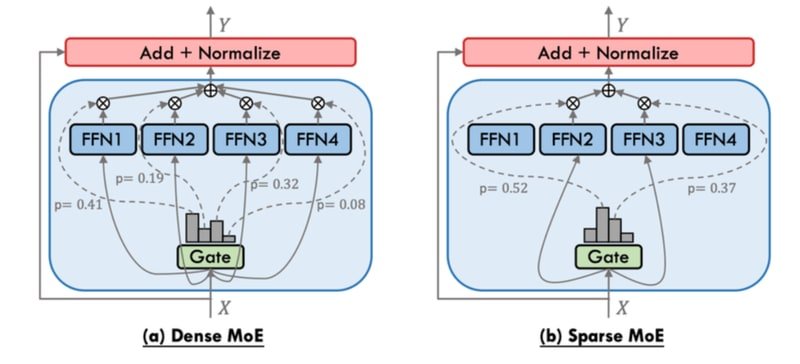
Dense Feed-Forward Network (FFN) layers are replaced with N independent expert FFN networks. A learned router selects a subset of experts (typically 2) per token. The remaining experts stay inactive during the forward pass.
Token → Attention → Router → Expert_2 + Expert_7 → Output
↑ (Expert_1, 3, 4, 5, 6, 8 inactive)| Model | Total Params | Active Params | Active % |
|---|---|---|---|
| Mixtral 8x7B | 46.7B | 12.9B | 27.6% |
| Qwen 3.5 35B-A3B | 34.7B | 3B | 8.6% |
Inference compute matches a dense model of the active parameter size. But all expert weights must sit in VRAM, so memory equals the total parameter count.
Hybrid Mamba-Transformer MoE
Standard self-attention Key-Value (KV) cache grows linearly with sequence length. In long-context tasks (like 128K tokens), the cache alone can exceed 20GB of VRAM. Nemotron 3 solves this by replacing most attention layers with Mamba-2 (State Space Model) layers. These compress past context into a fixed-size recurrent state, which keeps memory costs constant.
Standard Transformer:  [Attn][Attn][Attn][Attn]...  KV Cache: O(n)
Nemotron 3 Hybrid:     [Mamba][Mamba][Mamba][Attn]... KV Cache: O(1) for Mamba layers
Nemotron 3 Nano 30B uses only 6 attention layers out of 52 total. This gives 3.3x higher throughput than Qwen 3.5 35B-A3B at 8K/16K contexts. It also enables a practical 1M token context window on consumer hardware.
VRAM Allocation and Constraints
KV Cache Growth
The KV Cache stores keys and values for every token in the context window. It grows linearly with sequence length for attention-based layers:
| Context Length | KV Cache (typical 30B model) |
|---|---|
| 2K tokens | ~0.3 GB |
| 32K tokens | ~5.0 GB |
| 128K tokens | ~20.0 GB+ |
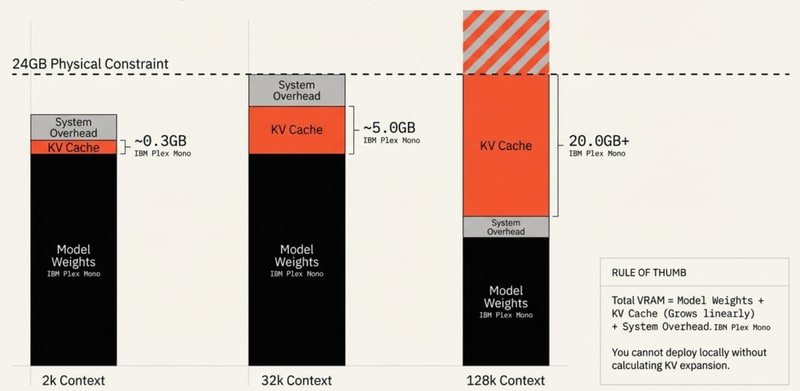
The Context Cliff
When KV cache and model weights exceed physical VRAM, the runtime offloads layers to system RAM via the PCIe bus. This sharply cuts throughput:
| Model | 16K ctx (TPS) | 32K ctx (TPS) | 48K ctx (TPS) |
|---|---|---|---|
| Qwen3 30B | 53.8 | 41.7 | 33.3 ✅ Stable |
| GLM-4.7-Flash | 42.4 | 35.2 | 6.5 ❌ PCIe Offload |
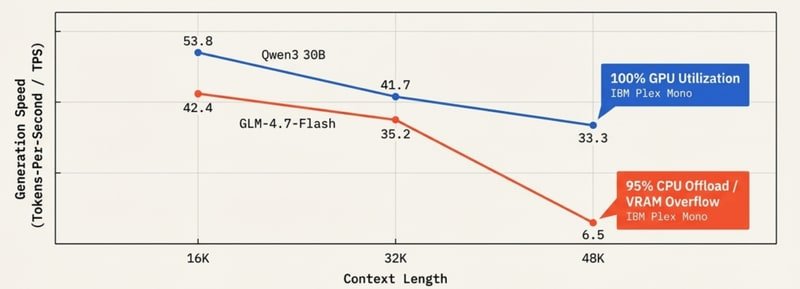
For models like Qwen 3.5 35B-A3B and Nemotron 30B on a single 24GB card, there is zero VRAM headroom for KV cache. Keep context under 8K tokens unless Flash Attention is on.
Quantization Strategies
Selecting the Q4_K_M Default
Always use Q4_K_M. This method uses 4-bit quantization with K-means grouping on sensitive weight blocks, providing a ~75% VRAM reduction with near-zero quality loss.
| Quantization | Quality | Use Case |
|---|---|---|
| Q2 / Q3 | Degraded, hallucinations | Avoid |
| Q4_K_M | Near lossless | Default for all local deployment |
| Q6 / Q8 / FP16 | Marginal gain | Needs 48GB+ VRAM for large models |
Parameter Size Impact
Quantization size impact across standard model scales:
| Model Size | FP16 Size | Q4_K_M Size |
|---|---|---|
| 8B | 16 GB | ~6 GB |
| 32B | 64 GB | ~22 GB |
The actual Ollama model file sizes are always larger than a simple parameter-byte calculation. The extra comes from vision projectors, MoE routing tables, SSM state matrices, tokenizer, and metadata.
Ollama Engine Features
Key Feature Reference
Recent updates (2025-2026) expand what Ollama can do locally:
| Feature | Details |
|---|---|
| Structured Outputs | JSON Schema-constrained responses |
| Streaming + Tool Calls | Tool execution mid-stream |
| Thinking Mode | Reasoning trace toggle via system prompt |
| Flash Attention | Enabled via OLLAMA_FLASH_ATTENTION=1 environment variable |
| VS Code Integration | Local models selectable inside VS Code via GitHub Copilot |
| Desktop App | Native GUI featuring drag-and-drop multimodal inputs |
Modelfile Configuration
Custom Coder Setup
Create a custom developer assistant by defining parameters and system instructions:
FROM qwen3.5:9b

PARAMETER temperature 0.7
PARAMETER num_ctx 32768

SYSTEM "You are a senior Python engineer. Return only clean, typed Python code."
Compile and launch your custom model using the command line:
ollama create my-coder -f Modelfile
ollama run my-coder