
Building AI agents in LangChain involves more than binding tools to models. Production systems need more. They need reliable memory, execution limits, privacy guards, structured outputs, and real-time streaming.
In this blog, we build a financial analysis agent step by step. It has SQLite memory, built-in security, planning middleware, and multi-format token streaming.
Building a Basic Agent
First, we initialize the LLM model, map our tools, and compile a stateless agent:
import os
from dotenv import load_dotenv
from langchain_google_genai import ChatGoogleGenerativeAI
from langchain.agents import create_agent
from langchain.messages import SystemMessage, HumanMessage
from scripts import base_tools

load_dotenv()

model = ChatGoogleGenerativeAI(model='gemini-2.5-flash')

system_prompt = (
    "You are a financial analyst specializing in tech stocks.\n"
    "Provide data-driven analysis with clear insights. "
    "You have access to web_search tools and get_weather tools."
)

agent = create_agent(
    model=model,
    tools=[base_tools.web_search, base_tools.get_weather],
    system_prompt=system_prompt
)
Test stateless tool execution:
query = "what's apple's current stock price? and what is the latest weather in Mumbai?"
response = agent.invoke({'messages': [HumanMessage(query)]})

print(response['messages'][-1].text)Apple's current stock price is $277.89, with an after-hours price of $277.16 (as of December 8, 2025).
The latest weather in Mumbai is overcast, with a temperature of 34.2°C (93.6°F) and 18% humidity.Here, we can see the agent answer both the stock price and the weather in a single response.
Short-Term Memory with SQLite
To carry context across multiple turns, we bind a SQLite checkpointer. It preserves state within active threads.
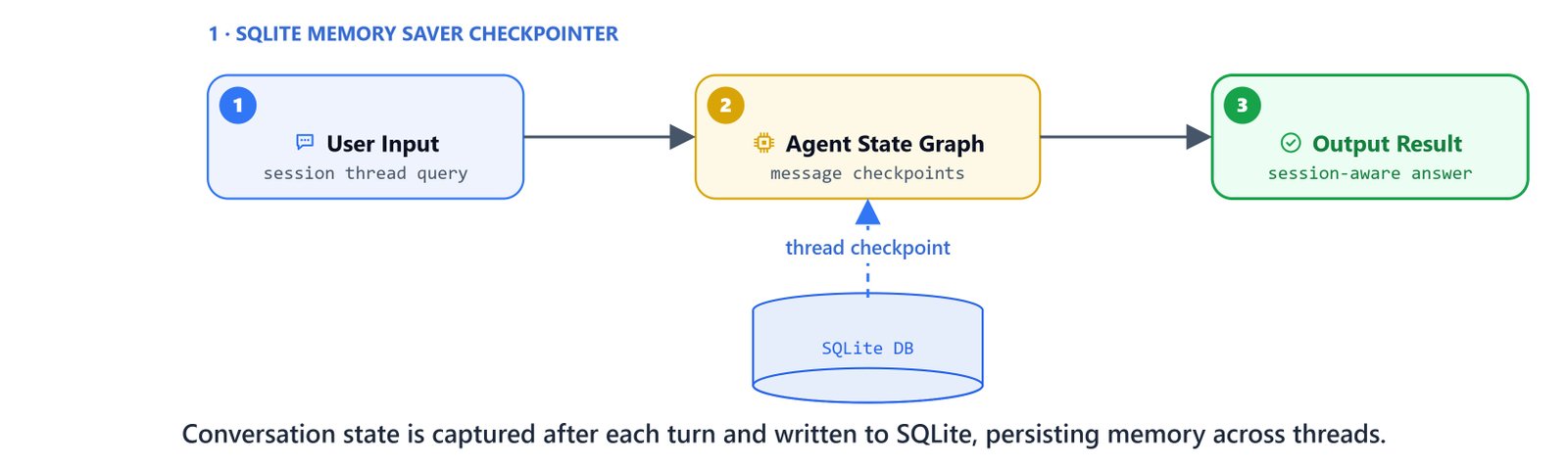
from langgraph.checkpoint.sqlite import SqliteSaver
import sqlite3

# Set up SQLite database
conn = sqlite3.connect("data/financial_agent.db", check_same_thread=False)
checkpointer = SqliteSaver(conn=conn)

agent_memory = create_agent(
    model=model,
    tools=[base_tools.web_search, base_tools.get_weather],
    system_prompt=system_prompt,
    checkpointer=checkpointer
)
Run a persistent session by providing a thread configuration:
config = {"configurable": {"thread_id": "memory_session"}}

# Initial query
agent_memory.invoke({'messages': [HumanMessage("what's apple's current stock price?")]}, config=config)

# Follow-up query
response = agent_memory.invoke({'messages': [HumanMessage("tell me about the weather in Mumbai too")]}, config=config)
print(response['messages'][-1].text)The latest weather in Mumbai is overcast, with a temperature of 34.2°C (93.6°F) and 18% humidity.Conversational Middleware
LangChain middleware intercept the execution loop. This lets us inject summarizers, call-budget limits, fallback strategies, and data scrubbers.

Summarization Middleware
When the chat history gets too long, this middleware sums up past messages in a second pass:
from langchain.agents.middleware import SummarizationMiddleware

agent_summary = create_agent(
    model=model,
    tools=[base_tools.web_search, base_tools.get_weather],
    system_prompt=system_prompt,
    checkpointer=checkpointer,
    middleware=[
        SummarizationMiddleware(
            model=ChatGoogleGenerativeAI(model='gemini-2.5-flash'),
            trigger=[("messages", 15)], # Summarizes when messages count reaches 15
            keep=("messages", 5)        # Retains the last 5 messages in raw format
        )
    ]
)
Execution and Call Limits
To prevent runaway agent loops and surprise API bills, we set call limits and define fallback models:
from langchain.agents.middleware import ModelCallLimitMiddleware
from langchain.agents.middleware import ToolCallLimitMiddleware
from langchain.agents.middleware import ModelFallbackMiddleware

agent_limit = create_agent(
    model=model,
    tools=[base_tools.web_search, base_tools.get_weather],
    system_prompt=system_prompt,
    checkpointer=checkpointer,
    middleware=[
        # Hard limits on LLM generation iterations
        ModelCallLimitMiddleware(run_limit=2, exit_behavior="end"),
        # Limits on tool call counts (continue skips tool output injection)
        ToolCallLimitMiddleware(run_limit=2, exit_behavior='continue'),
        # Fallback model if primary generation encounters an exception
        ModelFallbackMiddleware(ChatGoogleGenerativeAI(model='gemini-3-pro-preview'))
    ]
)
PII Guardrails and Redaction
We find and redact sensitive data before it reaches the model. This covers emails, credit card strings, and custom patterns like API keys:
from langchain.agents.middleware import PIIMiddleware

agent_pii = create_agent(
    model=model,
    tools=[base_tools.web_search, base_tools.get_weather],
    system_prompt=system_prompt,
    checkpointer=checkpointer,
    middleware=[
        # Blocks the entire execution if a Gemini/OpenAI style API key is leaked
        PIIMiddleware("api_key", detector=r"sk-[a-zA-Z0-9]{32}", strategy="block"),
        # Redacts email strings from inputs
        PIIMiddleware("email", strategy="redact", apply_to_input=True),
        # Replaces credit card patterns with asterisks
        PIIMiddleware("credit_card", strategy="mask", apply_to_input=True),
        # Redacts URLs from inputs
        PIIMiddleware("url", strategy="redact", apply_to_input=True)
    ]
)
Verify PII redaction at runtime:
config = {'configurable': {'thread_id': 'pii_session'}}
query = "Hi, my name is John. Here is my email: info@kgptalkie.com"

response = agent_pii.invoke({'messages': [HumanMessage(query)]}, config=config)
print(response['messages'][0].content)Hi, my name is John. Here is my email: [REDACTED_EMAIL]Here, we can see the email replaced with [REDACTED_EMAIL] before it ever reaches the model.
Todo List Planner
The TodoListMiddleware breaks a complex instruction into a visual todo checklist. It tracks each task through 'pending', 'in_progress', and 'completed' states.
from langchain.agents.middleware import TodoListMiddleware

agent_todo = create_agent(
    model=model,
    tools=[base_tools.web_search, base_tools.get_weather],
    system_prompt=system_prompt,
    checkpointer=checkpointer,
    middleware=[TodoListMiddleware()]
)
Output Formats and Streaming Modes
Streaming Execution Modes
LangChain agents support three streaming behaviors:
messages: yields message chunks as they are generated by the model.updates: yields state updates after each tool or model step completes.values: yields the entire state values array at every transition.
config = {'configurable': {'thread_id': 'stream_session'}}

for chunk in agent.stream({'messages':['tell me about apple news']}, stream_mode='messages', config=config):
    print(chunk)
    print("------\n")
Structured Schema Responses
We enforce type-safe structured JSON outputs from the agent using Pydantic models:
from pydantic import BaseModel, Field
from typing import Optional

class FinancialAnalysis(BaseModel):
    company: str = Field(description="Company Name")
    stock_symbol: str = Field(description="Company Stock Symbol")
    current_price: Optional[str] = Field(description="Company's current stock price")
    analysis: str = Field(description="Company's brief analysis")
    recommendation: str = Field(description="Action recommendation: Buy/Hold/Sell")

agent_structured = create_agent(
    model=model,
    tools=[base_tools.web_search, base_tools.get_weather],
    system_prompt=system_prompt,
    response_format=FinancialAnalysis
)
Invoke and verify structured dictionary serialization:
response = agent_structured.invoke({'messages': [HumanMessage('Analyze the apple stock')]})
print(response['structured_response'].model_dump()){'company': 'Apple Inc.', 'stock_symbol': 'AAPL', 'current_price': '$283.10', 'analysis': 'Apple Inc. exhibits a strong ecosystem of hardware, software, and services...', 'recommendation': 'Hold'}This is how a production LangChain agent comes together. We gave it SQLite memory. We added middleware for summarization, call limits, and PII redaction. We finished with structured outputs and token streaming.


