
Building production RAG systems means parsing complex multi-page PDF documents. These documents hold running text, nested financial tables, and chart graphics. With Docling and Qdrant, we can do three things. We extract document layouts, turn page images into text, and build a hybrid vector search index.
In this blog, we set up the multi-stage document ingestion pipeline. We extract layouts, run a vision description generator, and set up a hybrid Qdrant database.
Layout Extraction with Docling
Docling is an open-source parsing engine that converts PDF documents into structured layout formats. It detects text sections, tabular regions, and graphical figure items.

Create the parsing and extraction module scripts/data_extraction.py:
from pathlib import Path
from typing import List, Tuple
from docling_core.types.doc import PictureItem
from docling.datamodel.base_models import InputFormat
from docling.datamodel.pipeline_options import PdfPipelineOptions
from docling.document_converter import DocumentConverter, PdfFormatOption

# Define layout output directory structure
DATA_DIR = Path("data/rag-data/pdfs")
OUTPUT_MD_DIR = Path("data/rag-data/markdown")
OUTPUT_IMAGES_DIR = Path("data/rag-data/images")
OUTPUT_TABLES_DIR = Path("data/rag-data/tables")

for dir_path in [OUTPUT_MD_DIR, OUTPUT_IMAGES_DIR, OUTPUT_TABLES_DIR]:
    dir_path.mkdir(parents=True, exist_ok=True)
Parsing Metadata and Filenames
Pull company and date metadata straight from the PDF filename:
def extract_metadata_from_filename(filename: str) -> dict:
    filename = filename.replace('.pdf', '').replace('.md', '')
    parts = filename.split()
    return {
        'company_name': parts[0],
        'doc_type': parts[1],
        'fiscal_quarter': parts[2] if len(parts) == 4 else None,
        'fiscal_year': parts[-1]
    }

# Test filename extraction
print(extract_metadata_from_filename('apple 10-k 2023.pdf')){'company_name': 'apple', 'doc_type': '10-k', 'fiscal_quarter': None, 'fiscal_year': '2023'}Layout-Aware Conversion Setup
Configure the Docling converter to run OCR and detect picture boxes:
def convert_pdf_to_docling(pdf_file: Path):
    pipeline_options = PdfPipelineOptions()
    pipeline_options.images_scale = 2
    pipeline_options.generate_picture_images = True
    pipeline_options.generate_page_images = True

    doc_converter = DocumentConverter(
        format_options={
            InputFormat.PDF: PdfFormatOption(pipeline_options=pipeline_options)
        }
    )
    return doc_converter.convert(pdf_file)
Extract pages with large charts (over 500x500 pixels) and save them as image files:
def save_page_images(doc_converter, images_dir: Path):
    pages_to_save = set()
    for item in doc_converter.document.iterate_items():
        element = item[0]
        if isinstance(element, PictureItem):
            image = element.get_image(doc_converter.document)
            if image.size[0] > 500 and image.size[1] > 500:
                page_no = element.prov[0].page_no if element.prov else None
                if page_no is not None:
                    pages_to_save.add(page_no)

    for page_no in pages_to_save:
        page = doc_converter.document.pages[page_no]
        page.image.pil_image.save(images_dir / f"page_{page_no}.png", "PNG")
Table Extraction with Local Context
To keep the meaning intact, we extract each table along with the sentences that come just before it:
def extract_context_and_table(lines: List[str], table_index: int) -> Tuple[str, int]:
    table_lines = []
    i = table_index
    while i < len(lines) and lines[i].startswith('|'):
        table_lines.append(lines[i])
        i += 1

    # Extract 2 lines of preceding context for search grounding
    start = max(0, table_index - 2)
    context_lines = lines[start:table_index]
    content = '\n'.join(context_lines) + '\n\n' + '\n'.join(table_lines)
    return content, i

def extract_tables_with_context(markdown_text: str) -> List[Tuple[str, str, int]]:
    lines = [line for line in markdown_text.split('\n') if line.strip()]
    tables = []
    current_page = 1
    table_num = 1
    i = 0

    while i < len(lines):
        if '<!-- page break -->' in lines[i]:
            current_page += 1
            i += 1
            continue

        if lines[i].startswith('|') and lines[i].count('|') > 1:
            content, next_i = extract_context_and_table(lines, i)
            tables.append((content, f"table_{table_num}", current_page))
            table_num += 1
            i = next_i
        else:
            i += 1
    return tables

def save_tables(markdown_text: str, tables_dir: Path):
    tables = extract_tables_with_context(markdown_text)
    for table_content, table_name, page_num in tables:
        content_with_page = f"**Page:** {page_num}\n\n{table_content}"
        (tables_dir / f"{table_name}_page_{page_num}.md").write_text(content_with_page, encoding='utf-8')
Assemble these components to process a target folder of financial documents:
def extract_pdf_content(pdf_file: Path):
    metadata = extract_metadata_from_filename(pdf_file.stem)
    company_name = metadata['company_name']

    md_dir = OUTPUT_MD_DIR / company_name
    images_dir = OUTPUT_IMAGES_DIR / company_name / pdf_file.stem
    tables_dir = OUTPUT_TABLES_DIR / company_name / pdf_file.stem

    for path in [md_dir, images_dir, tables_dir]:
        path.mkdir(parents=True, exist_ok=True)

    print(f"Converting document: {pdf_file.name}")
    doc_converter = convert_pdf_to_docling(pdf_file)
    markdown_text = doc_converter.document.export_to_markdown(page_break_placeholder="<!-- page break -->")

    (md_dir / f"{pdf_file.stem}.md").write_text(markdown_text, encoding='utf-8')
    save_page_images(doc_converter, images_dir)
    save_tables(markdown_text, tables_dir)
Run extraction across all files:
pdf_files = list(DATA_DIR.rglob("*.pdf"))
for pdf_file in pdf_files:
extract_pdf_content(pdf_file)Converting document: amazon 10-k 2023.pdf
Finished converting document amazon 10-k 2023.pdf in 44.12 sec.Here, we can see Docling take about 44 seconds to convert one 10-K filing.
Warning
C:\Users\your-username\anaconda3\envs\ml\Lib\site-packages\rapidocr\models\ch_PP-OCRv4_det_infer.onnx
Replace your-username with your actual Windows username during setup.
Install an active CUDA runtime toolkit to speed up OCR.
Image Description with Gemini 2.5 Flash
Extracted layout diagrams must become searchable text. So we pass the saved page graphics to the Gemini 2.5 Flash vision model. It generates a structured text description of each one.
import io
import base64
from PIL import Image
from dotenv import load_dotenv
from langchain_google_genai import ChatGoogleGenerativeAI
from langchain_core.messages import HumanMessage, SystemMessage

load_dotenv()

IMAGES_DIR = Path("data/rag-data/images")
OUTPUT_DESC_DIR = Path("data/rag-data/images_desc")
OUTPUT_DESC_DIR.mkdir(parents=True, exist_ok=True)

model = ChatGoogleGenerativeAI(model="gemini-2.5-flash")

describe_image_prompt = """Analyze this financial document page and extract meaningful data in a concise format.

For charts and graphs:
- Identify the metric being measured
- List key data points and values
- Note significant trends (growth, decline, stability)

For tables:
- Extract column headers and key rows
- Note important values and totals

For text:
- Summarize key facts and numbers only
- Skip formatting, headers, and navigation elements

Be direct and factual. Focus on numbers, trends, and insights that would be useful for retrieval."""
Define the utility that generates and saves each description:
def generate_image_description(image_path: Path) -> str:
    image = Image.open(image_path)
    buffered = io.BytesIO()
    image.save(buffered, format='PNG')
    image_base64 = base64.b64encode(buffered.getvalue()).decode()

    message = HumanMessage(
        content=[
            {'type': 'text', 'text': describe_image_prompt},
            {'type': 'image_url', 'image_url': f"data:image/png;base64,{image_base64}"}
        ]
    )
    system_prompt = SystemMessage('You are an AI Assistant')
    response = model.invoke([system_prompt, message])
    return response.text

def generate_and_save_description(image_path: Path) -> bool:
    company_name = image_path.parent.parent.name
    doc_name = image_path.parent.name

    output_dir = OUTPUT_DESC_DIR / company_name / doc_name
    output_dir.mkdir(parents=True, exist_ok=True)
    desc_file = output_dir / f"{image_path.stem}.md"

    if desc_file.exists():
        return False

    description = generate_image_description(image_path)
    desc_file.write_text(description, encoding='utf-8')
    return True
Run description generation across all extracted images:
image_files = list(IMAGES_DIR.rglob("page_*.png"))
for path in image_files:
    generate_and_save_description(path)
Setting up Hybrid Retrieval Collections in Qdrant
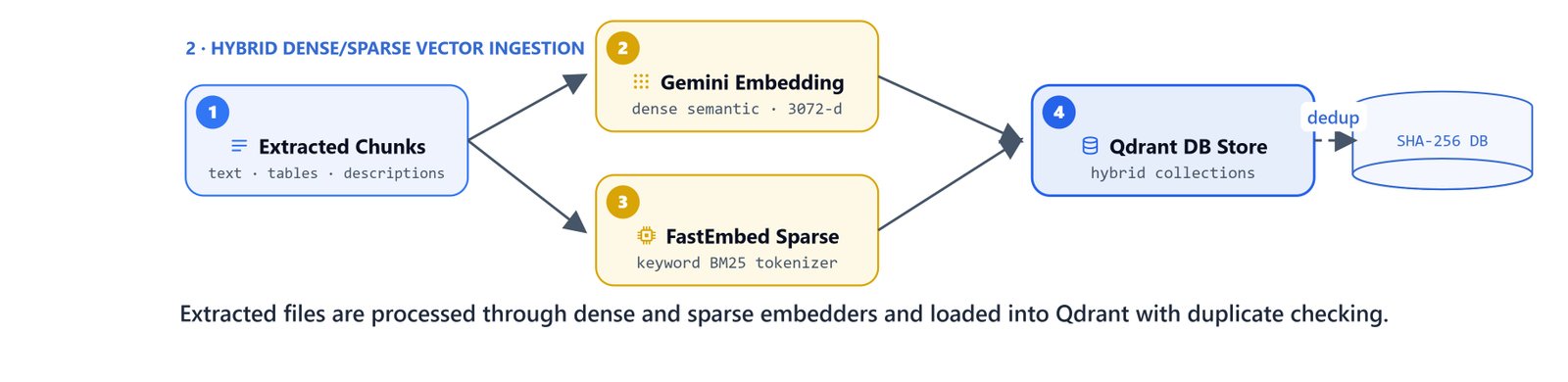
A hybrid search combines two signals. Dense vectors capture the meaning of sentences. Sparse token indices capture exact names, numbers, and codes.
from qdrant_client import QdrantClient
from langchain_google_genai import GoogleGenerativeAIEmbeddings
from langchain_qdrant import QdrantVectorStore, RetrievalMode, FastEmbedSparse
from langchain_core.documents import Document

# Connect to the local Qdrant server container
qdrant_client = QdrantClient(url="http://localhost:6333")

COLLECTION_NAME = "financial_docs"

# Configure Vector Dimension Models
dense_embeddings = GoogleGenerativeAIEmbeddings(model="models/gemini-embedding-001")
sparse_embeddings = FastEmbedSparse(model_name="Qdrant/bm25")

# Test dense size dimensions
print("Dense Dimension Size:", len(dense_embeddings.embed_query("test")))

# Test sparse index formats
print("Sparse representation:", sparse_embeddings.embed_query("apple revenue"))Dense Dimension Size: 3072
Sparse representation: SparseVector(indices=[11585292, 1948529], values=[1.0, 1.0])Initialize the hybrid database collection schema:
vector_store = QdrantVectorStore.from_documents(
    documents=[],
    embedding=dense_embeddings,
    sparse_embedding=sparse_embeddings,
    url="http://localhost:6333",
    collection_name=COLLECTION_NAME,
    retrieval_mode=RetrievalMode.HYBRID,
    force_recreate=False
)
Implementing Deduplication and Ingestion
To avoid uploading the same pages on repeated runs, we compute a SHA-256 hash of each file. Then we compare it against the records already in the collection.
import hashlib
import re

def compute_file_hash(file_path: Path) -> str:
    sha256 = hashlib.sha256()
    with open(file_path, 'rb') as f:
        for block in iter(lambda: f.read(4096), b""):
            sha256.update(block)
    return sha256.hexdigest()

def get_processed_hashes() -> set:
    processed_hashes = set()
    offset = None
    while True:
        points, offset = vector_store.client.scroll(
            collection_name=COLLECTION_NAME,
            limit=10000,
            with_payload=True,
            offset=offset
        )
        if not points:
            break
        for point in points:
            file_hash = point.payload.get("metadata", {}).get("file_hash")
            if file_hash:
                processed_hashes.add(file_hash)
        if offset is None:
            break
    return processed_hashes

def extract_page_number(file_path: Path) -> int:
    match = re.search(r'page_(\d+)', file_path.stem)
    return int(match.group(1)) if match else None
Create the loader that splits each document file into pages:
def ingest_file_in_db(file_path: Path, processed_hashes: set):
    file_hash = compute_file_hash(file_path)
    if file_hash in processed_hashes:
        print(f"Skipping duplicate file: {file_path.name}")
        return

    path_str = str(file_path)
    if 'markdown' in path_str:
        content_type = 'text'
        doc_name = file_path.name
    elif 'tables' in path_str:
        content_type = 'tables'
        doc_name = file_path.parent.name
    elif 'images_desc' in path_str:
        content_type = 'image'
        doc_name = file_path.parent.name
    else:
        content_type = 'unknown'
        doc_name = file_path.name

    content = file_path.read_text(encoding='utf-8')
    base_metadata = extract_metadata_from_filename(doc_name)
    base_metadata.update({
        'content_type': content_type,
        'file_hash': file_hash,
        'source_file': doc_name
    })

    if content_type == 'text':
        # Split layout documents at page boundaries
        pages = content.split('<!-- page break -->')
        documents = []
        for idx, page in enumerate(pages, start=1):
            metadata = base_metadata.copy()
            metadata.update({'page': idx})
            documents.append(Document(page_content=page, metadata=metadata))
        vector_store.add_documents(documents)
    else:
        # Ingest pre-chunked tables and image descriptions
        page_num = extract_page_number(file_path)
        metadata = base_metadata.copy()
        metadata.update({'page': page_num})
        documents = [Document(page_content=content, metadata=metadata)]
        vector_store.add_documents(documents)

    processed_hashes.add(file_hash)
Run the upload script to ingest all Markdown files, tables, and image descriptions:
all_md_files = list(Path('data/rag-data').rglob("*.md"))
active_hashes = get_processed_hashes()

for md_file in all_md_files:
    ingest_file_in_db(md_file, active_hashes)
Verifying Retrieval Results
Let's verify the database counts and run a query. This checks that text chunks, table values, and page summaries all landed correctly.
collection_info = vector_store.client.get_collection(COLLECTION_NAME)
print("Points uploaded to Qdrant:", collection_info.points_count)Points uploaded to Qdrant: 2878Run a test hybrid query:
query = "what is the meta's revenue for the year 2024?"
results = vector_store.similarity_search(query, k=1)

for doc in results:
    print(f"Source: {doc.metadata['source_file']} (Page {doc.metadata['page']})")
    print(f"Content Type: {doc.metadata['content_type']}")
print(doc.page_content)Source: meta 10-k 2024 (Page 101)
Content Type: tables
**Page:** 101
| Total revenue | $ 164,501 | $ 134,902 | $ 116,609 |
Revenue disaggregated by geography, based on the addresses of our customers, consists of the following (in millions):Here, we can see the hybrid query pull the exact revenue table from Meta's 10-K. This is how a multimodal ingestion pipeline works. We parsed PDFs with Docling, described charts with Gemini, and indexed text, tables, and images in Qdrant for hybrid search.


