Long-term memory in LangGraph goes beyond conversation history. Short-term memory keeps messages within a single thread_id. Long-term memory instead stores structured user preferences (diet, work interests, location) in a persistent store that any thread can reach. The agent looks up relevant memories via semantic search before every response.
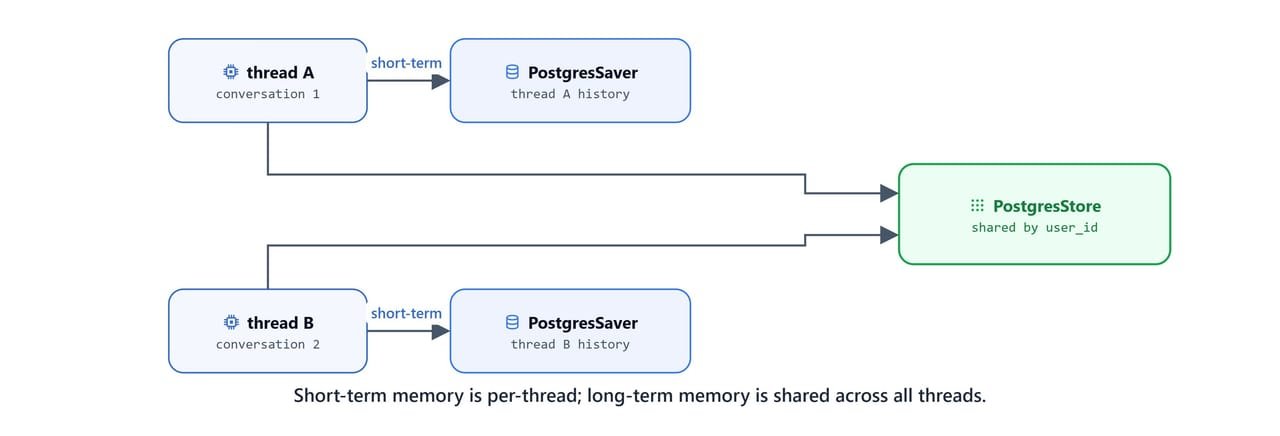
In this blog, we use PostgresStore from langgraph.store.postgres with OllamaEmbeddings and nomic-embed-text for 768-dimensional semantic search. Both short-term (PostgresSaver) and long-term (PostgresStore) storage connect to the same PostgreSQL database.
Prerequisites: langgraph, langchain-ollama, langgraph-checkpoint-postgres, psycopg, python-dotenv installed. Ollama running with qwen3 and nomic-embed-text. A PostgreSQL database (e.g. Neon) with the connection string in POSTGRESQL_URL.
pip install -U langgraph langchain-ollama langgraph-checkpoint-postgres psycopg python-dotenv
ollama pull qwen3
ollama pull nomic-embed-textSetup
from dotenv import load_dotenv

load_dotenv()Truefrom typing_extensions import TypedDict, Annotated
import operator
from langgraph.graph import StateGraph, START, END
# short term memory persistence
from langgraph.checkpoint.sqlite import SqliteSaver
from langgraph.checkpoint.postgres import PostgresSaver
# long term memory persistence
from langgraph.store.postgres import PostgresStore
from langgraph.store.sqlite import SqliteStore
from langchain_ollama import ChatOllama, OllamaEmbeddings
from langchain_core.messages import HumanMessage, SystemMessage
from langchain_core.tools import tool
import psycopg
import os
# Configuration
BASE_URL = "http://localhost:11434"
MODEL_NAME = "qwen3"
EMBEDDING_MODEL = "nomic-embed-text"
llm = ChatOllama(model=MODEL_NAME, base_url=BASE_URL)Store and Checkpointer Setup
Create an embedding function for semantic search. The PostgresStore uses this to index stored memories as 768-dimensional vectors:
embeddings = OllamaEmbeddings(model=EMBEDDING_MODEL, base_url=BASE_URL)

def embed_texts(texts: list[str]) -> list[list[float]]:

    return embeddings.embed_documents(texts)

db_url = os.getenv("POSTGRESQL_URL")

checkpointer_conn = psycopg.connect(db_url, autocommit=True, prepare_threshold=0)
checkpointer = PostgresSaver(checkpointer_conn)

store_conn = psycopg.connect(db_url, autocommit=True, prepare_threshold=0)
store = PostgresStore(store_conn, index = {'embed': embed_texts, 'dims': 768})


# first time setup
checkpointer.setup()
store.setup()
Important
checkpointer.setup() and store.setup() create the required database tables. Run these once on first use. They are safe to call again on later runs.
Two separate psycopg connections are required: one for the checkpointer (short-term memory) and one for the store (long-term memory). Both connect to the same PostgreSQL database.
Memory Management Tools
Direct Store Operations
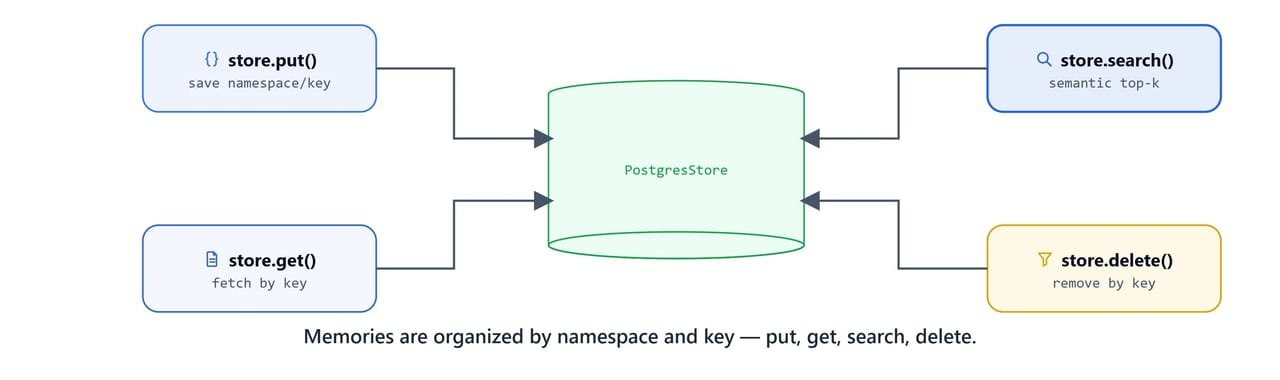
The store supports four core operations: put(), get(), search(), and delete(). Each memory is organized by a namespace tuple (e.g. (user_id, "preferences")) and a key (e.g. "food", "work"):
user_id = "demo-user"
namespace = (user_id, "preferences")

store.put(namespace, "food", {"diet": "veg",
                              "likes": ["pasta", "pizza", "veggies"]})


store.put(namespace, "color", {"favorite": "blue",
                               "dislike": "brown"})

store.put(namespace, "work", {
    "role": "Data Scientist",
    "interests": ["machine learning", "ai", "gen ai", "agents"]
})
Retrieve a specific memory by key:
store.get(namespace, "color")Item(namespace=['demo-user', 'preferences'], key='color', value={'dislike': 'brown', 'favorite': 'blue'}, created_at='2025-11-06T17:54:06.587068+00:00', updated_at='2025-11-06T17:54:06.587068+00:00')Delete a memory:
store.delete(namespace, "color")Semantic Search
store.search() finds the most relevant memories by embedding the query and comparing against stored memory vectors:

query = "What does the user like to eat?"
results = store.search(namespace, query=query, limit=1)
results[Item(namespace=['demo-user', 'preferences'], key='food', value={'diet': 'veg', 'likes': ['pasta', 'pizza', 'veggies']}, created_at='2025-11-06T09:46:57.726747+00:00', updated_at='2025-11-06T17:54:06.276885+00:00', score=0.5786444826046763)]Here, we can see the search return the food memory with a similarity score of 0.58, even though the query never used the exact key name. This is the power of semantic search. The embedding model understands that "like to eat" relates to "diet" and "likes" in the stored memory.
query = "What does the user like in colors?"
results = store.search(namespace, query=query, limit=1)
results[Item(namespace=['demo-user', 'preferences'], key='food', value={'diet': 'veg', 'likes': ['pasta', 'pizza', 'veggies']}, created_at='2025-11-06T09:46:57.726747+00:00', updated_at='2025-11-06T17:54:06.276885+00:00', score=0.42101958236507275)]Since we deleted the color memory earlier, the search falls back to the closest match (food) with a lower score of 0.42. In production, we would filter results by a minimum score threshold.
State Definition
The state adds a user_id field to the standard message list. This identifies whose memories to access:
class AgentState(TypedDict):
    messages: Annotated[list, operator.add]
    user_id: str
Memory Tools for the Agent
Two tools let the agent save and retrieve long-term memories during a conversation:
save_user_memory
@tool
def save_user_memory(user_id:str, category:str, information:dict) -> str:
    """
    Save user preference or information to long-term memory.

    Args:
        user_id: User identifier
        category: Category of information (e.g., 'food', 'work', 'hobbies', 'schedule', 'location')
        information: Dictionary containing the information to save
    """

    namespace = (user_id, "preferences")

    store.put(namespace, category, information)

    return f"Saved {category} preferences."
get_user_memory
@tool
def get_user_memory(user_id:str, category:str) -> str:
    """
        Retrieve user preference or information from long-term memory.

        Args:
            user_id: User identifier
            category: Category of information to retrieve (e.g., 'food', 'work', 'hobbies')
        """

    namespace = (user_id, "preferences")

    item = store.get(namespace, category)

    if item:
        return f"{category}: {item.value}"
    else:
        return f"No '{category}' information found!"
Test the retrieval tool:
get_user_memory.invoke({"user_id": 'demo-user', "category": 'color'})"No 'color' information found!"get_user_memory.invoke({"user_id": 'demo-user', "category": 'something'})"No 'something' information found!"Agent with Automatic Memory Retrieval
Utility Tools
Load the standard tools from the ReAct Agent with Tools lesson:
import sys
sys.path.append("../05. LangGraph ReAct Agent with Tools")

import my_tools

my_tools.calculate.invoke({'expression': '2+2*1.4/23-34'})

all_tools = [my_tools.get_weather, my_tools.calculate][TOOL] calculate ('2+2*1.4/23-34') -> '-31.878260869565217'Agent Node with Memory Context
The agent node does automatic memory retrieval before every response. It uses store.search() to find the top 3 memories that match the user's latest message, then injects them into the system prompt:

def agent_node(state: AgentState):

    store_conn = psycopg.connect(db_url, autocommit=True, prepare_threshold=0)
    store = PostgresStore(store_conn, index = {'embed': embed_texts, 'dims': 768})

    user_id = state.get("user_id", "unknown")
    namespace = (user_id, "preferences")

    last_message = state['messages'][-1].content
    memories = store.search(namespace, query=last_message, limit=3)

    # build context memory for personalized answer
    context_line = []
    for mem in memories:
        text = f" -{mem.key}: {mem.value}"
        context_line.append(text)

    memory_text = "\n\n".join(context_line) if context_line else "No user preferences stored yet!"

    print(f"User Memory Retrieved: \n{memory_text}\n")

    tools = all_tools + [save_user_memory, get_user_memory]

    llm_with_tools = llm.bind_tools(tools)

    system_prompt = SystemMessage(f"""
                        You are a helpful assistant with long-term memory capabilities and access to utility tools.

                            User ID: {user_id}
                            Current User Memories:
                            {memory_text}

                            MEMORY TOOLS USAGE:

                            1. save_user_memory: Use when user shares NEW information
                            - Always pass user_id: "{user_id}"
                            - Food preferences (diet, likes, dislikes, allergies)
                            - Work information (role, company, interests)
                            - Hobbies and activities
                            - Schedule and availability
                            - Location and timezone

                            2. get_user_memory: Use when you need to recall specific category
                            - Always pass user_id: "{user_id}"
                            - When answering questions about past preferences
                            - When user asks "what do you know about me?"
                            - When making recommendations based on preferences

                            UTILITY TOOLS USAGE:

                            3. get_weather: Use to retrieve current weather information
                            - Pass location as parameter (city name, zip code, or coordinates)
                            - Use when user asks about weather conditions
                            - Use when planning activities that depend on weather

                            4. calculate: Use to perform mathematical calculations
                            - Pass mathematical expression as string parameter
                            - Supports basic arithmetic (+, -, *, /)
                            - Supports advanced operations (powers, roots, trigonometry)
                            - Use when user needs numerical computations

                            GUIDELINES:
                            - Always save when user shares personal information
                            - Retrieve specific categories when needed for context
                            - Use semantic search results shown above for general context
                            - Use get_weather when location-based weather info is needed
                            - Use calculate for any mathematical operations or conversions
                            - Be conversational and natural when using all tools
                            - Combine tools when appropriate (e.g., weather + saved location preference)
                        """)

    messages = [system_prompt] + state['messages']

    response = llm_with_tools.invoke(messages)

    if hasattr(response, 'tool_calls') and response.tool_calls:
        for tc in response.tool_calls:
            print(f"[AGENT] called Tool {tc.get('name', '?')} with args {tc.get('args', '?')}")
    else:
        print(f"[AGENT] Responding...")


    return {'messages': [response]}
Routing and Graph
def should_continue(state: AgentState):
    last = state['messages'][-1]

    if hasattr(last, 'tool_calls') and last.tool_calls:
        return "tools"
    else:
return ENDfrom langgraph.prebuilt import ToolNode
tools = all_tools + [save_user_memory, get_user_memory]
def create_agent():
builder = StateGraph(AgentState)
builder.add_node("agent", agent_node)
builder.add_node("tools", ToolNode(tools))
builder.add_edge(START, "agent")
builder.add_conditional_edges("agent", should_continue, ["tools", END])
builder.add_edge("tools", "agent")
checkpointer_conn = psycopg.connect(db_url, autocommit=True, prepare_threshold=0)
checkpointer = PostgresSaver(checkpointer_conn)
graph = builder.compile(checkpointer=checkpointer)
return graphagent = create_agent()
agent<langgraph.graph.state.CompiledStateGraph object at 0x0000012749BCFAA0>End-to-End Demo
Sharing New Information
user_id = "demo-user"
config = {'configurable': {'thread_id': f"{user_id}_longterm"}}

query = "I am John. I love AI and machine learning in python."

result = agent.invoke({'messages': [HumanMessage(query)],
'user_id': user_id}, config=config)User Memory Retrieved:
-work: {'role': 'Data Scientist', 'interests': ['machine learning', 'ai', 'gen ai', 'agents']}
-food: {'diet': 'veg', 'likes': ['pasta', 'pizza', 'veggies']}
[AGENT] Responding...result['messages'][-1].pretty_print()================================== Ai Message ==================================
It seems you're introducing yourself! However, the user ID associated with your previous interactions is "demo-user". If you'd like to update your profile or share new information (e.g., work details, food preferences, etc.), let me know! For now, I'll continue using "demo-user" as your identifier. How can I assist you today with AI, machine learning, or Python? 😊Here, we can see the agent retrieve the existing work and food memories and use them as context for its reply.
Personalized Recommendations
user_id = "demo-user"
config = {'configurable': {'thread_id': f"{user_id}_longterm"}}

query = "Could you please suggest me some diet plan?"

result = agent.invoke({'messages': [HumanMessage(query)],
                       'user_id': user_id}, config=config)

result['messages'][-1].pretty_print()User Memory Retrieved:
-food: {'diet': 'veg', 'likes': ['pasta', 'pizza', 'veggies']}
-work: {'role': 'Data Scientist', 'interests': ['machine learning', 'ai', 'gen ai', 'agents']}
[AGENT] called Tool get_user_memory with args {'category': 'food', 'user_id': 'demo-user'}
User Memory Retrieved:
-food: {'diet': 'veg', 'likes': ['pasta', 'pizza', 'veggies']}
-work: {'role': 'Data Scientist', 'interests': ['machine learning', 'ai', 'gen ai', 'agents']}
[AGENT] Responding...
================================== Ai Message ==================================
Here's a vegetarian diet plan tailored to your preferences (veg diet, loves pasta, pizza, and veggies):
### **Breakfast Ideas**
- **Whole grain pasta with tomato sauce** + a side of steamed veggies (e.g., broccoli, carrots).
- **Oatmeal** topped with fresh fruits (e.g., berries, banana) and a sprinkle of nuts.
- **Veggie omelet** (using spinach, mushrooms, and bell peppers) with whole wheat toast.
### **Lunch Options**
- **Caprese salad** (tomato, mozzarella, basil) with a slice of whole grain bread.
- **Mixed veggie stir-fry** (bell peppers, snap peas, zucchini) with tofu or chickpeas.
- **Pasta salad** with cherry tomatoes, cucumbers, olives, and a lemon-herb dressing.
### **Dinner Suggestions**
- **Vegetable curry** (coconut milk base with spinach, cauliflower, and sweet potatoes) served over brown rice.
- **Stuffed bell peppers** filled with quinoa, black beans, and diced tomatoes.
- **Pasta with marinara sauce** and a side of garlic bread.
Let me know if you'd like help customizing this plan for specific goals (e.g., weight loss, energy boost)!Here, we can see the agent use the stored food preferences to build a vegetarian diet plan around pasta, pizza, and veggies, matching what the user saved.
Cross-Thread Memory Persistence
Now the critical test. We use a different thread_id but the same user_id. Long-term memory should still be available:
user_id = "demo-user"
config = {'configurable': {'thread_id': f"{user_id}_this_is_another_test"}}

query = "Could you please suggest me some diet plan?"

result = agent.invoke({'messages': [HumanMessage(query)],
                       'user_id': user_id}, config=config)

result['messages'][-1].pretty_print()User Memory Retrieved:
-food: {'diet': 'veg', 'likes': ['pasta', 'pizza', 'veggies']}
-work: {'role': 'Data Scientist', 'interests': ['machine learning', 'ai', 'gen ai', 'agents']}
[AGENT] called Tool get_user_memory with args {'category': 'food', 'user_id': 'demo-user'}
User Memory Retrieved:
-food: {'diet': 'veg', 'likes': ['pasta', 'pizza', 'veggies']}
-work: {'role': 'Data Scientist', 'interests': ['machine learning', 'ai', 'gen ai', 'agents']}
[AGENT] Responding...
================================== Ai Message ==================================
Here's a vegetarian diet plan incorporating your preferences for pasta, pizza, and veggies:
**Breakfast Ideas:**
- Veggie omelet with whole grain toast (spinach, tomatoes, onions)
- Pasta breakfast scramble (whole wheat pasta with veggies and vegan cheese)
- Fruit smoothie with spinach or frozen berries
**Lunch Options:**
- Veggie pizza with whole wheat crust, tomato sauce, and your favorite toppings
- Quinoa salad with roasted vegetables, chickpeas, and a lemon-tahini dressing
- Stuffed bell peppers filled with rice, beans, and cheese
**Dinner Suggestions:**
- Pasta primavera with fresh veggies and light garlic sauce
- Veggie stir-fry with tofu or tempeh over brown rice
- Baked pizza with a whole grain crust, tomato sauce, and a mix of veggies
**Tips:**
1. Stay hydrated with water or herbal teas
2. Include a variety of colorful vegetables for nutrients
3. Use whole grains as base for meals
4. Experiment with different herbs and spices for flavor
Would you like specific recipes or meal prep ideas?Even though this is a brand-new thread (_this_is_another_test), the agent still pulled the user's food and work preferences from long-term memory. This is the core difference between short-term and long-term memory:
| Memory Type | Scope | Storage | Access Pattern |
|---|---|---|---|
| Short-term | Per-thread conversation history | PostgresSaver / SqliteSaver |
Same thread_id only |
| Long-term | Cross-thread user preferences | PostgresStore |
Same user_id, any thread_id |
What You Built
In this blog, we built an agent with both short-term and long-term memory:
- PostgresStore: persistent key-value store with semantic search via
nomic-embed-textembeddings - Core operations:
store.put(),store.get(),store.search(),store.delete()for memory CRUD - Memory tools:
save_user_memoryandget_user_memorytools that the agent calls autonomously - Automatic retrieval: the agent node searches memories before every response, injecting relevant context into the system prompt
- Cross-thread persistence: user preferences are accessible from any conversation thread, not just the one where they were saved
- Dual persistence:
PostgresSaverfor short-term conversation state +PostgresStorefor long-term user preferences, both in the same PostgreSQL database
This is how long-term memory works. A store keeps user preferences outside any single thread, semantic search finds the ones that matter, and the agent weaves them into every reply.