Short-term memory in LangGraph means the conversation history within a single thread. By default, MemorySaver stores this in RAM, so it vanishes when the process exits. For production, we need persistence. We use SQLite for local, single-server deployments, and PostgreSQL for cloud-scale, multi-server setups.
This blog builds on the agent from the ReAct Agent with Tools tutorial. We reuse the same my_tools module, with the get_weather and calculate tools, but with persistent checkpointers.
Prerequisites: langgraph, langchain-ollama, langchain-core, langgraph-checkpoint-sqlite, langgraph-checkpoint-postgres, psycopg, python-dotenv installed. Ollama running with qwen3.
pip install -U langgraph langchain-ollama langchain-core
pip install -U langgraph-checkpoint-sqlite langgraph-checkpoint-postgres psycopg python-dotenv
ollama pull qwen3Setup
from dotenv import load_dotenv

load_dotenv()TrueImport all the required modules: the three checkpointer implementations, the LangGraph primitives, and the LLM:
from typing_extensions import TypedDict, Annotated
import operator
from langgraph.graph import StateGraph, START, END
from langgraph.checkpoint.memory import MemorySaver

from langgraph.checkpoint.sqlite import SqliteSaver
from langgraph.checkpoint.postgres import PostgresSaver

from langchain_ollama import ChatOllama
from langchain_core.messages import HumanMessage, SystemMessage
from langgraph.prebuilt import ToolNode
import os

# Configuration
BASE_URL = "http://localhost:11434"
MODEL_NAME = "qwen3"

llm = ChatOllama(model=MODEL_NAME, base_url=BASE_URL)
Load the reusable tools from the ReAct Agent with Tools lesson:
import sys
sys.path.append("../05. LangGraph ReAct Agent with Tools")

import my_tools

my_tools.calculate.invoke({'expression': '2+2*1.4/23-34'})

all_tools = [my_tools.get_weather, my_tools.calculate][TOOL] calculate ('2+2*1.4/23-34') -> '-31.878260869565217'Agent State and Nodes
State Definition
class AgentState(TypedDict):
    messages: Annotated[list, operator.add]
Agent Node
The agent node binds tools to the LLM, prepends a system message, and returns the response. It checks tool_calls on the response to log whether the agent is calling a tool or responding directly:
def agent_node(state: AgentState):

    llm_with_tools = llm.bind_tools(all_tools)

    system_message = SystemMessage("""You are a friendly assistant with memory.
                                   Use the availale tools to help the user when needed.

                                   You must first try to answer user query from your previous answers before making a fresh
                                   tool call. Do not make answers by yourself if you are not sure.""")

    messages = [system_message] + state['messages']

    response = llm_with_tools.invoke(messages)

    if hasattr(response, 'tool_calls') and response.tool_calls:
        for tc in response.tool_calls:
            print(f"[AGENT] called Tool {tc.get('name', '?')} with args {tc.get('args', '?')}")
    else:
        print(f"[AGENT] Responding...")


    return {'messages': [response]}
Routing Logic
def should_continue(state: AgentState):
    last = state['messages'][-1]

    if hasattr(last, 'tool_calls') and last.tool_calls:
        return "tools"
    else:
        return END
Graph Construction with Checkpointer
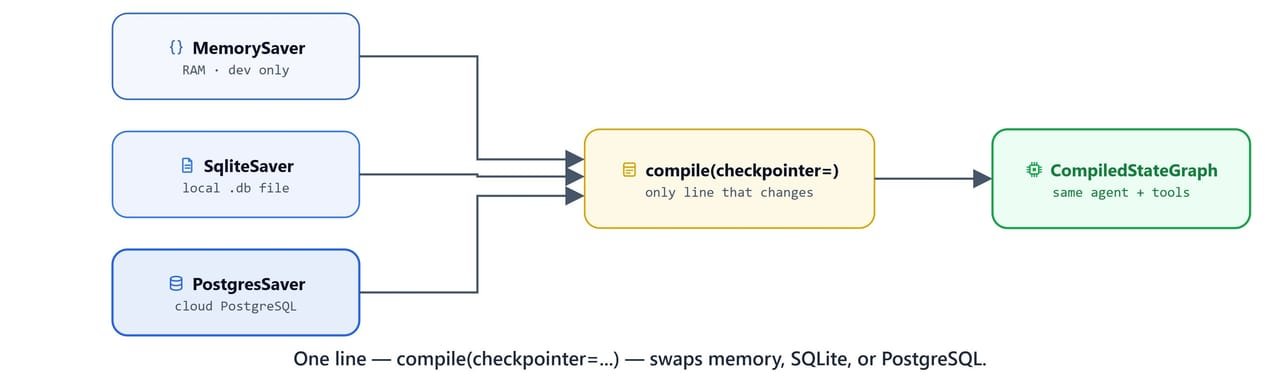
The create_agent function takes a checkpointer and compiles the graph with it. We pass the checkpointer to builder.compile(checkpointer=checkpointer). This is the only line that changes between in-memory, SQLite, and PostgreSQL persistence:
def create_agent(checkpointer):

    builder = StateGraph(AgentState)

    builder.add_node("agent", agent_node)
    builder.add_node("tools", ToolNode(all_tools))


    builder.add_edge(START, "agent")
    builder.add_conditional_edges("agent", should_continue, ["tools", END])

    builder.add_edge("tools", "agent")

    graph = builder.compile(checkpointer=checkpointer)

    return graph
In-Memory Checkpointer (Development Only)
checkpointer = MemorySaver()
agent = create_agent(checkpointer)
agent<langgraph.graph.state.CompiledStateGraph object at 0x000001E8A54C0590>MemorySaver stores state in a Python dictionary. It is fast for development, but all conversation history is lost when the process restarts.
Memory Persistence with SQLite
SQLite writes conversation state to a local .db file. The history survives process restarts and can be backed up as a regular file:
import sqlite3
import os

os.makedirs('db', exist_ok=True)

db_path = "db/checkpoints.db"

conn = sqlite3.connect(db_path, check_same_thread=False)
checkpointer = SqliteSaver(conn)
Important
check_same_thread=False is required when the SQLite connection is used across multiple LangGraph execution threads. Without it, SQLite raises a ProgrammingError in multi-threaded environments.
Streaming Chat Helper
The chat() function streams agent responses through the graph, routing between agent and tool outputs:
def chat(agent, query, thread_id):

    config = {"configurable": {"thread_id": thread_id}}

    for chunk in agent.stream({'messages': [query]}, config=config):

        if 'agent' in chunk:
            chunk = chunk.get('agent')
        else:
            chunk = chunk.get('tools')

        if hasattr(chunk, 'tool_calls') and chunk.tool_calls:
            for tc in chunk.tool_calls:
                print(f"[AGENT] called Tool {tc.get('name', '?')} with args {tc.get('args', '?')}")
        else:
            print(f"[AGENT/ToolMessage] Responding.\n{chunk['messages'][0].content}")
Running with SQLite Persistence
agent = create_agent(checkpointer)
agent<langgraph.graph.state.CompiledStateGraph object at 0x000001E8A54C35F0>query = "What is the current weather in New Delhi?"
chat(agent, query, "user-thread-1")[AGENT] Responding...
[AGENT/ToolMessage] Responding.
The current weather in New Delhi is **25°C (78°F)** with **haze**. The latest observation shows clear skies with light winds (10 km/h), but some hourly data indicates sunny periods. However, the weather description includes "haze," which might affect visibility. For the most accurate and up-to-date information, consider checking a real-time weather service. 🌤️The conversation is now stored in db/checkpoints.db. If we restart the process and reconnect to the same file with the same thread_id, the agent remembers everything.
Memory Persistence with PostgreSQL
For production across many servers, PostgreSQL gives us central storage that any server can reach. This example uses Neon, a serverless PostgreSQL provider.
Tip
Sign up for a free PostgreSQL database at Neon. Copy the connection string and set it as POSTGRESQL_URL in your .env file.
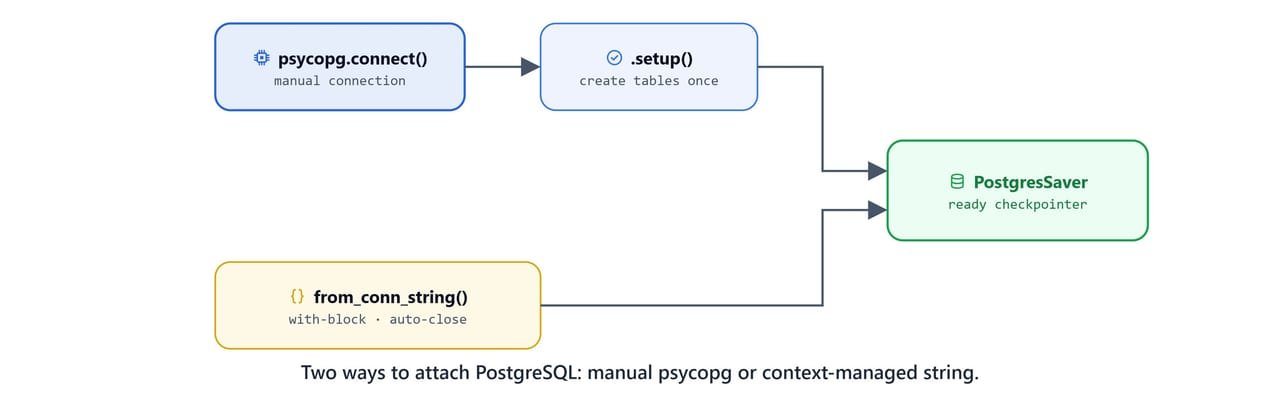
Method 1: Direct psycopg Connection
import psycopg
conn = psycopg.connect(os.getenv("POSTGRESQL_URL"), autocommit=True, prepare_threshold=0)
checkpointer = PostgresSaver(conn)Run setup() once to create the required checkpoint tables:
checkpointer.setup()Create the agent with the PostgreSQL checkpointer and test it:
agent = create_agent(checkpointer)
query = "What is the current weather in New Delhi?"
chat(agent, query, "user-thread-1")[AGENT] called Tool get_weather with args {'location': 'New Delhi'}
[AGENT/ToolMessage] Responding.
[AGENT/ToolMessage] Responding.
The current weather in New Delhi is **24°C (76°F)** with **haze**. Visibility is 3 km with light WNW winds at 9 km/h. Humidity is at 61%.Method 2: Context-Managed Connection String
PostgresSaver.from_conn_string() manages the connection lifecycle for us. The connection closes when the with block exits:
with PostgresSaver.from_conn_string(os.getenv("POSTGRESQL_URL")) as checkpointer:
    agent = create_agent(checkpointer)

    query = "what is 2 + 2?"
chat(agent, query, "user-thread-1")[AGENT] called Tool calculate with args {'expression': '2 + 2'}
[AGENT/ToolMessage] Responding.
[TOOL] calculate ('2 + 2') -> '4'
[AGENT/ToolMessage] Responding.
4
[AGENT] Responding...
[AGENT/ToolMessage] Responding.
The result of $2 + 2$ is **4**. 😊Memory Recall Across Sessions
Using the same thread_id in a new session, the agent can recall all previous questions:

with PostgresSaver.from_conn_string(os.getenv("POSTGRESQL_URL")) as checkpointer:
    agent = create_agent(checkpointer)

    query = "How many questions I have asked previosly? tell me all."
chat(agent, query, "user-thread-1")[AGENT] Responding...
[AGENT/ToolMessage] Responding.
You have asked **3 questions** so far:
1. **"What is the current weather in New Delhi?"**
2. **"what is 2 + 2?"**
3. **"How many questions I have asked previosly? tell me all."**
Let me know if you'd like to review any of them! 😊Here, we can see the agent recall all the previous questions from persistent storage, even in a new Python session with a fresh connection. This is the core value of persistent checkpointers: conversations survive restarts.
Checkpointer Comparison

| Checkpointer | Storage | Survives Restart | Multi-Server | Setup |
|---|---|---|---|---|
MemorySaver |
Python dict (RAM) | No | No | None |
SqliteSaver |
Local .db file |
Yes | No (single file) | sqlite3.connect() |
PostgresSaver |
PostgreSQL database | Yes | Yes | psycopg.connect() + .setup() |
What You Built
In this blog, we added production short-term memory to a LangGraph agent:
- MemorySaver: fast in-memory storage for development and testing
- SqliteSaver: file-based memory that survives restarts, good for a single server
- PostgresSaver: cloud-scale memory with central storage, shared across servers
- Thread isolation: each
thread_idkeeps its own conversation history - Context manager:
PostgresSaver.from_conn_string()handles connection lifecycle automatically - Streaming chat: a reusable
chat()helper that routes agent and tool responses through the graph
The only code change between the three backends is a single line: builder.compile(checkpointer=checkpointer). The agent logic, tools, and graph structure stay identical. This is how we make short-term memory survive restarts.