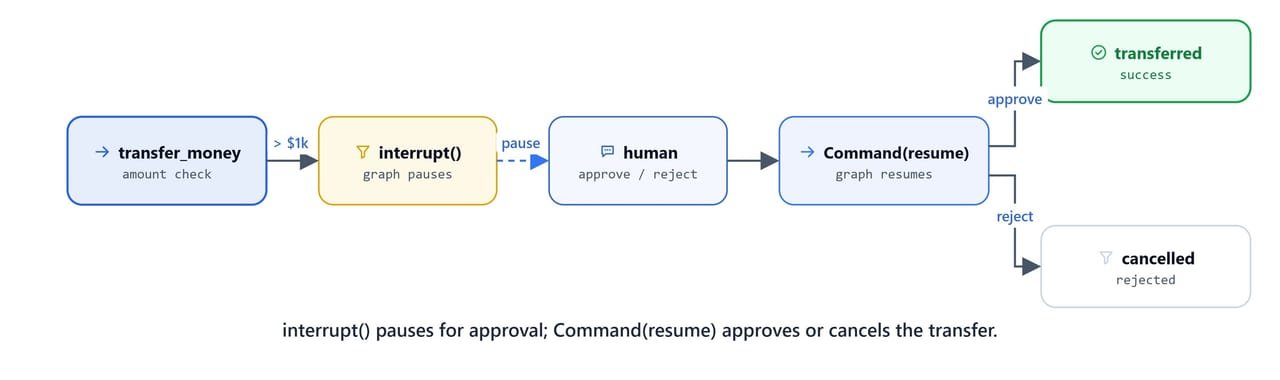
Human-in-the-loop workflows let agents pause mid-run to ask for human approval before taking an irreversible action. LangGraph gives us two primitives for this. interrupt() pauses the graph and hands control back to the caller. Command(resume=...) sends the human's decision back to the paused tool.
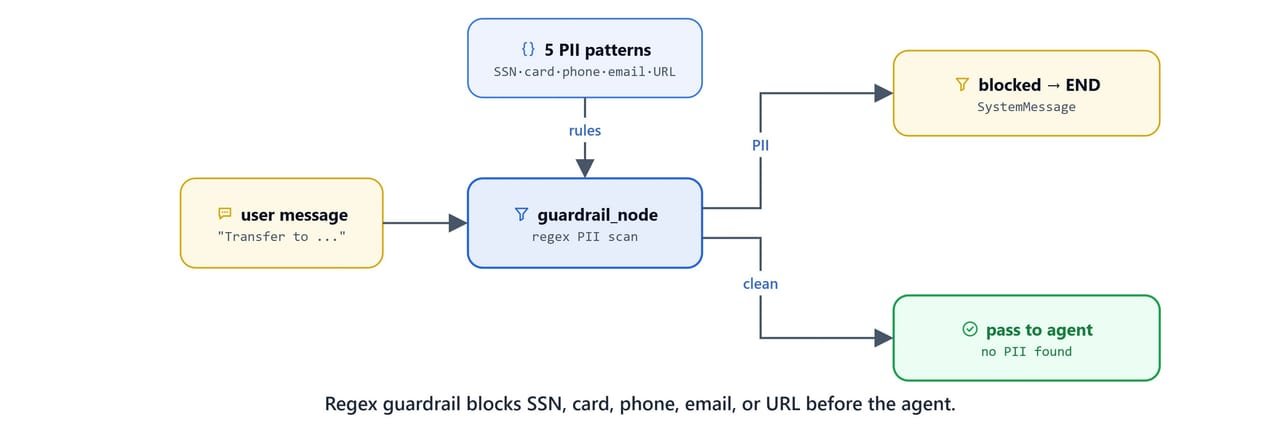
In this blog, we also add a PII guardrail. This is a preprocessing node that blocks any request with Social Security Numbers, credit card numbers, phone numbers, email addresses, or URLs before it reaches the agent.
Prerequisites: langgraph, langchain-ollama, langgraph-checkpoint-sqlite, python-dotenv installed. Ollama running with qwen3.
pip install -U langgraph langchain-ollama langgraph-checkpoint-sqlite python-dotenv
ollama pull qwen3Setup
from typing_extensions import TypedDict, Annotated
import operator
from langgraph.graph import StateGraph, START, END
from langgraph.checkpoint.sqlite import SqliteSaver

from langgraph.types import Command, interrupt

from langchain_ollama import ChatOllama
from langchain_core.messages import HumanMessage, SystemMessage
from langchain_core.tools import tool
from langgraph.prebuilt import ToolNode
import os
import re

# Configuration
BASE_URL = "http://localhost:11434"
MODEL_NAME = "qwen3"
llm = ChatOllama(model=MODEL_NAME, base_url=BASE_URL)from dotenv import load_dotenv
load_dotenv()TrueState Definition
class AgentState(TypedDict):
    messages: Annotated[list, operator.add]
Transfer Money Tool with Interrupt
The transfer_money tool checks the transfer amount. If it goes over $1,000, the tool calls interrupt() to pause execution and send an approval request to the caller. The caller must then resume with a Command that carries the decision:
@tool
def transfer_money(amount:int, recipient:str):
    """
    Transfer money. Large transfers require approval.

    Args:
        amount: Amount in dollars
        recipient: Recipient name
    """

    # ask for user approval if amount exceeds 1000
    if amount > 1000:
        approval = interrupt(
            {
                "type": "approval_required",
                "amount": amount,
                "recipient": recipient
            }
        )

        if approval.get("decision") != "approve":
            return "Transfer is cancelled!"

    return f"Transferred {amount} to {recipient}"
Test with a small transfer (no interrupt):
transfer_money.invoke({'amount': 100, 'recipient': 'John'})'Transferred 100 to John'Note
When called directly outside the graph, interrupt() is not active, so the tool completes normally. The interrupt mechanism only works when the tool runs inside a compiled LangGraph graph with a checkpointer.
PII Guardrail Node
The guardrail node runs before the agent. It scans the user's message for five categories of personally identifiable information using regex patterns:
patterns = {
        "SSN": r'\b\d{3}-\d{2}-\d{4}\b',  # SSN: 123-45-6789
        "Credit Card": r'\b\d{4}[\s-]?\d{4}[\s-]?\d{4}[\s-]?\d{4}\b',  # Credit Card: 1234-5678-9012-3456
        "Mobile Number": r'\b(\+?\d{1,3}[-.\s]?)?\(?\d{3}\)?[-.\s]?\d{3}[-.\s]?\d{4}\b',  # Mobile: +1-234-567-8900
        "Email": r'\b[A-Za-z0-9._%+-]+@[A-Za-z0-9.-]+\.[A-Z|a-z]{2,}\b',  # Email: user@example.com
        "URL/Link": r'https?://[^\s]+|www\.[^\s]+'  # URL: http://example.com or www.example.com
    }


def guardrail_node(state:AgentState):
    last_message = state['messages'][-1].content

    for pii_type, pattern in patterns.items():
        if re.search(pattern, last_message):
            return {
                "messages": [SystemMessage(f"Request Blocked: Contains {pii_type}. Please don't share sensitive personal information")]
            }

    return {"messages": []}
If PII is detected, the guardrail returns a SystemMessage blocking the request. If no PII is found, it returns an empty message list and the graph continues to the agent node.
Agent Node
def agent_node(state:AgentState):

    tools = [transfer_money]

    llm_with_tools = llm.bind_tools(tools)

    system_message = SystemMessage("You are a financial assistant. use transfer_money tool to transfer the money.")

    messages = [system_message] + state['messages']

    response = llm_with_tools.invoke(messages)

    if hasattr(response, 'tool_calls') and response.tool_calls:
        for tc in response.tool_calls:
            print(f"[AGENT] called Tool {tc.get('name', '?')} with args {tc.get('args', '?')}")
    else:
        print(f"[AGENT] Responding...")


    return {"messages": [response]}
Conditional Routing
Two routers control the graph flow:
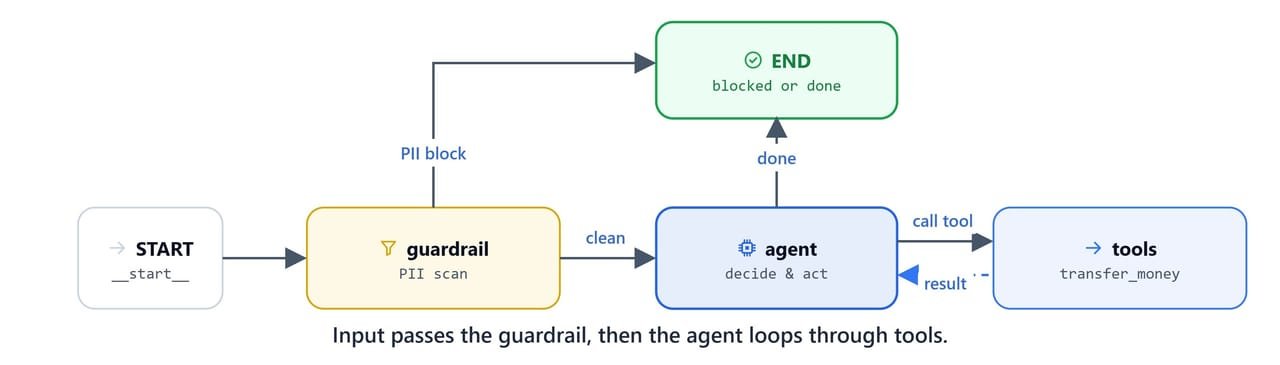
guardrail_router: if the guardrail produced aSystemMessage(PII detected), route toEND. Otherwise, route to theagent.should_continue: standard tool-call routing: if the agent's response hastool_calls, route totools; otherwise route toEND.
def should_continue(state: AgentState):
    last = state['messages'][-1]

    if hasattr(last, 'tool_calls') and last.tool_calls:
        return "tools"
    else:
        return END

def guardrail_router(state:AgentState):
    last = state['messages'][-1]

    if isinstance(last, SystemMessage):
        last.pretty_print()
        return  END

    return 'agent'
Graph Construction
import sqlite3

db_name = "db/checkpoints.db"

os.makedirs('db', exist_ok=True)def create_agent():
builder = StateGraph(AgentState)
# add all nodes
builder.add_node("guardrail", guardrail_node)
builder.add_node("agent", agent_node)
builder.add_node("tools", ToolNode([transfer_money]))
# add edges
builder.add_edge(START, "guardrail")
builder.add_conditional_edges("guardrail", guardrail_router, ['agent', END])
builder.add_conditional_edges("agent", should_continue, ['tools', END])
builder.add_edge("tools", "agent")
# always get a fresh connection
conn = sqlite3.connect(db_name, check_same_thread=False)
checkpointer = SqliteSaver(conn)
graph = builder.compile(checkpointer=checkpointer)
return graph
agent = create_agent()
agent<langgraph.graph.state.CompiledStateGraph object at 0x0000027B23DFBDA0>The graph has three nodes: guardrail → agent → tools, with conditional edges controlling the flow at each step.
Demo 1: Small Transfer (No Interrupt)
Transfers under $1,000 complete automatically without human approval:
config = {"configurable": {'thread_id': 'demo-2'}}

query = "Transfer 500 to John."
result = agent.invoke({
    "messages": [HumanMessage(query)]
}, config)[AGENT] called Tool transfer_money with args {'amount': 500, 'recipient': 'John'}
[AGENT] Responding...Here, we can see the agent call the tool and complete the transfer ($500 is under the $1,000 threshold). The agent then confirms. No interrupt fired.
Demo 2: Large Transfer (Approval Required)
Transfers over $1,000 trigger interrupt() and pause the graph:

query = "Transfer 5000 to John."
result = agent.invoke({
    "messages": [HumanMessage(query)]
}, config)[AGENT] called Tool transfer_money with args {'amount': 5000, 'recipient': 'John'}Here, we can see the graph pause at the interrupt() call inside transfer_money. The result carries an __interrupt__ key with the approval request data.
Handling the Interrupt
Check for the interrupt and resume with the human's decision using Command(resume=...):
if '__interrupt__' in result:

    interrupt_data = result['__interrupt__'][0]

    result = agent.invoke(
        Command(resume={'decision': input("do you approve or reject?")}),
        config
    )

result['messages'][-1].pretty_print()[AGENT] Responding...
================================== Ai Message ==================================
The transfer to John was cancelled. Please check if there are any limits or additional requirements for large transfers. Let me know if you need further assistance!Here, the user rejected the transfer, so the tool returned "Transfer is cancelled!" and the agent passed on the cancellation.
Reusable Chat Helper
Wrap the interrupt handling into a reusable function:
def chat(query, thread_id):
    config = {"configurable": {'thread_id': thread_id}}
    result = agent.invoke({
        "messages": [HumanMessage(query)]
    }, config)


    if '__interrupt__' in result:
        # use this data in front end design for approval workflow
        interrupt_data = result['__interrupt__'][0]

        result = agent.invoke(
            Command(resume={'decision': input("do you approve or reject?")}),
            config
        )


    result['messages'][-1].pretty_print()
Test with approval:
query = "Transfer 5000 to John."
thread_id = "demo-3"

chat(query, thread_id)[AGENT] called Tool transfer_money with args {'amount': 5000, 'recipient': 'John'}
[AGENT] Responding...
================================== Ai Message ==================================
The transfer of $5000 to **John** has been successfully processed. Let me know if you need further assistance!Demo 3: PII Guardrail Blocking
The guardrail node blocks requests before they reach the agent. Each PII type triggers a specific block message:
Email Blocked
thread_id = "demo-3"
query = "Transfer 5000 to user@example.com."

chat(query, thread_id)================================= System Message =================================
Request Blocked: Contains Email. Please don't share sensitive personal informationCredit Card Blocked
thread_id = "demo-3"
query = "Transfer 5000 to card 1234-5678-9012-3456."

chat(query, thread_id)================================= System Message =================================
Request Blocked: Contains Credit Card. Please don't share sensitive personal informationURL Blocked
thread_id = "demo-3"
query = "Transfer 5000 to John and send receipt to https://example.com/receipt."

chat(query, thread_id)================================= System Message =================================
Request Blocked: Contains URL/Link. Please don't share sensitive personal informationMobile Number Blocked
thread_id = "demo-3"
query = "Transfer 5000 to John and send receipt to +1-234-567-8900."

chat(query, thread_id)================================= System Message =================================
Request Blocked: Contains Mobile Number. Please don't share sensitive personal informationHere, we can see all five PII types (SSN, Credit Card, Mobile, Email, URL) caught by the guardrail before the agent ever sees any sensitive information.
The Interrupt and Guardrail Workflow
What You Built
In this blog, we built a financial assistant with two safety layers:
interrupt(): pauses execution inside a tool when a condition is met (transfer > $1,000)Command(resume=...): sends the human's approval/rejection decision back to the paused graph- PII guardrail: regex-based preprocessing node that blocks SSN, credit card, mobile, email, and URL patterns before the agent sees them
- Three-node graph:
guardrail → agent → toolswith conditional routing at each stage - Persistent state:
SqliteSaverensures the interrupt state survives across calls, enabling async approval workflows
The guardrail protects user privacy at the graph level, so no PII ever reaches the LLM. The interrupt mechanism powers production approval workflows, where sensitive actions need explicit human sign-off. This is how human-in-the-loop control works.