A 27B model that stores every weight as -1, 0, or +1 should be worse at everything. On our MacBook it was not. Bonsai 2 27B kept up with the full-size model it was built from, wrote answers faster, and left about 7 GB of memory free.
Bonsai 2 27B is Qwen 3.8 27B with every weight squeezed down to three values. On disk it is 8.0 GB. The 4-bit Qwen build we compare it with is 15 GB. But a smaller file is only part of the story. On a laptop, the model file is one of three things fighting for the same memory, so we measured all three.
In this blog, we will learn how much memory each model really needs at every prompt length, how fast each one reads and writes, and whether the smaller model gives worse answers. Everything runs on one MacBook Pro M5 Max with 36GB of memory.
What Is a Ternary Model?
A model is a huge pile of numbers called weights. A normal model stores each weight as a number with many possible values. A ternary model stores each weight as one of only three values: -1, 0, or +1. In simple words, every weight becomes "push down", "ignore", or "push up".
Three values need very few bits, so the file gets much smaller. Bonsai also keeps one shared size factor for every group of 128 weights, so it can still tell a big push from a small one. PrismML, who made Bonsai, lists it at 1.72 bits per weight. The build we used stores a little extra for each group, which brings it to 2.25 bits per weight on disk.
You may see Bonsai listed at 5.5 GB somewhere else. That is the same weights packed a different way for a different engine. Two things make our number bigger. The build we used stores a little extra for every group of 128 weights, which is the 2.25 bits above. It also includes the part of the model that reads images, which the 5.5 GB figure leaves out. Going by the file PrismML publishes, this download is 8.00 GB: 7.15 GB for the language part and 0.86 GB for the image part.
Bonsai is not a new design. Its model card says it is built from Qwen3.8-27B with the shape of the model unchanged. That makes this a clean test. We have the same model shape at two very different sizes, so any difference we see comes from how the weights are stored.
Our Test Setup
One MacBook Pro with an Apple M5 Max and 36GB of memory, on wall power, with sleep turned off during runs. Let me tabulate the setup for your better understanding:
| Item | Setting |
|---|---|
| Engine | mlx-vlm, the same code path for both models |
| Bonsai | Bonsai 2 27B ternary (PrismML), loaded with PrismML's runtime |
| Qwen | mlx-community/Qwen3.8-27B-4bit |
| Size on disk | Bonsai 8.0 GB, Qwen 15 GB |
| Number format while running | 16-bit for both |
| Model notes | 16-bit, or 8-bit where marked, the same for both |
| Memory the GPU may use | 28.08 GB of 36 GB, hard stop above it, no swap |
Both models were loaded with their image-reading parts included, and those are counted in every weight number below.
How Much Memory Does the GPU Really Get?
A 36GB Mac does not give 36GB to the model. macOS reports a graphics memory limit of 28.08 GB. The other 8 GB or so stays with macOS and our apps.
We made that limit a hard wall. Each run locked the model's memory in place so it could not be pushed out to disk. A watchdog stopped the run the moment the model needed more than 28.08 GB, and we record that as OOM, short for "out of memory". So, no number in this post was helped by moving memory to disk.
Each run was also a fresh start with no other model running. About 15 GB of disk swap was left over from earlier runs made before this guard existed. So, when we talk about swap, we mean how much it grew during a run, not the total.
Where Does the Memory Go?
Peak memory is made of three parts, and each one behaves differently.
- Weights: the model itself. This never changes. Bonsai uses 7.95 GB, and Qwen uses 14.95 GB.
- Notes: what the model remembers about every word it has read so far. This grows as the prompt gets longer. The technical name is the KV cache.
- Working space: temporary memory used while reading the prompt. It depends mostly on how many words we read at once.
Here is the interesting part. The notes take exactly the same space for both models, byte for byte. Why? Because both models have the same shape. Only 16 of the 64 layers keep full notes. The other 48 layers use a lighter method that keeps a small summary of about 0.15 GB, no matter how long the prompt is.
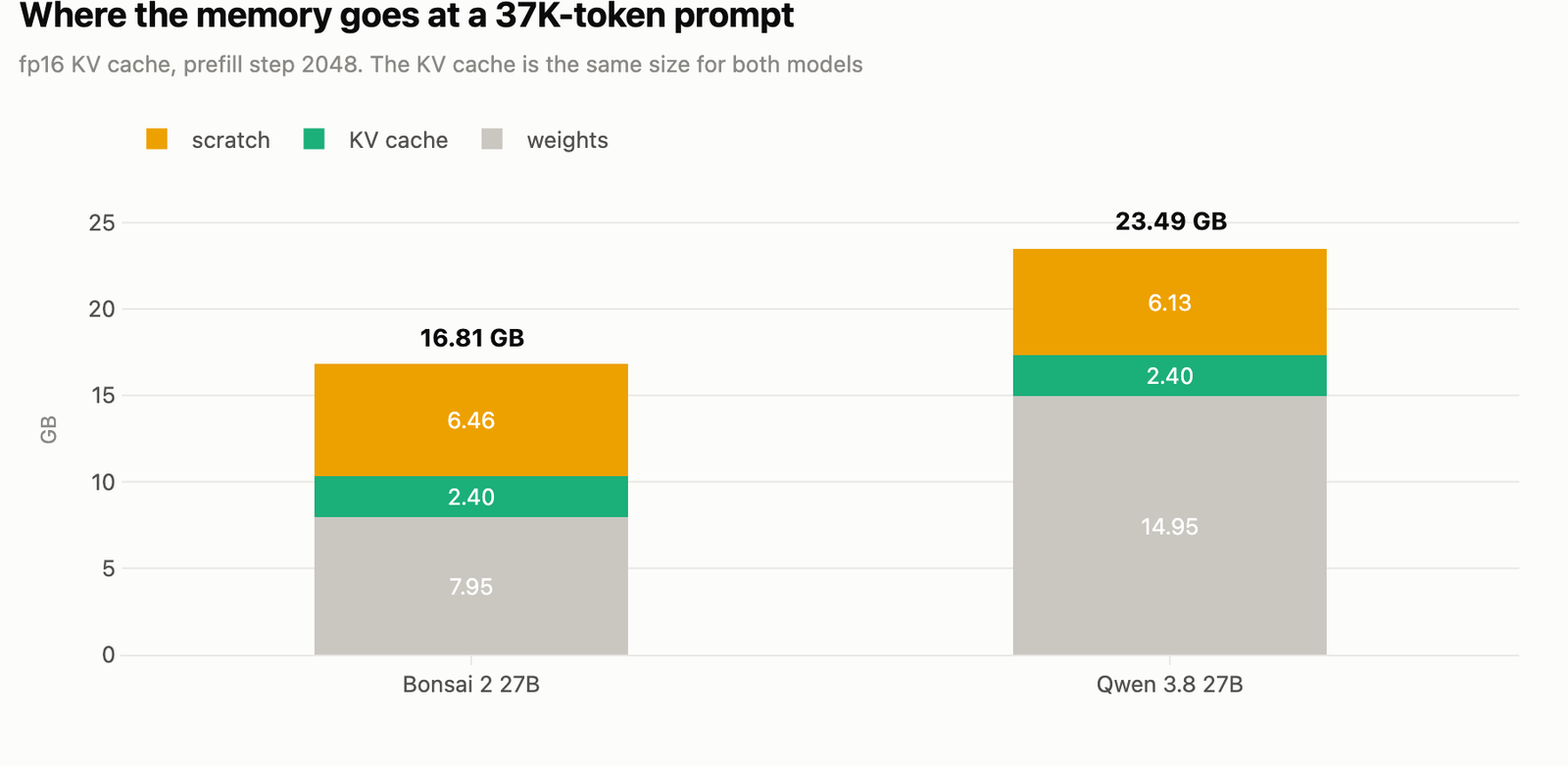
So, the memory gap between the two models is almost all weights. Let me tabulate peak memory with 16-bit notes:
| Prompt tokens | Prefill step | Bonsai peak | Qwen peak | Notes (both) |
|---|---|---|---|---|
| 2,015 | 2048 | 11.96 GB | 20.15 GB | 0.27 GB |
| 7,859 | 2048 | 11.84 GB | 18.52 GB | 0.62 GB |
| 36,973 | 2048 | 16.81 GB | 23.49 GB | 2.40 GB |
| 73,869 | 2048 | 22.79 GB | OOM | 4.65 GB |
| 73,869 | 512 | 16.36 GB | 23.12 GB | 4.65 GB |
| 147,630 | 512 | 23.47 GB | OOM | 9.16 GB |
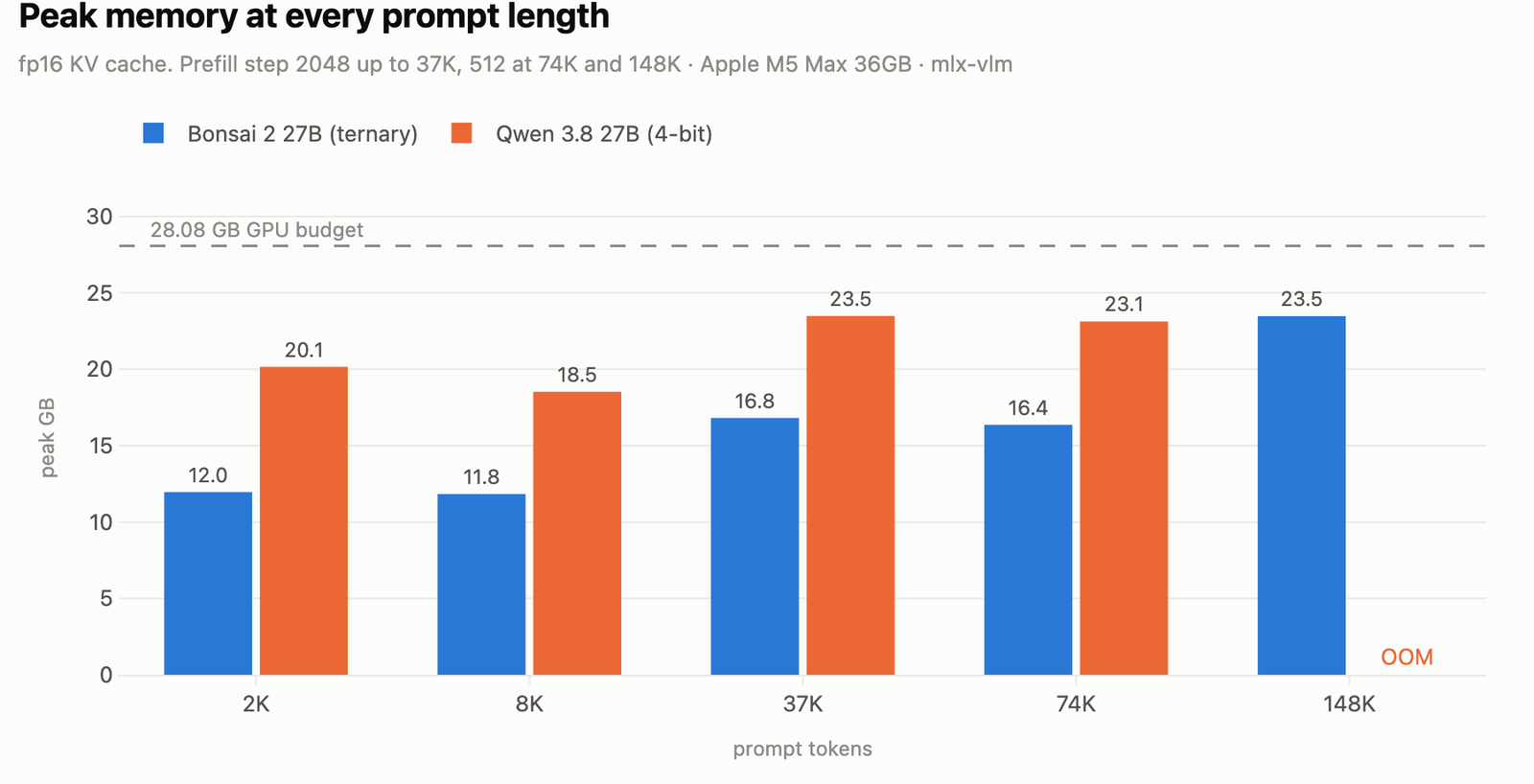
Here, we can see Bonsai sits 6.7 to 8.2 GB below Qwen at every length where both finished. That held with both note settings and both prefill steps. The weights explain 7.0 GB of it. The rest is working space, which differs by at most 0.4 GB between the models beyond 2K tokens, and by 1.2 GB at 2K.
Can Bonsai Really Hold a 148K-Token Prompt?
To test long prompts, we hid a passphrase exactly halfway through a very long document and asked each model to find it. Both models got byte-identical prompts, with thinking mode off, always picking the most likely next word, and 40 words of output.
With 16-bit notes and a prefill step of 512, Bonsai read the 147,630-token prompt at a 23.47 GB peak and found the passphrase. Qwen hit the 28.08 GB wall at the same length.
Qwen fits 74K tokens, but only just. With a prefill step of 2048 it ran out of memory. With a step of 512 it finished at 23.12 GB.
This is the whole point of the 7 GB saving. On a 36GB Mac, it is the difference between a 74K prompt and a 148K prompt with full-size notes. One honest note: reading that 148K prompt took Bonsai 694.7 seconds before the first word came out. It fits, but it is not quick.
What Is the Prefill Step, and Why Does It Matter?
Before a model writes anything, it reads the whole prompt. This reading phase is called prefill. The prefill step is how many words it reads in one go.
A bigger step needs a bigger working space. At 74K tokens, Bonsai's working space was 10.18 GB with a step of 2048 and 3.76 GB with a step of 512. And it did not get slower. Prefill was 323.9 words a second at step 512 and 297.7 at step 2048.
For Qwen, the same change was the difference between running out of memory and finishing. So, a step of 512 is the setting that makes long prompts fit on this machine.
How Much Memory Will This Take on Our Mac?
We measured enough points to turn all of this into simple arithmetic. Peak memory is weights plus notes plus working space, and only the notes change much with the length of the prompt.
The notes grew at a steady rate. Across every length we measured, from 2K to 148K tokens, this matched what we saw within 0.01 GB:
Notes in GB = 0.15 + 0.061 for every 1,000 tokens
The 0.15 GB is the small fixed summary the lighter layers keep. The rest grows with the prompt. Remember this part is the same for both models.
Working space depends on the prefill step. With a step of 512, ours ran from 3.76 GB at 74K tokens to 6.37 GB at 148K. So, about 4 GB is a safe allowance up to 74K, and about 6.5 GB beyond that.
Let's check the whole thing at 148K tokens. Weights 7.95, plus notes 9.15, plus working space 6.37, comes to 23.47 GB. That is exactly what we measured.
Now we can ask what fits on a different Mac. Our 36GB machine gave the GPU 28.08 GB, which is about three quarters of its memory. If we assume the same share:
| Mac memory | Roughly for the GPU | Longest prompt for Bonsai |
|---|---|---|
| 16 GB | about 12 GB | a few thousand tokens at best |
| 32 GB | about 24 GB | around 150K tokens |
| 36 GB | 28.08 GB, measured | 148K measured, with 4.6 GB to spare |
| 64 GB | about 48 GB | the model's own 262K limit, not memory |
| 128 GB | about 96 GB | the model's own 262K limit, not memory |
Only the 36GB row is measured. The others assume macOS hands the GPU the same share on a machine we did not test, so treat them as a guide. The exact share does not change the useful part. Below 32 GB, memory is what stops us. At 64 GB and above, the model's own 262K token limit is what stops us first.
For Qwen, swap 7.95 GB of weights for 14.95 GB. That 7 GB costs about 115,000 tokens of prompt room on every machine in the table.
Which Model Is Faster?
Speed comes in two parts. Prefill speed is how fast the model reads our prompt. Decode speed is how fast it writes the answer, one word at a time.
Writing speed is mostly limited by how fast the chip can read the weights. For every new word, the model reads all of its weights once. Bonsai has about half as many bytes to read, so it should write faster. Let's see the numbers with 16-bit notes:
| Prompt tokens | Prefill step | Bonsai prefill | Qwen prefill | Bonsai decode | Qwen decode |
|---|---|---|---|---|---|
| 2,015 | 2048 | 527.7 | 697.0 | 36.3 | 27.8 |
| 7,859 | 2048 | 587.0 | 631.4 | 37.7 | 26.7 |
| 36,973 | 2048 | 450.3 | 423.1 | 28.6 | 23.1 |
| 73,869 | 512 | 323.9 | 345.6 | 23.1 | 19.7 |
| 147,630 | 512 | 212.5 | OOM | 13.2 | OOM |
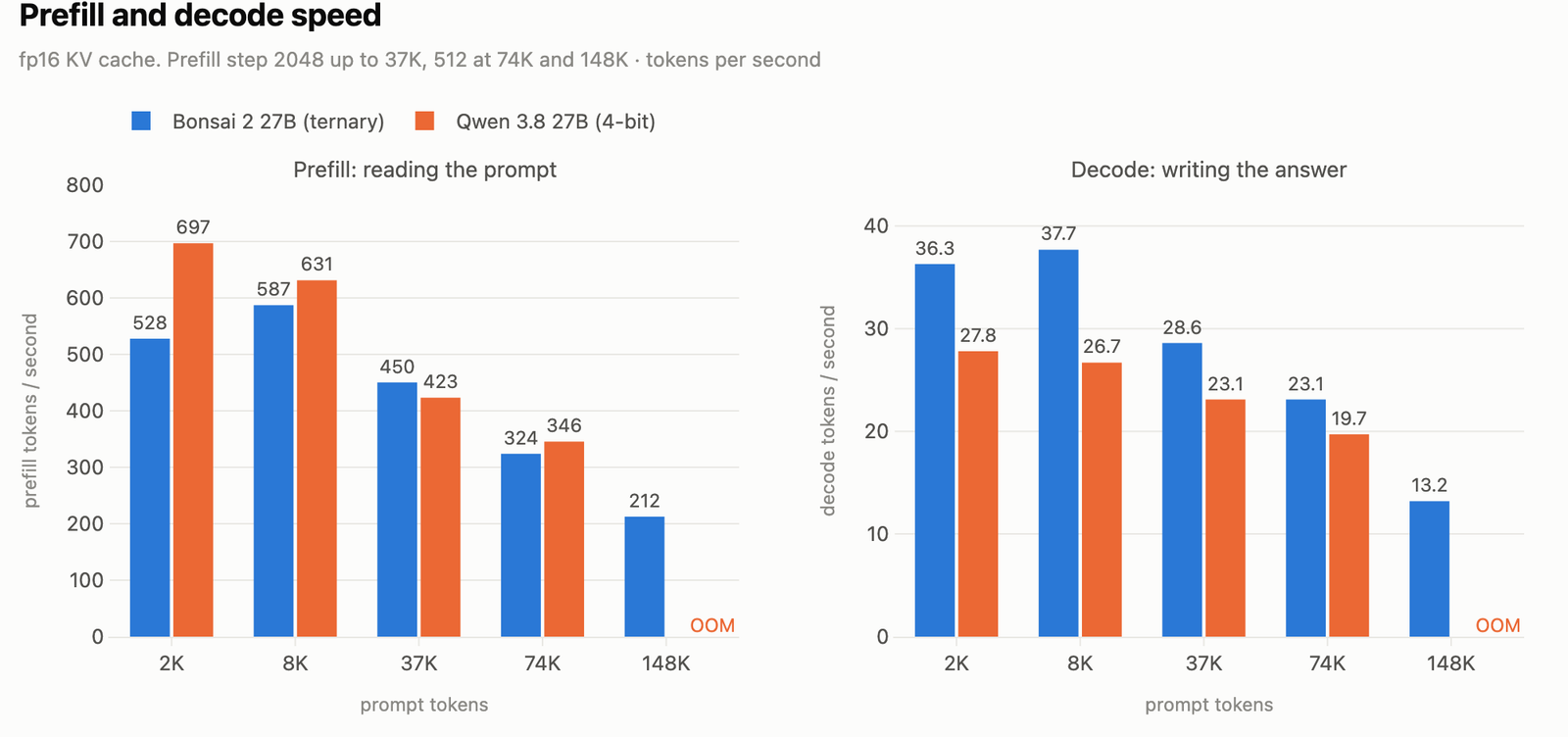
All speeds are tokens per second. Here, we can see Bonsai writes 17 to 41% faster at every length Qwen could finish. With 8-bit notes the lead is smaller: 10 to 25% up to 74K tokens.
Reading tells a different story. Qwen reads short prompts faster: 697 against 528 tokens a second at 2K. On long prompts the two are close. Bonsai edges ahead at 37K, and Qwen edges back at 74K, and both gaps are under 10%.
At 148K, where both fit only with 8-bit notes, the two are level: 8.1 against 8.0 tokens a second of writing. By then, most of the work is searching the huge pile of notes, and the weights stop being the slow part.
PrismML's model card quotes about 47 tokens a second on an M5 Max. Our fastest Bonsai writing speed was 37.7. Their number comes from a different engine and a different packing of the same weights, so the two are not measured the same way.
Should We Store the Notes at 8 Bits?
Eight-bit notes store the same information with less detail. In simple words, it trades a little accuracy in the notes for a lot of memory. Only the full notes are shrunk. The small summaries stay as they are.
It does roughly halve the notes. At 148K tokens they went from 9.16 GB to 4.93 GB. That is what let Qwen fit 148K at all:
| At 147,630 tokens, 8-bit notes | Bonsai | Qwen |
|---|---|---|
| Peak memory | 19.0 GB | 25.81 GB |
| Prefill (tok/s) | 183.3 | 180.9 |
| Decode (tok/s) | 8.1 | 8.0 |
| Found the passphrase | yes | yes |
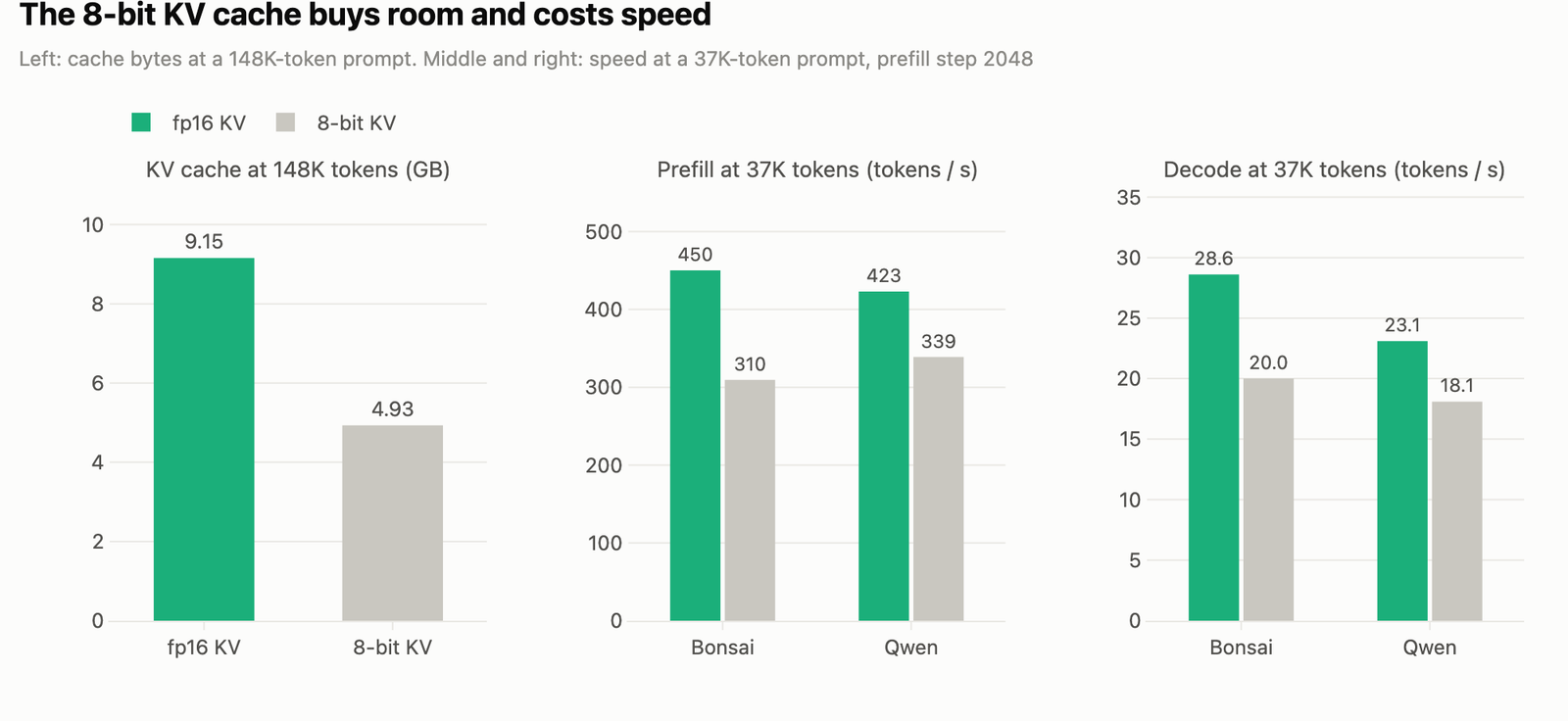
But the memory is not free. At 37K tokens, 8-bit notes cut Bonsai's reading from 450 to 310 tokens a second, and its writing from 28.6 to 20.0. Qwen slowed by about 20%: reading went from 423 to 339 and writing from 23.1 to 18.1.
So, we use 8-bit notes only when we need the room. On this Mac, that means Qwen beyond 74K. Bonsai already fits 148K without it.
What Happens Near the Memory Limit?
The models' own memory was locked in place, so the models themselves never got pushed out to disk. But other apps still can be.
When Qwen peaked at 27.4 GB (74K tokens, 8-bit notes, step 2048), macOS pushed 4.0 GB of other apps out to disk to make room. At 148K with 8-bit notes, it pushed 3.2 GB. No Bonsai run pushed anything out. On a laptop we are also browsing on, that matters.
Does Bonsai Give Worse Answers?
Now the most important question. A model that is half the size is only useful if it still thinks as well.
We asked both models 59 questions and graded them automatically. 43 are base questions: trick riddles, number traps, letter counting, instruction constraints, and false premises. 16 are harder ones, with the answers checked by brute force. For the code questions, we ran the answers against tests.
Both models ran in thinking mode at medium effort, with the settings the model makers recommend (temperature 1.0, top-p 0.95, top-k 20), the same starting point, and one try per question. Each answer had to end with a "Final answer:" line, and the grader read only that line.
| Bonsai 2 27B | Qwen 3.8 27B | |
|---|---|---|
| Total correct | 58 / 59 | 59 / 59 |
| Hard subset | 16 / 16 | 16 / 16 |
| Answers cut off | 0 | 0 |
| Tokens generated | 34,669 | 33,303 |
| Time for all 59 | 18.8 min | 24.9 min |
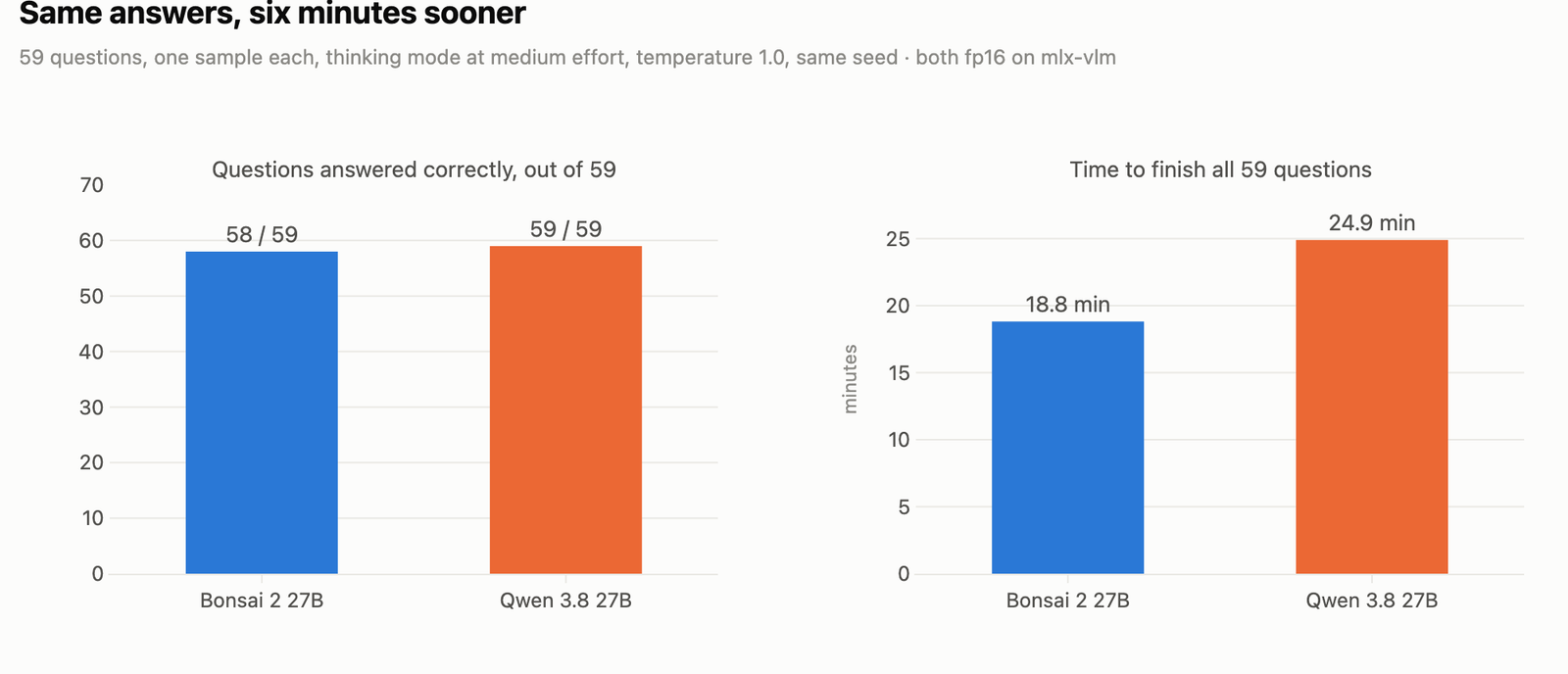
Here, we can see Bonsai missed one question, and the miss is worth reading. We asked it to reverse the string 'benchmark2026'. Its final line was 6202kr a m h c n e b. Every character is right and in the right order, but it has stray spaces, and the grader needs an exact match. Counted strictly it is 58 of 59. Counted after ignoring the spaces it is 59 of 59.
One thing this test cannot tell us: Qwen answered every question correctly. A test that one model gets perfect cannot show us a small gap in the other. It can only rule out a big one.
Why Did We Change Bonsai's Number Format?
This one surprised us. Bonsai's download keeps a handful of small helper values as 32-bit numbers. These are not the ternary weights. They are small extras the model uses while it runs.
The problem is what a 32-bit number does to everything it touches. When the running numbers get multiplied by a 32-bit value, they turn into 32-bit numbers too. So the whole stream of numbers, the notes, and the working space all ran at 32 bits: twice the size, and on slower code.
So, we changed those small extras to 16-bit numbers while loading. The ternary weights themselves are not touched. Let's see the code as below:
    model, tok, _ = rb.load_vl_model(PACK)
    if variant in ("bf16", "fp16"):
        dt = mx.bfloat16 if variant == "bf16" else mx.float16
        lm = model.language_model
        # every fp32 tensor in the language model: norm weights, GDN gates, Hadamard sign vectors
        # bf16 also needs the fp16 packed scales/biases in bf16, or mixed dtypes promote back to fp32
        src = (mx.float32, mx.float16) if dt == mx.bfloat16 else (mx.float32,)
        lm.apply(lambda a: a.astype(dt) if a.dtype in src else a)
        for _, m in lm.named_modules():
            if isinstance(m, Packed):
                m.dtype = dt  # dtype of dequantized embedding rows
mx.eval(lm.parameters())lm.apply(...)walks every value in the language model and changes only the 32-bit ones. The packed ternary weights are left alone.- For 16-bit, only the 32-bit values need changing. For the other 16-bit format, the packed size factors must be changed too, or mixing two formats pushes everything back to 32 bits.
- The
Packedmodules get theirdtypeset so that unpacked rows come out in the same format.
Let me tabulate what this changed, with 16-bit notes and a prefill step of 2048:
| At 36,973 tokens | Bonsai as shipped | Bonsai at 16 bits |
|---|---|---|
| Peak memory | 24.85 GB | 16.81 GB |
| Notes | 4.66 GB | 2.40 GB |
| Working space | 12.17 GB | 6.46 GB |
| Prefill (tok/s) | 252.4 | 450.3 |
| Decode (tok/s) | 22.8 | 28.6 |
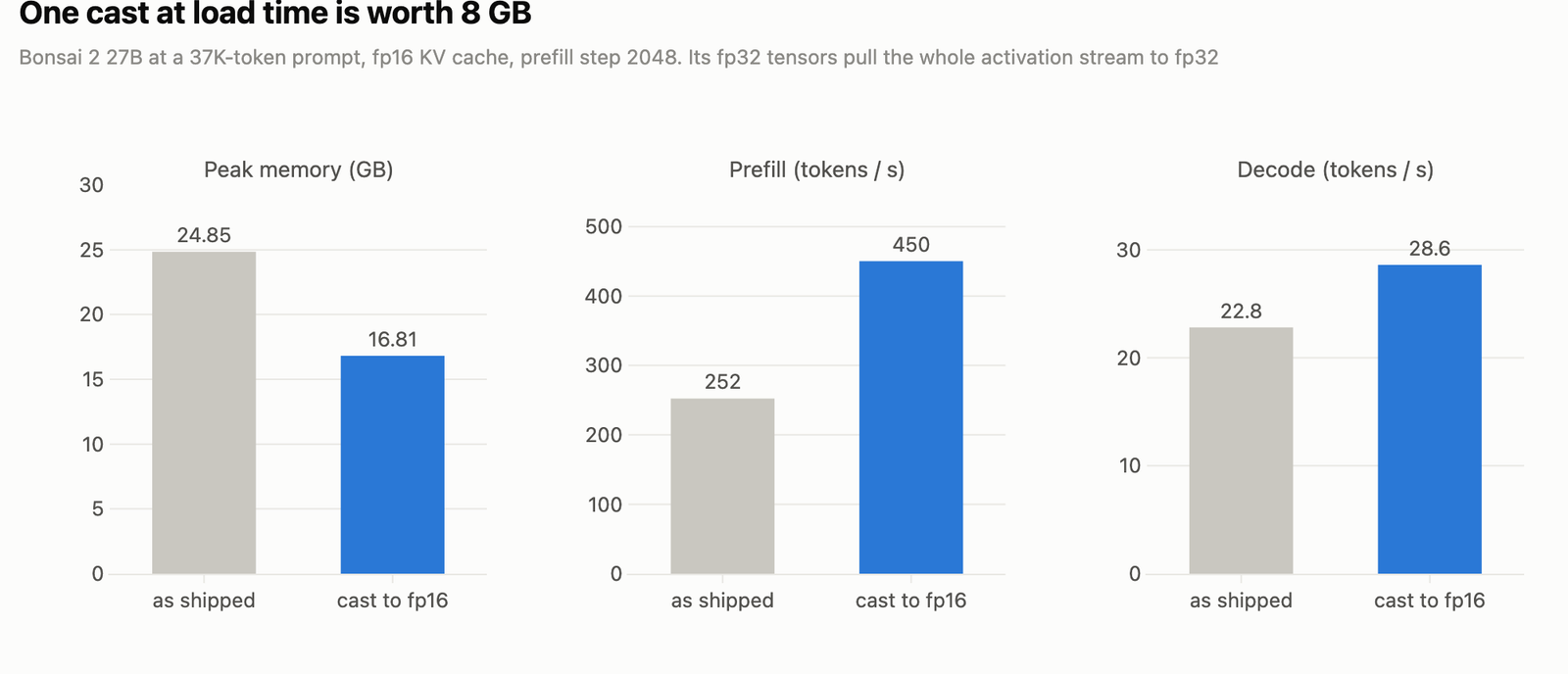
Here, we can see the change saves 8 GB at 37K tokens and makes reading about 1.8 times faster. Without it, Bonsai would lose most of its lead over Qwen.
To be fair to Qwen, it ran at 16 bits too. Qwen ships in a different 16-bit format, and it converts across without losing anything. Now both models ran the same way, on the same engine.
Did the Change Hurt Quality?
Changing a number format changes the numbers, so we checked it. We ran 4,096 tokens of ordinary text through each model. Then we counted how often the model's top next-word guess matched a more precise run of the same model. For Bonsai the reference was the model as shipped. For Qwen it was a run at 32 bits.
| Model | Format | Top guess matched | Mean KL |
|---|---|---|---|
| Bonsai | bf16 | 98.24% | 0.00034 |
| Bonsai | fp16 | 99.78% | 0.00001 |
| Qwen | bf16 | 97.78% | 0.00055 |
| Qwen | fp16 | 99.71% | 0.00001 |
The last column measures how far apart the two sets of next-word odds are, and lower means closer. Here, we can see fp16 tracks the reference more closely than bf16 does, for both models. So, fp16 was the right choice for both, not just the fast one.
Which Model Should We Run on a 36GB Mac?
Let me tabulate the answer for your better understanding:
| If we need | Pick | Why |
|---|---|---|
| Long prompts, up to 148K tokens | Bonsai, 16-bit notes, prefill step 512 | Fits at 23.47 GB with full-size notes |
| Faster answers on normal prompts | Bonsai | Writes 17 to 41% faster up to 74K tokens |
| Fastest reading of short prompts | Qwen | 697 against 528 tokens a second at 2K |
| Room left for other apps | Bonsai | 6.7 to 8.2 GB lower peak, nothing pushed to disk |
If we run Bonsai this way, we change its 32-bit extras to 16-bit while loading. That single change is worth 8 GB and most of the speed.
Limits of This Test
This is one laptop, one engine, and one run per setting.
The honest limits:
- Every long-prompt number is a single run. We did not repeat them, so small speed gaps, like the 6 to 7% reading gaps at 37K and 74K, could move.
- Qwen scored 59 out of 59 on our question set. A test one model gets perfect cannot measure a small gap in the other.
- The long-prompt test only asks the model to find one hidden passphrase. Finding a passphrase is not the same as reasoning over a long document.
- Our questions are single questions with a single answer. They cannot see the problems low-bit models are known for, like repeating themselves or breaking on multi-step tasks.
- We tested only one engine. PrismML also ships its own build and a llama.cpp build, and we measured neither.
- The weight numbers include the image-reading parts of both models. A text-only load would be smaller for both.
- Peak memory does not include up to 1.45 GB of freed memory the engine was still holding. Our 28.08 GB guard did count it.
If you run either model on your own Mac, please leave your memory size, prompt length, and tokens a second in the comments.
Conclusion
This is how Bonsai 2 27B compares with the model it was built from, Qwen 3.8 27B, on a 36GB MacBook Pro. We started with what a ternary model is and why it is a clean comparison. We saw that the notes are identical for both, so the 7 GB saving is all weights. That saving lets Bonsai hold a 148K-token prompt with full-size notes, write faster, and match Qwen on quality. Finally, we saw that one change at load time is what makes all of it work.
Key takeaways:
- Bonsai's peak memory is 6.7 to 8.2 GB below Qwen's at every length, and 7.0 GB of that is weights.
- The notes take the same space for both, because both models have the same shape.
- The notes grow by 0.061 GB for every 1,000 tokens, on top of a fixed 0.15 GB. That arithmetic predicts peak memory on any Mac.
- Bonsai writes faster at every length Qwen could finish. Qwen reads short prompts faster.
- A prefill step of 512 cuts working space sharply with no speed loss. Use it for long prompts.
- Eight-bit notes halve the notes but cost 20 to 31% of speed. Use them only when we need the room.
- On this set, quality is the same: 58 of 59 against 59 of 59, with the one miss a spacing slip.
Next steps:
- Read the Qwen 3.8 27B on a MacBook Pro M5 Max run to see the same parent model on llama.cpp.
- See DeepSeek V4 Flash at 1-bit vs Qwen Flash Next for another very-low-bit model under test.
- Use the local LLMs technical reference guide to match a model size and context length to your own machine.