We ran Qwen 3.8 27B on an RTX 5090 in an earlier post. Here we run the same model, the same quantization and the same llama.cpp sweep on a MacBook Pro M5 Max with 36GB of unified memory.
In this blog, we will learn what changes between the two machines and what does not. We will see where the laptop lands against the card, which settings still earn their place on Apple Silicon, and why the honest number to report on a laptop is not the median.
Our MacBook Pro M5 Max Test Setup
One MacBook Pro with an Apple M5 Max, 32 GPU cores, and 36GB of unified memory, on macOS 26.6.2 and wall power. The model is Qwen 3.8 27B in Q4_K_M, the same blob Ollama had already pulled. The runtime is llama.cpp build b10793 with the Metal backend.
We kept the discipline from the desktop run. One llama-server per configuration, the server killed between every configuration, and the port polled until it was free. Every prompt carries a unique request id, so llama.cpp cannot answer the second repeat from the cache of the first.
Sampling is greedy, and each generation is capped at 256 tokens. That cap matters, and we come back to it at the end.
How Much Memory Does llama.cpp Get on a 36GB Mac?
This is the first number to read on a Mac, and it is not 36GB. llama.cpp prints it at startup:
cmn  common_param:   - MTL0    : Apple M5 Max (28753 MiB, 28753 MiB free)
cmn  common_param:   - CPU     : Apple M5 Max (36864 MiB, 36864 MiB free)
Here, we can see the machine has 36,864 MB in total, and the GPU may address 28,753 MB of it. That is 28.1 GB. The model, the KV cache, the recurrent state, and the scratch buffers all have to fit inside that number.
The weights alone take 15.4 GB. So the whole tuning question on this laptop is what we do with the twelve and a half gigabytes that are left.
What Is Inside the Model File?
Qwen 3.8 carries a multi token prediction head, called MTP, inside the GGUF file. It is one extra layer at index 64, sitting behind the 64 transformer layers, and it comes down with an ordinary Q4_K_M download.
We do not have to trust anyone about that. The loader reads the header out loud:
qwen35.block_count             = 65
qwen35.context_length          = 262144
qwen35.nextn_predict_layers    = 1
qwen35.full_attention_interval = 4
qwen35.ssm.state_size          = 128
Here, we can see 65 blocks where the model has 64 layers, one prediction layer, and a real context window of 262,144 tokens.
The next line is the one that makes this model usable on a laptop at all. full_attention_interval = 4 means only every fourth layer keeps a KV cache. The other 48 layers are state space layers, and they carry a small recurrent state whose size never changes.
llama.cpp says the same thing when it builds the cache at an 8K window:
llama_kv_cache: size = 512.00 MiB (8192 cells, 16 layers, 1/1 seqs), K (f16): 256.00 MiB, V (f16): 256.00 MiB
llama_memory_recurrent: size = 149.62 MiB (1 cells, 64 layers, 1 seqs 0 rs_seq), R (f32): 5.62 MiB, S (f32): 144.00 MiB
Sixteen layers hold a cache, not 64. That works out to 64 KB per token, and the 150 MB of recurrent state is a flat cost that does not grow with the context at all.
There is one more line worth reading. With drafting switched off, the server tells us it is leaving the draft head on the floor:
model has unused tensor blk.64.nextn.eh_proj.weight (size = 29491200 bytes) -- ignoring
model has unused tensor blk.64.nextn.enorm.weight (size = 20480 bytes) -- ignoring
model has unused tensor blk.64.nextn.hnorm.weight (size = 20480 bytes) -- ignoring
We paid for those tensors in the download. Until we pass one flag, they do nothing.
How Many Tokens Should We Draft on the M5 Max?
The head drafts a few tokens cheaply, and the full model checks all of them in one pass. Accepted drafts are free. Rejected ones cost us the drafting work. The only choice left is how many tokens to draft per step.
We ran the whole ladder at an 8K context, from drafting off up to n=4.
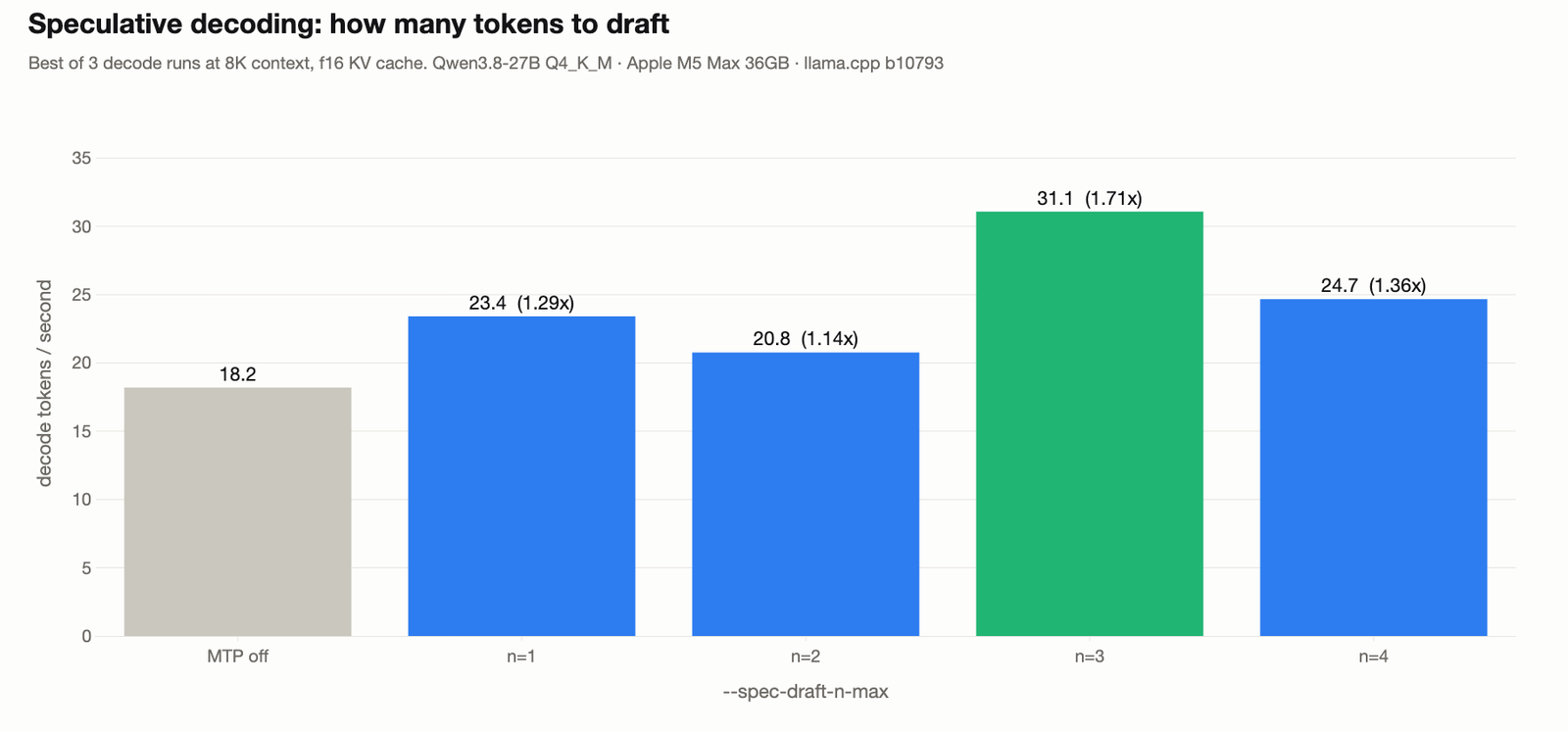
Let me tabulate the full ladder for your better understanding.
| setting | best of 3 | median of 3 | vs off | accept rate | tokens/step | Metal GB |
|---|---|---|---|---|---|---|
| MTP off | 18.2 | 9.2 | 1.00x | n/a | n/a | 16.20 |
n=1 |
23.4 | 18.4 | 1.29x | 0.821 | 1.82 | 16.75 |
n=2 |
20.8 | 19.5 | 1.14x | 0.614 | 1.99 | 16.90 |
n=3 |
31.1 | 28.5 | 1.71x | 0.575 | 2.10 | 17.04 |
n=4 |
24.7 | 20.3 | 1.36x | 0.444 | 1.77 | 17.19 |
Three draft tokens is the peak here, which is where the RTX 5090 peaked too. One flag takes this laptop from 18 to 31 tokens a second, and the head costs about 550 MB of extra Metal memory at n=1, then roughly 150 MB per level after that.
Why is there a peak at all? Because two curves pull against each other, and llama.cpp prints both of them:
spec common_specu: statistics draft-mtp: #mean acc len = 2.94, #acc rate/pos = (0.818, 0.636, 0.483)Here, we can see the first drafted token survives 82% of the time, the second 64%, and the third only 48%. Draft deeper and each single guess is worth less. But each accepted step harvests more tokens, so tokens per step climbs. Throughput is the two multiplied together, and that product tops out in the middle.
Why Did One MacBook Give 31 and 0.3 Tokens a Second?
Now look at the gap between the two speed columns above. At n=3 the best run was 31.1 tokens a second and the median was 28.5. At drafting off the best was 18.2 and the median was 9.2.
A median is supposed to be the safe number. Here it is the misleading one. Let's plot every single generation instead of summing them up.
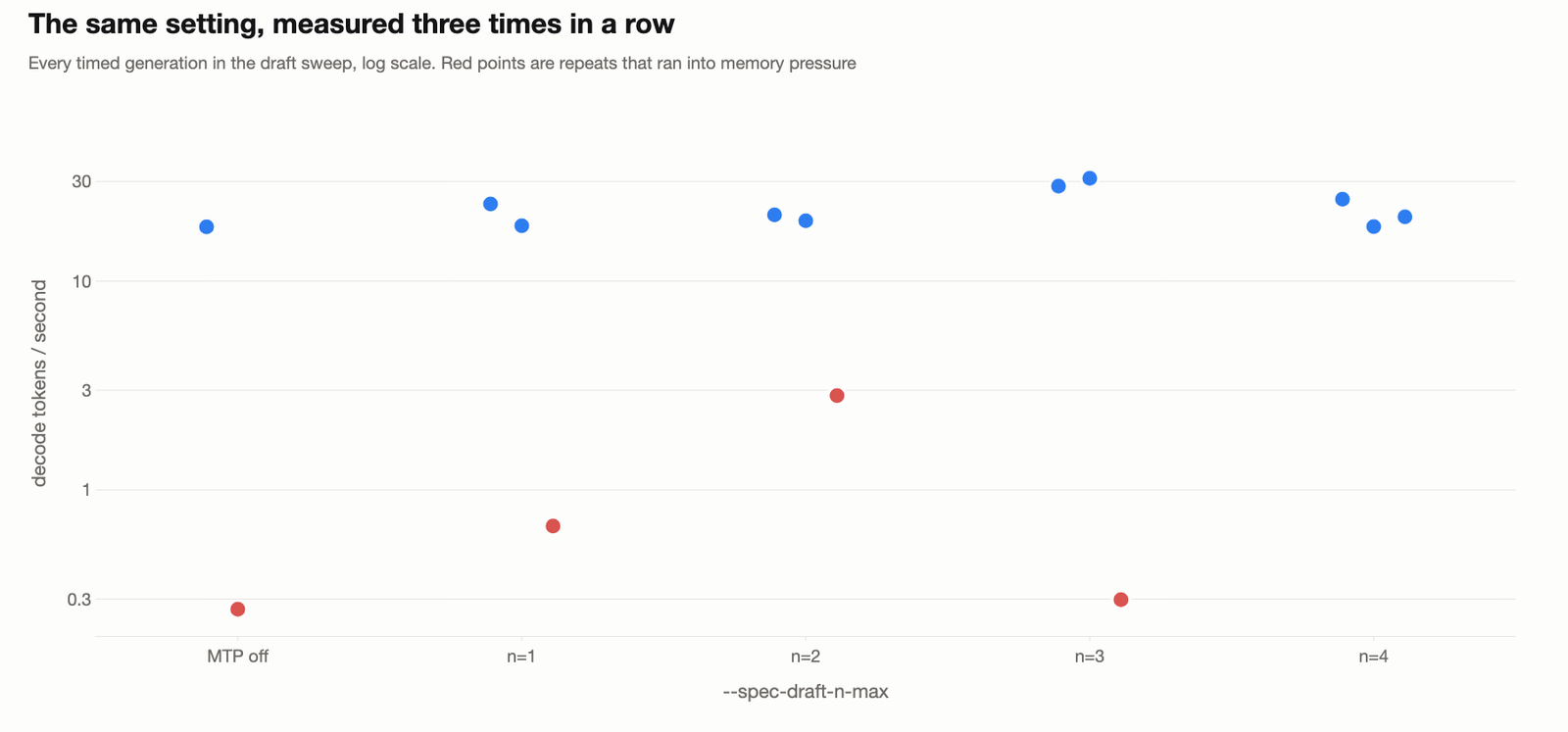
Here, we can see the shape of the problem. Most repeats land in a tight band between 18 and 31 tokens a second. Then one repeat per setting falls off the chart, down to 0.3 or 0.7 tokens a second. That is the same server, the same flags, and the same prompt, a few seconds later.
Nothing about the model changed. The machine ran out of physical memory and started paging the weights back and forth. One generation of 256 tokens took 952 seconds.
So, here comes the rule this laptop taught us. On a Mac we report the stall rate next to the speed, because a median over three repeats can be dragged anywhere by a single page fault. The best of three is the closest thing we have to a clean measurement of the setting itself.
Warning
A stall does not look like an error. The server keeps streaming, the logs stay clean, and the model still answers correctly. It just answers sixty times slower, and only for a while.
Does Flash Attention Still Matter on Apple Silicon?
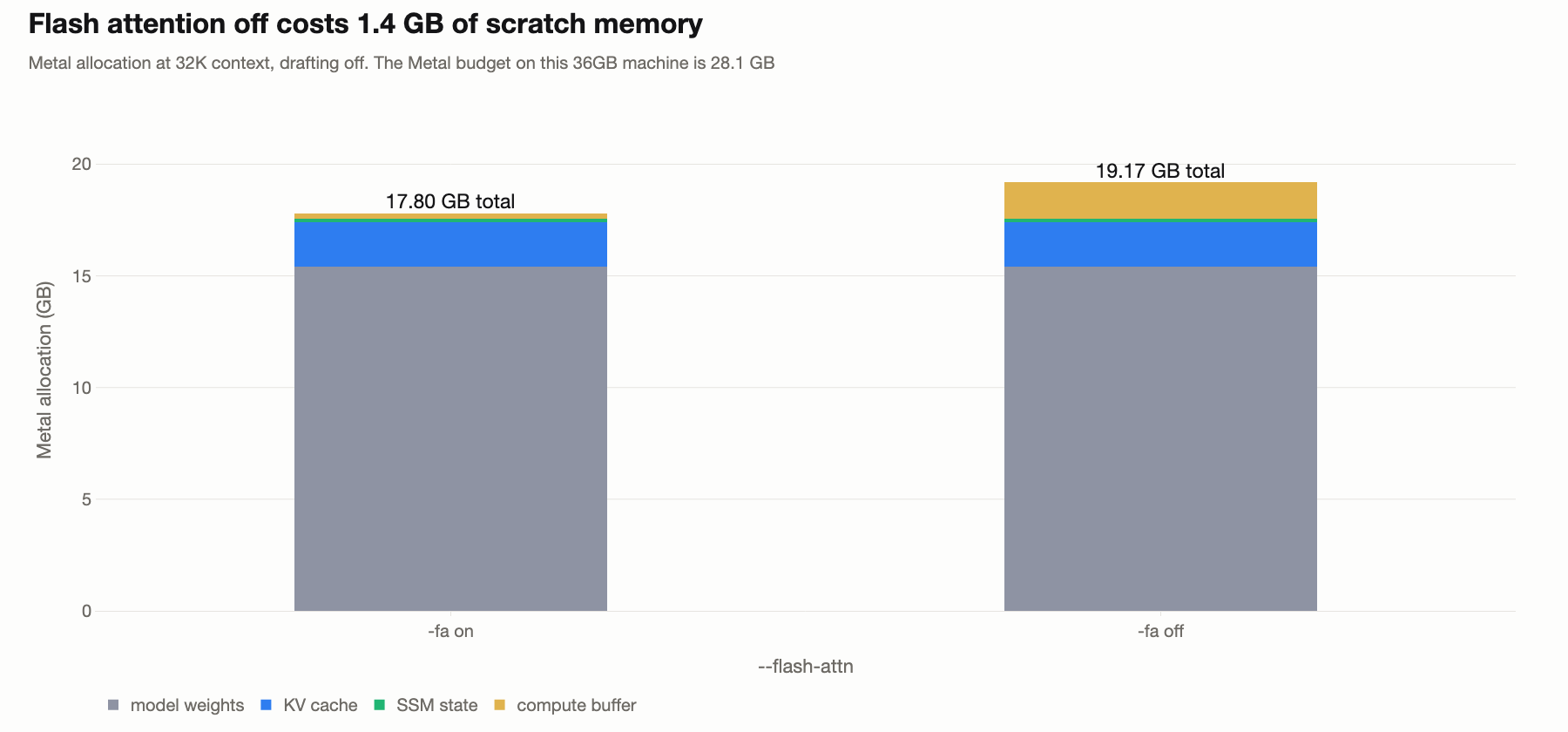
On the desktop card this was a quiet win. Flash attention saved 2.2GB and cost nothing, so we left it on and moved along. On a 36GB laptop it is not quiet at all.
-fa on |
-fa off |
|
|---|---|---|
| total Metal allocation | 17.80 GB | 19.17 GB |
| of which compute buffer | 257 MB | 1,664 MB |
| peak resident memory | 19.44 GB | 21.60 GB |
| decode | 18.80 tok/s | never finished |
| written to swap | none | 3.2 GB |
The compute buffer is the whole story. With flash attention on, llama.cpp reserves 257 MB of scratch space. With it off, the unfused attention path builds the full attention matrix and asks for 1,664 MB instead.
That extra 1.4GB is what tips this machine over. We killed the run after 50 minutes. Before that, the server's own counter recorded what happened:
0.47.708.033 slot print_timing: n_gen =  288, tg = 15.63 t/s, tg_3s = 15.55 t/s
13.33.811.336 slot print_timing: n_gen =  321, tg =  0.41 t/s, tg_3s =  0.04 t/s
13.36.823.502 slot print_timing: n_gen =  376, tg =  0.48 t/s, tg_3s = 18.26 t/s
Here, we can see the timestamps at the left. The model generated 33 tokens in twelve minutes and forty six seconds, then went straight back to 18 tokens a second as if nothing had happened.
That is the real difference between a graphics card and unified memory. Running out of VRAM is an allocation that fails and tells us so. Running out of unified memory is a soft collapse that looks like a slow model.
The advice does not change from the desktop post, but the reason gets much harder. Leave flash attention on. On this machine it is not a tuning choice, it is a requirement.
How Does the M5 Max Compare With the RTX 5090?
Speed does not carry across machines, and we should not pretend it does. A 27B model at Q4_K_M streams 15.4 GB of weights for every token, so decoding is a memory bandwidth problem first. A 5090 has fast dedicated memory and a 600 watt budget. This laptop shares LPDDR5 with the display and every open app.
Acceptance is different. It measures how predictable the model's own text is to its own draft head, and that depends on the weights and the prompt, not on the silicon.
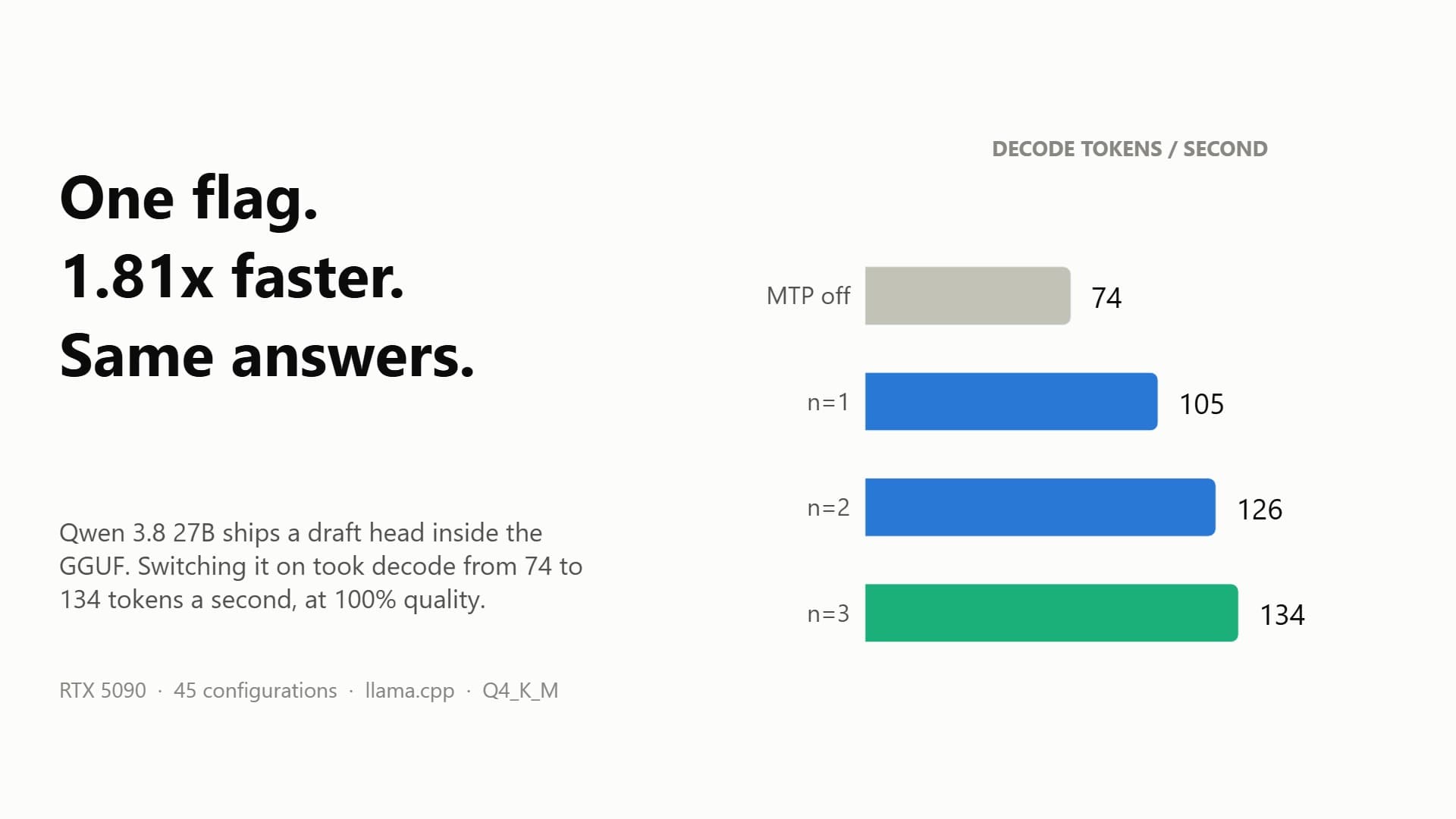
Here is the ladder we measured on the card, from the earlier run:
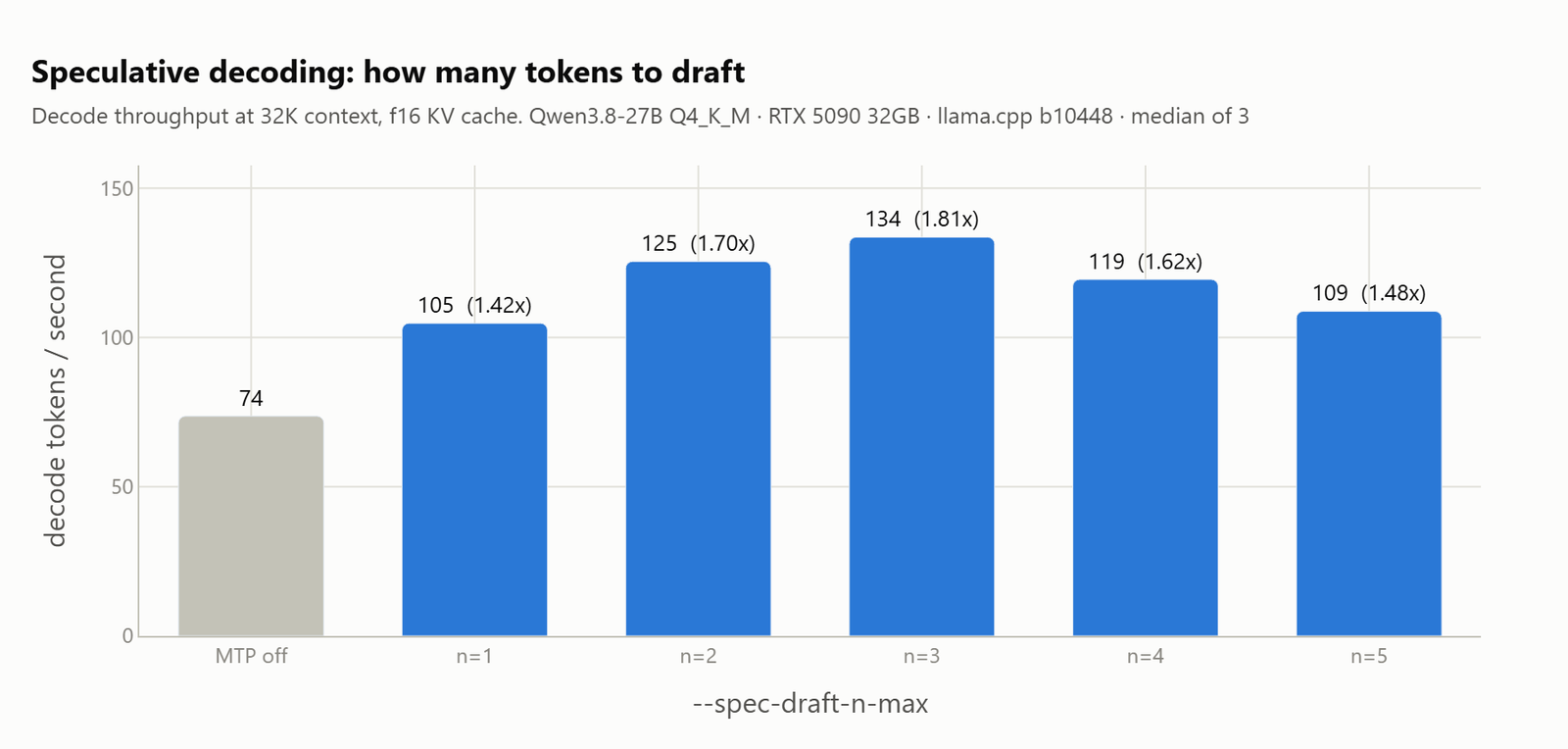
Put that next to the MacBook ladder further up and the two curves have the same silhouette at very different heights. Both start low with the draft head off, climb to a peak at n=3, and fall away at n=4.
| setting | MacBook tok/s | vs off | RTX 5090 tok/s | vs off | Mac accept | 5090 accept |
|---|---|---|---|---|---|---|
| MTP off | 18.2 | 1.00x | 73.6 | 1.00x | n/a | n/a |
n=1 |
23.4 | 1.29x | 104.8 | 1.42x | 0.821 | 0.860 |
n=2 |
20.8 | 1.14x | 125.5 | 1.70x | 0.614 | 0.766 |
n=3 |
31.1 | 1.71x | 133.6 | 1.81x | 0.575 | 0.674 |
n=4 |
24.7 | 1.36x | 119.5 | 1.62x | 0.444 | 0.592 |
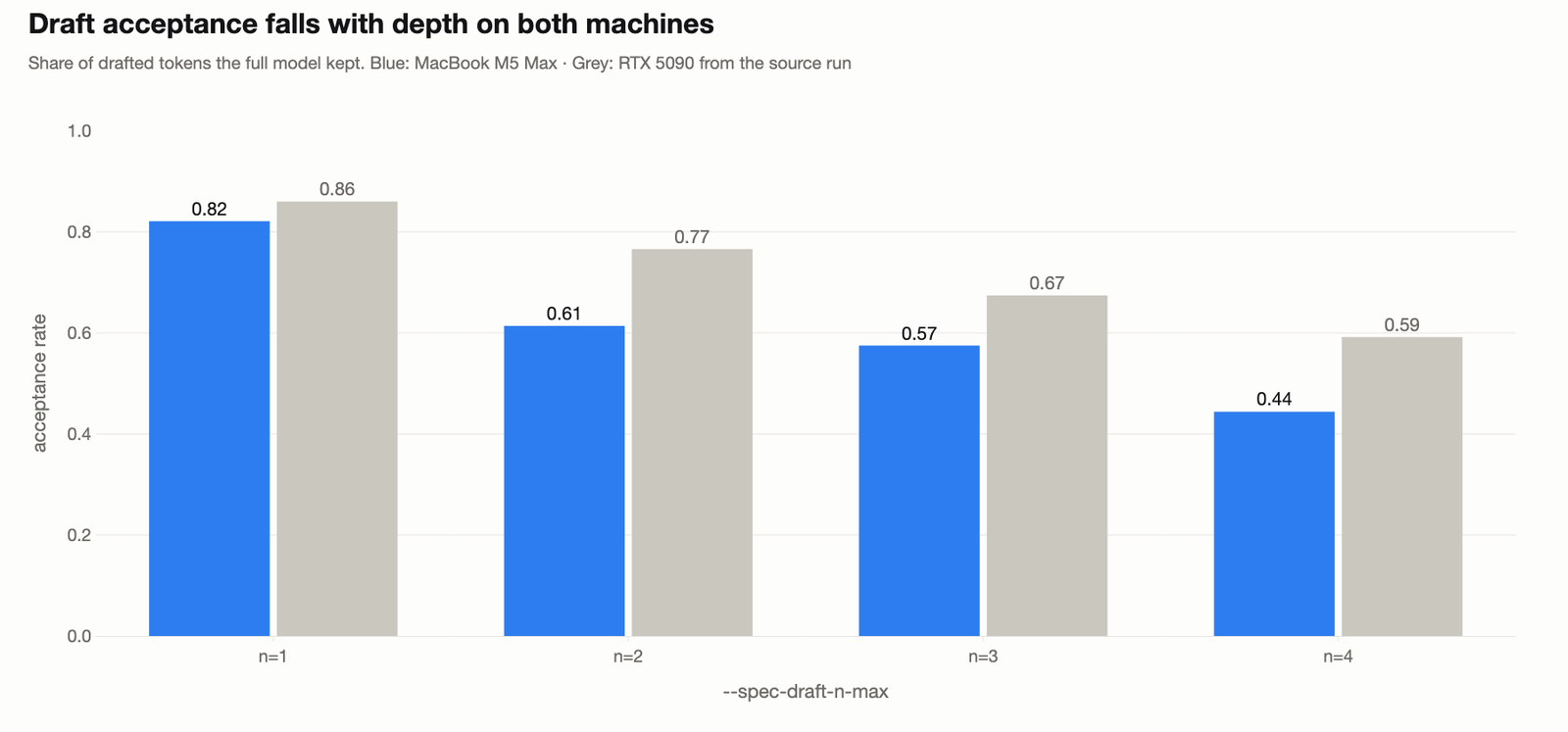
Let me tabulate what that table actually says. The absolute speeds are a different machine: the card decodes roughly four times faster at every depth, and no flag on the laptop closes that. The ratios and the acceptance rates are the same experiment twice, and those line up.
Both acceptance curves start high, fall at every step, and fall fastest after n=2. At n=1 the two agree closely, at 0.821 against 0.860. Past that the MacBook accepts less, and there is a plain reason for it: the desktop run averaged four different tasks, and this sweep ran one coding prompt. Acceptance depends on the text being generated, so a narrower prompt set gives a different level.
The shape held, the winner held, and the peak sat at n=3 on both machines. So the tuning we did on the card transfers to the laptop, even though not one of its numbers does.
There is one difference that no ratio captures. The RTX 5090 ran the whole sweep without a single stall. The MacBook stalled on one repeat in three, and that is the part of this comparison a benchmark table cannot show.
What Would We Actually Run on a 36GB Mac?
For everyday interactive work:
llama-server -m Qwen3.8-27B-Q4_K_M.gguf \
  -ngl 999 -fa on --jinja -np 1 \
  -c 8192 \
  --spec-type draft-mtp --spec-draft-n-max 3
That is 31 tokens a second at 17.0 GB of Metal memory, measured exactly as written.
Two of those flags are not preferences on this machine. -fa on saves 1.4GB of scratch memory that we do not have spare, and turning it off is what pushed this laptop into swap. The 8K window is what the sweeps ran at, and that is a headroom choice and not a hard ceiling. A 32K window adds about 1.5GB of KV cache, and we measured 32K finishing at 18.8 tokens a second. We stayed at 8K because this machine stalls when memory gets tight, and a smaller window leaves room for that.
Warning
These memory numbers are ours, not yours. The same model behaves differently depending on how much unified memory the machine has, what macOS is already holding, and what else is open at the time. Read the free memory llama.cpp prints at startup, size the window against that, and raise it until your own machine complains. If you run this on your Mac, please leave a comment with your model, your memory, and the tokens a second you saw. We will fold your numbers into this post.
There is one more setting worth knowing about, and it is not a speed flag. Qwen 3.8 reasons before it answers. At a 32K window with drafting off, we measured 18.8 tokens a second. The first token arrived after 0.555 seconds. The first word of the real answer took about 17 seconds, behind a median of 426 thinking tokens. Nobody waits on throughput. They wait through the thinking block. --reasoning-effort medium is the flag that shortens it.
Note
llama.cpp accepts minimal, high and max for that flag without complaining. Qwen 3.8's chat template defines only xhigh, medium and low, and it raises on anything else. The server starts cleanly and then returns HTTP 500 on every request.
What We Are Not Claiming
This is a spot check on one laptop, and a partial one.
The honest limits:
- The sweep ran one coding prompt with a 256 token cap. The model spent that budget inside the thinking block, so this run measures decode speed only. It says nothing about answer quality on this machine.
- The ladder ran forwards only, and
n=5never completed. On the desktop we ran every ladder backwards as well, and that check is missing here. - The KV cache, context window, and reasoning effort sweeps did not finish on this machine. Those numbers in the desktop post have not been replicated here.
- Memory pressure is inside every number above. A browser and two other apps held 3 to 4GB throughout, which is a realistic laptop and not a clean bench. A Mac with 64GB would not hit any of this.
- One quantization, one model. A different quantization would move the numbers, and we tested none.
One more thing worth saying plainly. This MacBook Pro is new to us. We bought it a few days ago and we are still getting hands on with it, so this post is a first pass and not a finished tuning guide. We will keep running sweeps on it and update this post as we learn what the machine likes. If your own numbers disagree with ours, that is useful to us, so please leave them in the comments.
Conclusion
This is how Qwen 3.8 27B compares on a MacBook Pro M5 Max and an RTX 5090. The card decodes about four times faster and never stalled. The laptop answers the same questions correctly, at 31 tokens a second instead of 134, and pages to swap on one repeat in three. Every tuning decision we made on the card held on the laptop.
Key takeaways:
- Turn the draft head on with
--spec-type draft-mtp. It is 1.71x atn=3on this laptop, and it is already inside the model file. - Keep
-fa on. It is worth 1.4GB of scratch memory here, and turning it off pushed this machine into swap. - Report the spread, not just the median. One repeat in three fell below one token a second, and a median hides that.
- Speed does not transfer between machines, and acceptance does. Compare ratios and acceptance rates, and leave absolute tokens per second where they were measured.
- Expect about a quarter of the card's decode speed on this laptop, and expect the settings that won on the card to keep winning.
- Size the window against the memory you actually have free, not against the 36GB on the box.
Next steps:
- Read the RTX 5090 speed settings run for the KV cache, context, and reasoning effort sweeps that this laptop could not finish.
- Use the local LLMs technical reference guide to match a quantization and a context size to your own machine.
- Try Qwen 3.8 Flash Next on CPU only if your Mac has less memory than this one.