A KV cache avoids repeated work, but it saves that work in GPU memory. This trade-off becomes serious when a model serves long prompts or many people at once. We will calculate the cost with one concrete model, not with a hand-wavy warning about VRAM.
Our example decoder has 32 layers, 8 KV heads, a head size of 128, and bfloat16 cache entries. It is serving one sequence of 8,192 tokens.
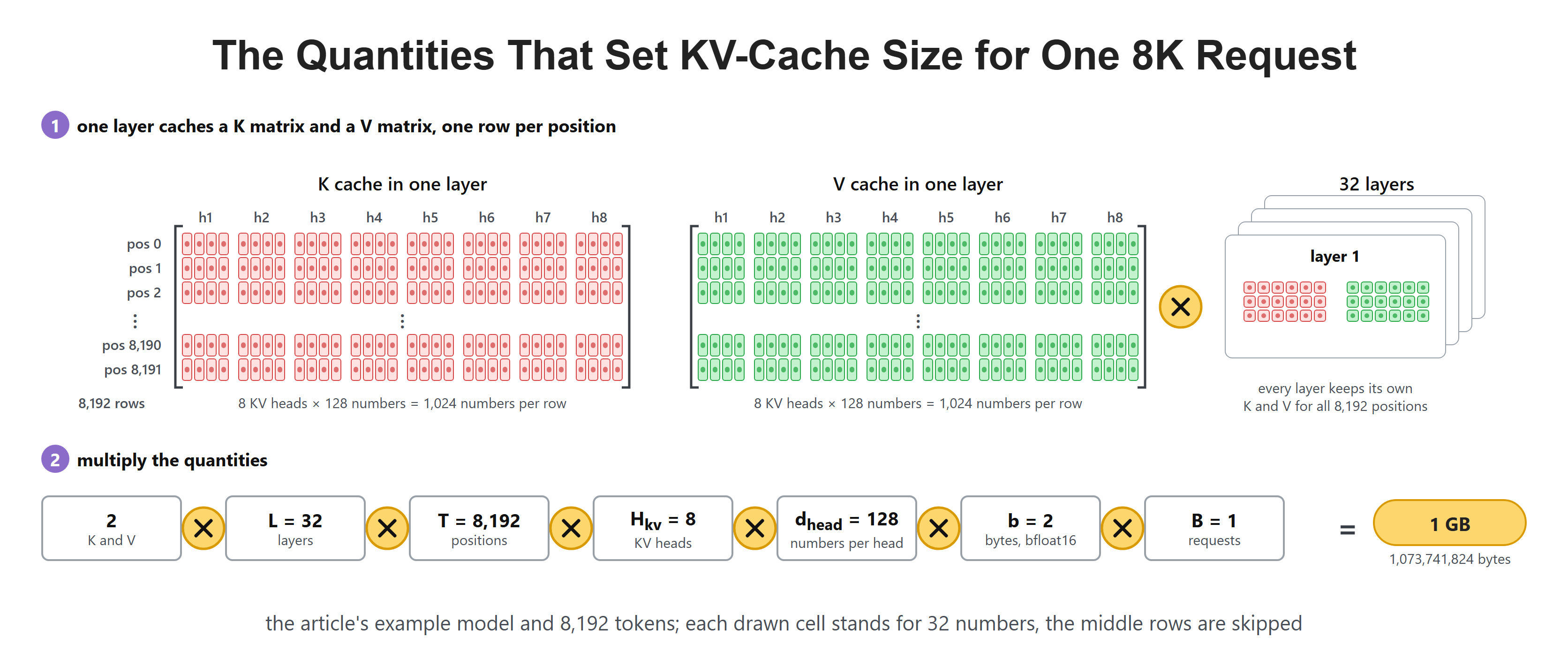
Layers, cache heads, head size, sequence length, data type, and batch size all matter.
VRAM is the memory attached to a GPU. A byte contains eight bits. A cache datatype such as bfloat16 uses 16 bits, or two bytes, per stored number. We need these units because "8K context" counts token positions, not memory.
A KV head is one set of key and value feature vectors. It is not necessarily one query head. We count the stored KV heads, because queries are not retained for future tokens. Our formula assumes that every attention layer uses the same full-length cache layout.
Start With One Token in One Layer
For one token in one attention layer, the cache stores a key and a value. Each has H_kv heads, and each head has d_head numbers. That is two arrays of H_kv x d_head values.
In our example, one token in one layer stores 2 x 8 x 128 = 2,048 numbers. Bfloat16 uses 2 bytes for one number, so that one small slice costs 2,048 x 2 = 4,096 bytes, or 4 KB.
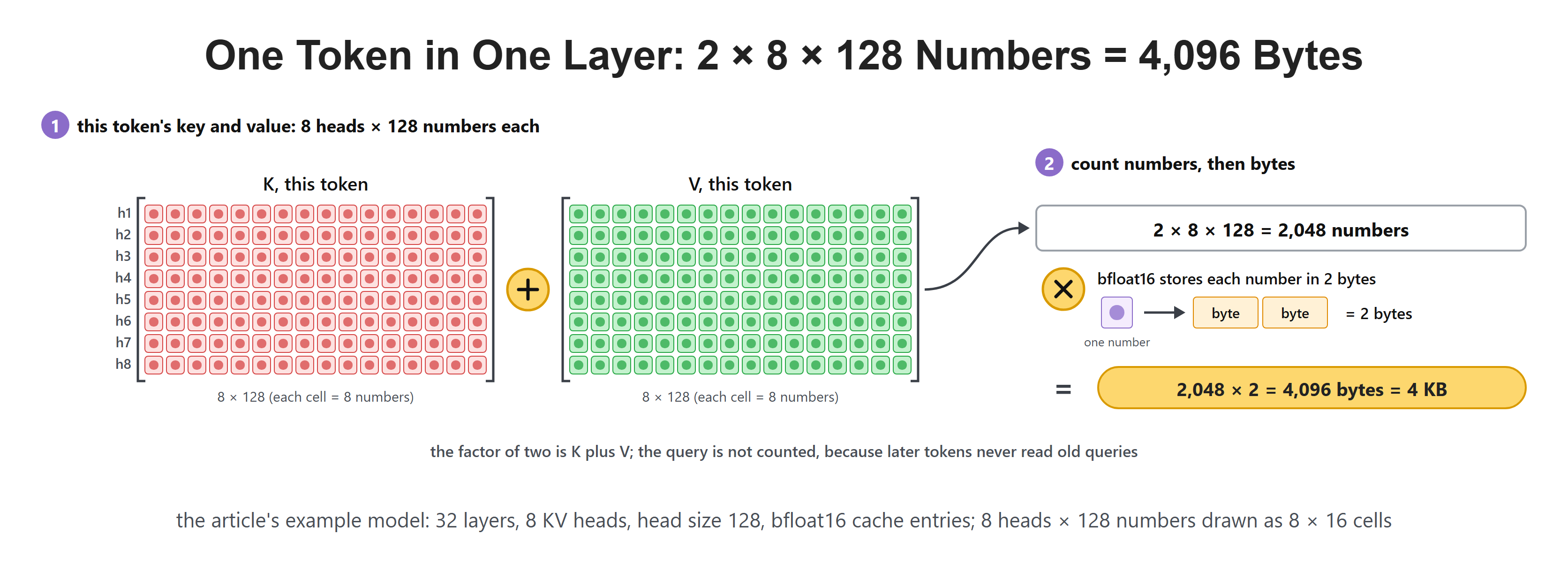
The factor of two comes from saving both K and V.
The query is missing from this count for the same reason we did not cache it yesterday: future tokens do not read old queries.
Extend the Count Through the Model
The first token is stored at every attention layer. With 32 layers, its 4 KB becomes 32 x 4 KB = 128 KB. That may look harmless, but each later token adds another 128 KB.
"Every layer" does not mean copying identical numbers thirty-two times. Each layer computes keys and values from its own input representations, so the entries differ. The repeated factor counts separate learned transformations at separate depths.
The layer count belongs outside the one-layer arithmetic. First count one position in one layer, then multiply by layers, then by positions and requests. This order is useful because it exposes a missing factor before large numbers make the mistake hard to see.
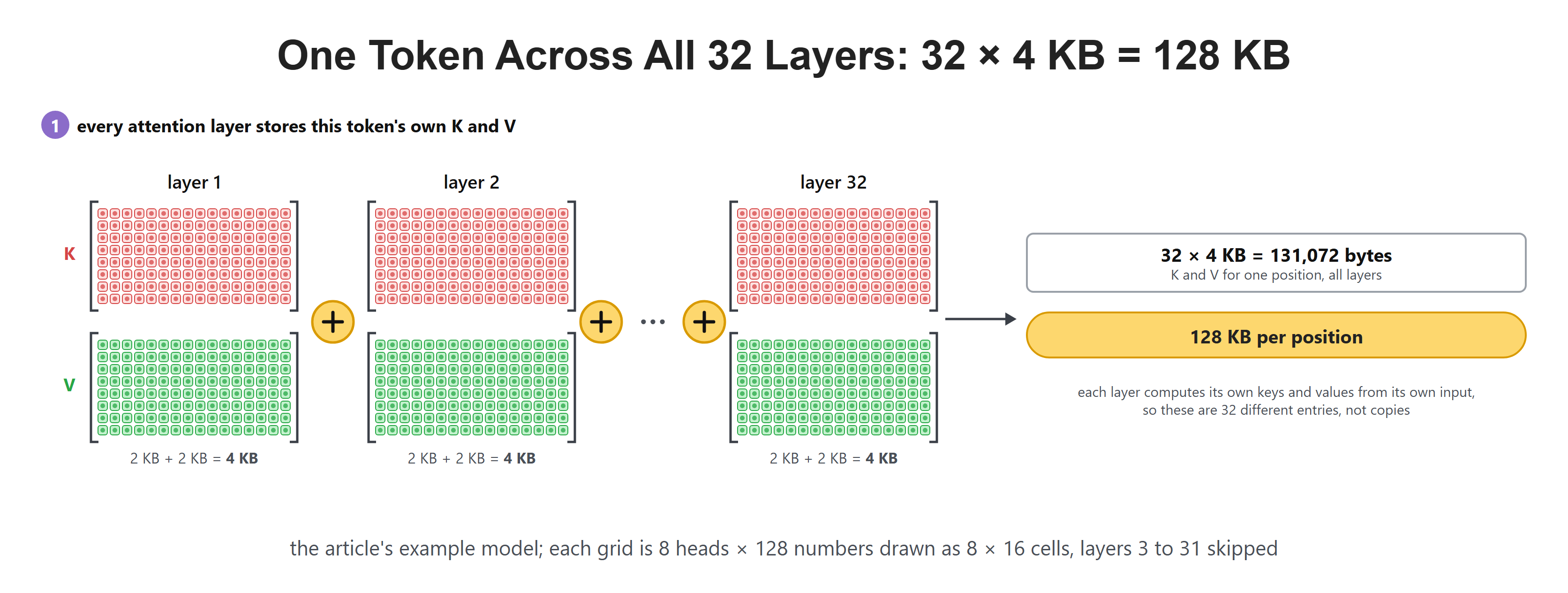
One position has a key and value cache entry in all 32 layers.
For T cached tokens, the core formula is:
Here, L is layers, H_kv is the number of key/value heads, d_head is values per head, and b is bytes per stored value. The leading 2 means key plus value.
Extend the Formula to Several Requests
For independent requests with the same length, multiply by :
$ \text{KV bytes}=2 B L T H_{kv} d_{head} b $
If their lengths differ, count their saved positions instead: replace with . That counts useful cache entries, before padding, block rounding, and unused reserved capacity.
For example, an 8,192-token request and a 4,096-token request together have 12,288 saved positions. At 128 KB per position across all layers, they need 1.5 GB of useful cache. Padding both to 8,192 would allocate 2 GB instead. A serving engine's allocation policy can therefore change the observed memory without changing the model's attention formula.
Work the 8K Example
Substitute our values:
That is exactly 1 GB for one 8K-token sequence. This is cache memory only. It does not include the model weights, temporary attention work, the prompt embeddings, or memory used by the serving engine.
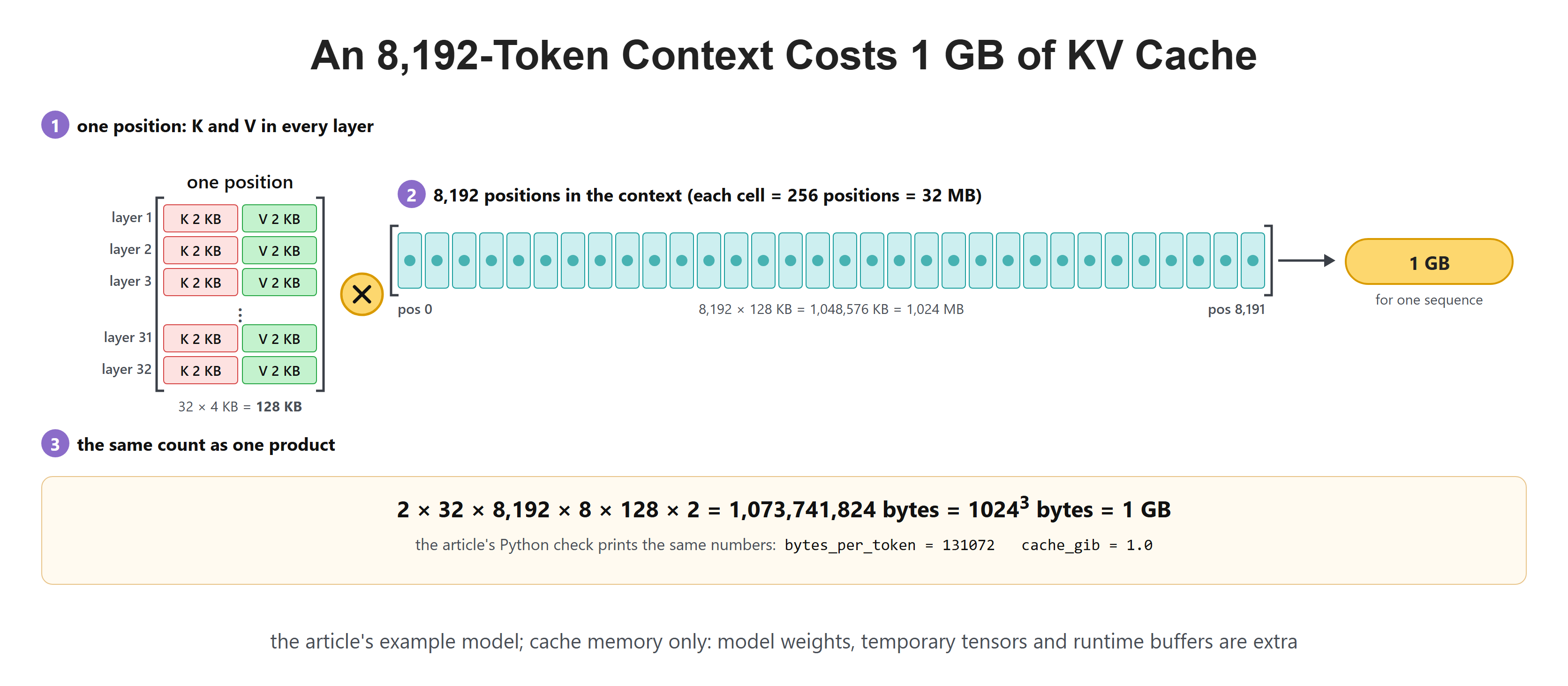
A modest-looking 4 KB per layer-token slice becomes 1 GB across the full model and context.
This is why model size alone does not tell us whether a request fits. A model can have enough room for its weights but not enough room for a large number of long active contexts.
Check Units With a Short Calculation
In this blog, a KB is 1,024 bytes, an MB is 1,024 KB, and a GB is 1,024 MB. So, dividing the byte count by gives the result in GB directly, and our result is exactly 1 GB.
This Python calculation keeps every factor named. No extra package is required.
layers = 32
kv_heads = 8
head_size = 128
bytes_per_number = 2
tokens = 8192
bytes_per_token = 2 * layers * kv_heads * head_size * bytes_per_number
cache_bytes = tokens * bytes_per_token
cache_gib = cache_bytes / (1024 ** 3)
bytes_per_token is 131,072, or 128 KB. cache_gib is 1.0, which is 1 GB. The leading two counts K and V; the separate bytes_per_number happens to be two too, but it represents a different fact. Float32 would change the latter to four without changing the K-plus-V factor.
The Cache Grows During the Answer Too
The prompt is not the final length. If an 8,192-token prompt produces 1,024 new tokens, a capacity plan can reserve for up to 9,216 positions. The memory rises in a straight line with token count.
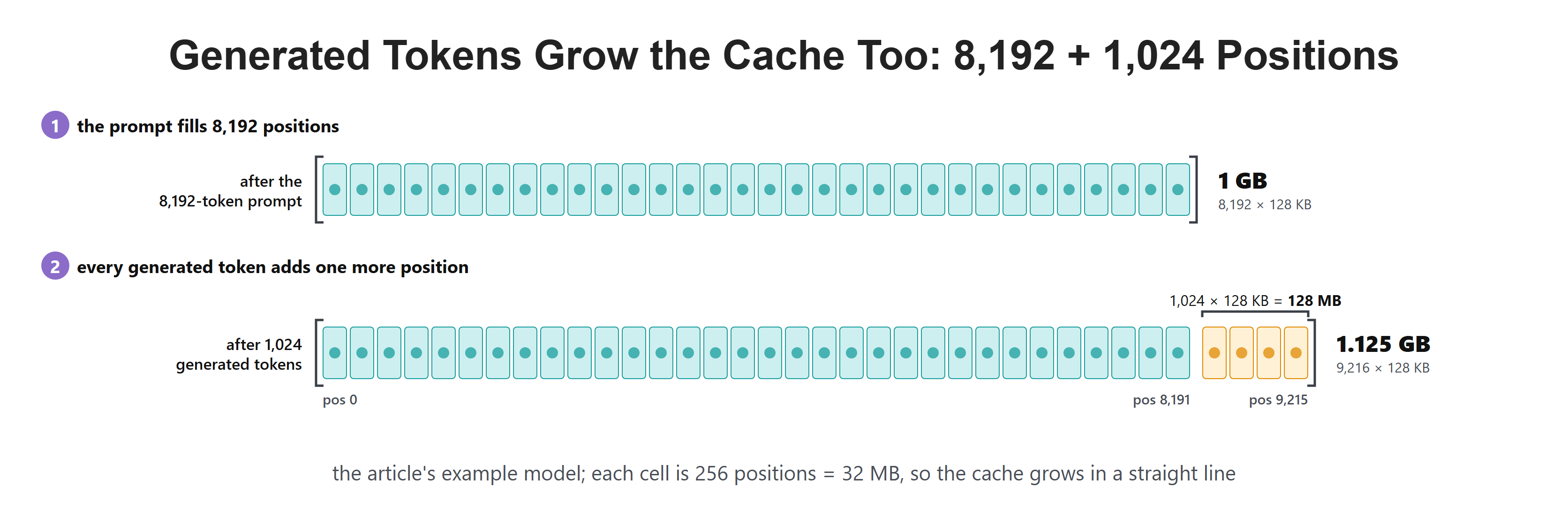
Every output token costs another cache entry just like every input token.
For the same example, each extra generated token adds 128 KB. An extra 1,024 tokens therefore add 128 MB. A maximum output length is also a memory decision.
Batch Size Multiplies the Result
Ten unrelated requests need ten different caches. Even if their prompts begin with the same sentence, ordinary decoding treats them as separate histories unless the engine has a special prefix-sharing feature.
Here batch size means the number of independent sequence histories being held at that moment, not the number of users registered with the service. A completed request may release its cache while another begins. Ten users taking turns need not hold ten caches at once.
If every active sequence has 8,192 cached positions, multiplying by ten is correct. If five have 8,192 positions and five have 1,024, count each length instead. Their useful cache is 5.625 GB in this example, before allocation overhead, not 10 GB.
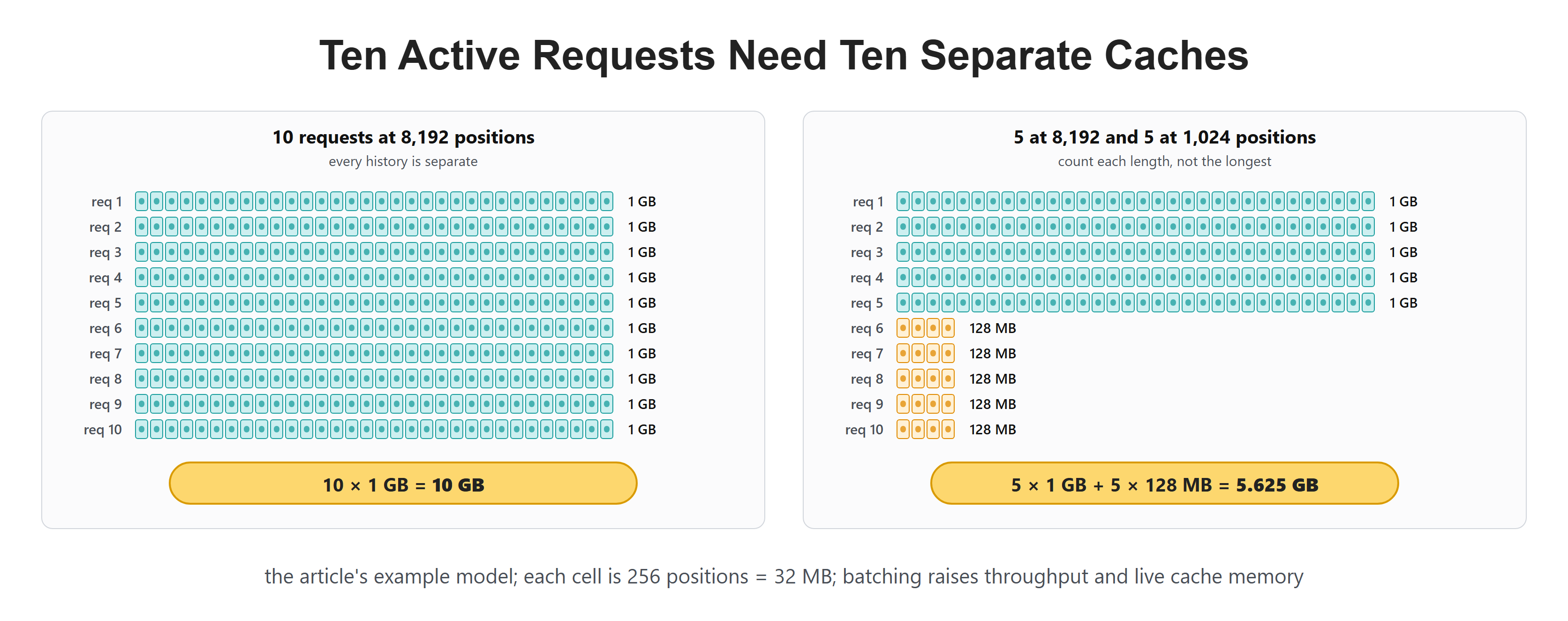
One GB per 8K sequence becomes ten GB for ten such independent sequences.
This explains an important serving rule: increasing batch size can improve hardware use, but it also increases live cache memory. We need a balance between throughput and available VRAM.
Data Type Changes the Cost
The formula includes bytes per value. Float32 uses 4 bytes. FP16 and bfloat16 use 2 bytes. If we changed our cache from bfloat16 to float32, the 1 GB result would become 2 GB.
Float32, float16, and bfloat16 differ in how they represent numbers, not only how much space they use. Bfloat16 and float16 both occupy two bytes, so swapping between them does not halve cache memory. Their precision and representable range differ, which can affect the numerical behavior of attention.
This is separate from tokenization. Reducing bytes per stored feature does not reduce the number of tokens. Conversely, reducing the token count with a different tokenizer would change the model inputs and usually require a compatible model; it is not a cache datatype setting.
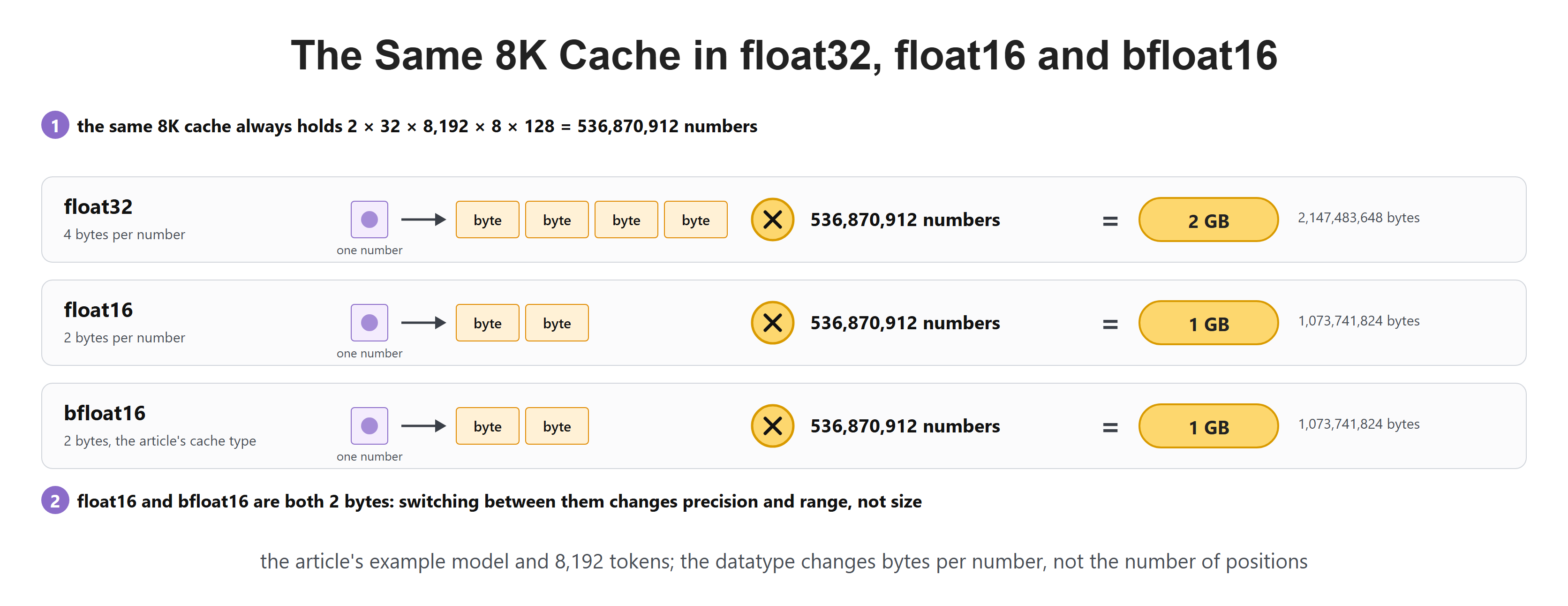
Precision changes the final byte count without changing the number of token positions.
Lower precision can reduce memory, but it must preserve model quality and work with the chosen hardware. It is not a free setting to turn down without testing.
The precision of model weights does not automatically set the precision of its cache. A service can store quantized weights while keeping cache entries in bfloat16. Quantization represents numbers with fewer bits, often with additional scale values. Those scales and any alignment overhead belong in a more exact byte count.
Likewise, fitting the cache is not the same as fitting the request. GPU memory also holds weights, temporary tensors, runtime buffers, and possibly unused allocations kept for reuse. A formula for useful cache bytes is a planning baseline, not a promise that the whole service fits.
If the model is split across GPUs, this formula still describes the combined logical cache under its assumptions. Memory on one device depends on how layers and heads are distributed or replicated. Do not divide by the GPU count without checking that layout.
Why KV Heads Matter
Our example has 8 KV heads. Standard multi-head attention can store one key and one value head for every query head, often far more than 8. Modern models often reduce only the number of KV heads while keeping many query heads. That directly shrinks the formula.
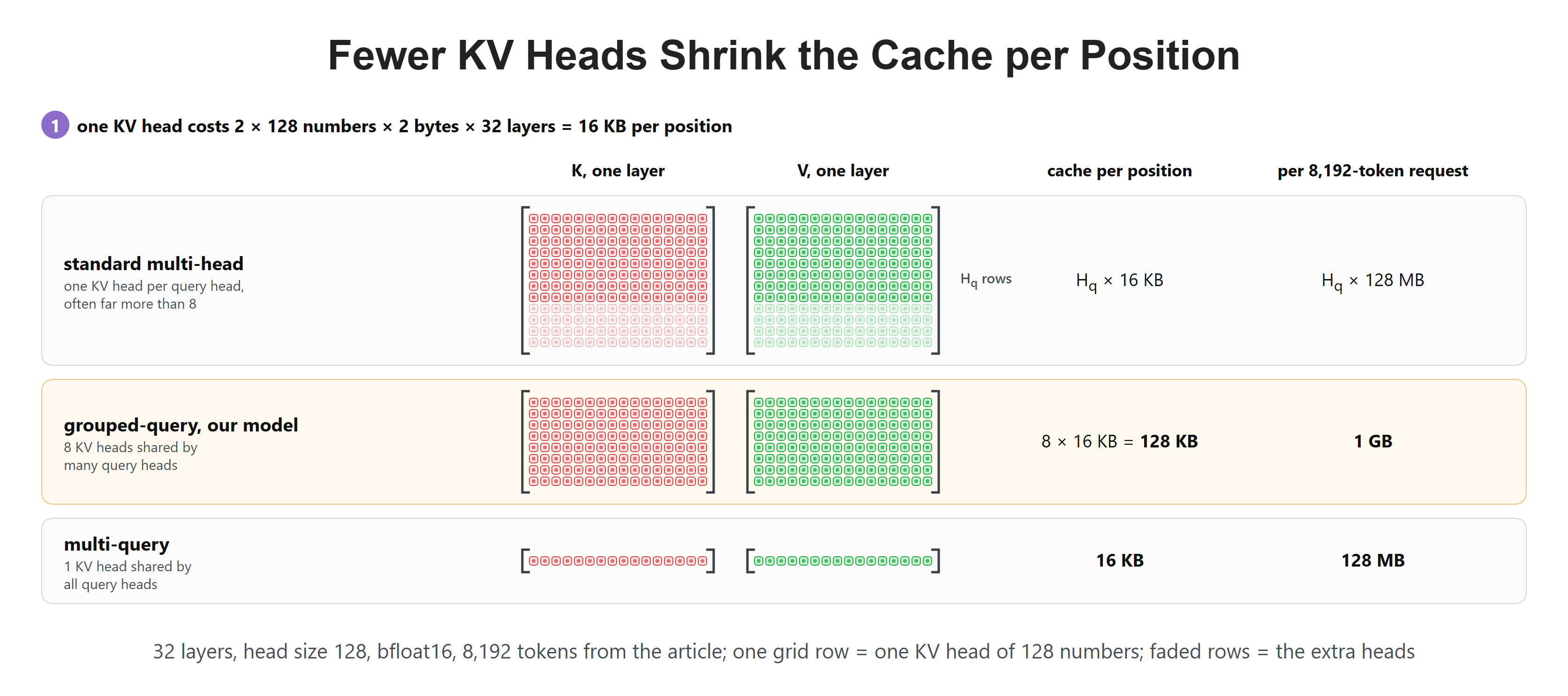
KV-head count changes cache memory even when query-head count stays high.
Day 26 will compare multi-head attention, multi-query attention, and grouped-query attention. Before that, we need to see when this memory is allocated and why users notice different speeds at the beginning and middle of a response.
Recap
This is how KV-cache memory is calculated. Store a key and value for every cached token, in every attention layer, for every KV head, then multiply by the head size and bytes per number. For our 32-layer, 8-KV-head bfloat16 model, an 8K context costs 1 GB for one sequence.
Longer prompts, longer answers, and more active requests multiply that cost. Day 23 explains the two very different phases that create and then use this cache: prefill and decode.