The simplest agentic RAG pattern is a ReAct loop. We bind the LLM to a retrieval tool, and it decides on its own when to call it. For a simple question it retrieves once. For a comparison it calls the tool several times, once per company, before writing a final answer. This is smarter than a fixed RAG chain, which always retrieves exactly once.
In this blog, we build on the `retrieve_docs` tool and the ingested ChromaDB collection from earlier in the series.
Prerequisites: the retrieve_docs tool (and its scripts/ helpers) from RAG Data Retrieval and Re-Ranking. Ollama running with qwen3, plus the packages below.
pip install -U langgraph langchain-ollama langchain-core
ollama pull qwen3State and Setup
The graph state is just a growing list of messages. The operator.add reducer appends new messages instead of overwriting them.
from typing_extensions import TypedDict, Annotated
import operator
import os

from langgraph.graph import StateGraph, START, END
from langgraph.prebuilt import ToolNode
from langchain_ollama import ChatOllama
from langchain_core.messages import HumanMessage, SystemMessage
from IPython.display import display, Markdown
from scripts import utils, my_tools

LLM_MODEL = "qwen3"
BASE_URL = "http://localhost:11434"
llm = ChatOllama(model=LLM_MODEL, base_url=BASE_URL)

class AgentState(TypedDict):
    messages: Annotated[list, operator.add]
The Agent Node
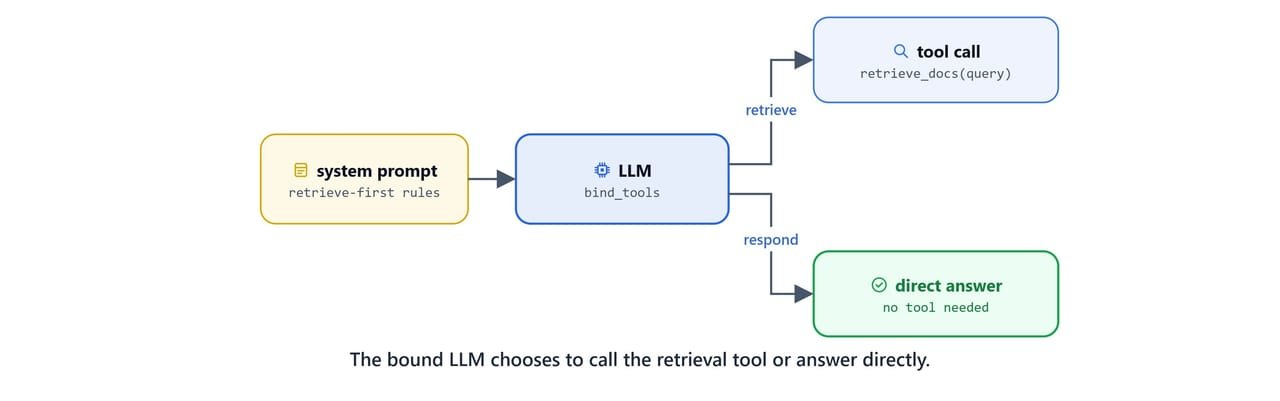
The agent node binds the retrieve_docs tool. It also supplies a detailed system prompt. The prompt tells the model to always retrieve before answering, to break comparison questions into sub-questions, and to format answers in Markdown with citations.
from scripts.my_tools import retrieve_docs

def agent_node(state: AgentState):
    messages = state['messages']

    tools = [retrieve_docs]
    llm_with_tools = llm.bind_tools(tools)

    system_prompt = """You are a financial document analysis assistant with access to a document retrieval tool.

                CRITICAL RULES:
                1. ALWAYS use the retrieve_docs tool first - NEVER answer from memory
                2. You MUST call the tool before providing any financial information
                3. Answer ONLY based on the retrieved documents
                4. If documents don't contain the answer, clearly state that

                WORKFLOW FOR COMPLEX/COMPARISON QUESTIONS:
                Step 1: Break down the question into sub-questions
                Step 2: Call retrieve_docs for EACH sub-question separately
                Step 3: Analyze all retrieved documents
                Step 4: Present comparison in TABLE format

                ANSWER FORMATTING (Use Markdown):
                - Use **headings** (##, ###) for sections
                - Use **tables** for comparisons and structured data
                - Cite sources: (Company: X, Year: Y, Quarter: Z, Page: N)

                REMEMBER:
                - ALWAYS call the tool first
                - Break complex questions into sub-questions
                - Always cite sources
                - If no relevant documents are found, try with different filters."""

    messages = [SystemMessage(system_prompt)] + messages
    response = llm_with_tools.invoke(messages)

    if hasattr(response, 'tool_calls') and response.tool_calls:
        for tc in response.tool_calls:
            print(f"[AGENT] called Tool {tc.get('name', '?')} with args {tc.get('args', '?')}")
    else:
        print(f"[AGENT] Responding...")

    return {'messages': [response]}
Note
The system prompt is abridged here for readability. The full version includes worked examples for simple, comparison, and multi-part questions. Rich few-shot examples noticeably improve how reliably a small local model follows the "always retrieve first" rule.
Routing
A router checks whether the latest message contains tool calls. If so, control passes to the tool node; otherwise the graph ends.
def should_continue(state: AgentState):
    last = state['messages'][-1]
    if hasattr(last, 'tool_calls') and last.tool_calls:
        return "tools"
    else:
return ENDBuilding the Graph
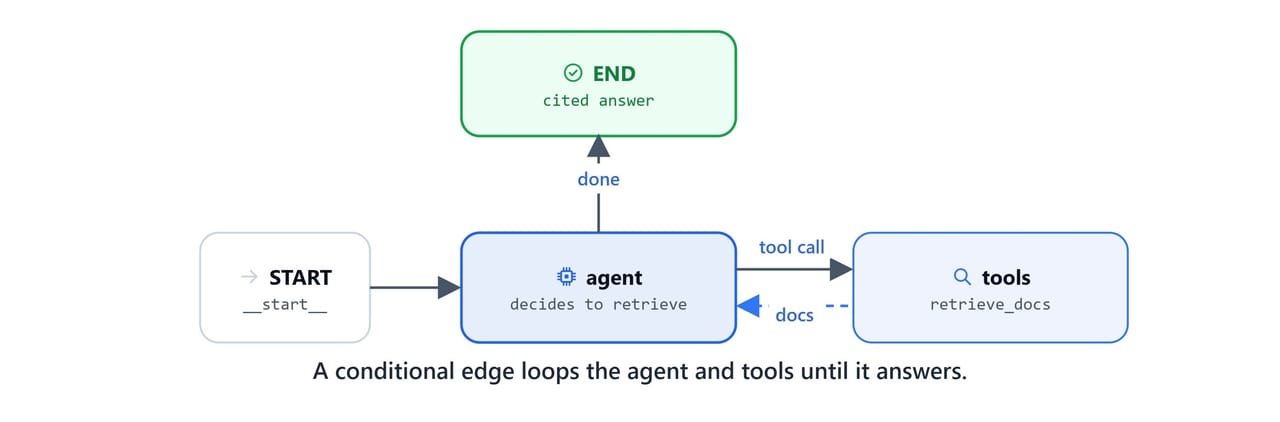
Assemble the graph: agent → (tools → agent)* → END. The conditional edge creates the ReAct loop. The agent runs, optionally calls tools, sees the results, and runs again until it produces a final answer.
def create_agent():
    builder = StateGraph(AgentState)

    builder.add_node('agent', agent_node)
    builder.add_node('tools', ToolNode([retrieve_docs]))

    builder.add_edge(START, 'agent')
    builder.add_conditional_edges('agent', should_continue, ['tools', END])
    builder.add_edge('tools', 'agent')

    return builder.compile()

agent = create_agent()
Testing the Agent
A simple question triggers a single retrieval and a cited answer.
query = "what is the amazon's revenue in 2023?"
result = agent.invoke({'messages': [HumanMessage(query)]})
display(Markdown(result['messages'][-1].content))[AGENT] called Tool retrieve_docs with args {'k': 5, 'query': "Amazon's revenue in 2023"}
[TOOL] retrieve_docs called
[QUERY] Amazon's revenue in 2023
[1] Doc 17: score=23.4068
[2] Doc 3: score=22.7389
[3] Doc 8: score=20.1882
[4] Doc 14: score=19.2649
[5] Doc 5: score=18.0985
[RETRIEVED] 5 documents
[AGENT] Responding...The model's Markdown answer:
Amazon's 2023 Revenue
Amazon's total revenue for 2023 was $574.785 billion, as reported in its consolidated net sales figures from the 10-K filing.
Key Details:
- Consolidated Net Sales: $574,785 million (Page 24)
- Year-over-Year Growth: 12% increase compared to 2022
- Segment Breakdown: North America $352.828 billion (61%), International $131.200 billion (23%), AWS $90.757 billion (16%)
Source: Amazon 10-K 2023, Page 24
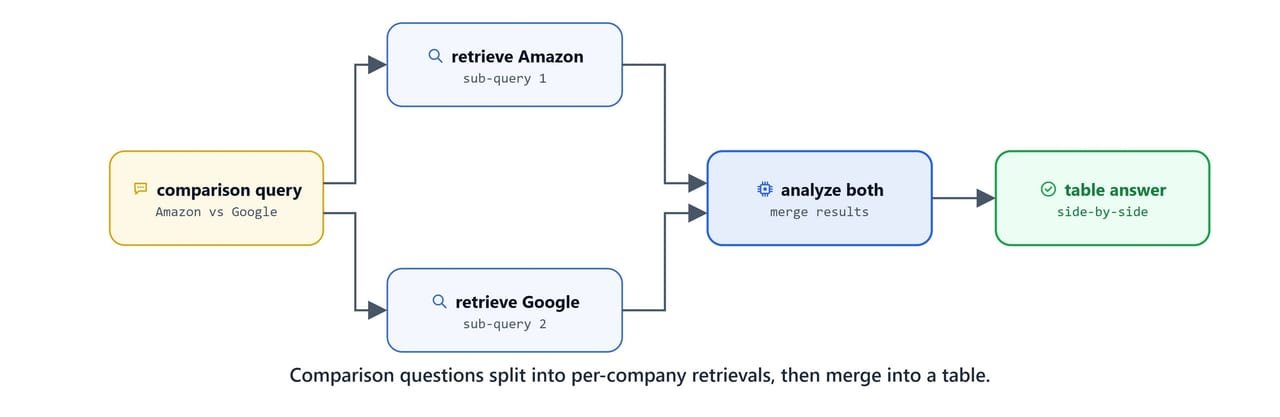
A comparison question makes the agent call the tool twice: once for Amazon, once for Google. Then it builds a table.
query = "what is the revenue of amazon's and google in 2023?"
result = agent.invoke({'messages': [HumanMessage(query)]})
display(Markdown(result['messages'][-1].content))[AGENT] called Tool retrieve_docs with args {'k': 5, 'query': 'Amazon revenue 2023'}
[AGENT] called Tool retrieve_docs with args {'k': 5, 'query': 'Google revenue 2023'}
[TOOL] retrieve_docs called
[QUERY] Amazon revenue 2023
[TOOL] retrieve_docs called
[QUERY] Google revenue 2023
[RETRIEVED] 5 documents
[RETRIEVED] 5 documents
[AGENT] Responding...Here, we can see the agent split the comparison into two retrievals before answering. This works well when the documents hold the answer. But the agent has no way to recover if retrieval returns junk. The next lesson, Corrective RAG (CRAG), adds a grading step and a web-search fallback to handle exactly that.
What You Built
In this blog, we built an Agentic PageRAG agent:
- Tool-bound LLM:
bind_toolsletsqwen3decide when to callretrieve_docs - Agent node: a system prompt enforces retrieve-first behavior and Markdown citations
- ReAct loop: a conditional edge cycles
agent → tools → agentuntil the agent stops calling tools - Question decomposition: comparison questions trigger one retrieval per company before the answer
- Grounded answers: every response cites the company, year, quarter, and page
This is how the basic agentic RAG loop works. The ReAct pattern is the foundation for the self-correcting patterns that follow. Each one adds a quality check or a fallback to this loop.