Plain vector similarity is not enough for financial questions. Asking for "Amazon's 2023 cash flow" should not return a Google document. It should also prefer pages that actually contain cash-flow statements. In this blog, we build a three-stage retrieval pipeline on top of the ChromaDB collection from PageRAG Data Ingestion:
- Metadata extraction: an LLM parses the query into structured filters (company, doc type, year, quarter).
- Keyword generation: an LLM produces five SEC-specific keywords for filtering and ranking.
- Filtered MMR search → BM25Plus re-rank: Chroma fetches a wide candidate set, then BM25Plus re-ranks by keyword relevance.
Prerequisites: the chroma_financial_db collection from the previous lesson. Ollama running with qwen3 and nomic-embed-text, plus the packages below.
pip install -U langchain-ollama langchain-chroma rank-bm25 pydantic
ollama pull qwen3
ollama pull nomic-embed-textDefining the Pydantic Schemas

Structured output is enforced with Pydantic models in scripts/schemas.py. Enums keep the LLM to valid document types and quarters.
from enum import Enum
from typing import Optional, List
from pydantic import BaseModel, Field

class DocType(Enum):
    TEN_K = "10-k"
    TEN_Q = "10-q"
    EIGHT_K = "8-k"
    OTHER = "other"

class FiscalQuarter(Enum):
    Q1 = "q1"
    Q2 = "q2"
    Q3 = "q3"
    Q4 = "q4"

class ChunkMetadata(BaseModel):
    company_name: Optional[str] = Field(default=None, description="Company name (lowercase, eg. 'amazon', 'apple', 'google',...)")
    doc_type: Optional[DocType] = Field(default=None, description="Document type (10-k, 10-q, 8-k, etc.)")
    fiscal_year: Optional[int] = Field(default=None, ge=1950, le=2050, description="Fiscal year of the document")
    fiscal_quarter: Optional[FiscalQuarter] = Field(default=None, description="Fiscal quarter (q1-q4) if applicable")

    model_config = {"use_enum_values": True}

class RankingKeywords(BaseModel):
    keywords: List[str] = Field(..., description="Generate Exactly 5 financial keywords related to user query", min_length=5, max_length=5)
Note
use_enum_values = True makes the model return the enum's string value ("10-k") rather than the enum object, which is exactly what ChromaDB's metadata filter expects.
Configure the LLM and vector store for retrieval (scripts/utils.py):
from langchain_ollama import ChatOllama, OllamaEmbeddings
from langchain_chroma import Chroma
from scripts.schemas import ChunkMetadata, RankingKeywords
import re
from rank_bm25 import BM25Plus

CHROMA_DIR = "chroma_financial_db"
COLLECTION_NAME = "financial_docs"
EMBEDDING_MODEL = "nomic-embed-text"
BASE_URL = "http://localhost:11434"
LLM_MODEL = "qwen3"

embeddings = OllamaEmbeddings(model=EMBEDDING_MODEL, base_url=BASE_URL, num_ctx=8192)
vector_store = Chroma(
    collection_name=COLLECTION_NAME,
    embedding_function=embeddings,
    persist_directory=CHROMA_DIR
)
llm = ChatOllama(model=LLM_MODEL, base_url=BASE_URL)
Extracting Metadata Filters from the Query

with_structured_output(ChunkMetadata) forces the LLM to return a validated object. A detailed prompt maps company aliases (AMZN → amazon) and report types (annual report → 10-k) to canonical values. Then model_dump(exclude_none=True) drops the unmentioned fields.
def extract_filters(user_query: str):
    llm_structured = llm.with_structured_output(ChunkMetadata)

    prompt = f"""Extract metadata filters from the query. Return None for fields not mentioned.

                USER QUERY: {user_query}

                COMPANY MAPPINGS:
                - Amazon/AMZN -> amazon
                - Google/Alphabet/GOOGL/GOOG -> google
                - Apple/AAPL -> apple
                - Microsoft/MSFT -> microsoft
                - Tesla/TSLA -> tesla
                - Nvidia/NVDA -> nvidia
                - Meta/Facebook/FB -> meta

                DOC TYPE:
                - Annual report -> 10-k
                - Quarterly report -> 10-q
                - Current report -> 8-k

                EXAMPLES:
                "Amazon Q3 2024 revenue" -> {{"company_name": "amazon", "doc_type": "10-q", "fiscal_year": 2024, "fiscal_quarter": "q3"}}
                "Apple 2023 annual report" -> {{"company_name": "apple", "doc_type": "10-k", "fiscal_year": 2023}}
                "Tesla profitability" -> {{"company_name": "tesla"}}

                Extract metadata:
                """

    metadata = llm_structured.invoke(prompt)
    filters = metadata.model_dump(exclude_none=True)
return filtersextract_filters("what is google's revenue in 2024?"){'company_name': 'google', 'fiscal_year': 2024}Generating Ranking Keywords
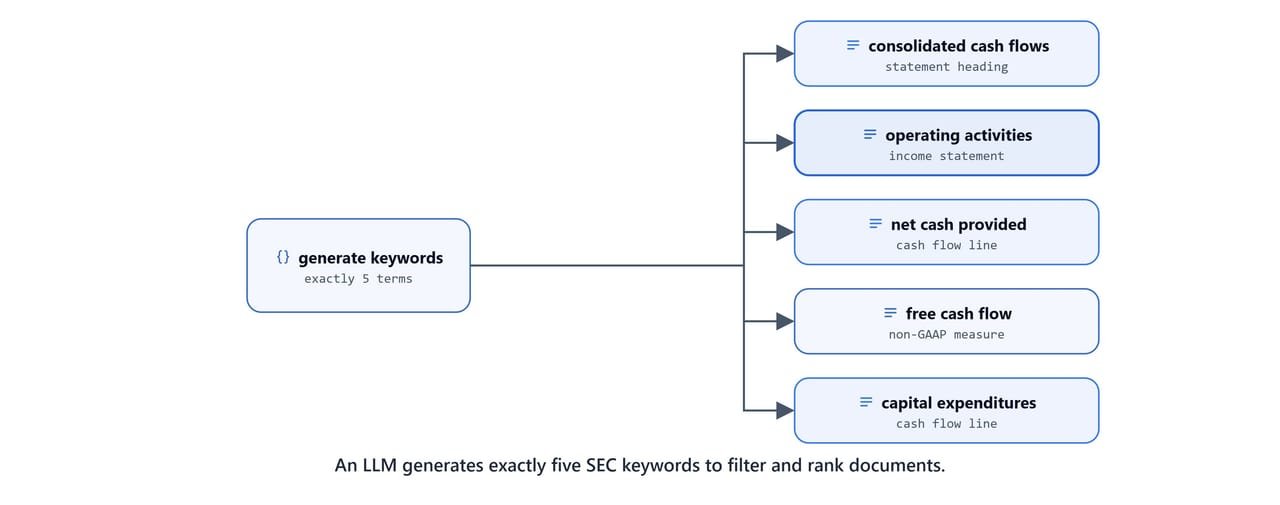
Vector similarity alone can miss the exact financial line items a query needs. So this function asks the LLM for exactly five keywords drawn from real SEC filing terms. These drive both content filtering and BM25 re-ranking.
def generate_ranking_keywords(user_query: str):
    prompt = f"""Generate EXACTLY 5 financial keywords from SEC filings terminology.

                USER QUERY: {user_query}

                USE EXACT TERMS FROM 10-K/10-Q FILINGS:

                STATEMENT HEADINGS:
                "consolidated statements of operations", "consolidated balance sheets", "consolidated statements of cash flows", "consolidated statements of stockholders equity"

                INCOME STATEMENT:
                "revenue", "net revenue", "cost of revenue", "gross profit", "operating income", "net income", "earnings per share"

                BALANCE SHEET:
                "total assets", "cash and cash equivalents", "total liabilities", "stockholders equity", "working capital", "long-term debt"

                CASH FLOWS:
                "cash flows from operating activities", "net cash provided by operating activities", "cash flows from investing activities", "free cash flow", "capital expenditures"

                RULES:
                - Return EXACTLY 5 keywords
                - Use exact phrases from SEC filings
                - Match query topic (revenue -> revenue terms, cash -> cash flow terms)
                - Use "cash flows" (plural), "stockholders equity"

                EXAMPLES:
                "revenue analysis" -> ["revenue", "net revenue", "total revenue", "consolidated statements of operations", "net sales"]
                "cash flow performance" -> ["consolidated statements of cash flows", "cash flows from operating activities", "net cash provided by operating activities", "free cash flow", "operating activities"]
                "balance sheet strength" -> ["consolidated balance sheets", "total assets", "stockholders equity", "cash and cash equivalents", "long-term debt"]

                Generate EXACTLY 5 keywords:
                """

    llm_structured = llm.with_structured_output(RankingKeywords)
    result = llm_structured.invoke(prompt)
return result.keywordsgenerate_ranking_keywords("what is google's revenue in 2024?")['revenue', 'net revenue', 'consolidated statements of operations', 'gross profit', 'operating income']Filtered MMR Search
ChromaDB supports both metadata filters (filter) and document content filters (where_document). The helper builds the right query shape. A single filter is passed directly, while multiple filters are combined with $and. Ranking keywords become a $or content filter, so a page must contain at least one keyword.
def build_search_kwargs(filters, ranking_keywords, k=3):
    search_kwargs = {"k": k, 'fetch_k': k * 20}

    if filters:
        if len(filters) == 1:
            search_kwargs['filter'] = filters
        else:
            filters_conditions = [{k: v} for k, v in filters.items()]
            search_kwargs['filter'] = {"$and": filters_conditions}

    if ranking_keywords:
        if len(ranking_keywords) == 1:
            search_kwargs['where_document'] = {'$contains': ranking_keywords[0]}
        else:
            search_kwargs['where_document'] = {
                "$or": [{'$contains': keyword} for keyword in ranking_keywords]
            }

    return search_kwargs
The search uses Maximal Marginal Relevance (MMR) retrieval. MMR balances relevance with diversity, so the results are not near-duplicates.
def search_docs(query, filters={}, ranking_keywords=[], k=3):
    search_kwargs = build_search_kwargs(filters, ranking_keywords, k)
    retriever = vector_store.as_retriever(
        search_type="mmr",
        search_kwargs=search_kwargs
    )
    return retriever.invoke(query)
A combined run (extract filters, generate keywords, then search) fetches a wide candidate pool (k=20) ready for re-ranking:
query = "show me amazon's cash flow in 2023"
filters = extract_filters(query)
ranking_keywords = generate_ranking_keywords(query)
results = search_docs(query, filters, ranking_keywords, k=20)

ranking_keywords['consolidated statements of cash flows', 'cash flows from operating activities', 'net cash provided by operating activities', 'free cash flow', 'capital expenditures']Re-Ranking with BM25Plus
The final stage re-ranks the candidate pages with BM25Plus. It is a lexical ranking algorithm from the `rank-bm25` package. To keep ranking on the most useful parts of each page, a helper first extracts Markdown headings. It pairs each heading with the paragraph that follows.
def extract_headings_with_content(text):
    chunks = []
    sections = text.split('\n\n')

    i = 0
    while i < len(sections):
        section = sections[i].strip()
        pattern = r"^#+\s+"
        if re.match(pattern, section):
            heading = section
            if i + 1 < len(sections):
                next_content = sections[i + 1].strip()
                chunk = f"{heading}\n\n{next_content}"
                i = i + 2
            else:
                chunk = heading
                i = i + 1
            chunks.append(chunk)
        else:
            i = i + 1

    return chunks
BM25Plus then scores each page against the keyword tokens, and returns the top-k pages.
def rank_documents_by_keywords(docs, keywords, k=5):
    if not docs or not keywords:
        print("Either No doc or keywords found!")
        return docs

    query_tokens = " ".join(keywords).lower().split(" ")

    doc_chunks = []
    for doc in docs:
        chunks = extract_headings_with_content(doc.page_content)
        combined = " ".join(chunks) if chunks else doc.page_content
        doc_chunks.append(combined.lower().split(' '))

    bm25 = BM25Plus(doc_chunks)
    doc_scores = bm25.get_scores(query_tokens)

    ranked_indices = sorted(range(len(doc_scores)), key=lambda i: doc_scores[i], reverse=True)

    for rank, idx in enumerate(ranked_indices[:k], 1):
        print(f"   [{rank}] Doc {idx}: score={doc_scores[idx]:.4f}")

return [docs[i] for i in ranked_indices[:k]]reranked_results = rank_documents_by_keywords(results, ranking_keywords) [1] Doc 7: score=42.6832
[2] Doc 2: score=37.5842
[3] Doc 1: score=36.8413
[4] Doc 3: score=33.8716
[5] Doc 0: score=28.4184Tip
The retrieval funnel widens then narrows. A request for k=5 final docs fetches 5 × 10 = 50 candidates from the retriever. The retriever itself scans 50 × 20 = 1000 via MMR's fetch_k. BM25Plus then trims that pool back to the best 5.
Packaging Retrieval as Reusable Tools
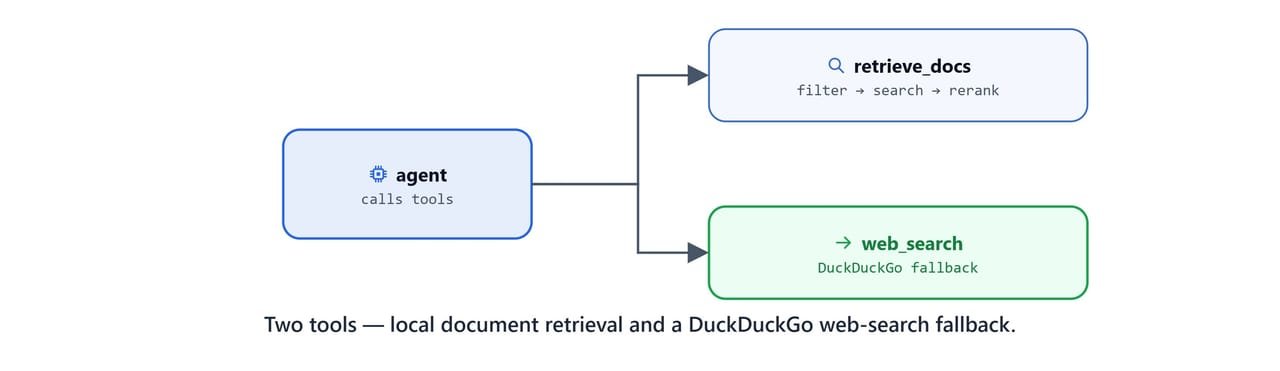
To let an agent use this pipeline, wrap it in LangChain @tool functions (scripts/my_tools.py). The retrieve_docs tool runs the full extract → search → re-rank flow. It formats the results as a readable string with metadata and content.
from dotenv import load_dotenv
load_dotenv()

import os
from langchain_core.tools import tool
from scripts import utils

@tool
def retrieve_docs(query: str, k=5):
    """
    Retrieve relevant financial documents from ChromaDB.
    Extracts filters from query and retrieves matching documents.

    Args:
        query: The search query (e.g., "What was Amazon's revenue in Q2 2025?")
        k: Number of documents to retrieve. generally prefer 5 docs

    Returns:
        Retrieved documents with metadata as formatted string
    """
    print(f"\n[TOOL] retrieve_docs called")
    print(f"[QUERY] {query}")

    filters = utils.extract_filters(query)
    ranking_keywords = utils.generate_ranking_keywords(query)

    # fetch more docs than needed for better re-ranking
    results = utils.search_docs(query, filters, ranking_keywords, k=10 * k)

    # rank retrieved docs
    docs = utils.rank_documents_by_keywords(results, ranking_keywords, k=k)

    print(f"[RETRIEVED] {len(docs)} documents")

    if len(docs) == 0:
        return f"No ducuments found for the query: '{query}'. Try rephrasing query or use different filter."

    retrieved_text = []
    for i, doc in enumerate(docs, 1):
        doc_text = [f"--- Document {i} ---"]
        for key, value in doc.metadata.items():
            doc_text.append(f"{key}: {value}")
        doc_text.append(f"\nContent:\n{doc.page_content}")
        retrieved_text.append("\n".join(doc_text))

    retrieved_text = "\n".join(retrieved_text)

    os.makedirs("debug_logs", exist_ok=True)
    with open("debug_logs/retrieved_reranked_docs.md", "w", encoding='utf-8') as f:
        f.write(retrieved_text)

    return retrieved_text
The second tool, web_search, queries DuckDuckGo through the ddgs client. It is the fallback for questions the local documents cannot answer.
from ddgs import DDGS

@tool
def web_search(query: str, num_results: int = 10) -> str:
    """Use this tool whenever you need to access realtime or latest information.
        Search the web using DuckDuckGo.

    Args:
        query: Search query string
        num_results: Number of results to return (default: 10)

    Returns:
        Formatted search results with titles, descriptions, and URLs
    """
    results = DDGS().text(query=query, max_results=num_results, region='us-en')

    if not results:
        return f"No results found for '{query}'"

    formatted_results = [f"Search results for search query: '{query}'"]
    for i, result in enumerate(results, 1):
        title = result.get('title', 'No title')
        href = result.get('href', '')
        body = result.get('body', 'No description available')
        formatted_results.append(f"{i}. **{title}**\n   {body}\n   {href}")

return "\n\n".join(formatted_results)pip install -U ddgsWith retrieval packaged as a tool, the next lessons build agents on top of it, starting with Agentic PageRAG.
What You Built
In this blog, we built a hybrid retrieval pipeline:
- Structured filters:
extract_filtersturns a query into a validatedChunkMetadataobject for ChromaDB - SEC keywords:
generate_ranking_keywordsreturns exactly five domain terms for filtering and ranking - MMR search:
search_docscombines metadata and content filters with diversity-aware retrieval - BM25Plus re-ranking:
rank_documents_by_keywordsscores heading and content chunks to find the most relevant pages - Reusable tools:
retrieve_docsandweb_searchexpose retrieval and a web fallback to any LangGraph agent
This funnel (filter, search wide, then re-rank) is what makes the agentic patterns in the rest of the series accurate. This is how hybrid retrieval works.