LangChain Expression Language (LCEL) is the way we connect LangChain building blocks, called runnables, into a pipeline. In simple words, a runnable is any LangChain block that can be invoked. LCEL lets us snap these blocks together, and the output of one block automatically becomes the input of the next. The | pipe operator is the main syntax, and .pipe() is the same thing written as a method.
In this tutorial, we will learn every LCEL chain pattern: sequential, parallel, router, custom runnables, and the @chain decorator.
Prerequisites: LangChain, langchain-ollama, and python-dotenv installed. Ollama running locally with qwen3 pulled. See the Prompt Templates guide.
How Does LCEL Work?
LCEL chains work on a single principle: runnables pass output forward. The .invoke() return value of one runnable becomes the input of the next. If we hold on to this one sentence, every pattern in this lesson will make sense.
Let's see the chain types we will build, one by one:
- Sequential Chain: steps run one after another in a linear pipeline
- Parallel Chain: multiple sub-chains run at the same time, results returned as a dict
- Router Chain: output of a first step decides which sub-chain handles the next step
- Chaining Runnables: one chain's string output feeds into another chain's prompt variable
- Custom Chain: our own Python functions wrapped as runnables with
RunnableLambdaor@chain
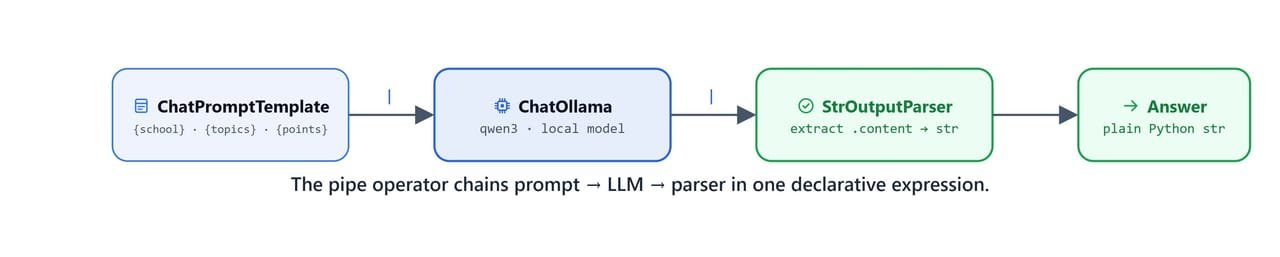
The pipe operator chains prompt → LLM → parser into one declarative LCEL expression.
Setup
First, we load our environment variables, the same way we did in the previous lessons:
from dotenv import load_dotenv

load_dotenv('.env')TrueOn Linux/macOS: adjust the path if .env is in a parent directory: load_dotenv('./../.env')
Then, we import the template classes from the Prompt Templates lesson and connect to our local qwen3 model:
from langchain_ollama import ChatOllama
from langchain_core.prompts import (
    SystemMessagePromptTemplate,
    HumanMessagePromptTemplate,
    ChatPromptTemplate
)

base_url = "http://localhost:11434"
model = 'qwen3'

llm = ChatOllama(base_url=base_url, model=model)
llmChatOllama(model='qwen3', base_url='http://localhost:11434')Here, we can see our llm object is ready and pointed at the local Ollama server. Everything in this lesson runs on this one model.
How Does a Sequential Chain Work?
What Problem Does the Pipe Solve?
Before we meet the | operator, we must see the problem it solves. Here is the manual two-step approach we used in the previous lesson: create a prompt, invoke it, then invoke the LLM with the result:
system = SystemMessagePromptTemplate.from_template(
    'You are {school} teacher. You answer in short sentences.'
)
question = HumanMessagePromptTemplate.from_template(
    'tell me about the {topics} in {points} points'
)

messages = [system, question]
template = ChatPromptTemplate(messages)

question = template.invoke({'school': 'primary', 'topics': 'solar system', 'points': 5})

response = llm.invoke(question)
print(response.content)1. The Sun is the center, holding the solar system together with gravity.
2. Eight planets orbit the Sun: Mercury, Venus, Earth, Mars, Jupiter, Saturn, Uranus, and Neptune.
3. The asteroid belt lies between Mars and Jupiter, with rocky objects.
4. Gas giants (Jupiter, Saturn, Uranus, Neptune) are large and mostly made of gas.
5. Distant regions like the Kuiper Belt and Oort Cloud contain icy bodies and comets.Here, we can see the pattern: the template's output becomes the LLM's input, and we are the ones carrying it from one step to the next. Two invokes for two steps. With more steps, this carrying work grows, and this is exactly the job LCEL takes off our hands.
How Do We Build the Chain with |?
So, here comes the | pipe to the rescue. LCEL joins the two steps into one chain. We define the chain once, then call .invoke() directly on it with a dict of values:
system = SystemMessagePromptTemplate.from_template(
    'You are {school} teacher. You answer in short sentences.'
)
question = HumanMessagePromptTemplate.from_template(
    'tell me about the {topics} in {points} points'
)

messages = [system, question]
template = ChatPromptTemplate(messages)

chain = template | llm
Here, template | llm means: send the output of template into llm. The pipe is the carrier now, not us. Let's invoke the chain:
response = chain.invoke({'school': 'primary', 'topics': 'solar system', 'points': 5})
print(response.content)1. The Sun is the center, holding the solar system together with gravity.
2. Eight planets orbit the Sun: Mercury, Venus, Earth, Mars, Jupiter, Saturn, Uranus, and Neptune.
3. The asteroid belt lies between Mars and Jupiter, with rocky objects.
4. Moons orbit planets, like Earth's Moon and Jupiter's many moons.
5. The Kuiper Belt and Oort Cloud are regions of icy bodies beyond Neptune.Same answer as the manual version, but now one .invoke() drives the whole pipeline. And because the variables live in a dict, we can switch the school value and get a different depth of explanation, with no code change:
response = chain.invoke({'school': 'phd', 'topics': 'solar system', 'points': 5})
print(response.content)1. The Sun is the central star, providing gravity and energy.
2. Eight planets orbit it: Mercury, Venus, Earth, Mars, Jupiter, Saturn, Uranus, Neptune.
3. Smaller bodies include asteroids, comets, and dwarf planets like Pluto.
4. The solar system has distinct regions: inner rocky planets, outer gas giants, asteroid belt, and Kuiper Belt.
5. It formed from a collapsing cloud of gas and dust around 4.6 billion years ago.What Does the Chain Return?
Now, what exactly does the chain return? Without a parser, chain.invoke() returns a full AIMessage object containing the content, the response_metadata, the token counts, and a run ID:
responseAIMessage(content='1. The Sun is the central star, providing gravity and energy. \n2. Eight planets orbit it: Mercury, Venus, Earth, Mars, Jupiter, Saturn, Uranus, Neptune. \n3. Smaller bodies include asteroids, comets, and dwarf planets like Pluto. \n4. The solar system has distinct regions: inner rocky planets, outer gas giants, asteroid belt, and Kuiper Belt. \n5. It formed from a collapsing cloud of gas and dust around 4.6 billion years ago.', additional_kwargs={}, response_metadata={'model': 'qwen3', 'created_at': '2025-10-22T06:48:23.0623152Z', 'done': True, 'done_reason': 'stop', 'total_duration': 2236060800, 'load_duration': 69630100, 'prompt_eval_count': 37, 'prompt_eval_duration': 15459300, 'eval_count': 402, 'eval_duration': 2052522300, 'model_name': 'qwen3', 'model_provider': 'ollama'}, id='lc_run--d02d48ee-498c-4a32-949a-dceb964ae040-0', usage_metadata={'input_tokens': 37, 'output_tokens': 402, 'total_tokens': 439})Here, we can see the full object: the answer text is buried inside content, surrounded by metadata. This is useful for debugging, but most of the time our program just wants the text. Digging .content out at every step gets tiring.
How Do We Get a Plain String?
So, we append StrOutputParser as the third block, and it extracts the plain text string from the AIMessage:
from langchain_core.output_parsers import StrOutputParser

chain = template | llm | StrOutputParser()
response = chain.invoke({'school': 'primary', 'topics': 'solar system', 'points': 5})
print(response)1. The Sun is the center, holding the solar system together with gravity.
2. Eight planets orbit the Sun: Mercury, Venus, Earth, Mars, Jupiter, Saturn, Uranus, and Neptune.
3. The asteroid belt lies between Mars and Jupiter, with rocky objects.
4. Moons orbit planets, like Earth's Moon and Jupiter's many moons.
5. Distant regions include the Kuiper Belt and Oort Cloud, home to icy bodies.Notice that we now print response directly, with no .content. Let's evaluate response to confirm it is a plain Python string, not a message object:
response'1. The Sun is the center, holding the solar system together with gravity. \n2. Eight planets orbit the Sun: Mercury, Venus, Earth, Mars, Jupiter, Saturn, Uranus, and Neptune. \n3. The asteroid belt lies between Mars and Jupiter, with rocky objects. \n4. Moons orbit planets, like Earth\'s Moon and Jupiter\'s many moons. \n5. Distant regions include the Kuiper Belt and Oort Cloud, home to icy bodies.'And if we inspect chain itself, LangChain shows us the full pipeline with all three components in order:
chainChatPromptTemplate(input_variables=['points', 'school', 'topics'], ...)
| ChatOllama(model='qwen3', base_url='http://localhost:11434')
| StrOutputParser()Here, we can see our sequential chain exactly as we built it: the template fills the prompt, the LLM answers, and the parser cleans the answer into a string. This three-block pattern is the workhorse of LangChain, and we will reuse it in every pattern below.
How Do We Compose Two Chains?
Now, here is a question: the chain's output is a plain string, and a prompt template's input is a dict of variables. Can we feed one chain's output into another chain's prompt variable? Yes, and this is called composing chains. It lets us analyze or transform an LLM's output in a single .invoke() call.
Let's say we want a second chain that judges how difficult a given text is to understand:
analysis_prompt = ChatPromptTemplate.from_template('''analyze the following text: {response}
                                                   You need tell me that how difficult it is to understand.
                                                   Answer in one sentence only.
                                                   ''')

fact_check_chain = analysis_prompt | llm | StrOutputParser()
output = fact_check_chain.invoke({'response': response})
print(output)The text is easy to understand as it presents basic, clear information about the solar system using simple language and familiar concepts.Here, we passed the previous response into the {response} variable by hand. It works, but we are the carrier again. To run both chains start to finish in one call, we join them using a dict that maps the first chain's output to the next prompt's variable:
composed_chain = {"response": chain} | analysis_prompt | llm | StrOutputParser()

output = composed_chain.invoke({'school': 'phd', 'topics': 'solar system', 'points': 5})
print(output)The text is relatively simple and accessible, requiring basic knowledge of astronomy concepts like planetary orbits, dwarf planets, and the solar system's structure.Here, we can see the flow: our input dict goes into chain, which produces the solar system text. That text lands under the key "response", which is exactly the variable name analysis_prompt expects. The second LLM call then judges the first LLM's answer, and we get the judgment back, all from one .invoke().
Note
{"response": chain} is LCEL shorthand for a RunnableParallel with a single key. The value of "response" is populated by running chain with the same input dict, and the result is passed to analysis_prompt as {response}.
How Does a Parallel Chain Work?
Till now, our steps ran one after another. But sometimes we want two independent answers from the same input, and there is no reason to wait for one before starting the other. This is the job of the parallel chain: multiple sub-chains run at the same time on the same input, and the results come back together as a dict. We use RunnableParallel to define the parallel structure.
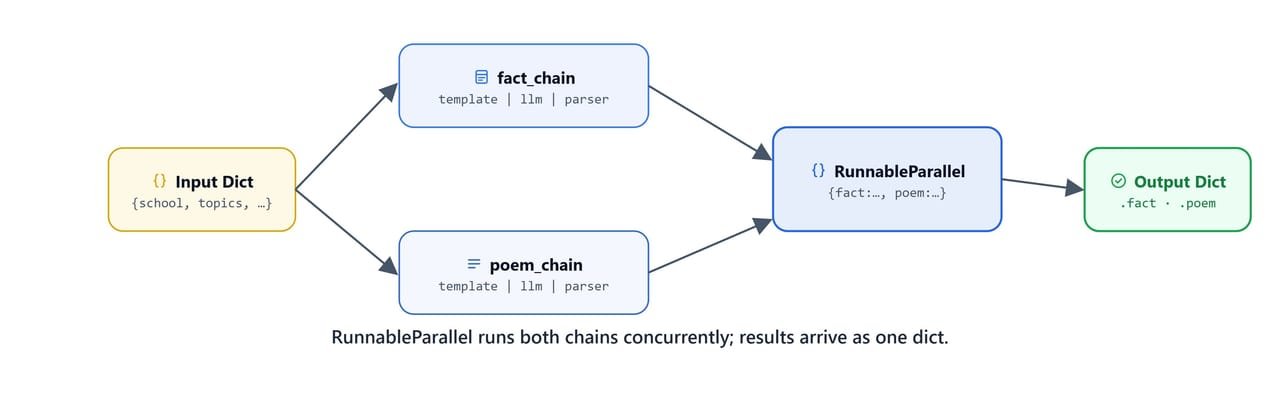
RunnableParallel runs both chains concurrently; their results arrive together as one dict.
Building Two Sub-Chains
First, we build a fact chain, the same pattern we already know:
system = SystemMessagePromptTemplate.from_template(
    'You are {school} teacher. You answer in short sentences.'
)
question = HumanMessagePromptTemplate.from_template(
    'tell me about the {topics} in {points} points'
)

messages = [system, question]
template = ChatPromptTemplate(messages)
fact_chain = template | llm | StrOutputParser()

output = fact_chain.invoke({'school': 'primary', 'topics': 'solar system', 'points': 2})
print(output)1. The solar system has the Sun at its center, with eight planets orbiting around it.
2. It includes moons, asteroids, comets, and other celestial objects in space.Then, we build a second chain that writes a poem instead. Notice that only the human template changes; the system template is reused:
question = HumanMessagePromptTemplate.from_template(
    'write a poem on {topics} in {sentences} lines'
)

messages = [system, question]
template = ChatPromptTemplate(messages)
poem_chain = template | llm | StrOutputParser()

output = poem_chain.invoke({'school': 'primary', 'topics': 'solar system', 'sentences': 2})
print(output)The sun shines bright, a golden sphere,
Planets dance in silent cheer.Both chains work on their own. Now, let's run them together.
Running Both in Parallel
Now, we create one chain out of two with RunnableParallel. The keyword names fact and poem will become the keys of the output dict:
from langchain_core.runnables import RunnableParallel

chain = RunnableParallel(fact=fact_chain, poem=poem_chain)
We call .invoke() once, with a dict containing all the variables that both sub-chains need:
output = chain.invoke({'school': 'primary', 'topics': 'solar system', 'points': 2, 'sentences': 2})
print(output['fact'])
print('\n\n')
print(output['poem'])1. The solar system has the Sun at its center, with eight planets orbiting around it.
2. It includes moons, asteroids, comets, and dwarf planets like Pluto, all held by gravity.
The sun, a fiery heart, spins bright and bold,
planets dance in orbits, each a world of gold.Here, we can see both results arriving together: the facts under output['fact'] and the poem under output['poem']. Each sub-chain picked the variables it needed from the shared input dict, and neither waited for the other.
Tip
RunnableParallel runs both chains concurrently in separate threads. For local LLM calls this reduces total wall-clock time compared to running them sequentially.
How Does a Router Chain Work?
Now, let's learn the pattern that makes decisions. A router chain classifies the input first, then sends it to a different sub-chain based on the result. In simple words, the router is a fork in the road, and the model's own answer decides which way we go. The decision happens while the program runs.
The best way to learn this is by building a real example: a review reply system. A positive review should get a thank-you reply, and a negative review should get an apology. Let's build it in steps.
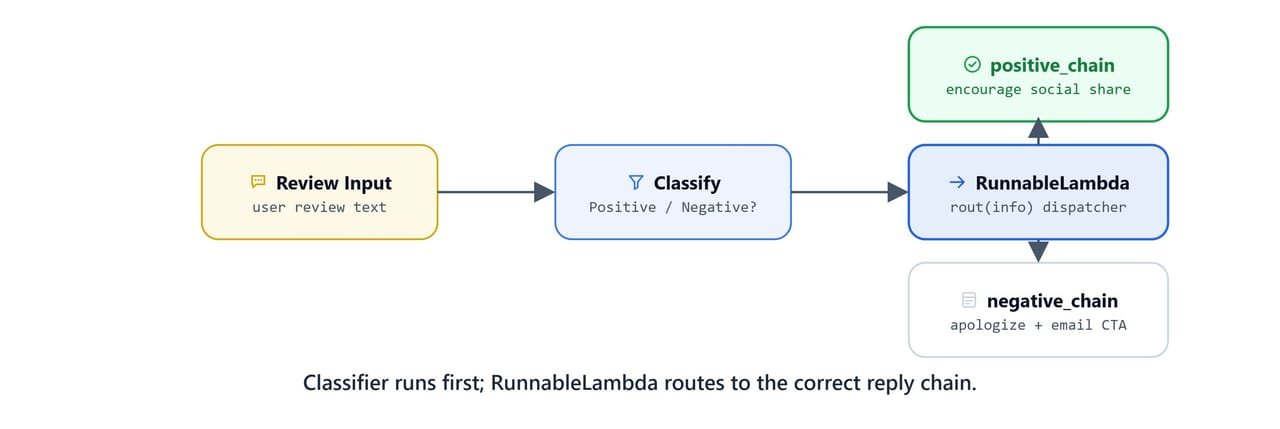
The classifier runs first; a RunnableLambda then routes the input to the correct reply chain.
Step 1, Sentiment Classifier Chain
First, we need a chain that reads a review and answers with one word, Positive or Negative. Notice how strict the prompt is: we ask for a single word, because this output will drive a Python if condition, and an if cannot handle a chatty answer.
prompt = """Given the user review below, classify it as either being about `Positive` or `Negative`.
            Do not respond with more than one word.

            Review: {review}
            Classification:"""

template = ChatPromptTemplate.from_template(prompt)

chain = template | llm | StrOutputParser()

review = "Thank you so much for providing such a great plateform for learning. I am really happy with the service."
chain.invoke({'review': review})'Positive'It works. One word, exactly as instructed.
Step 2, Sub-Chains for Each Route
Next, we build the two destination chains, one for each outcome. The positive chain encourages the user to share their experience:
positive_prompt = """
                You are expert in writing reply for positive reviews.
                You need to encourage the user to share their experience on social media.
                Review: {review}
                Answer:"""

positive_template = ChatPromptTemplate.from_template(positive_prompt)
positive_chain = positive_template | llm | StrOutputParser()
And the negative chain apologizes first, then points the user to a support email:
negative_prompt = """
                You are expert in writing reply for negative reviews.
                You need first to apologize for the inconvenience caused to the user.
                You need to encourage the user to share their concern on following Email:'udemy@kgptalkie.com'.
                Review: {review}
                Answer:"""

negative_template = ChatPromptTemplate.from_template(negative_prompt)
negative_chain = negative_template | llm | StrOutputParser()
Step 3, Router Function
Now, the fork itself. The router is a plain Python function that reads the classifier's answer and returns the matching chain:
def rout(info):
    if 'positive' in info['sentiment'].lower():
        return positive_chain
    else:
        return negative_chain
Here, notice two small but important choices. We use .lower() because the model might answer Positive or positive, and we use in instead of == because the model might add a stray space or period. Both choices keep the routing safe from tiny changes in the model's wording.
Step 4, Assembling the Full Router Chain
Now, we put the pieces together. The dict will run two things on our input: the classifier chain fills the sentiment key, and a small lambda passes the original review text through unchanged. Why do we need the lambda? Because the reply chains need the review text too. Without it, only the sentiment would survive to the next step. RunnableLambda(rout) wraps our router function so it can sit inside the pipeline:
from langchain_core.runnables import RunnableLambda

full_chain = {"sentiment": chain, 'review': lambda x: x['review']} | RunnableLambda(rout)
Let's inspect full_chain to see the complete pipeline structure:
full_chain{
sentiment: ChatPromptTemplate(...)
| ChatOllama(model='qwen3', base_url='http://localhost:11434')
| StrOutputParser(),
review: RunnableLambda(lambda x: x['review'])
}
| RunnableLambda(rout)Step 5, Invoking with a Negative Review
Now, let's test the fork with a negative review and watch the router pick the right path:
review = "I am not happy with the service. It is not good."

output = full_chain.invoke({'review': review})
print(output)We sincerely apologize for the inconvenience caused and understand your dissatisfaction. We value your feedback and kindly ask you to share your concern via email at udemy@kgptalkie.com so that we can address your issue promptly. We are committed to resolving this matter to your satisfaction and appreciate your patience as we work to improve our services. Thank you for bringing this to our attention.Here, we can see the whole journey: the classifier read the review and said Negative, the router returned negative_chain, and that chain wrote the apology with the support email. We never told the code which path to take. The input itself decided.
Note
Change review to a positive string and the router automatically dispatches to positive_chain instead, with no code change needed.
What Are RunnableLambda and RunnablePassthrough?
We have already met RunnableLambda in the router. Now let's understand the two helpers properly. RunnableLambda wraps any Python function as a runnable step, so our own logic can sit inside a chain. RunnablePassthrough passes its input through unchanged. We use it when we want to keep the original value next to the new ones we computed.
Helper Functions and Prompt
Let's say that after the LLM answers, we also want to know how long the answer is. We write two tiny functions for that:
from langchain_core.runnables import RunnablePassthrough, RunnableLambda

def char_counts(text):
    return len(text)

def word_counts(text):
    return len(text.split())

prompt = ChatPromptTemplate.from_template("Explain these inputs in 5 sentences: {input1} and {input2}")
Here, char_counts and word_counts are ordinary Python, nothing LangChain about them yet. Let's inspect the prompt to check the variables it detected:
promptChatPromptTemplate(input_variables=['input1', 'input2'], input_types={}, partial_variables={}, messages=[HumanMessagePromptTemplate(prompt=PromptTemplate(input_variables=['input1', 'input2'], ..., template='Explain these inputs in 5 sentences: {input1} and {input2}'), additional_kwargs={})])Plain Chain Output
First, the plain chain, so we have a baseline:
chain = prompt | llm | StrOutputParser()

output = chain.invoke({'input1': 'Earth is planet', 'input2': 'Sun is star'})

print(output)1. Earth is a planet, meaning it is a celestial body that orbits the Sun, has a solid surface, and meets specific criteria like clearing its orbit of other debris.
2. The Sun is a star, a massive, luminous sphere of plasma held together by gravity, where nuclear fusion powers its light and heat.
3. Planets, like Earth, do not produce their own light but reflect sunlight, while stars, like the Sun, generate energy through nuclear reactions.
4. Earth's classification as a planet distinguishes it from stars, which are much larger and emit light due to internal heat and fusion.
5. The Sun's role as a star is central to sustaining life on Earth, as its energy drives weather, climate, and the planet's orbital motion.Enriched Output with Counts and Passthrough
Now, we extend the chain. After StrOutputParser returns the text, three steps run on that same text in parallel: char_counts, word_counts, and RunnablePassthrough, which passes the raw string through under the key output:
chain = prompt | llm | StrOutputParser() | {
    'char_counts': RunnableLambda(char_counts),
    'word_counts': RunnableLambda(word_counts),
    'output': RunnablePassthrough()
}

output = chain.invoke({'input1': 'Earth is planet', 'input2': 'Sun is star'})

print(output){
"char_counts": 719,
"word_counts": 122,
"output": "1. Earth is a planet, meaning it is a celestial body that orbits the Sun and is characterized by its solid surface, atmosphere, and ability to support life. \n2. The Sun is a star, a massive, luminous sphere of plasma held together by gravity, which generates energy through nuclear fusion in its core. \n3. Planets like Earth are much smaller and cooler than stars, and they do not produce their own light but reflect sunlight. \n4. The Sun's gravitational pull keeps Earth and other planets in orbit, forming the solar system. \n5. While Earth is a planet, the Sun's status as a star highlights the fundamental difference between these two types of celestial objects in terms of size, composition, and energy sources."
}Here, we can see the result: the character count, the word count, and the untouched answer, all in one dict. We need RunnablePassthrough for the last key. Without it, the counts would survive but the answer itself would be lost. Passthrough keeps the original text flowing along with the values we computed from it.
Tip
RunnablePassthrough is the cleanest way to forward a value through a pipeline step without transformation. It avoids the need for a no-op lambda.
How Does the @chain Decorator Work?
Finally, let's learn the most flexible pattern of all. The @chain decorator from langchain_core.runnables turns any Python function into a full LCEL runnable. In simple words, we write ordinary Python inside the function, and outside, it behaves like every other chain: it can be used with |, .invoke(), .stream(), and .batch().
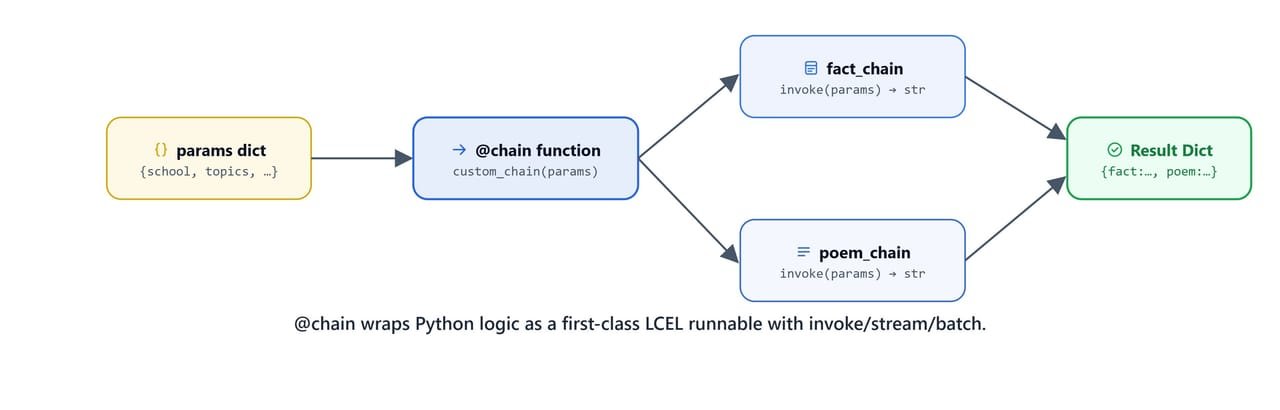
@chain wraps your Python logic as a first-class LCEL runnable with invoke/stream/batch support.
We will rebuild the fact-plus-poem result from the parallel section, but this time with plain Python inside a decorated function. We call fact_chain.invoke() and poem_chain.invoke() ourselves and shape the dict by hand. We choose this over RunnableParallel when we want freedom, because inside this function we can do anything Python can do: add if conditions, loops, logging, retries. The trade-off is in the note below. Let's see the code as below:
from langchain_core.runnables import chain

@chain
def custom_chain(params):
    return {
        'fact': fact_chain.invoke(params),
        'poem': poem_chain.invoke(params),
    }

params = {'school': 'primary', 'topics': 'solar system', 'points': 2, 'sentences': 2}
output = custom_chain.invoke(params)
print(output['fact'])
print('\n\n')
print(output['poem'])1. The solar system has the Sun at its center.
2. Eight planets orbit the Sun in elliptical paths.
The sun reigns bright, a golden core,
Planets dance in orbits, vast and wide.Here, we can see the same fact-plus-poem result as the parallel section, built this time by our own Python function.
Note
Unlike RunnableParallel, the @chain decorator runs sub-chains sequentially inside the function. Use RunnableParallel when true concurrency matters.
On Linux/macOS: all code above runs identically. No OS-specific differences.
Quick Reference
Let me tabulate all the patterns we learned for your better understanding, so that you can pick the right one for your use case.
LCEL Chain Patterns
| Pattern | Syntax | Use when |
|---|---|---|
| Sequential | a | b | c |
Steps run in order, each output feeds next |
| With parser | template | llm | StrOutputParser() |
Want a plain string instead of AIMessage |
| Composed | {"key": chain} | next_prompt | llm |
First chain's output becomes a variable in next prompt |
| Parallel | RunnableParallel(a=chain1, b=chain2) |
Run multiple chains concurrently |
| Router | {...} | RunnableLambda(router_fn) |
Dispatch to different chains based on runtime value |
| Custom | @chain decorator |
Wrap arbitrary Python logic as a runnable |
Key Imports
from langchain_core.output_parsers import StrOutputParser
from langchain_core.runnables import (
    RunnableParallel,
    RunnableLambda,
    RunnablePassthrough,
    chain
)
What You Built
In this lesson, we moved from carrying data between template.invoke() and llm.invoke() by hand to building full LCEL pipelines.
We now have five patterns in our toolkit:
- Sequential: the workhorse,
template | llm | StrOutputParser() - Composed: feeding one chain's string output as a variable into the next chain's prompt
- Parallel: running a fact chain and a poem chain at the same time with
RunnableParallel, getting both results in one dict - Router: classifying a review as positive or negative first, then sending it to the matching reply chain
- Custom: wrapping our own Python logic as a normal LCEL runnable with
RunnableLambdaor the@chaindecorator
Every pattern looks the same from the outside: one .invoke() call. The pipeline handles all the plumbing inside, and that is the promise of LCEL. This is how chains work. In the coming lessons, every agent and every RAG system we build will stand on this foundation.