Every chain we have built so far has one hidden weakness: it forgets. A plain chain.invoke() call has no memory, and every call is completely independent. Chat message memory solves exactly this. RunnableWithMessageHistory wraps our existing chain, loads the conversation history before each call, and saves the new exchange after it. In simple words, the model starts behaving like a real assistant that remembers everything said in the session.
We need only two things to set up memory:
- Where to store messages: a
BaseChatMessageHistoryimplementation (e.g.,SQLChatMessageHistoryfor SQLite) - What to wrap: our existing LCEL chain, plus the input and output key names
Prerequisites: LangChain, langchain-ollama, langchain-community, and python-dotenv installed. Ollama running locally with qwen3. See LangChain Output Parsing for prior context.
Why Do Chains Forget?
The best way to understand the problem is to watch a chain forget. Let's build a stateless chain and catch it in the act:
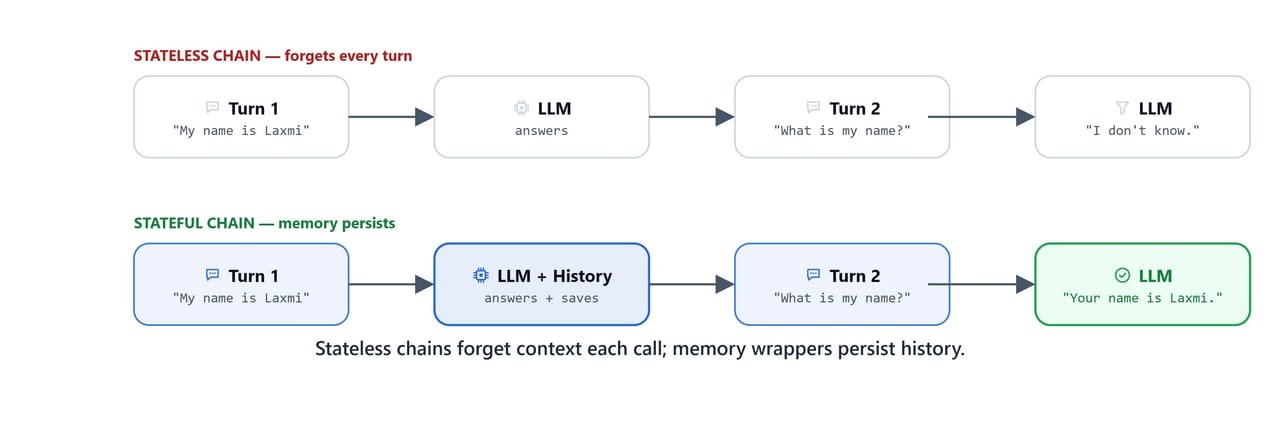
Stateless chains forget context on each call; a memory wrapper persists the conversation history.
from dotenv import load_dotenv

load_dotenv('.env')TrueOn Linux/macOS: use load_dotenv('./../.env') if .env is in a parent directory.
Now, we build the familiar three-block chain from the Chains lesson and introduce ourselves to the model:
from langchain_ollama import ChatOllama
from langchain_core.prompts import ChatPromptTemplate
from langchain_core.output_parsers import StrOutputParser

base_url = "http://localhost:11434"
model = 'qwen3'

llm = ChatOllama(base_url=base_url, model=model)

template = ChatPromptTemplate.from_template("{prompt}")
chain = template | llm | StrOutputParser()

about = "My name is Laxmi Kant. I work for KGP Talkie."
chain.invoke({'prompt': about})"Hello, Laxmi Kant! It's great to meet you. KGP Talkie sounds like a dynamic platform, and I'm curious to learn more about your role there. Could you share a bit about your work or what KGP Talkie specializes in? Whether it's podcasts, audio content, or something else, I'd love to hear about it! 😊"The model received the introduction and replied warmly. It clearly knows the name right now. So, let's ask it to recall:
prompt = "What is my name?"
chain.invoke({'prompt': prompt})"I don't have access to your name. Could you please tell me your name so I can address you properly? 😊"Here, we can see the problem with our own eyes. The model has no memory of the previous call. Why? Because each chain.invoke() is a completely independent request. The first conversation ended the moment it returned, and the second call started from a blank slate. No conversation state is carried over, ever.
What Is RunnableWithMessageHistory?
So, here comes RunnableWithMessageHistory to the rescue.
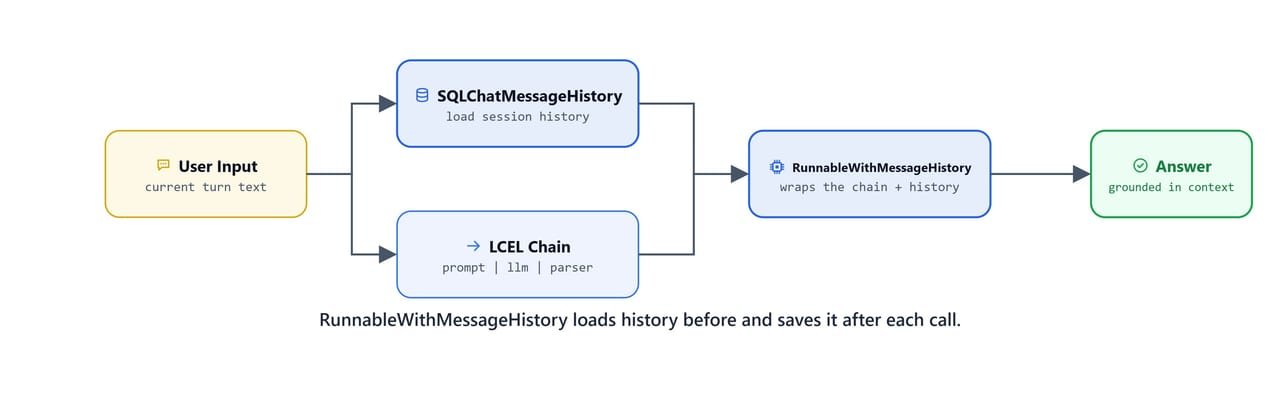
RunnableWithMessageHistory loads history before each call and saves the updated history after it.
RunnableWithMessageHistory wraps any LCEL chain and adds the stored history automatically before each call. In simple words, it does two jobs on every turn. Before the call, it loads the old messages and puts them in front of our new one. After the call, it saves the new exchange. Our chain itself stays untouched.
It needs:
- a history factory function
get_session_history(session_id)that returns aBaseChatMessageHistoryobject - our existing chain
Imports
Two imports are new here. RunnableWithMessageHistory is the wrapper itself, and SQLChatMessageHistory is the storage. Notice that the storage comes from langchain_community, which is why we installed that package.
from langchain_core.prompts import (
    SystemMessagePromptTemplate,
    HumanMessagePromptTemplate,
    ChatPromptTemplate
)
from langchain_core.output_parsers import StrOutputParser
from langchain_core.messages import HumanMessage, SystemMessage
from langchain_core.runnables.history import RunnableWithMessageHistory
from langchain_community.chat_message_histories import SQLChatMessageHistory
Where Do the Messages Live?
Now, where do the messages live? SQLChatMessageHistory stores them in a local SQLite database. Why SQLite? Because it is a real database that needs zero setup: no server, no account, just a file. And each session_id maintains its own independent conversation thread inside it:
def get_session_history(session_id):
    return SQLChatMessageHistory(session_id, connection="sqlite:///chat_history.db")
Here, we have written the history factory. It is a plain function that takes a session_id and returns the history object for that session. The wrapper will call this function on every invoke, which is how it knows where to load from and save to. The file chat_history.db is created automatically in the current working directory on first use.
Wrapping the Chain
Now, the wrapping itself is one line:
runnable_with_history = RunnableWithMessageHistory(chain, get_session_history)Here, we hand over the two ingredients: our existing chain and the history factory. Nothing about the chain changed. Memory is added around it, not inside it.
Invoking with a Session ID
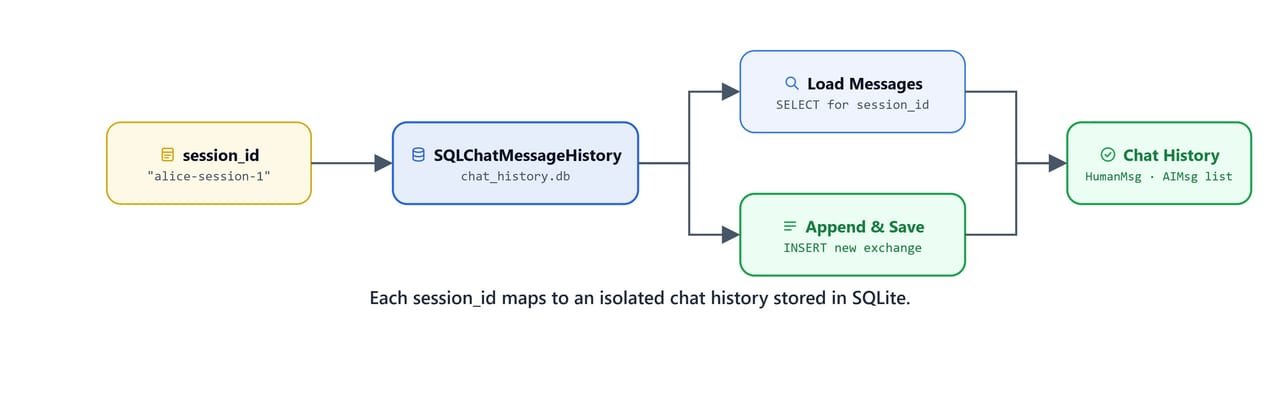
Each session_id maps to its own isolated chat history, persisted in SQLite.
We pass a session_id in the config dict. The wrapper loads the prior messages for that session, prepends them to the chain input, and saves the new exchange automatically. Let's first look directly inside a session's history:
user_id = 'your-username'
history = get_session_history(user_id)

history.get_messages()
After two turns (about + "whats my name?"), the history contains both exchanges:
[HumanMessage(content='My name is Laxmi Kant. I work for KGP Talkie.', ...),
 AIMessage(content='Hello, Laxmi Kant! Welcome to KGP Talkie...', ...),
 HumanMessage(content='whats my name?', ...),
 AIMessage(content='Your name is Laxmi Kant! 😊 ...', ...)]
Here, we can see the conversation stored as alternating HumanMessage and AIMessage objects, the same message types we learned in the Prompt Templates lesson. The memory is not magic. It is just these saved messages being replayed before every new call.
Clearing a Session
To start fresh, we call .clear() on the history object, and all messages for that session are wiped:
history.clear()After clearing, history.get_messages() returns an empty list and the next invocation starts a fresh conversation.
Sending Messages
Now, let's run the same forgetting experiment from the start of this lesson, but through the wrapper. We pass a list of HumanMessage objects (no prompt template needed for this simple form):
runnable_with_history.invoke(
    [HumanMessage(content=about)],
    config={'configurable': {'session_id': user_id}}
)'Hello, Laxmi Kant! Welcome to KGP Talkie. How are you doing today? If you have any questions or need assistance with anything related to your work or KGP Talkie, feel free to ask. 😊'Now, the moment of truth. We ask the follow-up that broke the stateless chain:
runnable_with_history.invoke(
    [HumanMessage(content="whats my name?")],
    config={'configurable': {'session_id': user_id}}
)'Your name is Laxmi Kant! 😊 Let me know if you need anything else.'The model correctly recalled the name from the stored session history. The same question that failed before now works, and the only difference is the wrapper. Problem solved.
Note
session_id is how LangChain separates conversations. Two different users with different session_id values get completely independent histories from the same chain.
How Do We Use Memory with Dictionary Inputs?
The simple form above works when the chain takes a list of messages as input. But in production, our chains use a ChatPromptTemplate with named input keys, like {'input': ...}. So the question is: where exactly inside the prompt should the loaded history go? For this pattern, we use MessagesPlaceholder to reserve the spot, and we tell the wrapper which key is which with input_messages_key and history_messages_key.
What Is MessagesPlaceholder?
from langchain_core.prompts import (
    SystemMessagePromptTemplate,
    HumanMessagePromptTemplate,
    ChatPromptTemplate,
    MessagesPlaceholder
)
from langchain_core.output_parsers import StrOutputParser
from langchain_core.messages import HumanMessage, SystemMessagesystem = SystemMessagePromptTemplate.from_template("You are helpful assistant.")
human = HumanMessagePromptTemplate.from_template("{input}")
messages = [system, MessagesPlaceholder(variable_name='history'), human]
prompt = ChatPromptTemplate(messages=messages)
chain = prompt | llm | StrOutputParser()Here, MessagesPlaceholder(variable_name='history') reserves a slot in the prompt where the conversation history will be injected. And look at the order of the messages list, because it matters: the system message comes first to set the behaviour, then the full history, then the current user input. The model reads the past before it reads the new question, which is exactly how a human would catch up on a conversation.
Wrapping with Named Keys
runnable_with_history = RunnableWithMessageHistory(
    chain,
    get_session_history,
    input_messages_key='input',
    history_messages_key='history'
)
Here, we have added two new arguments, and each answers a question the wrapper cannot guess on its own:
input_messages_key='input'tells the wrapper which key in our input dict holds the current user messagehistory_messages_key='history'tells it which key to fill with the loaded history. This must match thevariable_namewe gaveMessagesPlaceholder, because that is the slot it fills
Chat Helper Function
Passing the config dict on every call gets repetitive, so we wrap the invocation in a small helper:
def chat_with_llm(session_id, input):
    output = runnable_with_history.invoke(
        {'input': input},
        config={'configurable': {'session_id': session_id}}
    )
    return output
Testing Across Turns
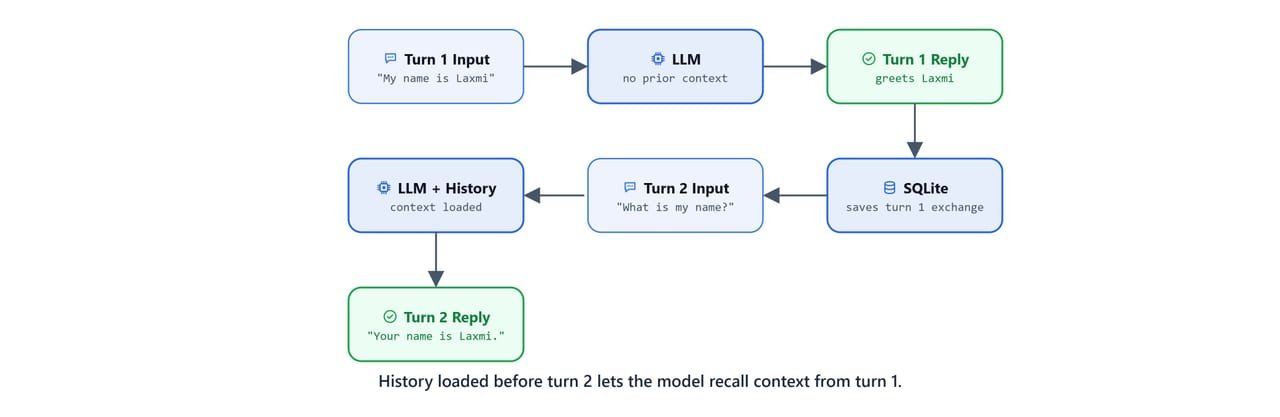
Loading history before turn 2 lets the model recall the context established in turn 1.
First turn, we introduce ourselves:
user_id = "kgptalkie"
chat_with_llm(user_id, about)'Namaste, Laxmi Kant! 😊
Your name is **Laxmi Kant**, and you work at **KGP Talkie**. If you ever need help with anything or want to share your experiences, feel free to chat. 🎬✨ What's your role there?'Second turn, we ask the model to recall:
chat_with_llm(user_id, "what is my name?")'Your name is **Laxmi Kant**. 😊
If you have any questions or need assistance, feel free to ask! 🎬✨'Here, we can see the full pattern working end to end. The model remembers the name across turns through the persisted SQL history, this time with a proper system prompt and named keys, exactly the shape a production chatbot uses.
Tip
Because history is stored in SQLite, it survives Python restarts. Shut down the kernel, restart, call get_session_history(user_id) again with the same session_id, and all prior messages are still there.
Important
The history_messages_key in RunnableWithMessageHistory and the variable_name in MessagesPlaceholder must match exactly. A mismatch causes the history slot to be empty and the model loses all context.
On Linux/macOS: all code above runs identically, no OS-specific differences. The SQLite file chat_history.db is created in the current working directory on all platforms.
Next Step: Build Your Own Chatbot
Everything we assembled here, MessagesPlaceholder + RunnableWithMessageHistory + get_session_history + a streaming chat_with_llm helper, is exactly what the next lesson uses to build a full interactive chatbot with a Streamlit UI. See the Build Your Own Chatbot guide.
Quick Reference
Let's put the full pattern in one place for quick copy-paste.
Core Pattern
from langchain_core.runnables.history import RunnableWithMessageHistory
from langchain_community.chat_message_histories import SQLChatMessageHistory

def get_session_history(session_id):
    return SQLChatMessageHistory(session_id, connection="sqlite:///chat_history.db")

runnable_with_history = RunnableWithMessageHistory(
    chain,                          # your LCEL chain
    get_session_history,            # history factory
    input_messages_key='input',     # key for current user message
    history_messages_key='history'  # key where history is injected (must match MessagesPlaceholder)
)

# Invoke
output = runnable_with_history.invoke(
    {'input': "Hello!"},
    config={'configurable': {'session_id': 'user-123'}}
)
Prompt Template with History Slot
from langchain_core.prompts import ChatPromptTemplate, MessagesPlaceholder

prompt = ChatPromptTemplate([
    SystemMessagePromptTemplate.from_template("You are a helpful assistant."),
    MessagesPlaceholder(variable_name='history'),  # history injected here
    HumanMessagePromptTemplate.from_template("{input}")
])
Session Management
history = get_session_history('user-123')
history.get_messages()   # list all stored messages
history.clear()          # wipe the session
Key Imports
from langchain_core.runnables.history import RunnableWithMessageHistory
from langchain_community.chat_message_histories import SQLChatMessageHistory
from langchain_core.prompts import MessagesPlaceholder
from langchain_core.messages import HumanMessage, AIMessage, SystemMessage
What You Built
In this lesson, we upgraded a stateless chain into a stateful conversational assistant. Let's recap the journey.
- Without memory: each
chain.invoke()is independent, and the model forgets everything between calls. We watched it forget a name it had just been told. - With
RunnableWithMessageHistory: the wrapper loads the stored messages before each call and saves the response after, with no changes to our chain at all. SQLChatMessageHistory: stores all sessions in a local SQLite file. It survives restarts, keeps sessions separate, and needs zero setup.MessagesPlaceholder: reserves the slot in theChatPromptTemplatewhere the history goes, keeping the system + history + input order the model needs for context.session_id: the key that separates conversations. Different users, or different threads for the same user, each get their own independent history.
The model never actually remembers anything. We save the conversation, and we show it the past before every new question. That is all chat memory is, and now we have built it ourselves.