We asked Qwen 3.8 to return JSON for 12 sentences from two 10-K filings. Every answer looked perfect. Then our code tried to read them, and all 12 failed. The JSON was fine. The problem was three backticks around it. But here's the real mystery: one setting in the API call fixed all 12, and another setting made the shape of every answer certain.
Structured output means getting an answer from the model in a fixed format that code can read, like JSON with known keys. In simple words, we want a record for a spreadsheet, not a paragraph for a person. In this blog, we will compare three ways to get JSON out of a model: asking in the prompt, JSON mode, and a JSON schema.
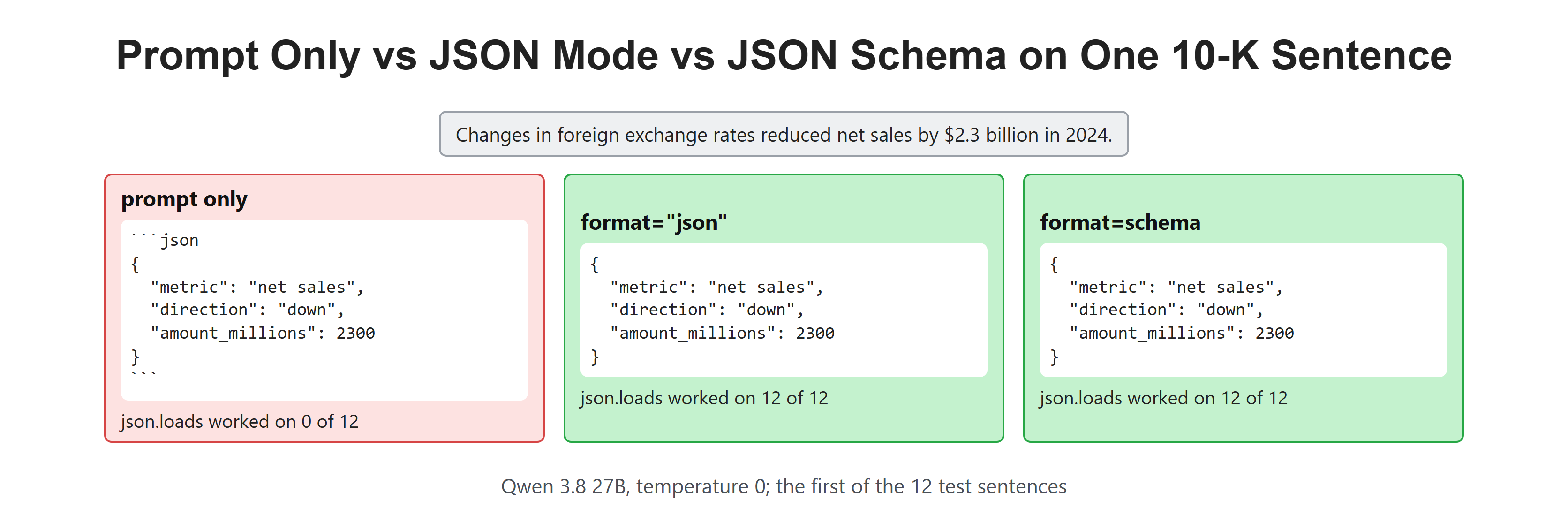
The same sentence, three ways to ask for JSON.
Setup
We use Qwen 3.8 27B in Ollama, with thinking off and the same answer on every run. Our helper has one new argument, format. We will use it to switch between the three setups. We also import Pydantic, which checks that a record has the right keys and types. Let's see the code as below:
import json
from typing import Literal

import ollama
from pydantic import BaseModel, ValidationError

MODEL = "qwen3.8:27b"

def ask(prompt, format=None):
    response = ollama.chat(
        model=MODEL,
        messages=[{"role": "user", "content": prompt}],
        think=False,
        format=format,
        options={"temperature": 0, "seed": 7},
    )
    return response.message.content
Our Test: 12 Sentences Into 12 Records
We reuse the 12 sentences from Few-Shot Prompting, taken from the 2024 10-K filings of Amazon and Alphabet. This time, each answer must be a JSON record with three fields: the metric, the direction, and the amount in millions of dollars.
The Change class describes the record we want. The direction field can only be "up" or "down", and amount_millions must be a whole number.
test_set = [
    ("Changes in foreign exchange rates reduced net sales by $2.3 billion in 2024.",
     ("net sales", "down", 2300)),
    ("Changes in foreign exchange rates reduced North America net sales by $462 million in 2024.",
     ("North America net sales", "down", 462)),
    ("Changes in foreign exchange rates reduced International net sales by $1.8 billion in 2024.",
     ("International net sales", "down", 1800)),
    ("Changes in foreign exchange rates reduced cost of sales by $1.7 billion in 2024.",
     ("cost of sales", "down", 1700)),
    ("Changes in foreign exchange rates reduced technology and infrastructure costs by $244 million in 2024.",
     ("technology and infrastructure costs", "down", 244)),
    ("Changes in foreign exchange rates reduced sales and marketing costs by $263 million in 2024.",
     ("sales and marketing costs", "down", 263)),
    ("Changes in foreign exchange rates positively impacted operating income by $240 million in 2024.",
     ("operating income", "up", 240)),
    ("Google subscriptions, platforms, and devices revenues increased $5.7 billion from 2023 to 2024.",
     ("Google subscriptions, platforms, and devices revenues", "up", 5700)),
    ("Google Cloud revenues increased $10.1 billion from 2023 to 2024 primarily driven by growth "
     "in Google Cloud Platform largely from infrastructure services.",
     ("Google Cloud revenues", "up", 10100)),
    ("Google Services operating income increased $25.4 billion from 2023 to 2024.",
     ("Google Services operating income", "up", 25400)),
    ("Google Cloud operating income increased $4.4 billion from 2023 to 2024.",
     ("Google Cloud operating income", "up", 4400)),
    ("Other Bets operating loss increased $349 million from 2023 to 2024.",
     ("Other Bets operating loss", "up", 349)),
]

class Change(BaseModel):
    metric: str
    direction: Literal["up", "down"]
    amount_millions: int
Next, we write a checker.
It counts three things for each setup:
- Parsed: Python's
json.loadscan read the text. - Valid: the parsed data matches our
Changerecord. - Right: all three fields equal our hand-written answer.
def check(answers):
    parsed = valid = right = 0
    for text, (_, truth) in zip(answers, test_set):
        try:
            data = json.loads(text)
        except json.JSONDecodeError:
            continue
        parsed += 1
        try:
            record = Change.model_validate(data)
        except ValidationError:
            continue
        valid += 1
        right += (record.metric, record.direction, record.amount_millions) == truth
return f"parsed {parsed:2}/12 valid {valid:2}/12 all fields right {right:2}/12"What Happens When We Ask for JSON in the Prompt?
First, the simple way. We describe the keys in the prompt and ask for a JSON object. Let's test it:
instruction = (
    "Read the sentence from a 10-K filing. Return a JSON object with the keys "
    "metric, direction and amount_millions. Direction is up or down. "
    "amount_millions is the amount in millions of dollars, as a whole number."
)

prompt_only = [ask(f"{instruction}\n\nSentence: {s}") for s, _ in test_set]
print(prompt_only[0])
print(check(prompt_only))```json
{
"metric": "net sales",
"direction": "down",
"amount_millions": 2300
}parsed 0/12 valid 0/12 all fields right 0/12
Here, we can see a neat JSON object inside a markdown code fence. A chat model is trained to show code inside fences, because that looks good in a chat window. But `json.loads` reads the backticks as broken JSON, so all 12 answers failed to parse.

A common fix is to cut the fences off with string code:

```python
def strip_fences(text):
    text = text.strip()
    if text.startswith("```"):
        text = text.split("\n", 1)[1].rsplit("```", 1)[0]
    return text

stripped = [strip_fences(t) for t in prompt_only]
print(check(stripped))
for text, (s, truth) in zip(stripped, test_set):
    record = Change.model_validate_json(text)
    if (record.metric, record.direction, record.amount_millions) != truth:
print(f" got {record.amount_millions:>6} {record.direction:4} {record.metric!r} want {truth[2]:>6} {truth[1]:4} {truth[0]!r}")parsed 12/12 valid 12/12 all fields right 11/12
got 462 down 'net sales' want 462 down 'North America net sales'Here, we can see 12 records parsed and 11 right. One record dropped "North America" from the metric name. The fence fix works today, but it is fragile. Our code now depends on how the model chooses to wrap its answer, and a small change in the prompt or the model can break it again.
What Is JSON Mode?
So, here comes JSON mode to the rescue. With format="json", Ollama makes sure that the answer is valid JSON. It does not ask the model nicely. It changes how tokens are picked, as we will see below. Let's run the same prompt in JSON mode:
json_mode = [ask(f"{instruction}\n\nSentence: {s}", format="json") for s, _ in test_set]
print(json_mode[0])
print(check(json_mode)){
"metric": "net sales",
"direction": "down",
"amount_millions": 2300
}
parsed 12/12 valid 12/12 all fields right 12/12Here, we can see plain JSON with no fences, and all 12 records parsed, valid and right.
But JSON mode only promises valid JSON. It says nothing about the keys. Our prompt listed the keys, so the model used them. Let's see what happens with a short prompt that does not list them:
loose = [ask(f"Extract the change from this 10-K sentence as JSON.\n\nSentence: {s}", format="json") for s, _ in test_set]
for text in loose[:3]:
    print(text.replace("\n", " "))
print(check(loose)){ "metric": "net sales", "change_amount": -2300000000, "currency": "USD", "period": "2024", "driver": "foreign exchange rates" }
{ "metric": "North America net sales", "change_amount": -462000000, "currency": "USD", "period": "2024", "driver": "Changes in foreign exchange rates" }
{ "metric": "International net sales", "change_amount": -1.8, "unit": "billion", "currency": "USD", "period": "2024", "driver": "Changes in foreign exchange rates" }
parsed 12/12 valid 0/12 all fields right 0/12Here, we can see valid JSON that our code cannot use. The model made up its own keys, like change_amount and currency. Two answers gave the amount in full dollars, like -2300000000. Another gave -1.8 with a separate unit of "billion". All 12 parsed, and none matched our record.
What Is a JSON Schema?
A JSON schema is a description of the exact shape we want: the keys, the type of each value, and the allowed choices. Pydantic can write it for us from the Change class:
schema = Change.model_json_schema()
print(json.dumps(schema, indent=2)){
"properties": {
"metric": {
"title": "Metric",
"type": "string"
},
"direction": {
"enum": [
"up",
"down"
],
"title": "Direction",
"type": "string"
},
"amount_millions": {
"title": "Amount Millions",
"type": "integer"
}
},
"required": [
"metric",
"direction",
"amount_millions"
],
"title": "Change",
"type": "object"
}Here, we can see everything our code expects. metric is a string, direction is one of "up" or "down", amount_millions is an integer, and all three keys are required. Now, we pass this schema as the format:
with_schema = [ask(f"{instruction}\n\nSentence: {s}", format=schema) for s, _ in test_set]
print(with_schema[0])
print(check(with_schema)){
"metric": "net sales",
"direction": "down",
"amount_millions": 2300
}
parsed 12/12 valid 12/12 all fields right 12/12Here, we can see 12 of 12 again, the same as JSON mode with a good prompt. The difference shows up when the prompt is weak. Let's use the same short prompt that broke JSON mode, but with the schema:
bare = [ask(f"Extract the change from this 10-K sentence.\n\nSentence: {s}", format=schema) for s, _ in test_set]
print(check(bare))
for text, (s, truth) in zip(bare, test_set):
    record = Change.model_validate_json(text)
    if (record.metric, record.direction, record.amount_millions) != truth:
print(f" got {record.amount_millions:>6} {record.direction:4} {record.metric!r} want {truth[2]:>6} {truth[1]:4} {truth[0]!r}")parsed 12/12 valid 12/12 all fields right 10/12
got 25400 up 'operating income' want 25400 up 'Google Services operating income'
got 4400 up 'operating income' want 4400 up 'Google Cloud operating income'Here, we can see all 12 records valid. The keys and types are now fixed by the schema, even though the prompt never named them. The amounts were even in millions, likely because the key itself is named amount_millions. Two metric names lost their segment and became just "operating income". The schema can force a string. It cannot force the right string.
Let me tabulate the five runs for your better understanding:
| Setup | Parsed | Valid record | All fields right |
|---|---|---|---|
| JSON asked in the prompt | 0 of 12 | 0 of 12 | 0 of 12 |
| Same, with fences cut off | 12 of 12 | 12 of 12 | 11 of 12 |
| JSON mode, keys in the prompt | 12 of 12 | 12 of 12 | 12 of 12 |
| JSON mode, short prompt | 12 of 12 | 0 of 12 | 0 of 12 |
| JSON schema, short prompt | 12 of 12 | 12 of 12 | 10 of 12 |
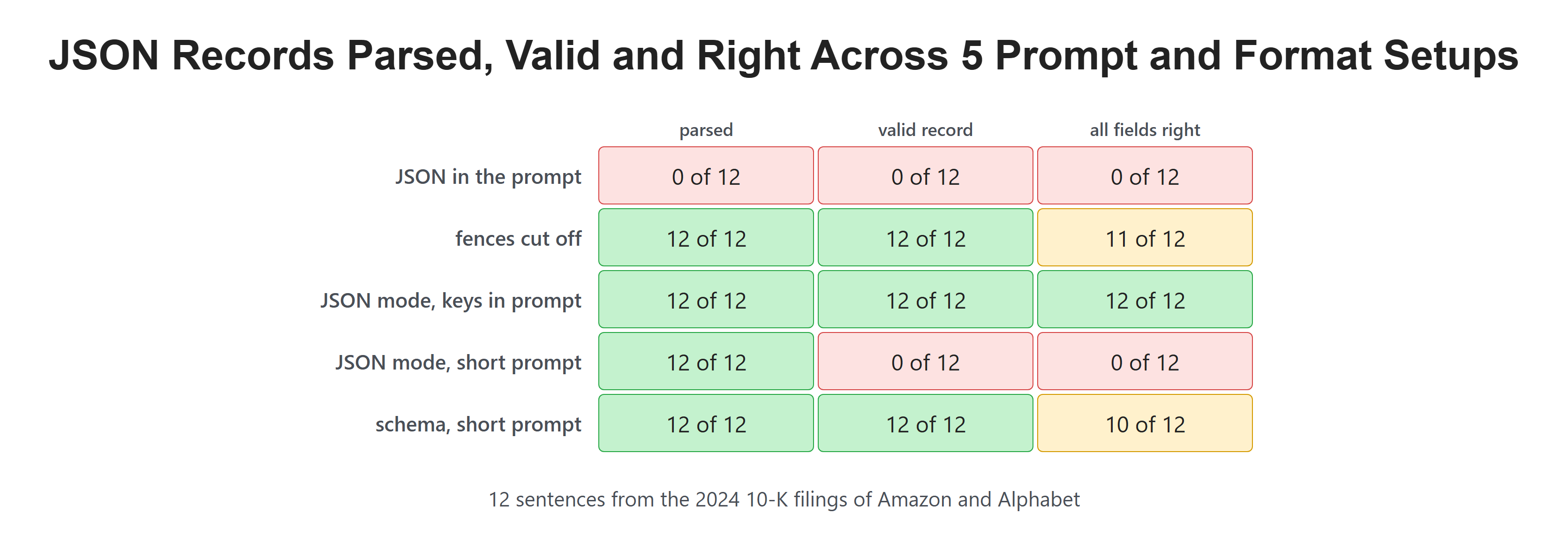
JSON mode fixed the syntax. The schema fixed the shape.
How Does Constrained Decoding Work?
How can Ollama promise valid JSON at all? In Temperature, Top-k and Top-p, we saw that the model makes a list of possible next tokens, and a setting then cuts that list before the pick. Structured output adds one more cut.
Ollama turns the schema into a grammar: a set of rules for which text is allowed next. At each step, any token that would break the rules is removed from the list. This is called constrained decoding. Let's say the model has just written {"direction": ". The schema says the value must be "up" or "down", so every token except the start of those two words is removed. In the same way, at the very start of the answer only { fits the rules, so a code fence can never start.
This also shows the limit. The grammar only removes tokens that break the shape. Inside a string, almost any text fits, so "operating income" and "Google Cloud operating income" are both allowed. The model's own judgment still picks between them.
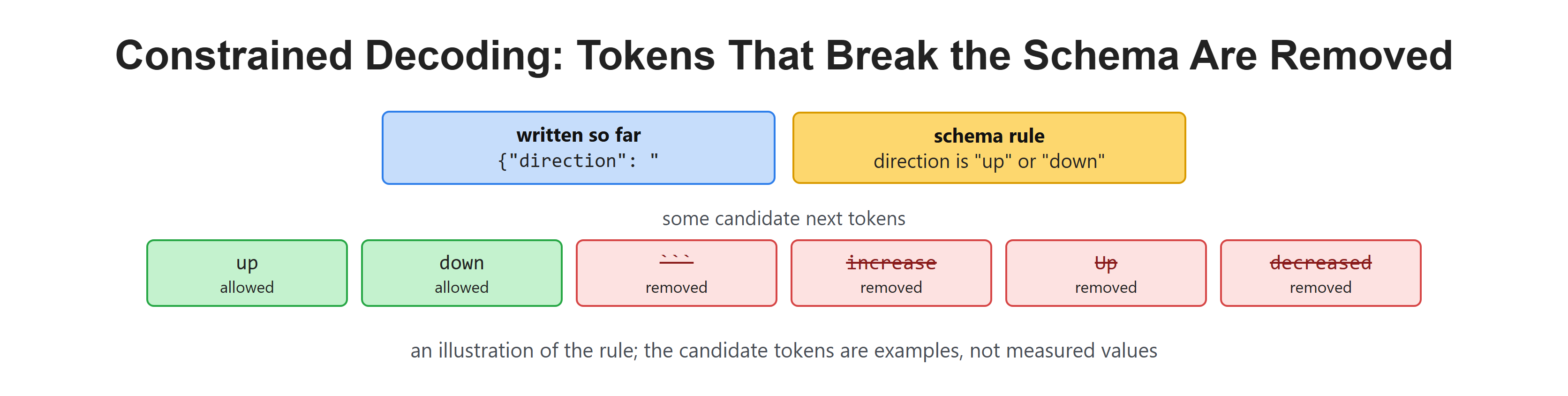
The grammar cuts the list before the pick, just like top-k and top-p.
How Should We Use Structured Output?
Our tests point to a simple recipe:
- Pass a JSON schema as
format, not justformat="json". - Still describe the fields in the prompt. The schema fixes the shape, and the prompt helps the model fill it with the right values.
- Name keys clearly. A key like
amount_millionstells the model the unit. - Validate every answer with Pydantic anyway, and check the values that matter, like amounts, against the source.
Recap
This is how structured output works. We started by asking for JSON in the prompt, and every answer came wrapped in a code fence that json.loads could not read. JSON mode removed the fences, but with a short prompt it made up its own keys. A JSON schema fixed the keys and types of all 12 records, because constrained decoding removes every token that would break the shape. Finally, we saw that a schema guarantees the shape, not the truth, so two metric names still came back too short.
In the next lesson, we will look at prompt caching, and how the order of the parts in a long 10-K prompt decides how much work the model can skip.