We asked Qwen 3.8 the same finance question 10 times at temperature 0.7, without the 10-K excerpt. We got 9 different answers, from 0.13 billion to $5.2 billion. With the excerpt, all 10 answers said $240 million, even at a high temperature. But there is a shocking difference hiding underneath: at temperature 0, the guess looked just as confident as the fact.
Temperature, top-k and top-p are settings that control how the model picks each next token. In simple words, the model does not write one fixed answer. It writes a list of possible next tokens with a chance for each, and these settings decide how it picks from that list. In this blog, we will look at the real list from Qwen 3.8 and see what each setting does to it.
The model gives every possible next token a chance. A setting then picks one.
Setup
We use Qwen 3.8 27B in Ollama, with thinking off. This time, our helper takes the sampling settings as keyword arguments, so we can change them on every call. Let's see the code as below:
import math
import ollama

MODEL = "qwen3.8:27b"

def ask(prompt, **options):
    response = ollama.chat(
        model=MODEL,
        messages=[{"role": "user", "content": prompt}],
        think=False,
        options=options,
    )
    return response.message.content.strip()
How Does the Model Pick the Next Word?
In Why Text Generation Is Slow, we saw that a model writes one token at a time. At each step, it gives every token in its vocabulary a probability. Then one token is picked, added to the text, and the step repeats.
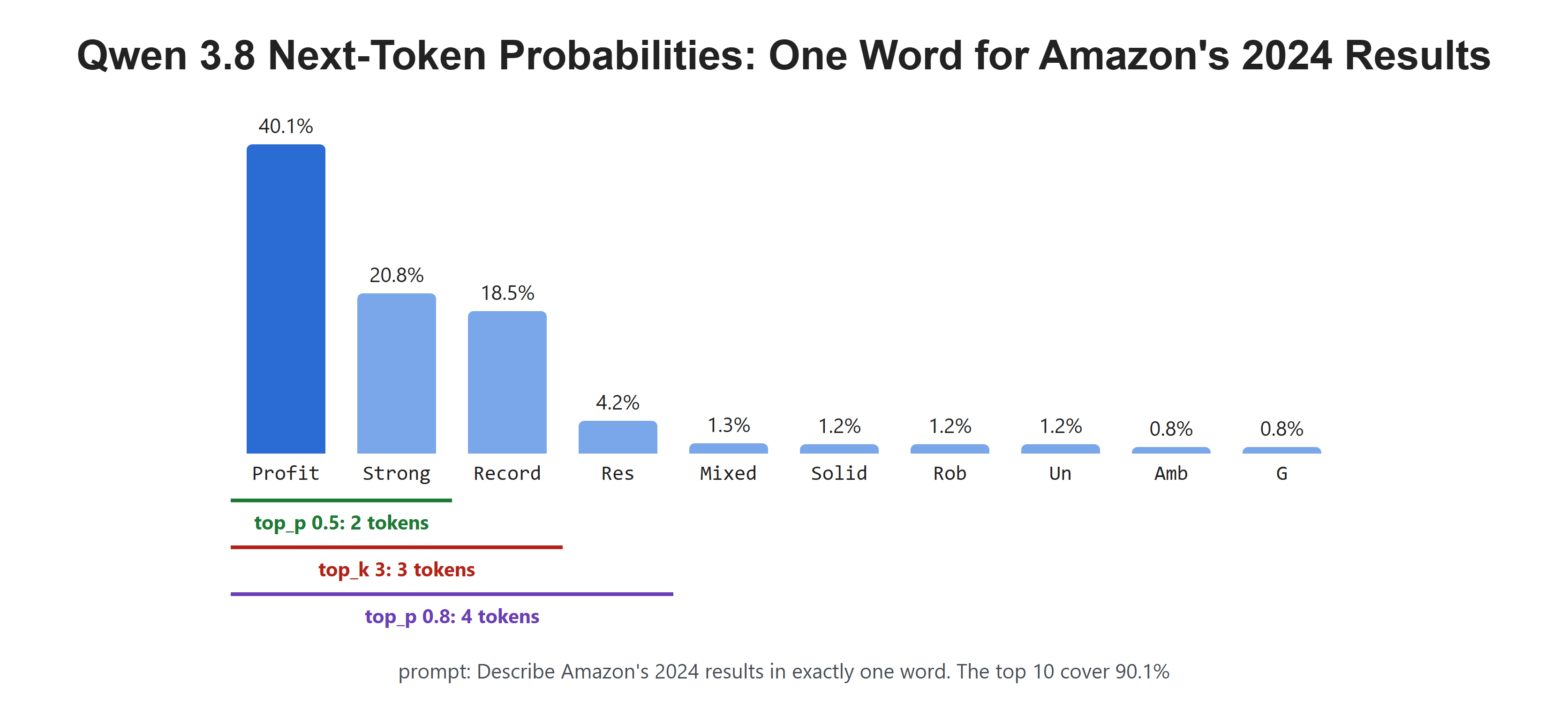
Let's see this list for a real prompt. We ask for one word about Amazon's 2024 results, and Ollama returns the top 10 candidates for the first token:
prompt = "Describe Amazon's 2024 results in exactly one word."

response = ollama.chat(
    model=MODEL,
    messages=[{"role": "user", "content": prompt}],
    think=False,
    options={"temperature": 0, "num_predict": 1},
    logprobs=True,
    top_logprobs=10,
)

first = response.logprobs[0]
top10 = [(t.token, math.exp(t.logprob)) for t in first.top_logprobs]
for token, p in top10:
    print(f"{token!r:10} {p:6.1%}")
print(f"top 10 cover {sum(p for _, p in top10):.1%}")'Profit' 40.1%
'Strong' 20.8%
'Record' 18.5%
'Res' 4.2%
'Mixed' 1.3%
'Solid' 1.2%
'Rob' 1.2%
'Un' 1.2%
'Amb' 0.8%
'G' 0.8%
top 10 cover 90.1%Here, we can see that the model is not sure. "Profit" is the favorite at 40.1%, but "Strong" and "Record" are close behind. The token "Res" is the start of a longer word like "Resilient". The top 10 cover 90.1% of the chance. The rest is spread over thousands of other tokens.
These numbers are the model's raw output. We asked for them at temperature 0 and at temperature 1.5, and they were the same both times. The settings below act after the model has made this list.
What Does Temperature Do?
At temperature 0, the model always picks the top token. This is called greedy decoding, and it is what we used in every earlier lesson. It gives the same answer on every run.
At any other temperature, the model draws a token at random, with each token's chance as its weight.
Before the draw, the temperature reshapes the list:
- A temperature below 1 makes the favorites stronger.
- A temperature of 1 keeps the list as it is.
- A temperature above 1 flattens the list, so rare tokens get a bigger share.
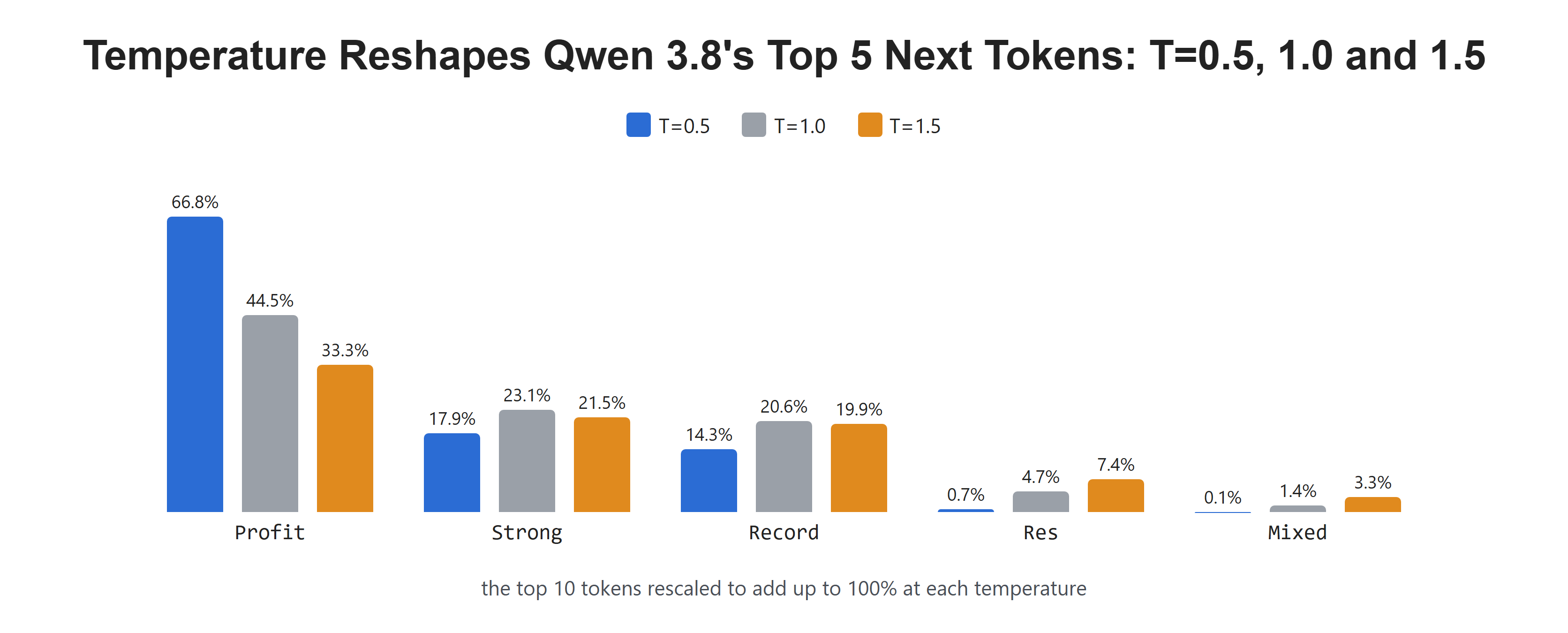
In math terms, temperature divides the scores before they turn into probabilities. That is the same as raising each probability to the power 1/T and scaling them so they add up to 100% again. We only have the top 10 tokens, so we scale those 10 to add up to 100%. That is why the T=1.0 column shows 44.5% for "Profit" and not 40.1%. Let's see the code as below:
def with_temperature(probs, T):
    weights = [p ** (1 / T) for p in probs]
    total = sum(weights)
    return [w / total for w in weights]

tokens = [t for t, _ in top10]
probs = [p for _, p in top10]
print(f"{'token':10}" + "".join(f"  T={T:<5}" for T in (0.5, 1.0, 1.5)))
for i, token in enumerate(tokens[:5]):
    row = "".join(f"  {with_temperature(probs, T)[i]:6.1%} " for T in (0.5, 1.0, 1.5))
print(f"{token!r:10}{row}")token T=0.5 T=1.0 T=1.5
'Profit' 66.8% 44.5% 33.3%
'Strong' 17.9% 23.1% 21.5%
'Record' 14.3% 20.6% 19.9%
'Res' 0.7% 4.7% 7.4%
'Mixed' 0.1% 1.4% 3.3%Here, we can see the list change shape. At T=0.5, "Profit" jumps to 66.8%. At T=1.5, it drops to 33.3%, and "Res" grows from 0.7% to 7.4%. A higher temperature gives the long tail more room.
What Do Top-k and Top-p Do?
Top-k and top-p cut the list before the draw. Only the tokens that are left can be picked.
- Top-k keeps the k most likely tokens. With top_k 3, only three tokens can be picked.
- Top-p keeps the smallest group of top tokens whose chances add up to at least p. The size of the group changes with the list.
Let's apply both to our list:
def top_k(tokens, probs, k):
    return tokens[:k]

def top_p(tokens, probs, p):
    kept, total = [], 0.0
    for token, prob in zip(tokens, probs):
        kept.append(token)
        total += prob
        if total >= p:
            break
    return kept

print("top_k 3   :", top_k(tokens, probs, 3))
print("top_p 0.5 :", top_p(tokens, probs, 0.5))
print("top_p 0.8 :", top_p(tokens, probs, 0.8))top_k 3 : ['Profit', 'Strong', 'Record']
top_p 0.5 : ['Profit', 'Strong']
top_p 0.8 : ['Profit', 'Strong', 'Record', 'Res']Here, we can see top_k 3 keep "Profit", "Strong" and "Record". Top_p 0.5 keeps only two tokens, because "Profit" and "Strong" already add up to 60.9%. Top_p 0.8 keeps four, because the first three add up to only 79.4%.
This is the main difference. Top-k always keeps the same number of tokens. Top-p keeps few tokens when the model is sure and more tokens when it is not.
What Happens When We Sample for Real?
Now, let's ask the one-word question 20 times with each setting. Each run uses a different seed, so the random draws are different. Let's test it:
from collections import Counter

settings = {
    "temperature 0":             {"temperature": 0},
    "temperature 0.7":           {"temperature": 0.7},
    "temperature 1.5":           {"temperature": 1.5},
    "temperature 1.5, top_k 3":  {"temperature": 1.5, "top_k": 3},
}

for name, options in settings.items():
    words = Counter(ask(prompt, seed=s, num_predict=8, **options).strip(".!*\n ") for s in range(20))
print(f"{name:26} {len(words):2} different: {dict(words.most_common())}")temperature 0 1 different: {'Profitable': 20}
temperature 0.7 4 different: {'Profitable': 13, 'Record': 4, 'Strong': 2, 'Unpredictable': 1}
temperature 1.5 9 different: {'Profitable': 9, 'Strong': 3, 'Record': 2, 'Ambitious': 1, 'Profit': 1, 'Solid': 1, 'Unprecedented': 1, 'Robust': 1, 'Resilient': 1}
temperature 1.5, top_k 3 4 different: {'Profitable': 11, 'Record': 5, 'Strong': 3, 'Profit': 1}Here, we can see the same story as in our tables:
- At temperature 0, we got "Profitable" 20 times.
- At temperature 0.7, we got 4 different words, and "Profitable" won 13 times.
- At temperature 1.5, we got 9 different words, including "Ambitious" and "Unprecedented".
- With top_k 3 added, the tail was cut, and we were back to 4 words.
Let me tabulate the settings for your better understanding:
| Setting | What it changes | Effect in our test |
|---|---|---|
temperature 0 |
Always picks the top token | 1 word in 20 runs |
temperature 0.7 |
Draws, favorites stay strong | 4 different words |
temperature 1.5 |
Draws from a flatter list | 9 different words |
top_k 3 |
Keeps only the 3 likeliest tokens | Back to 4 words at temperature 1.5 |
top_p 0.8 |
Keeps the top tokens up to 80% | 4 tokens in our list |
A low temperature sharpens the list. A high temperature flattens it.
Does Temperature Break Facts?
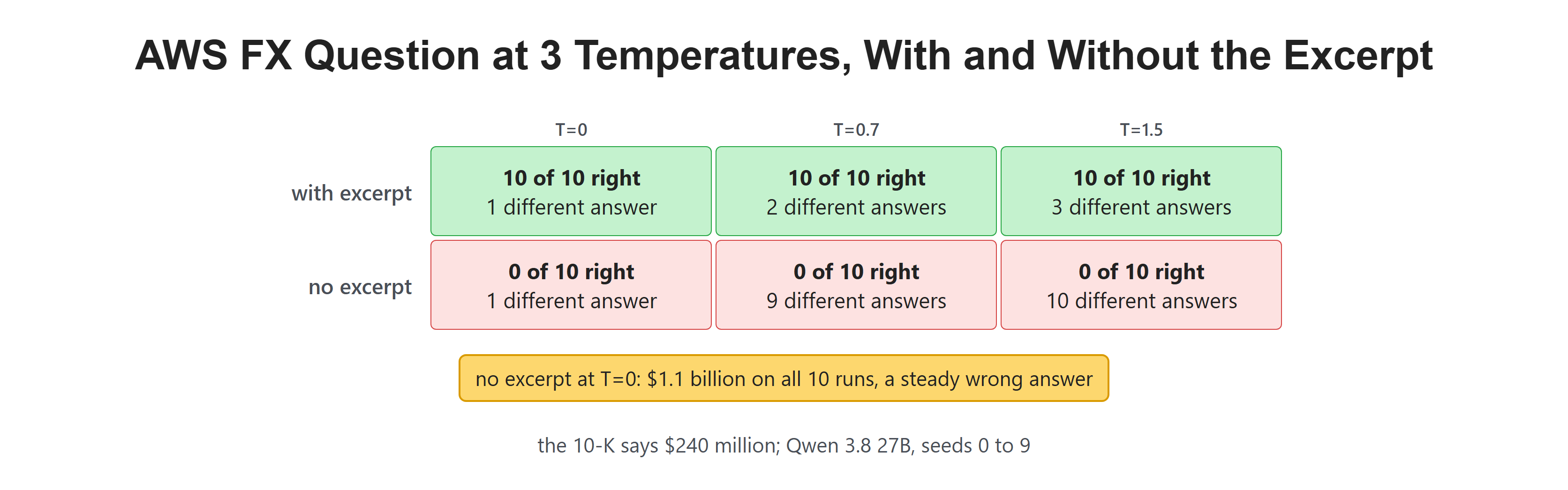
A one-word summary is a matter of taste. A number in a finance answer is not. So let's ask a fact question from lesson 1: how much did exchange rates change AWS operating income in 2024? The answer in the 10-K is $240 million. We ask it 10 times at each temperature, with the excerpt and without it:
excerpt = ("Changes in foreign exchange rates positively impacted AWS operating income "
           "by $240 million in 2024.")
question = "By how much did exchange rates change AWS operating income in 2024? Reply with the amount only."

results = {}
for label, text in [("with excerpt", f"{excerpt}\n\n{question}"), ("no excerpt", question)]:
    for T in (0, 0.7, 1.5):
        answers = Counter(ask(text, temperature=T, seed=s, num_predict=20) for s in range(10))
        right = sum(n for a, n in answers.items() if "240" in a)
        results[label, T] = answers
print(f"{label:13} T={T:<4} right {right:2}/10 {len(answers):2} different answers")with excerpt T=0 right 10/10 1 different answers
with excerpt T=0.7 right 10/10 2 different answers
with excerpt T=1.5 right 10/10 3 different answers
no excerpt T=0 right 0/10 1 different answers
no excerpt T=0.7 right 0/10 9 different answers
no excerpt T=1.5 right 0/10 10 different answersHere, we can see a big split:
- With the excerpt, every answer at every temperature was right. The few different answers were only different ways to write it, like "$240 million" and "240".
- Without the excerpt, no answer was right. At temperature 0, all 10 runs gave the same wrong answer. At 0.7 and 1.5, almost every run gave a different one.
Let's print the wrong answers:
print("T=0:  ", *results["no excerpt", 0])
print("T=0.7:", ", ".join(results["no excerpt", 0.7]))T=0: $1.1 billion
T=0.7: $372 million, 0.13 billion, $5.2 billion, $300 million, $1,150 million, $353 million, $1.2 billion, $186 million, $1.5 billionHere, we can see why temperature 0 can fool us. At temperature 0, the model said $1.1 billion every time, so it looked sure. At 0.7, the same question gave 0.13 billion, $5.2 billion and many amounts in between. The model never knew the number. Temperature 0 only hid that.
When the fact is in the prompt, the right token gets nearly all the chance, so even a flat list still picks it. When the fact is missing, the chance is spread thin, and every draw lands somewhere new. This gives us a useful trick. Asking the same question a few times at a higher temperature is a cheap way to see if the model is guessing.
With the excerpt, the right answer held. Without it, the answers scattered.
What Does the Seed Do?
The draw is random, but the random numbers come from a seed. The same seed gives the same draws, so the same answer. Let's ask twice with each of five seeds, at temperature 1.5:
for s in range(5):
    first = ask(prompt, temperature=1.5, seed=s, num_predict=8)
    again = ask(prompt, temperature=1.5, seed=s, num_predict=8)
print(f"seed {s}: {first:14} again: {again}")seed 0: Record. again: Record.
seed 1: Ambitious again: Ambitious
seed 2: Profit again: Profit
seed 3: Profitable again: Profitable
seed 4: Solid again: SolidHere, we can see each seed repeat its own answer, while different seeds give different words. So a seed makes a test repeatable even at a high temperature. That is why our earlier lessons used both temperature 0 and a fixed seed.
What Settings Does Qwen 3.8 Use by Default?
If we send no options at all, Ollama uses the settings in the model file. For Qwen 3.8, these are temperature 1, top_k 20 and top_p 0.95. There is no fixed seed, so every run draws new random numbers. Let's ask our one-word question 10 times with no options:
defaults = Counter(ask(prompt, num_predict=8).strip(".!*\n ") for _ in range(10))
print(f"{len(defaults)} different: {dict(defaults.most_common())}")3 different: {'Profitable': 5, 'Strong': 3, 'Record': 2}Here, we can see more than one word, even though we changed nothing. This surprises many people. An app that sends no options does not get the same answer twice.
Let me tabulate a simple guide for finance work:
| Task | Suggested setting | Why |
|---|---|---|
| Extract numbers, fill a table | Temperature 0 | One answer, easy to test |
| Answer from a 10-K excerpt | Temperature 0 or low | The fact is in the prompt anyway |
| Draft a summary or a headline | The model defaults | Some variety helps |
| Check if the model is guessing | Several runs at 0.7 or higher | Scattered answers mean a guess |
Recap
This is how sampling works. We started with the real list of next tokens from Qwen 3.8, where "Profit" led at 40.1%. We saw temperature sharpen or flatten that list, and top-k and top-p cut its tail. Then we sampled for real, and a fact from the 10-K held at every temperature, while the same question without the excerpt gave a different wrong amount on almost every run. Finally, we saw that a seed makes random runs repeatable.
In the next lesson, we will look at chain-of-thought prompting, and whether asking the model to think step by step makes its 10-K math more accurate.