We sent Qwen 3.8 twelve pages of Amazon's 10-K, about 11,000 tokens, with four questions in a row. In one layout, the model needed about 3.5 seconds to read the prompt every time. In the other layout, it needed 3.5 seconds once and about half a second after that. The pages were the same, and so were the questions. But there is a shocking difference hiding underneath: the only change was where the question sat.
Prompt caching means reusing the work the model already did on the start of a prompt. In simple words, if the start of the new prompt is the same as the last one, the model does not need to read it again. In this blog, we will measure the cache in Ollama and learn how to order a prompt so that it gets reused.
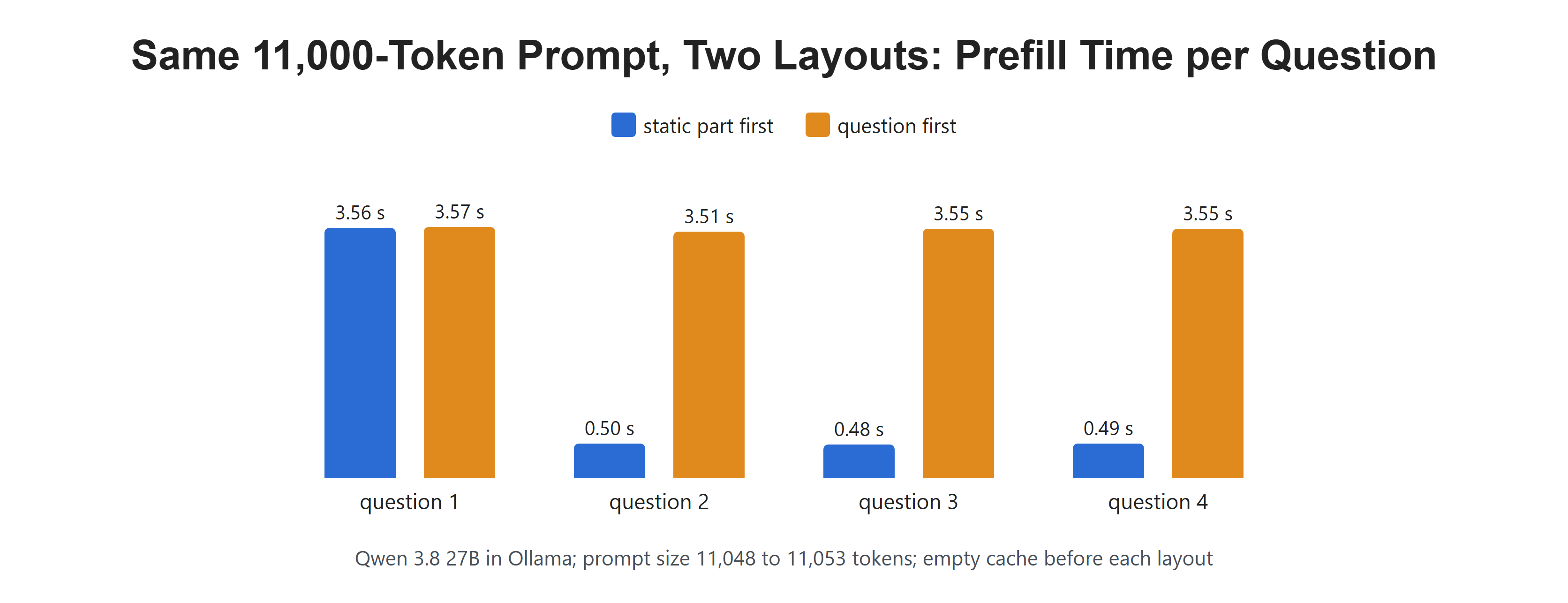
The document-first layout paid the full cost once.
Setup
We use Qwen 3.8 27B in Ollama, with thinking off. Our helper returns four values from each response: the prompt size in tokens, the prefill time, the total time without model loading, and the answer. Ollama reports all of these with every response. Let's see the code as below:
import time
import ollama
from pypdf import PdfReader

MODEL = "qwen3.8:27b"

def ask(messages):
    response = ollama.chat(
        model=MODEL,
        messages=messages,
        think=False,
        options={"temperature": 0, "seed": 7, "num_ctx": 32768, "num_predict": 80},
    )
    return {
        "prompt": response.prompt_eval_count,
        "prefill_s": response.prompt_eval_duration / 1e9,
        "total_s": (response.total_duration - response.load_duration) / 1e9,
        "answer": response.message.content.strip(),
    }
We set num_ctx to 32768, so the model can hold the whole 10-K excerpt. Next, we load twelve pages from Amazon's 2024 10-K, from the MD&A section, and write four questions about them:
pages = [" ".join(page.extract_text().split()) for page in PdfReader("data/amazon 10-k 2024.pdf").pages]
document = "\n\n".join(pages[19:31])

rules = "You are a financial analyst. Answer only from the 10-K pages in the user message. Answer in one sentence."
questions = [
    "What was AWS operating income in 2024?",
    "How much did foreign exchange rates change AWS operating income in 2024?",
    "Why did North America operating income rise in 2024?",
    "What was Amazon's consolidated net sales in 2024?",
]
print(f"{len(document):,} characters of 10-K text")51,559 characters of 10-K textWhat Is Prefill?
Before the model can write a single token, it must read the whole prompt. This first stage is called prefill. In KV Cache Explained, we saw that while reading, the model stores a key and a value for every token in the KV cache. Writing the answer then reuses those stored keys and values.
For a short prompt, prefill is quick. For a 10-K excerpt of about 11,000 tokens, it is the slowest part of a short answer. In Prefill vs Decode, we looked at these two stages in depth.
Now, the useful part. The KV cache for a token depends only on that token and all the tokens before it. So if a new prompt starts with exactly the same tokens as the last one, the stored keys and values for that shared start are still right. Ollama keeps the cache from the last request while the model stays loaded, and it reuses the longest start that matches.
Does the Order of the Prompt Matter?
Let's test two layouts with the same system message, the same document and the same four questions:
- Static part first: the document, then the question.
- Question first: the question, then the document.
Before each layout, we unload the model, so both start with an empty cache. Let's test it:
def static_first(question):
    return [{"role": "system", "content": rules},
            {"role": "user", "content": f"<document>\n{document}\n</document>\n\n{question}"}]

def question_first(question):
    return [{"role": "system", "content": rules},
            {"role": "user", "content": f"{question}\n\n<document>\n{document}\n</document>"}]

def session(layout):
    ollama.generate(model=MODEL, prompt="", keep_alive=0)   # unload: start with an empty cache
    rows = []
    for q in questions:
        r = ask(layout(q))
        rows.append(r)
        print(f"  prompt {r['prompt']:6} tokens   prefill {r['prefill_s']:5.2f} s   total {r['total_s']:5.2f} s")
    return rows

print("static part first:")
static_rows = session(static_first)
print("question first:")
question_rows = session(question_first)static part first:
prompt 11048 tokens prefill 3.56 s total 3.73 s
prompt 11053 tokens prefill 0.50 s total 0.70 s
prompt 11050 tokens prefill 0.48 s total 0.70 s
prompt 11050 tokens prefill 0.49 s total 0.67 s
question first:
prompt 11048 tokens prefill 3.57 s total 3.77 s
prompt 11053 tokens prefill 3.51 s total 4.05 s
prompt 11050 tokens prefill 3.55 s total 4.10 s
prompt 11050 tokens prefill 3.55 s total 4.06 sHere, we can see the whole story:
- With the static part first, the first question took 3.56 seconds of prefill. The next three took about half a second each.
- With the question first, every question took about 3.5 seconds.
Why? In the first layout, the second prompt matches the first one all the way to the end of the document. Only the new question at the end needs to be read. In the second layout, the prompts differ right after the system message, because each one starts with a different question. Everything after that first difference must be read again, and that is almost the whole prompt.
Note one detail in the output. Ollama reported about 11,050 prompt tokens for every call, even the fast ones. The count shows the size of the prompt, not how much of it was read again. The prefill time is what shows the cache at work.
Let me tabulate the result for your better understanding:
| Layout | Prefill, first question | Prefill, next three | Total time, next three |
|---|---|---|---|
| Static part first | 3.56 s | 0.48 to 0.50 s | 0.67 to 0.70 s |
| Question first | 3.57 s | 3.51 to 3.55 s | 4.05 to 4.10 s |
The follow-up questions got about 7 times faster to read, and about 5 times faster in total.
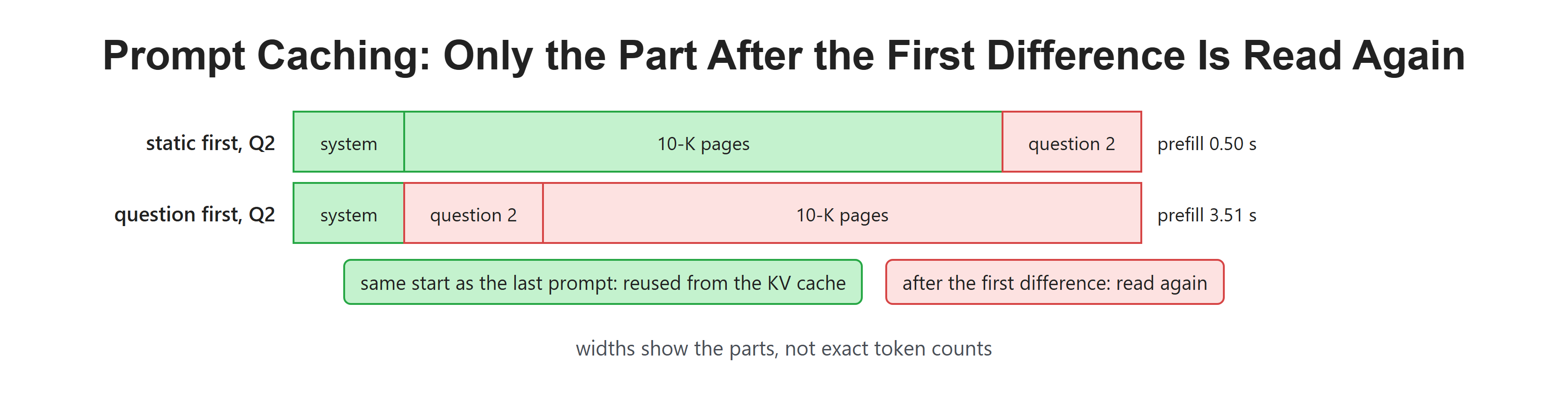
The cache covers the longest matching start, and nothing after the first change.
Did the Answers Change?
Caching only skips repeated work. It should not change the answers. Let's print what the model said in the fast layout:
for q, r in zip(questions, static_rows):
print(f"{q}\n {r['answer']}")What was AWS operating income in 2024?
AWS operating income in 2024 was $39,834 million.
How much did foreign exchange rates change AWS operating income in 2024?
Changes in foreign exchange rates positively impacted AWS operating income by $240 million in 2024.
Why did North America operating income rise in 2024?
North America operating income rose in 2024 primarily due to increased unit sales and increased advertising sales, partially offset by increased fulfillment and shipping costs.
What was Amazon's consolidated net sales in 2024?
Amazon's consolidated net sales in 2024 were $637,959 million.Here, we can see four correct answers from the 10-K pages, including the $240 million exchange rate effect from lesson 1. The cached keys and values are the same numbers the model would have computed again, so the answers are the same.
How Can a Small Change Break the Cache?
Many apps add the current date and time to the top of the system prompt, so the model knows what day it is. It looks harmless. Let's add a clock line above our rules and keep the document first:
def with_clock(question):
    stamped = f"Current time: {time.strftime('%Y-%m-%d %H:%M:%S')}\n{rules}"
    return [{"role": "system", "content": stamped},
            {"role": "user", "content": f"<document>\n{document}\n</document>\n\n{question}"}]

print("static part first, but a clock at the top:")
clock_rows = []
for q in questions:
    time.sleep(1.1)
    clock_rows.append(r := ask(with_clock(q)))
print(f" prompt {r['prompt']:6} tokens prefill {r['prefill_s']:5.2f} s total {r['total_s']:5.2f} s")static part first, but a clock at the top:
prompt 11072 tokens prefill 3.57 s total 4.05 s
prompt 11077 tokens prefill 3.58 s total 4.14 s
prompt 11074 tokens prefill 3.57 s total 4.17 s
prompt 11074 tokens prefill 3.53 s total 4.09 sHere, we can see every question back at about 3.5 seconds. The clock changes every second, and it sits near the very start of the prompt. So every prompt differs from the last one almost at once, and the whole document after it must be read again. One line of 24 tokens undid the whole benefit.
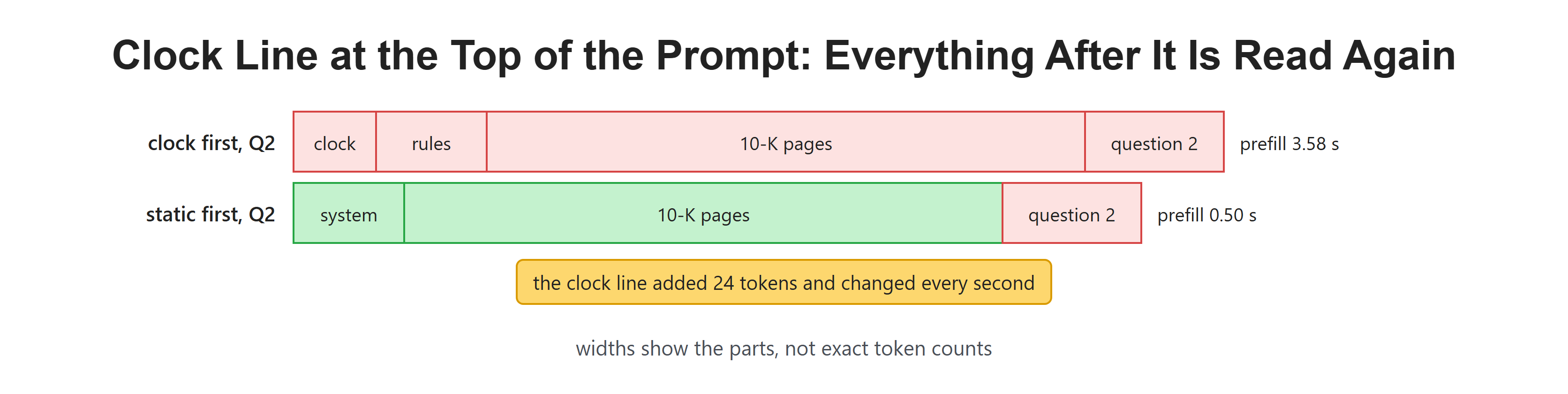
A line that changes every second sits before the 10-K pages.
If an app needs the date, it should go near the end of the prompt, after the long static part, or be rounded to the day so it rarely changes.
How Should We Order a Long Prompt?
The rule is simple: put what stays the same first, and what changes last. Let me tabulate a good order for a finance assistant:
| Order | Part | Changes how often |
|---|---|---|
| 1 | System message: role and rules | Almost never |
| 2 | Few-shot examples, if any | Rarely |
| 3 | The 10-K pages or other documents | Per document |
| 4 | Chat history | Every turn, but only at the end |
| 5 | The new question, and anything with a date or time | Every request |
This order also matches the other lessons. The rules sit at the top, as in System Prompts and Roles, and the document goes inside tags before the question.
Two more points are worth knowing. First, the cache lives only while the model stays loaded. Ollama unloads a model after a few idle minutes by default, and the next request starts cold. Second, hosted APIs often have their own prompt caching, sometimes with a lower price for cached tokens. The rules differ by provider, so check the docs before counting on it. The idea is the same everywhere: only a matching start can be reused.
Recap
This is how prompt caching works. We started with an 11,000-token 10-K prompt that took about 3.5 seconds to read. With the document first and the question last, follow-up questions reused the cached start and needed only about half a second of prefill. With the question first, or with a clock at the top, every prompt differed early, and every call paid the full price again.
In the next lesson, we will look at long prompts, and whether the model finds a fact equally well at the start, the middle and the end of a long 10-K context.