Two new open models came out this month, and both fit under 35B parameters. NVIDIA released Nemotron 3.5 Lightning on August 11, and Meta released Muse Glimmer 30B a little earlier. Most comparisons stop at the vendor benchmark tables.
In this blog, we will ask a simpler question. What happens when we run both models on one consumer GPU, side by side, on everyday tasks? So we did exactly that. One RTX 5090 with 32GB of VRAM, Ollama, a 64K context window, and ten simple tasks. Same prompts for both models.
How Are These Two 30B Models Different?
On paper these look like twins. They are not. They disagree on almost every design choice, which makes the comparison worth running.
| Nemotron 3.5 Lightning | Muse Glimmer 30B | |
|---|---|---|
| Maker | NVIDIA | Meta |
| Architecture | Mixture of Experts + Mamba-2 hybrid | Dense transformer |
| Total parameters | 30B | ~29.6B |
| Active per token | only 3B | all ~29.6B |
| Modality | Text only | Text + images (vision encoder built in) |
| Max context | 1M tokens | 131K tokens |
| License | OpenMDW-1.1 | Apache 2.0 |
In simple words, Nemotron wakes up only 3B of its 30B parameters for each token, so it should be fast. Glimmer uses all of its parameters on every token, so it should be smarter per parameter but slower. Glimmer can also look at images, which Nemotron cannot do at all.
Our Test Setup
- GPU: RTX 5090, 32GB VRAM
- Runner: Ollama 0.32.8 on Windows 11
- Context window: 65,536 tokens for every test
- Temperature: 0.2, one run per task
Note
We ran the 4-bit builds that Ollama ships: a 24GB GGUF for Nemotron and a 17GB K-Quant for Glimmer. These are not the exact NVFP4 and BF16 files from the Hugging Face pages. The NVFP4 build needs TensorRT-LLM or vLLM, which is not a comfortable setup on Windows. For local use through Ollama, what we tested is what we would actually run.
The Ten Tasks
We kept the tasks simple on purpose.
These are the things people ask a local model to do all day:
- Multiply 847 by 36
- A small money word problem
- The classic "Sara has 3 brothers and 2 sisters" riddle
- Capital of Australia
- Write a palindrome checker in Python
- Fix a buggy sum function (the classic off-by-one)
- Summarize a paragraph in one sentence
- Output exactly three bullet points, nothing else
- Extract name, age, and city as JSON
- Find one hidden fact buried in a 40,000-token document
The two coding answers were not judged by eye. We executed the generated code and ran test cases against it. The needle test used the full 64K window, with the secret code planted in the middle of the document.
Did Either Model Get a Task Wrong?
Both scored 10 out of 10. Every math answer was correct. Both code functions passed all tests. Both found the hidden code "BLUE-742" in the 40K-token haystack. Both produced valid JSON and exactly three bullets when asked.
We expected at least one slip somewhere. Nothing. Simple tasks are simply solved now, even by 4-bit quantized 30B models running on a desk. Two years ago this was not true. So if our workload is everyday tasks like these, accuracy will not help us pick between these two. Speed and memory will.
Which Model Generates Tokens Faster?
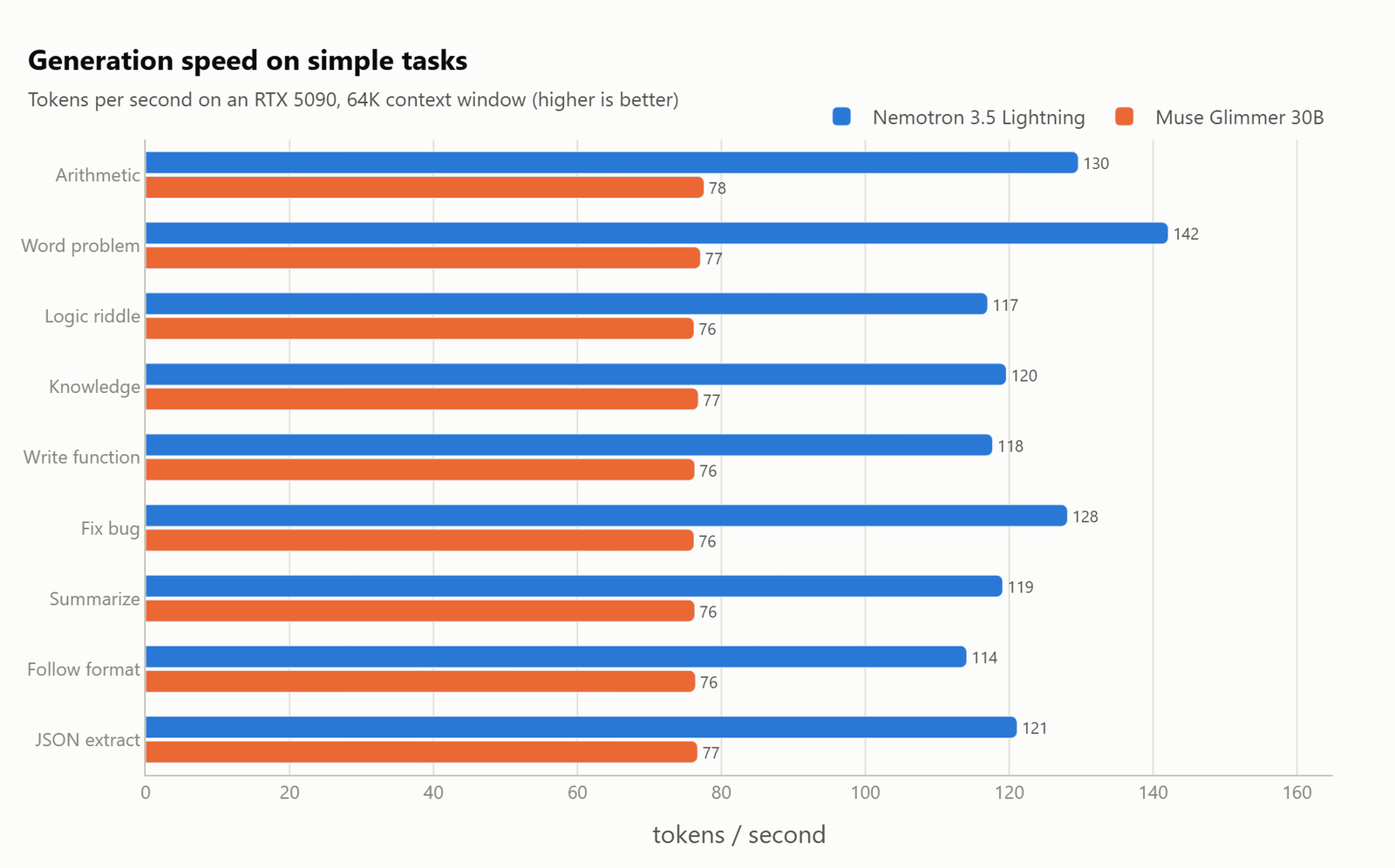
Nemotron averaged about 123 tokens per second across the short tasks. Glimmer sat at a very steady 76. That is the MoE design doing its job. It only computes with 3B parameters per token, so each token is cheap.
Steady is worth a mention too. Glimmer printed 76 to 78 tokens per second on every single task, like a metronome. Nemotron bounced between 114 and 142 depending on the task.
What Happens to Speed at Long Context?
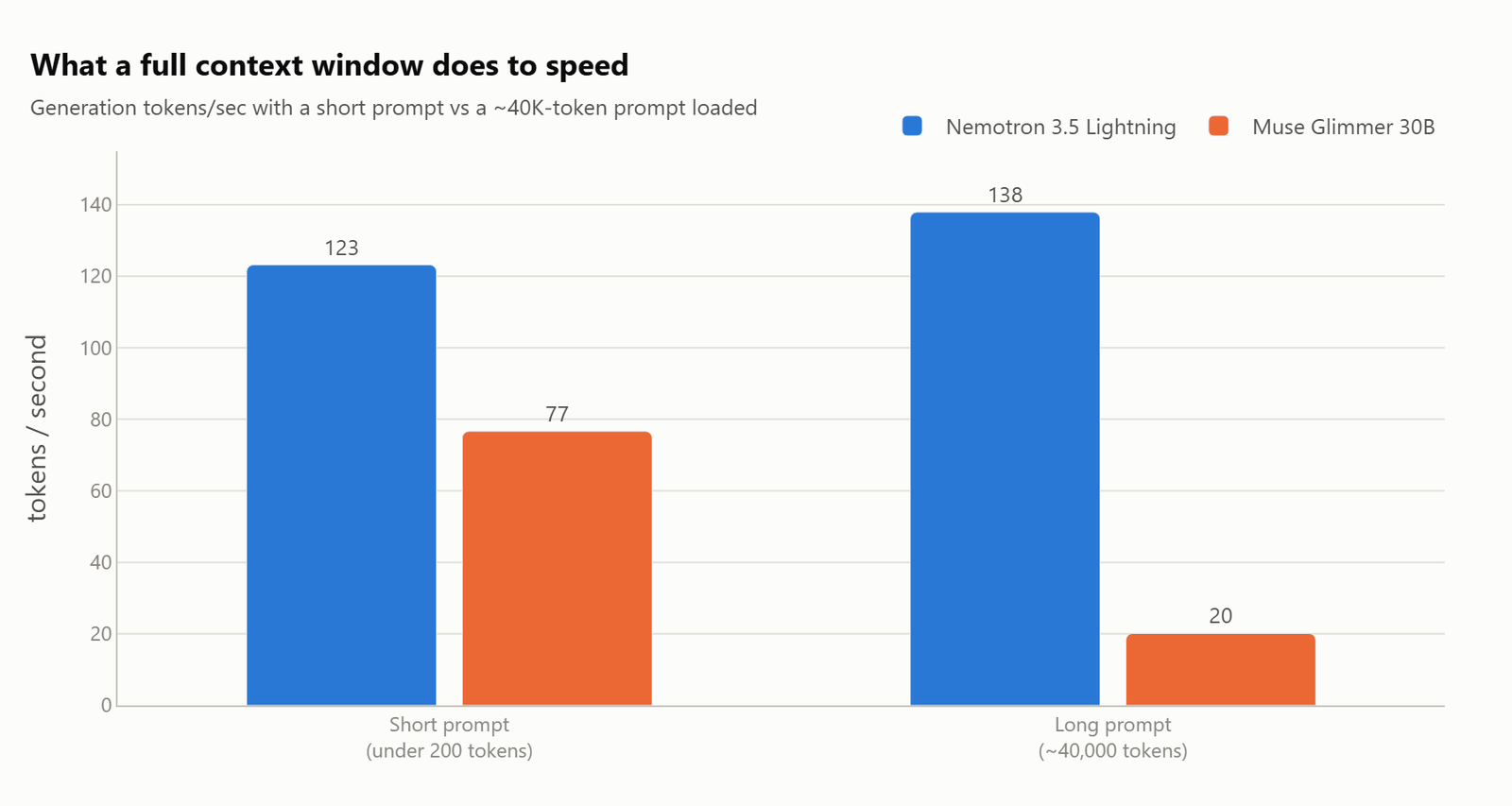
This chart is the biggest finding of the whole experiment. With the 40,000-token document loaded, Glimmer's generation speed collapsed from 76 to 20 tokens per second. Nemotron did not slow down at all. It ran at 138, slightly faster than its short-task average.
The reason is architecture. A normal transformer like Glimmer keeps a memory called the KV cache. That memory grows with every token in the context, and reading through it slows down each new token. Nemotron replaces most of its attention layers with Mamba-2 layers, which keep a small fixed-size state no matter how long the context is. NVIDIA claims the model handles 1M tokens. After watching it shrug off 40K without losing a step, we believe the design at least holds up at the sizes we could test.
Both models read the long prompt at similar speed, around 4,000 to 4,700 tokens per second. The difference is only in generation afterward.
How Much VRAM Does Each Model Need?
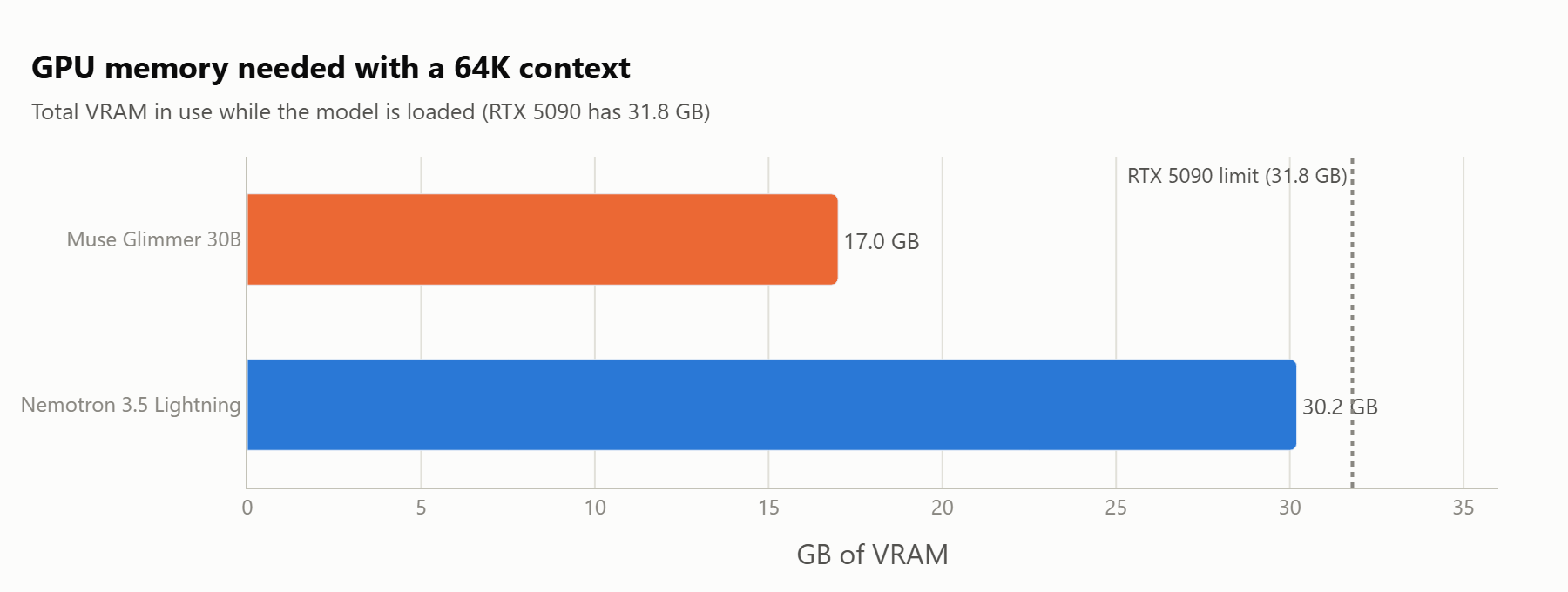
Here Glimmer wins clearly. With the 64K context loaded, Glimmer used about 17GB, leaving 15GB free on our card. That headroom is not decoration. It is room for a bigger context, an embedding model running next to it, or in Glimmer's case, image inputs.
Nemotron used 30.2 of our 31.8GB. It fit fully on the GPU, and it ran fine, but the card was nearly full. On a 24GB card like a 4090, the Ollama build of Nemotron would spill into system RAM at this context size, and the speed advantage would shrink or disappear. Glimmer would still fit with room to spare.
Here is the surprise in that result. The "fast, light" MoE model is the heavy one on disk and in memory. Sparse compute does not mean small weights. All 30B parameters have to sit in VRAM even though only 3B work at a time.
How Long Does Each Model Think?
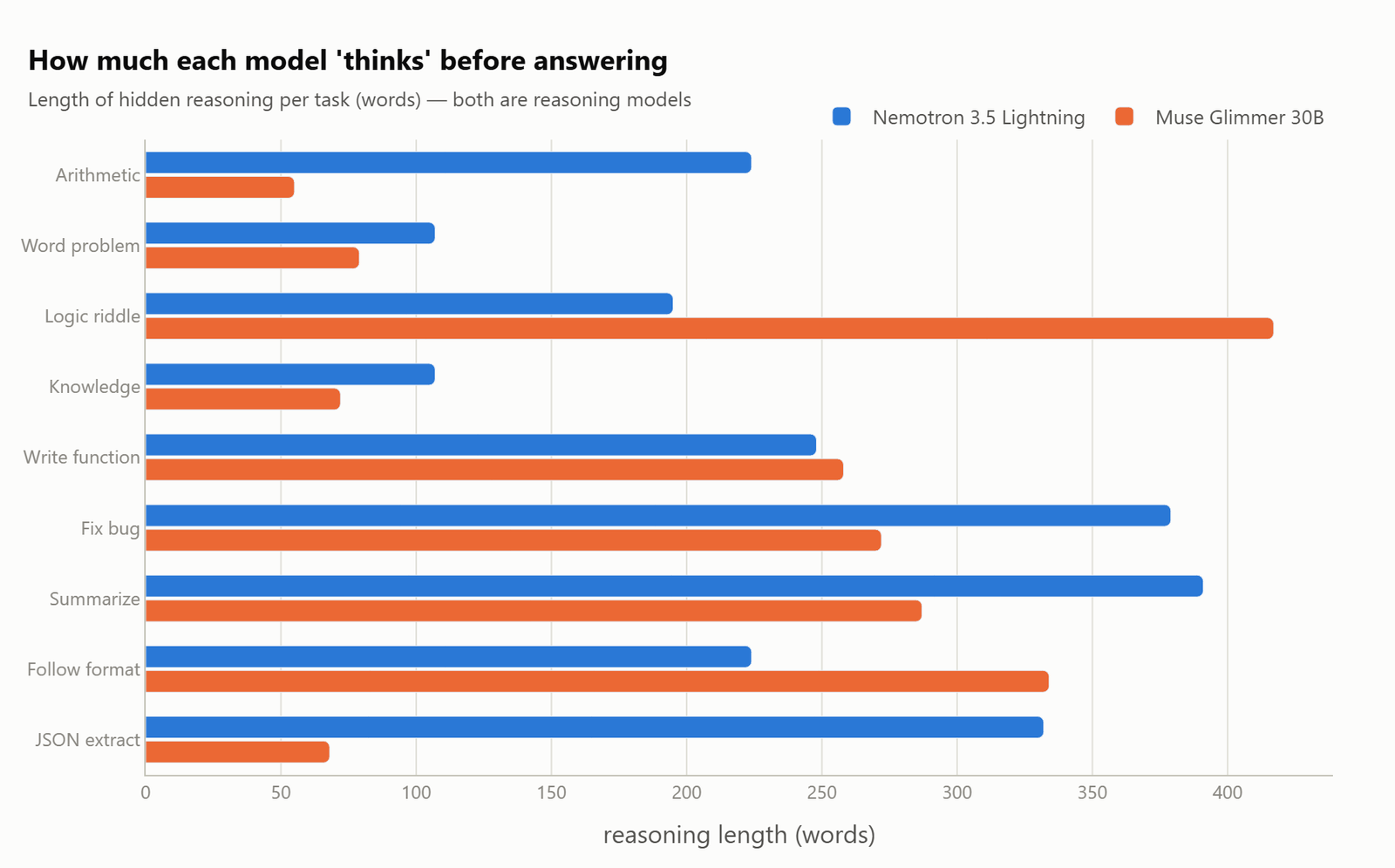
Both are reasoning models. In simple words, they write hidden reasoning before the final answer. Watching where each one spends that effort tells us a lot.
Glimmer thinks hard when the task deserves it. It spent its longest thinking session, over 400 words, on the sisters riddle, which is genuinely the trickiest question in the set. On easy extraction jobs like JSON it barely thought at all, under 70 words.
Nemotron thinks a lot everywhere. Even "what is the capital of Australia" got over 100 words of private deliberation. It also writes longer final answers. So it is faster per token but writes more tokens per answer, and its wall-clock advantage on short tasks is smaller than the tokens-per-second gap suggests.
Both models nearly skipped thinking on the needle task. They found the code, stated it, done.
Which One Should We Run?
The choice splits cleanly by use case.
We should pick Muse Glimmer 30B when we have a 24GB card, when we want image understanding, or when we want lots of VRAM headroom. It is Apache 2.0, it is frugal with memory, and its accuracy on these tasks was flawless. Just know that long contexts will slow it down a lot.
We should pick Nemotron 3.5 Lightning when our work lives in long contexts: big documents, long agent sessions, large codebases. Its speed simply does not degrade as the context fills, and nothing else we have run locally does that. But we should budget a full 32GB card for it at this context size.
Limitations
- Simple tasks only. This is not MMLU or SWE-bench, and hard problems could separate the models in ways this suite cannot.
- One run per task at temperature 0.2. Good enough for the speed numbers, thin for accuracy claims.
- Quantized community builds through Ollama, not the original NVFP4 and BF16 releases.
- We tested text only. Glimmer's vision ability is a real advantage we did not measure here.
Conclusion
We ran Nemotron 3.5 Lightning and Muse Glimmer 30B on the same ten everyday tasks on one RTX 5090 through Ollama. Both models scored 10 out of 10, so the real differences showed up in speed and memory, not in correctness.
Key takeaways:
- Both models solved every everyday task. Accuracy no longer separates models at this size on simple work.
- Nemotron generates much faster, about 123 tokens per second against 76, and it holds that speed even with 40K tokens of context loaded.
- Glimmer is far lighter on memory, about 17GB against 30.2GB at a 64K context, and it is the only one of the two that fits a 24GB card.
- Sparse compute does not mean small weights. Every Nemotron parameter must sit in VRAM even though only 3B work per token.
Next steps:
- See how these two behave on hard problems in Qwen 3.8 27B vs Nemotron 3.5 vs Muse Glimmer.
- Set your own machine up with the Ollama setup guide before running either model locally.
- Use the local LLMs technical reference guide to match a quantization and context size to your own GPU.
This is how these two 30B models compare. We started with ten everyday tasks that both models aced, we saw Nemotron hold its speed at long context while Glimmer slowed to a crawl, and we finished with the memory numbers that decide which one fits our card.