Qwen3.8-Flash-Next is a 180 billion parameter model. Its model card asks for four GB300 cards, or eight H200s. We have one desktop with 96 GB of RAM and one RTX 5090. So we ignored the recipe and tried it anyway.
In this blog, we will run this model two ways. First on the processor alone, with no graphics card involved at all. Then with part of the model moved onto the 5090. We also check whether the answers are any good, because a model that runs fast and talks nonsense is not worth the disk space.
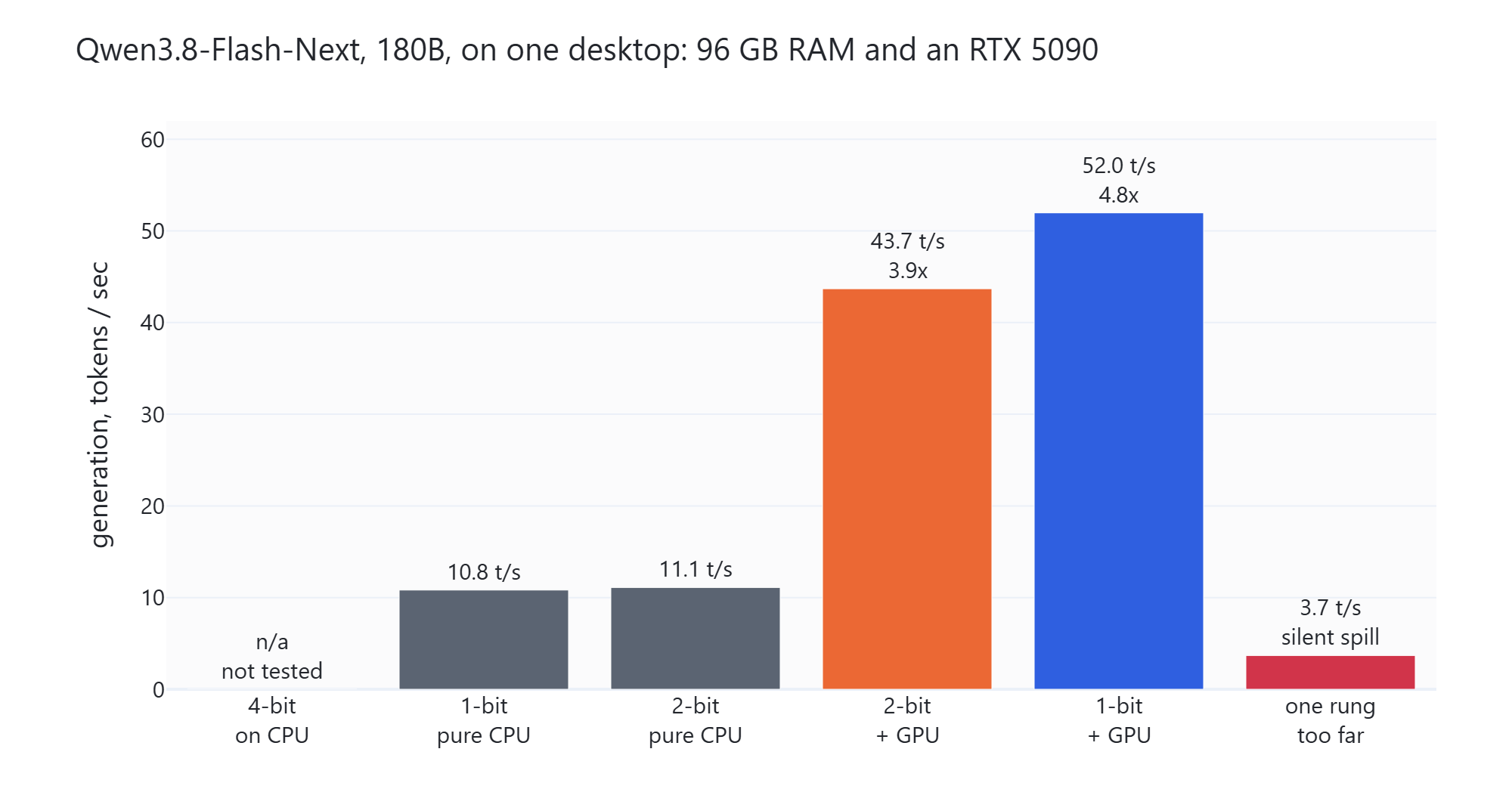
It works. On the CPU alone we get about 11 tokens a second. With the 5090 helping, about 52. And the most heavily squeezed build of this large model answers better than a lightly squeezed build of the smaller Qwen 3.8 27B.
What Is Qwen 3.8 Flash Next?
Qwen3.8-Flash-Next is Qwen's preview of the architecture behind Qwen4. It is a mixture of experts model. In simple words, the model stores 512 small expert networks in each layer and wakes up only 10 of them for each token. A token is a piece of a word, and it is the unit these models actually read and write.
That design is why this model has any chance on a desktop. It stores 180 billion parameters, but it runs only about 6 billion of them per token. We took the whole architecture apart in Qwen 3.8 Flash Next vs Qwen 3.8 27B, so here we only measure.
That earlier post said this model needs a datacenter. It was right about the graphics card and wrong about the machine. We can now say which part changed, and why.
Our Test Setup
Everything below ran on one machine in one session.
- CPU: Intel Core Ultra 9 285K, 24 cores and 24 threads, 8 performance cores and 16 efficiency cores, no hyper-threading
- RAM: 95.3 GB
- GPU: NVIDIA RTX 5090, 32 GB VRAM, driver 610.88, CUDA 13.1
- OS: Windows 11 Pro 26200
The qwen4exp architecture is not in llama.cpp master yet. Support lives in the open pull request #27742, and we checked it out at commit 6c5afc86. A stock llama.cpp build cannot load these files today.
We then built it twice, and the two builds are not interchangeable.
cmake llama.cpp -B build-cuda -G Ninja -DCMAKE_BUILD_TYPE=Release -DBUILD_SHARED_LIBS=OFF -DGGML_CUDA=ON -DLLAMA_CURL=OFF -DCMAKE_CUDA_ARCHITECTURES=120
cmake --build build-cuda --target llama-cli llama-server llama-bench -j 20
The second build sets -DGGML_CUDA=OFF, so no GPU code is compiled in at all. Its --list-devices prints nothing.
Why two builds? Because a CUDA build run with -ngl 0 is not a CPU-only run. It still sends batch matrix work to the card. We measured that directly: the CUDA build with -ngl 0 read prompts at 212.2 tokens a second, while the build with no CUDA compiled in managed 53.1. Anyone reporting a CPU baseline from -ngl 0 on a CUDA build is reporting a GPU number.
Important
On Windows, CMake picks the Visual Studio 2026 BuildTools, and CUDA 13.1 has no MSBuild integration for them. Configuring with Ninja plus the Visual Studio 2022 toolchain gets around it. The CPU-only build has no such problem and uses the default generator.
The weights are Unsloth dynamic quants, pulled with curl in parallel shards.
curl.exe -sL --retry 10 --retry-delay 5 --retry-all-errors -C - -o Qwen3.8-Flash-Next-UD-IQ1_S-00001-of-00003.gguf https://huggingface.co/unsloth/Qwen3.8-Flash-Next-GGUF/resolve/main/UD-IQ1_S/Qwen3.8-Flash-Next-UD-IQ1_S-00001-of-00003.ggufDoes a 4-Bit Build Fit in 96 GB?
We planned to test a 4-bit build, because 4-bit is the usual sweet spot for local models. On a 96 GB machine, only one 4-bit build fits, and only just.
Unsloth ships seven quantizations of this model. Let me tabulate all of them against our RAM for your better understanding.
| Build | Size on disk | Fits in 96 GB? |
|---|---|---|
| UD-IQ1_S | 67.6 GB | Yes |
| UD-IQ1_M | 69.4 GB | Yes |
| UD-Q2_K_XL | 73.5 GB | Yes |
| UD-IQ3_XXS | 76.3 GB | Yes |
| UD-Q3_K_XL | 83.8 GB | Tight |
| UD-IQ4_XS | 87.2 GB | Tight |
| UD-Q4_K_XL | 103.7 GB | No |
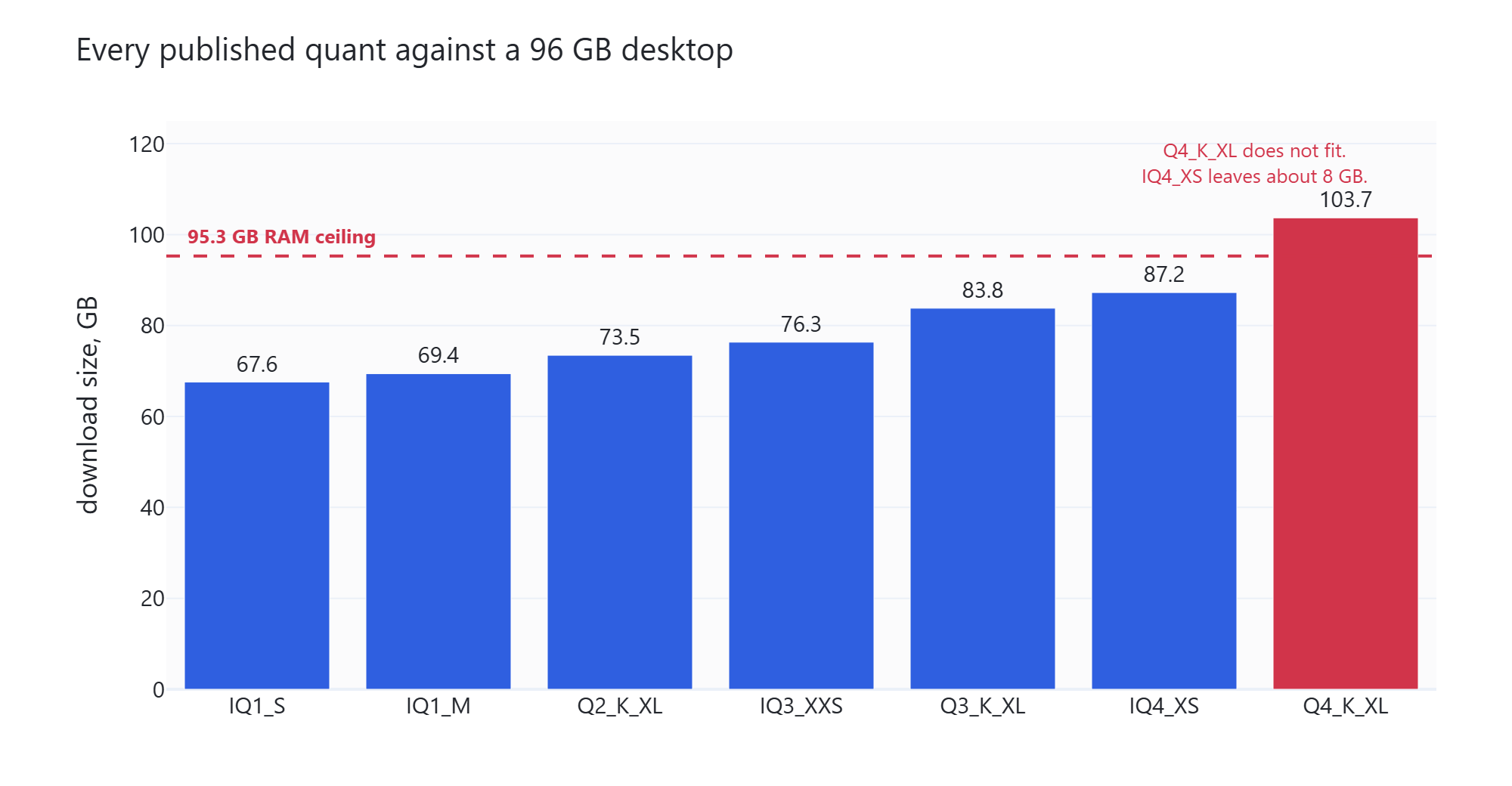
Sizes come from the Hugging Face manifest. We checked the two files we downloaded byte for byte against it: UD-IQ1_S is 72,546,461,344 bytes and UD-Q2_K_XL is 78,869,128,864 bytes.
The 4-bit UD-Q4_K_XL is 103.7 GB, so it cannot load at all. The 4-bit UD-IQ4_XS is 87.2 GB, which leaves about 8 GB of our 95.3 GB for the KV cache and the operating system. Our download of it failed, so we did not test it.
So we tested the 1-bit and the 2-bit builds. The 2-bit build is the largest one that sits comfortably below the RAM ceiling with room for the KV cache and the operating system.
Why Is the 1-Bit File Still 67.6 GB?
Here is the number that shapes this whole article. A 180 billion parameter model at roughly one bit per weight should be about 21 GB. This file is 67.6 GB. So we opened the GGUF header and added up every tensor.
| Part of the model | Size | Share | Tensors |
|---|---|---|---|
| MoE expert banks | 37.11 GB | 54.9% | 144 |
| PLE n-gram table | 26.82 GB | 39.7% | 1 |
| Attention and QSA | 1.71 GB | 2.5% | 384 |
| Everything else | 1.91 GB | 2.8% | 695 |
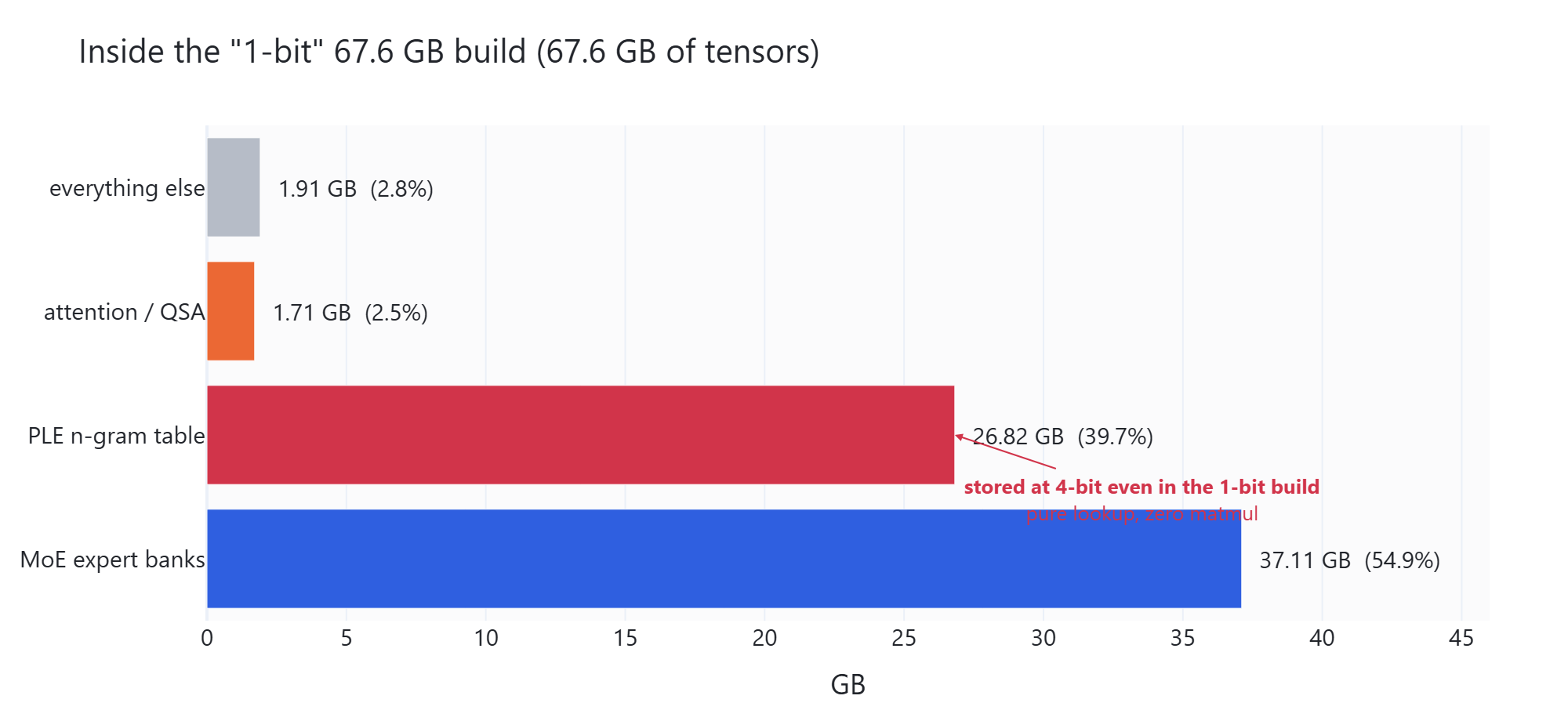
Here, we can see that nearly 40 percent of the file is one single tensor. It is called per_layer_token_embd.weight, and it is the n-gram lookup table. In simple words, it is a giant table of stored patterns that the model reads from. It never multiplies anything.
Two facts about it matter. First, Unsloth stored it at IQ4_NL, which is 4-bit, even inside the build we all call 1-bit. Crushing a lookup table costs accuracy and buys no speed, so they refused to crush it. That is why no smaller build of this model exists anywhere.
Second, the table is registered as a GGML_OP_GET_ROWS operation. That is a pure gather: pick some rows, return them, do no maths. A tensor that does no maths has no business taking space on a graphics card.
Add up attention and everything else and we get about 3.6 GB of ordinary dense weight that every single token passes through. That tiny number is the reason a 67.6 GB model can run on a 32 GB card at all.
How Fast Is It on the CPU Alone?
Now we take the graphics card out of the picture completely and use the build with no CUDA in it. We sweep the thread count from 4 up to all 24.
build-cpu\bin\Release\llama-bench.exe -m models\UD-Q2_K_XL\Qwen3.8-Flash-Next-UD-Q2_K_XL-00001-of-00003.gguf -o jsonl -r 3 --progress -p 512 -n 128 -t 4,8,12,16,20,24Two speeds come out of this. Prompt processing is how fast the model reads our question. Generation is how fast it writes the answer. Both are in tokens a second.
| Threads | 1-bit generation | 2-bit generation | 1-bit prompt | 2-bit prompt |
|---|---|---|---|---|
| 4 | 7.50 | 7.91 | 18.69 | 19.52 |
| 8 | 10.25 | 10.35 | 34.32 | 35.24 |
| 12 | 10.61 | 10.46 | 37.53 | 37.84 |
| 16 | 10.17 | 10.09 | 43.49 | 42.88 |
| 20 | 11.52 | 11.52 | 50.06 | 48.33 |
| 24 | 10.82 | 11.10 | 53.10 | 52.78 |
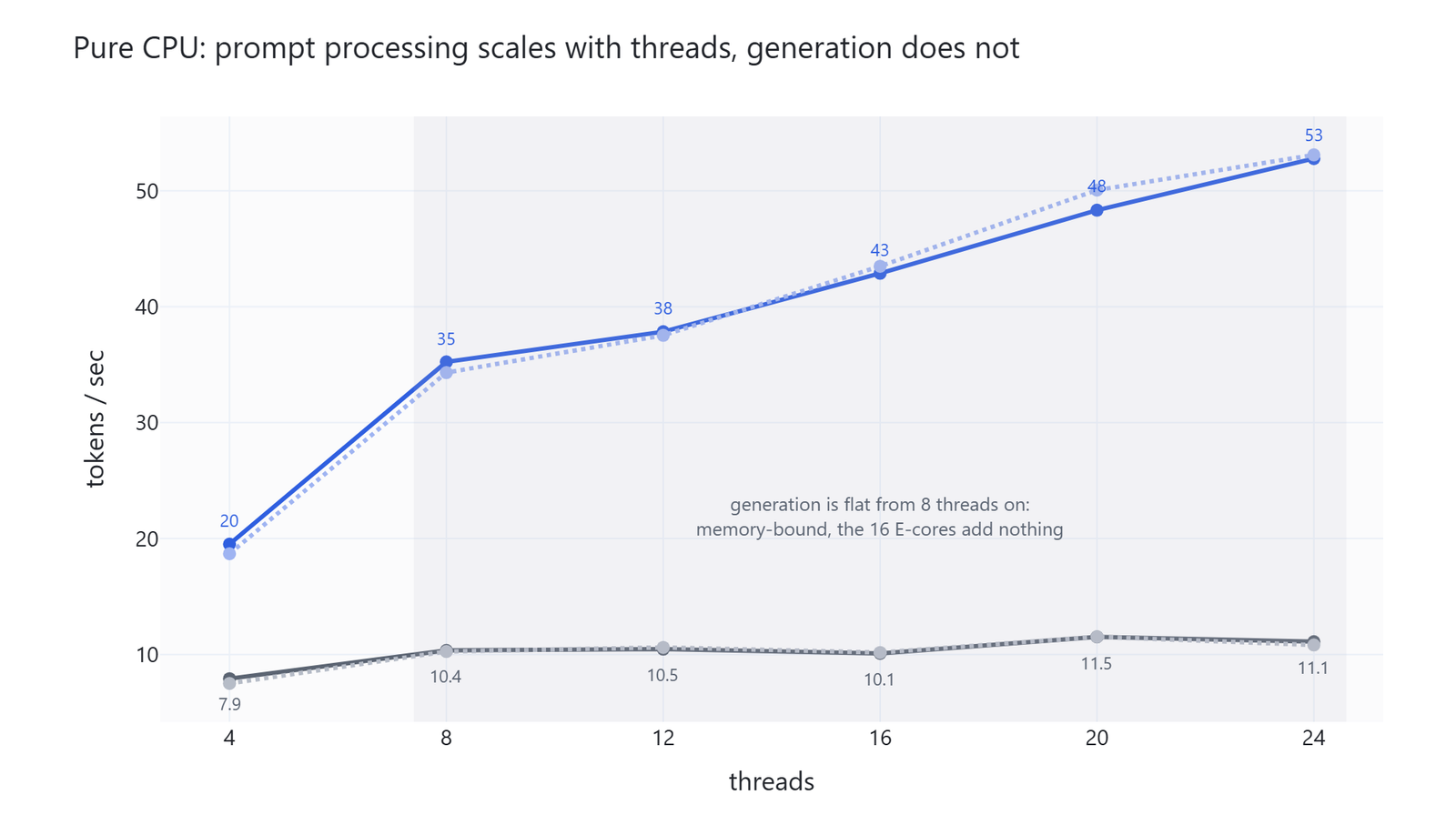
Here, we can see two different shapes. Generation stops improving after about 8 threads and then wobbles between 10.1 and 11.5. Prompt processing keeps climbing all the way to 24 threads, from 18.7 to 53.1.
Why the difference? Because generation is waiting on memory, not on the processor. Writing one token means reading the active weights out of RAM, and adding more threads does not make RAM faster. Reading a prompt processes many tokens in one batch, which is real arithmetic, and arithmetic scales with cores.
The practical reading is to give it every thread. Generation is flat up there anyway, and prompt processing nearly triples.
The other thing worth noticing is that the 1-bit and 2-bit builds run at the same speed. So there is no speed reason to accept the extra damage of 1-bit if we have the RAM for 2-bit.
We also tested -lm mlock, which locks the model in RAM instead of letting the operating system page it in. It changed nothing useful. On the 2-bit build it was slightly worse, at 10.39 against 10.97 tokens a second.
How Much Does the RTX 5090 Help?
The card has 32 GB and the model is 67.6 GB, so the whole model will never fit. But we do not need the whole model on the card. We need the part that does the arithmetic.
So we make two moves. We pin the 26.82 GB lookup table to system RAM with -ot per_layer_token_embd=CPU, because it does no maths. Then we move expert layers onto the card, a few at a time, with -ncmoe.
The -ncmoe N flag says how many mixture of experts layers to keep on the CPU. This model has 48 such layers, and each layer holds its own 512 experts. So -ncmoe 48 keeps them all in RAM, and -ncmoe 16 moves 32 of them onto the card.
Let's see the sweep as below:
build-cuda\bin\llama-bench.exe -m models\UD-IQ1_S\Qwen3.8-Flash-Next-UD-IQ1_S-00001-of-00003.gguf -o jsonl -r 3 --progress -p 512 -n 128 -t 24 -ngl 99 -ncmoe 48,40,32,24,16,12 -ot per_layer_token_embd=CPU-ncmoe |
Expert layers on the GPU | 1-bit generation | 2-bit generation |
|---|---|---|---|
| 48 | 0 | 32.42 | 30.29 |
| 40 | 8 | 36.35 | 33.12 |
| 32 | 16 | 39.37 | 37.30 |
| 24 | 24 | 45.80 | 43.69 |
| 16 | 32 | 51.97 | 5.51 |
| 12 | 36 | 3.68 | 7.87 |
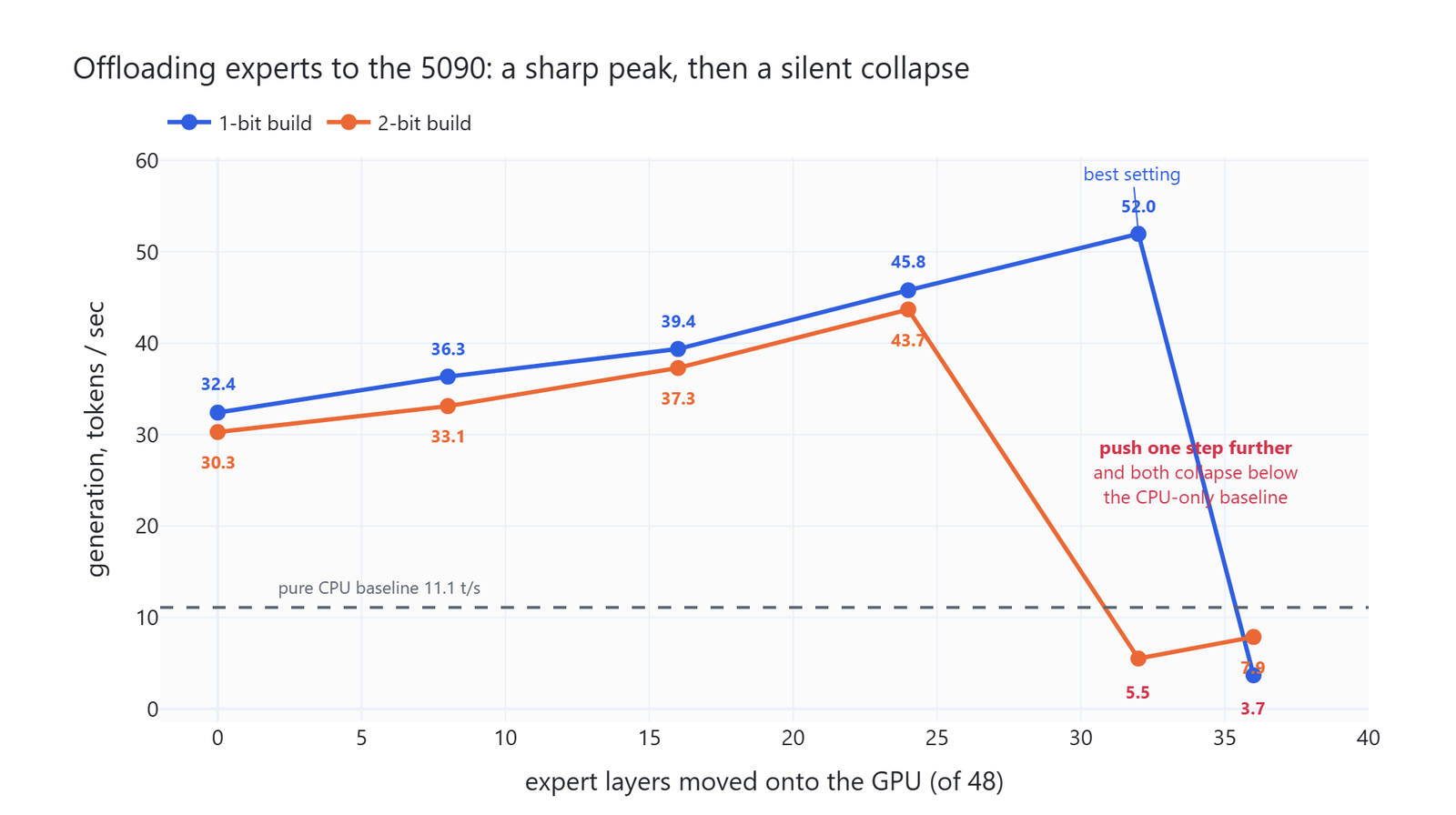
Here, we can see that even with zero expert layers on the card we already get 32.4 tokens a second, against 11.1 on pure CPU. That gain comes from attention and the dense path alone, which is that 3.6 GB we found earlier.
The 1-bit build peaks at 52.0 tokens a second with 32 expert layers on the card. The 2-bit build peaks at 43.7 with 24 layers, one step earlier, because its layers are bigger.
We also expected the lookup table to be faster in system RAM by itself. It is not consistent. On the 1-bit build, keeping it in RAM is 4 to 6 percent faster. On the 2-bit build it is about 2 to 3 percent slower. The real reason to do it is that it frees roughly 27 GB of VRAM for expert layers, and that is what puts the best setting inside reach.
What Happens One Step Past the Best Setting?
This is the trap, and it deserves its own section.
Move one more group of layers onto the card and speed does not degrade gently. It falls off a cliff, from 52.0 down to 3.7 tokens a second, and from 43.7 down to 5.5. Both numbers are far below the pure CPU baseline of 11.1.
Nothing crashes. There is no error message and no warning in the log. On Windows, when a program asks for more VRAM than the card has, the driver quietly serves the overflow out of system memory across the PCIe bus. Everything keeps working, about fifteen times slower.
Warning
A silent spill looks exactly like a slow model. If a setting that should be faster comes back slower, suspect VRAM overflow before you suspect the model.
So the working method is simple. Start with -ncmoe high, which keeps everything in RAM. Step it down four at a time. Watch the tokens a second climb. The moment it collapses, go back one step and stay there. Our best settings were -ncmoe 16 for the 1-bit build and -ncmoe 24 for the 2-bit build, and ours will differ from yours with any change in card, context size, or quant.
Does It Stay Fast on Long Documents?
A 262,144 token context is only useful if the model stays usable when that context fills up. So we measured at four depths, using -d to pre-fill the KV cache.
build-cuda\bin\llama-bench.exe -m models\UD-IQ1_S\Qwen3.8-Flash-Next-UD-IQ1_S-00001-of-00003.gguf -o jsonl -r 2 --progress -n 128 -d 0,4096,16384,32768 -t 24 --no-warmup -ngl 99 -ncmoe 20 -ot per_layer_token_embd=CPU| Tokens already in the cache | 1-bit + GPU | 2-bit + GPU | 2-bit, CPU only |
|---|---|---|---|
| 0 | 49.67 | 39.35 | 10.23 |
| 4,096 | 50.26 | 39.71 | 9.79 |
| 16,384 | 46.17 | 37.92 | 8.24 |
| 32,768 | 42.41 | 32.77 | 7.98 |
| Loss at 32k | 15% | 17% | 22% |
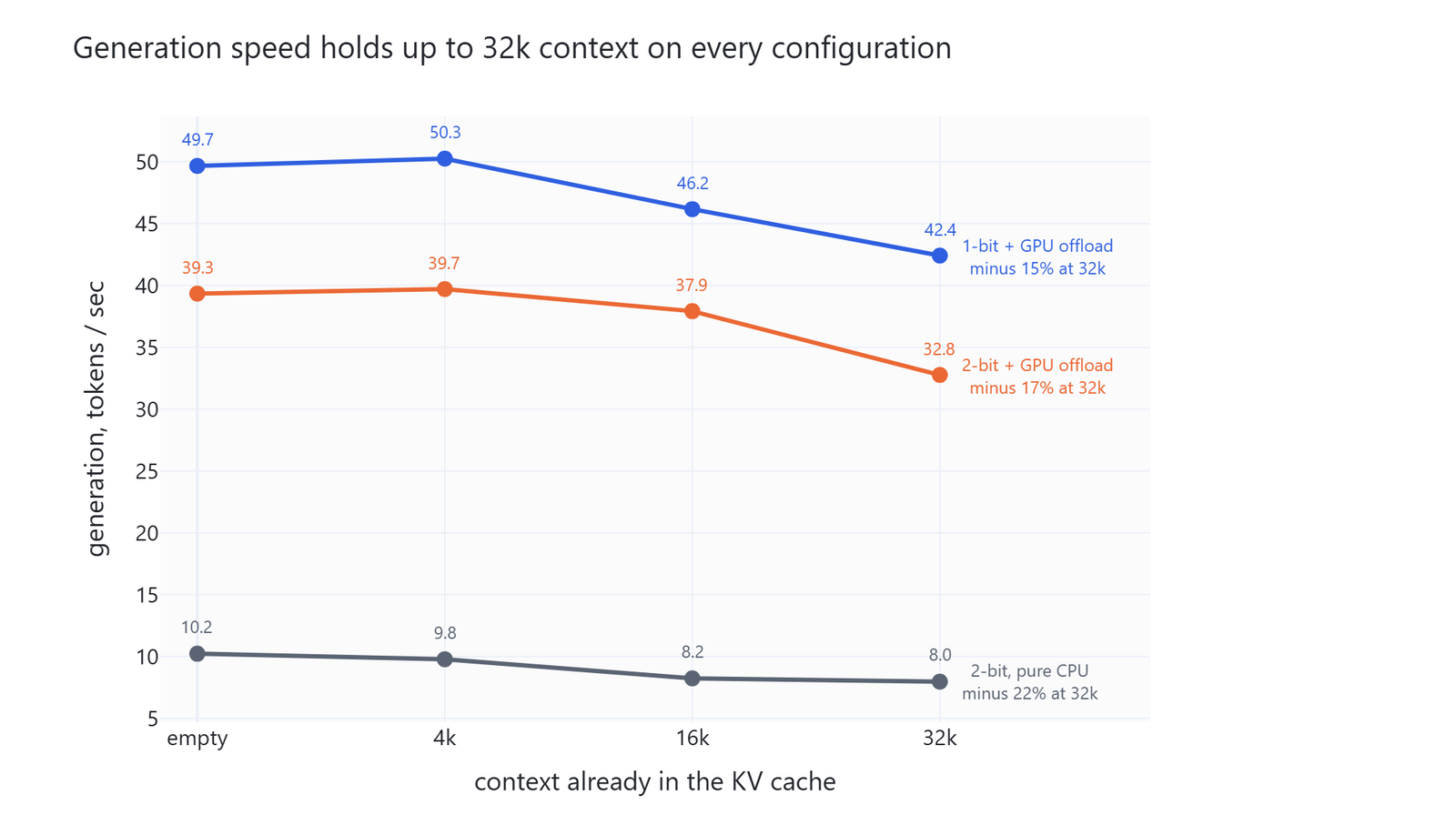
Here, we can see that generation holds up well everywhere. Losing 15 percent over 32k of context is mild for a model this size.
The real cost of long documents is reading them in the first place. At 32,768 tokens of context, the CPU-only setup reads at 31.6 tokens a second while the GPU setup reads at 266.0. Feeding a 30,000 token document to the CPU-only build means waiting about sixteen minutes before the first word of the answer appears. On the GPU setup it is under two minutes.
So for short chats, the CPU alone is fine. For long documents, the graphics card stops being optional.
Are the Answers Any Good?
Speed means nothing if the model is confidently wrong. We checked in two ways.
What Does Perplexity Say?
Perplexity measures how surprised a model is by ordinary text. Lower is better. We ran the standard wikitext-2 test on all five models.
build-cuda\bin\llama-perplexity.exe -m models\UD-IQ1_S\Qwen3.8-Flash-Next-UD-IQ1_S-00001-of-00003.gguf -f wikitext2-test.raw -c 2048 --chunks 40 -t 24 --no-warmup -ngl 99 -ncmoe 20 -ot per_layer_token_embd=CPUComparing perplexity across models is only fair when the tokenizer is the same, because the score counts surprise per token. We checked first: both models use vocab 248,320, gpt2 BPE, the qwen35 pre-tokenizer, and the same BOS and EOS. They match.
| Model | Size on disk | Perplexity |
|---|---|---|
| Flash Next, 2-bit | 73.5 GB | 3.67 |
| Flash Next, 1-bit | 67.6 GB | 4.01 |
| Qwen 3.8 27B, 4-bit | 15.3 GB | 5.68 |
| Qwen 3.8 27B, 2-bit | 9.2 GB | 6.03 |
| Qwen 3.8 27B, 1-bit | 5.8 GB | 7.97 |
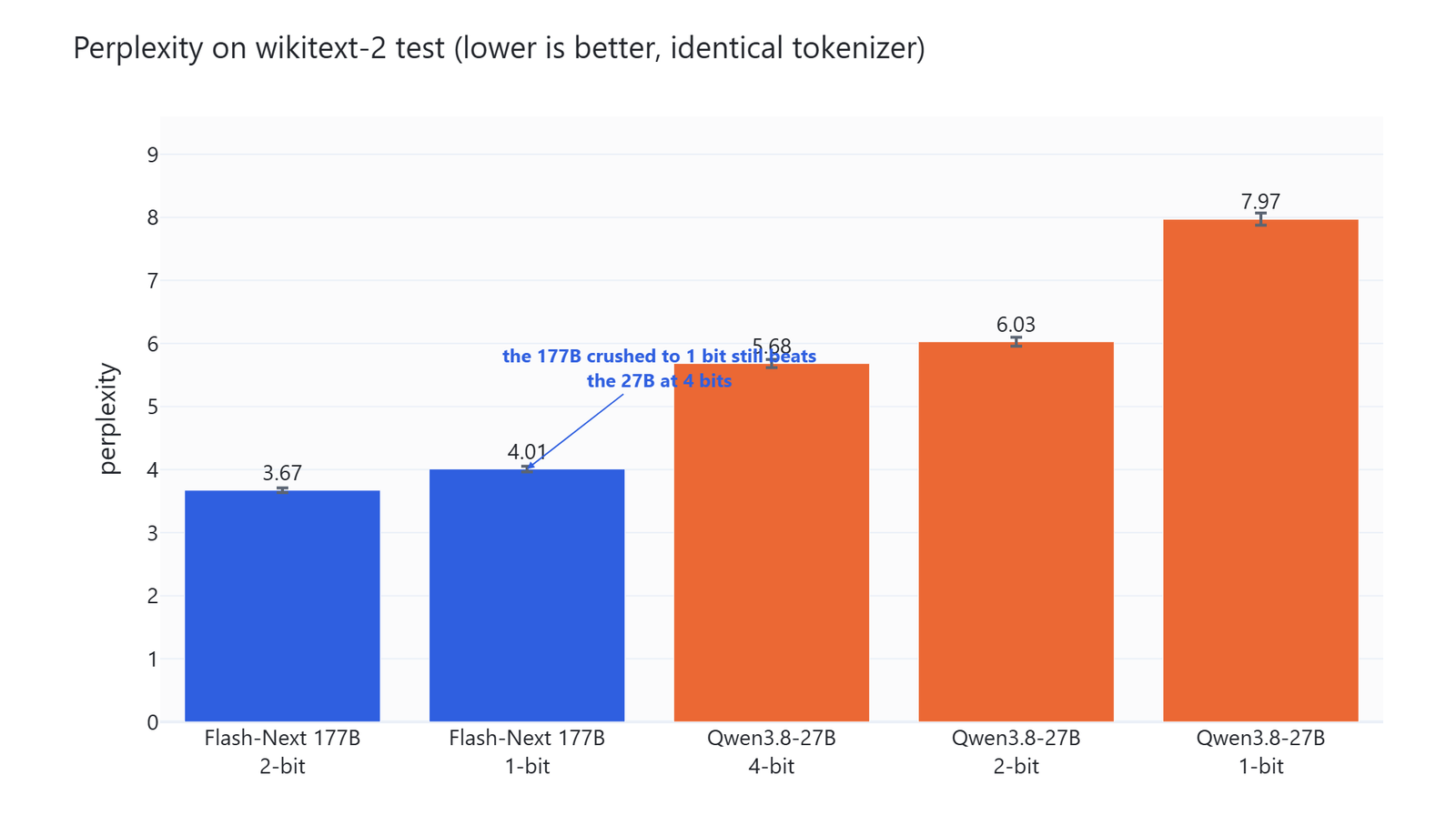
Here, we can see the 180B model crushed to 1 bit still scoring better than the 27B model at 4 bits, 4.01 against 5.68. The standard errors are 0.043 and 0.066, so the gap is far larger than the noise.
The second pattern matters more for anyone choosing a quant. Going from 2-bit down to 1-bit costs Flash Next 9.2 percent and costs the 27B model 32.2 percent. Big sparse models survive heavy squeezing much better than small dense ones do.
How Do They Do on Real Questions?
Perplexity is a statistic, not a task. So we wrote 12 problems covering maths, code, instruction following, factual recall, and long form writing. Each ran twice with different seeds, on five models. That is 120 runs in all.
Here is the whole set, so nothing about the score is hidden.
| Problem | What we ask for | How we grade it |
|---|---|---|
math1 |
Two pipes fill a 4,800 litre tank while a drain empties it, so how many minutes until it is full | A number within 0.02 of 34.29 |
math2 |
Count the ordered pairs (x, y) from 1 to 100 where x times y divides by 12 | Exact match on 2,722 |
math3 |
Find the roots of a cubic, then the exact area where the curve sits below the axis | A number within 0.001 of 0.25 |
code1 |
Longest subarray whose sum divides by k, with negative numbers allowed | The function is run against 4 test cases |
code2 |
Convert any number from 1 to 3999 into a Roman numeral | The function is run against 5 test cases |
code3 |
Fewest bracket insertions that make a mixed sequence valid | The function is run against 5 test cases |
if1 |
Four sentences on the water cycle, every one starting with S, and no letter z | Three rules checked separately |
if2 |
Six programming languages as N. Name - Year and nothing else |
Exactly 6 lines, each matching that shape |
if3 |
One JSON object about Kyoto with four named keys | It parses, all keys exist, and landmarks holds 3 items |
fact1 |
The year the transistor was demonstrated, the three researchers, and the Nobel year | All of 1947, Bardeen, Brattain, Shockley, 1956 appear |
fact2 |
B-tree against B+ tree on record storage, leaf linkage, and range scans | All three ideas appear, each accepting several wordings |
long1 |
Explain a mixture of experts layer to a programmer new to machine learning | The answer lands between 180 and 520 words |
Three choices matter here. Every prompt has one answer a Python function can check, so nothing rests on taste. Code answers are executed rather than read, so a function that looks correct but returns the wrong number scores zero. And we recomputed every answer by hand before any model saw a prompt. Three of the answers we first wrote down were wrong, and we corrected them before the runs began.
Not every problem is pass or fail. The four sentence task scores its three rules separately, and the transistor question scores the share of the five required facts a model recalls. That is why a broken model lands at 0.309 instead of at zero.
The scores drop any run that hit the token ceiling while still reasoning, which is what the column means by runs that finished. That leaves 22 of 24 runs for four of the models, and 19 of 24 for the 1-bit 27B.
The bracket problem is why. All ten of its runs returned empty content and scored zero, and eight of the ten were truncated, so the problem drops out for four models. The 1-bit 27B is the exception. It stopped on its own with nothing written, so its two zeros are counted, and part of its 0.309 is our bad problem rather than its own failure.
Sampling was temperature 1.0, top-p 0.95, top-k 20, min-p 0.0, which is what Unsloth recommends for this model. Every model was served the same way, and only the model path and -ncmoe value changed. Let's see the command as below:
build-cuda\bin\llama-server.exe -m models\UD-IQ1_S\Qwen3.8-Flash-Next-UD-IQ1_S-00001-of-00003.gguf --port 8099 -c 32768 --jinja -t 24 --no-warmup -ngl 99 -ncmoe 20 -ot per_layer_token_embd=CPUImportant
Every response records its finish_reason. A thinking model that burns its whole token budget on reasoning returns empty content, and empty content looks exactly like a wrong answer unless truncation is tracked separately. Our first pilot at max_tokens 4096 lost 3 of 12 problems that way. The real runs use 16,384 and grade content only, never reasoning_content.
| Model | Score on runs that finished |
|---|---|
| Flash Next, 2-bit | 1.000 |
| Flash Next, 1-bit | 1.000 |
| Qwen 3.8 27B, 4-bit | 1.000 |
| Qwen 3.8 27B, 2-bit | 1.000 |
| Qwen 3.8 27B, 1-bit | 0.309 |
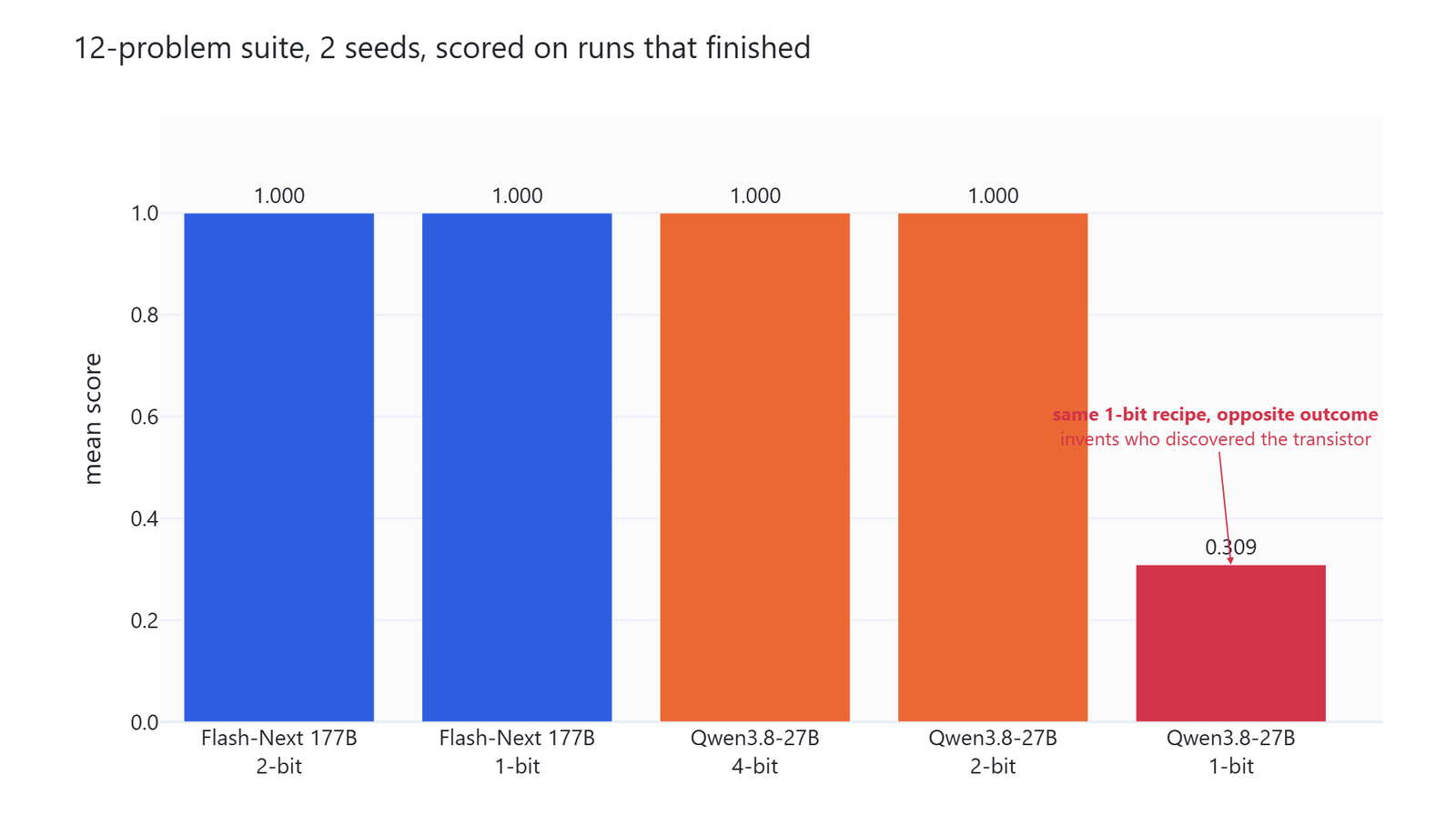
Four of the five models answered everything correctly. The 27B at 1 bit fell apart, and how it fell apart is the part worth reading. Asked who invented the transistor, it answered:
The three Bell Labs researchers credited for the transistor effect were J.E. Miller, L. Brillet, and A. Loewe; the effect was first demonstrated in 1925, and they shared the Nobel Prize in 1956.
Flash Next, using the same 1-bit recipe from the same people, answered:
The transistor was first demonstrated at Bell Labs in 1947. The three researchers credited with its invention were John Bardeen, Walter Brattain, and William Shockley, who later shared the Nobel Prize in Physics in 1956 for their work.
All three names in the first answer are invented, and the date is wrong by 22 years. Only the Nobel year is right. It reads perfectly well, and that is what makes it dangerous.
The same model also broke a JSON task. Asked for a landmarks array with three entries, it wrote a field called land and filled it with "Kiyomizu-ji" three times.
So the lesson is not that 1-bit is fine. It is that 1-bit is fine for a very large sparse model and ruinous for a small dense one.
What Should We Run on Our Own Machine?
Let me tabulate the settings we would actually use for your better understanding.
| Our hardware | Build | Flags | Expect |
|---|---|---|---|
| 96 GB RAM, no useful GPU | UD-Q2_K_XL | -t 24 |
about 11 tokens a second |
| 96 GB RAM, 24 to 32 GB GPU | UD-IQ1_S | -ngl 99 -ncmoe 16 -ot per_layer_token_embd=CPU |
about 52 tokens a second |
| 96 GB RAM, 24 to 32 GB GPU | UD-Q2_K_XL | -ngl 99 -ncmoe 24 -ot per_layer_token_embd=CPU |
about 44 tokens a second |
Three rules come out of the measurements.
- Always pin the lookup table with
-ot per_layer_token_embd=CPU. It does no arithmetic, and the 27 GB it gives back is what makes the good settings reachable. - Find your own cliff. Step
-ncmoedown until speed collapses, then go back one step. The collapse is silent, so watch the number and not the log. - Do not assume a smaller model at higher precision is the safer pick. On our measurements it is the opposite. The 1-bit 180B beat the 4-bit 27B on perplexity and matched it on every task, while the 1-bit 27B was unusable.
And if we benchmark this ourselves, we never use a CUDA build with -ngl 0 as the CPU baseline. It still hands batch work to the card, and it inflated our prompt speed from 53.1 to 212.2 tokens a second.
What We Did Not Test
- Our 12-problem suite is too easy. Four models tie at 1.000, so it catches a broken model but cannot rank good ones. Only perplexity separated them.
- One problem, a bracket-balancing task, scored zero for all five models. Four of them reasoned past the 16,384 token ceiling without answering, and the fifth stopped on its own with nothing written. That is a flaw in our problem, not five model failures. Truncated runs are dropped, so it leaves the scores for four models, but the fifth keeps its two zeros.
- We tested two quantizations out of seven, both from Unsloth. The 3-bit builds may be the real sweet spot on a 96 GB machine, and we did not measure them.
- No speed numbers for Qwen 3.8 27B appear here. It ran on the card for quality checking only, so nothing above compares the two models on speed.
- The 2-bit prompt-processing figures in the offload sweep are noisy, moving up and down between 117 and 232 tokens a second. Treat that column as indicative. Generation, which every conclusion here rests on, was stable.
- Perplexity and 12 problems are not a substitute for a real benchmark suite. We did not test tool use, agentic work, vision, or multi-turn chat, which is where Qwen claims this model is strongest.
- Everything ran on Windows. The silent VRAM spill is driver behaviour and may not happen the same way on Linux.
We also fixed two of our own mistakes on the way. Our first maths grader only recognised fractions written as 1/4, and every model answered in LaTeX, so a problem all of them solved was marked wrong across the board. We taught the grader all four LaTeX fraction forms and regraded from the saved answers. And one network request dropped a very long answer mid-transfer, so we added a mode that re-runs only the missing combinations. The final matrix is complete at 120 of 120.
Conclusion
This is how a 180B model runs on one desktop. We started with a model card asking for four GB300 cards, we found that its 1-bit build is 40 percent lookup table, and we finished at 52 tokens a second on a machine that costs less than one of those cards.
Key takeaways:
- The smallest 4-bit build is 87.2 GB and leaves a 96 GB desktop only about 8 GB, so the 1-bit and 2-bit builds are the practical choice.
- The 1-bit file is 67.6 GB because its 26.82 GB n-gram table is stored at 4-bit. That table does pure lookup, so it belongs in system RAM and nowhere else.
- Only about 3.6 GB is dense weight touched by every token, which is why a 32 GB card can carry the part that matters.
- On the CPU alone we get about 11 tokens a second, and prompt reading keeps improving all the way to 24 threads while generation flattens after 8.
- With
-ot per_layer_token_embd=CPUand-ncmoetuned one step short of the cliff, we get 52.0 tokens a second. One step further is 3.7, with no error message. - A 1-bit 180B model scored 4.01 perplexity against 5.68 for a 4-bit 27B, and answered every finished problem correctly, while the 1-bit 27B invented three scientists and a JSON field.
Next steps:
- Read the architecture behind these numbers in Qwen 3.8 Flash Next vs Qwen 3.8 27B.
- Tune the model most of us will still run daily with Qwen 3.8 27B speed settings on llama.cpp.
- Match a model and a context size to our own card with the local LLMs technical reference guide.