Amazon collects millions of product reviews every day, and each review carries a star rating from 1 to 5. Automatically predicting that rating from the text alone is a classic text classification problem: turn words into numbers, train a classifier, and let the model decide which star bucket a new review falls into.
In this blog, we use the Amazon Musical Instruments reviews dataset. We clean the raw text, convert it into TF-IDF features, train a LinearSVC classifier, and evaluate the results. Along the way we also handle class imbalance. The dataset has many more 5-star reviews than 1-star reviews, which can skew the model unless we correct for it.
Prerequisites: Python 3.x, Pandas, NumPy, scikit-learn, spaCy, BeautifulSoup4, TextBlob, and the preprocess_kgptalkie helper package.
The banner below shows Amazon's star-rating system, the same 1-5 scale our model will learn to predict:
Setting Up the Environment
Install the required libraries before importing anything. Run these commands once in the terminal or notebook:
!pip install pandas
!pip install numpy
!pip install scikit-learn
Once installed, import Pandas, a column-oriented data analysis library, and NumPy, which adds support for large multi-dimensional arrays and fast mathematical operations:
import pandas as pd
import numpy as np
Loading the Dataset
The Amazon Musical Instruments reviews dataset is hosted on GitHub. Load it directly with pd.read_csv(), keeping only the two columns we need: reviewText (the raw text) and overall (the star rating):
df = pd.read_csv('https://raw.githubusercontent.com/laxmimerit/Amazon-Musical-Reviews-Rating-Dataset/master/Musical_instruments_reviews.csv', usecols = ['reviewText', 'overall'])df.sample(5) draws five random rows so we can quickly inspect what the data looks like:
df.sample(5)| reviewText | overall | |
|---|---|---|
| 7959 | Cheap and good. Just what I needed. No issue... | 4.0 |
| 6048 | It sounds like it's Behringer. Very fake, che... | 3.0 |
| 1596 | I already had the nickel finished version (whi... | 5.0 |
| 8796 | Well... it's not really too expensive, but it ... | 1.0 |
| 948 | The mic stand pick holder is a great way to ke... | 5.0 |
Handling Class Imbalance
Check how many reviews exist per star rating:
df['overall'].value_counts()5.0 6938
4.0 2084
3.0 772
2.0 250
1.0 217
Name: overall, dtype: int64The dataset is heavily skewed: there are 6,938 five-star reviews but only 217 one-star reviews. If we train on this raw distribution, the model will simply learn to predict "5 stars" most of the time and still appear accurate. To fix this, under-sample each class down to 217 rows (the size of the smallest class):
df1 = pd.DataFrame()
for val in df['overall'].unique():
  temp = df[df['overall']==val].sample(217)
  df1 = df1.append(temp, ignore_index = True)
df1| reviewText | overall | |
|---|---|---|
| 0 | First off; let me start by saying I bought thi... | 5.0 |
| 1 | I purchased these cables for my Behringer 802 ... | 5.0 |
| 2 | It looks fine but as other reviewers have poin... | 5.0 |
| 3 | I bought this for my 11 year old daughter to h... | 5.0 |
| 4 | I use this with my mobile DJ equipment and it ... | 5.0 |
| ... | ... | ... |
| 1080 | Bought this a while back just got around to in... | 1.0 |
| 1081 | DOA...no good, out of the box,plug it, nothing... | 1.0 |
| 1082 | I have had 2 of these tuners (you'd think I'd ... | 1.0 |
| 1083 | These speakers worked great for 14 months. Las... | 1.0 |
| 1084 | This is a cheap stand and I was not surprised ... | 1.0 |
1085 rows x 2 columns
After under-sampling we have 1,085 rows with exactly 217 reviews per star class, a perfectly balanced training set.
Text Preprocessing
Raw review text is messy: it contains HTML tags, URLs, email addresses, special characters, and repeated letters like "looooove". Text preprocessing is the step that cleans all of this away so the model only sees meaningful words.
Install the preprocess_kgptalkie package along with its dependencies:
!pip install spacy==2.2.3
!python -m spacy download en_core_web_sm
!pip install beautifulsoup4==4.9.1
!pip install textblob==0.15.3!pip install git+https://github.com/laxmimerit/preprocess_kgptalkie.gitThe installation output confirms the package version:
Collecting git+https://github.com/laxmimerit/preprocess_kgptalkie.git
  Cloning https://github.com/laxmimerit/preprocess_kgptalkie.git to c:\users\mdezaj~1\appdata\local\temp\pip-req-build-5g7bbg9w
Requirement already satisfied (use --upgrade to upgrade): preprocess-kgptalkie==0.0.5 from git+https://github.com/laxmimerit/preprocess_kgptalkie.git in c:\users\md ezajul hassan\appdata\local\programs\python\python37\lib\site-packagesYou are using pip version 19.0.3, however version 20.2.2 is available.
You should consider upgrading via the 'python -m pip install --upgrade pip' command.Now import the package and the standard re module for regular expressions:
import preprocess_kgptalkie as ps
import re
The get_clean function runs every review through a six-step pipeline. The docstring below documents each step:
"""
Step 1: Lowering the letter then after replacing backward slash from nothing and underscore from space.
Step 2: Remove emails from the Reviews column.
Step 3: Removing html tags from the Reviews column.
Step 4: Removing special character.
Step 5: If you have multiple repeated character then it converted into single character and make meaningful.

          E.g. x = 'lllooooovvveeee youuuu'
               x = re.sub("(.)\\1{2,}", "\\1", x)
               print(x)
               -------
               love you
"""
Define the function and apply it to every row in the reviewText column:
def get_clean(x):
    x = str(x).lower().replace('\\', '').replace('_', ' ')
    x = ps.cont_exp(x)
    x = ps.remove_emails(x)
    x = ps.remove_urls(x)
    x = ps.remove_html_tags(x)
    x = ps.remove_accented_chars(x)
    x = ps.remove_special_chars(x)
    x = re.sub("(.)\\1{2,}", "\\1", x)
    return x
df['reviewText'] = df['reviewText'].apply(lambda x: get_clean(x))
df.head()| reviewText | overall | |
|---|---|---|
| 0 | not much to write about here but it does exact... | 5.0 |
| 1 | the product does exactly as it should and is q... | 5.0 |
| 2 | the primary job of this device is to block the... | 5.0 |
| 3 | nice windscreen protects my mxl mic and preven... | 5.0 |
| 4 | this pop filter is great it looks and performs... | 5.0 |
The text is now lowercase, stripped of noise, and ready for vectorization.
TF-IDF Vectorization
TF-IDF (Term Frequency-Inverse Document Frequency) converts text into numbers by measuring how important each word, or character sequence, is within a document relative to the whole collection. Common words like "the" get a low score; rare but meaningful words like "beautiful" get a high score.
The diagram below illustrates the TF-IDF formula and its two components:
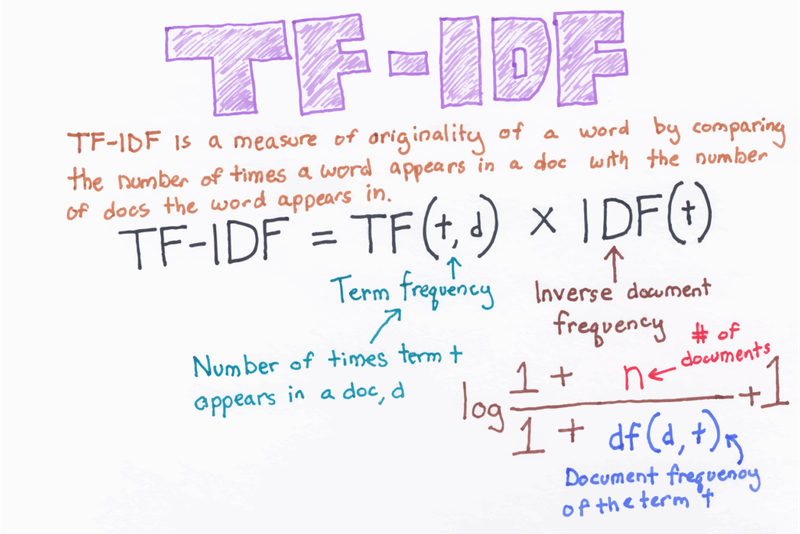
The full formula is:
Where:
- : the term (word or character n-gram) being scored
- : the document (review) being scored
- : term frequency: the number of times term appears in document
- : total number of documents in the corpus
- : document frequency: the number of documents that contain term
- The smoothing prevents division-by-zero for terms not seen during fitting
Import the vectorizer and all other modeling utilities in one block:
from sklearn.feature_extraction.text import TfidfVectorizer
from sklearn.model_selection import train_test_split
from sklearn.svm import LinearSVC
from sklearn.metrics import classification_report
Configure TfidfVectorizer with character-level n-grams up to length 5 and a vocabulary cap of 20,000 features. Character n-grams capture sub-word patterns (prefixes, suffixes, typos) that word-level tokens miss:
tfidf = TfidfVectorizer(max_features=20000, ngram_range=(1,5), analyzer='char')Fit the vectorizer on the full review column and create the feature matrix X and label vector y:
X = tfidf.fit_transform(df['reviewText'])
y = df['overall']
Check the shape of the resulting sparse matrix:
X.shape, y.shape((10261, 20000), (10261,))Each of the 10,261 reviews is now represented as a vector of 20,000 TF-IDF scores. Split the data into 80 % training and 20 % test sets:
X_train, X_test, y_train, y_test = train_test_split(X, y, test_size = 0.2, random_state = 0)Confirm the training set size:
X_train.shape(8208, 20000)Support Vector Machine Classifier
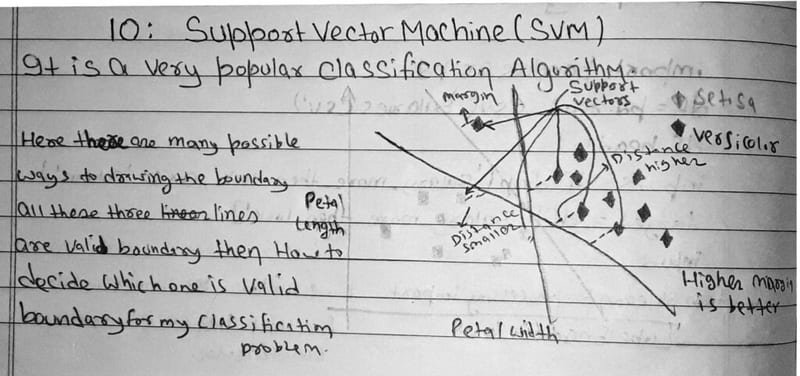
A Support Vector Machine (SVM) is a supervised learning algorithm that finds the hyperplane, a flat boundary in high-dimensional space, that best separates the classes while maximising the margin between them. The margin is the gap between the hyperplane and the nearest data points from each class. A wider margin means better generalisation to new data.
The diagram below shows how SVM chooses between multiple valid boundaries by picking the one with the largest margin:
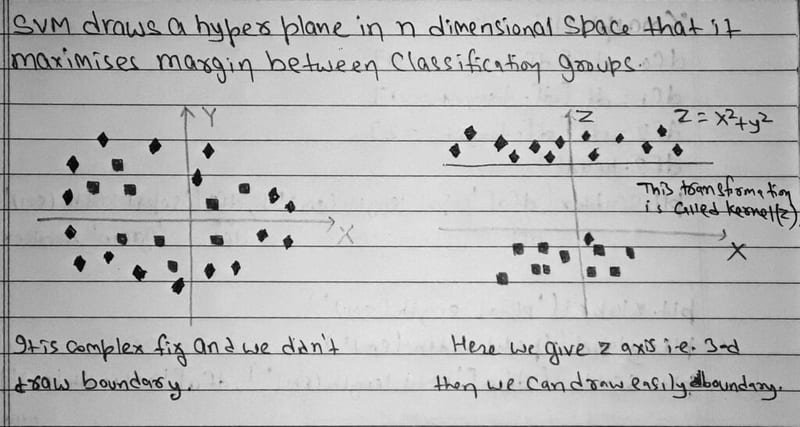
When data is not linearly separable in its original feature space, SVM applies the kernel trick, a mathematical transformation that projects the data into a higher-dimensional space where a linear boundary can be drawn. The diagram below illustrates this 2D-to-3D transformation:
LinearSVC, the linear variant of SVM, skips the full kernel computation and fits directly in the original feature space, which makes it fast enough for high-dimensional TF-IDF vectors. The C parameter controls regularisation strength (higher C = less regularisation, tighter fit), and class_weight='balanced' automatically adjusts class weights to compensate for any remaining imbalance:
clf = LinearSVC(C = 20, class_weight='balanced')
clf.fit(X_train, y_train)
The convergence warning below is informational. The model converged but Liblinear suggests increasing max_iter for a cleaner exit:
c:\users\md  ezajul hassan\appdata\local\programs\python\python37\lib\site-packages\sklearn\svm\_base.py:977: ConvergenceWarning: Liblinear failed to converge, increase the number of iterations.
"the number of iterations.", ConvergenceWarning)LinearSVC(C=20, class_weight='balanced')Generate predictions on the held-out test set:
y_pred = clf.predict(X_test)Evaluating the Model
A classification report shows precision, recall, and F1-score for every class individually. This matters here because 5-star reviews are still more common than 1-star reviews even in the test set, and a single accuracy number would hide how poorly the model might perform on rarer classes.
print(classification_report(y_test, y_pred))precision recall f1-score support
1.0 0.31 0.21 0.25 39
2.0 0.18 0.11 0.13 55
3.0 0.23 0.27 0.25 134
4.0 0.34 0.33 0.34 451
5.0 0.77 0.78 0.78 1374
accuracy 0.62 2053
macro avg 0.37 0.34 0.35 2053
weighted avg 0.61 0.62 0.62 2053Overall accuracy is 62 %. The model performs best on 5-star reviews (F1 = 0.78) because even after under-sampling the 5-star class still dominates the test set. The middle classes (2- and 3-star) are hardest to distinguish. Their F1 scores fall below 0.25, reflecting genuine ambiguity in borderline reviews.
Live Predictions
Test the pipeline end-to-end on a hand-written negative review. Clean the text first with get_clean, then transform it into a TF-IDF vector and call predict:
x = 'this product is really bad. i do not like it'
x = get_clean(x)
vec = tfidf.transform([x])
clf.predict(vec)array([1.])The model correctly assigns 1 star to the negative review. Now test a positive one:
x = 'this product is really good. thanks a lot for speedy delivery'
x = get_clean(x)
vec = tfidf.transform([x])
clf.predict(vec)array([5.])The model assigns 5 stars to the positive review. Both extreme predictions are correct.
Conclusion
In this blog, we built a complete text classification pipeline that predicts Amazon star ratings from raw review text. We loaded and balanced a skewed dataset, cleaned the text with a multi-step preprocessing function, converted reviews into 20,000-dimensional TF-IDF character n-gram features, and trained a LinearSVC classifier that reached 62 % overall accuracy. The model handles extreme sentiments (1-star and 5-star) well but struggles with middle ratings, which is expected given the natural overlap in language between 3- and 4-star reviews.
Key takeaways:
- Class imbalance directly harms classifier fairness. Always check
value_counts()before training and correct with under-sampling orclass_weight='balanced'. - Character-level n-grams (
analyzer='char') capture sub-word patterns and handle typos better than word-level features for informal review text. LinearSVCscales efficiently to high-dimensional sparse TF-IDF matrices where kernel SVM would be too slow.- A classification report is essential for multi-class problems. Overall accuracy alone masks per-class failures.
- Middle star ratings (2-4) are inherently hard to distinguish; consider collapsing them into positive/negative/neutral buckets for a more reliable model.
Next steps:
- Explore Sentiment Analysis with scikit-learn to see how the same TF-IDF + SVM approach is applied to binary positive/negative classification.
- Read Multi-label Text Classification on Stack Overflow Tag Prediction for a more complex scenario where each sample can belong to multiple classes at once.
- Study SVM with Python: Support Vector Machines for a deeper treatment of the SVM algorithm, kernel types, and hyperparameter tuning.