
Getting Started with spaCy
This tutorial covers spaCy and the NLP linguistic features it provides. You will work through tokenization, part-of-speech tagging, named entity recognition, dependency parsing, and visualization using displaCy.
spaCy is a free, open-source library for advanced Natural Language Processing (NLP) in Python. It is designed for production use and helps you build applications that process and understand large volumes of text. It is written in Cython and built for information extraction, natural language understanding, and pre-processing text for deep learning.
Linguistic Features in spaCy
Processing raw text intelligently is difficult: most words are rare, and it is common for words that look completely different to mean almost the same thing.
That is exactly what spaCy is designed to handle. You put in raw text and get back a Doc object with a variety of linguistic annotations attached.
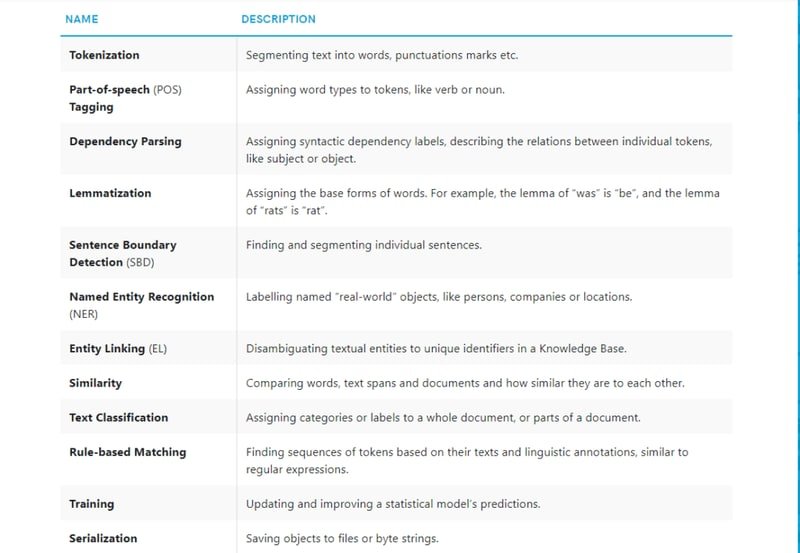
spaCy covers tokenization, lemmatization, part-of-speech (POS) tagging, named entity recognition, dependency parsing, sentence segmentation, word-to-vector transformations, and various text cleaning and normalization methods.
Setup
pip install -U spacy
pip install -U spacy-lookups-data
python -m spacy download en_core_web_sm
Once you have downloaded and installed a model, load it via spacy.load(). spaCy includes several pretrained models. The default model for the English language is en_core_web_sm.
The nlp object is a language instance of the spaCy model. It returns a Language object containing all components and data needed to process text.
import spacy
nlp = spacy.load('en_core_web_sm')
Tokenization
Tokenization is the task of splitting a text into meaningful segments called tokens. The input to the tokenizer is a unicode text and the output is a Doc object.
A Doc is a sequence of Token objects. Each Doc consists of individual tokens that you can iterate over.
doc = nlp("Apple isn't looking at buyig U.K. startup for $1 billion")
for token in doc:
print(token.text)Apple
is
n't
looking
at
buyig
U.K.
startup
for
$
1
billionLemmatization
Lemmatization reduces a word to its base or origin form. This reduced form is called a lemma.
For example, organizes, organized, and organizing are all forms of organize. Here, organize is the lemma.
Lemmatization helps reduce inflected forms of a word so they can be analyzed as a single item. It also normalizes text for downstream processing.
docApple isn't looking at buyig U.K. startup for $1 billionfor token in doc:
print(token.text, token.lemma_)Apple Apple
is be
n't not
looking look
at at
buyig buyig
U.K. U.K.
startup startup
for for
$ $
1 1
billion billionPart-of-speech tagging
Part-of-speech tagging assigns a POS tag to each token depending on its usage in the sentence.
for token in doc:
print(f'{token.text:{15}} {token.lemma_:{15}} {token.pos_:{10}} {token.is_stop}')Apple Apple PROPN False
is be AUX True
n't not PART True
looking look VERB False
at at ADP True
buyig buyig NOUN False
U.K. U.K. PROPN False
startup startup NOUN False
for for ADP True
$ $ SYM False
1 1 NUM False
billion billion NUM FalseDependency Parsing
Dependency parsing extracts the grammatical structure of a sentence by defining relationships between headwords and their dependents. The head of a sentence has no dependency and is called the root. The verb is usually the head of the sentence. All other words link to the headword.
Noun chunks are flat phrases that have a noun as their head. To get the noun chunks in a document, iterate over Doc.noun_chunks.
for chunk in doc.noun_chunks:
print(f'{chunk.text:{30}} {chunk.root.text:{15}} {chunk.root.dep_}')Apple Apple nsubj
buyig U.K. startup startup pobjNamed Entity Recognition
Named Entity Recognition (NER) locates named entities in unstructured text and classifies them into pre-defined categories such as person names, organizations, locations, monetary values, percentages, and time expressions.
It is used to populate tags for a set of documents to improve keyword search. Named entities are available as the ents property of a Doc.
docApple isn't looking at buyig U.K. startup for $1 billionfor ent in doc.ents:
print(ent.text, ent.label_)Apple ORG
U.K. GPE
$1 billion MONEYSentence Segmentation
Sentence Segmentation locates the start and end of sentences in a given text, dividing it into linguistically meaningful units. spaCy uses the dependency parse to determine sentence boundaries. The sents property extracts sentences from a Doc.
docApple isn't looking at buyig U.K. startup for $1 billionfor sent in doc.sents:
print(sent)Apple isn't looking at buyig U.K. startup for $1 billiondoc1 = nlp("Welcome to KGP Talkie. Thanks for watching. Please like and subscribe")
for sent in doc1.sents:
print(sent)Welcome to KGP Talkie.
Thanks for watching.
Please like and subscribedoc1 = nlp("Welcome to.*.KGP Talkie.*.Thanks for watching")
for sent in doc1.sents:
print(sent)Welcome to.*.KGP Talkie.*.Thanks for watchingWhen delimiters are present, sentence segmentation may fail to detect boundaries correctly. In that case, write custom rules based on the delimiter pattern.
Here is an example where ... is used as the delimiter.
def set_rule(doc):
for token in doc[:-1]:
if token.text == '...':
doc[token.i + 1].is_sent_start = True
return docnlp.add_pipe(set_rule, before = 'parser')text = 'Welcome to KGP Talkie...Thanks...Like and Subscribe!'
doc = nlp(text)
for sent in doc.sents:
print(sent)Welcome to KGP Talkie...
Thanks...
Like and Subscribe!for token in doc:
print(token.text)Welcome
to
KGP
Talkie
...
Thanks
...
Like
and
Subscribe
!Visualization
spaCy includes a built-in visualizer called displaCy. You can use it to visualize a dependency parse or named entities in a browser or Jupyter notebook.
Pass a Doc or a list of Doc objects to displaCy and call displacy.serve to run the web server, or displacy.render to generate the raw markup.
from spacy import displacydoc
Welcome to KGP Talkie...Thanks...Like and Subscribe!Visualizing the dependency parse
The dependency visualizer, dep, shows part-of-speech tags and syntactic dependencies.
displacy.render(doc, style='dep')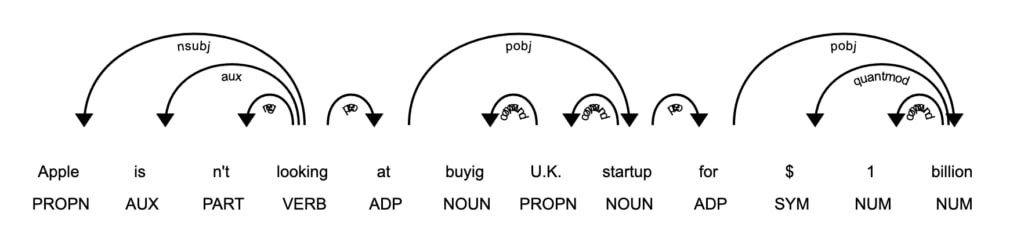
The argument options accepts a dictionary of settings to customize the layout.
displacy.render(doc, style='dep', options={'compact':True, 'distance': 100})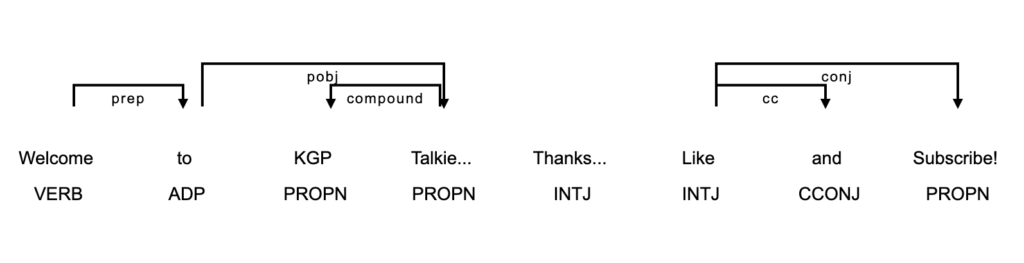
Visualizing the entity recognizer
The entity visualizer, ent, highlights named entities and their labels in a text.
doc = nlp("Apple isn't looking at buyig U.K. startup for $1 billion")displacy.render(doc, style='ent')
Conclusion
spaCy is a production-grade NLP library for Python. It covers tokenization, lemmatization, POS tagging, named entity recognition, dependency parsing, sentence segmentation, and visualization through displaCy.