In the previous lesson, we built a two-stage LLM pipeline. It pulls structured JSON out of PDF resumes. But we cannot ship a Jupyter Notebook to users.
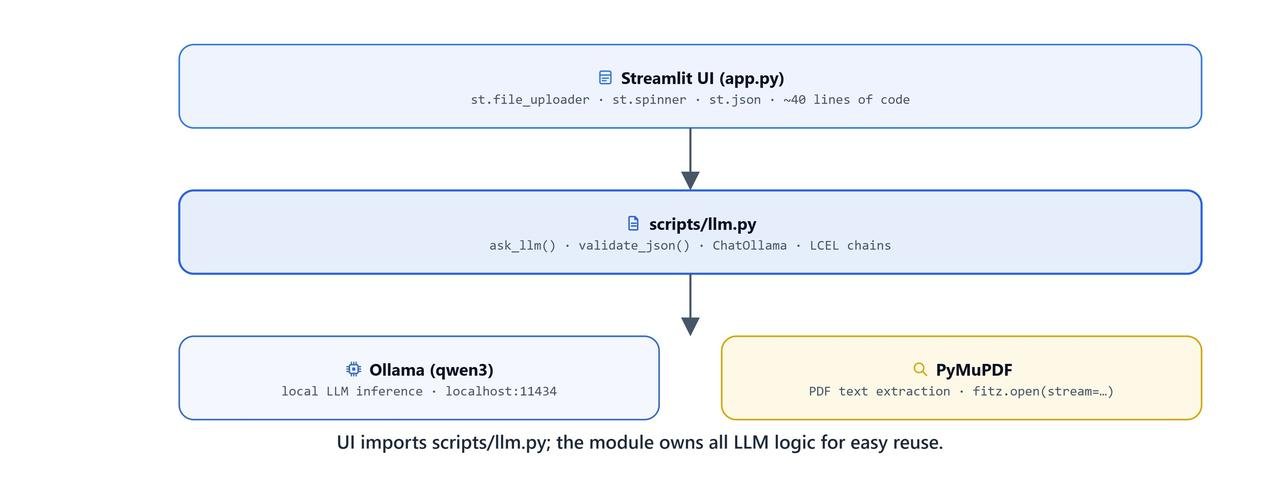
In this lesson, we wrap that exact pipeline in a Streamlit web application. Our LLM logic already lives in scripts/llm.py, so the whole UI needs fewer than 40 lines of code.
Prerequisites: Finish the Resume Parsing lesson first. You will need streamlit, pymupdf, and the scripts/llm.py module from it.
pip install streamlitThe Application Code (app.py)
We create an app.py file in the same directory as our scripts/ folder.
1. Imports and Basic Setup
import streamlit as st
import pymupdf
from scripts.llm import ask_llm, validate_json

st.title("Resume Parsing")
st.write("Upload a resume in PDF format to extract information")
We import streamlit for the UI and pymupdf to read the PDF text. We also import our two LangChain functions, ask_llm and validate_json, from the scripts.llm module.
2. Handling File Uploads in Memory
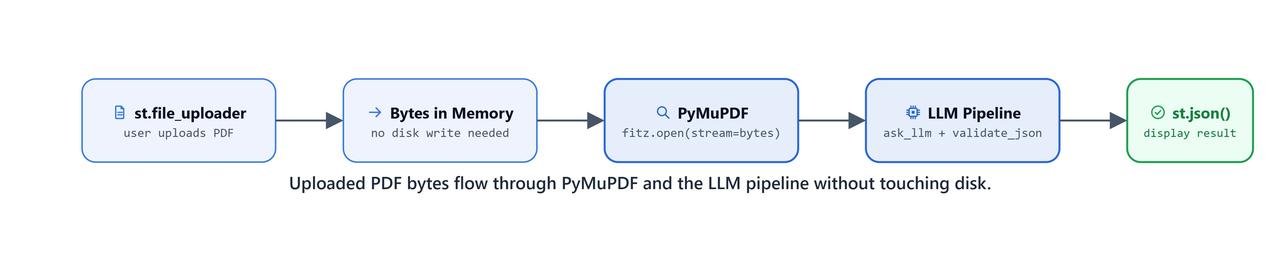
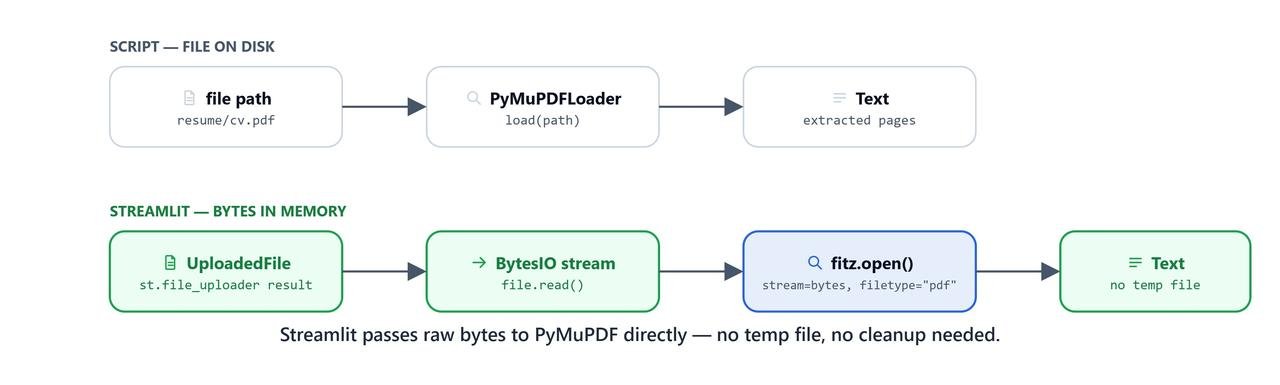
In a notebook, we loaded PDFs from a hardcoded file path on disk. In a web app, users upload files from their browser. For speed and safety, we keep the uploaded file in memory as bytes. Nothing is saved to the server's disk.
uploaded_file = st.file_uploader("Choose a file")

if uploaded_file is not None:
    # Read the uploaded file into memory as bytes
    bytearray = uploaded_file.read()

    # Open the byte stream with PyMuPDF
    pdf = pymupdf.open(stream=bytearray, filetype="pdf")

    context = ""
    # Extract text from every page
    for page in pdf:
        context = context + "\n\n" + page.get_text()

    pdf.close()
3. Executing the Pipeline with UX Feedback
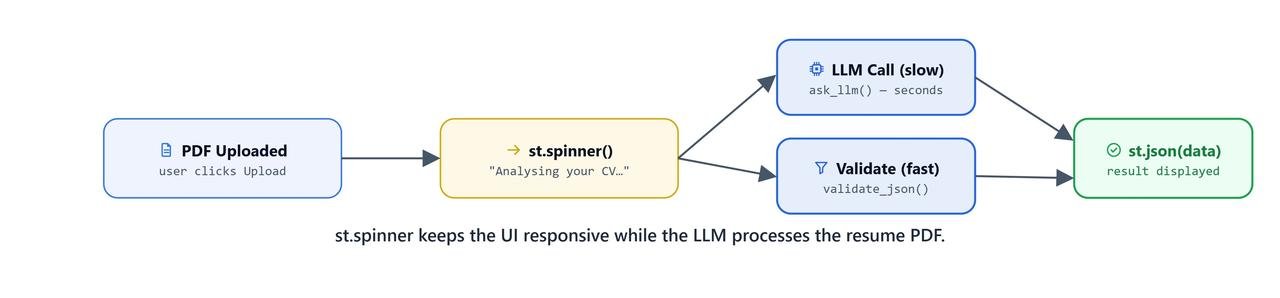
LLM calls take time, especially local ones running on Ollama. If the app freezes while processing, users will assume it broke and refresh the page.
So, we wrap our pipeline calls in st.spinner() blocks. The user sees a spinner instead of a frozen page.
question = """You are tasked with parsing a job resume. Your goal is to extract relevant information in a valid structured 'JSON' format.
                Do not write preambles or explanations."""

if st.button("Parse Resume"):
    # Run the first LLM pass (Semantic Extraction)
    with st.spinner("Parsing Resume..."):
        response = ask_llm(context=context, question=question)

    # Run the second LLM pass (JSON Validation)
    with st.spinner("Validating JSON..."):
        response = validate_json(response)

    # Display the final output
    st.write("**Extracted Information**")
    st.write(response)

    st.write("You can copy the JSON output and use it in your application.")

    # Show a celebration animation on success!
st.balloons()How Do We Run the App?
To start the server, we run the following command from the directory containing app.py:
streamlit run app.pyStreamlit starts a local web server, usually at http://localhost:8501. It opens in the browser on its own.
The User Flow
- The user clicks "Browse files" and selects a PDF resume.
- The user clicks the "Parse Resume" button.
- The UI shows a spinning "Parsing Resume..." indicator while the
StrOutputParserchain extracts the text. - The UI changes to "Validating JSON..." while the
JsonOutputParserchain strictly formats the output. - Balloons animate on the screen, and the structured JSON dictionary is rendered cleanly on the page.
What Changes for Cloud Deployment?
This app runs perfectly on our local machine using Ollama.
Deploying it to a public cloud (like AWS, Render, or Streamlit Community Cloud) needs a few changes:
- Local vs. cloud LLMs: Ollama runs on our own machine. To deploy in the cloud, we have two choices. We can run Ollama on a cloud server, which needs a costly GPU. Or we can point
scripts/llm.pyat a managed API like OpenAI (ChatOpenAI), Anthropic (ChatAnthropic), or AWS Bedrock. - State: if many users upload resumes at once, we may need Streamlit's
@st.cache_dataorst.session_state. This keeps one user's screen from leaking into another's. - File size limits: make sure the web server or proxy (like Nginx) accepts files up to 5-10MB. Normal PDF resumes fit in that range.
What You Built
In this final lesson, we completed the full journey from raw data to a working application:
- We kept the backend LangChain logic (
llm.py) separate from the frontend UI logic (app.py). - We read uploaded files in memory with PyMuPDF instead of saving them to disk.
- We added
st.spinner()feedback so users know the app is working during long LLM calls. - We built a working Streamlit app. It turns messy resumes into clean JSON in real time.
This is how the series ends where it began: a model running on our own machine, now doing a real job for real users.