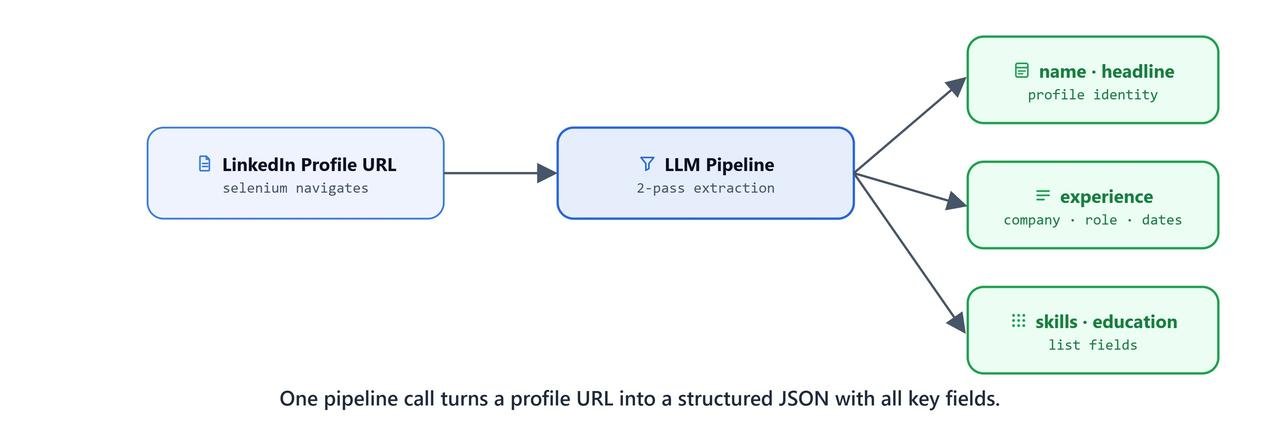
LinkedIn does not provide a public API for profile data. So, in this lesson, we will build our own scraper. Selenium drives the browser and renders the JavaScript. BeautifulSoup parses the HTML. Then, a two-pass LLM pipeline turns the raw text into a clean JSON profile.
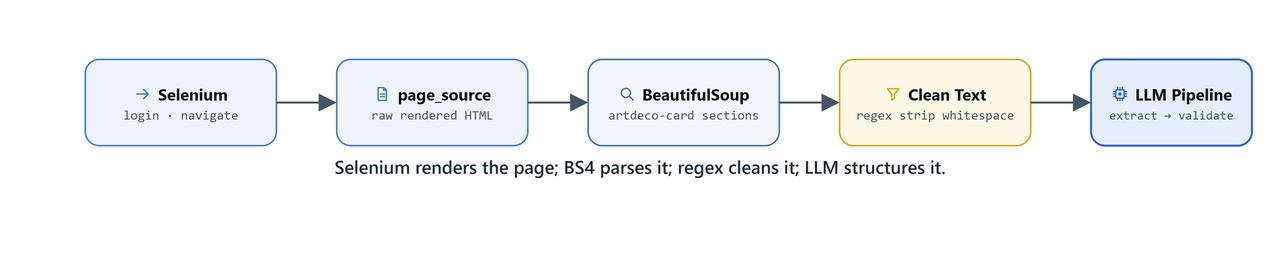
Prerequisites: selenium, beautifulsoup4, lxml, langchain-ollama, langchain-core, python-dotenv installed. Chrome browser and ChromeDriver matching your Chrome version. EMAIL and PASSWORD set in .env.
pip install selenium beautifulsoup4 python-dotenvImportant
Scraping LinkedIn violates their Terms of Service. Use this only for educational purposes with your own account and profile. LinkedIn actively detects automated access and may restrict or ban accounts.
Setup
import warnings
warnings.filterwarnings("ignore")

import os
from dotenv import load_dotenv
load_dotenv()TrueHow Do We Automate the Browser?
Launching Chrome
from bs4 import BeautifulSoup
from selenium import webdriver
from selenium.webdriver.common.by import By

driver = webdriver.Chrome()
This opens a Chrome window that Selenium controls.
Navigating to the LinkedIn Login Page
driver.get('https://www.linkedin.com/login')
driver.title'LinkedIn Login, Sign in | LinkedIn'Logging In with Credentials from .env
We keep the credentials in .env, never hardcoded:
email = driver.find_element(By.ID, 'username')
email.send_keys(os.getenv('EMAIL'))

password = driver.find_element(By.ID, 'password')
password.send_keys(os.getenv('PASSWORD'))

password.submit()
After submit(), LinkedIn processes the login. If 2FA is enabled on your account, you may need to handle it manually in the browser window before the next step.
Navigating to a Profile
## MAKE SURE TO USE ONLY THIS URL FORMAT TO AVOID BEING STUCK IN ERRORS

url = "https://www.linkedin.com/in/laxmimerit"
driver.get(url)
Note
Always use the canonical /in/username URL format. Using other LinkedIn URLs (e.g., search pages or redirect URLs) can cause the scraper to land on unexpected pages.
How Do We Extract and Parse the HTML?
Getting the Page Source
page_source = driver.page_sourcepage_source captures the fully rendered page. It includes the JavaScript content that a plain HTTP request would miss.
Parsing with BeautifulSoup
soup = BeautifulSoup(page_source, 'lxml')Finding the Profile Main Container
LinkedIn's profile content is inside a <main> tag with a specific CSS class:
profile = soup.find('main', {'class': 'IDbhLWzXdzKoCEksNaayQTAEeGRjvNDI'})Warning
LinkedIn frequently changes its CSS class names. The class IDbhLWzXdzKoCEksNaayQTAEeGRjvNDI was correct at the time of recording. If profile returns None, inspect the page source to find the current main container class.
Extracting Profile Sections
LinkedIn puts each profile section (About, Experience, Education, and so on) inside a <section class="artdeco-card"> element:
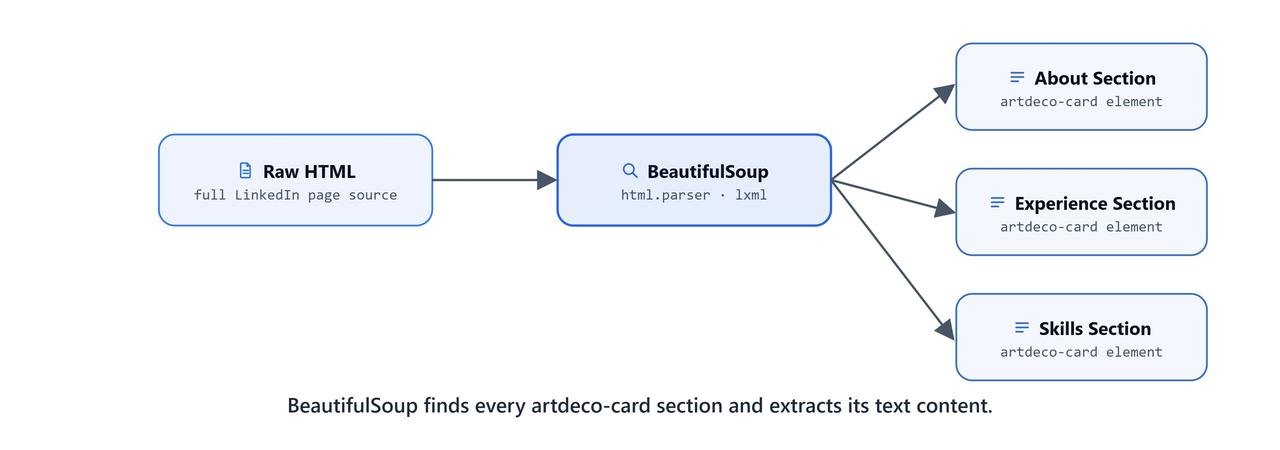
sections = profile.find_all('section', {'class': 'artdeco-card'})
len(sections)20Here, we can see 20 sections found on the profile page.
Converting Sections to Text
sections_text = [section.get_text() for section in sections]How Do We Clean the Text?
Removing Excess Whitespace
The raw LinkedIn text is messy. It carries extra newlines, tabs, and mixed whitespace from the rendered page:
import re

def clean_text(text):
    text = re.sub(r'\n+', '\n', text)       # collapse multiple newlines into one
    text = re.sub(r'\t+', '\t', text)       # collapse multiple tabs into one
    text = re.sub(r'\t\s+', ' ', text)      # replace tab+spaces with a single space
    text = re.sub(r'\n\s+', '\n', text)     # remove leading spaces after newlines
    return text

sections_text = [clean_text(section) for section in sections_text]
Removing LinkedIn UI Duplication
LinkedIn duplicates certain strings in its UI (e.g., section headers appear twice in the raw text). The remove_duplicates() function detects this pattern: if the first half of a line equals the second half, we keep only the first half:
def remove_duplicates(text):
    lines = text.split('\n')
    new_lines = []
    for line in lines:
        if line[:len(line)//2] == line[len(line)//2:]:
            new_lines.append(line[:len(line)//2])
        else:
            new_lines.append(line)
    return '\n'.join(new_lines)

sections_text = [remove_duplicates(section) for section in sections_text]
Here is a sample cleaned section:
print(sections_text[1])Open to work
Chief Data Scientist, Head of Data Science, Data Science Vice President, Lead Data Scientist and Data Scientist roles
Show details
EditSample Raw Section Data
sections_text[0] contains the full profile header:
Laxmi Kant has a {:badgeType} account
Laxmi Kant Tiwari
Gen AI in Finance & Investment Services | Data Scientist | IIT Kharagpur | Asset Management | AI-Driven Financial Modeling | Search Ranking | NLP Python BERT AWS Elasticsearch GNN SQL LLM | AI in Investment Strategies
Indian Institute of Technology, Kharagpur
Mumbai, Maharashtra, India
Contact info
27,018 followers
500+ connections
Open to
Add profile section
...How Does the First LLM Pass Work?
LLM and Chain Setup
from langchain_ollama import ChatOllama
from langchain_core.prompts import (SystemMessagePromptTemplate,
                                    HumanMessagePromptTemplate,
                                    ChatPromptTemplate)
from langchain_core.output_parsers import StrOutputParser

base_url = "http://localhost:11434"
model = 'qwen3'

llm = ChatOllama(base_url=base_url, model=model)

system = SystemMessagePromptTemplate.from_template(
    """You are helpful AI assistant who answer LinkedIn profile parsing related
    user question based on the provided profile text data."""
)

def ask_llm(prompt):
    prompt = HumanMessagePromptTemplate.from_template(prompt)
    messages = [system, prompt]
    template = ChatPromptTemplate(messages)
    qna_chain = template | llm | StrOutputParser()
    return qna_chain.invoke({})
Let's test the connection:
llmChatOllama(model='qwen3', base_url='http://localhost:11434')ask_llm("hello")'Hello! How can I assist you with LinkedIn profile parsing today? Are you looking to extract specific information, automate data collection, or need guidance on best practices? Let me know your query! 😊'Extraction Prompt Template
The template takes the section's raw text and the key to extract, and asks for up to 5 bullet points:
template = """
Extract and return the requested information from the LinkedIn profile data in a concise, point-by-point format (up to 5 points). Avoid preambles or any additional context.

### LinkedIn Profile Data:
{}

### Information to Extract:
Extract '{}' in bullet points, limiting the output to 5 points. Provide only the necessary details.
Remember, It is LinkedIn profile data.

### Extracted Data:"""
Let's test it on the first section:
context = sections_text[0]
k = "Name and Headline"

prompt = template.format(context, k).replace('{', '{{').replace('}', '}}')
response = ask_llm(prompt)
print(response)- Name: Laxmi Kant Tiwari
- Headline: Gen AI in Finance & Investment Services | Data Scientist
- Education: Indian Institute of Technology, Kharagpur
- Skills: NLP, Python, BERT, AWS, Elasticsearch, GNN, SQL, LLM
- Focus Area: AI in Investment StrategiesNote
The .replace('{', '{{').replace('}', '}}') is necessary because ChatPromptTemplate uses curly-brace syntax. Escaping the braces prevents LangChain from treating the section text content as template variables.
Extracting Section Keys Automatically
Instead of hardcoding section names, we take them from the first line of each section:
section_keys = ['Name and Headline']
for section in sections_text[1:]:
    section_keys.append(section.strip().split('\n')[0])

section_keys['Name and Headline', 'Open to work', "Tell non-profits you're interested in getting involved with your time and skills", 'Suggested for you', 'Analytics', 'About', 'Featured', 'Activity', 'Experience', 'Education', 'Licenses & certifications', 'Projects', 'Skills', 'Recommendations', 'Patents', 'Courses', 'Honors & awards', 'Languages', 'Interests', 'Causes']Processing All 20 Sections
responses = {}

for k, context in zip(section_keys, sections_text):
    prompt = template.format(context, k).replace('{', '{{').replace('}', '}}')
    response = ask_llm(prompt=prompt)
    responses[k] = response
The responses dict maps each section key to its extracted bullet points. Here is the shortened output:
print(responses){'Name and Headline': '- Name: Laxmi Kant Tiwari\n- Headline: Data Scientist | Gen AI in Finance & Investment Services\n- Headline: Asset Management | AI-Driven Financial Modeling\n- Headline: AI in Investment Strategies\n- Headline: NLP Python BERT AWS Elasticsearch GNN SQL LLM', 'Open to work': '- Open to work', 'Analytics': '- 418 profile views\n- 2,950 post impressions\n- 129 search appearances\n- Past 7 days\n- Show all analytics', 'About': '- Demonstrated 8+ years of expertise in Advanced Analytics and Machine Learning, leading strategic AI initiatives at Linedata.\n- Specializes in designing scalable GenAI/LLM applications for financial workflows...\n- Developed AI-powered reconciliation system for cash/position breaks...\n- Built aliasing framework for securities/accounts mapping...\n- Created LLM-driven financial memo generator and research assistants...', 'Experience': '- **Senior Manager, Linedata** (Sep 2024 – Present)\n Developed AI-powered financial solutions using LLMs, custom algorithms...\n- **Assistant Vice President, IGP** (Oct 2023 – Sep 2024)\n Led projects including customer behavior modeling...\n- **Data Science Manager, IGP.COM** (Dec 2019 – Apr 2021)\n Implemented AI-powered search with BERT algorithms, boosting search conversion by 20% and revenue by 25%...', 'Education': '- Senior Research Scholar, Computer Science, IIT Kharagpur (2014–2016)\n- M.Tech., Computer Science, IIT Kharagpur (2012–2014)\n- Signal processing algorithms for respiration and heart rate monitoring\n- Machine Learning algorithms and Android app for Sleep Apnea detection\n- 5-stage pipelined RISC processor in Verilog (term project)', ...}We save it to JSON:
import json

with open('linkedin_profile_data.json', 'w') as f:
    json.dump(responses, f, indent=4)
How Does the Second LLM Pass Work?
The first pass gave us a dict of section-level bullet points. The second pass re-parses this dict into a clean, structured schema:
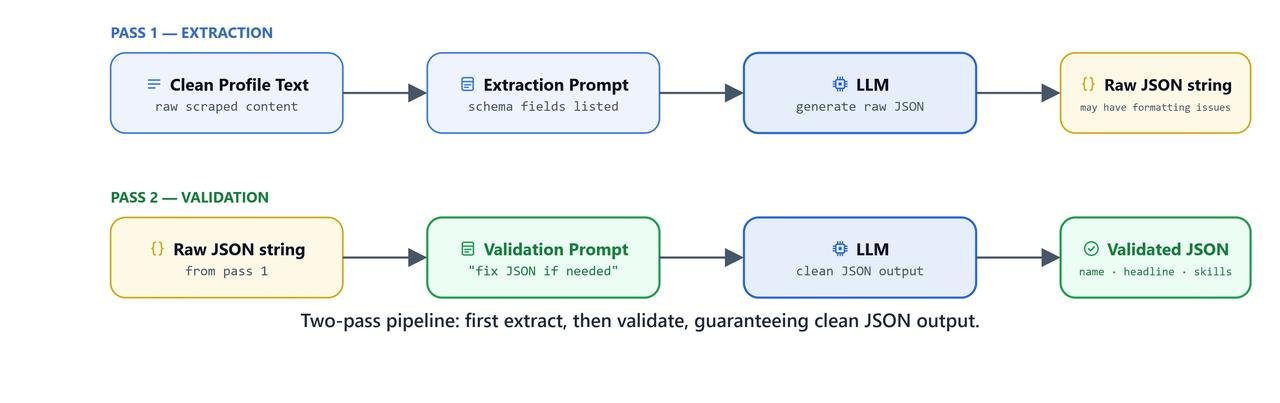
template = """You are provided with LinkedIn profile data in JSON format.
            Parse the data according to the specified schema, correct any spelling errors,
            and condense the information if possible.

### LinkedIn Profile JSON Data:
{context}

### Schema You need to follow:
You need to extract
Name:
Headline:
About:
Experience:
Education:
Skills:
Projects:
Summary:

Do not return preambles or any other information.
### Parsed Data:"""

prompt = template.format(context=responses).replace("{", "{{").replace("}", "}}")
response = ask_llm(prompt=prompt)
print(response){
"Name": "Laxmi Kant Tiwari",
"Headline": "Data Scientist | Gen AI in Finance & Investment Services | AI-Driven Financial Modeling | NLP, Python, BERT, AWS, Elasticsearch, GNN, SQL, LLM",
"About": "Demonstrated 8+ years of expertise in Advanced Analytics and Machine Learning, leading strategic AI initiatives at Linedata. Specializes in designing scalable GenAI/LLM applications for financial workflows to transform legacy processes into intelligent systems.",
"Experience": [
{
"Title": "Senior Manager",
"Company": "Linedata",
"Dates": "Sep 2024 – Present",
"Responsibilities": [
"Developed AI-powered financial solutions using LLMs, custom algorithms, and scalable architectures",
"Created intelligent reconciliation systems, security frameworks, and covenant analysis tools"
]
},
{
"Title": "Assistant Vice President",
"Company": "IGP",
"Dates": "Oct 2023 – Sep 2024",
"Responsibilities": [
"Led projects including customer behavior modeling, hashtag search optimization, automated feedback reports, and meta tag generators"
]
},
{
"Title": "Associate Vice President",
"Company": "IGP",
"Dates": "Apr 2021 – Oct 2023",
"Responsibilities": [
"Engineered personalized search algorithms, graph/big data analysis tools, and social graph-based recommendation systems"
]
},
{
"Title": "Data Science Manager",
"Company": "IGP.COM",
"Dates": "Dec 2019 – Apr 2021",
"Responsibilities": [
"Implemented AI-powered search with BERT algorithms, real-time product recommendations, boosting search conversion by 20% and revenue by 25%"
]
},
{
"Title": "Co-Founder",
"Company": "mBreath",
"Dates": "Aug 2016 – Nov 2019",
"Responsibilities": [
"Developed wearable health tech with patents for sleep apnea detection, respiration monitoring, and environmental sound analysis using ML models (CNN, LSTM)"
]
}
],
"Education": [
{
"Degree": "Senior Research Scholar, Computer Science",
"Institution": "IIT Kharagpur",
"Dates": "2014–2016"
},
{
"Degree": "M.Tech., Computer Science",
"Institution": "IIT Kharagpur",
"Dates": "2012–2014"
}
],
"Skills": ["Finance", "HuggingFace", "NLP", "Python", "BERT", "AWS", "Elasticsearch", "GNN", "SQL", "LLM"],
"Projects": [...]
}Two-Pass Pipeline Summary
Raw LinkedIn HTML
     │
     ▼
BeautifulSoup → 20 section elements
     │
     ▼
clean_text() → remove excess whitespace
remove_duplicates() → remove LinkedIn UI duplication
     │
     ▼
section_keys[] ← first line of each section as key
     │
     ▼
Pass 1: LLM extracts up to 5 bullets per section → responses{}
     │
     ▼
Save: linkedin_profile_data.json (section-level bullets)
     │
     ▼
Pass 2: LLM re-parses responses{} → structured JSON schema
        (Name, Headline, About, Experience, Education, Skills, Projects, Summary)
What You Built
In this lesson, we built a complete LinkedIn profile extraction pipeline:
- Selenium automation: logged in with
.envcredentials, opened the profile page, and captured the rendered page - BeautifulSoup parsing: pulled the
artdeco-cardsections out of the page - Text cleaning: used regex to tidy whitespace and remove LinkedIn's doubled UI text
- Section keys: took each section's name from its first line
- First LLM pass: pulled up to 5 bullet points out of each section's raw text
- Second LLM pass: turned the section bullets into a clean JSON profile (Name, Headline, Experience, Education, Skills)
- Saving: wrote
linkedin_profile_data.jsonafter both passes
This is how the pipeline works. Selenium sees the page. BeautifulSoup cuts it into sections. Regex scrubs the text. The LLM then turns messy text into structured data, twice.