A vector store is the memory of a RAG system: the place where our documents live as numbers. In simple words, it converts document chunks into vectors (embeddings), stores them in an index built for fast nearest-neighbour search, and returns the chunks whose meaning is closest to any query. In this lesson, we will build that store step by step, from raw PDFs to a saved FAISS index, using Ollama-hosted embeddings and LangChain's vector store classes.

PDFs are split into chunks, embedded into 768-d vectors, indexed in FAISS, and persisted to disk.
Prerequisites: langchain-community, langchain-ollama, langchain-text-splitters, faiss-cpu, pymupdf, tiktoken, and python-dotenv installed. Ollama running with both qwen3 and nomic-embed-text models pulled. A rag-dataset/ folder containing PDFs (clone from https://github.com/laxmimerit/rag-dataset).
Note
Install FAISS with pip install faiss-cpu (CPU-only). For GPU acceleration use pip install faiss-gpu. On Windows you may also need to set KMP_DUPLICATE_LIB_OK=True to avoid an OpenMP conflict if multiple math libraries are loaded.
Setup
import os
import warnings
from dotenv import load_dotenv

os.environ['KMP_DUPLICATE_LIB_OK'] = 'True'
warnings.filterwarnings("ignore")

load_dotenv()TrueKMP_DUPLICATE_LIB_OK prevents a runtime crash on Windows when both PyTorch and FAISS link their own OpenMP runtime.
How Do We Load the Documents?
First, we walk the rag-dataset/ directory and load every PDF page by page using PyMuPDFLoader. Each page becomes one Document object:
from langchain_community.document_loaders import PyMuPDFLoader
import os

pdfs = []
for root, dirs, files in os.walk("rag-dataset"):
    for file in files:
        if file.endswith(".pdf"):
            pdfs.append(os.path.join(root, file))

docs = []
for pdf in pdfs:
    loader = PyMuPDFLoader(pdf)
    temp = loader.load()
    docs.extend(temp)

len(docs)64Here, we can see 64 pages across all the PDFs in the dataset.
Why Do We Chunk the Documents?
Raw PDF pages are often too long to embed as one unit, and too long to sit usefully inside a retrieval prompt. So, we split each page into smaller overlapping chunks with RecursiveCharacterTextSplitter:
from langchain_text_splitters import RecursiveCharacterTextSplitter

text_splitter = RecursiveCharacterTextSplitter(chunk_size=1000, chunk_overlap=100)
chunks = text_splitter.split_documents(docs)chunk_size=1000: maximum characters per chunkchunk_overlap=100: characters shared between adjacent chunks to preserve context at split boundaries
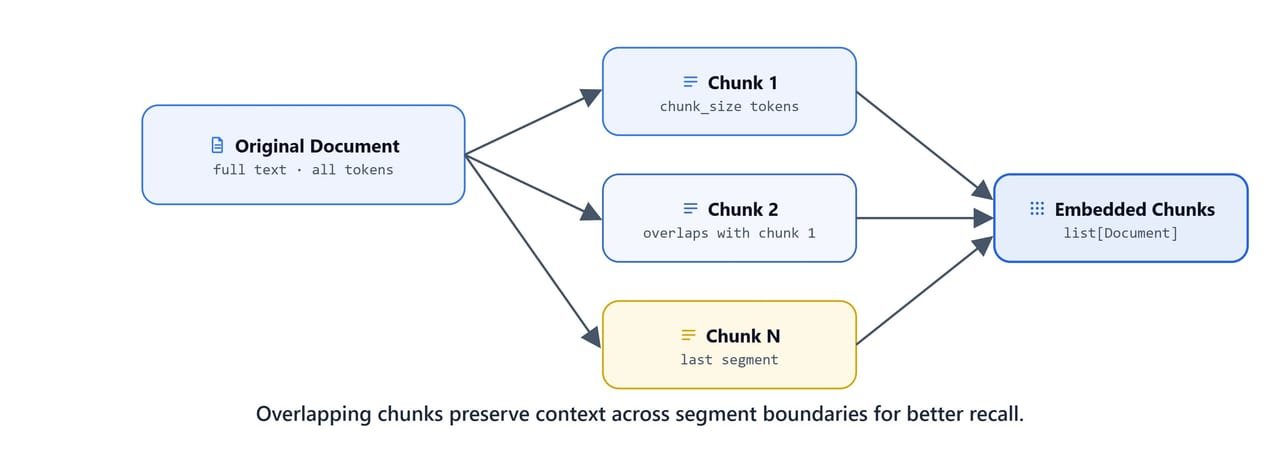
Overlapping chunks share text at the boundaries so context is preserved across segment splits, improving recall.
Verifying Chunk Sizes with tiktoken
import tiktoken

encoding = tiktoken.encoding_for_model("gpt-4o-mini")
len(encoding.encode(chunks[0].page_content)), len(encoding.encode(chunks[1].page_content)), len(encoding.encode(docs[1].page_content))(294, 219, 922)Here, we can see the effect. Before chunking, page 1 was 922 tokens. After chunking, the first two chunks are 294 and 219 tokens. That fits easily in any model's context window and is small enough for precise embedding.
Tip
The chunk_size parameter is in characters, not tokens. Roughly 1 token ≈ 4 characters for English text, so a chunk_size=1000 yields chunks of approximately 200-300 tokens. That is a good balance between precision (small chunks surface precise answers) and context (large chunks preserve paragraph-level meaning).
How Do We Embed the Chunks?
Imports
from langchain_ollama import OllamaEmbeddings

import faiss
from langchain_community.vectorstores import FAISS
from langchain_community.docstore.in_memory import InMemoryDocstore
Embedding Model
nomic-embed-text is a high-quality, open-source embedding model that runs locally through Ollama. It produces 768-dimensional vectors:
embeddings = OllamaEmbeddings(model='nomic-embed-text', base_url='http://localhost:11434')Let's verify the embedding dimension by embedding a test string:
vector = embeddings.embed_query("Hello World")
len(vector)
It returns 768. Every nomic-embed-text vector has 768 numbers.
Building the FAISS Index
IndexFlatL2 is a flat (brute-force) index. It computes the exact L2 (Euclidean) distance between the query vector and every stored vector. In simple words, it checks everything, so the results are exact, but the search time grows with the number of vectors. For small to medium datasets (up to a few hundred thousand chunks), it is the right default choice:
index = faiss.IndexFlatL2(len(vector))
index.ntotal, index.d(0, 768)Here, we can see ntotal is 0 (the index is empty) and d is 768 (the vector dimension).
Creating the LangChain FAISS Vector Store
Now, we wrap the FAISS index in a LangChain FAISS vector store. This adds document storage (InMemoryDocstore) and a mapping from FAISS index positions to document IDs:
vector_store = FAISS(
    embedding_function=embeddings,
    index=index,
    docstore=InMemoryDocstore(),
    index_to_docstore_id={},
)

vector_store.index.ntotal, vector_store.index.d(0, 768)The store is ready but still empty.
Adding Chunks to the Vector Store
ids = vector_store.add_documents(documents=chunks)add_documents embeds every chunk using OllamaEmbeddings, adds the vectors to the FAISS index, and stores the corresponding Document objects in the docstore. Each chunk gets a unique UUID:
len(ids), vector_store.index.ntotal(311, 311)Here, we can see 311 chunks embedded and indexed. The 64 original pages became 311 overlapping chunks after splitting.
How Do We Retrieve Relevant Chunks?
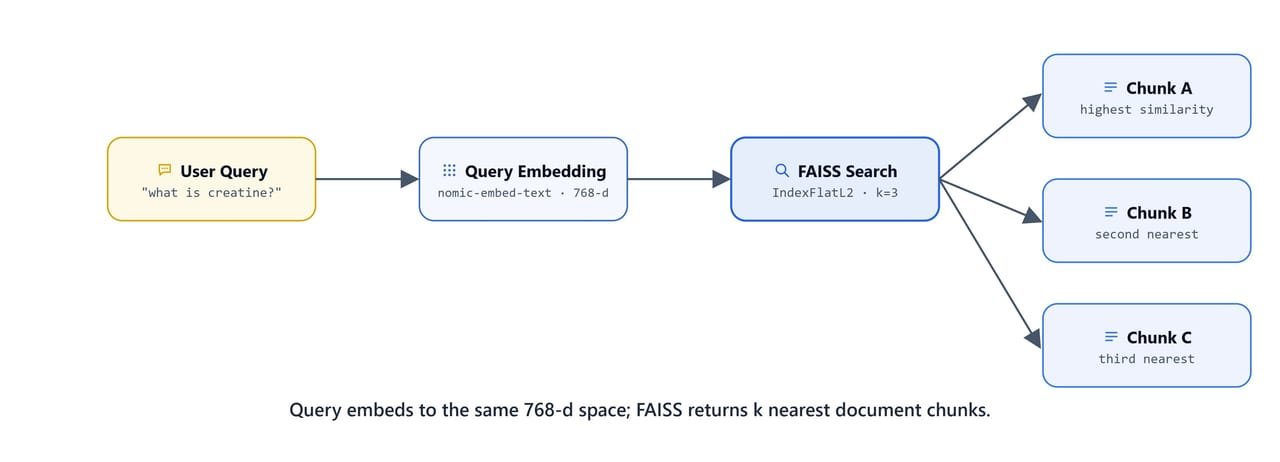
The query is embedded into the same 768-d space; FAISS returns the k nearest document chunks.
Direct Search on the Vector Store
We use vector_store.search() for a quick similarity lookup:
question = "how to gain muscle mass?"
docs = vector_store.search(query=question, k=5, search_type="similarity")
It returns the 5 chunks whose meaning is closest to the query. Each result is a Document with page_content and metadata (source file, page number, format, dates):
docs[Document(id='99f5925c-...', metadata={'source': 'rag-dataset\\gym supplements\\2. High Prevalence of Supplement Intake.pdf', 'page': 8, 'total_pages': 11, ...},
page_content='and strength gain among men. We detected more prevalent protein and creatine supplementation
among younger compared to older fitness center users, whereas the opposite was found for vitamin
supplementation...'),
Document(id='fb6f7c4b-...', metadata={'source': 'rag-dataset\\gym supplements\\2. High Prevalence of Supplement Intake.pdf', 'page': 5, ...},
page_content='for two training goals. Improving health was named by 59%, 60%, 75%, and 89% as a training goal
among the four age groups...'),
Document(id='fd2726cd-...', metadata={'source': 'rag-dataset\\gym supplements\\1. Analysis of Actual Fitness Supplement.pdf', 'page': 0, ...},
page_content='acids than traditional protein sources. Its numerous benefits have made it a popular choice
for snacks and drinks among consumers. Another widely embraced supplement is caffeine...'),
...]Here, we can see it worked. We asked about muscle gain, and the store surfaced passages from gym supplement research papers.
Which Retriever Strategy Should We Use?
as_retriever() wraps the vector store as a LangChain Retriever, the standard interface used by LCEL chains. Let's see the three search strategies one by one:
1. Similarity (Default)
This strategy returns the k nearest vectors, no matter how far away they are:
retriever = vector_store.as_retriever(
    search_type='similarity',
    search_kwargs={'k': 3}
)

retriever.invoke(question)
It returns the 3 closest chunks for "how to gain muscle mass?", the same top results as vector_store.search().
2. Similarity Score Threshold
This strategy only returns results whose similarity score crosses a minimum threshold. It stops the retriever from returning irrelevant chunks when no good match exists:
retriever = vector_store.as_retriever(
    search_type='similarity_score_threshold',
    search_kwargs={'k': 3, 'score_threshold': 0.1}
)

question = "how to lose weight?"
retriever.invoke(question)
It returns chunks specifically about weight loss supplements from the health supplements research PDF (page 12, the "Dietary Supplements and Weight Loss" section), keeping only those above the 0.1 score threshold.
Note
In FAISS with IndexFlatL2, the similarity score is computed from L2 distance. A lower threshold (e.g., 0.1) allows more results through. A higher threshold makes the filter stricter. Tune score_threshold based on your dataset to avoid empty results or irrelevant matches.
3. MMR (Maximal Marginal Relevance)
MMR balances relevance (how close a chunk is to the query) and diversity (how different the returned chunks are from each other). It stops us from retrieving several near-duplicate chunks from the same page:
retriever = vector_store.as_retriever(
    search_type='mmr',
    search_kwargs={'k': 3, 'fetch_k': 20, 'lambda_mult': 1}
)

docs = retriever.invoke(question)
docsfetch_k=20: initially fetches 20 candidates by similaritylambda_mult=1: controls relevance vs. diversity trade-off (1 = full relevance, 0 = maximum diversity)
The returned chunks are the most relevant and most varied subset of those 20 candidates.
Tip
Use mmr when your dataset has redundant content (e.g., many similar paragraphs across multiple papers). similarity is fine for small or well-curated datasets. similarity_score_threshold is ideal when you need to handle the "no good answer exists" case gracefully.
How Do We Save the Vector Store?
Finally, we save the populated vector store to disk, so later lessons can load it without re-embedding anything:
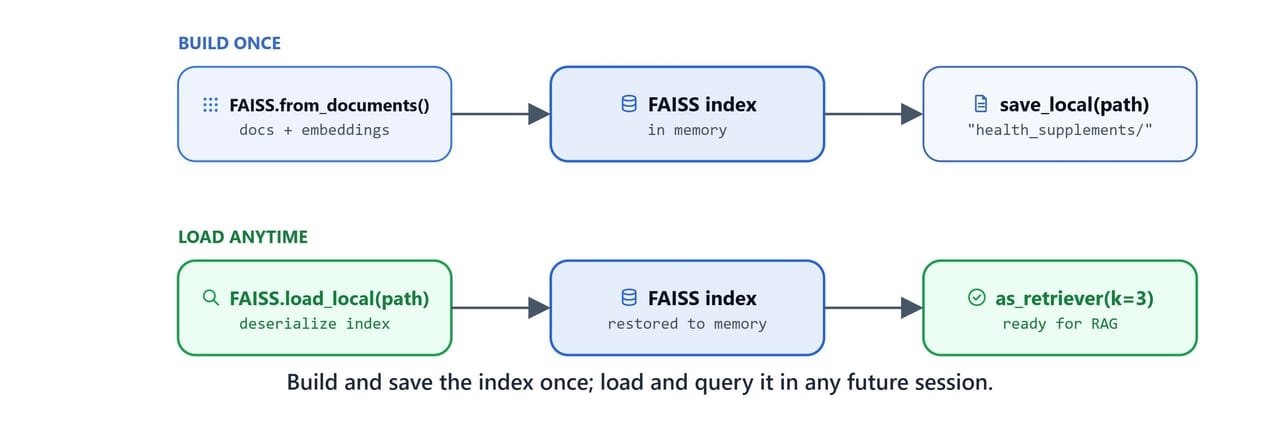
Build and save the index once; load and query it in any future session without re-embedding.
db_name = "health_supplements"
vector_store.save_local(db_name)
This creates a health_supplements/ directory containing:
index.faiss: the serialized FAISS index with all 311 vectorsindex.pkl: the docstore andindex_to_docstore_idmapping (pickled)
The next lesson (RAG) loads this saved store directly with FAISS.load_local().
Quick Reference
Full Build Pipeline
# 1. Load PDFs
from langchain_community.document_loaders import PyMuPDFLoader
import os

pdfs = [os.path.join(r, f) for r, _, fs in os.walk("rag-dataset") for f in fs if f.endswith(".pdf")]
docs = []
for pdf in pdfs:
    docs.extend(PyMuPDFLoader(pdf).load())

# 2. Chunk
from langchain_text_splitters import RecursiveCharacterTextSplitter
chunks = RecursiveCharacterTextSplitter(chunk_size=1000, chunk_overlap=100).split_documents(docs)

# 3. Embed + Index
from langchain_ollama import OllamaEmbeddings
from langchain_community.vectorstores import FAISS
from langchain_community.docstore.in_memory import InMemoryDocstore
import faiss

embeddings = OllamaEmbeddings(model='nomic-embed-text', base_url='http://localhost:11434')
vector = embeddings.embed_query("test")
index = faiss.IndexFlatL2(len(vector))

vector_store = FAISS(
    embedding_function=embeddings,
    index=index,
    docstore=InMemoryDocstore(),
    index_to_docstore_id={},
)
vector_store.add_documents(documents=chunks)

# 4. Save
vector_store.save_local("health_supplements")
Retriever Strategies at a Glance
# Similarity (top-k)
retriever = vector_store.as_retriever(search_type='similarity', search_kwargs={'k': 3})

# With minimum score filter
retriever = vector_store.as_retriever(
    search_type='similarity_score_threshold',
    search_kwargs={'k': 3, 'score_threshold': 0.1}
)

# Maximal Marginal Relevance (diverse results)
retriever = vector_store.as_retriever(
    search_type='mmr',
    search_kwargs={'k': 3, 'fetch_k': 20, 'lambda_mult': 1}
)
What You Built
In this lesson, we built the complete ingestion and indexing layer of a RAG system:
- Loaded 64 pages from a research PDF dataset with
PyMuPDFLoader - Chunked them into 311 overlapping 1000-character chunks with
RecursiveCharacterTextSplitter - Embedded every chunk into 768-dimensional vectors using
nomic-embed-textvia Ollama - Indexed all the vectors in a FAISS
IndexFlatL2for exact nearest-neighbour search - Retrieved relevant chunks using three strategies:
similarity,similarity_score_threshold, andmmr - Saved the complete index to disk for reuse across sessions
This is how a vector store works. Text goes in as chunks, lives as vectors, and comes back by meaning. The saved health_supplements/ store is the starting point for the next lesson, where a full RAG chain will load it and answer questions grounded entirely in these documents.