Document loaders are LangChain's bridge between raw files and LLM chains. In simple words, a loader reads a source (a local PDF, a live webpage, a PowerPoint deck, an Excel sheet, a Word document) and returns a list of Document objects. Each Document carries a page_content string and a metadata dict. From there, we can pass the content straight into any LCEL chain for Q&A, summarization, or report generation.
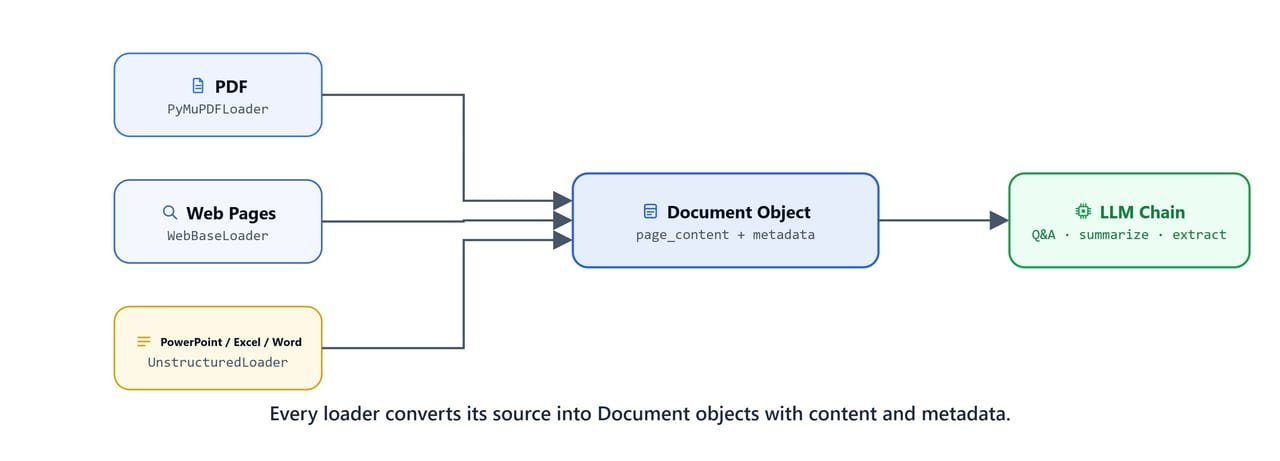
Every loader converts its source (PDF, webpage, or Office file) into uniform Document objects with content and metadata.
In this lesson, we will learn five loader patterns, plus two newer converters, MarkitDown (from Microsoft) and Docling (from IBM). These two go beyond basic loading and produce structured Markdown and extracted tables from complex documents.
Prerequisites: LangChain, langchain-community, langchain-ollama, pymupdf, tiktoken, python-dotenv, unstructured, openpyxl, python-pptx, docx2txt, markitdown, and docling installed. Ollama running locally with qwen3.
Note
Install the full unstructured package for Office file support: pip install "unstructured[all-docs]". Install MarkitDown with pip install markitdown and Docling with pip install docling.
How Do We Load PDF Files?
Loading a Single PDF
PyMuPDFLoader reads a PDF file and returns one Document per page. The metadata dict includes the source path, page number, total pages, format, author, creation date, and more.
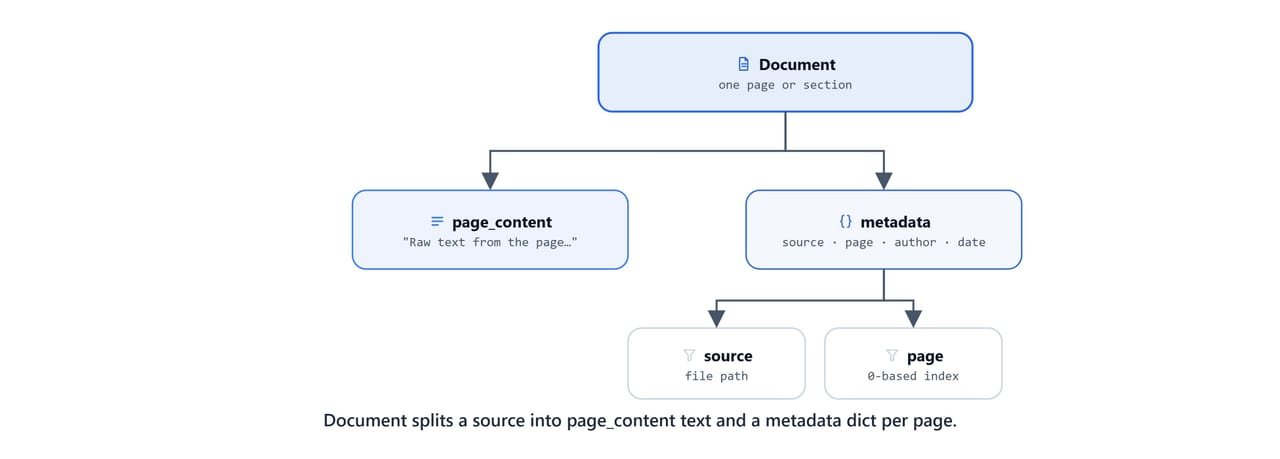
Each Document splits a source into a page_content text field and a metadata dict, one per page.
from dotenv import load_dotenv

load_dotenv('.env')TrueOn Linux/macOS: use load_dotenv('./../.env') if .env is in a parent directory.
from langchain_community.document_loaders import PyMuPDFLoader

loader = PyMuPDFLoader("rag-dataset/health supplements/1. dietary supplements - for whom.pdf")

docs = loader.load()len(docs)17Here, we can see 17 pages loaded. Each element in docs is one page, and we read the content and metadata through docs[0].page_content and docs[0].metadata.
Loading All PDFs in a Directory
Now, we walk the rag-dataset/ folder and load every .pdf file into one flat list:
import os

pdfs = []
for root, dirs, files in os.walk("rag-dataset"):
    for file in files:
        if file.endswith(".pdf"):
            pdfs.append(os.path.join(root, file))

docs = []
for pdf in pdfs:
    loader = PyMuPDFLoader(pdf)
    temp = loader.load()
    docs.extend(temp)

len(docs)64Here, we can see 64 pages across all the PDFs. Next, we build a single context string by joining all the page contents:
def format_docs(docs):
    return "\n\n".join([x.page_content for x in docs])

context = format_docs(docs)
How Many Tokens Is Our Context?
Before sending the context to an LLM, we should check how many tokens it uses. Every LLM has a context window limit, and the token count affects both cost and quality.
import tiktoken

encoding = tiktoken.encoding_for_model("gpt-4o-mini")
Let's check the encoding on two sample strings:
encoding.encode("congratulations"), encoding.encode("rqsqeft")([542, 111291, 14571], [81, 31847, 80, 5276])Now, we count the tokens for one page and for the full context:
len(encoding.encode(docs[0].page_content))968len(encoding.encode(context))58181
969 * 64
62016Here, we can see the full dataset is about 58,000 tokens. That fits comfortably in a 128K-context model like qwen3 for direct Q&A, but it is worth chunking for smaller models.
Project 1: Q&A from PDF
Now, let's build a Q&A chain that answers strictly from the loaded PDF context. The system prompt tells the model not to answer outside the provided context:
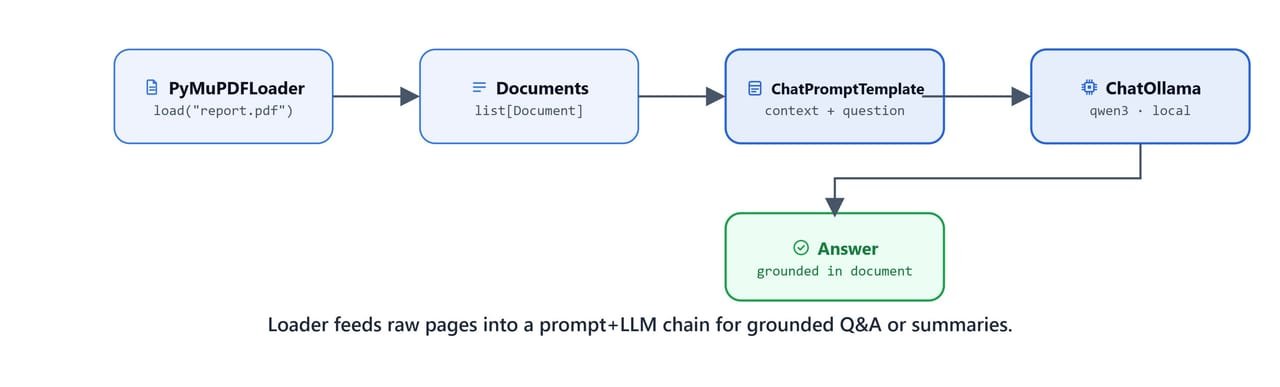
The loader feeds raw pages into a prompt + LLM chain for grounded Q&A or summaries.
from langchain_ollama import ChatOllama
from langchain_core.prompts import (SystemMessagePromptTemplate, HumanMessagePromptTemplate, ChatPromptTemplate)
from langchain_core.output_parsers import StrOutputParser

base_url = "http://localhost:11434"
model = 'qwen3'
llm = ChatOllama(base_url=base_url, model=model)

system = SystemMessagePromptTemplate.from_template("""You are helpful AI assistant who answer user question based on the provided context.
                                                    Do not answer in more than {words} words""")

prompt = """Answer user question based on the provided context ONLY! If you do not know the answer, just say "I don't know".
            ### Context:
            {context}

            ### Question:
            {question}

            ### Answer:"""

prompt = HumanMessagePromptTemplate.from_template(prompt)

messages = [system, prompt]
template = ChatPromptTemplate(messages)

qna_chain = template | llm | StrOutputParser()
Let's confirm the chain structure:
qna_chainChatPromptTemplate(input_variables=['context', 'question', 'words'], ...)
| ChatOllama(model='qwen3', base_url='http://localhost:11434')
| StrOutputParser()Now, we ask a question grounded in the document:
response = qna_chain.invoke({'context': context, 'question': "How to gain muscle mass?", 'words': 50})
print(response)To gain muscle mass (hypertrophy), a combination of resistance training, proper nutrition, recovery, and lifestyle factors is essential. Here's a structured approach:
### 1. Resistance Training (Exercise)
- Focus on Compound Movements: Prioritize exercises that work multiple muscle groups...
- Progressive Overload: Gradually increase weight, reps, or intensity over time...
- Training Frequency: Train each major muscle group 2–3 times per week...
- Rep Range: Aim for 6–12 reps per set for hypertrophy...
### 2. Nutrition
- Protein Intake: Consume 1.2–2.2 grams of protein per kilogram of body weight daily...
- Caloric Surplus: Eat more calories than you burn — aim for a surplus of 250–500 calories/day...Let's test the "I don't know" boundary with an out-of-scope question:
response = qna_chain.invoke({'context': context, 'question': "How many planets are there outside of our solar system?", 'words': 50})
print(response)As of the latest data up to 2023, there are over 5,000 confirmed exoplanets...Note
The model answered with its general knowledge instead of saying "I don't know", a common LLM behaviour. For strict RAG, use a retriever-based setup (covered in later lessons) so only relevant chunks are passed as context.
Project 2: PDF Summarization
Next, we swap the prompt for a summarization task. The {words} variable lets us control the length of the summary at call time:
system = SystemMessagePromptTemplate.from_template("""You are helpful AI assistant who works as document summarizer.
                                                   You must not hallucinate or provide any false information.""")

prompt = """Summarize the given context in {words}.
            ### Context:
            {context}

            ### Summary:"""

prompt = HumanMessagePromptTemplate.from_template(prompt)
template = ChatPromptTemplate([system, prompt])

summary_chain = template | llm | StrOutputParser()
Short summary (50 words limit):
response = summary_chain.invoke({'context': context, 'words': 50})
print(response)Summary of Dietary Supplements and Nutraceuticals: Safety, Regulation, and Adverse Effects
Regulatory Frameworks:
- United States: DSHEA allows supplements to be sold without pre-market approval. FDA focuses on post-market safety monitoring.
- European Union: Stricter regulations under EC Regulation 1924/2006. EFSA evaluates health claims.
...
Key Adverse Effects: Excess vitamin A/E, omega-3 drug interactions, soy isoflavone estrogenic effects, banned stimulants (Ephedra, DMAA), herbal liver toxicity (Black Cohosh, Kava).Longer summary (500 words):
response = summary_chain.invoke({'context': context, 'words': 500})
print(response)Summary of Dietary Supplements and Nutraceuticals: Benefits, Risks, and Regulatory Context
Regulatory Framework: In the U.S., dietary supplements are regulated under DSHEA of 1994. Unlike drugs, supplements do not require pre-market approval...
Key Supplement Categories and Risks:
1. Vitamins and Minerals: Essential for preventing deficiencies. Excess intake (vitamin A, E) can cause toxicity...
2. Omega-3 Fatty Acids: Linked to cardiovascular health. High doses may increase bleeding risk with anticoagulants...
3. Protein Powders: Support muscle growth. Soy isoflavones may mimic estrogen, raising reproductive concerns...
4. Weight-Loss Supplements: Ephedra and DMAA have been banned due to severe side effects (hypertension, heart attacks, liver damage)...
5. Botanical Supplements: Black cohosh, kava, ginkgo biloba carry liver toxicity and bleeding interaction risks...Project 3: Report Generation
Finally, we generate a full structured Markdown report from the document context:
response = qna_chain.invoke({'context': context,
                             'question': "Provide a detailed report from the provided context. Write answer in Markdown.",
                             'words': 2000})
print(response)
The output is a full Markdown report with sections on regulatory frameworks, supplement categories, adverse effects, notable bans, and a conclusion. The report comes entirely from the loaded PDFs. We can save it directly to a file:
with open("data/report.md", "w", encoding="utf-8") as f:
f.write(response)How Do We Load Webpages?
Project 1: Share Market Data Analysis
WebBaseLoader fetches multiple URLs at the same time and returns the extracted text as Document objects. We use alazy_load() for async loading, because it is faster than the synchronous version when there are many URLs.
from langchain_community.document_loaders import WebBaseLoader

urls = [
    'https://economictimes.indiatimes.com/markets/stocks/news',
    'https://www.livemint.com/latest-news',
    'https://www.livemint.com/latest-news/page-2',
    'https://www.livemint.com/latest-news/page-3',
    'https://www.moneycontrol.com/'
]
Note
Set the USER_AGENT environment variable to identify your requests to web servers: os.environ["USER_AGENT"] = "MyApp/1.0". Without it, some sites may block or throttle your requests.
loader = WebBaseLoader(web_paths=urls)

docs = []
async for doc in loader.alazy_load():
    docs.append(doc)
We combine all the page content into one context string:
def format_docs(docs):
    return "\n\n".join([x.page_content for x in docs])

context = format_docs(docs)
Cleaning Raw Web Text
Raw web scrapes are messy. They contain repeated newlines, tabs, and extra whitespace. A small regex cleaner tidies the text before we pass it to the LLM:
import re

def text_clean(text):
    text = re.sub(r'\n\n+', '\n\n', text)
    text = re.sub(r'\t+', '\t', text)
    text = re.sub(r'\s+', ' ', text)
    return text

context = text_clean(context)
The cleaned context is a continuous string of all scraped market news, headlines, and article snippets.
Why Do We Chunk Long Contexts?
When the scraped context is too long for a single LLM call, we cut it into chunks. A sliding window with an overlap makes sure nothing is lost at a chunk border:
def chunk_text(text, chunk_size, overlap=100):
    chunks = []
    for i in range(0, len(text), chunk_size - overlap):
        chunks.append(text[i:i + chunk_size])
    return chunks

chunks = chunk_text(context, 10_000)
Extracting Market News from Each Chunk
The shared llm.py helper script wraps our Q&A chain into a single ask_llm(context, question) call. We import it as a module:
from scripts import llmquestion = "Extract stock market news from the given text."
chunk_summary = []
for chunk in chunks:
response = llm.ask_llm(chunk, question)
chunk_summary.append(response)Each chunk returns a structured market news summary. Here is the first chunk's output:
for chunk in chunk_summary:
    print(chunk)
breakHere is the extracted stock market news from the provided text:
1. Nifty Index Performance: The Nifty25 index closed at 25,709.85, with a 124.55-point gain. It broke above a key chart pattern, signaling a bullish trend...
2. Featured Funds: HSBC Large Cap Fund Direct-Growth (5Y Return: 18.34%), UTI Aggressive Hybrid Fund Regular Plan-Growth (5Y Return: 19.89%)
3. Diwali 2025 Investment Picks: Small-cap stocks are highlighted for Samvat 2082 with up to 36% upside...
4. Market Trends: Rising VIX signals hedging. 9 Nifty500 stocks gained for 5 consecutive days...
5. Company Updates: Signature Global raised Rs 875 crore via debentures to reduce debt and expand...
6. Earnings Season: Banks' Q2 earnings under scrutiny. Mutual funds cut holdings in 10 stocks (down up to 70%)...Generating the Final Market Report
Finally, we combine all the chunk summaries and generate one polished Markdown report:
summary = "\n\n".join(chunk_summary)

question = "Write a detailed market news report in markdown format. Think carefully then write the report."
response = llm.ask_llm(summary, question)
We save the summary and the report to files:
import os
os.makedirs("data", exist_ok=True)

with open("data/report.md", "w", encoding="utf-8") as f:
    f.write(response)

with open("data/summary.md", "w", encoding="utf-8") as f:
f.write(summary)How Do We Load Office Files?
The scripts/llm.py Helper Module
The Office projects use a shared LLM helper module (scripts/llm.py) that wraps the Q&A chain. Here is the full module:
# scripts/llm.py
from langchain_ollama import ChatOllama
from langchain_core.prompts import (SystemMessagePromptTemplate,
                                    HumanMessagePromptTemplate,
                                    ChatPromptTemplate)
from langchain_core.output_parsers import StrOutputParser

base_url = "http://localhost:11434"
model = 'qwen3'
llm = ChatOllama(base_url=base_url, model=model)

system = SystemMessagePromptTemplate.from_template(
    "You are helpful AI assistant who answer user question based on the provided context."
)

prompt = """Answer user question based on the provided context ONLY! If you do not know the answer, just say "I don't know".
            ### Context:
            {context}

            ### Question:
            {question}

            ### Answer:"""

prompt = HumanMessagePromptTemplate.from_template(prompt)
template = ChatPromptTemplate([system, prompt])
qna_chain = template | llm | StrOutputParser()

def ask_llm(context, question):
    return qna_chain.invoke({'context': context, 'question': question})
We import it from our notebooks with from scripts import llm, then call llm.ask_llm(context, question).
Project 1: PowerPoint Speaker Script Generator
UnstructuredPowerPointLoader extracts all the text from a .pptx file. Setting mode="elements" returns each text block (title, body, bullet) as a separate Document, and metadata["page_number"] tells us which slide it belongs to.
import nltk
nltk.download('punkt')TrueNote
The unstructured library requires NLTK punkt tokenizer data. nltk.download('punkt') downloads it on first use. If you encounter OSError: No such file or directory: .../punkt/PY3_tab, rename the downloaded PY3 folder to PY3_tab inside nltk_data/tokenizers/punkt/.
from langchain_community.document_loaders import UnstructuredPowerPointLoader

loader = UnstructuredPowerPointLoader("data/ml_course.pptx", mode="elements")
docs = loader.load()

len(docs)47doc = docs[0]
doc.page_content'Machine Learning Model Deployment'We group all the text elements by slide number into a dict:
ppt_data = {}
for doc in docs:
page = doc.metadata["page_number"]
ppt_data[page] = ppt_data.get(page, "") + "\n\n" + doc.page_contentThe resulting ppt_data dict (abbreviated) maps each slide number to its combined text:
ppt_data{1: '\n\nMachine Learning Model Deployment\n\nIntroduction to ML Pipeline\n\nhttps://bit.ly/bert_nlp\n\n', 2: '\n\nWhat is Machine Learning Pipeline?\n\n', 3: '\n\nType of ML Deployment\n\nBatch: In batch deployment, ML models process large volumes of data at scheduled intervals...\nStream: Stream deployment enables ML models to process and analyze data in real-time...\nRealtime: Realtime deployment allows ML models to provide instant predictions...\nEdge: Edge deployment involves running ML models on local devices close to the data source...\n\n', 4: '\n\nInfrastructure and Integration\n\nHardware and Software: Setting up the right environment...\nIntegration: Seamlessly integrating the model with existing systems...\n\n', 5: '\n\nBenefits of Deploying ML Models\n\nFocus on new models, not maintaining existing... || Prevention of bugs || Creation of records for debugging...\n\n', 6: '\n\nChallenges in ML Deployment\n\nData Management, Model Scalability and Performance, Integration with Existing Systems...\n\n', ...}Then, we build a structured context string with slide headers:
context = ""
for page, content in ppt_data.items():
context += f"### Slide {page}:\n\n{content.strip()}\n\n\n"Now, we generate a 2-minute speaker script for every slide:
from scripts import llm
question = """
For each PowerPoint slide provided above, write a 2-minute script that effectively conveys the key points.
Ensure a smooth flow between slides, maintaining a clear and engaging narrative.
"""
response = llm.ask_llm(context, question)We save the script:
with open("data/ppt_script.md", "w") as f:
f.write(response)Project 2: Excel Data Analysis
Note
LLMs are not reliable for mathematical calculations or aggregate analytics. Use them only for reading, formatting, and filtering tabular data, not for computing sums or averages.
from langchain_community.document_loaders import UnstructuredExcelLoader
loader = UnstructuredExcelLoader("data/sample.xlsx", mode="elements")
docs = loader.load()
doc = docs[0]
doc.page_content'First Name Last Name City Gender Brandon James Miami M Sean Hawkins Denver M Judy Day Los Angeles F Ashley Ruiz San Francisco F Stephanie Gomez Portland F'The metadata dict contains the full HTML representation of the sheet:
context = doc.metadata['text_as_html']
context<table><tr><td>First Name</td><td>Last Name</td><td>City</td><td>Gender</td></tr><tr><td>Brandon</td><td>James</td><td>Miami</td><td>M</td></tr><tr><td>Sean</td><td>Hawkins</td><td>Denver</td><td>M</td></tr><tr><td>Judy</td><td>Day</td><td>Los Angeles</td><td>F</td></tr><tr><td>Ashley</td><td>Ruiz</td><td>San Francisco</td><td>F</td></tr><tr><td>Stephanie</td><td>Gomez</td><td>Portland</td><td>F</td></tr></table>We ask the LLM to format it as Markdown:
question = "Return this data in Markdown format."
response = llm.ask_llm(context, question)
print(response)| First Name | Last Name | City | Gender |
|------------|-----------|---------------|--------|
| Brandon | James | Miami | M |
| Sean | Hawkins | Denver | M |
| Judy | Day | Los Angeles | F |
| Ashley | Ruiz | San Francisco | F |
| Stephanie | Gomez | Portland | F |We can even filter rows in plain English:
question = "Return all entries in the table where Gender is 'F'. Format the response in Markdown. Do not write preambles and explanation."
response = llm.ask_llm(context, question)
print(response)| First Name | Last Name | City | Gender |
|------------|-----------|---------------|--------|
| Judy | Day | Los Angeles | F |
| Ashley | Ruiz | San Francisco | F |
| Stephanie | Gomez | Portland | F |question = "Return all entries in the table where Gender is 'male'. Format the response in Markdown. Do not write preambles and explanation."
response = llm.ask_llm(context, question)
print(response)| First Name | Last Name | City | Gender |
|------------|-----------|--------|--------|
| Brandon | James | Miami | M |
| Sean | Hawkins | Denver | M |Project 3: Personalized Job Application Letter
Docx2txtLoader reads .docx Word documents and returns the full text content as a single Document:
from langchain_community.document_loaders import Docx2txtLoader

loader = Docx2txtLoader("data/job_description.docx")
docs = loader.load()

context = docs[0].page_content
We pass the job description as the context and the applicant's details as the question:
question = """
My name is Aaditya, and I am a recent graduate from IIT with a focus on Natural Language Processing and Machine Learning.
I am applying for a Data Scientist position at SpiceJet.
Please write a concise job application email for me in short, removing any placeholders, including references to job boards or sources.
"""

response = llm.ask_llm(context, question)
print(response)Subject: Application for Data Scientist Position
Dear SpiceJet Team,
My name is Aaditya, a recent graduate from IIT with a focus on Natural Language Processing and Machine Learning. I am applying for the Data Scientist role at SpiceJet, as outlined in your job description.
With a strong foundation in data science, machine learning, and NLP, I am eager to contribute to your mission of leveraging data to drive revenue growth, reduce costs, and enhance customer experiences. My proficiency in Python, R, SQL, and tools like Tableau aligns with your requirements, and I have experience in predictive modeling and statistical analysis.
I am particularly drawn to SpiceJet's emphasis on collaboration with product teams and deploying models to automate processes...
Best regards,
AadityaWhat Is MarkitDown?
MarkitDown is a Microsoft open-source library that converts almost any file format to Markdown. It handles PDFs, DOCX, PPTX, XLSX, images, audio files, and even YouTube video metadata. Unlike LangChain document loaders, it produces structured Markdown output rather than raw text Document objects.
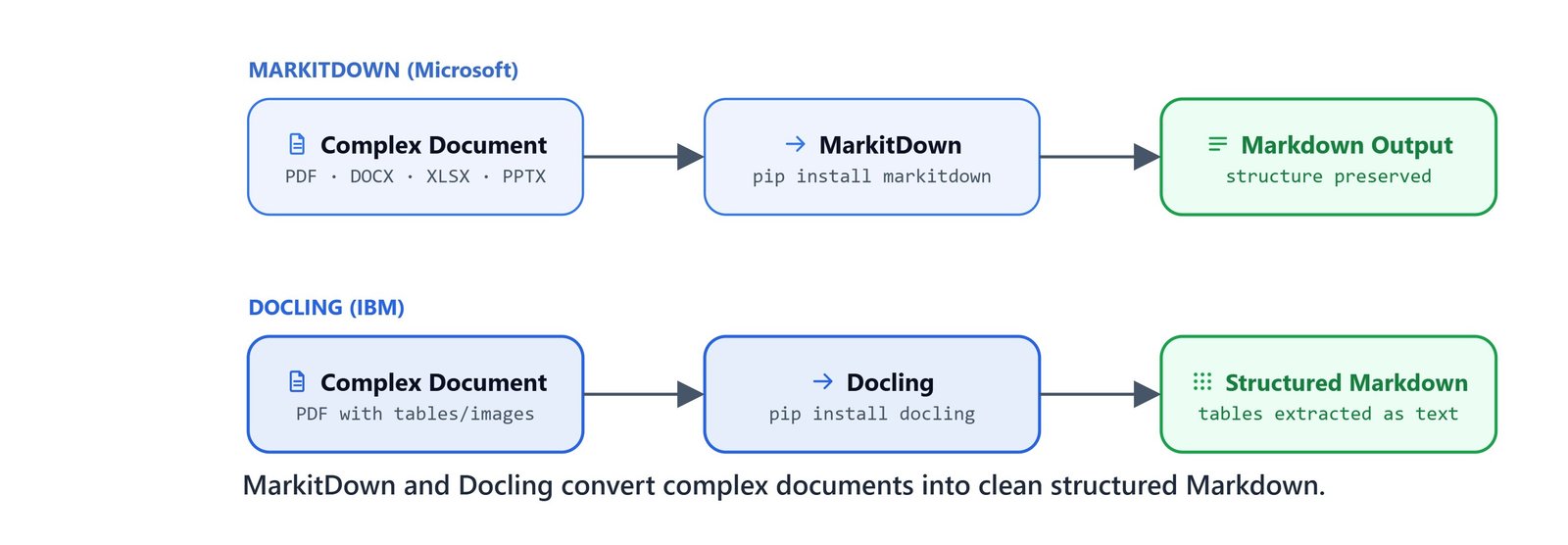
MarkitDown and Docling convert complex documents into clean, structured Markdown, preserving tables and layout.
Install: pip install markitdown
GitHub: https://github.com/microsoft/markitdown
import warnings
warnings.filterwarnings("ignore")

from markitdown import MarkItDown
from pathlib import Path

md = MarkItDown()

file_path = Path("data/Apple-10-Q-2025-Q1.pdf")
file_path.stem'Apple-10-Q-2025-Q1'We convert the file and save it as Markdown:
import os
os.makedirs("markitdown", exist_ok=True)

result = md.convert(file_path)

with open(f"markitdown/{file_path.stem}.md", "w", encoding="utf-8") as f:
    f.write(result.text_content)
Let's preview the first 500 characters of the converted output:
print(result.text_content[:500])UNITED STATES
SECURITIES AND EXCHANGE COMMISSION
Washington, D.C. 20549
FORM 10-Q
(Mark One)
☑ QUARTERLY REPORT PURSUANT TO SECTION 13 OR 15(d) OF THE SECURITIES EXCHANGE ACT OF 1934
For the quarterly period ended December 28, 2024
or
☐ TRANSITION REPORT PURSUANT TO SECTION 13 OR 15(d) OF THE SECURITIES EXCHANGE ACT OF 1934
For the transition period from to .
Commission File Number: 001-36743
Apple Inc.Here, we can see the SEC 10-Q filing's formatting, headers, and structure preserved in Markdown.
Reusable Convert-and-Save Helper
def convert_and_save(file_path):
    file_path = Path(file_path)
    result = md.convert(file_path)

    with open(f"markitdown/{file_path.stem}.md", "w", encoding="utf-8") as f:
        f.write(result.text_content)
The same function converts every supported file type:
convert_and_save("data/Apple-10-Q-2025-Q1.pdf")   # PDF
convert_and_save("data/job_description.docx")       # Word
convert_and_save("data/ml_course.pptx")             # PowerPoint
convert_and_save("data/sample.xlsx")                # Excel
Converting YouTube Video Metadata
MarkitDown can also fetch YouTube video metadata (title, description, keywords) from a URL:
md = MarkItDown()

result = md.convert("https://www.youtube.com/watch?v=De66dBYqQWI")

print(result.text_content[:500])# YouTube
## Deploy OpenAI Agent Builder Workflow in Production at Your Website | Integrate Chatbot in Website
### Video Metadata
- **Keywords:** kgp talkie, kgp talkie videos, kgp talkie ml, openai agent builder, chatbot deployment, website chatbot integration, vercel deployment, chatkit tutorial, vector database chatbot, openai api tutorial, ai chatbot development, agent builder workflow...Tip
Use MarkitDown as a preprocessing step before LangChain loaders, convert a complex PDF or PPTX to clean Markdown first, then load the Markdown file with UnstructuredMarkdownLoader for more reliable chunking and retrieval.
What Is Docling?
Docling is IBM's open-source library for understanding documents. It converts PDFs and other files into structured formats (Markdown, HTML, JSON), and it truly understands layout, tables, figures, and scanned text. Unlike MarkitDown, Docling uses ML models to read the document's structure, so it can extract tables as DataFrames and figures as images.
GitHub: https://github.com/docling-project/docling
from docling.document_converter import DocumentConverter
import os
from pathlib import Path

converter = DocumentConverter()
Basic Markdown Extraction
We convert the Apple 10-Q PDF:
file_path = Path("data/Apple-10-Q-2025-Q1.pdf")
result = converter.convert(file_path)
Docling processes the document with its ML pipeline: layout analysis, OCR via RapidOCR, and table detection. Processing time depends on the GPU. This example ran in about 17 seconds on a CUDA-enabled machine.
We export to Markdown and save:
os.makedirs("docling", exist_ok=True)

markdown = result.document.export_to_markdown()
with open(f"docling/{file_path.stem}.md", "w", encoding="utf-8") as f:
    f.write(markdown)
We can export to HTML as well:
html = result.document.export_to_html()
with open(f"docling/{file_path.stem}.html", "w", encoding="utf-8") as f:
    f.write(html)
Reusable Docling Convert Helper
def convert_and_save(file_path):
    file_path = Path(file_path)
    result = converter.convert(file_path)

    markdown = result.document.export_to_markdown()
    with open(f"docling/{file_path.stem}.md", "w", encoding="utf-8") as f:
        f.write(markdown)
Docling handles multiple file types with format-specific pipelines:
convert_and_save("data/scansmpl.pdf")                        # Scanned PDF (uses OCR)
convert_and_save("data/job_description.docx")                # Word document
convert_and_save("data/sample.xlsx")                         # Excel spreadsheet
convert_and_save("data/finance and health rag system.jpg")   # Image file
Each format uses the appropriate Docling pipeline. The scanned PDF processes through OCR; DOCX uses a SimplePipeline; XLSX extracts sheet data; images run through vision-based analysis.
Extracting Tables to CSV
Docling finds all the tables in a PDF and can export each one to a pandas DataFrame, and then to CSV:
os.makedirs("docling/tables", exist_ok=True)

converter = DocumentConverter()
file_path = Path("data/Apple-10-Q-2025-Q1.pdf")
result = converter.convert(file_path)

for i, table in enumerate(result.document.tables):
    df = table.export_to_dataframe()
    df.to_csv(f"docling/tables/{file_path.stem}_table_{i+1}.csv", index=False)
The Apple 10-Q contains financial tables (income statements, balance sheets, cash flow). Each one is saved as a separate numbered CSV file.
Note
table.export_to_dataframe() without a doc argument is deprecated in newer Docling versions. Pass table.export_to_dataframe(doc=result.document) to suppress the deprecation message.
Extracting Figures as Images
We turn on figure extraction by configuring PdfPipelineOptions before converting:
from docling.document_converter import DocumentConverter
from docling.datamodel.pipeline_options import PdfPipelineOptions
from docling.datamodel.base_models import InputFormat
from docling.document_converter import PdfFormatOption

os.makedirs("docling/figures", exist_ok=True)

pipeline_options = PdfPipelineOptions()
pipeline_options.generate_picture_images = True
pipeline_options.images_scale = 3.0

converter = DocumentConverter(
    format_options={
        InputFormat.PDF: PdfFormatOption(
            pipeline_options=pipeline_options
        )
    }
)
images_scale = 3.0 renders images at 3× resolution for high-quality extraction. Now, we convert a textbook PDF and save all its figures:
file_path = Path("data/sample_textbook.pdf")
result = converter.convert(file_path)

for i, picture in enumerate(result.document.pictures):
    image = picture.get_image(result.document)
    image.save(f"docling/figures/{file_path.stem}_figure_{i+1}.png")
Each detected figure or chart from the PDF is saved as a separate numbered PNG file.
Which Loader Should We Use?
Let me tabulate all the loaders for your better understanding, so that you can pick the right one for your use case.
| Loader | Library | Best For | Output |
|---|---|---|---|
PyMuPDFLoader |
langchain-community |
Digital PDFs, fast, metadata-rich | list[Document] |
WebBaseLoader |
langchain-community |
Scraping multiple webpages | list[Document] |
UnstructuredPowerPointLoader |
unstructured |
PPTX slide content by page | list[Document] |
UnstructuredExcelLoader |
unstructured |
XLSX with HTML table in metadata | list[Document] |
Docx2txtLoader |
docx2txt |
Word .docx plain text |
list[Document] |
MarkItDown |
markitdown |
Any file → clean Markdown (PDF, DOCX, PPTX, XLSX, images, YouTube) | str |
Docling |
docling |
Structured extraction, tables as CSV, figures as PNG, Markdown/HTML/JSON | ConversionResult |
What You Built
In this lesson, we built the complete document loading layer of a RAG or document-processing pipeline:
- PDF loaders: load one PDF or an entire folder, count tokens with
tiktoken, and wire to Q&A, summarization, and report chains - Webpage loaders: scrape multiple URLs asynchronously, clean raw text with regex, chunk for large contexts, and summarize market news per chunk
- Office loaders: extract slide text for speaker scripts (PPTX), query tabular data in natural language (XLSX), and generate personalized emails from job descriptions (DOCX)
- MarkitDown: Microsoft's single-function converter that turns any file type into clean Markdown, including YouTube video metadata
- Docling: IBM's ML-powered extractor that produces structured Markdown, HTML, per-table CSVs, and per-figure PNGs from complex PDFs
This is how document loaders work. Every loader, no matter the source, hands us the same thing: text we can pass straight into an LCEL chain with format_docs(). The next step is chunking and embedding that content into a vector store for retrieval-augmented generation.