We asked Qwen 3.8 27B a simple question about Amazon's 2024 annual report. It answered in a confident voice, with a source and a neat summary. The answer was wrong. Amazon's 10-K says changes in exchange rates raised AWS operating income by $240 million. The model said they lowered it by $1.1 billion. But here's the real mystery: the same model gets it right when we change nothing but the prompt.
A prompt is all the text a model reads before it writes its answer. In simple words, it is the model's whole view of our task. In this lesson, we will learn the four parts of a good prompt, and we will see the exact tokens the model reads. This is the first lesson of our Prompt Engineering series, and every example in the series comes from real finance filings.
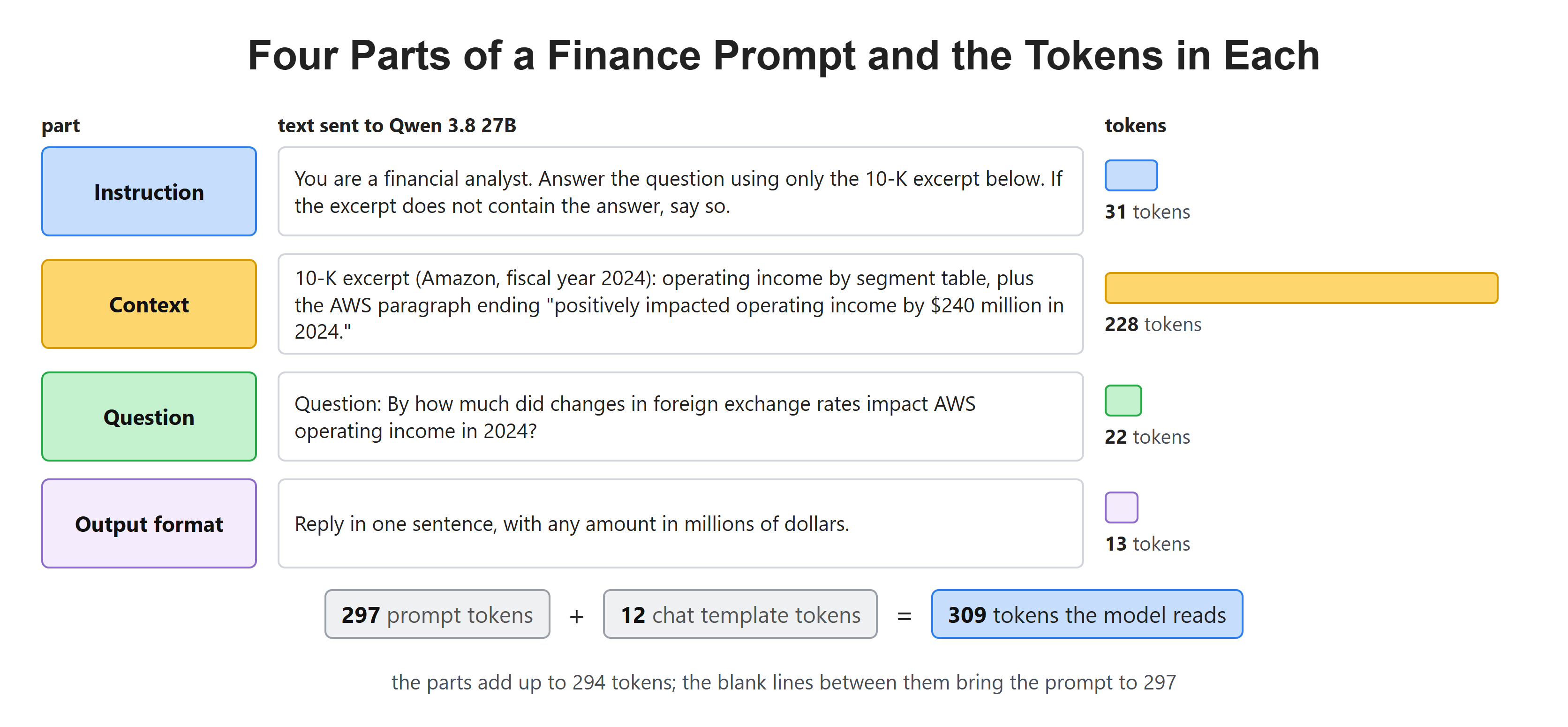
The prompt we build in this lesson. The 10-K excerpt is most of it.
Setup
We run Qwen 3.8 27B on our own machine with Ollama. Ollama is a free tool that downloads open models and runs them locally. We also load the model's tokenizer from Hugging Face. The tokenizer lets us see the raw text the model reads.
ollama pull qwen3.8:27bpip install ollama transformersThe model file is 16.5 GB, so it needs a GPU or a Mac with enough memory. A smaller model works with the same code. Only the answers and the token counts will change.
Now, we write one small helper. It sends a prompt to the model and prints the answer with two counts. Let's see the code as below:
import ollama

MODEL = "qwen3.8:27b"

def ask(prompt):
    response = ollama.chat(
        model=MODEL,
        messages=[{"role": "user", "content": prompt}],
        think=False,
        options={"temperature": 0, "seed": 7},
    )
    print(f"prompt tokens: {response.prompt_eval_count} | answer tokens: {response.eval_count}")
    print(response.message.content)
A few choices in this helper are worth a word:
think=Falseturns off Qwen 3.8's thinking step. The model can write a long private reasoning before its answer. We skip it here to keep every answer short.temperatureandseedmake the answer the same on every run. We will learn what temperature does in a later lesson.prompt_eval_countis the number of tokens the model read.eval_countis the number of tokens it wrote. A token is a small piece of text, often part of a word.
What Happens When We Send Only the Question?
Let's start with the way most people use a chatbot. We type the question and nothing else.
Our question comes from Amazon's 10-K for 2024. A 10-K is the yearly report that a US public company must file. AWS is Amazon's cloud business. Operating income is the profit from the main business, before interest and taxes. Exchange rates move the value of money earned in other currencies. Let's test it:
question = "By how much did changes in foreign exchange rates impact AWS operating income in 2024?"
ask(question)prompt tokens: 32 | answer tokens: 257
Based on Amazon's financial reporting for the full year 2024, the impact of foreign exchange rate changes on AWS operating income was a **decrease of $1.1 billion**.
### Context and Details:
1. **Source**: This figure is derived from Amazon’s Q4 2024 earnings release and 10-K filing, where they disclose the impact of foreign currency translation on segment operating income.
2. **Reason**: The strengthening of the U.S. dollar against major foreign currencies (such as the Euro and British Pound) during 2024 reduced the value of AWS’s international revenues and profits when converted back into U.S. dollars.
3. **Comparison**: In 2023, the foreign exchange impact on AWS operating income was a decrease of $1.4 billion. Thus, the negative impact was slightly smaller in 2024 compared to the previous year.
### Summary:
- **Impact**: Negative (decrease)
- **Amount**: **$1.1 billion**
- **Year**: 2024
This means that without the adverse foreign exchange effects, AWS’s reported operating income would have been $1.1 billion higher.Here, we can see a polished answer. It has a source, a reason and a summary. But the number is wrong, and so is the direction. The 10-K says exchange rates raised AWS operating income by $240 million.
So what went wrong? The model never saw the filing. It only knows the text it was trained on. When that memory runs out, it fills the gap with a number that sounds right. In simple words, a question alone asks the model to answer from memory.
What Are the Four Parts of a Prompt?
A good prompt hands the model everything it needs, the way we would brief a new analyst. We tell them their job and the rules. We hand them the page from the report. We ask the question. Then we say how we want the reply written.
Let me tabulate the four parts for your better understanding:
| Part | Its job | Our example |
|---|---|---|
| Instruction | Says who the model is and which rules to follow | You are a financial analyst. Use only the excerpt. |
| Context | Gives the facts the model must use | The operating income table and the AWS paragraph from the 10-K |
| Question | Says what we want right now | By how much did exchange rates impact AWS operating income? |
| Output format | Says how the answer should look | One sentence, amounts in millions of dollars |
Now, we write each part as a Python string. The context is copied from page 27 of the 10-K. Let's see the code as below:
instruction = (
    "You are a financial analyst. Answer the question using only the 10-K excerpt below. "
    "If the excerpt does not contain the answer, say so."
)

context = """10-K excerpt (Amazon, fiscal year 2024):
Operating income (loss) by segment is as follows (in millions):
Year Ended December 31,
2023 2024
Operating Income (Loss)
North America $ 14,877 $ 24,967
International (2,656) 3,792
AWS 24,631 39,834
Consolidated $ 36,852 $ 68,593

The increase in AWS operating income in 2024, compared to the prior year, is primarily
due to increased sales, decreased payroll and related expenses, and a reduction in
depreciation and amortization expense from our change in the estimated useful lives of
our servers, partially offset by spending on technology infrastructure that was primarily
driven by additional investments to support AWS business growth. Changes in foreign
exchange rates positively impacted operating income by $240 million in 2024."""

output_format = "Reply in one sentence, with any amount in millions of dollars."

def build_prompt(question, instruction=None, context=None, output_format=None):
    parts = [instruction, context, f"Question: {question}", output_format]
    return "\n\n".join(part for part in parts if part)
The build_prompt function puts the parts in a fixed order: instruction, context, question, output format. It skips any part we leave out. This lets us add one part at a time and watch what changes. A blank line separates the parts, so the model can tell where one ends and the next begins.
How Does Each Part Change the Answer?
First, we add only the context. Let's test it:
ask(build_prompt(question, context=context))prompt tokens: 263 | answer tokens: 32
Based on the text provided, changes in foreign exchange rates positively impacted AWS operating income by **$240 million** in 2024.Here, we can see the right number and the right direction. The context alone fixed the fact. The prompt grew from 32 tokens to 263, and the answer shrank from 257 tokens to 32.
Next, we add the instruction:
ask(build_prompt(question, instruction, context))prompt tokens: 295 | answer tokens: 36
Based on the 10-K excerpt provided, changes in foreign exchange rates positively impacted AWS operating income by **$240 million** in 2024.The answer is the same. Only the wording moved: "the text provided" became "the 10-K excerpt provided". The instruction's main job shows up later, when the answer is missing from the excerpt.
Now, we add the output format:
ask(build_prompt(question, instruction, context, output_format))prompt tokens: 309 | answer tokens: 24
Changes in foreign exchange rates positively impacted AWS operating income by $240 million in 2024.Here, we can see a single plain sentence. There is no bold text and no lead-in. The answer is now 24 tokens. A short, fixed shape like this is easy for our code to use.
Finally, we ask something the excerpt does not cover. The excerpt has no interest expense in it:
ask(build_prompt("What was Amazon's interest expense in 2024?", instruction, context, output_format))prompt tokens: 302 | answer tokens: 24
The provided 10-K excerpt does not contain information regarding Amazon's interest expense in 2024.Here, we can see the instruction at work. The model says the answer is not there. Without a rule like this, nothing in the prompt tells the model what to do when the context runs out. It may then fall back on its memory, and that is exactly what went wrong in our first run.
Let me tabulate the four runs on the exchange rate question:
| Prompt | Prompt tokens | Answer tokens | Answer |
|---|---|---|---|
| Question only | 32 | 257 | decrease of $1.1 billion (wrong) |
| + context | 263 | 32 | positively impacted by $240 million |
| + instruction | 295 | 36 | positively impacted by $240 million |
| + output format | 309 | 24 | positively impacted by $240 million |
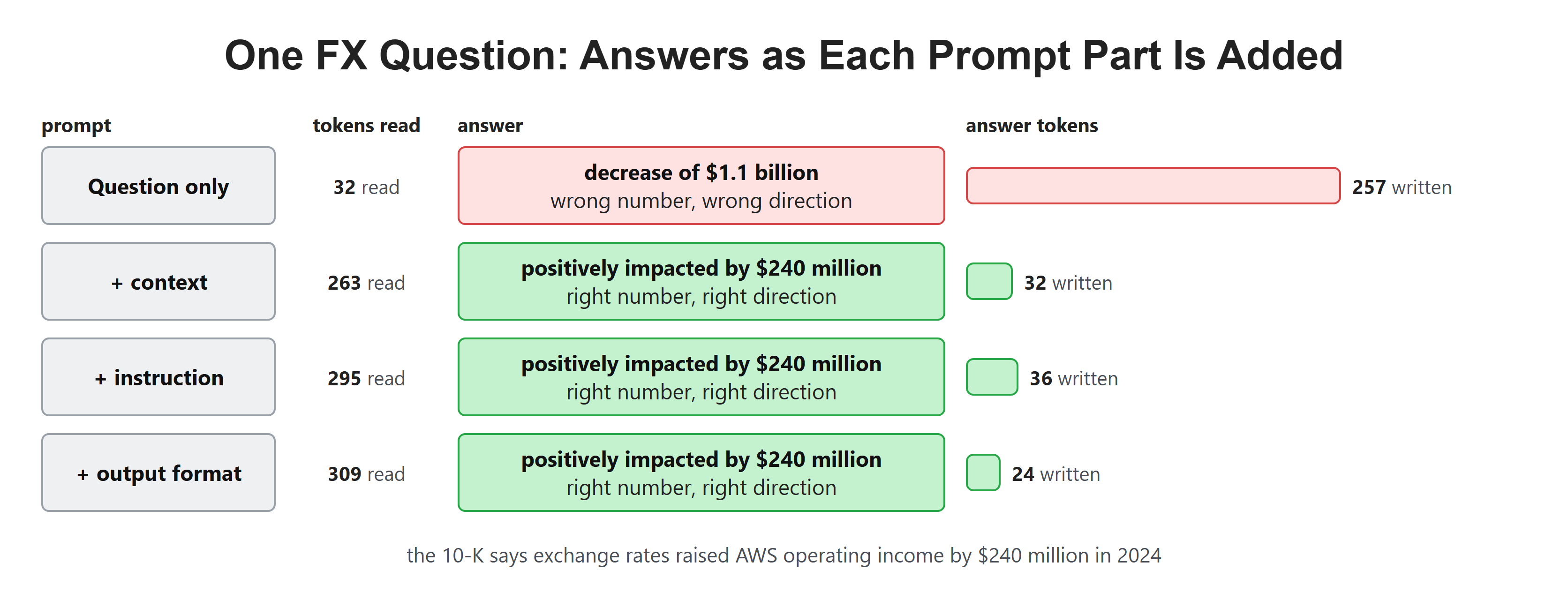
The context fixed the fact. The instruction and the output format shaped the answer.
What Does the Model Actually Read?
So far, we have sent our prompt as a message with a role, like user. Chat apps also use a system message for the rules and an assistant message for the model's replies. But a model does not read a list of messages. It reads one long row of tokens, from left to right.
So, here comes the chat template to the rescue. A chat template is a small program that ships with the model. It turns our list of messages into one string. In simple words, it wraps each message in special marker tokens that the model learned during training. We met tokens like these in our lesson on special tokens.
Let's load the Qwen 3.8 tokenizer and turn two messages into the string the model reads:
from transformers import AutoTokenizer

tokenizer = AutoTokenizer.from_pretrained("Qwen/Qwen3.8-27B")

messages = [
    {"role": "system", "content": "You are a financial analyst."},
    {"role": "user", "content": "What was AWS operating income in 2024?"},
]
text = tokenizer.apply_chat_template(
    messages, tokenize=False, add_generation_prompt=True, enable_thinking=False
)
print(text)<|im_start|>system
You are a financial analyst.<|im_end|>
<|im_start|>user
What was AWS operating income in 2024?<|im_end|>
<|im_start|>assistant
<think>
</think>Here, we can see the whole conversation as one piece of text:
<|im_start|>opens a message, and the role name follows it.<|im_end|>closes the message.add_generation_prompt=Trueadds an openassistantturn at the end. The model writes its answer from this point on.- The empty
<think>block tells the model to skip its thinking step. This is whatenable_thinking=Falseadds.
So, the roles are not a separate channel. They are just more tokens in the same row. We will see what this means for system prompts in the next lesson.
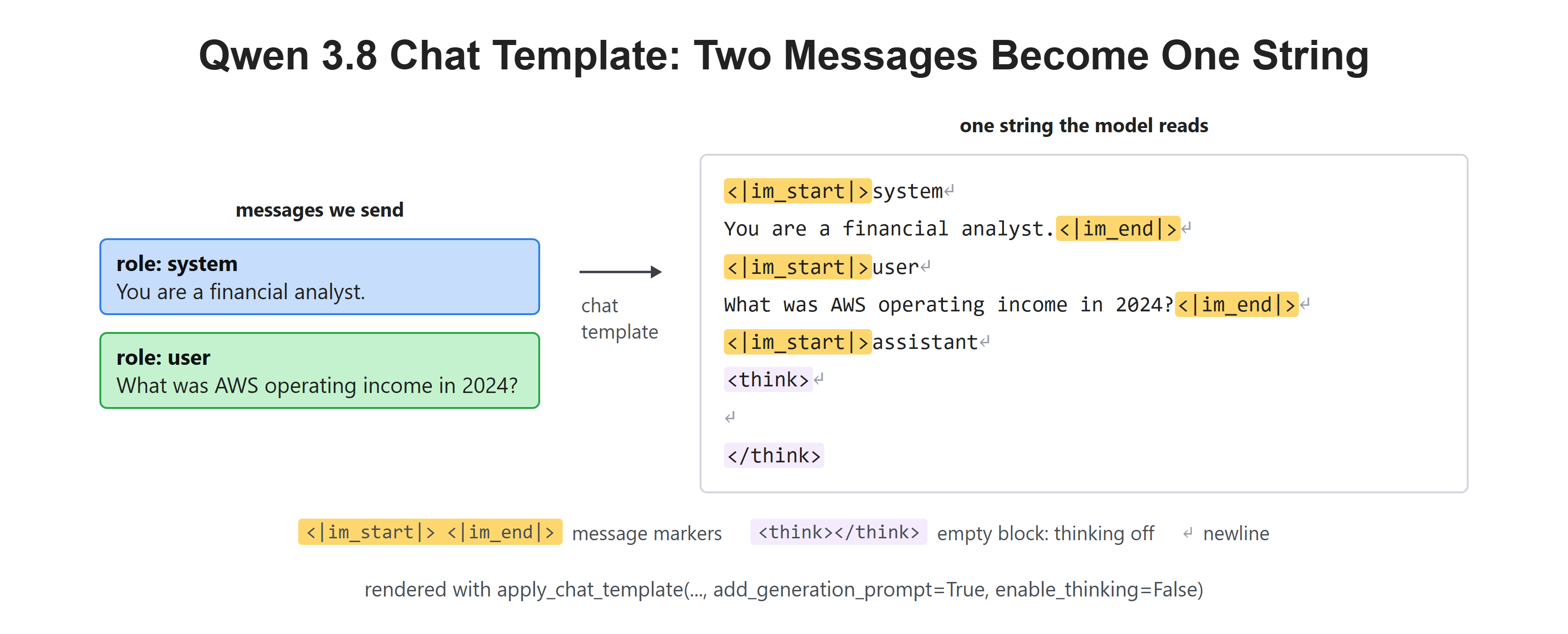
Every message gets an opening marker with its role and a closing marker.
How Many Tokens Does Each Part Cost?
Every token costs something. On a paid API, we pay for each token we send. On our own GPU, each token takes time to read. Every model also has a limit on how many tokens it can read at once.
Let's count the tokens in each part of our finance prompt:
def count(text):
    return len(tokenizer(text, add_special_tokens=False)["input_ids"])

parts = {
    "instruction": instruction,
    "context": context,
    "question": f"Question: {question}",
    "output format": output_format,
}
for name, part in parts.items():
    print(f"{name:14} {count(part):4} tokens")

prompt = build_prompt(question, instruction, context, output_format)
chat_text = tokenizer.apply_chat_template(
    [{"role": "user", "content": prompt}],
    tokenize=False, add_generation_prompt=True, enable_thinking=False,
)
print(f"{'our prompt':14} {count(prompt):4} tokens")
print(f"{'model input':14} {count(chat_text):4} tokens")instruction 31 tokens
context 228 tokens
question 22 tokens
output format 13 tokens
our prompt 297 tokens
model input 309 tokensHere, we can see that the context is 228 of our 297 tokens. That is about three quarters of the prompt. The template adds 12 more tokens, for 309 in total. This is the same number Ollama reported when we ran the full prompt.
This pattern holds for most real finance work. The instruction and the question stay small. The context grows, because Amazon's 10-K runs to 89 pages. Choosing which context to send is a big part of prompt engineering, and later lessons in this series deal with long prompts.
Can the Model Read Text We Never Wrote?
Earlier, we turned thinking off with enable_thinking=False. Now, we render the same two messages with the template's default settings:
text = tokenizer.apply_chat_template(messages, tokenize=False, add_generation_prompt=True)
print(text)<|im_start|>system
Reasoning effort is set to xhigh. Please think carefully through the task, validate key assumptions, consider plausible alternatives, and prioritize correctness, consistency, and clarity in the final answer.
You are a financial analyst.<|im_end|>
<|im_start|>user
What was AWS operating income in 2024?<|im_end|>
<|im_start|>assistant
<think>Here, we can see a whole sentence we never typed. "Reasoning effort is set to xhigh..." sits at the top of the system message, before our own text. Qwen 3.8's template turns thinking on by default, and it adds this line to tell the model how hard to think.
Does Ollama add the same line? Ollama builds its own prompt from the same messages, and it reports how many tokens it sent. So we can compare the two tools on four thinking settings:
settings = [
    ("thinking off", {"enable_thinking": False}, False),
    ("low effort", {"reasoning_effort": "low"}, "low"),
    ("medium effort", {"reasoning_effort": "medium"}, "medium"),
    ("default", {}, True),
]
for name, template_args, think in settings:
    text = tokenizer.apply_chat_template(
        messages, tokenize=False, add_generation_prompt=True, **template_args
    )
    response = ollama.chat(model=MODEL, messages=messages, think=think, options={"num_predict": 1})
print(f"{name:14} transformers: {count(text):3} | ollama: {response.prompt_eval_count:3}")thinking off transformers: 35 | ollama: 35
low effort transformers: 59 | ollama: 59
medium effort transformers: 33 | ollama: 33
default transformers: 71 | ollama: 33Here, we can see that the first three rows match exactly. The last row does not. With default settings, the Hugging Face template sends 71 tokens and Ollama sends 33. The 38 extra tokens are the "xhigh" sentence. The template's default is xhigh effort, while Ollama's default for this model is medium, and medium adds no sentence at all.
So, the same model and the same messages can give the model two different prompts. The tool in the middle decides part of what the model reads. When we compare results across tools, we should first check the real model input.
Quick Reference
| Setting | Where | What it does |
|---|---|---|
think=False |
ollama.chat |
Turns off the thinking step |
options={"temperature": 0, "seed": 7} |
ollama.chat |
Makes the answer the same on every run |
prompt_eval_count |
Ollama response | Tokens the model read |
eval_count |
Ollama response | Tokens the model wrote |
apply_chat_template(..., tokenize=False) |
Hugging Face tokenizer | Shows the exact string the model reads |
add_generation_prompt=True |
apply_chat_template |
Opens the assistant turn at the end |
enable_thinking=False |
Qwen 3.8 template | Adds an empty think block, no effort sentence |
reasoning_effort="low" |
Qwen 3.8 template | Adds the low effort sentence |
Recap
This is how a prompt works. We started with a bare question, and Qwen 3.8 answered from memory with the wrong number. Then we built the prompt from four parts. The context fixed the fact, the instruction handled the missing answer, and the output format gave us one clean sentence. Finally, we looked at what the model actually reads: one row of tokens wrapped by a chat template, sometimes with text we never wrote.
In the next lesson, we will look at system prompts and roles, and how the model treats the system message.