
In this blog, we build the production Chainlit frontend. It connects to the FastAPI RAG backend from the FastAPI RAG Backend article. It adds SSE streaming, persistent chat history with SQLite, password authentication, document upload, and a one-click PDF export button on every AI response.
Architecture
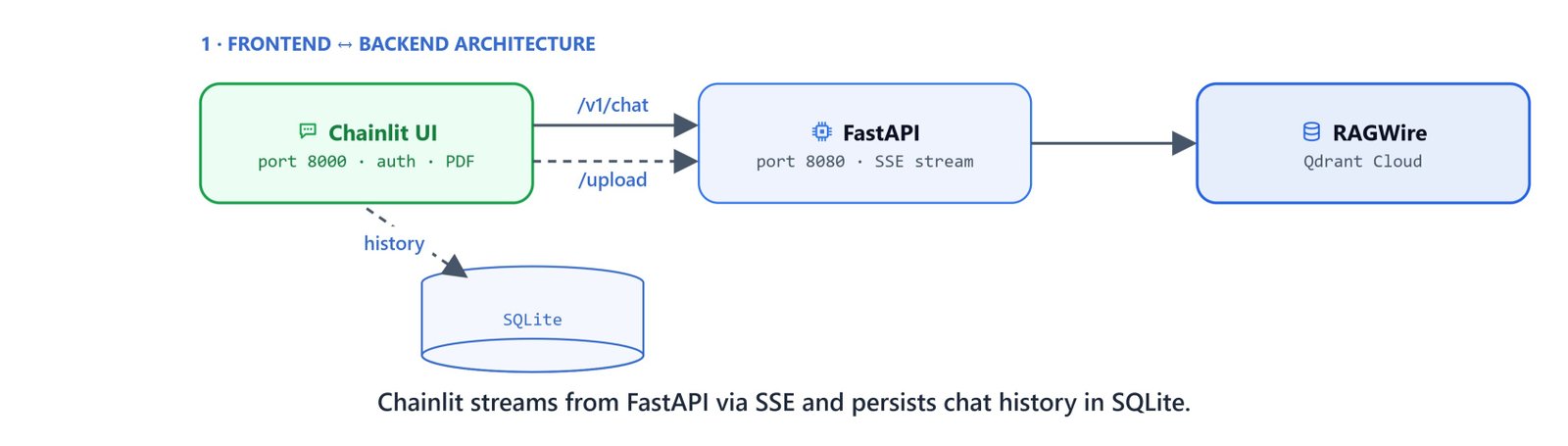
The frontend is a standalone Chainlit app that communicates with the FastAPI backend over HTTP:
- Chat messages →
POST /v1/chat/completionswith SSE streaming - File uploads →
POST /uploadwith multipart form data - History → SQLite database managed by SQLAlchemy
- Auth → password callback checking environment variables
Dependencies
pip install chainlit httpx sqlalchemy aiosqlite markdown2 xhtml2pdf python-dotenvEnvironment Variables
Add frontend-specific variables to your .env file:
GOOGLE_API_KEY=your_google_api_key
QDRANT_URL=https://your-cluster.cloud.qdrant.io:6333
QDRANT_API_KEY=your_qdrant_api_key

APP_USER=admin
APP_PASSWORD=admin
CHAINLIT_AUTH_SECRET=your_random_secret_string

FASTAPI_URL=http://localhost:8080
API_KEY=your_api_key
Important
CHAINLIT_AUTH_SECRET must be set for Chainlit's authentication to work. Generate a random string with python -c "import secrets; print(secrets.token_hex(32))".
Initialise the Database
Create init_db.py to set up the SQLite schema for chat history:
"""Run this once to create the SQLite database schema for Chainlit chat history."""

import asyncio
import os
import aiosqlite

DB_PATH = "data/chat_history.db"

SCHEMA = """
CREATE TABLE IF NOT EXISTS users (
    id TEXT PRIMARY KEY,
    identifier TEXT NOT NULL UNIQUE,
    "createdAt" TEXT,
    metadata TEXT NOT NULL DEFAULT '{}'
);

CREATE TABLE IF NOT EXISTS threads (
    id TEXT PRIMARY KEY,
    "createdAt" TEXT,
    name TEXT,
    "userId" TEXT,
    "userIdentifier" TEXT,
    tags TEXT,
    metadata TEXT NOT NULL DEFAULT '{}',
    FOREIGN KEY ("userId") REFERENCES users(id) ON DELETE CASCADE
);

CREATE TABLE IF NOT EXISTS steps (
    id TEXT PRIMARY KEY,
    name TEXT NOT NULL,
    type TEXT NOT NULL,
    "threadId" TEXT NOT NULL,
    "parentId" TEXT,
    "disableFeedback" INTEGER NOT NULL DEFAULT 0,
    streaming INTEGER NOT NULL DEFAULT 0,
    "waitForAnswer" INTEGER,
    "isError" INTEGER NOT NULL DEFAULT 0,
    metadata TEXT NOT NULL DEFAULT '{}',
    tags TEXT,
    input TEXT,
    output TEXT,
    "createdAt" TEXT,
    start TEXT,
    "end" TEXT,
    "showInput" TEXT,
    language TEXT,
    indent INTEGER,
    generation TEXT,
    "defaultOpen" INTEGER,
    "autoCollapse" INTEGER,
    FOREIGN KEY ("threadId") REFERENCES threads(id) ON DELETE CASCADE
);

CREATE TABLE IF NOT EXISTS feedbacks (
    id TEXT PRIMARY KEY,
    "forId" TEXT NOT NULL,
    "threadId" TEXT NOT NULL,
    value INTEGER NOT NULL,
    comment TEXT
);

CREATE TABLE IF NOT EXISTS elements (
    id TEXT PRIMARY KEY,
    "threadId" TEXT,
    type TEXT,
    url TEXT,
    "chainlitKey" TEXT,
    name TEXT NOT NULL,
    display TEXT,
    "objectKey" TEXT,
    size TEXT,
    page INTEGER,
    language TEXT,
    "forId" TEXT,
    mime TEXT,
    props TEXT
);
"""


async def init():
    os.makedirs(os.path.dirname(DB_PATH), exist_ok=True)
    async with aiosqlite.connect(DB_PATH) as db:
        await db.executescript(SCHEMA)
        await db.commit()
    print(f"Database initialized: {DB_PATH}")


if __name__ == "__main__":
    asyncio.run(init())
Run it once:
python init_db.pyDatabase initialized: data/chat_history.dbOn Linux/macOS: The command is identical.
The Complete Frontend
Create app.py:
from dotenv import load_dotenv
load_dotenv("../.env")

import io
import json
import os
import re
from typing import Optional

import httpx
import markdown2
from xhtml2pdf import pisa
import chainlit as cl
import chainlit.data as cl_data
from chainlit.data.sql_alchemy import SQLAlchemyDataLayer
from chainlit.types import ThreadDict
Helper Functions
Clean the display text by stripping the JSON metadata blocks that some backend responses add. Then convert the markdown to PDF:
_STATUS_LINE = re.compile(r"`\[[^\]]+\s+working\.\.\.\]`")
_JSON_PREAMBLE = re.compile(r"^\s*```json\s*\{[^`]*?\}\s*```\s*", re.DOTALL)

def clean_display(text: str) -> str:
    """Remove leading JSON metadata code block so only the markdown answer is shown."""
    return _JSON_PREAMBLE.sub("", text).lstrip()

def md_to_pdf(text: str) -> bytes:
    cleaned = "\n".join(
        line for line in text.splitlines()
        if not _STATUS_LINE.search(line)
    ).strip()
    body = markdown2.markdown(
        cleaned,
        extras=["tables", "fenced-code-blocks", "cuddled-lists"]
    )
    html = f"""<html><head><meta charset="utf-8"><style>
        body {{ font-family: Helvetica, Arial, sans-serif; font-size: 14px; line-height: 1.25; padding: 15px; }}
        h1 {{ font-size: 21px; margin: 8px 0 4px 0; line-height: 1.2; }}
        h2 {{ font-size: 18px; margin: 6px 0 3px 0; line-height: 1.2; }}
        h3 {{ font-size: 17px; margin: 5px 0 3px 0; line-height: 1.2; }}
        p {{ margin: 3px 0; line-height: 1.25; }}
        ul, ol {{ margin: 2px 0; padding-left: 20px; }}
        li {{ margin: 1px 0; padding: 0; line-height: 1.25; }}
        li p {{ display: inline; margin: 0; }}
        strong {{ font-weight: bold; }}
        code {{ background: #f4f4f4; padding: 2px 4px; font-size: 13px; }}
        pre {{ background: #f4f4f4; padding: 6px; margin: 4px 0; font-size: 13px; line-height: 1.2; }}
        table {{ border-collapse: collapse; width: 100%; margin: 5px 0; }}
        th, td {{ border: 1px solid #ddd; padding: 4px; font-size: 13px; line-height: 1.2; }}
        th {{ background: #f0f0f0; font-weight: bold; }}
    </style></head><body>{body}</body></html>"""
    buf = io.BytesIO()
    pisa.CreatePDF(html, dest=buf)
    return buf.getvalue()
Config
API_URL = os.getenv("FASTAPI_URL", "http://localhost:8080")
API_KEY = os.getenv("API_KEY", "")
Data Layer and Authentication
Connect the SQLite data layer and define the password auth callback:
cl_data._data_layer = SQLAlchemyDataLayer(
    conninfo="sqlite+aiosqlite:///data/chat_history.db"
)

@cl.password_auth_callback
def auth_callback(username: str, password: str) -> Optional[cl.User]:
    if (username == os.getenv("APP_USER", "admin") and
        password == os.getenv("APP_PASSWORD", "admin")):
        return cl.User(identifier=username, metadata={"role": "user"})
    return None
Chat Handlers
@cl.on_chat_start
async def on_start():
    cl.user_session.set("history", [])
    cl.user_session.set("last_response_msg", None)
    await cl.Message(content="Hello! Upload documents (drag & drop) or ask me a question.").send()


@cl.on_chat_resume
async def on_resume(thread: ThreadDict):
    history = []
    for step in thread.get("steps", []):
        if step.get("type") == "user_message":
            history.append({"role": "user", "content": step.get("output", "")})
        elif step.get("type") == "assistant_message":
            history.append({"role": "assistant", "content": step.get("output", "")})
    cl.user_session.set("history", history)
Message Handler with SSE Streaming
The message handler supports two modes: file upload and chat:
@cl.on_message
async def on_message(message: cl.Message):
    history = cl.user_session.get("history", [])

    # File upload → FastAPI /upload
    if message.elements:
        handles = [open(elem.path, "rb") for elem in message.elements]
        files = [("files", (elem.name, fh)) for elem, fh in zip(message.elements, handles)]
        try:
            async with httpx.AsyncClient(timeout=300) as client:
                msg = cl.Message(content="Ingesting documents...")
                await msg.send()
                resp = await client.post(
                    f"{API_URL}/upload",
                    files=files,
                    headers={"Authorization": f"Bearer {API_KEY}"}
                )
                resp.raise_for_status()
                await msg.update(content=resp.json()["message"])
        finally:
            for fh in handles:
                fh.close()
        return

    # Chat → FastAPI /v1/chat/completions (streaming)
    history.append({"role": "user", "content": message.content})

    response_msg = cl.Message(content="")
    await response_msg.send()

    full_response = ""
    async with httpx.AsyncClient(timeout=300) as client:
        async with client.stream(
            "POST",
            f"{API_URL}/v1/chat/completions",
            json={"messages": history, "stream": True},
            headers={"Authorization": f"Bearer {API_KEY}"},
        ) as resp:
            async for line in resp.aiter_lines():
                if not line.startswith("data:"):
                    continue
                data = line[len("data:"):].strip()
                if data == "[DONE]":
                    continue
                chunk = json.loads(data)
                delta = chunk["choices"][0]["delta"]
                token = delta.get("content", "")
                if token:
                    full_response += token
                    await response_msg.stream_token(token)

    # Remove download button from previous response
    prev_msg = cl.user_session.get("last_response_msg")
    if prev_msg:
        prev_msg.actions = []
        await prev_msg.update()

    display_response = clean_display(full_response)
    response_msg.content = display_response
    response_msg.actions = [
        cl.Action(
            name="download_pdf",
            payload={"text": display_response},
            label="Download PDF",
            icon="download"
        )
    ]
    await response_msg.update()
    cl.user_session.set("last_response_msg", response_msg)

    history.append({"role": "assistant", "content": display_response})
    cl.user_session.set("history", history)
PDF Export Action
When the user clicks the Download PDF button, convert the markdown response to PDF and send it as a file:
@cl.action_callback("download_pdf")
async def download_pdf(action: cl.Action):
    pdf_bytes = md_to_pdf(action.payload["text"])
    await cl.Message(
        content="",
        elements=[cl.File(name="response.pdf", content=pdf_bytes, mime="application/pdf")],
    ).send()
Key Implementation Details
- SSE streaming: The frontend uses
httpx.AsyncClient.stream()to consume the FastAPI backend's Server-Sent Events, parsing eachdata:line and streaming tokens to the UI withresponse_msg.stream_token(token) - Chat history persistence:
SQLAlchemyDataLayerwithaiosqlitestores all messages, threads, and user data in a local SQLite database. Theon_chat_resumehandler rebuilds the in-memory history from saved steps when a user revisits a previous thread - PDF export:
markdown2converts the markdown response (including tables, code blocks, and bold text) to HTML, thenxhtml2pdfrenders it to a PDF. Status lines are stripped before export - Action buttons: Only the latest response shows the Download PDF button. Previous buttons are removed by clearing
prev_msg.actionsto keep the UI clean

Running the Frontend
Start the FastAPI backend first (see FastAPI RAG Backend):
uvicorn main:app --host 0.0.0.0 --port 8080Then start the Chainlit frontend:
chainlit run app.pyOn Linux/macOS: Both commands are identical.
Open http://localhost:8000 in your browser. Log in with the credentials set in your .env file (default: admin/admin). Upload documents, ask questions, and download responses as PDF. This is how we wrap the RAG backend in a production Chainlit frontend, with streaming, saved history, login, and PDF export.
Tip
To run both services simultaneously during development, open two terminal windows, one for the FastAPI backend on port 8080 and one for the Chainlit frontend on port 8000.


