
RAGWire is a production RAG toolkit. It folds the whole RAG stack into a single config.yaml. That stack covers loading, chunking, embedding, storage, metadata, and retrieval. It supports Ollama, OpenAI, Gemini, Groq, Anthropic, and HuggingFace as providers. It uses Qdrant for dense, sparse, and hybrid vector search. And it deduplicates at both the file and chunk level with SHA-256 hashes.
In this blog, we cover RAGWire's architecture, its two core pipelines, the provider system, and the config design. Then we walk through a full setup and first retrieval in a Jupyter notebook. We start with single-document ingestion and build all the way up to a filter-aware conversational agent.
RAGWire Architecture
RAGWire has two pipelines, both run by one config file.
Ingestion Pipeline
The ingestion pipeline turns raw documents into searchable vectors:
Load → Chunk → Embed → Extract Metadata → Store
- Load: Supports PDF, DOCX, XLSX, PPTX, TXT, and MD files
- Chunk: splits documents with a markdown-aware or recursive strategy, using set
chunk_sizeandchunk_overlap - Embed: turns each chunk into a vector with the chosen provider (Ollama, Google, OpenAI, HuggingFace, or FastEmbed)
- Extract Metadata: uses the LLM to pull key fields (company name, document type, fiscal year, fiscal quarter) from each document, guided by a
metadata.yamlprompt - Store: Writes embeddings and metadata to Qdrant with SHA-256 deduplication at both file and chunk level

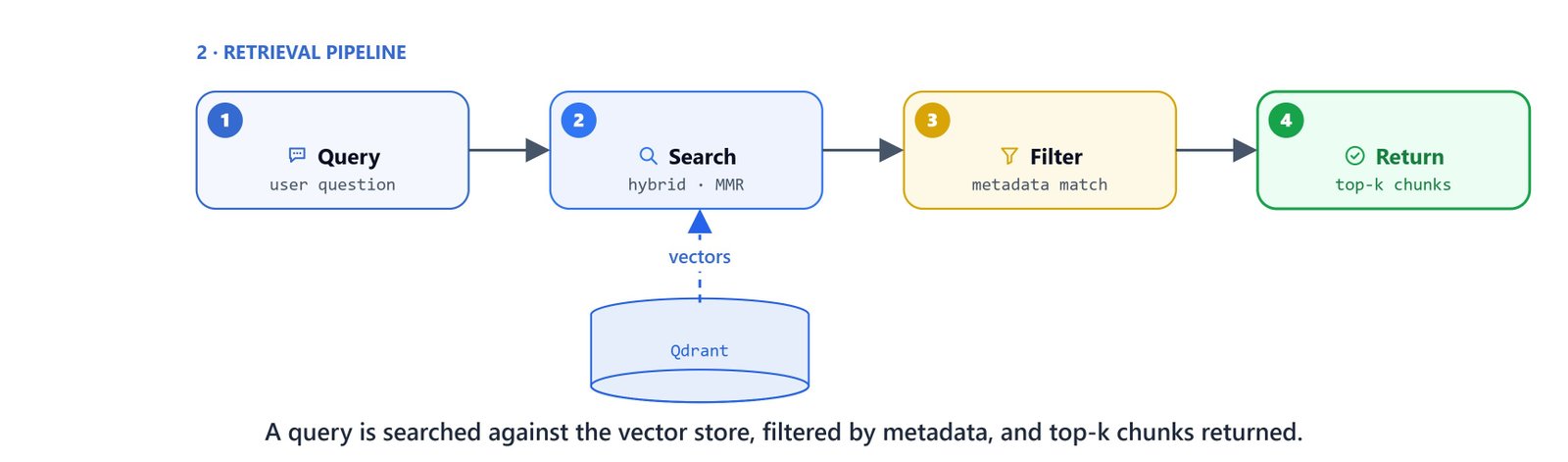
Retrieval Pipeline
The retrieval pipeline finds relevant chunks for a given query:
Query → Search → Filter → Rank → Return
- Similarity: standard dense vector search.
- MMR (Maximal Marginal Relevance): cuts repeat results by adding variety.
- Hybrid: combines dense and sparse (BM25) retrieval with Reciprocal Rank Fusion.
Supported Providers
| Component | Providers |
|---|---|
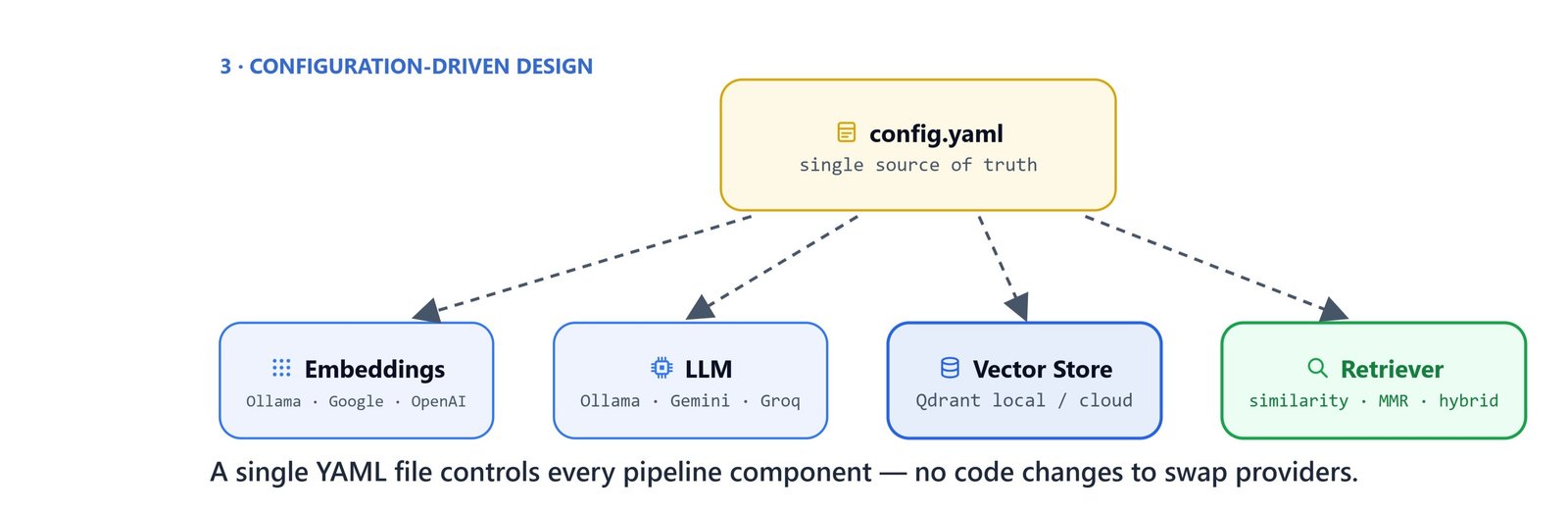
| Embeddings | Ollama, Google, OpenAI, HuggingFace, FastEmbed |
| LLM | Ollama, Google, OpenAI, Groq, Anthropic |
| Vector Store | Qdrant (local or cloud) |
Configuration-Driven Design
Every pipeline setting lives in a single config.yaml. Switching providers, changing retrieval strategies, or moving from local Qdrant to Qdrant Cloud means editing only this file. There are no code changes.
Installation
Install RAGWire and its provider extras:
pip install ragwireNote
For hybrid search with sparse vectors, also install FastEmbed: pip install fastembed
For Ollama as the local provider, pull the required models:
ollama pull qwen3.5:9b
ollama pull qwen3-embedding:0.6b
On Linux/macOS: The commands are identical. Ensure Ollama is running with ollama serve before proceeding.
Start a local Qdrant instance:
docker run -p 6333:6333 qdrant/qdrantWriting the Configuration
Create config.yaml in your project directory:
embeddings:
  provider: "ollama"
  model: "qwen3-embedding:0.6b"
  base_url: "http://localhost:11434"

llm:
  provider: "ollama"
  model: "qwen3.5:9b"
  base_url: "http://localhost:11434"
  num_ctx: 16384

vectorstore:
  url: "http://localhost:6333"
  collection_name: "finance-rag-ollama"
  use_sparse: true
  force_recreate: false

retriever:
  search_type: "hybrid"
  top_k: 5
  auto_filter: false

metadata:
  config_file: "finance_metadata.yaml"
Each section maps directly to a pipeline component:
embeddings: provider, model name, and connection details for the embedderllm: provider and model for metadata, and optionally query rewritingvectorstore: Qdrant URL, collection name, whether to use sparse vectors for hybrid search, and whether to recreate the collection on startupretriever: search strategy (similarity,mmr, orhybrid), number of results (top_k), and whether to auto-extract filters from queriesmetadata: path to a YAML file that defines the metadata prompt and fields
Detailed Configuration Reference
For full control, every section supports additional options:
loader:
  extensions: [".pdf", ".docx", ".xlsx", ".pptx", ".txt", ".md"]

splitter:
  chunk_size: 10000
  chunk_overlap: 2000
  strategy: "markdown"   # "markdown" | "recursive"

embeddings:
  provider: "ollama"
  model: "nomic-embed-text"
  base_url: "http://localhost:11434"

llm:
  provider: "ollama"
  model: "qwen3.5:9b"
  base_url: "http://localhost:11434"
  num_ctx: 65536

vectorstore:
  url: "http://localhost:6333"
  collection_name: "my_docs"
  use_sparse: true
  force_recreate: false

retriever:
  search_type: "hybrid"   # "similarity" | "mmr" | "hybrid"
  top_k: 5
  auto_filter: false

logging:
  level: "INFO"
  console_output: true
  colored: true
Metadata Configuration
The finance_metadata.yaml file defines the LLM prompt and fields for metadata extraction:
prompt: |
  You are parsing an SEC filing. This document IS an SEC filing — treat it as such.
  Extract the four fields below. All values must be lowercase strings.

  **company_name**: The company that filed this document.
  Scan for "registrant", the title block, or the company name printed above the form number.
  Use the full legal name. Example: "AMAZON.COM, INC." → 'amazon.com inc.'

  **doc_type**: The SEC form type. Map exactly:
  "Form 10-K" or "Annual Report on Form 10-K" → '10-k'
  "Form 10-Q" or "Quarterly Report on Form 10-Q" → '10-q'
  "Form 8-K" or "Current Report on Form 8-K" → '8-k'

  **fiscal_year**: The primary year this filing covers.
  Look for "fiscal year ended", "year ended", "for the year ended".
  Return a single 4-digit integer. Example: "Year ended December 31, 2024" → 2024

  **fiscal_quarter**: The quarter this filing covers. Only for 10-Q filings — null for 10-K and 8-K.
  Look for "quarter ended", "three months ended", or "Q1/Q2/Q3".
  Map: first/Q1 → 'q1', second/Q2 → 'q2', third/Q3 → 'q3', fourth/Q4 → 'q4'

  ## Grounding
  If existing collection values are provided above, reuse the exact stored value when this document refers to the same entity.

fields:
  - name: company_name
    description: "Full legal registrant name in lowercase. Example: 'alphabet inc.', 'apple inc.'"

  - name: doc_type
    description: "SEC form type: '10-k', '10-q', or '8-k'. Null if not an SEC filing."
    values: ["10-k", "10-q", "8-k"]

  - name: fiscal_year
    description: "Primary fiscal year as a 4-digit integer (e.g. 2024). Null if not stated."
    type: integer

  - name: fiscal_quarter
    description: "Fiscal quarter: 'q1', 'q2', 'q3', or 'q4'. Only for 10-Q. Null for 10-K and 8-K."
    values: ["q1", "q2", "q3", "q4"]
Setup and First Retrieval
Initialise RAGWire
from dotenv import load_dotenv
load_dotenv()

from ragwire import RAGWire, setup_logging
import ragwire

print(ragwire.__version__)1.2.7logger = setup_logging(log_level="INFO")Create a RAGWire instance by passing your config file:
rag = RAGWire('config.yaml')Ingest a Single Document
stats = rag.ingest_documents(["../data/finance_data/Apple_10k_2025.pdf"])RAGWire loads the PDF, splits it into chunks, embeds each chunk, extracts metadata with the LLM, and stores everything in Qdrant. If we run the same command again, it skips the file. SHA-256 deduplication prevents duplicate ingestion.
Basic Retrieval
results = rag.retrieve("What is the apple's revenue?")Each result is a LangChain Document. It carries page_content (the chunk text) and metadata (source file, company name, fiscal year, chunk index, and more).
Scale to Multiple Companies
Ingest all documents in a directory at once. RAGWire deduplicates automatically. Re-running skips already-ingested files:
rag.ingest_directory('../data/finance_data'){'total': 6, 'processed': 3, 'skipped': 3, 'failed': 0, 'chunks_created': 141, 'errors': []}Here, we can see 3 of the 6 files processed and 3 skipped as duplicates.
The collection now holds Apple, Google, and Amazon 10-K filings across several years.
Explore Metadata
RAGWire extracts company name, document type, and fiscal year during ingestion. Let's inspect what is stored:
rag.discover_metadata_fields()['source', 'file_name', 'file_type', 'file_hash', 'chunk_id', 'chunk_hash', 'chunk_index', 'total_chunks', 'created_at', 'company_name', 'doc_type', 'fiscal_year', 'fiscal_quarter']The four custom fields in finance_metadata.yaml are the filterable ones:
rag.filter_fields['company_name', 'doc_type', 'fiscal_year', 'fiscal_quarter']Manual Metadata Filters
When multiple companies share the same collection, unfiltered retrieval can mix up results. So we use metadata filters to pin retrieval to a specific company, year, or document type:
query = "what is apple's revenue in 2025?"
results = rag.retrieve(query=query, filters={'company_name': 'apple inc.'})
Combine multiple filters for precise retrieval:
query = "what is revenue of Google in 2024?"
results = rag.retrieve(
    query=query,
    filters={'company_name': 'alphabet inc.', 'fiscal_year': 2024}
)
Auto-Filter
RAGWire can extract filters from the query automatically. There is no need to pass them by hand. Toggle it at runtime:
rag._auto_filter = True

query = "what is apple's revenue in 2025?"
results = rag.retrieve(query=query)
RAGWire logs the extracted filters:
Auto-extracted filters from query: {'company_name': 'apple inc.', 'fiscal_year': 2025}Turn it off when you want unfiltered semantic search:
rag._auto_filter = FalseTip
You can also set auto_filter: true in config.yaml under the retriever section to enable it by default for all queries.
Simple Agent with No Filters
Build a basic LangChain agent with a single search_documents tool:
from langchain.agents import create_agent
from langchain.tools import tool
from langchain.messages import HumanMessage
from langchain_ollama import ChatOllama
from langgraph.checkpoint.memory import InMemorySaver@tool
def search_documents(query: str):
"""Search the document knowledge base for relevant information."""
results = rag.retrieve(query=query)
if not results:
return "No relevant information is found!"
else:
return resultsagent = create_agent(
model=ChatOllama(model='qwen3.5:9b'),
tools=[search_documents],
system_prompt="You are a helpful document assistant. Use search_documents to answer questions.",
checkpointer=InMemorySaver()
)Query the agent:
config = {"configurable": {"thread_id": "session-1"}}

response = agent.invoke(
    {"messages": [HumanMessage("What is Apple's total revenue?")]},
    config=config,
)

print(response["messages"][-1].text)Based on Apple's financial documents:
**Apple's Total Revenue by Fiscal Year:**
- **Fiscal Year 2025** (ended September 27, 2025): **$416.161 billion**
- **Fiscal Year 2024** (ended September 28, 2024): **$391.035 billion**
- **Fiscal Year 2023** (ended September 30, 2023): **$383.285 billion**
- **Fiscal Year 2022** (ended September 24, 2022): **$394.328 billion**
Apple's total revenue has been growing steadily in recent fiscal years, with a notable increase in 2025 compared to previous years.This agent has no metadata awareness. It searches all documents in the collection. For multi-company queries where the model must tell filings apart, we need a filter-aware agent.
Filter-Aware Agent
Upgrade the agent with two tools. get_filter_context inspects what metadata is stored and suggests filters. search_documents retrieves with optional filters. The model decides when to use filters based on the query.

First, test get_filter_context directly:
query = "what is apple's revenue in 2025?"
filter_context = rag.get_filter_context(query=query)
print(filter_context)## RAGWire Filter Context
### Available Metadata Fields and Stored Values
- **company_name**: ['alphabet inc.', 'apple inc.', 'amazon.com inc.']
- **doc_type**: ['10-k']
- **fiscal_year**: [2024, 2025]
- **fiscal_quarter**: ['null']
### Extracted Filters from Query
- **company_name**: `apple inc.`
- **fiscal_year**: `2025`
### Instructions
1. Review the extracted filters above.
2. If an extracted value does not match or closely relate to any stored value, adjust or drop that filter.
3. If the query has no clear metadata intent, pass an empty dict `{}` as filters.
4. Pass the final filters dict to the retrieval tool as `filters=`.Define both tools and create the filter-aware agent:
@tool
def get_filter_context(query: str) -> str:
    """Get available metadata fields, stored values, and filter suggestions for a query.

    Call this before search_documents when the query involves a specific company,
    year, or document type. Skip for purely semantic queries.
    """
    return rag.get_filter_context(query)

@tool
def search_documents(query: str, filters=None):
    """Search the document knowledge base for relevant information.

    Args:
        query: The search query
        filters: Optional metadata filters from get_filter_context.
    """
    results = rag.retrieve(query=query, filters=filters)
    if not results:
        return "No relevant information is found!"
    else:
return resultsagent = create_agent(
model=ChatOllama(model='qwen3.5:9b'),
tools=[get_filter_context, search_documents],
system_prompt=(
"You are a helpful financial document assistant. "
"For complex questions, break them down into simple sub-questions. "
"Always use search_documents to retrieve information — never answer from general knowledge. "
"Use get_filter_context before search_documents when the query involves specific metadata. "
"Always cite the source document in your answer."
),
checkpointer=InMemorySaver(),
)Interactive Q&A Loop
Put it all together. This runs the filter-aware agent in a conversational loop with persistent memory:
config = {"configurable": {"thread_id": "demo"}}

print("\nRAG Agent ready. Type 'quit' to exit.\n")

while True:
    question = input("You: ").strip()
    if question.lower() in ("quit", "exit", "q"):
        break
    if not question:
        continue
    response = agent.invoke(
        {"messages": [HumanMessage(question)]},
        config=config,
    )
    print(f"\nAgent: {response['messages'][-1].content}\n")
The agent uses get_filter_context to discover the available companies and years. Then it passes the right filters to search_documents for precise retrieval. Conversational memory via InMemorySaver keeps context across turns within the same thread_id. This is how RAGWire goes from raw documents to a filter-aware agent.
Important
The thread_id in the config controls memory isolation. Use a unique thread_id per conversation to keep sessions independent.


