
Chainlit is an open-source Python framework for building conversational AI interfaces. We combine it with RAGWire and a LangChain agent. Together they produce a full RAG chatbot in a single file. We get drag-and-drop document upload, conversational memory, and tool-calling retrieval, with no frontend code.
Work through the RAGWire Architecture and Setup and RAGWire Providers and Components articles first.
Architecture
This chatbot runs as a single process with three layers:
- Chainlit: Chat UI with file upload, message handling, and streaming
- LangChain Agent: Tool-calling agent with
get_filter_contextandsearch_documents - RAGWire: Document ingestion and retrieval pipeline backed by Qdrant Cloud

Configuration
Use the same Gemini + Qdrant Cloud config from previous articles:
# config_gemini_qdrant.yaml
embeddings:
  provider: "google"
  model: "models/gemini-embedding-001"
  api_key: "${GOOGLE_API_KEY}"

llm:
  provider: "google"
  model: "gemini-2.5-flash"
  api_key: "${GOOGLE_API_KEY}"

vectorstore:
  url: "${QDRANT_URL}"
  api_key: "${QDRANT_API_KEY}"
  collection_name: "finance-rag-google-qdrant"
  use_sparse: true
  force_recreate: false

retriever:
  search_type: "hybrid"
  top_k: 5
  auto_filter: false

metadata:
  config_file: "finance_metadata.yaml"

logging:
  level: "INFO"
  console_output: true
  colored: false
  log_file: "./.log/ragwire.log"
Environment Variables
Create a .env file with the required API keys:
GOOGLE_API_KEY=your_google_api_key
QDRANT_URL=https://your-cluster.cloud.qdrant.io:6333
QDRANT_API_KEY=your_qdrant_api_key
Dependencies
pip install ragwire chainlit langchain langchain-google-genai langgraph python-dotenvThe Complete Chatbot
Create app.py. The entire chatbot is a single file:
from dotenv import load_dotenv
load_dotenv()

from ragwire import RAGWire
from langchain.agents import create_agent
from langchain.tools import tool
from langchain_google_genai import ChatGoogleGenerativeAI
from langchain_core.messages import HumanMessage
from langgraph.checkpoint.memory import InMemorySaver

import chainlit as cl
from typing import Optional
import tempfile, os

rag = RAGWire("config_gemini_qdrant.yaml")
RAG Tools
The same two tools from the notebook pipeline, now shared with the Chainlit agent:
@tool
def get_filter_context(query: str) -> str:
    """Get available metadata fields, stored values, and filter suggestions for a query.

    Call this before search_documents when the query involves a specific company,
    year, or document type. Skip for purely semantic queries.
    """
    return rag.get_filter_context(query)

@tool
def search_documents(query: str, filters=None):
    """Search the document knowledge base for relevant information.

    Args:
        query: The search query
        filters: Optional metadata filters from get_filter_context.
    """
    results = rag.retrieve(query=query, filters=filters)
    if not results:
        return "No relevant information is found!"
    else:
        return results
LLM and System Prompt
model = ChatGoogleGenerativeAI(model="gemini-2.5-flash")
memory = InMemorySaver()

SYSTEM_PROMPT = """
    You are a helpful document assistant.
    For complex questions, break them down into simpler sub-questions and answer each one before forming a final answer.
    Always call search_documents to find information before answering.
    If the query mentions a company, year, or document type, call get_filter_context first.
    If no documents are found, say so honestly — never make up an answer.
    Always mention the source document in your answer."""
Chat Start Handler
on_chat_start runs once when a user opens the chat. It creates a fresh agent with its own memory session:
@cl.on_chat_start
async def on_chat_start():
    agent = create_agent(
        model=model,
        tools=[get_filter_context, search_documents],
        system_prompt=SYSTEM_PROMPT,
        checkpointer=memory
    )

    cl.user_session.set('agent', agent)
    cl.user_session.set('thread_id', cl.context.session.id)

    await cl.Message(content="Hello! Upload documents (drag & drop) or ask me a question.").send()
Message Handler
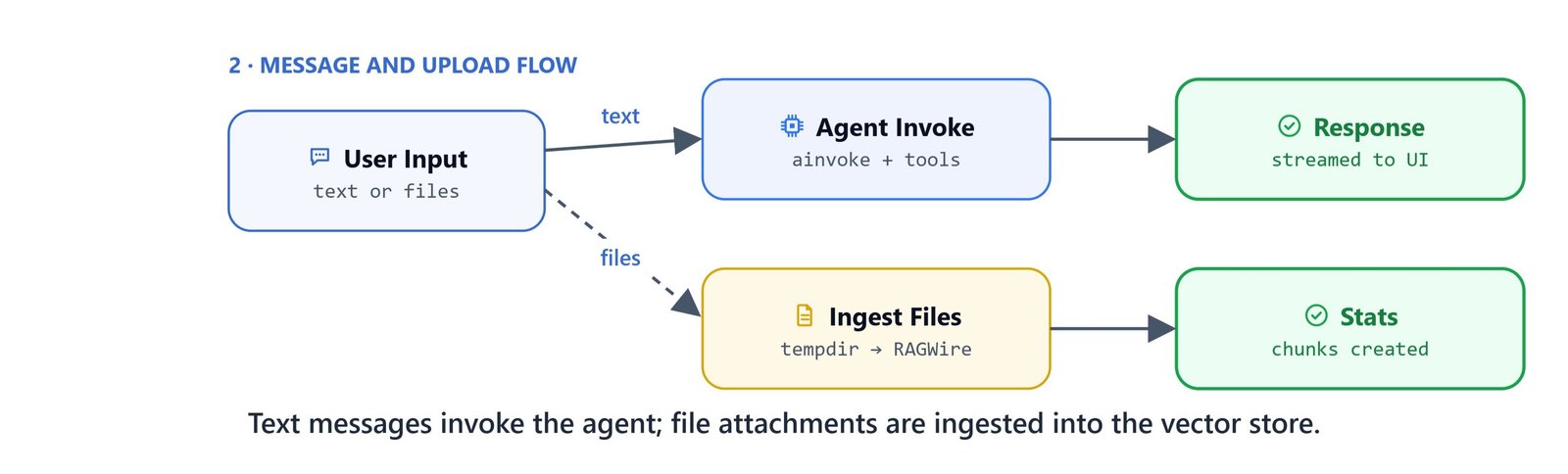
on_message handles every incoming message.
It supports two modes:
- File upload: If the message contains attached files, copy them to a temporary directory and ingest with RAGWire
- Chat query: Otherwise, invoke the agent with the user's question
@cl.on_message
async def on_message(message: cl.Message):
    agent = cl.user_session.get('agent')
    thread_id = cl.user_session.get('thread_id')

    if message.elements:
        with tempfile.TemporaryDirectory() as tmpdir:
            for elem in message.elements:
                dest = os.path.join(tmpdir, elem.name)
                with open(elem.path, 'rb') as src, open(dest, 'wb') as dst:
                    dst.write(src.read())

            msg = cl.Message(content="Ingesting documents...")
            await msg.send()

            stats = rag.ingest_directory(tmpdir)
            msg.content = f"Files have been ingested. Stats: {stats}"
            await msg.update()

            return

    config = {'configurable': {'thread_id': thread_id}}

    response_msg = cl.Message(content='Thinking...')
    await response_msg.send()

    result = await agent.ainvoke(
        {'messages': [HumanMessage(message.content)]},
        config=config
    )

    response_msg.content = result['messages'][-1].text
    await response_msg.update()
Key Implementation Details
cl.user_sessionstores the agent and thread ID per user session, so each user gets an independent agent with its own memory.cl.context.session.idprovides a unique session identifier used as thethread_idfor theInMemorySavercheckpointer.agent.ainvokeis the async version ofinvoke, required inside Chainlit's async handlers.tempfile.TemporaryDirectorycreates a temporary directory for uploaded files, which is cleaned up automatically after ingestion.message.elementscontains the list of files attached to a message via drag-and-drop or the upload button.

Welcome Page
Create chainlit.md in the same directory as app.py to customise the welcome screen:
# Welcome to the RAGWire Document Assistant

Upload documents (drag & drop) or ask questions about your ingested documents.

## Supported File Types
- PDF, DOCX, XLSX, PPTX, TXT, MD
Tip
If you do not want a welcome screen, leave chainlit.md empty.
Running the Chatbot
chainlit run app.pyOn Linux/macOS: The command is identical. Chainlit opens a browser window at http://localhost:8000 by default.
The chatbot is now live. Drag and drop PDF files into the chat to ingest them, then ask questions. The agent uses get_filter_context to discover the available metadata and search_documents to retrieve relevant chunks with optional filters. Conversational memory persists across messages within the same session. This is how we build a full RAG chatbot in a single file.
Important
This simple chatbot uses InMemorySaver, so memory is lost when the process restarts. For persistent chat history across sessions, see the Chainlit Chat Frontend article. It adds SQLite-backed history, authentication, and PDF export.


