
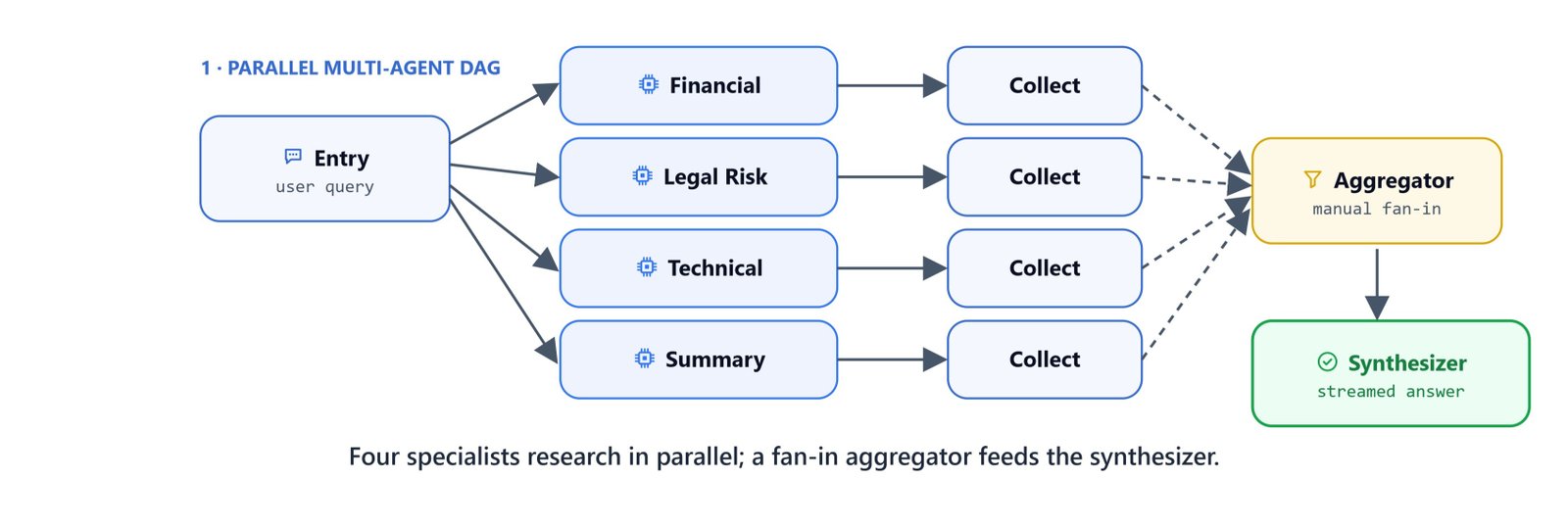
The Microsoft Agent Framework runs graph-based multi-agent workflows. It supports typed message routing and conditional edges. In this blog, we build a parallel multi-agent RAG supervisor. Four specialist agents research a query at the same time from different angles. A manual fan-in aggregator collects their outputs. Then a synthesizer merges everything into one streamed answer.
Work through the FastAPI RAG Backend article first. This agent plugs into the same backend as all the other agent implementations.
Architecture
User query
    │
    ▼
 [entry]  ──────────────────────────────────────────────────────┐
    │                                                            │
    ├──► specialist_financial  ──► collect_financial  ──►       │
    ├──► specialist_legal_risk ──► collect_legal_risk ──►  [aggregator]
    ├──► specialist_technical  ──► collect_technical  ──►       │
    └──► specialist_summary    ──► collect_summary    ──►       │
                                                                 │
                                                                 ▼
                                                          [synthesizer]
                                                                 │
                                                                 ▼
                                                          Final answer (streamed)
The workflow is an acyclic DAG, so there are no loops. The Microsoft Agent Framework enforces this at build time.
Constants and Configuration
MODEL_ID = "ragwire-ms-supervisor"
GEMINI_MODEL = "models/gemini-2.5-flash"
The agent uses Google Gemini 2.5 Flash via its OpenAI-compatible endpoint. The API key is read from the GOOGLE_API_KEY environment variable.
Define the specialist domains:
SPECIALISTS = {
    "financial":  "revenue income profit margin financial statements cash flow",
    "legal_risk": "risk factors legal proceedings regulatory compliance liabilities",
    "technical":  "product technology research development innovation strategy",
    "summary":    "overview business strategy key highlights performance",
}
RAG Tools
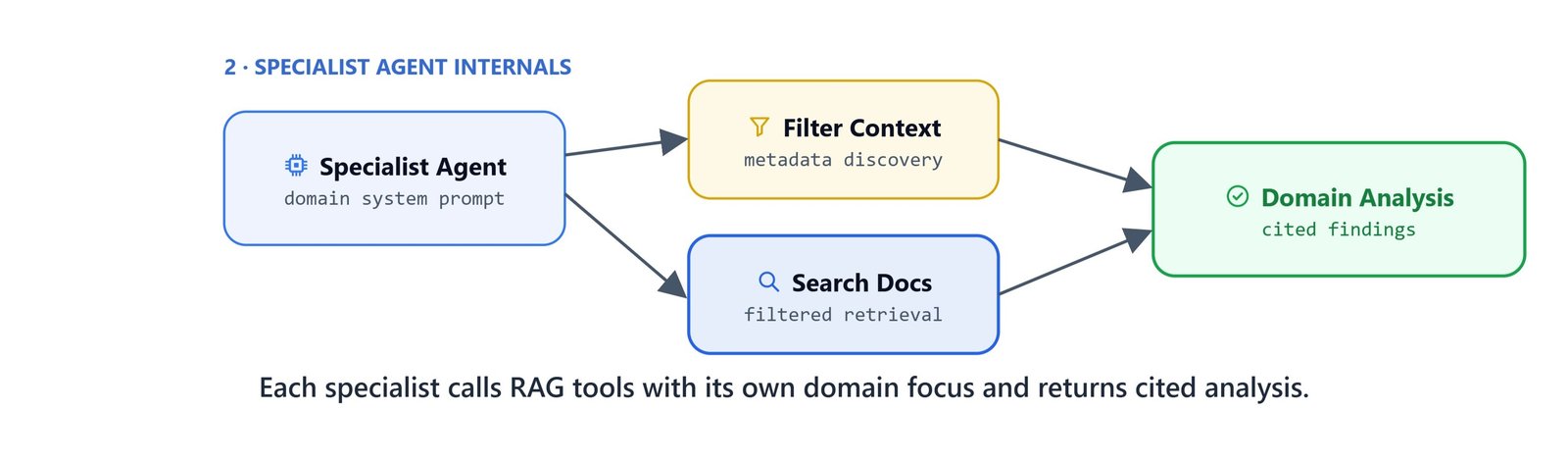
Two tools are available to every specialist agent:
| Tool | Purpose |
|---|---|
get_filter_context(query) |
Returns metadata fields (company, year, doc type) to use as filters. Call first when the query mentions a specific company or year. |
search_documents(query, filters) |
Searches the vector store and returns the top-5 matching document chunks with source filenames. |
These are registered with @tool so the Agent Framework can expose them to the LLM as callable functions.
Entry Executor
The entry point receives the raw user query and fans out to all four specialists:
@executor(id="entry")
async def entry(message: str, ctx: WorkflowContext[AgentExecutorRequest]) -> None:- Saves the query to shared workflow state so downstream executors can access it.
- Initialises an empty
specialist_outputsdict in shared state. - Fans out by sending an
AgentExecutorRequest. The framework routes this to all four specialists in parallel, because of the edges defined inbuild_workflow.
Specialist AgentExecutors
A factory creates one AgentExecutor per specialist:
def make_specialist(name: str) -> AgentExecutor:Each specialist:
- Has a focused system prompt telling it which domain to cover.
- Has access to both RAG tools (
get_filter_context,search_documents). - Is told to bold all numbers and figures and cite source filenames.
- Runs its own LLM call independently and in parallel with the other three.
All four are created at module load time:
specialists = {name: make_specialist(name) for name in SPECIALISTS}Collector Executors
A factory creates one collector per specialist:
def make_collector(name: str) -> object:
    @executor(id=f"collect_{name}")
    async def collect(response: AgentExecutorResponse, ctx: ...) -> None:
Each collector:
- Receives the
AgentExecutorResponsefrom its paired specialist. - Extracts the text via
response.agent_response.text. - Saves it into the shared
specialist_outputsdict, keyed by specialist name. - Forwards an
AgentExecutorRequestto the aggregator.
All four collectors write into the same shared dict. The aggregator uses the dict's length to know when all four are done.
Aggregator Executor
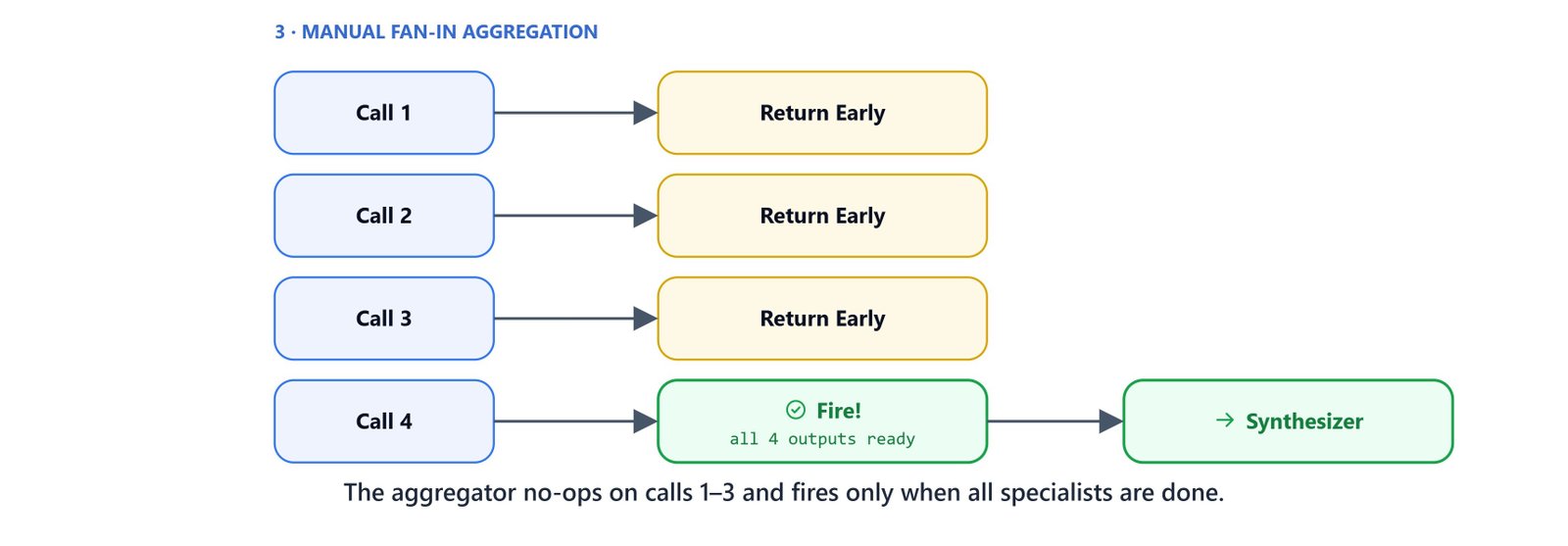
The aggregator is a manual fan-in gate. Each collector calls it once, so four times total:
@executor(id="aggregator")
async def aggregator(_request: AgentExecutorRequest, ctx: ...) -> None:- Returns early (does nothing) for the first three calls, since not all specialists are done yet.
- On the fourth call, all outputs are present. It combines all four analyses into a single formatted string and sends one
AgentExecutorRequestto the synthesizer.
Note
The manual aggregator is used instead of the framework's built-in add_fan_in_edges because the latter raises a TypeCompatibilityError when the source executors output AgentExecutorRequest. The manual approach achieves the same fan-in semantics without the type-checking issue.
Synthesizer AgentExecutor
synthesizer_exec = AgentExecutor(
    client.as_agent(name="Synthesizer", instructions=(...)),
    id="synthesizer",
)- Receives the combined output from the aggregator containing all four specialist analyses
- Its system prompt instructs it to merge all analyses into one well-structured, cited answer
- Bolds all key figures and formats references as
1. filename, p.XX
Building the Workflow
def build_workflow():
    builder = WorkflowBuilder(start_executor=entry)
    for name in SPECIALISTS:
        builder.add_edge(entry, specialists[name])          # fan-out
        builder.add_edge(specialists[name], collectors[name])
        builder.add_edge(collectors[name], aggregator)      # all 4 → aggregator
    builder.add_edge(aggregator, synthesizer_exec)          # aggregator → synthesizer
    return builder.build()
The WorkflowBuilder defines the DAG by registering directed edges. The framework validates all edges at build time. It checks that executor inputs and outputs match.
Streaming Interface
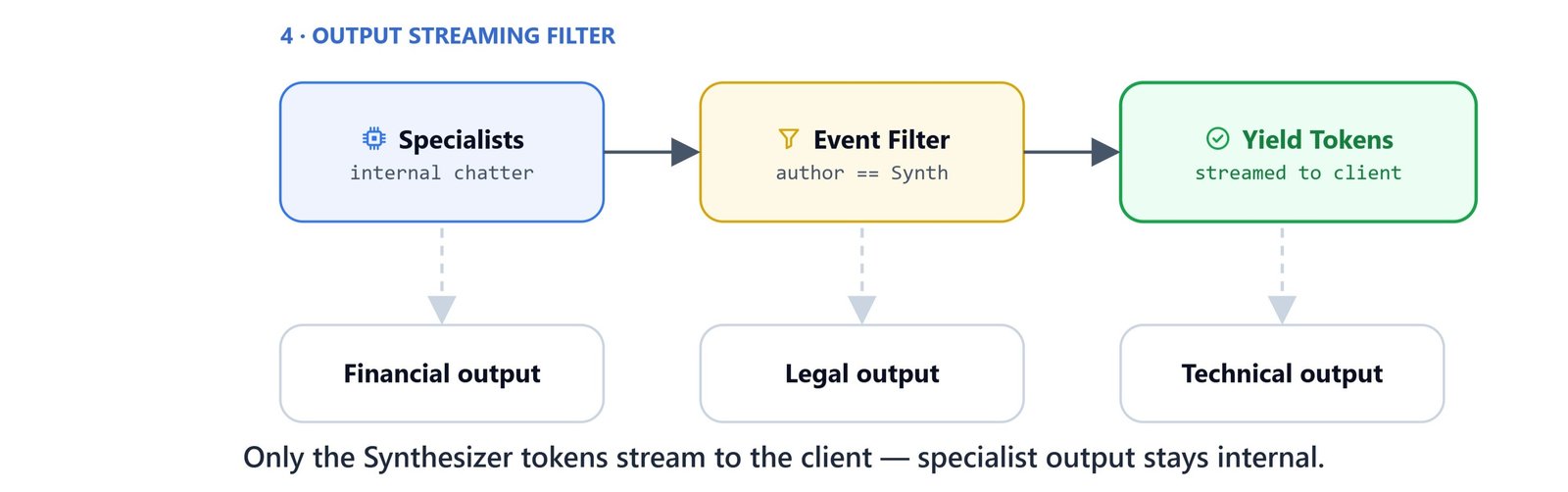
The public stream() function runs the workflow and yields only the synthesizer's tokens:
async def stream(messages: List[dict]) -> AsyncGenerator[str, None]:
    async for event in workflow.run(last_user(messages), stream=True):
        if event.type == "output" and isinstance(event.data, AgentResponseUpdate):
            if event.data.author_name == "Synthesizer" and event.data.text:
yield event.data.text- Extracts the last user message from the chat history.
- Runs the full workflow in streaming mode.
- Filters the event stream to yield only token-by-token chunks from the Synthesizer.
- All intermediate specialist outputs are processed silently and never streamed to the client.
The MODEL_ID string ("ragwire-ms-supervisor") is used by routes.py to label responses in the OpenAI-compatible API format.
Data Flow Summary
| Step | Executor | Input | Output |
|---|---|---|---|
| 1 | entry |
Raw query string | AgentExecutorRequest (×4, fan-out) |
| 2 | specialist_* (×4, parallel) |
AgentExecutorRequest |
AgentExecutorResponse |
| 3 | collect_* (×4) |
AgentExecutorResponse |
Saves text to state; sends AgentExecutorRequest to aggregator |
| 4 | aggregator (called 4×, fires once) |
AgentExecutorRequest |
AgentExecutorRequest (combined analyses) |
| 5 | synthesizer |
AgentExecutorRequest |
Streamed AgentResponseUpdate tokens |
Key Design Decisions
- Parallel execution: all four specialists run at the same time. So total latency drops to about one LLM call instead of four.
- Shared state:
WorkflowContextacts as a small key-value store. It passes the query and collected outputs between executors that do not connect directly. - Manual fan-in: the aggregator replaces the built-in
add_fan_in_edgesto dodge a type-checking limitation. - Output filtering: only the Synthesizer's tokens reach the caller. All specialist chatter stays internal.
Running the Agent
Set the AGENT environment variable and start the FastAPI backend:
set AGENT=08_microsoft_multiagent
uvicorn main:app --host 0.0.0.0 --port 8080
On Linux/macOS: export AGENT=08_microsoft_multiagent
The agent is now live at http://localhost:8080/v1/chat/completions. Connect the Chainlit frontend or any OpenAI-compatible client to use the multi-agent supervisor. This is how a parallel supervisor works. Four specialists research at once, an aggregator waits for all of them, and a synthesizer streams one merged answer.
Tip
Compare this agent's response quality with the single-agent LangChain version. The parallel specialists produce fuller answers by covering the financial, legal, technical, and summary angles at once.


