
RAGWire works well beyond finance. In this blog, we see how little changes when we switch from SEC filings to health supplement research papers. Different domain, different data, different metadata schema, but the same pipeline.
Work through the RAGWire Architecture and Setup article first for the core pipeline. Then read RAGWire Providers and Components for the Qdrant Cloud setup.
What Changes Between Domains
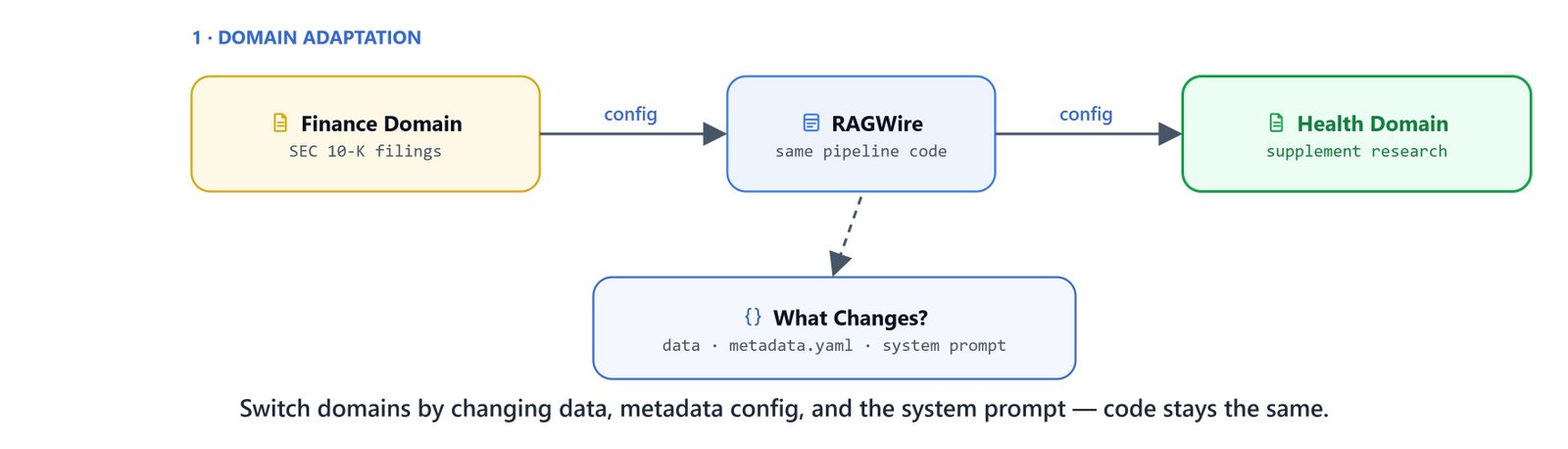
Moving from finance to health means changing only three things:
- Data: Health supplement PDFs instead of SEC filings
- Metadata config:
health_metadata.yamlinstead offinance_metadata.yaml - System prompt: Tuned for health and fitness instead of financial analysis
The config YAML, pipeline code, tools, and agent logic stay identical.
Health Metadata Configuration
Create health_metadata.yaml with fields relevant to research papers:
prompt: |
  You are an expert research paper analyst specializing in health, fitness, and sports science.
  Your task is to extract structured metadata from the research paper below.

  ## Extraction Rules
  1. **Be thorough**: Extract every field you can find. A field should only be null if the information is completely absent.
  2. **Be precise**: Extract exactly what is stated. Do not infer, assume, or hallucinate values not present in the document.
  3. **Lists**: Scan the entire document and extract ALL matching values - not just the first occurrence.
  4. **Strings**: Normalize to lowercase. Trim extra whitespace.
  5. **Integers**: Return the numeric value only — no units, symbols, or surrounding text.
  6. **Null**: Return null only when the field is genuinely not mentioned anywhere in the document.

fields:
  - name: title
    description: "Full title of the research paper exactly as it appears in the document. Do not paraphrase."

  - name: authors
    description: "List of full author names exactly as they appear in the paper (e.g. 'John A. Smith'). Extract all authors."
    type: list

  - name: publication_year
    description: "Year the paper was published or last revised. Extract the 4-digit year only."
    type: integer

  - name: research_focus
    description: "List of all primary research topics covered, in lowercase-hyphenated format. Not limited to the examples — extract any focus area mentioned in the paper."
    type: list
    values: ["muscle-growth", "recovery", "performance", "endurance", "cognitive-function", "fat-loss", "safety", "hormonal"]
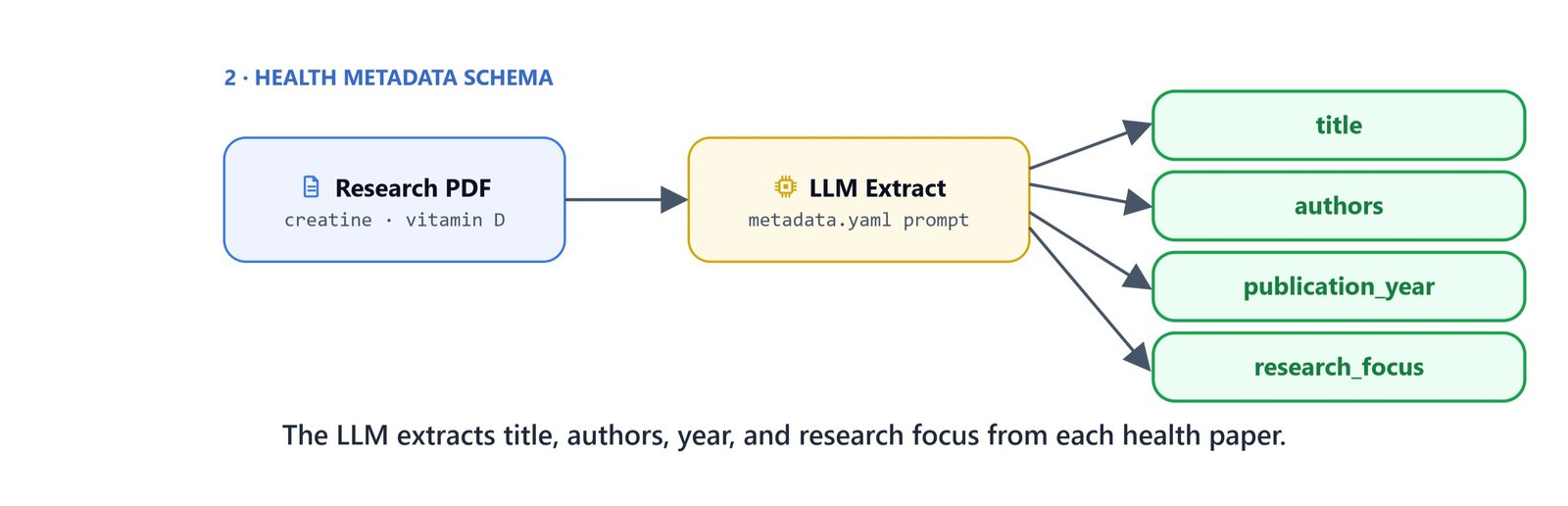
This schema extracts fields for each paper: title, authors, publication year, and research focus areas. The values list in research_focus gives examples, but it is not a hard limit. The LLM can extract any focus area mentioned in the paper.
Configuration
The config file points to Qdrant Cloud and references the health metadata:
# config_gemini_qdrant.yaml
embeddings:
  provider: "google"
  model: "models/gemini-embedding-001"
  api_key: "${GOOGLE_API_KEY}"

llm:
  provider: "google"
  model: "gemini-2.5-flash"
  api_key: "${GOOGLE_API_KEY}"

vectorstore:
  url: "${QDRANT_URL}"
  api_key: "${QDRANT_API_KEY}"
  collection_name: "health-rag-google-qdrant"
  use_sparse: true
  force_recreate: false

retriever:
  search_type: "hybrid"
  top_k: 5
  auto_filter: false

metadata:
  config_file: "health_metadata.yaml"

logging:
  level: "INFO"
  console_output: true
  colored: false
  log_file: "./.log/ragwire.log"
The only differences from the finance config are:
collection_name:health-rag-google-qdrantinstead offinance-rag-google-qdrantmetadata.config_file:health_metadata.yamlinstead offinance_metadata.yaml
Setup and Ingest
from dotenv import load_dotenv
load_dotenv(override=True)

from ragwire import RAGWire, setup_logging
import ragwire

logger = setup_logging(log_level="INFO")
print(ragwire.__version__)1.2.7rag = RAGWire('config_gemini_qdrant.yaml')Ingest all health supplement research papers:
rag.ingest_directory('../data/health_data'){'total': 11, 'processed': 10, 'skipped': 1, 'failed': 0, 'chunks_created': 75, 'errors': []}Here, we can see 10 of the 11 papers processed and 1 skipped as a duplicate.
The health data directory holds research papers on many topics. These cover creatine, vitamin D, protein muscle synthesis, caffeine, beta-alanine, hydration, sleep, and functional foods for athletes. RAGWire processes all of them in a single call. It extracts the title, authors, publication year, and research focus from each paper.
Basic Retrieval
Query the collection with simple keyword and semantic searches:
rag.retrieve("protein", top_k=3)Here, we can see chunks from the creatine and protein papers. Each one carries full metadata, including the research focus areas.
rag.retrieve("what are the benefits of vitamin d?", top_k=3)Hybrid search combines dense semantic matching with sparse keyword retrieval. So it surfaces relevant chunks from the vitamin D performance paper.
Building the Agent
The same two tools from the finance pipeline, get_filter_context and search_documents, work unchanged. The only difference is the system prompt. We tune it for a health and fitness assistant:
from langchain.agents import create_agent
from langchain.tools import tool
from langchain.messages import HumanMessage
from langchain_google_genai import ChatGoogleGenerativeAI
from langgraph.checkpoint.memory import InMemorySaver

@tool
def get_filter_context(query: str) -> str:
    """Get available metadata fields, stored values, and filter suggestions for a query.

    Call this before search_documents when the query involves a specific company,
    year, or document type. Skip for purely semantic queries.
    """
    return rag.get_filter_context(query)

@tool
def search_documents(query: str, filters=None):
    """Search the document knowledge base for relevant information.

    Args:
        query: The search query
        filters: Optional metadata filters from get_filter_context.
    """
    results = rag.retrieve(query=query, filters=filters)
    if not results:
        return "No relevant information is found!"
    else:
        return results

agent = create_agent(
    model=ChatGoogleGenerativeAI(model="gemini-2.5-flash"),
    tools=[get_filter_context, search_documents],
    system_prompt=(
        "You are a helpful health and fitness research assistant. "
        "For complex questions, break them down into simple sub-questions. "
        "Always use search_documents to retrieve information — never answer from general knowledge. "
        "Use get_filter_context before search_documents when the query involves specific metadata. "
        "Always cite the source paper in your answer."
    ),
    checkpointer=InMemorySaver(),
)
Interactive Q&A
config = {"configurable": {"thread_id": "demo"}}

print("\nRAG Agent ready. Type 'quit' to exit.\n")

while True:
    question = input("You: ").strip()
    if question.lower() in ("quit", "exit", "q"):
        break
    if not question:
        continue
    response = agent.invoke(
        {"messages": [HumanMessage(question)]},
        config=config,
    )
    print(f"\nAgent: {response['messages'][-1].text}\n")
Example queries to try:
- "What are the benefits of vitamin D for athletes?"
- "What does the research say about creatine and muscle growth?"
- "How does caffeine affect endurance performance?"
- "What hydration strategies are recommended for athletes?"
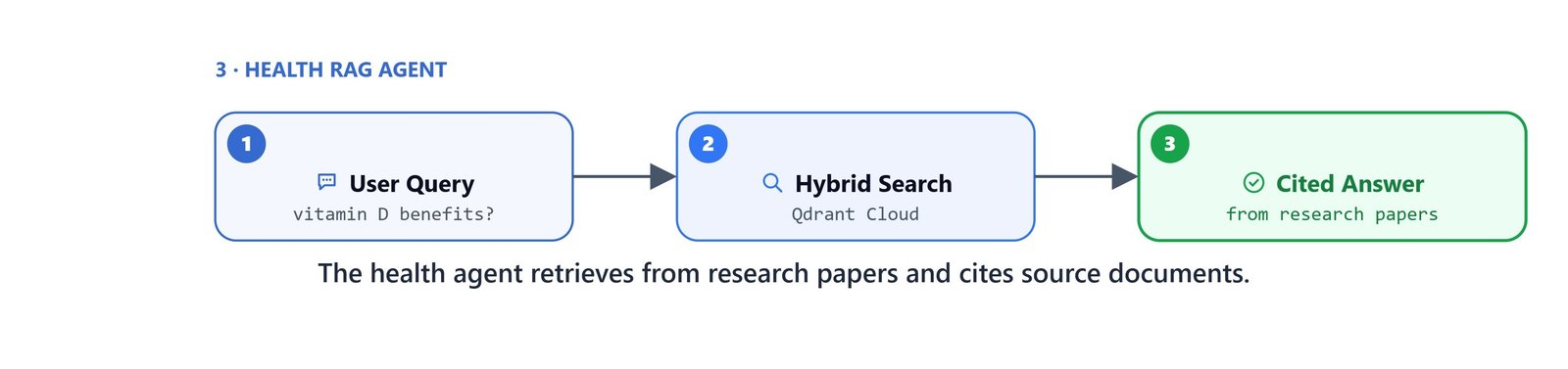
The agent retrieves from the health supplement research papers and cites its source documents. This shows that RAGWire's pipeline works across domains with only small config changes. This is how we take one pipeline from finance to health.
Tip
Compare the retrieval quality in this health pipeline with the finance pipeline from earlier articles. Same hybrid search, same top_k, same agent architecture. Different domain, different metadata, same precision.


