
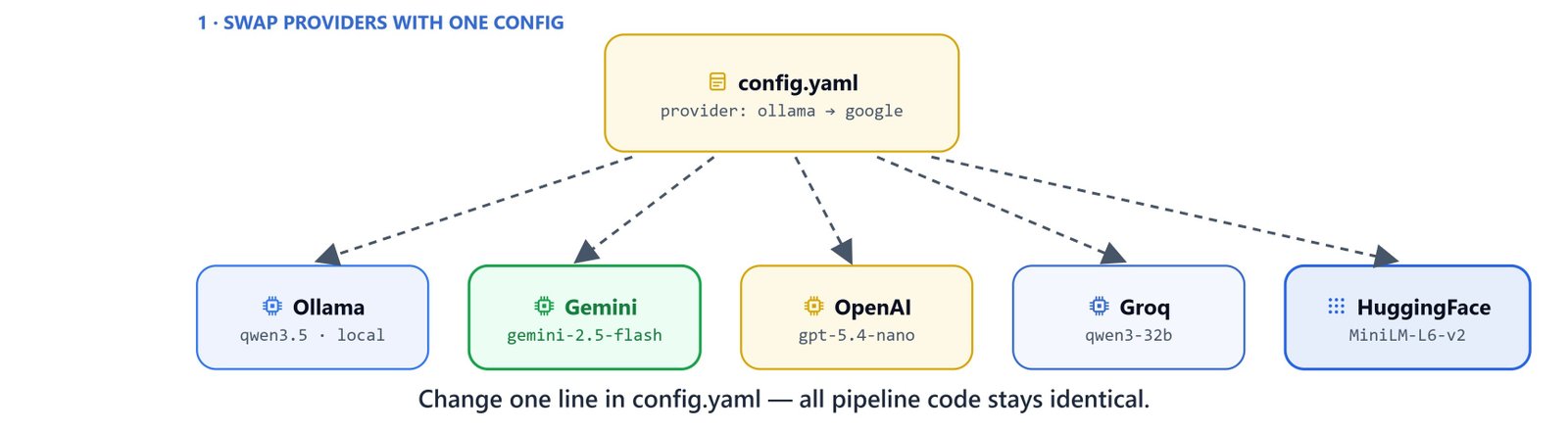
RAGWire separates the provider choice from the pipeline logic. Switching from Ollama to OpenAI to Gemini to Groq needs only a config file change. In this blog, we walk through every supported provider config. Then we build a production setup with Qdrant Cloud and MMR retrieval.
Before we start, work through the RAGWire Architecture and Setup article so we have a working local pipeline.
RAGWire with All Providers
Switch providers by changing the config file. All tools, agents, and retrieval logic stay the same. Only the YAML changes.
| Config | Embedding | LLM |
|---|---|---|
config_ollama.yaml |
qwen3-embedding:0.6b (Ollama) |
qwen3.5:9b (Ollama) |
config_gemini.yaml |
gemini-embedding-001 (Google) |
gemini-2.5-flash (Google) |
config_openai.yaml |
text-embedding-3-small (OpenAI) |
gpt-5.4-nano (OpenAI) |
config_groq.yaml |
all-MiniLM-L6-v2 (HuggingFace) |
qwen/qwen3-32b (Groq) |
Setup
from dotenv import load_dotenv
load_dotenv()

from ragwire import RAGWire, setup_logging
import ragwire

logger = setup_logging(log_level="INFO")
print(ragwire.__version__)1.2.7Ollama (Local)
# config_ollama.yaml
embeddings:
  provider: "ollama"
  model: "qwen3-embedding:0.6b"
  base_url: "http://localhost:11434"

llm:
  provider: "ollama"
  model: "qwen3.5:9b"
  base_url: "http://localhost:11434"
  num_ctx: 16384

vectorstore:
  url: "http://localhost:6333"
  collection_name: "finance-rag-ollama"
  use_sparse: true
  force_recreate: false

retriever:
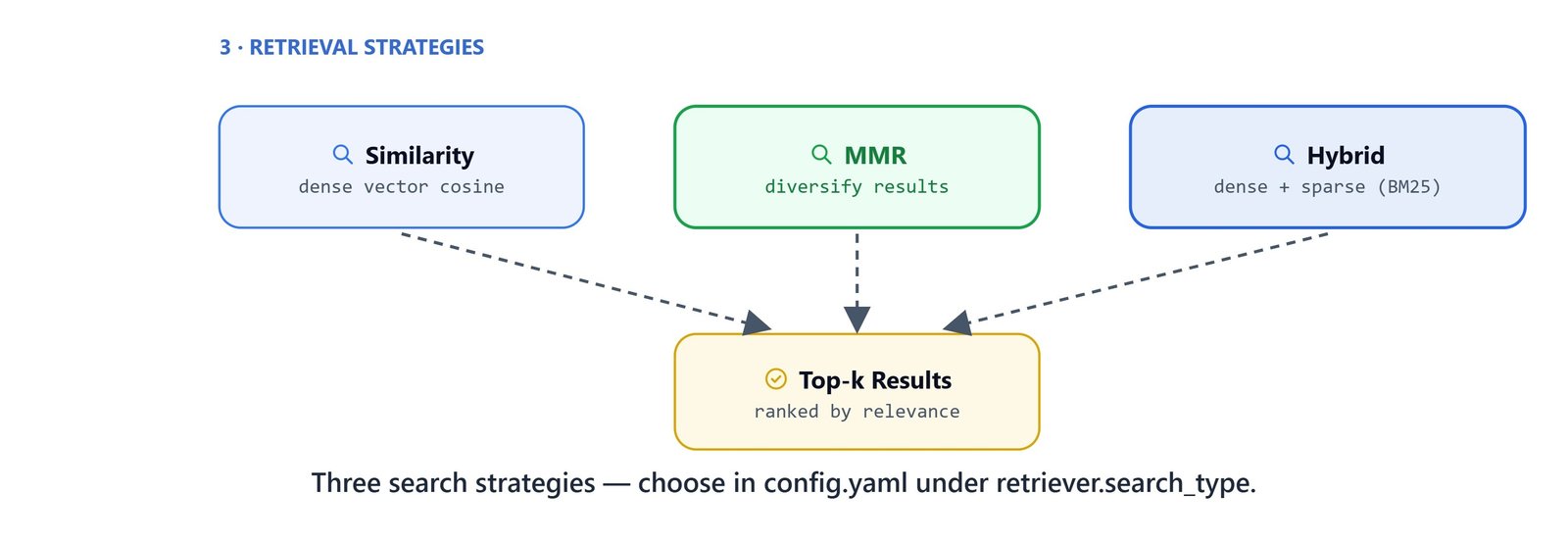
  search_type: "hybrid"
  top_k: 5
  auto_filter: false

metadata:
config_file: "finance_metadata.yaml"rag = RAGWire('config_ollama.yaml')
stats = rag.ingest_directory('../data/finance_data')OpenAI
# config_openai.yaml
embeddings:
  provider: "openai"
  model: "text-embedding-3-small"
  api_key: "${OPENAI_API_KEY}"

llm:
  provider: "openai"
  model: "gpt-5.4-nano"
  api_key: "${OPENAI_API_KEY}"

vectorstore:
  url: "http://localhost:6333"
  collection_name: "finance-rag-openai"
  use_sparse: true
  force_recreate: false

retriever:
  search_type: "hybrid"
  top_k: 5
  auto_filter: true

metadata:
  config_file: "finance_metadata.yaml"

logging:
  level: "INFO"
  console_output: true
  colored: false
log_file: "./.log/ragwire.log"rag_openai = RAGWire('config_openai.yaml')
stats = rag_openai.ingest_directory('../data/finance_data')Test retrieval:
rag_openai.retrieve("what is apple revenue in 2025?")Note
Each provider creates its own Qdrant collection with a different name. Embeddings from different models are not interchangeable. So we must re-ingest when switching embedding providers.
Groq
Groq provides fast inference for supported models. This config pairs Groq's LLM with HuggingFace embeddings:
# config_groq.yaml
embeddings:
  provider: "huggingface"
  model_name: "sentence-transformers/all-MiniLM-L6-v2"

llm:
  provider: "groq"
  model: "qwen/qwen3-32b"
  api_key: "${GROQ_API_KEY}"

vectorstore:
  url: "http://localhost:6333"
  collection_name: "finance-rag-groq"
  use_sparse: true
  force_recreate: true

retriever:
  search_type: "hybrid"
  top_k: 5
  auto_filter: true

metadata:
  config_file: "finance_metadata.yaml"

logging:
  level: "INFO"
  console_output: true
  colored: false
  log_file: "./.log/ragwire.log"
Note
HuggingFace embeddings require an additional dependency: pip install langchain-huggingface
load_dotenv(override=True)

rag_groq = RAGWire('config_groq.yaml')
rag_groq.ingest_documents([r'..\data\finance_data\amazon 10-k 2024.pdf']){'total': 1, 'processed': 1, 'skipped': 0, 'failed': 0, 'chunks_created': 39, 'errors': []}On Linux/macOS: Use forward slashes in paths: ../data/finance_data/amazon 10-k 2024.pdf
Gemini
# config_gemini.yaml
embeddings:
  provider: "google"
  model: "models/gemini-embedding-001"
  api_key: "${GOOGLE_API_KEY}"

llm:
  provider: "google"
  model: "gemini-2.5-flash"
  api_key: "${GOOGLE_API_KEY}"

vectorstore:
  url: "http://localhost:6333"
  collection_name: "finance-rag-google"
  use_sparse: true
  force_recreate: true

retriever:
  search_type: "hybrid"
  top_k: 5
  auto_filter: true

metadata:
  config_file: "finance_metadata.yaml"

logging:
  level: "INFO"
  console_output: true
  colored: false
log_file: "./.log/ragwire.log"load_dotenv(override=True)
rag_gemini = RAGWire('config_gemini.yaml')
rag_gemini.ingest_documents([r'..\data\finance_data\amazon 10-k 2024.pdf']){'total': 1, 'processed': 1, 'skipped': 0, 'failed': 0, 'chunks_created': 39, 'errors': []}Tip
Use load_dotenv(override=True) when switching between providers in the same notebook session. This forces the environment variables to reload from .env.
Qdrant Cloud with MMR Retrieval
For production, we replace the local Qdrant instance with Qdrant Cloud.
Two things change in the config:
vectorstore.urlpoints to your Qdrant Cloud cluster URL.vectorstore.api_keyauthenticates with your Qdrant API key.
Everything else stays identical: ingest, retrieve, and agent.

# config_gemini_qdrant.yaml
embeddings:
  provider: "google"
  model: "models/gemini-embedding-001"
  api_key: "${GOOGLE_API_KEY}"

llm:
  provider: "google"
  model: "gemini-2.5-flash"
  api_key: "${GOOGLE_API_KEY}"

vectorstore:
  url: "${QDRANT_URL}"
  api_key: "${QDRANT_API_KEY}"
  collection_name: "finance-rag-google-qdrant"
  use_sparse: true
  force_recreate: false

retriever:
  search_type: "hybrid"
  top_k: 5
  auto_filter: false

metadata:
  config_file: "finance_metadata.yaml"

logging:
  level: "INFO"
  console_output: true
  colored: false
  log_file: "./.log/ragwire.log"
Set QDRANT_URL and QDRANT_API_KEY in your .env file:
QDRANT_URL=https://your-cluster-id.cloud.qdrant.io:6333
QDRANT_API_KEY=your_qdrant_api_key
Ingest to Qdrant Cloud
load_dotenv(override=True)

rag_qdrant = RAGWire("config_gemini_qdrant.yaml")
rag_qdrant.ingest_directory("../data/finance_data"){'total': 6, 'processed': 6, 'skipped': 0, 'failed': 0, 'chunks_created': 260, 'errors': []}Build a Filter-Aware Agent on Qdrant Cloud
The agent code is identical no matter the provider. The same two tools (get_filter_context and search_documents) work with any backend:
from langchain.agents import create_agent
from langchain.tools import tool
from langchain.messages import HumanMessage
from langchain_google_genai import ChatGoogleGenerativeAI
from langgraph.checkpoint.memory import InMemorySaver

@tool
def get_filter_context(query: str) -> str:
    """Get available metadata fields, stored values, and filter suggestions for a query.

    Call this before search_documents when the query involves a specific company,
    year, or document type. Skip for purely semantic queries.
    """
    return rag_qdrant.get_filter_context(query)

@tool
def search_documents(query: str, filters=None):
    """Search the document knowledge base for relevant information.

    Args:
        query: The search query
        filters: Optional metadata filters from get_filter_context.
    """
    results = rag_qdrant.retrieve(query=query, filters=filters)
    if not results:
        return "No relevant information is found!"
    else:
        return results

agent = create_agent(
    model=ChatGoogleGenerativeAI(model="gemini-2.5-flash"),
    tools=[get_filter_context, search_documents],
    system_prompt=(
        "You are a helpful financial document assistant. "
        "For complex questions, break them down into simple sub-questions. "
        "Always use search_documents to retrieve information — never answer from general knowledge. "
        "Use get_filter_context before search_documents when the query involves specific metadata. "
        "Always cite the source document in your answer."
    ),
    checkpointer=InMemorySaver(),
)
Interactive Q&A
config = {"configurable": {"thread_id": "demo"}}

print("\nRAG Agent ready. Type 'quit' to exit.\n")

while True:
    question = input("You: ").strip()
    if question.lower() in ("quit", "exit", "q"):
        break
    if not question:
        continue
    response = agent.invoke(
        {"messages": [HumanMessage(question)]},
        config=config,
    )
    print(f"\nAgent: {response['messages'][-1].text}\n")
Important
The Qdrant Cloud collection built in this article is the same collection used by the FastAPI backend in later articles. We do not need to re-ingest. The backend connects to the same finance-rag-google-qdrant collection.
This is how RAGWire stays provider-agnostic. We swapped Ollama, OpenAI, Groq, and Gemini with only a YAML change. Then we moved the same pipeline to Qdrant Cloud for production.


