In Introduction to Model Context Protocol we saw the roles of client, host, and server. Now we will build them. FastMCP turns ordinary Python functions into MCP tools. We write the function, add a decorator, and FastMCP generates the schema and validation automatically.
In this blog, we build two servers. First a tiny math server to learn the mechanics, then a weather server that calls a real public API. We call each one from two kinds of client. This way we understand both the official MCP SDK and the higher-level FastMCP client.
Note
Prerequisites: the environment from MCP Dev Setup, with fastmcp and httpx installed (uv add fastmcp httpx).
A minimal MCP server

Create server.py inside a demo-server folder. A FastMCP server is an instance of FastMCP plus one or more functions decorated with @mcp.tool. The docstring becomes the tool's description that clients (and LLMs) read.
from fastmcp import FastMCP

mcp = FastMCP("Demo 🚀")

@mcp.tool
def add(a: int, b: int) -> int:
    """Add two numbers"""
    return a + b

if __name__ == "__main__":
    mcp.run(transport="streamable-http")
Run the server:
uv run python server.pyBy default the Streamable HTTP transport serves the MCP endpoint at http://127.0.0.1:8000/mcp/. Leave this terminal running and open a second one for the client.
Tip
The type hints (a: int, b: int -> int) are not just decoration. FastMCP uses them to build the JSON schema that validates incoming tool calls.
Calling the server with the FastMCP client
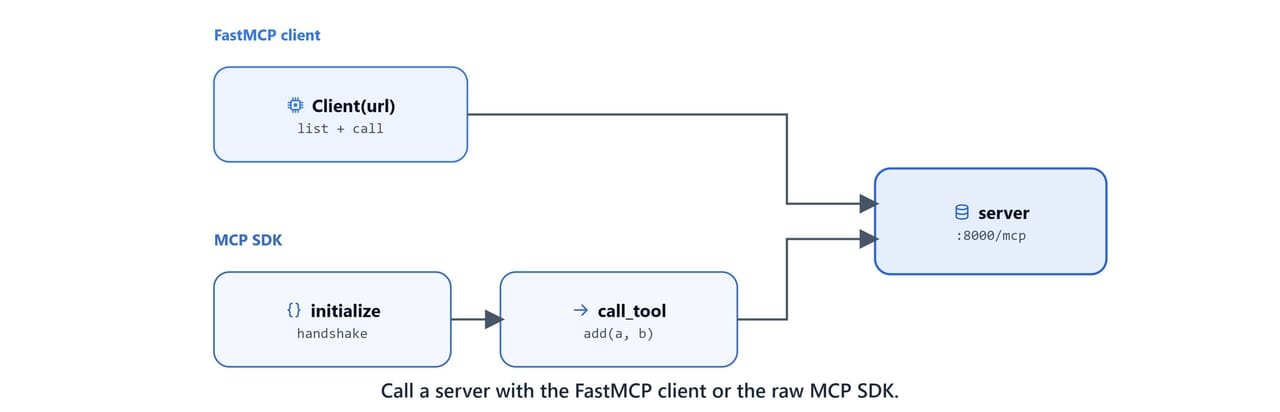
The simplest client is FastMCP's own Client. It connects, lists tools, and calls them. Create client_fastmcp.py:
import asyncio
from fastmcp import Client

async def main():
    async with Client("http://127.0.0.1:8000/mcp") as client:
        if client.is_connected:
            print("Connected to MCP server")

        # List available tools
        tools = await client.list_tools()
        print("\n--- Available Tools ---")
        for t in tools:
            print(f"{t.name}: {t.description}")

        # Call the "add" tool
        response = await client.call_tool("add", {"a": 5, "b": 7})
        print("\n--- Tool Response ---")
        print("5 + 7 =", response)

if __name__ == "__main__":
    asyncio.run(main())
Run it while the server is up:
uv run python client_fastmcp.pyConnected to MCP server
--- Available Tools ---
add: Add two numbers
--- Tool Response ---
5 + 7 = CallToolResult(content=[TextContent(type='text', text='12')], ...)Note
MCP clients are asynchronous. The async with block manages the connection lifecycle. It opens the session, runs our calls, and cleanly closes the connection.
Calling the server with the official MCP SDK
The lower-level approach uses the official mcp package directly. It is more verbose, but it shows what FastMCP does for us. We open a transport, create a ClientSession, initialize it, then call tools. Create client_mcp.py:
import asyncio
from mcp import ClientSession
from mcp.client.streamable_http import streamablehttp_client

async def main():
    url = "http://127.0.0.1:8000/mcp/"
    async with streamablehttp_client(url) as (read, write, get_session_id):
        async with ClientSession(read, write) as session:
            print("Before initialize:", get_session_id())

            await session.initialize()

            sid = get_session_id()
            print("Session ID after initialize:", sid)

            result = await session.call_tool("add", {"a": 21, "b": 2})
            print("Server result:", result)

if __name__ == "__main__":
asyncio.run(main())uv run python client_mcp.pyBefore initialize: None
Session ID after initialize: 3f1c9a8e2b7d4f06a1c5e9d2b8470a13
Server result: meta=None content=[TextContent(type='text', text='23')] isError=FalseImportant
Notice the session ID is None before session.initialize() and a real ID afterward. The initialize handshake is mandatory. It negotiates protocol version and capabilities before any tool call.
A real tool: the weather server

A tool is far more useful when it reaches a live service. This weather server exposes two tools that call wttr.in, a free console weather service, using the async HTTP client httpx. Create weather/server.py:
import httpx
from fastmcp import FastMCP

mcp = FastMCP("Weather")

@mcp.tool()
async def get_weather(location: str) -> str:
    """Get current weather for a location"""
    async with httpx.AsyncClient() as client:
        response = await client.get(f"https://wttr.in/{location}?format=j1")
        data = response.json()

        current = data["current_condition"][0]
        area = data["nearest_area"][0]["areaName"][0]["value"]

        return f"Weather in {area}: {current['temp_C']}°C, {current['weatherDesc'][0]['value']}"

@mcp.tool()
async def get_forecast(location: str) -> str:
    """Get 3-day weather forecast"""
    async with httpx.AsyncClient() as client:
        response = await client.get(f"https://wttr.in/{location}?format=j1")
        data = response.json()

        result = f"3-day forecast for {location}:\n"
        for day in data["weather"][:3]:
            result += f"{day['date']}: {day['mintempC']}-{day['maxtempC']}°C\n"
        return result

if __name__ == "__main__":
    mcp.run(transport="streamable-http")
A few things to note:
- Tools can be
async def, ideal when they do I/O like HTTP calls. - The
?format=j1query asks wttr.in for JSON, which is easy to parse. - Each tool returns a plain string; FastMCP wraps it in the MCP response format.
Tip
wttr.in is an open service maintained at github.com/chubin/wttr.in. It is free and needs no API key, which makes it perfect for learning.
Calling the weather tools
Create weather/client.py to list and call both tools:
import asyncio
from fastmcp import Client

async def main():
    async with Client("http://127.0.0.1:8000/mcp") as client:
        if client.is_connected:
            print("Connected to Weather MCP server")

        tools = await client.list_tools()
        print("\n--- Available Tools ---")
        for t in tools:
            print(f"{t.name}: {t.description}")

        print("\n--- Getting Weather for New York ---")
        response = await client.call_tool("get_weather", {"location": "New York"})
        print(response)
        print(response.data)

        print("\n--- Getting Forecast for London ---")
        response = await client.call_tool("get_forecast", {"location": "London"})
        print(response)
        print(response.data)

if __name__ == "__main__":
    asyncio.run(main())
Start the weather server in one terminal, then run the client in another:
uv run python weather/server.py
uv run python weather/client.pyConnected to Weather MCP server
--- Available Tools ---
get_weather: Get current weather for a location
get_forecast: Get 3-day weather forecast
--- Getting Weather for New York ---
Weather in New York: 18°C, Partly cloudy
--- Getting Forecast for London ---
3-day forecast for London:
2026-06-17: 12-21°C
2026-06-18: 13-22°C
2026-06-19: 14-20°CNote
response.data returns the parsed value of the tool result, while printing response shows the full CallToolResult envelope. Live weather numbers will differ from the example above.
What you built
We now have the core MCP skills:
- A FastMCP server is
FastMCP(...)plus@mcp.tool-decorated functions. mcp.run(transport="streamable-http")serves tools over HTTP on port8000.- The FastMCP client is the quick way to connect; the official MCP SDK client shows the explicit
initialize→call_toolhandshake underneath. - Tools can be synchronous or
async, and async tools are the right choice for network calls.
Next, instead of calling tools by hand, we will let a local LLM decide which tools to call. See MCP Servers with a Local LangChain Agent.