So far we have called MCP tools by hand. MCP becomes far more useful when an LLM decides which tools to call. In this blog, a local Ollama model becomes an autonomous agent over our MCP servers. We use the mcp-use library, which connects any LangChain-compatible LLM to any MCP server.
We run a math server and a weather server side by side. We describe them in a config file. Then we let the agent route each part of a question to the correct tool. All of it runs privately on our machine.
Note
Prerequisites: MCP Dev Setup with Ollama running, plus uv add mcp-use langchain-ollama. For an Ollama refresher see the Ollama Setup Guide, and for the tool-calling idea in plain LangChain see Tool Calling.
Two servers on two ports
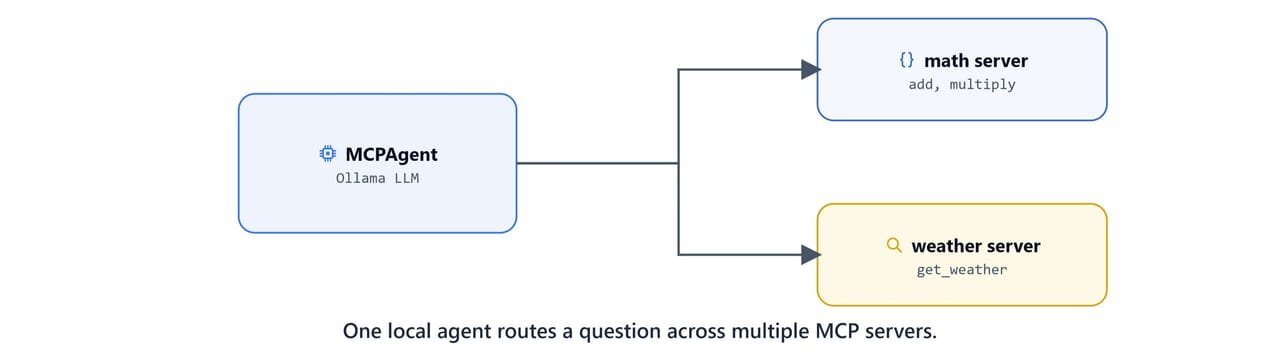
Put both servers in a servers/ folder. The math server exposes four arithmetic tools and runs on port 8000:
from fastmcp import FastMCP

mcp = FastMCP("Demo 🚀")

@mcp.tool
def add(a: int, b: int) -> int:
    """Add two numbers"""
    return a + b

@mcp.tool
def multiply(a: int, b: int) -> int:
    """Multiply two numbers"""
    return a * b

@mcp.tool
def subtract(a: int, b: int) -> int:
    """Subtract two numbers"""
    return a - b

@mcp.tool
def divide(a: int, b: int) -> float:
    """Divide two numbers"""
    if b == 0:
        return "Error: Division by zero"
    return a / b

if __name__ == "__main__":
    # mcp.run(transport="stdio")
    mcp.run(transport="streamable-http", port=8000)
The weather server (from the previous lesson) runs on port 8001:
import httpx
from fastmcp import FastMCP

mcp = FastMCP("Weather")

@mcp.tool()
async def get_weather(location: str) -> str:
    """Get current weather for a location"""
    async with httpx.AsyncClient() as client:
        response = await client.get(f"https://wttr.in/{location}?format=j1")
        data = response.json()
        current = data["current_condition"][0]
        area = data["nearest_area"][0]["areaName"][0]["value"]
        return f"Weather in {area}: {current['temp_C']}°C, {current['weatherDesc'][0]['value']}"

@mcp.tool()
async def get_forecast(location: str) -> str:
    """Get 3-day weather forecast"""
    async with httpx.AsyncClient() as client:
        response = await client.get(f"https://wttr.in/{location}?format=j1")
        data = response.json()
        result = f"3-day forecast for {location}:\n"
        for day in data["weather"][:3]:
            result += f"{day['date']}: {day['mintempC']}-{day['maxtempC']}°C\n"
        return result

if __name__ == "__main__":
    # mcp.run(transport="stdio")
    mcp.run(transport="streamable-http", port=8001)
Tip
Each server keeps the stdio line commented out. Toggling between transports is a one-line change. The tool code never moves.
Describing servers with a config file
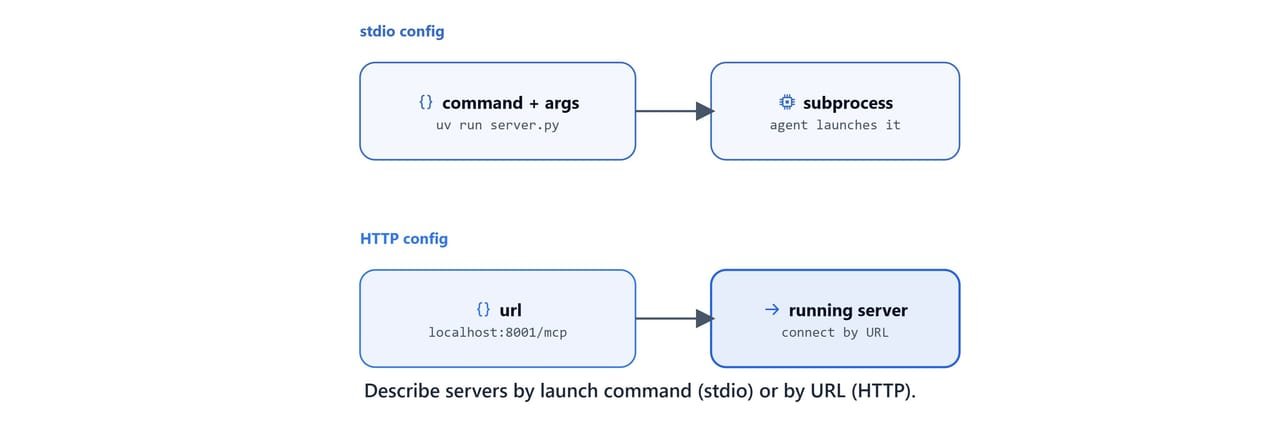
mcp-use reads a JSON file that lists our servers. There are two styles.
HTTP config (mcp-http.json): the agent connects to already-running HTTP servers by URL:
{
  "mcpServers": {
    "weather": {
      "url": "http://localhost:8001/mcp"
    },
    "math_server": {
      "url": "http://localhost:8000/mcp"
    }
  }
}
stdio config (mcp.json): the agent launches each server as a subprocess with uv:
{
  "mcpServers": {
    "weather": {
      "command": "uv",
      "args": ["run", "--directory",
               "C:\\Users\\your-username\\projects\\mcp-course\\04 MCP Servers and Local Agent\\servers",
               "weather_server.py"]
    },
    "math_server": {
      "command": "uv",
      "args": ["run", "--directory",
               "C:\\Users\\your-username\\projects\\mcp-course\\04 MCP Servers and Local Agent\\servers",
               "math_server.py"]
    }
  }
}
Important
Replace your-username and the path with your real project location. The --directory value must be the absolute path to the folder that holds your server scripts.
On Linux/macOS: use forward slashes, e.g. /home/your-username/projects/mcp-course/servers.
The difference: with the HTTP config we start the servers ourselves first. With the stdio config, mcp-use starts and stops them for us.
The agent client
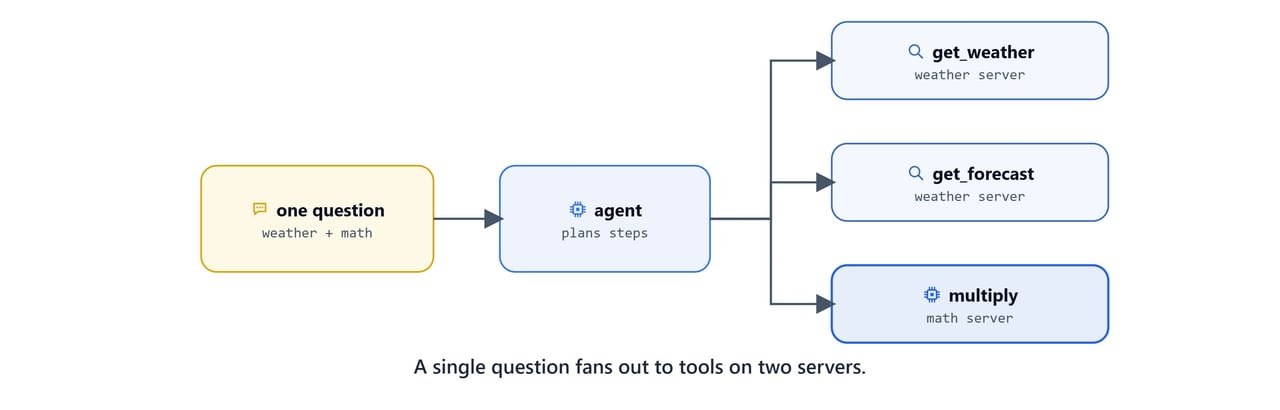
This client loads the config, creates a local LLM, and wraps both in an MCPAgent. With use_server_manager=True, the agent can reason across multiple servers and pick tools from whichever one fits the request.
import asyncio
import os
from langchain_ollama import ChatOllama
from mcp_use import MCPAgent, MCPClient

async def main():
    # Create MCPClient from a config file
    client = MCPClient.from_config_file(
        os.path.join(os.path.dirname(__file__), "mcp-http.json")
    )

    # Local LLM via Ollama
    llm = ChatOllama(base_url="http://localhost:11434", model="gpt-oss:20b")

    # Build the agent
    agent = MCPAgent(llm=llm, client=client, max_steps=30, use_server_manager=True)

    # Ask one question that needs BOTH servers
    result = await agent.run(
        "What's the weather in New York and the 3-day forecast? "
        "Also, what's 12 multiplied by 342?",
    )
    print(f"\nResult: {result}")

if __name__ == "__main__":
    asyncio.run(main())
Start both servers, then run the agent:
uv run python servers/math_server.py
uv run python servers/weather_server.py
uv run python agentic_client.pyResult: Here's what I found:
- Weather in New York: 18°C, Partly cloudy
- 3-day forecast for New York:
2026-06-17: 16-24°C
2026-06-18: 17-25°C
2026-06-19: 15-23°C
- 12 multiplied by 342 is 4104.Here, we can see the single question touch three tools across two servers. It used get_weather and get_forecast on the weather server, and multiply on the math server. The agent decided the plan on its own.
Note
max_steps=30 caps how many tool-call/observation cycles the agent may take before it must answer, which prevents runaway loops on hard questions.
Inline config and choosing a model
We do not need a separate file. We can pass the config as a Python dictionary. This version launches the weather server over stdio and uses a smaller model:
import asyncio
from langchain_ollama import ChatOllama
from mcp_use import MCPAgent, MCPClient

async def main():
    config = {
        "mcpServers": {
            "weather": {
                "command": "C:\\Users\\your-username\\anaconda3\\envs\\ml\\Scripts\\uv.exe",
                "args": [
                    "run", "--directory",
                    "C:\\Users\\your-username\\projects\\mcp-course\\04 MCP Servers and Local Agent\\servers",
                    "weather_server.py",
                ],
            }
        }
    }

    client = MCPClient.from_dict(config)
    llm = ChatOllama(base_url="http://localhost:11434", model="qwen3:8b")
    agent = MCPAgent(llm=llm, client=client, max_steps=30)

    result = await agent.run("What's the weather in New York and the 3-day forecast?")
    print(f"\nResult: {result}")

if __name__ == "__main__":
    asyncio.run(main())
Important
The command here points at a full path to uv.exe inside an Anaconda environment. Replace your-username with your actual Windows username, and adjust the path to where uv lives in your environment. If uv is on your PATH, you can simply use "command": "uv".
On Linux/macOS: the path looks like /home/your-username/anaconda3/envs/ml/bin/uv, or just uv if it is on your PATH.
Tip
Larger models (gpt-oss:20b) plan multi-tool requests more reliably; smaller ones (qwen3:8b) are faster and lighter. Pick based on your hardware and how complex the requests are.
Recap
- A config file (or dict) lists our MCP servers by
url(HTTP) orcommand+args(stdio). MCPClientloads that config;MCPAgentpairs it with any LangChain LLM such asChatOllama.use_server_manager=Truelets one agent coordinate tools across several servers.- Everything runs locally through Ollama, no data leaves our machine.
The mcp-use library lives at github.com/mcp-use/mcp-use. Next we will connect these same servers to a polished host instead of a script. See Connect MCP Servers to Claude Desktop.