In this blog, we combine everything so far into one agent. A LangGraph client connects to two MCP servers at once. One is a custom research server with per-topic ChromaDB storage and deduplication. The other is the official Firecrawl server for web scraping and search. A local Ollama model decides, per query, whether to crawl the web or search what it already knows.
The result is a research assistant with memory: it scrapes sources, stores findings organized by topic, avoids duplicates, and recalls them in future sessions.
Note
Prerequisites: Ollama with qwen3 and nomic-embed-text; Node.js for the Firecrawl server; a Firecrawl API key. uv add fastmcp chromadb langchain-chroma langchain-ollama langchain-mcp-adapters langgraph python-dotenv. For LangGraph basics see LangGraph Getting Started and ReAct Agent with Tools.
Architecture
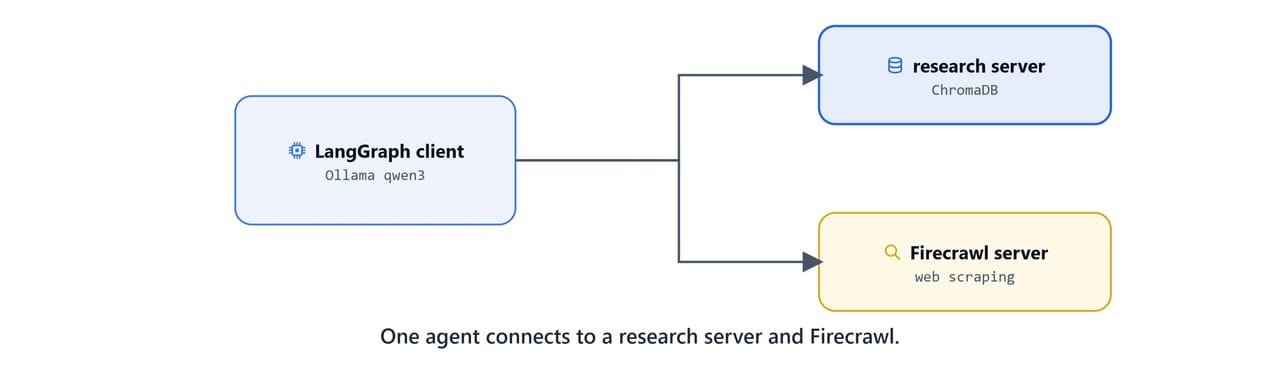
Two cooperating halves:
- Client (
client.py): a LangGraph agent using Qwen3 (Ollama), a multi-server MCP client, automatic tool routing, and conversation memory. - Server (
server.py): a FastMCP research server backed by ChromaDB, with a separate vector database per research topic and content-hash deduplication.
The data flow is simple. A user query goes to the LangGraph agent, which selects a tool. It picks Firecrawl to scrape the web, or the research server to search and save. Then it processes and stores the content, and returns a structured answer with sources.
The research server
Create server.py. It keeps one ChromaDB collection per topic, so research areas never mix. It also uses MD5 content hashes to skip duplicates.

from mcp.server.fastmcp import FastMCP
from pathlib import Path
from typing import List, Set
from langchain_chroma import Chroma
from langchain_ollama import OllamaEmbeddings
from langchain_core.documents import Document
import shutil, hashlib, json

mcp = FastMCP("Research Assistant")

current_dir = Path(__file__).parent.absolute()
CHROMA_DB_ROOT = current_dir / "research_chroma_dbs"
EMBED_MODEL = "nomic-embed-text"
OLLAMA_BASE_URL = "http://localhost:11434"

embeddings = OllamaEmbeddings(model=EMBED_MODEL, base_url=OLLAMA_BASE_URL)

def get_content_hash(content: str) -> str:
    """Hash content to detect duplicates."""
    return hashlib.md5(content.encode("utf-8")).hexdigest()

def load_content_hashes(topic_path: Path) -> Set[str]:
    metadata_file = topic_path / "content_hashes.json"
    if metadata_file.exists():
        try:
            with open(metadata_file, "r") as f:
                return set(json.load(f))
        except Exception:
            return set()
    return set()

def save_content_hashes(topic_path: Path, hashes: Set[str]):
    with open(topic_path / "content_hashes.json", "w") as f:
        json.dump(list(hashes), f)

def get_vectorstore(topic: str) -> Chroma:
    """Get or create a ChromaDB vector store for a topic."""
    topic_path = CHROMA_DB_ROOT / topic
    topic_path.mkdir(parents=True, exist_ok=True)
    return Chroma(
        persist_directory=str(topic_path),
        embedding_function=embeddings,
        collection_name=f"research_{topic}",
    )
Saving and searching with deduplication
save_research_data hashes each item, skips anything already stored, and writes the rest with metadata:
@mcp.tool()
def save_research_data(content: List[str], topic: str = "default") -> str:
    """Save research content to a topic's vector database."""
    try:
        topic_path = CHROMA_DB_ROOT / topic
        topic_path.mkdir(parents=True, exist_ok=True)
        existing_hashes = load_content_hashes(topic_path)

        new_content, new_hashes = [], set(existing_hashes)
        for text in content:
            h = get_content_hash(text)
            if h not in new_hashes:
                new_content.append(text)
                new_hashes.add(h)

        if not new_content:
            return f"No new content - all {len(content)} documents already exist in topic: {topic}"

        vectorstore = get_vectorstore(topic)
        documents, doc_ids = [], []
        for i, text in enumerate(new_content):
            h = get_content_hash(text)
            documents.append(Document(
                page_content=text,
                metadata={"topic": topic, "content_hash": h, "doc_index": len(existing_hashes) + i},
            ))
            doc_ids.append(f"{topic}_{h}")

        vectorstore.add_documents(documents=documents, ids=doc_ids)
        save_content_hashes(topic_path, new_hashes)
        return f"Saved {len(new_content)} new documents to topic: {topic} (skipped {len(content) - len(new_content)} duplicates)"
    except Exception as e:
        return f"Error saving research data: {str(e)}"


@mcp.tool()
def search_research_data(query: str, topic: str = "default", max_results: int = 5) -> str:
    """Search saved research using semantic similarity."""
    try:
        topic_path = CHROMA_DB_ROOT / topic
        if not topic_path.exists():
            return f"No research data found for topic: {topic}"

        vectorstore = get_vectorstore(topic)
        if vectorstore._collection.count() == 0:
            return f"No documents found in topic: {topic}"

        results = vectorstore.similarity_search_with_score(query, k=max_results)
        if not results:
            return f"No relevant results for '{query}' in topic: {topic}"

        formatted = []
        for i, (doc, score) in enumerate(results):
            similarity = 1 - score
            formatted.append(f"Result {i+1} (Similarity: {similarity:.3f}):\n{doc.page_content}\n")
        return "\n" + "=" * 50 + "\n".join(formatted) + "=" * 50
    except Exception as e:
        return f"Error searching research data: {str(e)}"
Managing topics
Three more tools list, delete, and inspect topics:
@mcp.tool()
def list_research_topics() -> str:
    """List all research topics with document counts."""
    if not CHROMA_DB_ROOT.exists():
        return "No research topics found"
    topics = []
    for path in CHROMA_DB_ROOT.iterdir():
        if path.is_dir():
            try:
                count = get_vectorstore(path.name)._collection.count()
            except Exception:
                count = len(load_content_hashes(path))
            topics.append(f"Topic: {path.name} ({count} documents)")
    return "\n".join(topics) if topics else "No research topics found"


@mcp.tool()
def delete_research_topic(topic: str) -> str:
    """Delete a topic and all its data."""
    topic_path = CHROMA_DB_ROOT / topic
    if not topic_path.exists():
        return f"Topic '{topic}' does not exist"
    try:
        get_vectorstore(topic).delete_collection()
    except Exception:
        pass
    shutil.rmtree(topic_path)
    return f"Successfully deleted topic: {topic}"


@mcp.tool()
def get_topic_info(topic: str) -> str:
    """Get details about a topic."""
    topic_path = CHROMA_DB_ROOT / topic
    if not topic_path.exists():
        return f"Topic '{topic}' does not exist"
    doc_count = get_vectorstore(topic)._collection.count()
    hash_count = len(load_content_hashes(topic_path))
    return (f"Topic: {topic}\n- Collection: research_{topic}\n"
            f"- Documents: {doc_count}\n- Hash records: {hash_count}\n"
            f"- Embedding model: {EMBED_MODEL}")


if __name__ == "__main__":
    mcp.run(transport="stdio")
Tip
Storing hashes in content_hashes.json alongside each topic means deduplication survives restarts. Re-crawling the same page never bloats the store.
Connecting two servers
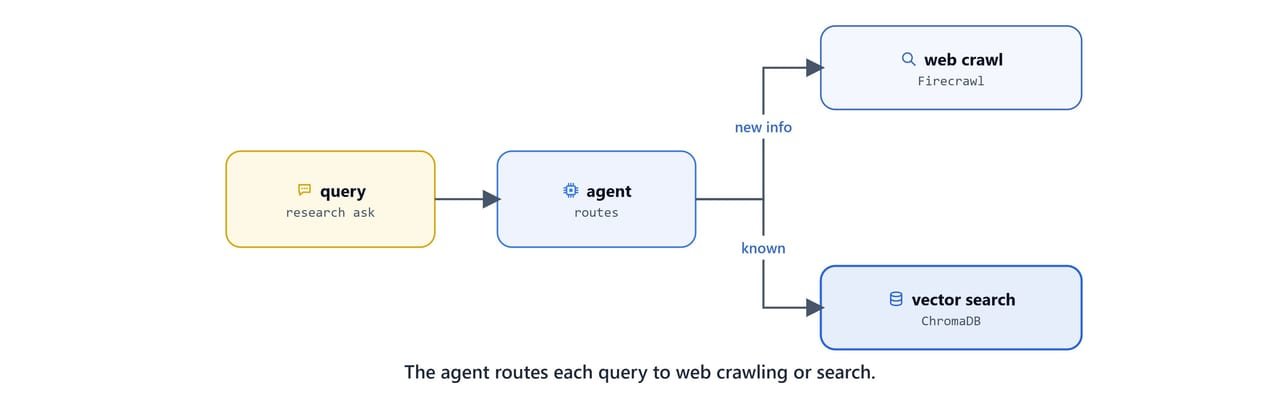
The client reads an mcp.json that lists both servers. The research server runs over stdio; Firecrawl runs via npx:
{
    "research_server": {
        "command": "uv",
        "args": ["--directory",
                "C:\\Users\\your-username\\projects\\mcp-course\\09 Research Assistant with MCP and LangGraph",
                "run", "server.py"],
        "transport": "stdio"
    },
    "firecrawl_server": {
        "command": "npx",
        "args": ["-y", "firecrawl-mcp"],
        "transport": "stdio"
    }
}
Important
Replace your-username and the path with your real absolute path to the server folder.
On Linux/macOS: use a path like /home/your-username/projects/mcp-course/09 Research Assistant with MCP and LangGraph.
Firecrawl is the official web-context server. See github.com/firecrawl/firecrawl-mcp-server and firecrawl.dev. Put your key in .env:
FIRECRAWL_API_KEY=your-firecrawl-api-keyThe LangGraph agent
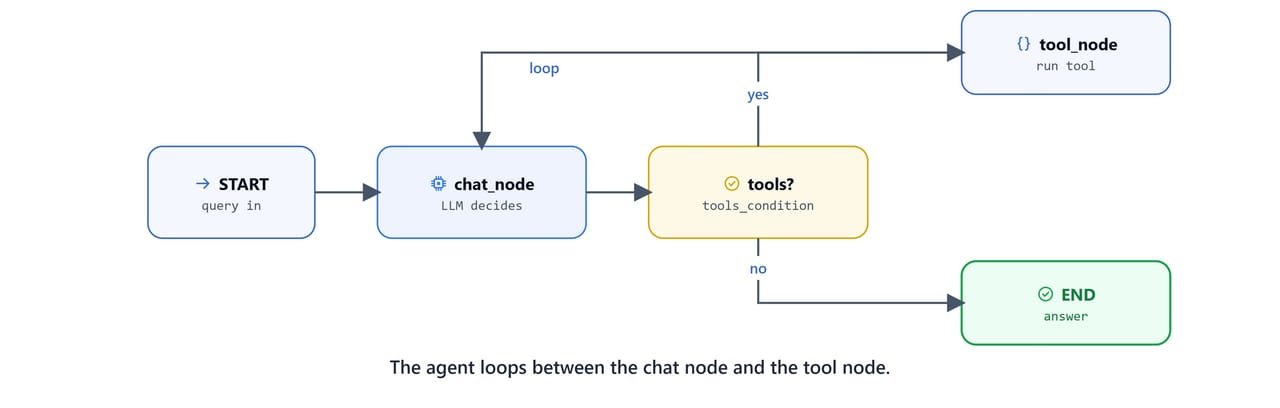
client.py loads the config, injects the Firecrawl key, gathers tools from both servers via MultiServerMCPClient, and builds a graph with a chat node and a tool node.
import asyncio, os, json
from typing import List, Annotated
from typing_extensions import TypedDict
from langchain_core.prompts import ChatPromptTemplate, MessagesPlaceholder
from langchain_ollama import ChatOllama
from langgraph.prebuilt import tools_condition, ToolNode
from langgraph.graph import StateGraph, START, END
from langgraph.graph.message import AnyMessage, add_messages
from langgraph.checkpoint.memory import MemorySaver
from langchain_mcp_adapters.client import MultiServerMCPClient
from dotenv import load_dotenv

load_dotenv()
FIRECRAWL_API_KEY = os.getenv("FIRECRAWL_API_KEY")

current_dir = os.path.dirname(os.path.abspath(__file__))
mcp_json = json.load(open(os.path.join(current_dir, "mcp.json"), "r"))
mcp_json["firecrawl_server"]["env"] = {"FIRECRAWL_API_KEY": FIRECRAWL_API_KEY}

client = MultiServerMCPClient(mcp_json)

async def create_research_agent():
    llm = ChatOllama(model="qwen3", base_url="http://localhost:11434/")
    tools = await client.get_tools()             # tools from BOTH servers
    llm_with_tools = llm.bind_tools(tools)

    system_message = """You are an advanced research assistant with web crawling and
                        knowledge storage capabilities. Save important findings to the
                        appropriate topic database, search existing knowledge first,
                        provide well-structured responses, and cite sources when possible."""

    prompt_template = ChatPromptTemplate.from_messages([
        ("system", system_message),
        MessagesPlaceholder("messages"),
    ])
    chat_llm = prompt_template | llm_with_tools

    class State(TypedDict):
        messages: Annotated[List[AnyMessage], add_messages]

    def chat_node(state: State) -> State:
        return {"messages": [chat_llm.invoke({"messages": state["messages"]})]}

    graph_builder = StateGraph(State)
    graph_builder.add_node("chat_node", chat_node)
    graph_builder.add_node("tool_node", ToolNode(tools=tools))
    graph_builder.add_edge(START, "chat_node")
    graph_builder.add_conditional_edges("chat_node", tools_condition,
                                        {"tools": "tool_node", "__end__": END})
    graph_builder.add_edge("tool_node", "chat_node")

    return graph_builder.compile(checkpointer=MemorySaver()), tools
The graph is the classic agent loop: chat_node calls the LLM; tools_condition checks whether the model asked for a tool; if so, tool_node runs it and loops back; otherwise it ends. MemorySaver keeps conversation state across turns.
async def main():
    config = {"configurable": {"thread_id": "research_session"}}
    agent, tools = await create_research_agent()

    print("Available tools:", [t.name for t in tools])
    while True:
        user_input = input("You: ").strip()
        if user_input.lower() in ["quit", "exit", "bye"]:
            break
        if not user_input:
            continue
        response = await agent.ainvoke(
            {"messages": [{"role": "user", "content": user_input}]}, config=config
        )
        print("Assistant:", response["messages"][-1].content, "\n")

if __name__ == "__main__":
    asyncio.run(main())
Run it:
uv run python client.pyAvailable tools: ['save_research_data', 'search_research_data', 'list_research_topics',
'delete_research_topic', 'get_topic_info', 'firecrawl_scrape', 'firecrawl_search', ...]
You: Research the latest developments in AI agents and save them to topic: ai_agents
Assistant: I scraped three sources, saved 8 new findings to 'ai_agents', and here is a summary ...
You: What topics have I researched?
Assistant: Topic: ai_agents (8 documents)Note
Because the same thread_id is reused, the agent remembers earlier turns. Use a different thread_id to start a fresh, isolated session.
Recap
MultiServerMCPClientaggregates tools from several MCP servers into one tool list for an agent.- Per-topic ChromaDB collections plus content-hash deduplication build a clean, persistent knowledge base.
- The LangGraph
chat_node → tools_condition → tool_nodeloop withMemorySaveris the reusable shape of a tool-using agent.
We already saw this exact pattern in LangGraph + MCP. Here it scales to multiple servers. Next, we will take this server off our laptop and onto the cloud in Deploy an MCP Server on AWS EC2.