Retrieval-Augmented Generation (RAG) grounds an LLM in our own documents. In this blog, we expose a complete RAG pipeline as an MCP server. It ingests PDFs into ChromaDB using Ollama embeddings, and offers retrieval as tools any MCP client can call. A Streamlit chat app then uses those tools through a local LangChain agent.
The whole stack runs on our machine. FastMCP handles the protocol, ChromaDB the storage, Ollama nomic-embed-text the embeddings, and PyPDF2 the text extraction.
Note
Prerequisites: Ollama running with nomic-embed-text and qwen3 pulled; uv add fastmcp chromadb langchain-chroma langchain-ollama langchain-mcp-adapters langgraph langchain streamlit pypdf2 requests. For RAG fundamentals see RAG, Chat with Your Own Documents and Vector Stores and Retrievals.
Architecture

The data-processing flow is a classic indexing pipeline wrapped in MCP:
PDF (file / folder / URL)
  -> PyPDF2 text extraction
  -> RecursiveCharacterTextSplitter (chunks)
  -> Ollama nomic-embed-text (embeddings)
  -> ChromaDB collection "documents"
The server has six layers: an MCP layer (FastMCP routes tool calls), a processing layer (PDF extraction and chunking), an AI layer (Ollama embeddings), a storage layer (ChromaDB), a search layer (similarity search with scoring), and an integration layer (LangChain ties it together).
Configuration and static initialization
Create server.py. The configuration up top is the single place to tune the pipeline:
import os
import requests
from typing import List, Dict, Any
from pathlib import Path

from langchain_chroma import Chroma
from langchain_ollama import OllamaEmbeddings
from langchain_core.documents import Document
from langchain_text_splitters import RecursiveCharacterTextSplitter
from PyPDF2 import PdfReader
from fastmcp import FastMCP

current_dir = Path(__file__).parent
CHROMA_PATH = os.path.join(current_dir, "chroma_db")
EMBED_MODEL = "nomic-embed-text"
OLLAMA_BASE_URL = "http://localhost:11434"
CHUNK_SIZE = 4096
CHUNK_OVERLAP = CHUNK_SIZE // 10  # 10% overlap
COLLECTION_NAME = "documents"

mcp = FastMCP("langchain-vector-db")
The expensive objects (embeddings, splitter, and vector store) are created once at module load rather than lazily. This single-instance pattern is memory-efficient and gives every tool direct access to shared globals.
embeddings = OllamaEmbeddings(model=EMBED_MODEL, base_url=OLLAMA_BASE_URL)

text_splitter = RecursiveCharacterTextSplitter(
    chunk_size=CHUNK_SIZE,
    chunk_overlap=CHUNK_OVERLAP,
    length_function=len,
    separators=["\n\n", "\n", " ", ""],
)

vectorstore = Chroma(
    persist_directory=CHROMA_PATH,
    embedding_function=embeddings,
    collection_name=COLLECTION_NAME,
)
Note
A 4096-character chunk with 10% overlap suits long technical PDFs. Smaller chunks improve precision but increase the number of vectors; tune CHUNK_SIZE to your documents.
Helper functions
Three helpers handle text extraction, single-PDF processing, and downloading a PDF from a URL.
def extract_text_from_pdf(pdf_path: str) -> str:
    """Extract text from a PDF using PyPDF2."""
    try:
        reader = PdfReader(pdf_path)
        text = ""
        for page in reader.pages:
            page_text = page.extract_text()
            if page_text:
                text += page_text + "\n"
        return text
    except Exception as e:
        print(f"Error reading PDF {pdf_path}: {e}")
        return ""


def process_single_pdf(pdf_path: str) -> int:
    """Process one PDF and add its chunks to the vector store."""
    text = extract_text_from_pdf(pdf_path)
    if not text:
        print(f"No text extracted from {pdf_path}")
        return 0

    doc = Document(
        page_content=text,
        metadata={"source": str(pdf_path), "filename": Path(pdf_path).name},
    )
    chunks = text_splitter.split_documents([doc])
    for i, chunk in enumerate(chunks):
        chunk.metadata["chunk_index"] = i
        chunk.metadata["total_chunks"] = len(chunks)

    ids = [f"{Path(pdf_path).stem}_chunk_{i}" for i in range(len(chunks))]
    vectorstore.add_documents(documents=chunks, ids=ids)
    return len(chunks)


def download_pdf(url: str, download_dir: str = "./downloads") -> str:
    """Download a PDF from a URL to a local folder."""
    os.makedirs(download_dir, exist_ok=True)
    filename = Path(url.split("?")[0]).name
    if not filename.endswith(".pdf"):
        filename = f"downloaded_{Path(url).stem}.pdf"
    local_path = os.path.join(download_dir, filename)

    response = requests.get(url, stream=True)
    response.raise_for_status()
    with open(local_path, "wb") as f:
        for chunk in response.iter_content(chunk_size=8192):
            f.write(chunk)
return local_pathThe MCP tools
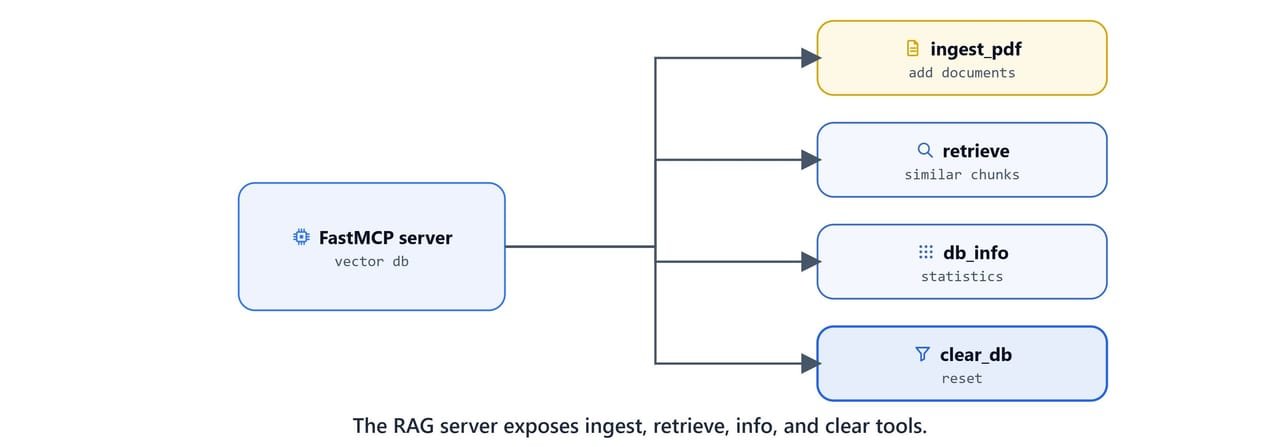
ingest_pdf
One tool handles three source types: a URL, a folder of PDFs, or a single file. It reports how many chunks were added.
@mcp.tool()
async def ingest_pdf(source: str) -> Dict[str, Any]:
    """
    Ingest a PDF from a folder, file path, or URL.

    Args:
        source: a URL, a folder path (all PDFs), or a single PDF file path.
    Returns:
        Status and number of chunks added.
    """
    try:
        total_chunks = 0
        processed_files = []

        if source.startswith(("http://", "https://")):
            local_path = download_pdf(source)
            total_chunks += process_single_pdf(local_path)
            processed_files.append(local_path)

        elif os.path.isdir(source):
            for pdf_file in Path(source).glob("*.pdf"):
                total_chunks += process_single_pdf(str(pdf_file))
                processed_files.append(str(pdf_file))

        elif os.path.isfile(source) and source.endswith(".pdf"):
            total_chunks += process_single_pdf(source)
            processed_files.append(source)

        else:
            return {"status": "error",
                    "message": f"Invalid source: {source}. Must be a PDF file, folder, or URL."}

        return {"status": "success", "chunks_added": total_chunks,
                "files_processed": len(processed_files), "files": processed_files}
    except Exception as e:
        return {"status": "error", "message": str(e)}
retrieve
Returns the top-N most similar chunks, converting ChromaDB's distance into a similarity score.

@mcp.tool()
async def retrieve(query: str, n: int = 5) -> List[Dict[str, Any]]:
    """Retrieve the top-N chunks for a query."""
    try:
        results = vectorstore.similarity_search_with_score(query, k=n)
        chunks = []
        for doc, score in results:
            chunks.append({
                "text": doc.page_content,
                "metadata": doc.metadata,
                "similarity_score": float(1 - score),
                "distance": float(score),
            })
        return chunks
    except Exception as e:
        return [{"error": str(e)}]
db_info and clear_db
Inspect and reset the collection.
@mcp.tool()
async def db_info() -> Dict[str, Any]:
    """Get ChromaDB collection statistics."""
    try:
        collection = vectorstore._collection
        count = collection.count()
        sources = set()
        if count > 0:
            sample = collection.get(limit=min(100, count), include=["metadatas"])
            for metadata in sample.get("metadatas", []) or []:
                if metadata and "source" in metadata:
                    sources.add(metadata["source"])
        return {
            "database_path": CHROMA_PATH,
            "collection_name": COLLECTION_NAME,
            "embedding_model": EMBED_MODEL,
            "total_chunks": count,
            "unique_sources": list(sources),
            "num_sources": len(sources),
        }
    except Exception as e:
        return {"error": str(e)}


@mcp.tool()
async def clear_db() -> Dict[str, Any]:
    """Clear all data from the database."""
    try:
        global vectorstore
        vectorstore.delete_collection()
        vectorstore = Chroma(
            persist_directory=CHROMA_PATH,
            embedding_function=embeddings,
            collection_name=COLLECTION_NAME,
        )
        return {"status": "success", "message": "Database cleared and reset"}
    except Exception as e:
        return {"status": "error", "message": str(e)}


if __name__ == "__main__":
    mcp.run(transport="stdio")
Caution
clear_db deletes the entire collection and cannot be undone. Expose destructive tools deliberately, and consider removing them from servers connected to a shared host.
A Streamlit client agent

The client is a Streamlit chat app. It launches the server over stdio, converts the MCP tools into LangChain tools with langchain-mcp-adapters, and builds an agent that decides when to ingest or retrieve. Create app.py:
import streamlit as st
import asyncio
from langchain_ollama import ChatOllama
from mcp import ClientSession, StdioServerParameters
from mcp.client.stdio import stdio_client
from langchain_mcp_adapters.tools import load_mcp_tools
from langchain.agents import create_agent

# Update to the absolute path of your server.py
server_params = StdioServerParameters(
    command="uv",
    args=["--directory",
          "C:\\Users\\your-username\\projects\\mcp-course\\08 MCP RAG with LangChain",
          "run", "server.py"])

st.title(":brain: Streamlit App for MCP RAG with Ollama LLM")
st.write("LEARN LLM @ KGP Talkie: https://www.youtube.com/kgptalkie")

model = ChatOllama(model="qwen3", base_url="http://localhost:11434/")

if "chat_history" not in st.session_state:
    st.session_state["chat_history"] = []

with st.form("llm-form"):
    text = st.text_area("Enter your question here.")
    submit = st.form_submit_button("Submit")
    new_chat = st.form_submit_button("New Chat")
    debug_info = st.checkbox("Show Debug Info")

async def generate_response_async(user_message):
    async with stdio_client(server_params) as (read, write):
        async with ClientSession(read, write) as session:
            await session.initialize()
            tools = await load_mcp_tools(session)
            agent = create_agent(model, tools)
            agent_response = await agent.ainvoke(
                {"messages": [{"role": "user", "content": user_message}]}
            )
            if debug_info:
                st.write("### Debug - Agent Response")
                st.write(agent_response)
            return agent_response.get("messages")[-1].content

def generate_response(user_message):
    try:
        loop = asyncio.get_event_loop()
    except RuntimeError:
        loop = asyncio.new_event_loop()
        asyncio.set_event_loop(loop)
    return loop.run_until_complete(generate_response_async(user_message))

if submit and text:
    with st.spinner("Generating response..."):
        response = generate_response(text)
        st.session_state["chat_history"].append({"user": text, "assistant": response})

if new_chat:
    st.session_state["chat_history"] = []

if st.session_state["chat_history"]:
    st.write("## Chat History")
    for chat in reversed(st.session_state["chat_history"]):
        st.write(f"**:adult: User**: {chat['user']}")
        st.write(f"**:brain: Assistant**: {chat['assistant']}")
        st.write("---")
Important
Set --directory to the absolute path of the folder containing your server.py. Replace your-username with your actual Windows username.
On Linux/macOS: use a path like /home/your-username/projects/mcp-course/08 MCP RAG with LangChain.
Note
create_agent is the LangChain v1 helper. On LangChain/LangGraph v0.3 use from langgraph.prebuilt import create_react_agent as create_agent instead.
Run the app:
uv run streamlit run app.pyAsk it to ingest first, then query:
You: Ingest the PDF at https://example.com/whitepaper.pdf
Assistant: Added 12 chunks from 1 file to the vector database.

You: What does the document say about deployment costs?
Assistant: According to the ingested document, deployment costs are driven by ...
Tip
The same server works in Claude Desktop. Register it like any stdio server (see Connect MCP Servers to Claude Desktop) and ask Claude to ingest and query PDFs directly.
Recap
- A RAG pipeline becomes reusable when exposed as MCP tools:
ingest_pdf,retrieve,db_info,clear_db. - Initializing embeddings, splitter, and vector store once at module load keeps the server fast and memory-efficient.
langchain-mcp-adaptersturns MCP tools into LangChain tools so any agent can call them, see github.com/langchain-ai/langchain-mcp-adapters.
Next, we will scale this idea into a multi-server research assistant that combines retrieval with live web crawling in Research Assistant with MCP and LangGraph.