A full MCP server is more than tools.
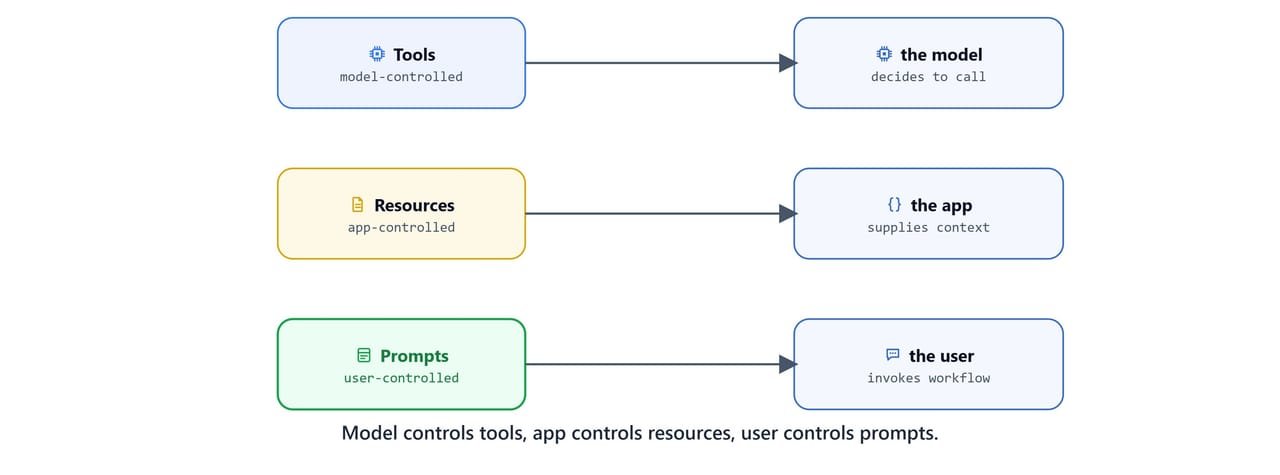
The protocol defines three building blocks, each controlled by a different party:
- Tools: model-controlled. The "do something now" pattern: AI-initiated actions, dynamic operations, side effects allowed.
- Resources: application-controlled. The "here's information" pattern: read-only, contextual data with no side effects.
- Prompts: user-controlled. The "here's how to think" pattern: reusable templates the user invokes to set up a task.
In this blog, we build one server, a Job Market Explorer. It uses all three blocks to search jobs, expose a résumé and saved jobs as context, and package expert workflows as prompts.
Note
Prerequisites: Build Your First MCP Server, plus uv add fastmcp pypdf2 requests python-dotenv. The job search uses the JSearch API on RapidAPI. The rest works without any key.
The three pillars
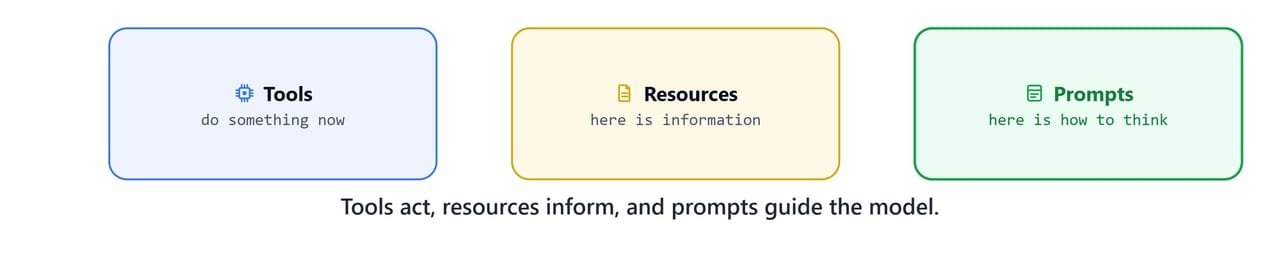
The fundamental distinction is who controls what, and when:
| Tools 🔧 | Resources 📚 | Prompts 💭 | |
|---|---|---|---|
| Control | Model-controlled | Application-controlled | User-controlled |
| Pattern | "Do something now" | "Here's information" | "Here's how to think" |
| Side effects | Allowed | None (read-only) | None |
| Examples | Search, DB query, API call | Files, docs, DB snapshots | Code-review templates, workflows |
- Use tools when data is dynamic, computation is needed, an external API must be called, or an action must be performed.
- Use resources when data is static or changes rarely, documentation must be referenced, or background context is needed for reasoning.
- Use prompts when standardized workflows need structure, complex interactions need guidance, or domain expertise should be captured and reused.
Setting up the server
Create server.py. It loads the JSearch API credentials from .env, prepares folders for saved jobs and the résumé, and initializes a FastMCP server.
import json
import requests
from typing import List, Dict, Optional
from PyPDF2 import PdfReader
from fastmcp import FastMCP
from pathlib import Path
import os
from dotenv import load_dotenv

# Directories for job data and the résumé
BASE_DIR = Path(".")
JOBS_DIR = BASE_DIR / "jobs" / "saved_by_candidate"
TEMP_DIR = BASE_DIR / "jobs" / "temp"
RESUME_PATH = BASE_DIR / "resume" / "resume.pdf"
JOBS_DIR.mkdir(parents=True, exist_ok=True)
TEMP_DIR.mkdir(parents=True, exist_ok=True)

load_dotenv()

# JSearch API credentials (from RapidAPI)
RAPIDAPI_KEY = os.getenv("RAPIDAPI_KEY")
RAPIDAPI_HOST = os.getenv("RAPIDAPI_HOST")

mcp = FastMCP("Job Market Explorer")
Add the credentials to your .env:
RAPIDAPI_KEY=your-rapidapi-key
RAPIDAPI_HOST=jsearch.p.rapidapi.com
Tip
Subscribe to the free tier of the JSearch API at rapidapi.com/letscrape-6bRBa3QguO5/api/jsearch to get your key and host. Replace your-rapidapi-key with your real key.
Tools: performing actions
search_jobs
This tool calls the JSearch API, stores the raw results in a temp file (so other tools can use them), and returns a trimmed summary for the model.
@mcp.tool()
def search_jobs(role: str, location: str, max_results: int = 5) -> List[Dict]:
    """
    Fetch jobs using JSearch API and store them temporarily. Return key info.

    Args:
        role: The role to search for.
        location: The location to search for.
        max_results: The maximum number of jobs to return.
    """
    headers = {"X-RapidAPI-Key": RAPIDAPI_KEY, "X-RapidAPI-Host": RAPIDAPI_HOST}
    query = f"{role} in {location}"
    url = f"https://{RAPIDAPI_HOST}/search?query={query}&num_pages=1"

    response = requests.get(url, headers=headers)
    data = response.json()
    job_list = data.get("data", [])[:max_results]

    if not job_list:
        return [{"message": "No jobs found."}]

    # Save raw jobs so save_job can read them later
    temp_path = TEMP_DIR / "fetched_jobs_temp.json"
    with open(temp_path, "w") as f:
        json.dump(job_list, f, indent=2)

    results = []
    for job in job_list:
        desc = job.get("job_description", "")
        if isinstance(desc, str):
            if len(desc) <= 1000:
                summary = desc
            else:
                summary = desc[:1000] + ("\n...\n" if len(desc) > 2000 else "") + desc[-1000:]
        else:
            summary = ""
        results.append({
            "job_id": job.get("job_id"),
            "title": job.get("job_title"),
            "company": job.get("employer_name"),
            "location": job.get("job_city"),
            "description": summary,
            "apply_link": job.get("job_apply_link", "Not provided"),
        })
    return results
Note
Long descriptions are truncated to the first and last 1000 characters. This keeps the model's context small while preserving the most useful parts of each posting.
save_job
This tool reads the temp file, finds a job by ID, and computes a salary range if one was not supplied. Then it writes the job to the candidate's saved folder. That is a clear side effect, which is exactly what tools are for.
@mcp.tool()
def save_job(job_id: str, salary: Optional[str] = None) -> str:
    """
    Save a specific job from the temporary list into the candidate's saved folder.
    If salary is not provided, it tries to extract it from the fetched job data.
    """
    temp_path = TEMP_DIR / "fetched_jobs_temp.json"
    if not temp_path.exists():
        return "No fetched jobs available. Please run search_jobs first."

    with open(temp_path, "r") as f:
        jobs = json.load(f)

    selected = next((job for job in jobs if job.get("job_id") == job_id), None)
    if not selected:
        return f"Job ID {job_id} not found in fetched data."

    final_salary = salary
    if not final_salary:
        currency = selected.get("salary_currency")
        min_base = selected.get("min_base_salary") or selected.get("job_min_salary")
        max_base = selected.get("max_base_salary") or selected.get("job_max_salary")
        salary_period = selected.get("job_salary_period")
        if currency and min_base and max_base:
            total_min = int(min_base)
            total_max = int(max_base)
            per = f" per {salary_period.lower()}" if salary_period else ""
            final_salary = f"{currency} {total_min:,} – {total_max:,}{per}"
    if not final_salary:
        final_salary = "Not specified"

    job_data = {
        "title": selected.get("job_title", "Not specified"),
        "company": selected.get("employer_name", "Not specified"),
        "location": selected.get("job_city", "Not specified"),
        "description": selected.get("job_description", "Not specified"),
        "employment_type": selected.get("job_employment_type", "Not specified"),
        "posted_at": selected.get("job_posted_at_datetime_utc", "Not specified"),
        "apply_link": selected.get("job_apply_link", "Not specified"),
        "salary": final_salary,
    }

    role_folder = JOBS_DIR / "general"
    role_folder.mkdir(exist_ok=True)
    with open(role_folder / f"{job_id}.json", "w") as f:
        json.dump(job_data, f, indent=2)

    return f"Job {job_id} saved successfully with salary: {final_salary}"
Resources: sharing data
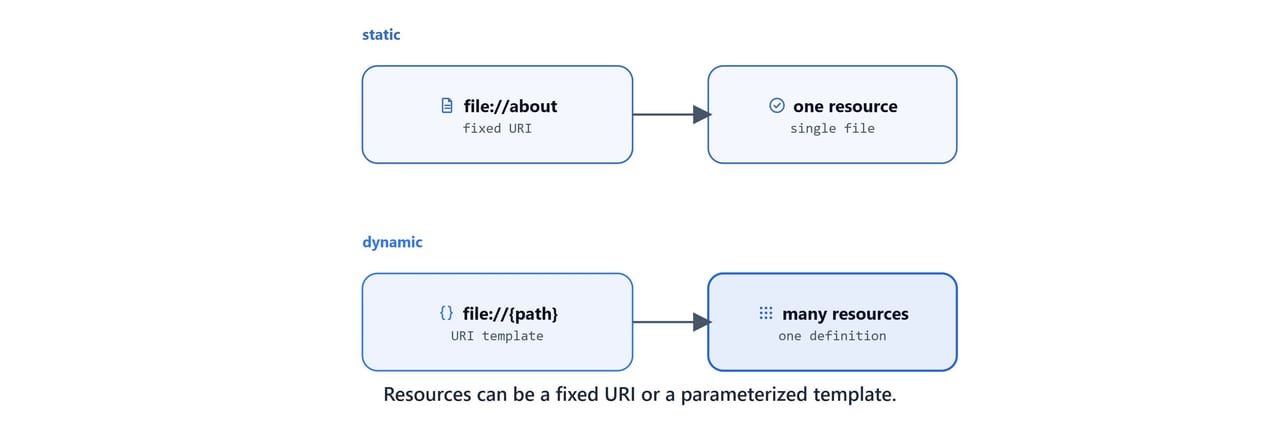
Resources expose data as read-only, contextual information identified by a URI. Think of them as the knowledge layer. They let the model read without causing side effects.
Resource types include text (UTF-8), binary (Base64), static (fixed URI and content), and dynamic (URI templates with parameters).
A static resource has a fixed URI:
@mcp.resource("file://about")
def get_about_info() -> str:
    """Reads and returns contents of a static text file."""
    with open("about.txt", "r", encoding="utf-8") as f:
        return f.read()
A dynamic resource uses a URI template (following RFC 6570) so one definition can serve a whole family of resources:
@mcp.resource("file://{path}/data.json")
def read_file(path: str) -> str:
    """Read the contents of a file at the given path."""
    with open(f"{path}/data.json", "r") as f:
        return f.read()
We can also attach full metadata:
@mcp.resource(
    uri="data://app-status",
    name="ApplicationStatus",
    description="Provides the current status of the application.",
    mime_type="application/json",
    tags={"monitoring", "status"},
)
def get_application_status() -> dict:
    return {"status": "ok", "uptime": 12345, "version": "1.2.0"}
For the job server, two resources expose context. The first extracts the candidate's résumé from a PDF:
@mcp.resource("resume://default")
def candidate_resume() -> str:
    """Extract text from resume.pdf and return as markdown."""
    try:
        reader = PdfReader(str(RESUME_PATH))
        text = "\n\n".join(p.extract_text() for p in reader.pages if p.extract_text())
        return f"# Resume Content\n\n{text.strip() or 'No readable content.'}"
    except Exception as e:
        return f"Error reading resume: {e}"
The second lists every saved job as markdown:
@mcp.resource("jobs://saved")
def get_saved_jobs() -> str:
    """Return markdown listing of all saved jobs."""
    content = "# Saved Jobs\n\n"
    for file in JOBS_DIR.glob("**/*.json"):
        try:
            with open(file, "r") as f:
                job = json.load(f)
                content += f"## {job.get('title', 'Untitled')}\n"
                content += f"- **Company**: {job.get('company')}\n"
                content += f"- **Location**: {job.get('location')}\n"
                content += f"- **Apply**: [Link]({job.get('apply_link')})\n"
                content += f"- **Salary**: {job.get('salary')}\n\n"
        except Exception:
            continue
    return content if content.strip() != "# Saved Jobs" else "# No saved jobs found."
Note
Place your own resume.pdf in the resume/ folder. The course uses a sample résumé. Never commit a real résumé with personal details to a public repository.
Tip
Duplicate handling: FastMCP(name="SampleServer", on_duplicate_resources="error") controls what happens if two resources share a URI. Options are "warn" (default, replaces), "error" (raises), "replace" (silently replaces), and "ignore" (keeps the original).
Prompts: reusable instructions
Prompts are predefined message templates. They are instructional blueprints the user selects to set context before generation. They centralize expert strategies on the server, are discoverable via /prompts/list, and can be updated server-side.
A simple string prompt:
@mcp.prompt()
def ask_about_topic(topic: str) -> str:
    """Ask for an explanation of a topic."""
    return f"Can you explain the concept of '{topic}'?"
A structured PromptMessage for explicit roles:
from fastmcp.prompts.prompt import PromptMessage, TextContent

@mcp.prompt()
def generate_code_request(language: str, task_description: str) -> PromptMessage:
    """Generates a user message requesting code generation."""
    content = f"Write a {language} function that performs the following task:\n{task_description}"
    return PromptMessage(role="user", content=TextContent(type="text", text=content))
A multi-turn conversation seed:
from fastmcp.prompts.prompt import Message

@mcp.prompt()
def roleplay(character: str) -> list:
    return [
        Message(f"You are now {character}. Respond in character."),
        Message("Understood. I'm ready.", role="assistant"),
    ]
A type-annotated, validated prompt. Annotations give automatic input validation, schema generation, and IDE support:
from pydantic import Field
from typing import Literal, Optional

@mcp.prompt()
def content(
    topic: str = Field(description="The subject to cover"),
    formatting: Literal["blog", "email", "social"] = "blog",
    tone: str = "professional",
    word_count: Optional[int] = None,
) -> str:
    """Create a request for generating content in a specific format."""
    prompt = f"Please write a {formatting} post about {topic} in a {tone} tone."
    if word_count:
        prompt += f" It should be approximately {word_count} words long."
    return prompt
For the job server, three prompts package expert workflows:
@mcp.prompt()
def analyze_job_market(role: str, location: str, num_jobs: int = 5) -> str:
    """Analyze the job market for a role and location."""
    return f"""Analyze the job market for top {num_jobs} jobs for '{role}' in '{location}'.

            Steps:
            1. Run the job search tool with suitable roles and locations.
            2. Review fields like title, company, type, and description.
            3. Summarize most common roles, repeated skills, salary trends,
               and remote vs onsite distribution.

            Structure insights clearly in markdown format."""

@mcp.prompt()
def personalized_job_recommender() -> str:
    """Recommend jobs based on the candidate's resume."""
    return """Use the resume to extract key skills, interests, and preferred job types.
            Then:
            1. Call the job search tool with suitable roles and locations.
            2. Review descriptions and recommend jobs.
            3. Optionally save the top matches.

            Output sections: Top Matches, Stretch Roles, Company Highlights."""

@mcp.prompt()
def create_match_report() -> str:
    """Summarize how well the resume matches saved jobs."""
    return """Given the attached jobs data and resume, create a concise and accurate
summary of how well the resume matches the jobs.

Output sections: Job Summary, Resume Summary, Job Match Summary."""
Tip
Prompts support metadata and can be disabled: @mcp.prompt(name="analyze_data_request", tags={"analysis"}) or @mcp.prompt(enabled=False) to hide one from the list. Duplicate handling mirrors resources via on_duplicate_prompts.
Finally, run the server over stdio so Claude Desktop can load it:
if __name__ == "__main__":
    mcp.run(transport="stdio")
The complete workflow
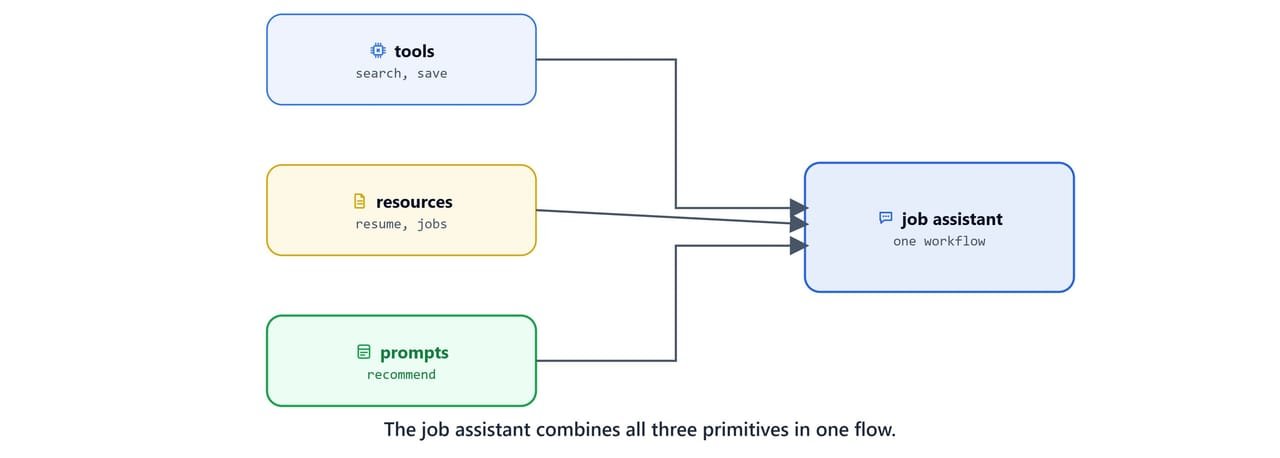
Put together, the Job Search Assistant uses every layer at once:
- Tools layer:
search_jobs(),save_job(), fetch and persist real data. - Resources layer:
resume://default,jobs://saved, static context for reasoning. - Prompts layer:
analyze_job_market(),personalized_job_recommender(),create_match_report(), reusable expert workflows.
Register the server in Claude Desktop (see Connect MCP Servers to Claude Desktop), pick the personalized_job_recommender prompt, and Claude will read our résumé resource, call the search tool, and recommend roles. Here, tools, resources, and prompts cooperate in a single conversation.
Next, we will add retrieval to the mix and build an MCP server backed by a vector database in MCP RAG Server with LangChain & ChromaDB.