Speculative decoding lets a small helper guess the next few tokens, and the full model checks all of them in one pass. In simple words, the model drafts ahead, and it keeps only the guesses it would have written anyway.
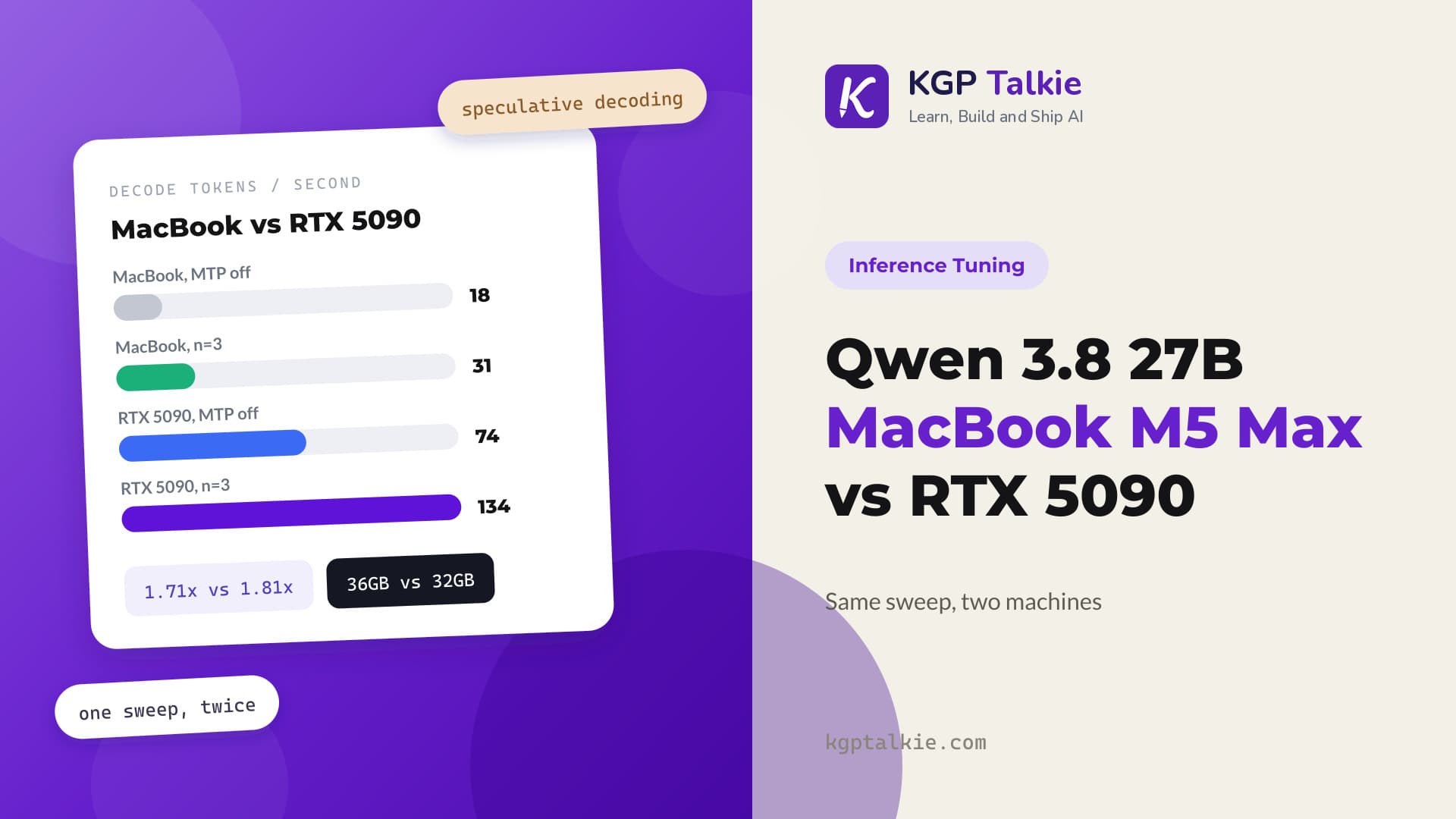
Qwen 3.8 27B ships that helper inside the GGUF file. One llama.cpp flag switches it on, and decode goes from 74 to 134 tokens a second.
In this blog, we will learn which llama.cpp settings actually make Qwen 3.8 27B faster on one GPU. We ran 45 configurations, measured every one of them, and four of our own clean looking results turned out to be wrong.
Our Test Setup
One RTX 5090 with 32GB. Qwen 3.8 27B in Q4_K_M, llama.cpp build b10448, and Ollama 0.32.13. Each configuration ran three times and we report the median.
We had one hard rule. Between every single configuration the server was killed, the GPU was polled until the memory came back, and the idle baseline was measured again. No configuration ever inherited another one's memory or its heat.
That rule matters more than it sounds. This card sits at 599 watts against a 600 watt cap under load, and the clocks fall from 3090MHz to 2700MHz. A benchmark that ignores this measures its own cooling.
What Is the Draft Head Inside Qwen 3.8?
Qwen 3.8 carries a multi token prediction head, called MTP, inside the model file. It is a real extra layer sitting at index 64, behind the 64 transformer layers, and it is there in a normal Q4_K_M download.
Let's see what the file itself says:
qwen35.nextn_predict_layers = 1
blk.64.nextn.eh_proj.weight           [10240, 5120]  Q4_K
blk.64.nextn.enorm.weight             [5120]         F32
blk.64.nextn.hnorm.weight             [5120]         F32
blk.64.nextn.shared_head_norm.weight  [5120]         F32
qwen35.context_length = 262144
Here, we can see one MTP layer, and we can also see the real context window. It is 262,144 tokens, not the 1M number that gets repeated online.
The head drafts a few tokens cheaply, and the full model checks them in one pass. Accepted drafts are free. Rejected ones cost us the drafting work.
The part that matters most is this. A drafted token is kept only if the full model would have accepted it, so answer quality does not drop. Under greedy decoding the output is byte identical at every depth, and we verified that. With sampling switched on, the exact wording can still differ between runs, as we measured in the Granite 4.2 benchmark. So depth can cost us speed, but it does not cost us accuracy.
One flag turns it on. The only choice left is how many tokens to draft per step.
How Many Tokens Should We Draft?
We ran the same suite at every draft depth from one to five, plus a run with drafting off.
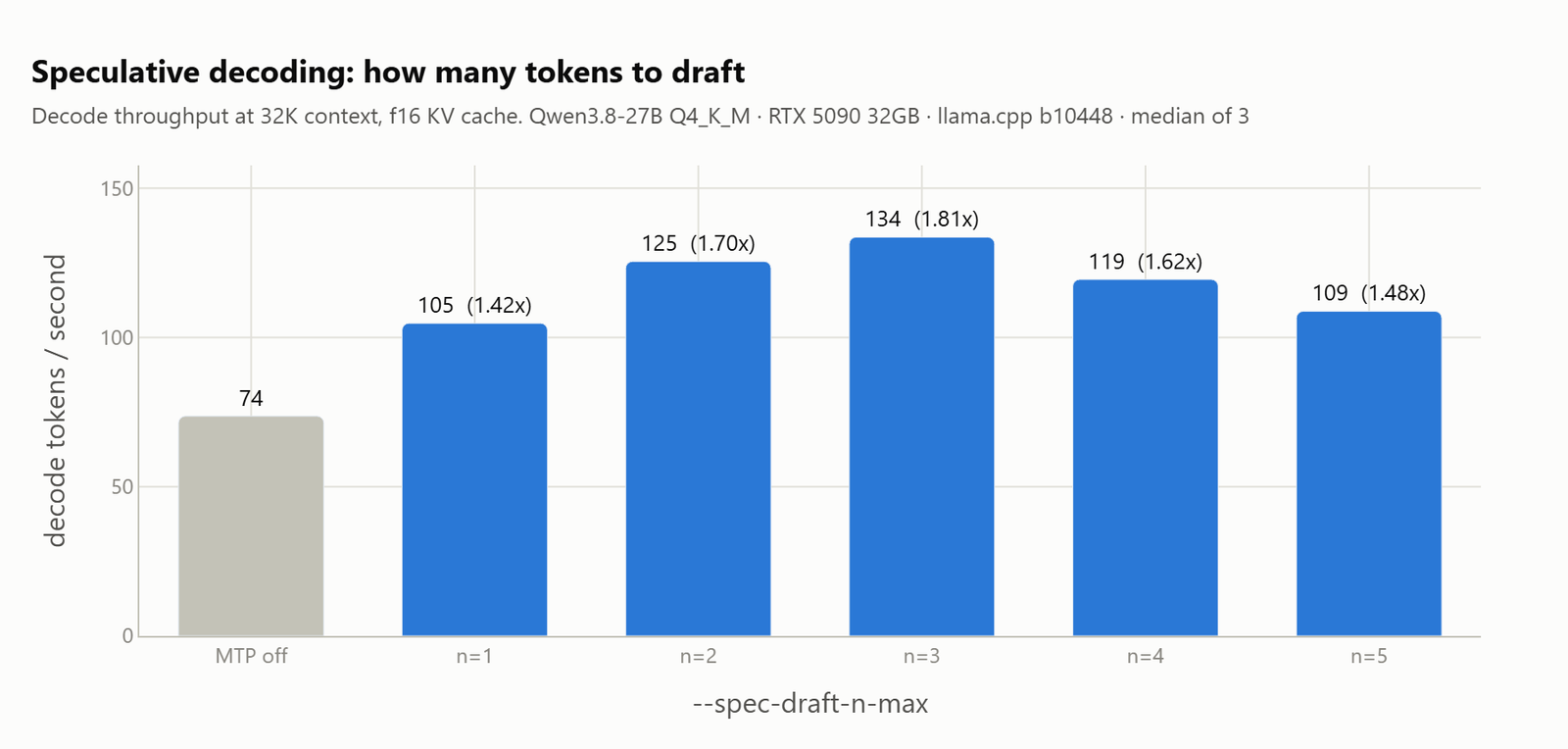
Let me tabulate the full ladder for your better understanding.
| setting | decode tok/s | vs off | accept rate | tokens/step | VRAM MB | quality |
|---|---|---|---|---|---|---|
| MTP off | 73.6 | n/a | n/a | n/a | 17966 | 100% |
n=1 |
104.8 | 1.42x | 0.860 | 1.88 | 18648 | 100% |
n=2 |
125.5 | 1.70x | 0.766 | 2.56 | 18798 | 100% |
n=3 |
133.6 | 1.81x | 0.674 | 3.11 | 18948 | 100% |
n=4 |
119.5 | 1.62x | 0.592 | 3.56 | 19098 | 100% |
n=5 |
108.8 | 1.48x | 0.520 | 3.90 | 19246 | 100% |
Three draft tokens is the peak. Nothing breaks past it. Both n=4 and n=5 answered every task correctly, they are simply slower.
Why is there a peak at all? Because two curves pull against each other.
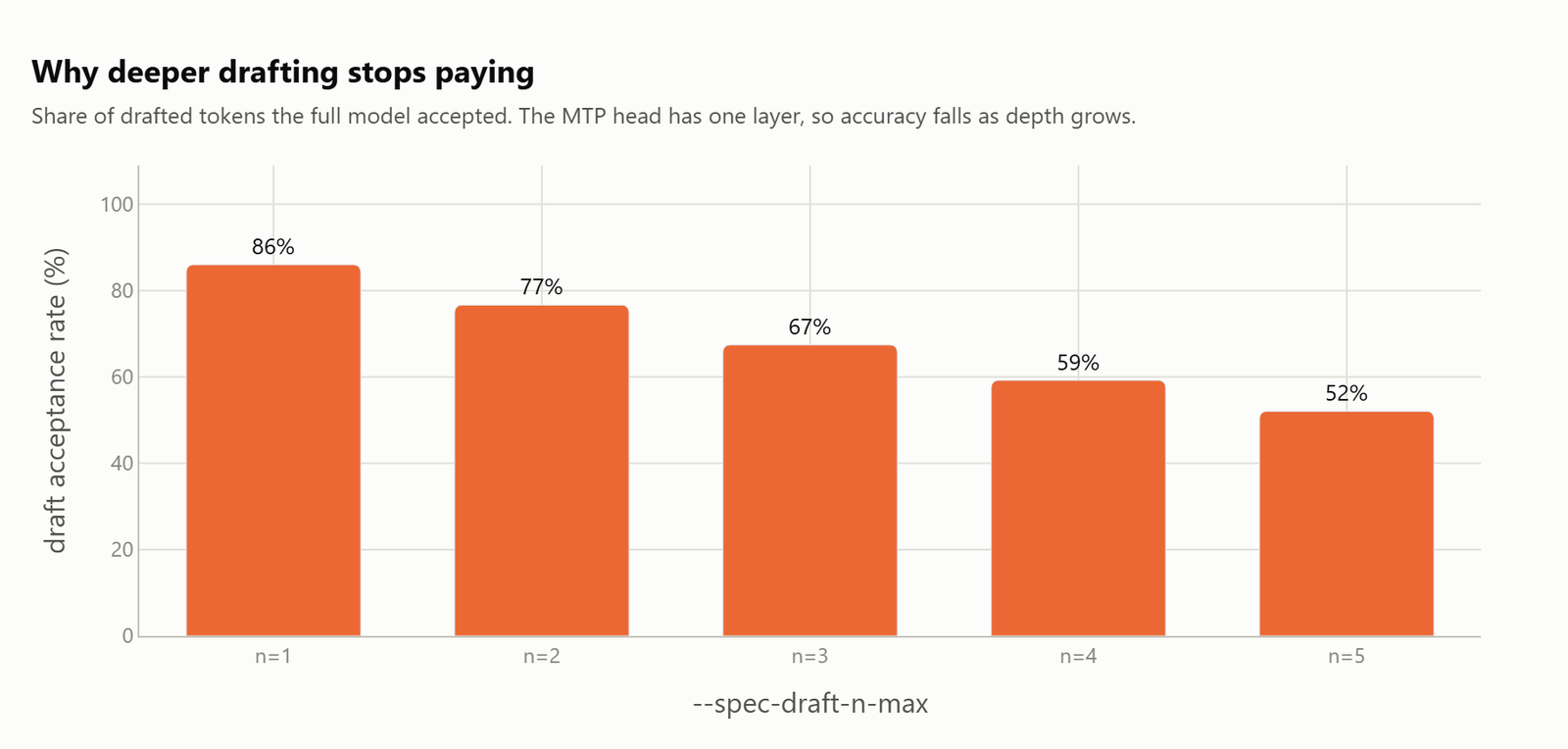
Here, we can see the first curve. Draft deeper and each single token is less likely to survive, so acceptance falls from 0.86 down to 0.52.
The second curve goes the other way. Each successful step harvests more tokens, from 1.88 up to 3.90. We multiply the two together and the product tops out at three.
The head costs about 680MB of extra memory at n=1, and roughly 150MB more per level after that. Prompt processing also drops by 5 to 8 percent. On a 32GB card, at 133 tokens a second, that is an easy trade.
Did the Hot Card Fake That Peak?
Here is the first result we got wrong.
That ladder ran n=1 through n=5 in order. Every configuration in the sequence met a hotter and slower card than the one before it.
So let's think about what that does. A peak at n=3, in a sweep that starts at n=1, is exactly what heat drift would fake. The early settings get the cool card and the late ones get the hot card. We would see a peak near the front no matter what the setting did.
So, we ran the whole ladder again, backwards.
| setting | n=1 to n=5 order | n=5 to n=1 order | change | accept rate |
|---|---|---|---|---|
| MTP off | 73.6 | 73.6 | -0.0% | n/a |
n=1 |
104.8 | 105.0 | +0.2% | 0.8599 / 0.8599 |
n=2 |
125.5 | 125.8 | +0.2% | 0.7664 / 0.7664 |
n=3 |
133.6 | 129.7 | -2.9% | 0.6741 / 0.6741 |
n=4 |
119.5 | 120.0 | +0.5% | 0.5920 / 0.5920 |
n=5 |
108.8 | 113.0 | +3.9% | 0.5204 / 0.5204 |
n=3 still wins. The bias was real, but it lived in the tail. The n=5 run went last on the hottest card, and it had been under measured by nearly four percent.
Now let's look at the acceptance column, because that is the reason we trust the result. Those numbers are the same to four decimal places across two separate runs.
They have to be. Acceptance is a property of the draft head, not of temperature. It is the one column that cannot drift, which makes it a perfect control. If acceptance ever moves, something structural changed and we should go and find out what.
We later measured that this rig repeats to 0.2% inside a single session, and drifts 6% between sessions. So every comparison in this post is a paired sweep run back to back. Nothing is compared against a number we wrote down yesterday.
Why Did n-gram Drafting Fool Us?
llama.cpp offers a second drafter called ngram-mod. It learns patterns from text instead of using the model's own head. It scored 1.04x, which is small but positive, and we nearly wrote it up as a free win.
Then we looked at the three repeats one by one:
task decode_structured
  rep 0:   76 tok/s
  rep 1:   97 tok/s
  rep 2:  699 tok/s
  mean accepted length: 26.92 tokens
Here, we can see nearly 700 tokens a second on the third pass, accepting runs of 27 tokens at a time. No drafter on earth predicts 27 tokens in a row correctly.
It was replaying answers it had already given. N-gram drafting learns from text it has seen, and our benchmark asks each prompt three times.
On cold prompts it has never seen, it delivers 0.97x. That is a net loss. The whole apparent benefit was our own harness feeding it the answers.
Warning
Any benchmark that loops the same prompt will overstate n-gram drafting, by up to 9x in our run. The model's own MTP head has no such problem, because it starts fresh on every request.
Why Is Reasoning the Biggest Speed Lever?
Qwen 3.8 reasons by default. That single choice moves performance more than every server flag in this post put together.
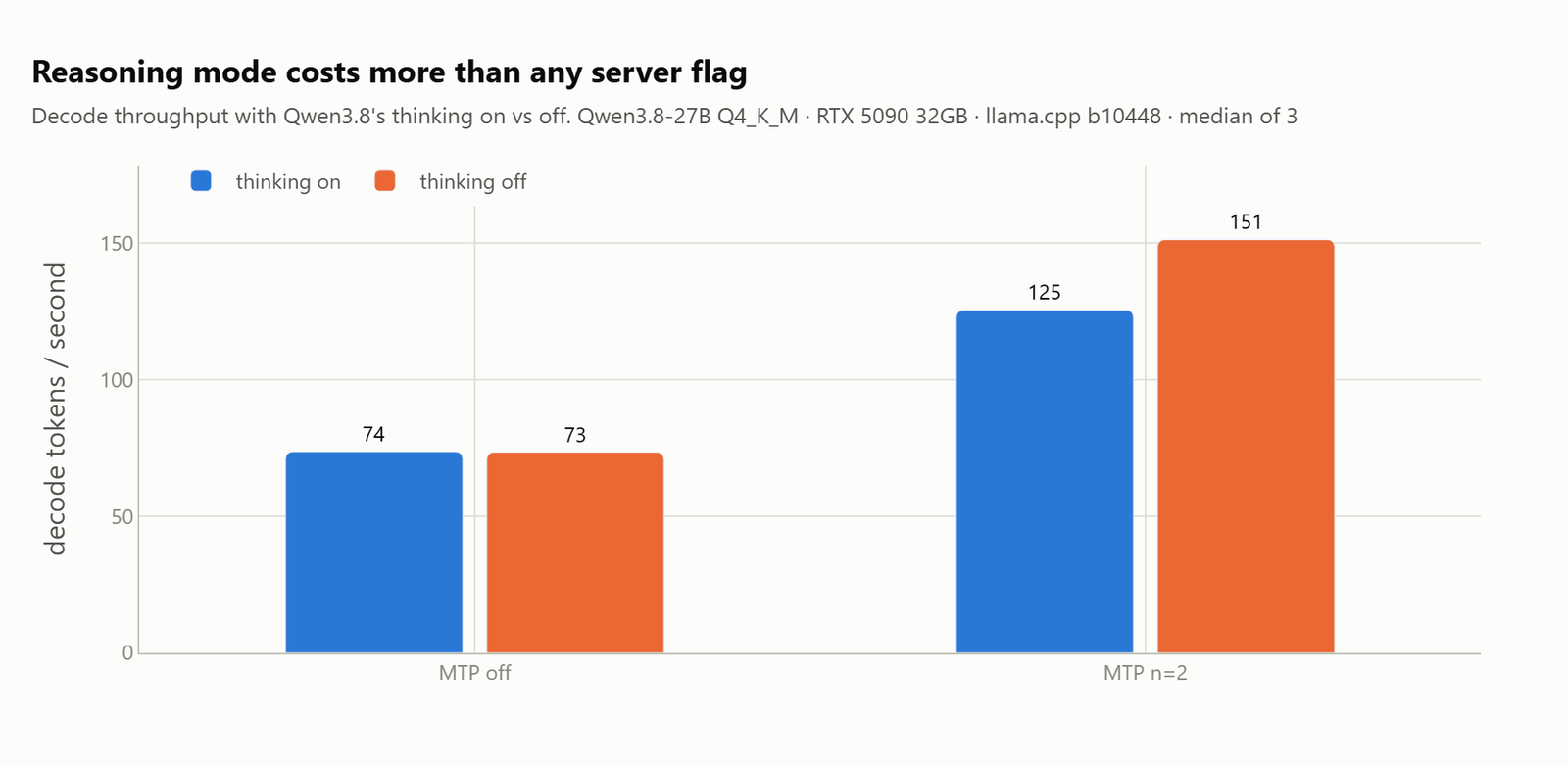
| mode | spec | think tokens | time to answer | decode tok/s | accept |
|---|---|---|---|---|---|
| thinking on | none | 106 | 2.18 s | 73.6 | n/a |
| thinking on | MTP n=3 | 106 | 1.30 s | 133.6 | 0.674 |
| thinking off | none | 0 | 0.18 s | 73.4 | n/a |
| thinking off | MTP n=2 | 0 | 0.21 s | 151.2 | 0.863 |
Time to the first word of a real answer goes from 2.18 seconds to 0.21 seconds. That is roughly ten times faster. Nobody sits there waiting on throughput, they wait through 106 reasoning tokens before a single word of the answer shows up.
There is a bonus hiding in that table. Turning reasoning off also makes the draft head work better, because acceptance climbs from 0.766 to 0.863. Reasoning prose is less predictable than a direct answer. The two effects multiply into 2.06x, which is more than speculation gives us on its own.
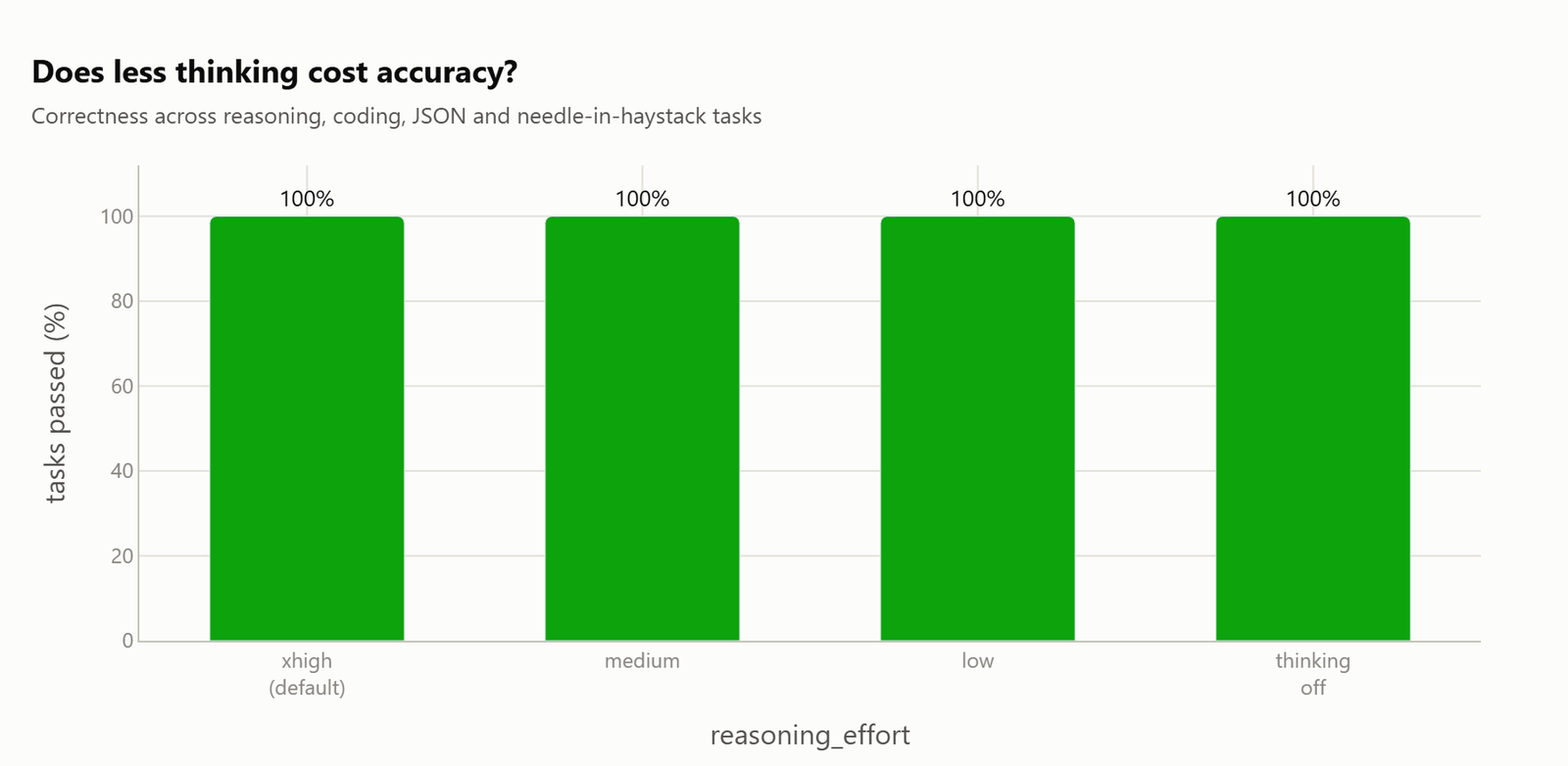
What if we need reasoning, but not all of it? Qwen 3.8 gives us three effort levels.
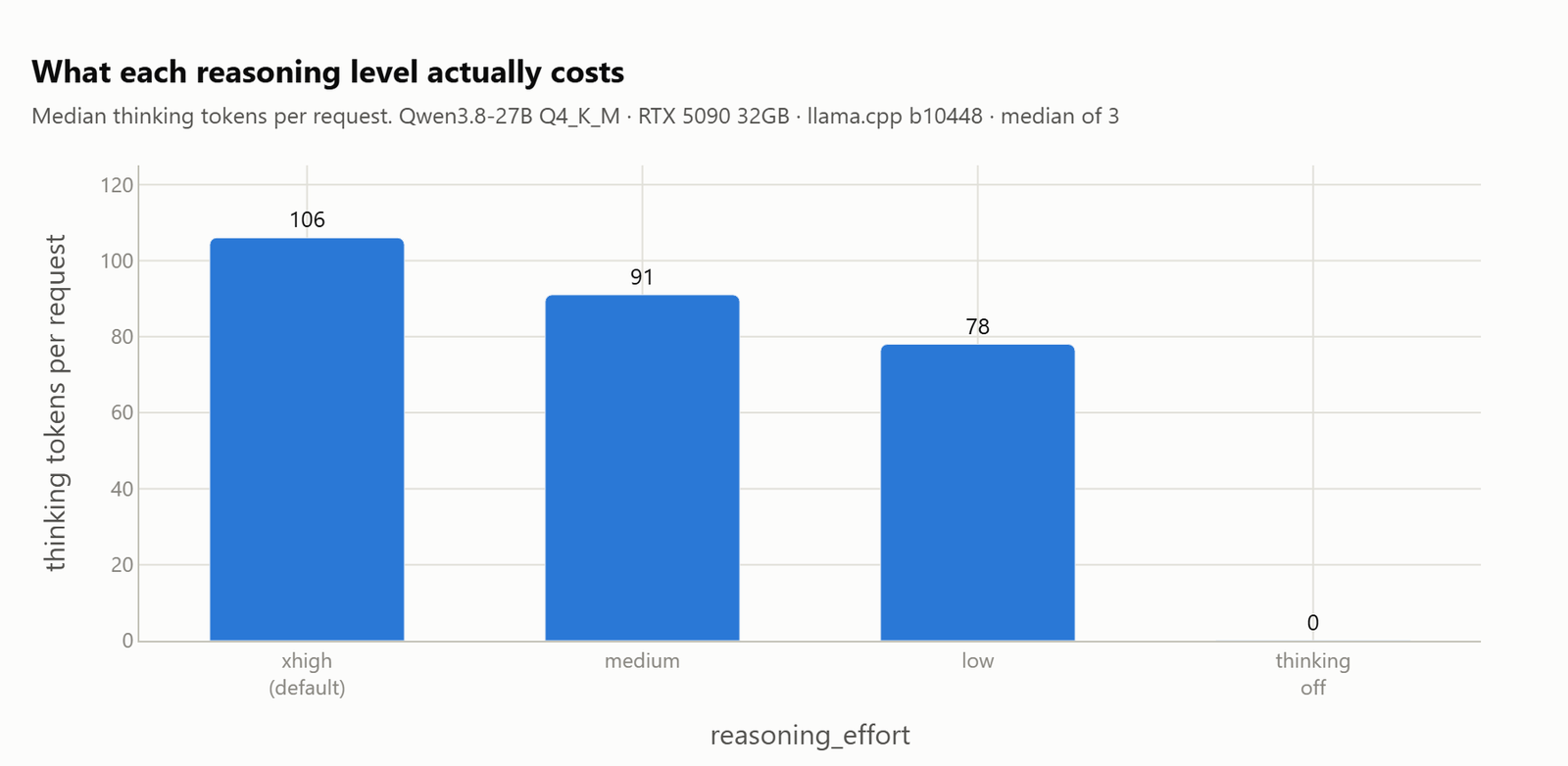
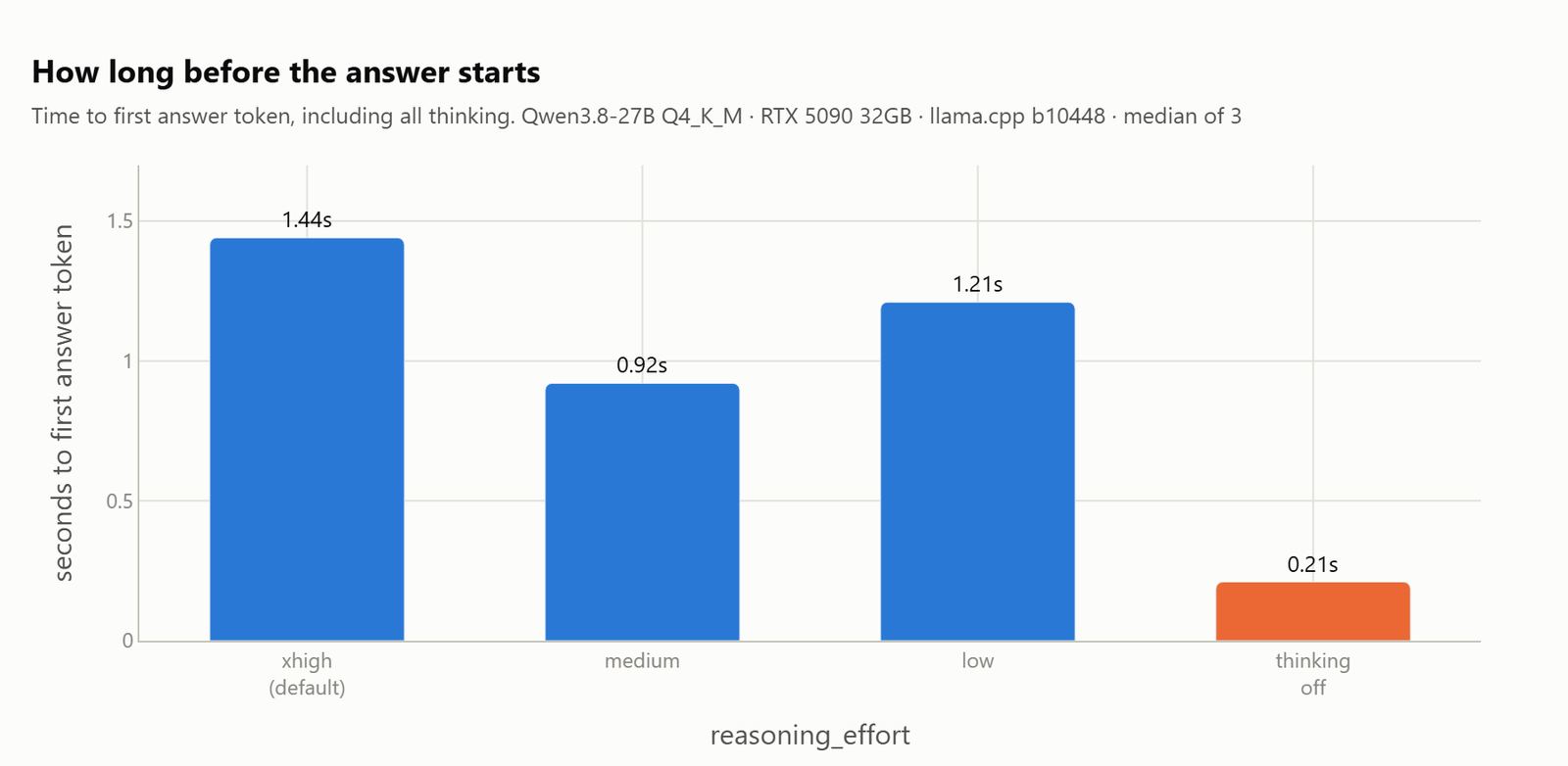
| level | think tokens | time to answer | decode tok/s | accept |
|---|---|---|---|---|
xhigh (default) |
106 | 1.44 s | 128.9 | 0.766 |
medium |
91 | 0.92 s | 139.2 | 0.820 |
low |
78 | 1.21 s | 147.3 | 0.839 |
| off | 0 | 0.21 s | 151.2 | 0.863 |
The medium level takes about a third off the wait, and it cost us nothing we could measure.
One thing to know before we go looking for more levels. llama.cpp's --reasoning-effort will happily accept minimal, high and max. Qwen 3.8's chat template defines exactly three levels, and it throws on anything else:
HTTP 500: raise_exception('Unexpected reasoning effort ' ~ reasoning_effort)The server starts fine and then fails on every single request. We found this by probing a live server instead of reading the docs, and it is the kind of thing that eats an afternoon.
Why Does Quantizing the KV Cache Make It Faster?
This is the result that surprised us most.
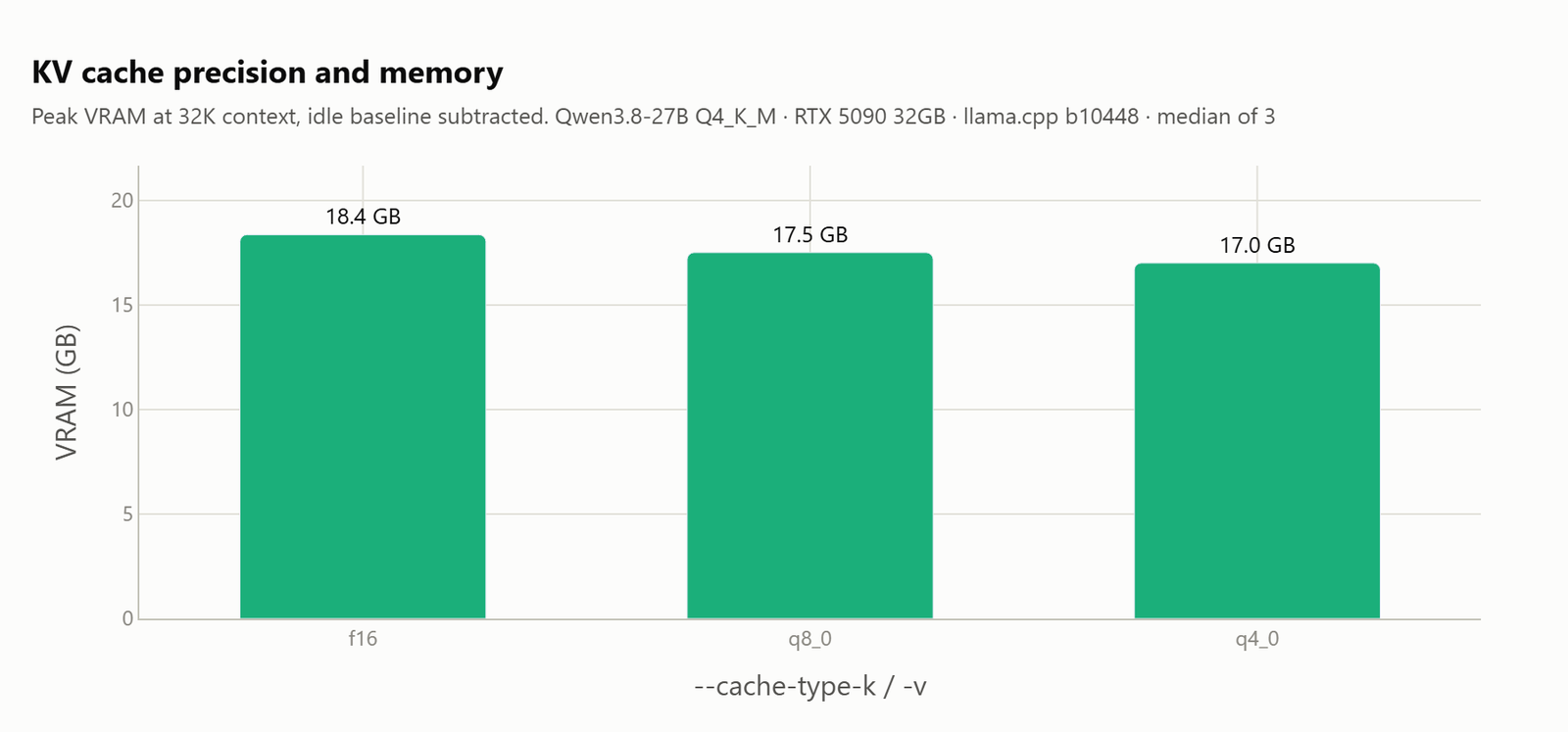
| KV type | spec | decode tok/s | VRAM MB | saved | quality | needles |
|---|---|---|---|---|---|---|
| f16 | MTP n=2 | 125.5 | 18798 | n/a | 100% | all pass |
| q8_0 | MTP n=2 | 128.3 | 17924 | 874 | 100% | all pass |
| q4_0 | MTP n=2 | 136.7 | 17412 | 1386 | 100% | all pass |
Shrinking the cache does not cost us speed. It buys us speed.
The reason is simple. Decoding is limited by memory bandwidth, so a smaller cache means less data read for every token we generate. Here, q4_0 wins on both axes at once: 1.4GB lighter and faster.
Now let's compare that against the previous section. A q4_0 cache at n=2 gets 136.7 tokens a second. An f16 cache at n=3, the best result from the entire draft depth sweep, gets 133.6. So the cache type is worth more than the draft depth.
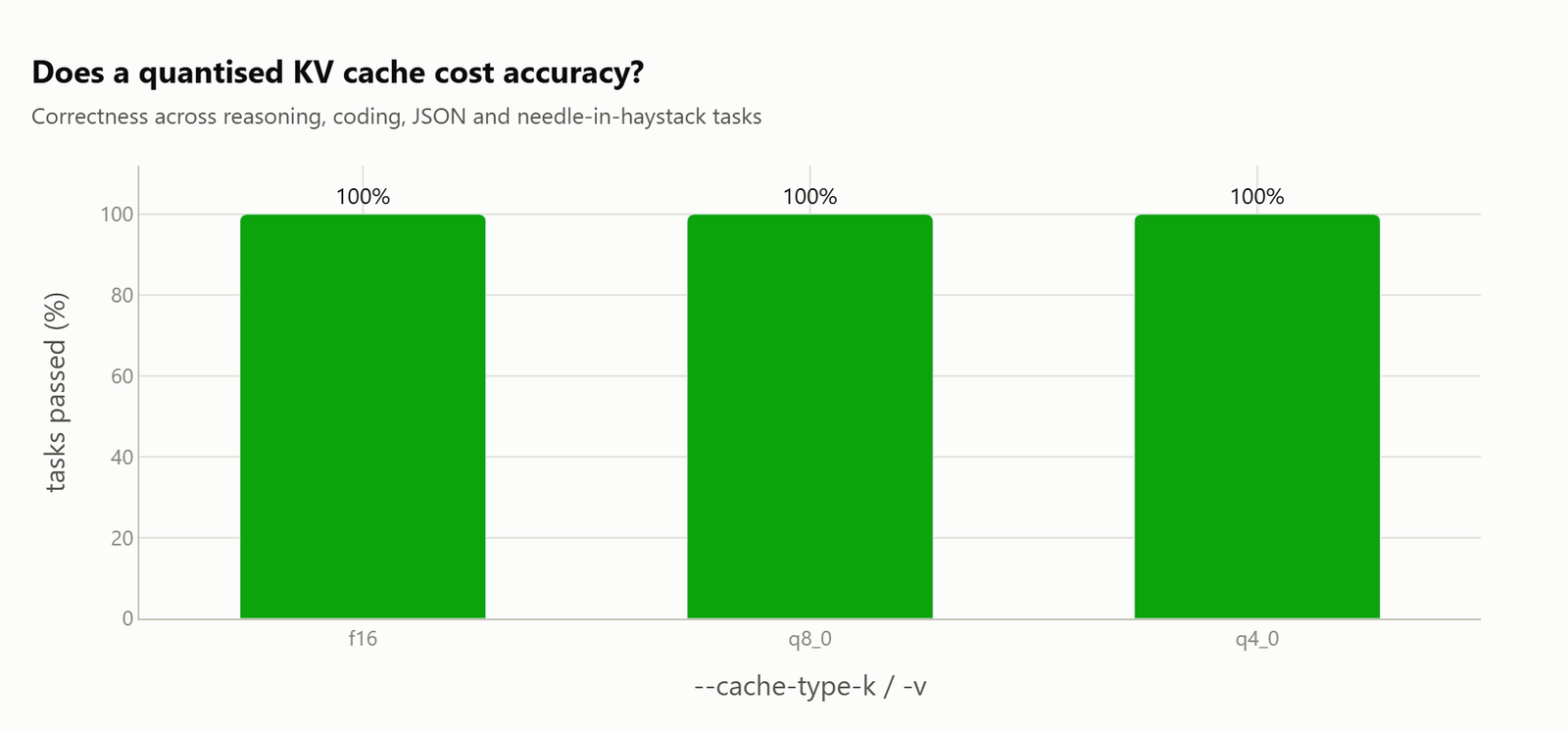
There was no quality cost at any precision, including needle retrieval at three different depths in the document. We checked that on purpose, because "quantize everything" is the kind of advice that quietly breaks long context recall.
Note
One sizing note, since it is easy to assume the wrong thing. The q8_0 cache does not halve the memory. Measured, it is about 63% of f16, not 50%.
Should We Keep Flash Attention On?
Yes, and this one needs no discussion.
-fa on |
-fa off |
|
|---|---|---|
| VRAM | 17966 MB | 20232 MB |
| prefill | 3036 tok/s | 2576 tok/s |
| TTFT | 0.32 s | 0.46 s |
| decode | 73.6 | 73.2 |
Flash attention saves 2.2GB and a fifth of the prompt processing time, and it costs nothing.
What Does a Bigger Context Window Cost?
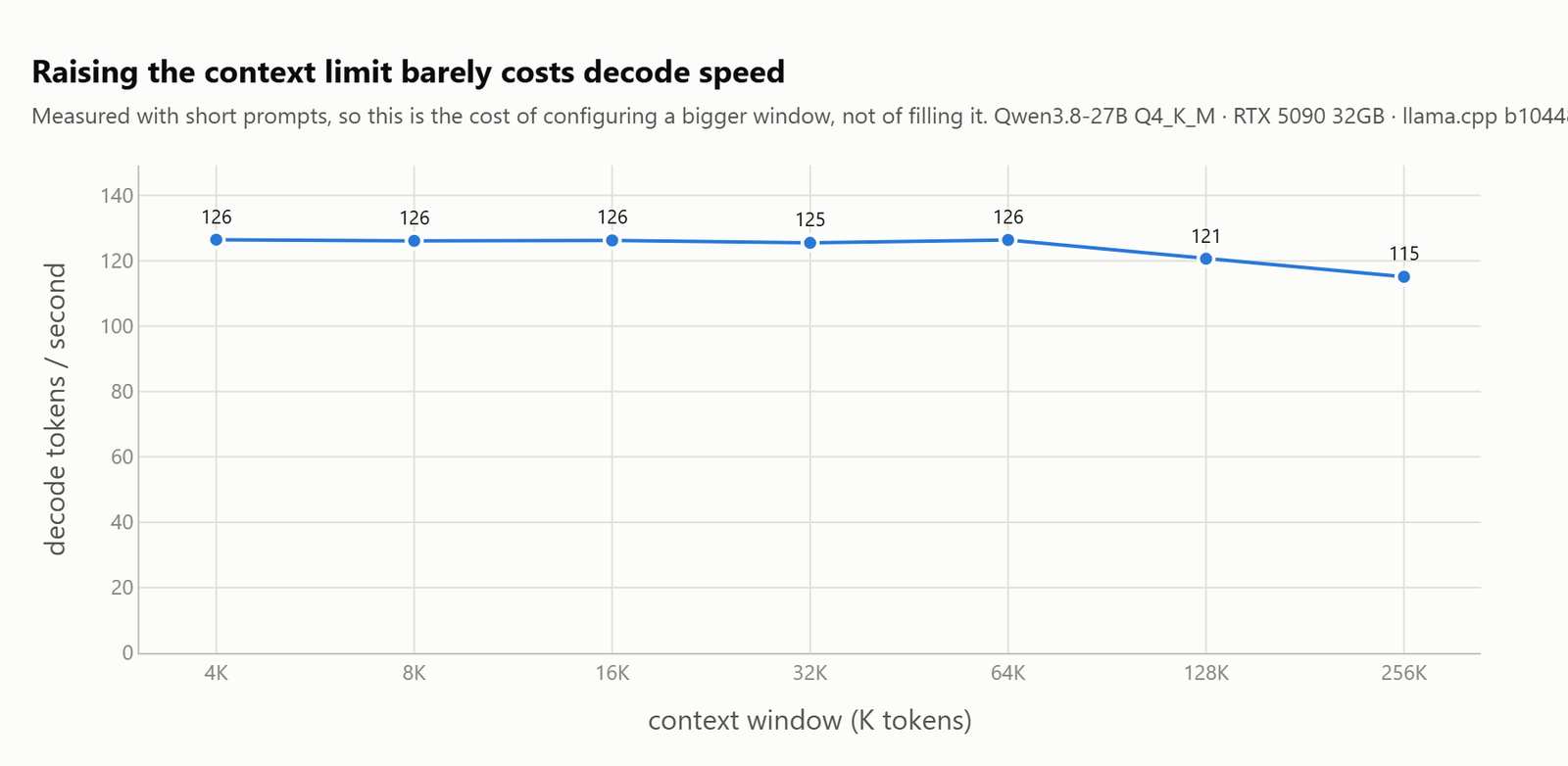
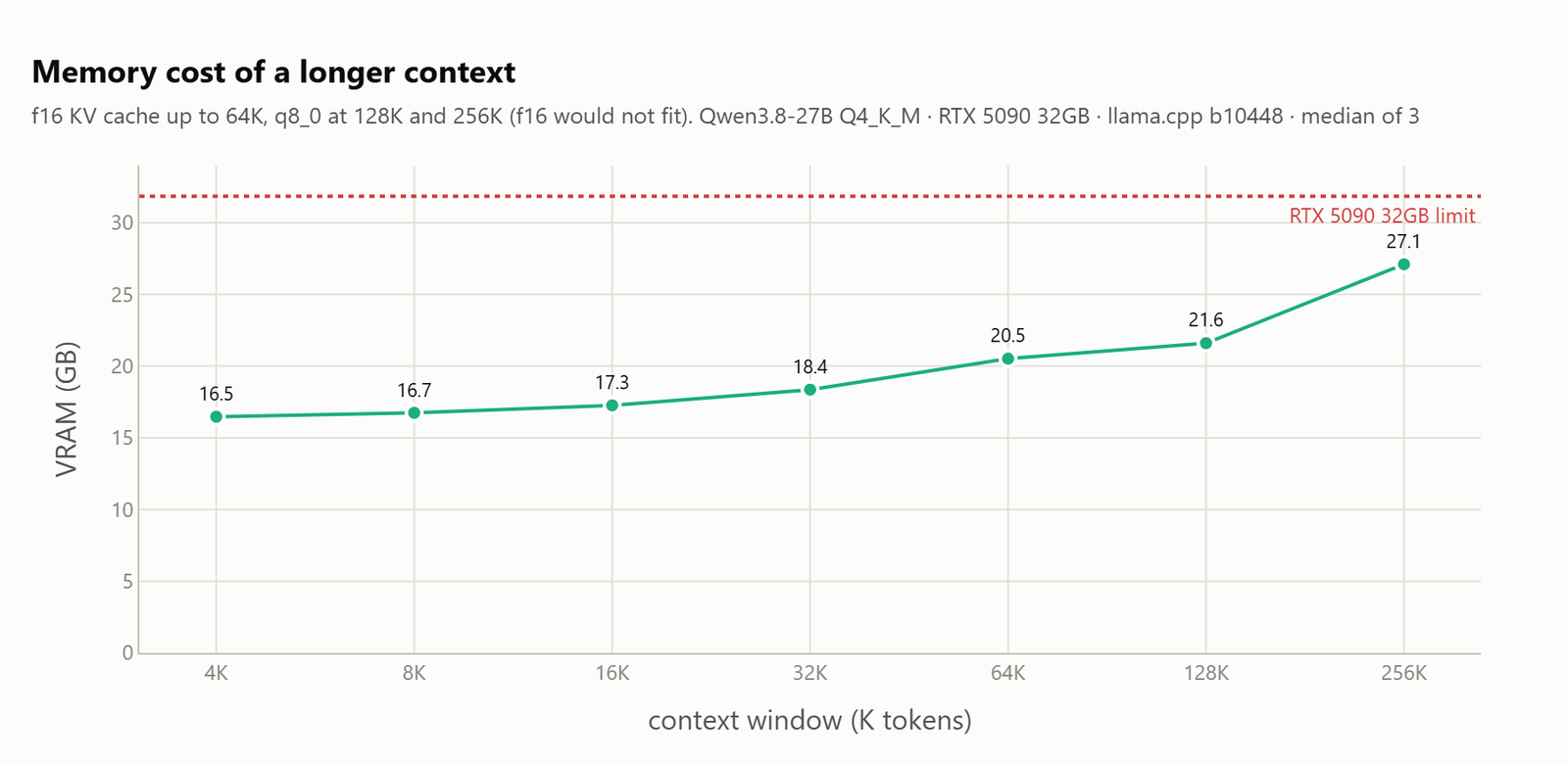
| ctx | VRAM | decode (short prompt) | TTFT (full window) | decode (full) |
|---|---|---|---|---|
| 4K | 16.5 GB | 126.5 | 1.4 s | 136.3 |
| 32K | 18.4 GB | 126.5 | 11 s | 122.7 |
| 64K | 20.5 GB | 126.4 | 27 s | 109.7 |
| 128K | 21.6 GB | 120.6 | 78 s | 77.2 |
| 256K | 27.1 GB | 115.1 | 757 s | 13.3 |
These are two completely different questions, and they get mixed up all the time.
Setting a big -c is nearly free. Decode holds at about 126 tokens a second from 4K all the way to 64K. A bigger window costs us VRAM, not speed.
Actually filling that window is the expensive part, and it gets worse than linearly. Going from 128K to 256K multiplied the time to first token by 9.7x, not by 2x.
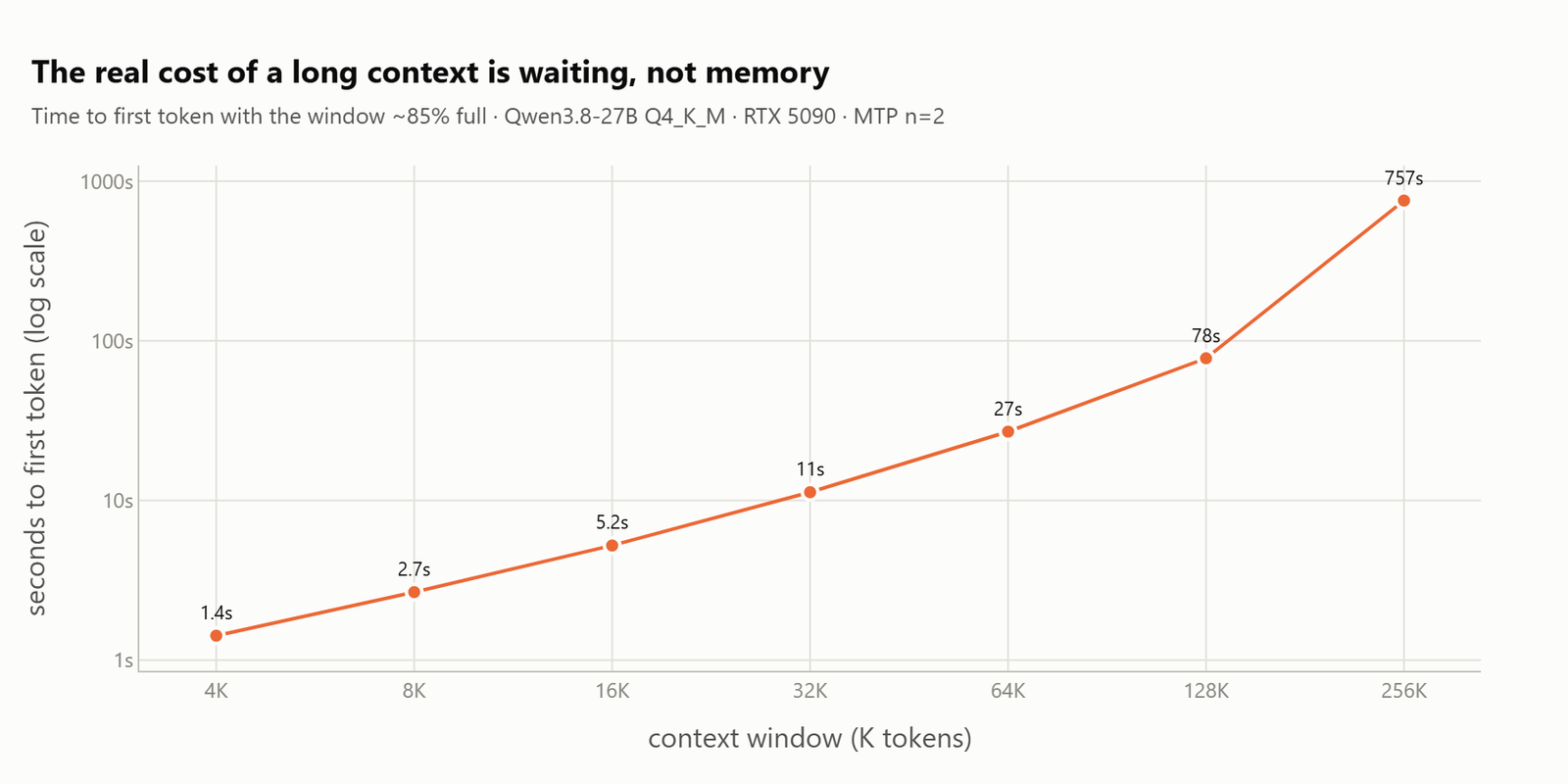
A 256K window genuinely runs on a 32GB card. It sits at 27.1GB, with perfect needle recall at every depth we tested. But we wait twelve and a half minutes for the first token. That is a batch job, not a conversation. The practical interactive ceiling is somewhere between 64K and 128K.
Tip
Long context servers need warming. At 256K the first few requests run at about half speed while the 5.5GB cache is committed.
Is Ollama Faster Than llama.cpp?
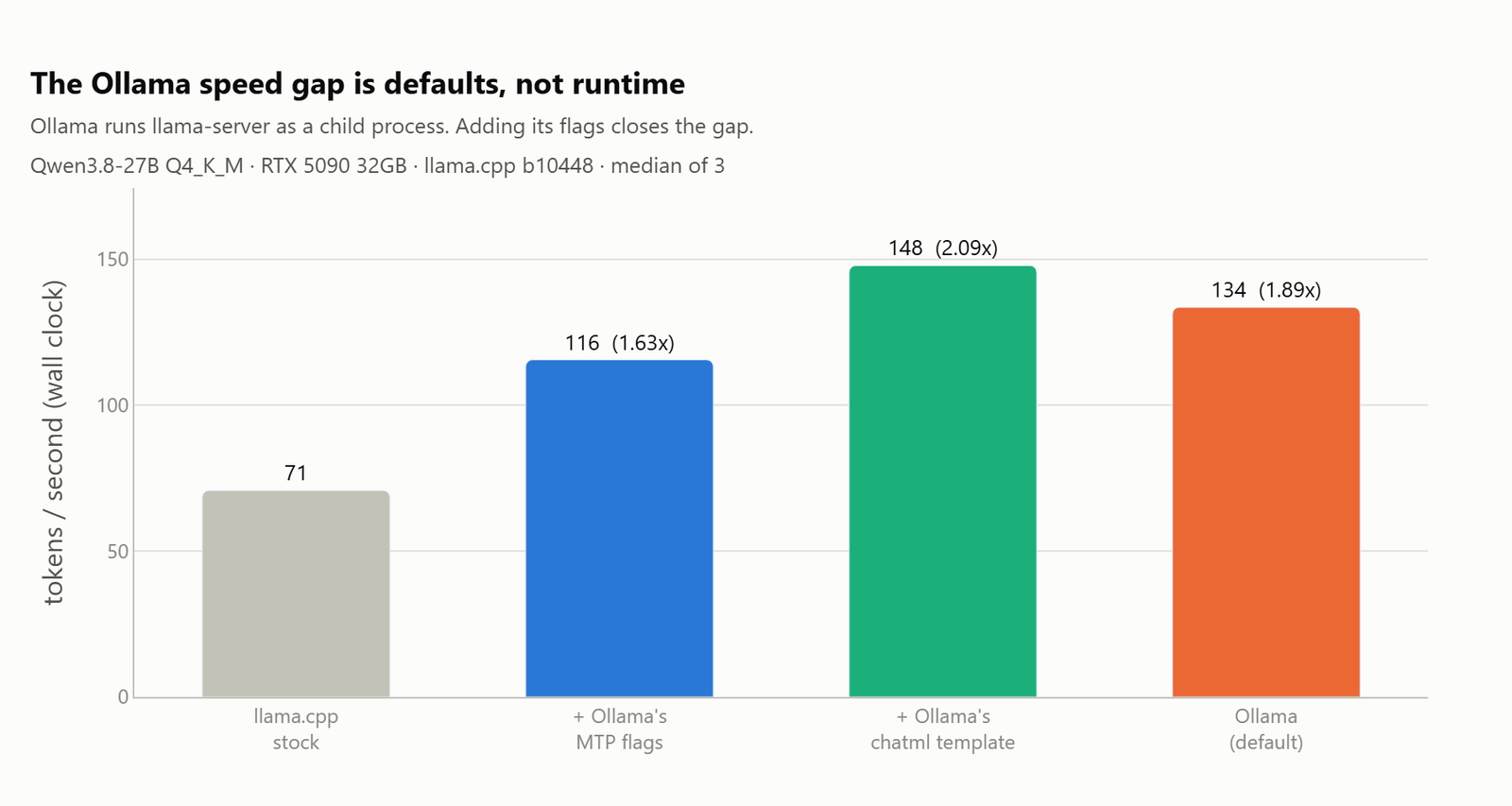
We ran the same GGUF through Ollama expecting a small gap. We got twice the throughput of a stock llama-server, which was too big to believe.
It is not a runtime difference, because Ollama runs llama-server as a child process. So we read the command line it hands to that child:
llama-server.exe --model <blob> -c 32768 -np 1 \
  --spec-type draft-mtp --spec-draft-n-max 4 --spec-draft-backend-sampling \
  --cache-type-k f16 --cache-type-v f16 --flash-attn on \
  -b 1024 -ub 1024 --context-shift --keep 4 \
  --no-jinja --chat-template chatml
Here, we can see that Ollama turns the draft head on by default, at n=4. Our runtime comparison had been speculation on against speculation off the whole time.
So, we added Ollama's flags to stock llama.cpp, one group at a time.
| config | tok/s | vs stock | accept rate |
|---|---|---|---|
| llama.cpp, stock defaults | 70.7 | 1.00x | n/a |
| plus Ollama's MTP flags | 115.5 | 1.63x | 0.591 |
plus Ollama's chatml template |
147.8 | 2.09x | 0.689 |
| Ollama, default | 133.5 | 1.89x | 0.815 |
Two thirds of the gap is simply the draft head being on. The rest is the prompt, and we can prove that instead of asserting it, because Ollama's own logs report its draft acceptance:
Ollama    draft acceptance = 0.81458  (391 accepted / 480 generated), mean len 4.26
llama.cpp draft acceptance = 0.5909                                 , mean len 3.56
Same model, same n=4, and acceptance apart by 0.22. Acceptance depends on how predictable the generated text is, so that number says plainly that the two servers are not asking the model to do the same job.
Ollama's model template is a bare passthrough, and it hands chat formatting to chatml. So Qwen's own template, the thing that carries the reasoning effort directive, never gets applied at all.
Matched on flags and template, llama.cpp is about 11% faster than Ollama. There is no runtime advantage to go hunting for.
There is a real cost to Ollama's approach, and it is not the speed. Because the model's template gets discarded, we cannot set reasoning effort through Ollama at all. That is the cheapest win in this whole post, and it is unavailable.
Important
Those throughput numbers are completion_tokens / wall_s, not each server's self reported rate. Ollama times from its own eval_duration and llama.cpp from the client stream, and measuring both on one response put them 3.8% apart. Comparing two servers needs a number measured the same way on both.
The Result We Most Wanted to Be True
While chasing that template effect we got the most tempting wrong answer of the whole project.
Running llama.cpp with --no-jinja --chat-template chatml measured 2.13x the baseline while reporting zero thinking tokens. The story writes itself. The chatml template has none of Qwen's reasoning scaffolding, so the model stopped reasoning and got faster. Clean, mechanical, and we nearly published it.
It is wrong. The model was reasoning the whole time. The raw response starts like this:
<think>
The user wants a complete Python implementation of a thread-safe LRU cache...
Without --jinja, llama.cpp does not apply the model's reasoning format, so thinking never gets separated into reasoning_content. It stays inline in the answer. Our harness counted reasoning by reading reasoning_content, found nothing there, and decided the model had stopped thinking.
The speedup was real, but for a different reason. With no reasoning effort directive in the prompt, the model reasons at a lower effort, and lower effort reasoning is more predictable. Acceptance went from 0.591 to 0.689, which matches the effort ladder from earlier exactly.
There is a practical consequence beyond our bookkeeping. Under --no-jinja, those <think> blocks go to our users as ordinary answer text.
What We Would Actually Run
For everyday interactive work:
llama-server -m Qwen3.8-27B-Q4_K_M.gguf \
  -ngl 999 -fa on --jinja -np 1 \
  -c 32768 \
  --cache-type-k q4_0 --cache-type-v q4_0 \
  --spec-type draft-mtp --spec-draft-n-max 2
That gives 136.7 tokens a second, 17.0GB, and 100% quality, measured exactly as written above.
Note the n=2, because this is the one place we nearly published a config we had never run. The peak is n=3 with an f16 cache, so we wrote n=3 into the recommendation out of habit while quoting numbers measured at n=2. When we went back and ran q4_0 with n=3, the two tied at 136.75 against 136.72, and n=3 costs an extra 150MB of draft context for nothing. The best draft depth depends on the cache type, and it does not carry over.
Add --reasoning-effort medium and we take about a third off the wait before answers. Turn thinking off for simple work and throughput roughly doubles.
For long documents:
  -c 131072 --cache-type-k q8_0 --cache-type-v q8_0 \
  --spec-type draft-mtp --spec-draft-n-max 3
That gives 121.8 tokens a second, 21.7GB, and about 77 seconds to swallow a full 128K prompt.
Three things we would not bother with: ngram-mod, which is a net loss on real prompts, -fa off, which costs 2.2GB and a fifth of prompt processing, and an f16 KV cache, which is slower and larger than q4_0.
What We Are Not Claiming
- This is 45 configurations, three repeats each, on one card. It is a careful spot check, not a paper.
- All of it is one Q4_K_M build of one model. A different quantization could move the numbers and we did not test any.
- Every quality task scored 100%, including thinking off and a
q4_0cache. That proves these settings do not break basic competence. It does not prove reasoning is useless, because the suite is not hard enough to test that. - The reasoning effort levels do not shorten thinking evenly across prompts. A single prompt probe disagreed with the suite medians, so treat the direction as solid and the per level numbers as workload dependent.
- We never isolated why the rig drifts 6% between sessions when it repeats to 0.2% inside one. Ambient temperature and background GPU load are the obvious suspects.
Conclusion
We ran 45 llama.cpp configurations of Qwen 3.8 27B on one RTX 5090, killed the server between every one of them, and re-ran each sweep backwards to check the numbers. One flag is worth 1.81x decode throughput for free, and four of our own clean looking results turned out to be wrong.
Key takeaways:
- Turn the draft head on with
--spec-type draft-mtp. It is 1.81x atn=3, it is free, and under greedy decoding the output stays byte identical. - Quantize the KV cache to
q4_0. It is faster and smaller at the same time, and it matters more than the draft depth does. - Reasoning is the biggest lever, and it is not a server flag. Turning it off is ten times faster to a visible answer, and
mediumeffort is close to free. - Ollama's speed is its defaults, not its engine. It runs the same binary, and matched properly llama.cpp is ahead. llama.cpp is also the only one of the two where we can set reasoning effort.
- Report draft acceptance next to throughput, and run each sweep backwards once. Acceptance does not drift with heat, so together the two checks separate a faster setting from a cooler card.
Next steps:
- Set your machine up first with the Ollama setup guide, then move to
llama-serverwhen you want reasoning effort control. - Read our accuracy run, Qwen 3.8 27B vs Nemotron 3.5 vs Muse Glimmer, to see how this model behaves on sixteen hard problems.
- Use the local LLMs technical reference guide to match a quantization and a context size to your own GPU.
This is how the settings on a local model work. We started with one flag that drafts tokens ahead of time, we saw that a smaller KV cache beats a deeper draft, and we finished with the reasoning mode that outweighs both of them.