
Every Stack Overflow question can carry several tags at once — a question about reading a CSV file in Python might be tagged python, pandas, and csv simultaneously. A standard classifier that predicts only one label cannot handle this. You need multi-label classification — a technique where a model predicts any number of labels for each input.
In this tutorial you will build a tag-suggestion system for Stack Overflow questions. You will load a real dataset of 48 000 questions, clean and encode the tags, turn question text into TF-IDF vectors, and train three classifiers (SGDClassifier, LogisticRegression, and LinearSVC) wrapped in the OneVsRestClassifier strategy. You will evaluate each model using Jaccard score.
Prerequisites: Python 3.x, scikit-learn, Pandas, NumPy.
Classification Task Types
Before diving into the code, it helps to understand the four main types of classification tasks, because multi-label is one specific variant.
Binary classification — the output is one of exactly two classes.
- Email spam detection (spam or not spam)
- Churn prediction (will churn or will not)
- Conversion prediction (buy or not buy)
Multi-class classification — the output is one of more than two classes, but still only one class per sample.
- Identifying a fruit as apple, pear, or banana — it can only be one at a time.
Multi-label classification — the output can be any combination of classes. One or more labels may apply to the same sample simultaneously.
- A photo of a person riding a bicycle near a tree could be tagged
person,bicycle, andtreeall at once. - A Stack Overflow question about reading files in Python could be tagged
pythonandpandastogether.
Imbalanced classification — the classes in the dataset are not evenly distributed. Fraud detection and outlier detection are typical examples.
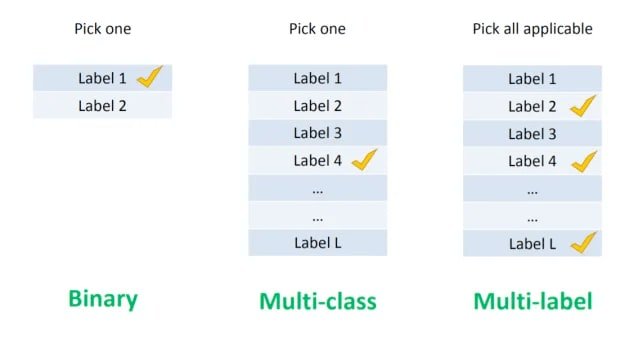
The diagram below shows the structural difference between binary, multi-class, and multi-label tasks — notice that multi-label allows multiple checkmarks on the same sample:
Notebook Setup
Import all the libraries you will need for this tutorial in one block:
import pandas as pd
import numpy as np
from sklearn.feature_extraction.text import TfidfVectorizer
from sklearn.preprocessing import MultiLabelBinarizer
from sklearn.model_selection import train_test_split

from sklearn.linear_model import SGDClassifier
from sklearn.linear_model import LogisticRegression
from sklearn.svm import LinearSVC

from sklearn.multiclass import OneVsRestClassifier
Load the Stack Overflow dataset directly from a public CSV. The index_col=0 argument tells Pandas to use the first column as the row index:
df = pd.read_csv('https://raw.githubusercontent.com/laxmimerit/All-CSV-ML-Data-Files-Download/master/stackoverflow.csv', index_col=0)Inspect the first five rows to understand the structure:
df.head()| Text | Tags | |
|---|---|---|
| 2 | aspnet site maps has anyone got experience cre... | ['sql', 'asp.net'] |
| 4 | adding scripting functionality to net applicat... | ['c#', '.net'] |
| 5 | should i use nested classes in this case i am ... | ['c++'] |
| 6 | homegrown consumption of web services i have b... | ['.net'] |
| 8 | automatically update version number i would li... | ['c#'] |
The Tags column looks like a list, but check its actual type:
type(df['Tags'].iloc[0])strIt is a plain string, not a Python list. Confirm what the raw string looks like:
df['Tags'].iloc[0]"['sql', 'asp.net']"Parsing the Tag Strings
Because each tag cell is stored as a string representation of a list, you need to convert it to a real Python list before encoding. The ast module — part of the Python standard library — provides literal_eval, which safely parses a string that looks like a Python literal (list, dict, number, etc.) into the corresponding Python object.
Use ast.literal_eval on one row to verify it works:
import ast
ast.literal_eval(df['Tags'].iloc[0])['sql', 'asp.net']Apply it to the entire Tags column with lambda:
df['Tags'] = df['Tags'].apply(lambda x: ast.literal_eval(x))
df.head()| Text | Tags | |
|---|---|---|
| 2 | aspnet site maps has anyone got experience cre... | [sql, asp.net] |
| 4 | adding scripting functionality to net applicat... | [c#, .net] |
| 5 | should i use nested cases in this case i am ... | [c++] |
| 6 | homegrown consumption of web services i have b... | [.net] |
| 8 | automatically update version number i would li... | [c#] |
The tags are now real Python lists, ready for encoding.
Encoding the Tag Labels
Machine learning models require numerical inputs. The tags are text labels, so you need to convert them to numbers. There are several standard encoding strategies — it is worth understanding each one before choosing the right tool for multi-label problems.
Label Encoding
LabelEncoder maps each unique text label to an integer (0, 1, 2, …). It works well for binary columns like Yes/No or Male/Female, where order is meaningful or there are only two values. For multi-class columns it creates a false ordering — the model may interpret 0 < 1 < 2 as a numerical relationship between the classes, which is not correct.
One-Hot Encoding
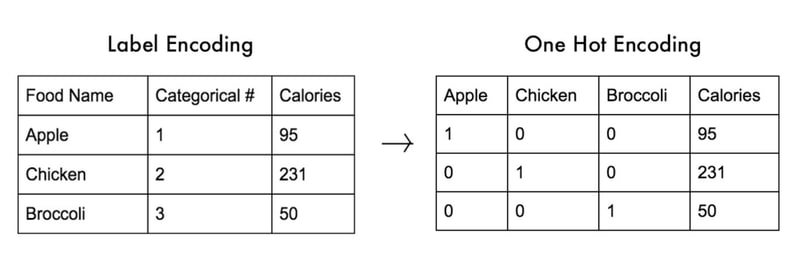
OneHotEncoder converts a categorical column into one binary column per class. A value of 1 means the class is present; 0 means it is absent. The diagram below shows a food dataset converted from label encoding to one-hot encoding — each food name becomes its own column:
A known pitfall of one-hot encoding is the variable trap (also called multicollinearity): if you know the values of all but one column, you can always infer the last. For example, knowing Apple=0 and Chicken=0 means Broccoli=1 is certain. Use the drop parameter in OneHotEncoder to remove one redundant column.
The Pandas get_dummies() function does the same thing in one step. The drop_first=True argument drops the first dummy column to eliminate the variable trap automatically.
MultiLabel Binarizer
MultiLabelBinarizer is designed specifically for multi-label targets. It accepts a column where each cell is a list of labels and outputs a binary matrix — one column per unique label, with 1 indicating that label is present for a given row.
Extract the target column and confirm its shape before encoding:
y = df['Tags']
y2 [sql, asp.net]
4 [c#, .net]
5 [c++]
6 [.net]
8 [c#]
...
1262668 [c++]
1262834 [c++]
1262915 [python]
1263065 [python]
1263454 [c++]
Name: Tags, Length: 48976, dtype: objectFit the MultiLabelBinarizer and transform the tag lists into a binary array:
multilabel = MultiLabelBinarizer()
y = multilabel.fit_transform(df['Tags'])
yarray([[0, 0, 1, ..., 0, 0, 1],
[1, 0, 0, ..., 0, 0, 0],
[0, 0, 0, ..., 0, 0, 0],
...,
[0, 0, 0, ..., 0, 0, 0],
[0, 0, 0, ..., 0, 0, 0],
[0, 0, 0, ..., 0, 0, 0]])Check which class each column represents:
multilabel.classes_array(['.net', 'android', 'asp.net', 'c', 'c#', 'c++', 'css', 'html',
'ios', 'iphone', 'java', 'javascript', 'jquery', 'mysql',
'objective-c', 'php', 'python', 'ruby', 'ruby-on-rails', 'sql'],
dtype=object)There are 20 unique tags in the dataset. View the full binary label matrix as a readable DataFrame:
pd.DataFrame(y, columns=multilabel.classes_)| .net | android | asp.net | c | c# | c++ | css | html | ios | iphone | java | javascript | jquery | mysql | objective-c | php | python | ruby | ruby-on-rails | sql | |
|---|---|---|---|---|---|---|---|---|---|---|---|---|---|---|---|---|---|---|---|---|
| 0 | 0 | 0 | 1 | 0 | 0 | 0 | 0 | 0 | 0 | 0 | 0 | 0 | 0 | 0 | 0 | 0 | 0 | 0 | 0 | 1 |
| 1 | 1 | 0 | 0 | 0 | 1 | 0 | 0 | 0 | 0 | 0 | 0 | 0 | 0 | 0 | 0 | 0 | 0 | 0 | 0 | 0 |
| 2 | 0 | 0 | 0 | 0 | 0 | 1 | 0 | 0 | 0 | 0 | 0 | 0 | 0 | 0 | 0 | 0 | 0 | 0 | 0 | 0 |
| 3 | 1 | 0 | 0 | 0 | 0 | 0 | 0 | 0 | 0 | 0 | 0 | 0 | 0 | 0 | 0 | 0 | 0 | 0 | 0 | 0 |
| 4 | 0 | 0 | 0 | 0 | 1 | 0 | 0 | 0 | 0 | 0 | 0 | 0 | 0 | 0 | 0 | 0 | 0 | 0 | 0 | 0 |
| ... | ... | ... | ... | ... | ... | ... | ... | ... | ... | ... | ... | ... | ... | ... | ... | ... | ... | ... | ... | ... |
| 48971 | 0 | 0 | 0 | 0 | 0 | 1 | 0 | 0 | 0 | 0 | 0 | 0 | 0 | 0 | 0 | 0 | 0 | 0 | 0 | 0 |
| 48972 | 0 | 0 | 0 | 0 | 0 | 1 | 0 | 0 | 0 | 0 | 0 | 0 | 0 | 0 | 0 | 0 | 0 | 0 | 0 | 0 |
| 48973 | 0 | 0 | 0 | 0 | 0 | 0 | 0 | 0 | 0 | 0 | 0 | 0 | 0 | 0 | 0 | 0 | 1 | 0 | 0 | 0 |
| 48974 | 0 | 0 | 0 | 0 | 0 | 0 | 0 | 0 | 0 | 0 | 0 | 0 | 0 | 0 | 0 | 0 | 1 | 0 | 0 | 0 |
| 48975 | 0 | 0 | 0 | 0 | 0 | 1 | 0 | 0 | 0 | 0 | 0 | 0 | 0 | 0 | 0 | 0 | 0 | 0 | 0 | 0 |
48976 rows × 20 columns
Each row is now a 20-element binary vector that tells the model which tags belong to that question.
Text Vectorization with TF-IDF
Machine learning models cannot accept raw text — every word must be converted to a number first. The process of turning text into a numerical matrix is called text vectorization.
TF-IDF (Term Frequency–Inverse Document Frequency) is the most common vectorization method for classification tasks. It assigns each word a score that reflects how important the word is to a specific document relative to the entire collection. A word that appears often in one document but rarely across all documents gets a high score; common words like "the" that appear everywhere get a low score.
The score is the product of two values:
Where:
- — the term (word or n-gram) being scored
- — the individual document (question) being scored
- — the full collection of documents (the entire dataset)
- — term frequency: how often term appears in document
- — inverse document frequency: a penalty for terms that appear in many documents across ; common terms get a lower weight
Scikit-learn provides three vectorizers:
CountVectorizer— counts how many times each word appears in each document.TfidfVectorizer— computes the TF-IDF score for each word, downweighting common words.HashingVectorizer— applies a hashing function to word counts, which saves memory but is not reversible.
Fit the TfidfVectorizer on the question text. The max_features=10000 argument limits the vocabulary to the 10 000 most important terms; ngram_range=(1,3) captures single words and phrases up to three words long:
tfidf = TfidfVectorizer(analyzer='word', max_features=10000, ngram_range=(1,3), stop_words='english')
X = tfidf.fit_transform(df['Text'])
X.shape, y.shape
Split the data into 80 % training and 20 % test sets:
X_train, X_test, y_train, y_test = train_test_split(X, y, test_size = 0.2, random_state = 0)Defining the Classifiers
Instantiate the three classifiers you will compare. Each one will later be wrapped inside OneVsRestClassifier:
sgd = SGDClassifier()
lr = LogisticRegression(solver='lbfgs')
svc = LinearSVC()
Metrics for Multi-Label Classification
Standard accuracy is not meaningful for multi-label problems because a prediction is rarely either fully right or fully wrong — it can be partially correct. Two metrics designed for multi-label evaluation are Hamming loss and Jaccard score.
Hamming Loss
Hamming loss — the fraction of labels that are incorrectly predicted, averaged over all samples. It counts every individually wrong label slot. A lower value is better; the perfect score is 0.
Where:
- — the number of samples
- — the total number of possible labels
- — the predicted label for sample , label position
- — the true label for sample , label position
- — the indicator function, equal to 1 when the condition inside is true
Jaccard Score
Jaccard score (also called the Jaccard index or Intersection over Union) — the size of the intersection between the predicted labels and the true labels divided by the size of their union. It ranges from 0 to 1, and 1 is the perfect score.
Where:
- — the set of true labels for a sample
- — the set of predicted labels for the same sample
- — the number of labels that are both true and predicted (true positives)
- — the number of unique labels that appear in either set (true positives + false positives + false negatives)
Define helper functions to compute and print the Jaccard score for any classifier:
def j_score(y_true, y_pred):
  jaccard = np.minimum(y_true, y_pred).sum(axis = 1)/np.maximum(y_true, y_pred).sum(axis = 1)
  return jaccard.mean()*100

def print_score(y_pred, clf):
  print("Clf: ", clf.__class__.__name__)
  print('Jacard score: {}'.format(j_score(y_test, y_pred)))
  print('----')
OneVsRest Classifier
The OneVsRest strategy (one-vs-all) is the standard way to adapt a binary classifier to multi-class or multi-label problems. It works by training one separate binary classifier per label. Each binary classifier learns to distinguish "is this label present?" from "is it absent?", treating all other labels as the negative class.
For 20 Stack Overflow tags, OneVsRestClassifier trains 20 independent binary models and combines their predictions into a final multi-label output. Any binary classifier — LinearSVC, SGDClassifier, or LogisticRegression — can be passed as the base estimator.
First, train a tuned LinearSVC alone to establish a baseline:
for classifier in [LinearSVC(C=1.5, penalty = 'l1', dual=False)]:
  clf = OneVsRestClassifier(classifier)
  clf.fit(X_train, y_train)
  y_pred = clf.predict(X_test)
  print_score(y_pred, classifier)
Then compare all three default classifiers in a loop:
for classifier in [sgd, lr, svc]:
  clf = OneVsRestClassifier(classifier)
  clf.fit(X_train, y_train)
  y_pred = clf.predict(X_test)
  print_score(y_pred, classifier)
The classifier with the highest Jaccard score is the best choice for this dataset.
Testing the Model on Real Data
To verify that the model works in practice, pass a new, unseen question as a plain string:
x = [ 'how to write ml code in python and java i have data but do not know how to do it']Transform the text with the same TF-IDF vectorizer used during training, then predict:
xt = tfidf.transform(x)
clf.predict(xt)
Decode the binary prediction back to human-readable tag names:
multilabel.inverse_transform(clf.predict(xt))inverse_transform converts the binary output array back into the list of tag strings that the model predicted for this question.
Conclusion
In this tutorial you built a complete multi-label tag-prediction pipeline for Stack Overflow questions. You parsed tag strings with ast.literal_eval, encoded them into a binary matrix with MultiLabelBinarizer, converted question text into TF-IDF vectors, and trained SGDClassifier, LogisticRegression, and LinearSVC classifiers wrapped in the OneVsRestClassifier strategy. You evaluated each model using Jaccard score, which correctly handles partially correct multi-label predictions.
Key takeaways:
- Multi-label classification allows a model to assign any number of labels per sample — a standard single-output classifier cannot do this.
MultiLabelBinarizerconverts a list of tag strings into a binary matrix that scikit-learn models can consume.- TF-IDF downweights common words and boosts rare but informative words, making it a strong baseline for text classification.
OneVsRestClassifierdecomposes any multi-label problem into one binary classifier per label, so you can use any standard binary estimator.- Jaccard score is the right evaluation metric for multi-label problems: accuracy and F1 alone do not capture partial matches correctly.
Next steps:
- Explore Sentiment Analysis with scikit-learn to apply similar TF-IDF and classification techniques to opinion mining.
- Read Logistic Regression in Python for a deep dive into one of the base classifiers used here and how its coefficients relate to feature importance.
- Try SVM with Python to understand the theoretical basis behind
LinearSVCand how the margin hyperparameterCcontrols the bias-variance trade-off.