
Two students may report the same double charge in very different words. A plain word search can miss that link. In this blog, we will learn how an embedding turns each support message into a list of numbers. Then we can compare messages by meaning instead of by exact words.
We will make these numbers with Scikit-LLM and a small embedding model running on our own machine. Then we will rank saved tickets against a new one. We will also find out why a close match still needs a person to read the words.
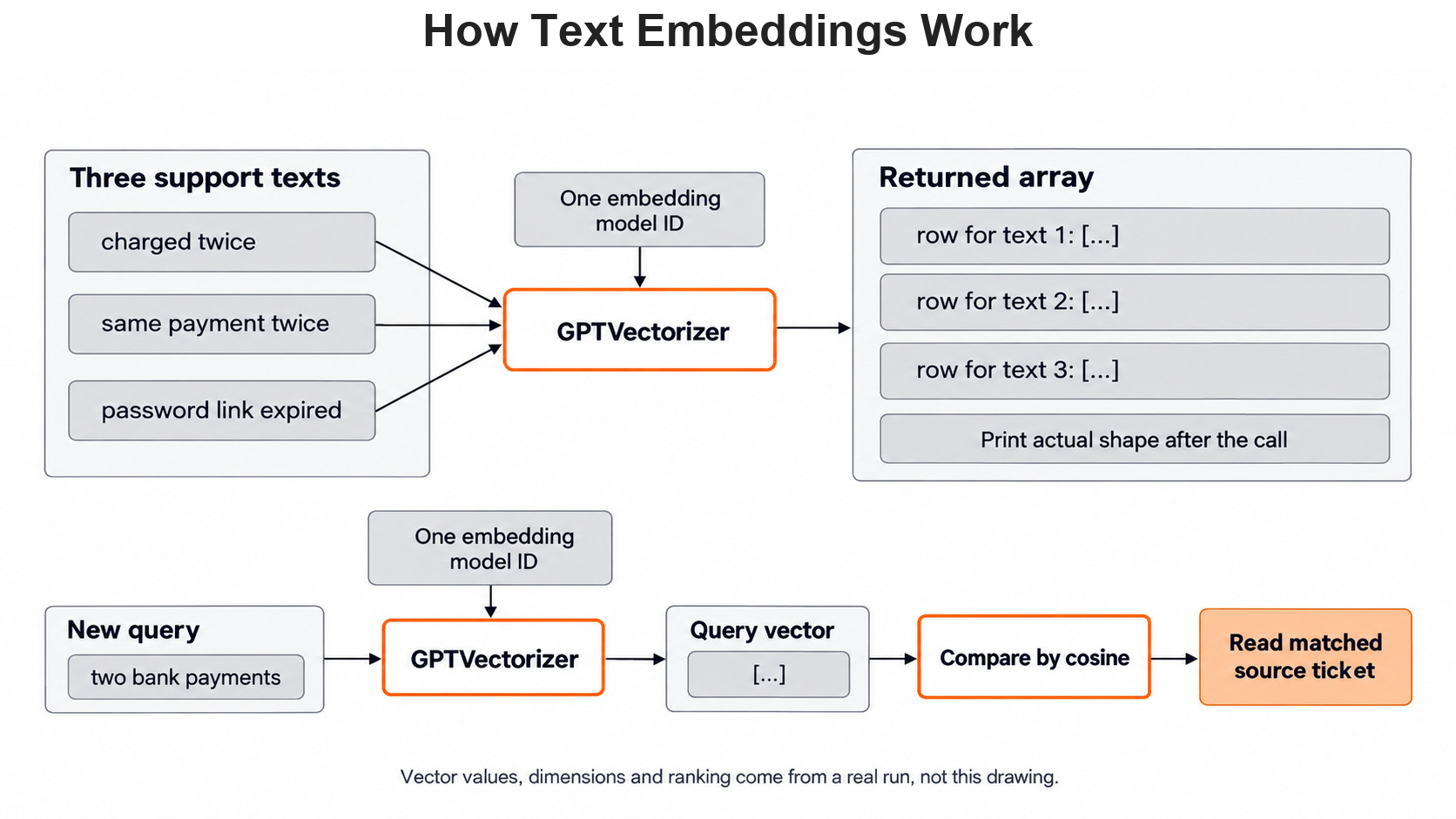
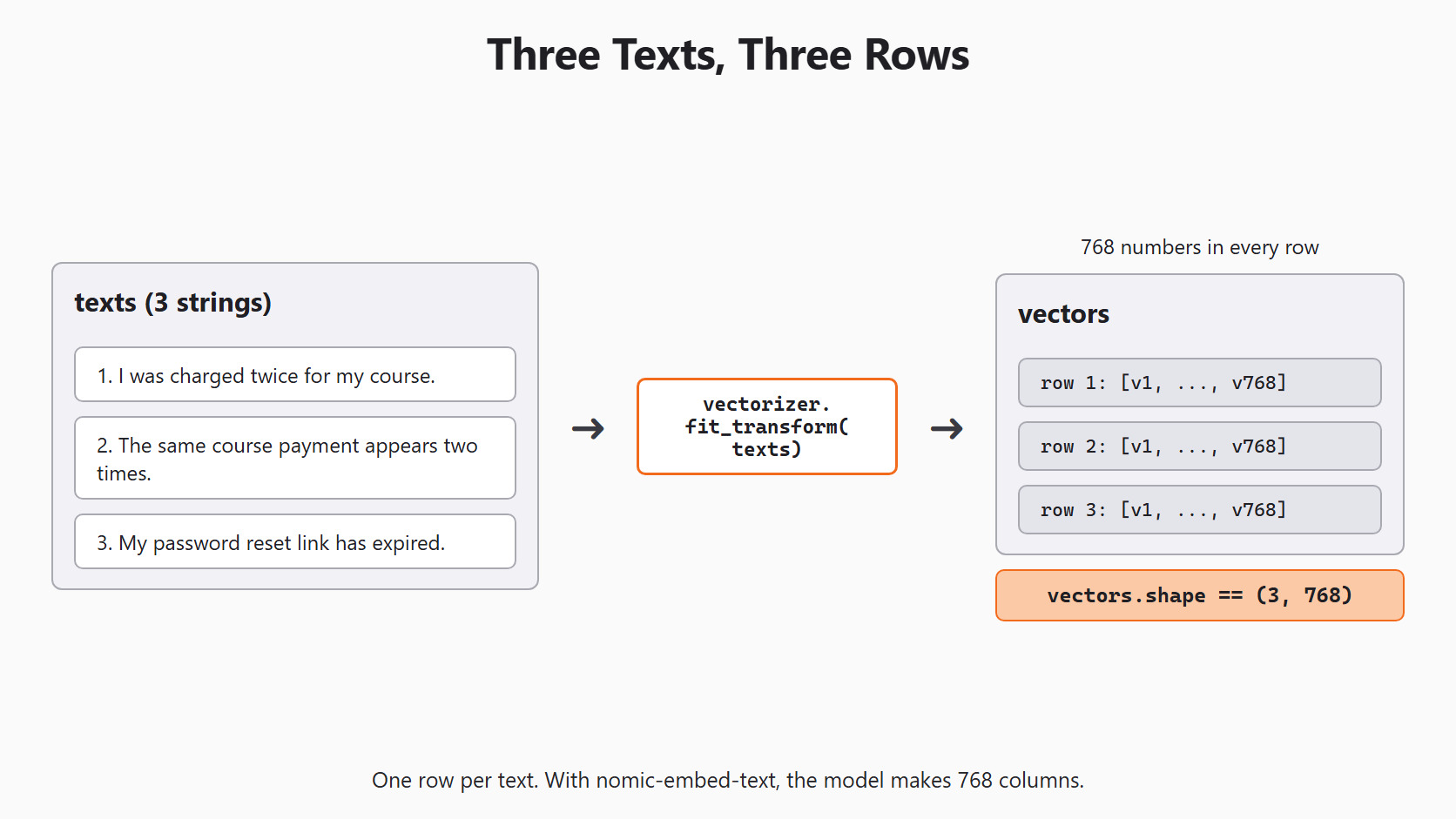
Here is the whole path we will build today, from three saved tickets to one ranked match.
What an Embedding Is
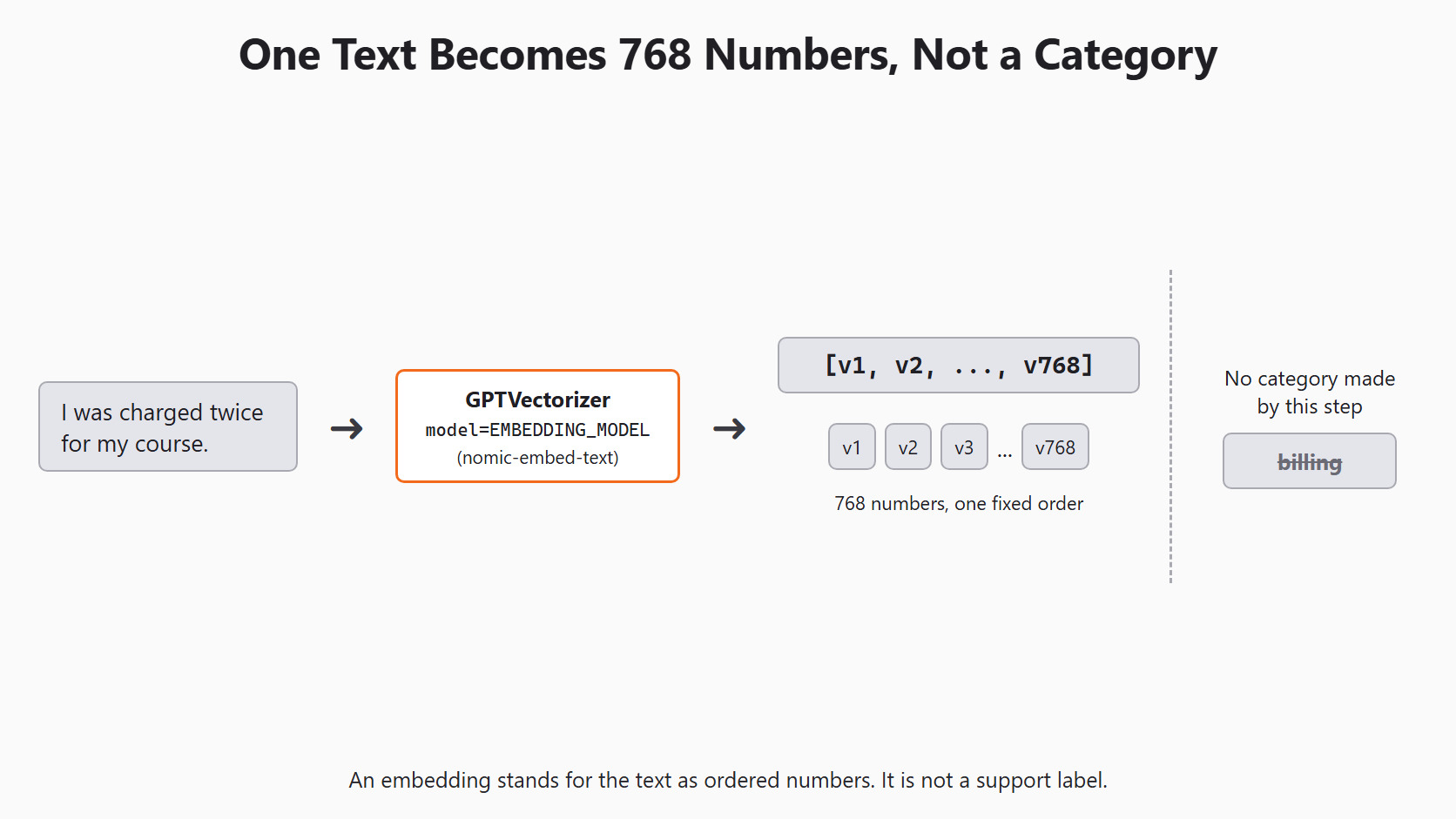
An embedding is a list of numbers that stands for a piece of text. In simple words, the model reads a ticket and gives back a long row of numbers. We call that row a vector. Every text gets a row of the same length.
The model we use today, nomic-embed-text, returns 768 numbers for each text. We cannot point at one position and say it means billing. The meaning is spread across all 768 numbers. What we can do is compare whole rows. Rows for similar messages tend to point in similar directions.
An embedding gives us numbers, not a support label. Deciding the label is a separate job, which we do in Day 8.
How Cosine Similarity Compares Two Vectors
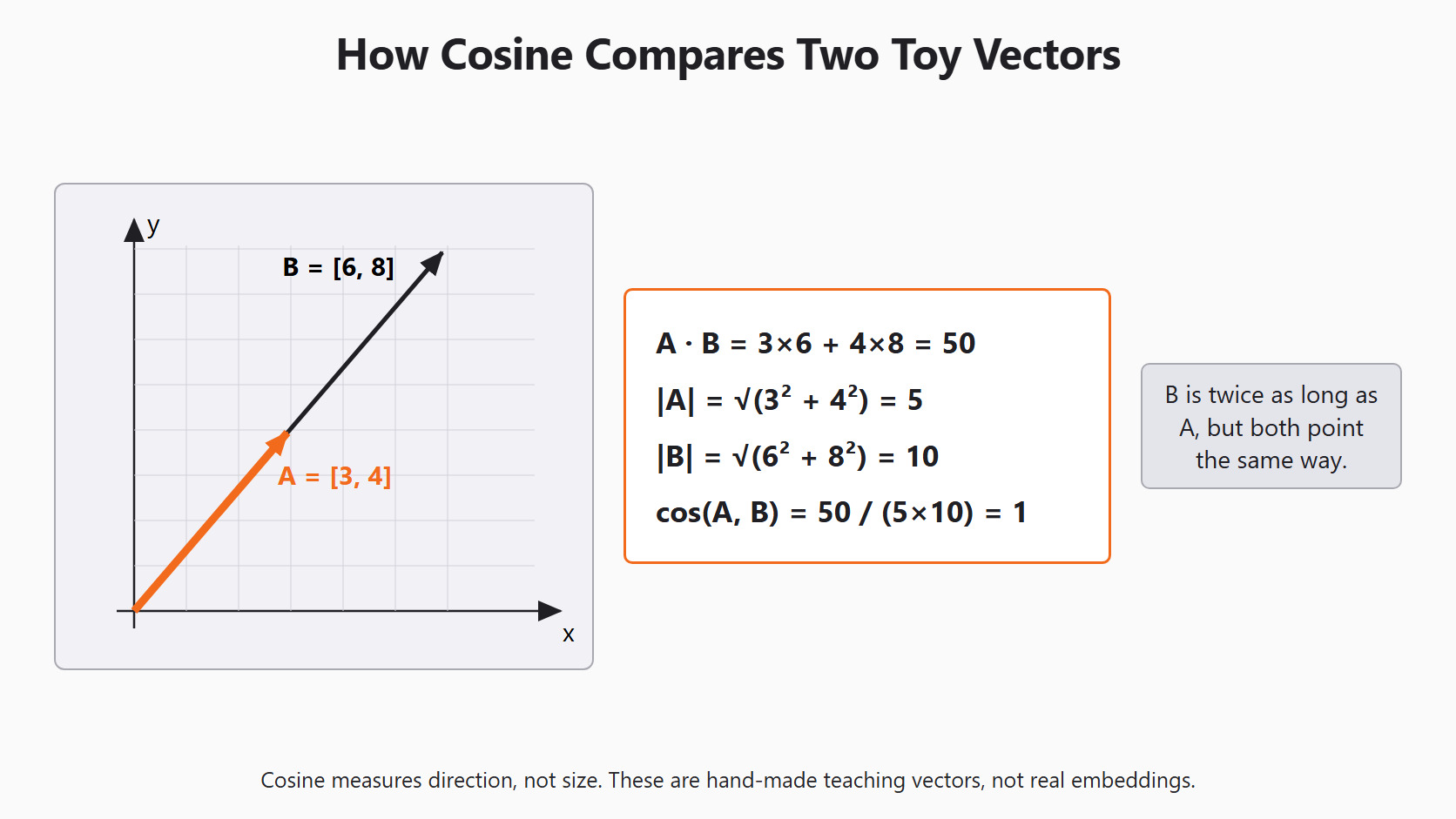
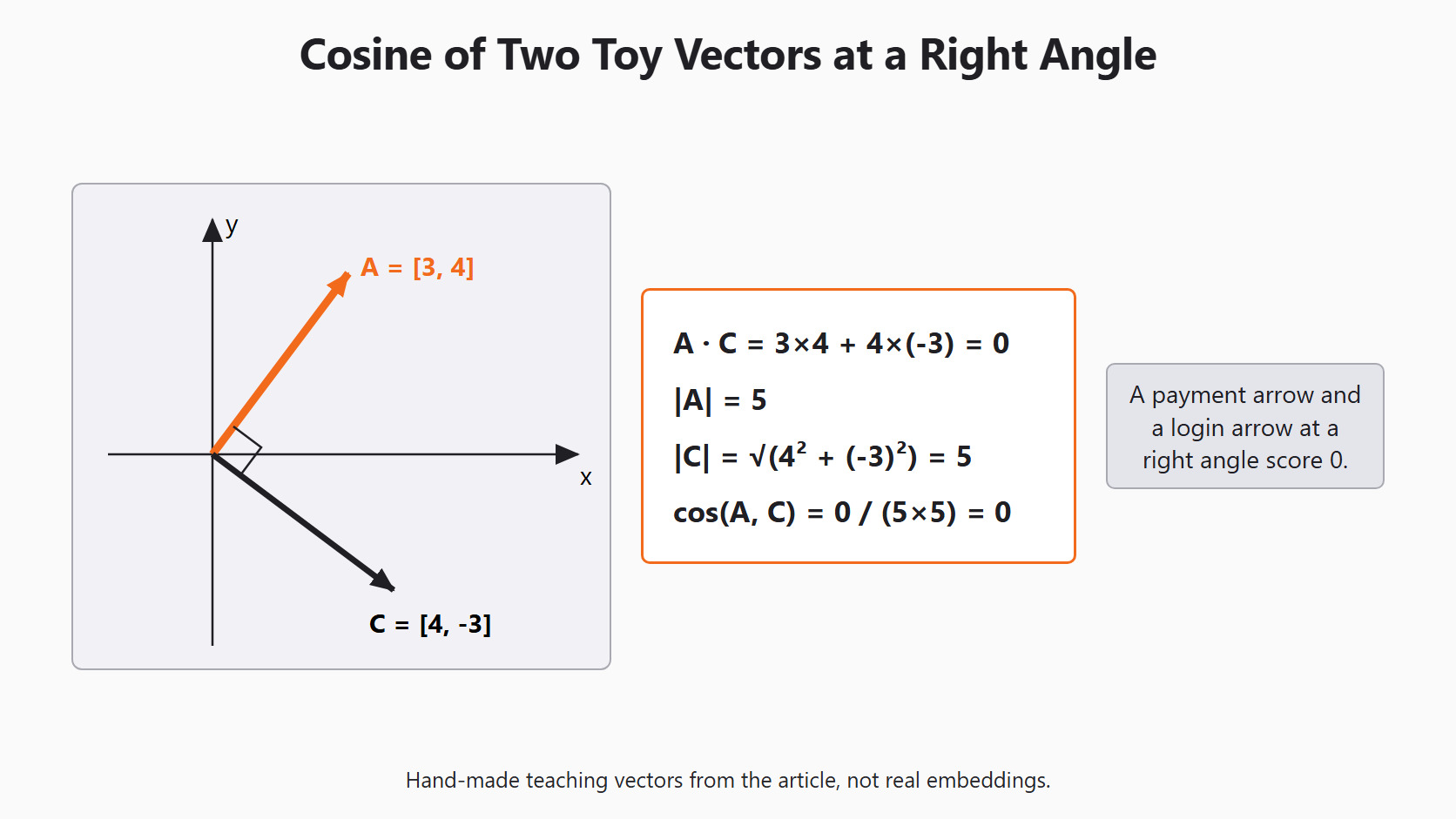
Before we touch real vectors, let's say each ticket had only two numbers. These are made-up teaching numbers. The first payment ticket is . A second payment ticket is . A login ticket is .
Cosine similarity checks whether two arrows point the same way. It ignores how long they are. The formula is:
Where:
- : the dot product, found by multiplying matching positions and adding them
- : the length of vector
- : the length of vector
For the two payment tickets, the dot product is . The first length is . The second length is . So the cosine is .
Here, is twice as long as , yet the cosine is still 1. That is the point of cosine: it measures direction, not size.
For the first payment ticket and the login ticket, the dot product is . The arrows meet at a right angle, so their cosine is 0.
We can check both results with scikit-learn. This code runs on our machine and needs no model:
import numpy as np
from sklearn.metrics.pairwise import cosine_similarity

first_payment = np.array([[3, 4]])
second_payment = np.array([[6, 8]])
login_ticket = np.array([[4, -3]])

print(cosine_similarity(first_payment, second_payment))
print(cosine_similarity(first_payment, login_ticket))[[1.]]
[[0.]]Here, we can see 1 for the two payment arrows and 0 for the login arrow. Real embeddings are not this neat. Their scores usually sit somewhere in between, and we read them as a ranking.
Setup
We use the same setup as every day of this series. Day 2 explains each line. Today we only need EMBEDDING_MODEL. MODEL is the chat model, and it comes back in Day 9.
import os

from skllm.config import SKLLMConfig

# Default: local models through Ollama
SKLLMConfig.set_gpt_url("http://localhost:11434/v1")
SKLLMConfig.set_gpt_key("ollama")
MODEL = "custom_url::qwen3.8:27b"
EMBEDDING_MODEL = "custom_url::nomic-embed-text"

# Option: free models on OpenRouter (uncomment these lines)
# SKLLMConfig.set_gpt_url("https://openrouter.ai/api/v1")
# SKLLMConfig.set_gpt_key(os.environ["OPENROUTER_API_KEY"])
# MODEL = "custom_url::qwen/qwen3.8-27b:free"
# EMBEDDING_MODEL = "custom_url::nvidia/nemotron-3-embed-1b:free"
With Ollama, the key "ollama" is only a placeholder. The embedding model must be on our machine first. We pull it once with ollama pull nomic-embed-text. It is a 262 MB download with 137M parameters.
Note
The OpenRouter option reads your key from the OPENROUTER_API_KEY environment variable, so the key never appears in the code. Free OpenRouter models allow 20 requests per minute and 50 requests per day. With batch size 1, every text is one request, so a large ticket set will hit that daily limit fast.
Make Vectors with Scikit-LLM
GPTVectorizer is the Scikit-LLM class that turns texts into vectors. It works like a scikit-learn transformer. We give it a list of strings, and it returns one row per string.
We start with three short tickets. Two are about the same double charge. One is about a login problem.
from skllm.models.gpt.vectorization import GPTVectorizer

texts = [
    "I was charged twice for my course.",
    "The same course payment appears two times.",
    "My password reset link has expired.",
]
Now we create the vectorizer and pass our embedding model. We always pass model=EMBEDDING_MODEL. Without it, the vectorizer asks for an OpenAI model name that our Ollama server does not have.
vectorizer = GPTVectorizer(model=EMBEDDING_MODEL, batch_size=2)
vectors = vectorizer.fit_transform(texts)
print(vectors.shape)
A few things happen in this block:
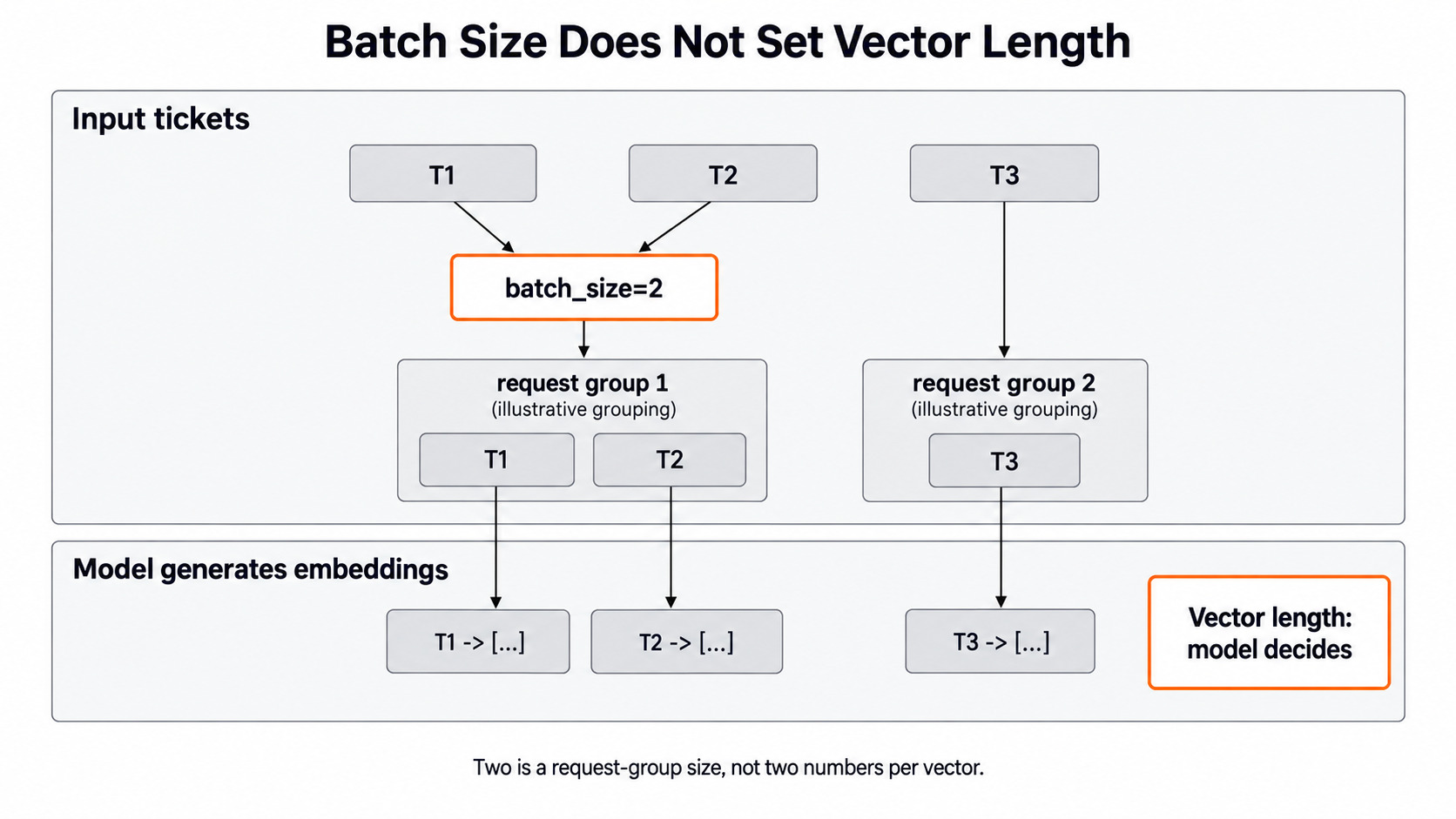
fitdoes nothing for this vectorizer. All the work happens intransform, which calls the embedding model.batch_size=2puts two texts in one request. Our three texts need two requests. The default is 1, which means one request per text.- The library prints
Batch size: 2and shows a progress bar while it works. - With
nomic-embed-text, the shape is(3, 768): one row per text, 768 numbers per row.
The number 2 in batch_size has nothing to do with the vector length. The embedding model alone decides that length.
Warning
If Ollama is not running, Scikit-LLM tries each request 3 times before it gives up. On a test machine this took about 50 seconds. Then it prints Could not complete the operation after 3 retries and raises RuntimeError.
Rank Saved Tickets Against a New Message
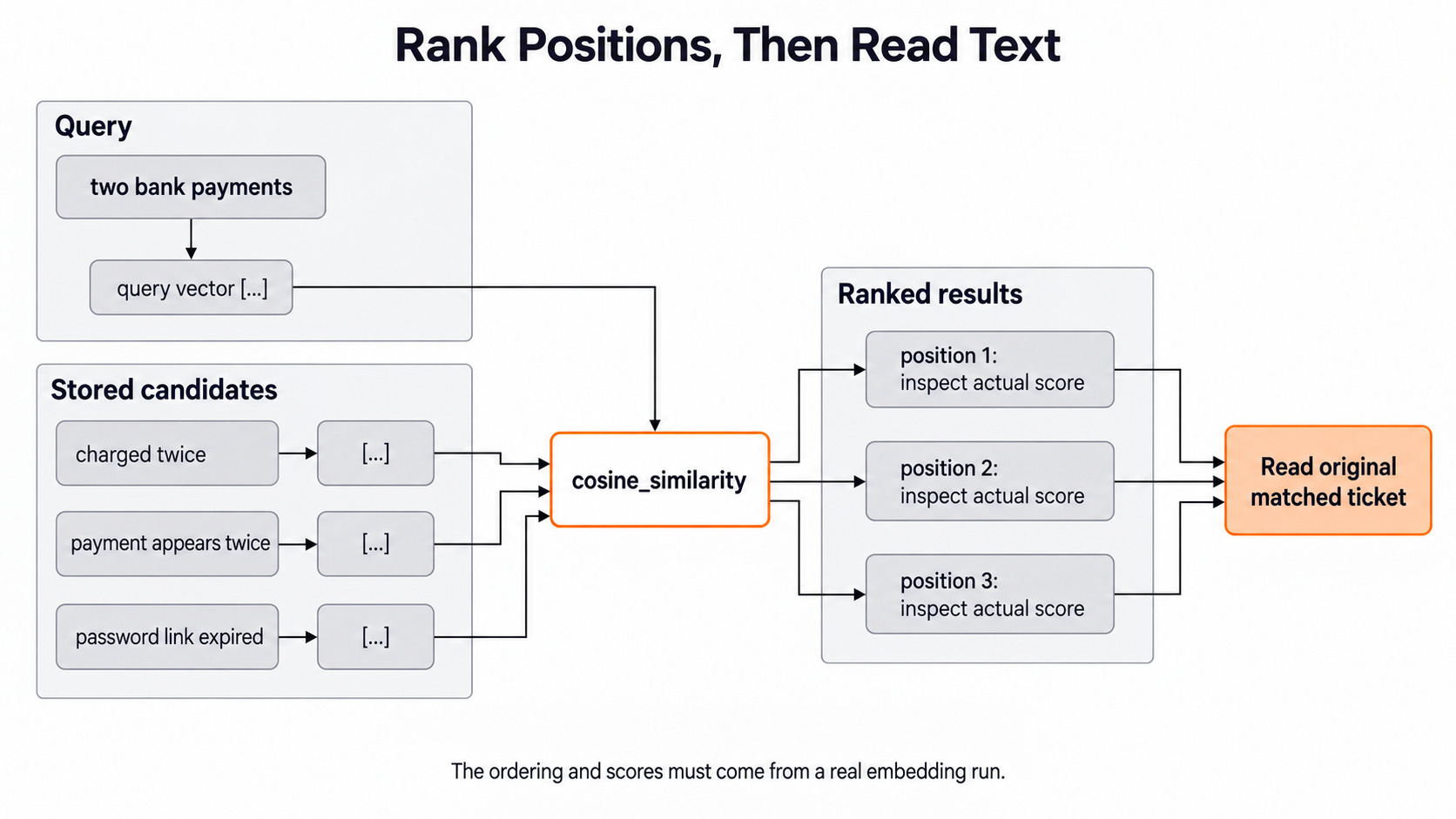
Now a new ticket arrives. We want to know which saved ticket is closest to it. First, we turn the new ticket into a vector with the same vectorizer. Then we score it against every saved row with cosine similarity.
Let's see the code as below:
from sklearn.metrics.pairwise import cosine_similarity

query = ["My bank shows two payments for one course."]
query_vector = vectorizer.transform(query)
similarities = cosine_similarity(query_vector, vectors)[0]
ranked = similarities.argsort()[::-1]
for position in ranked:
    print(texts[position], float(similarities[position]))
Here is what each step does:
cosine_similarityreturns one row of scores per query. We have one query, so[0]takes that row.argsort()gives the positions from lowest score to highest.[::-1]flips them, so the best match comes first.- We print each saved text next to its score. A score on its own tells a support agent nothing.
The loop prints three lines, one per saved ticket, highest score first. The scores depend on the model, so we read the order and the words, not one number.
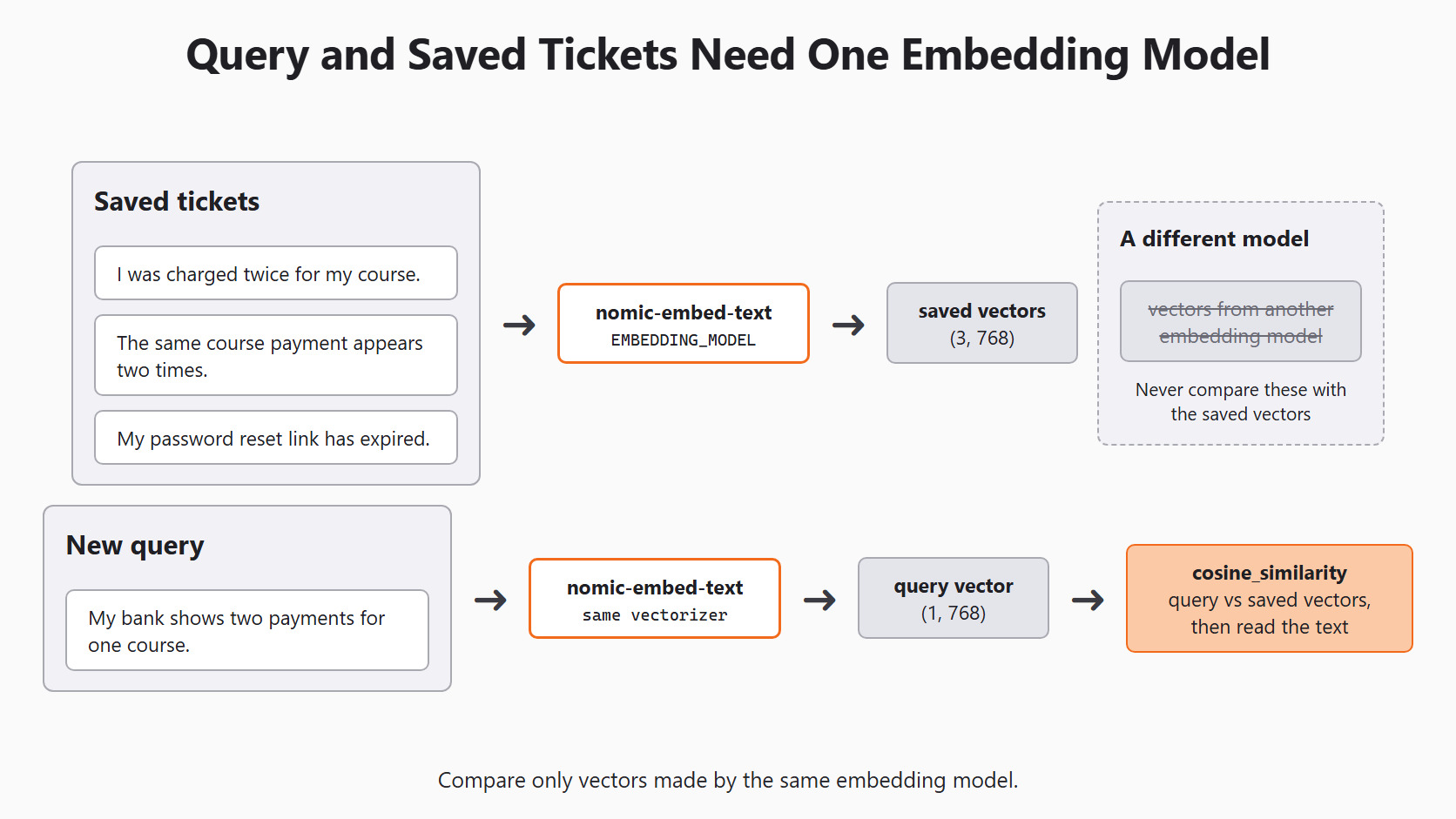
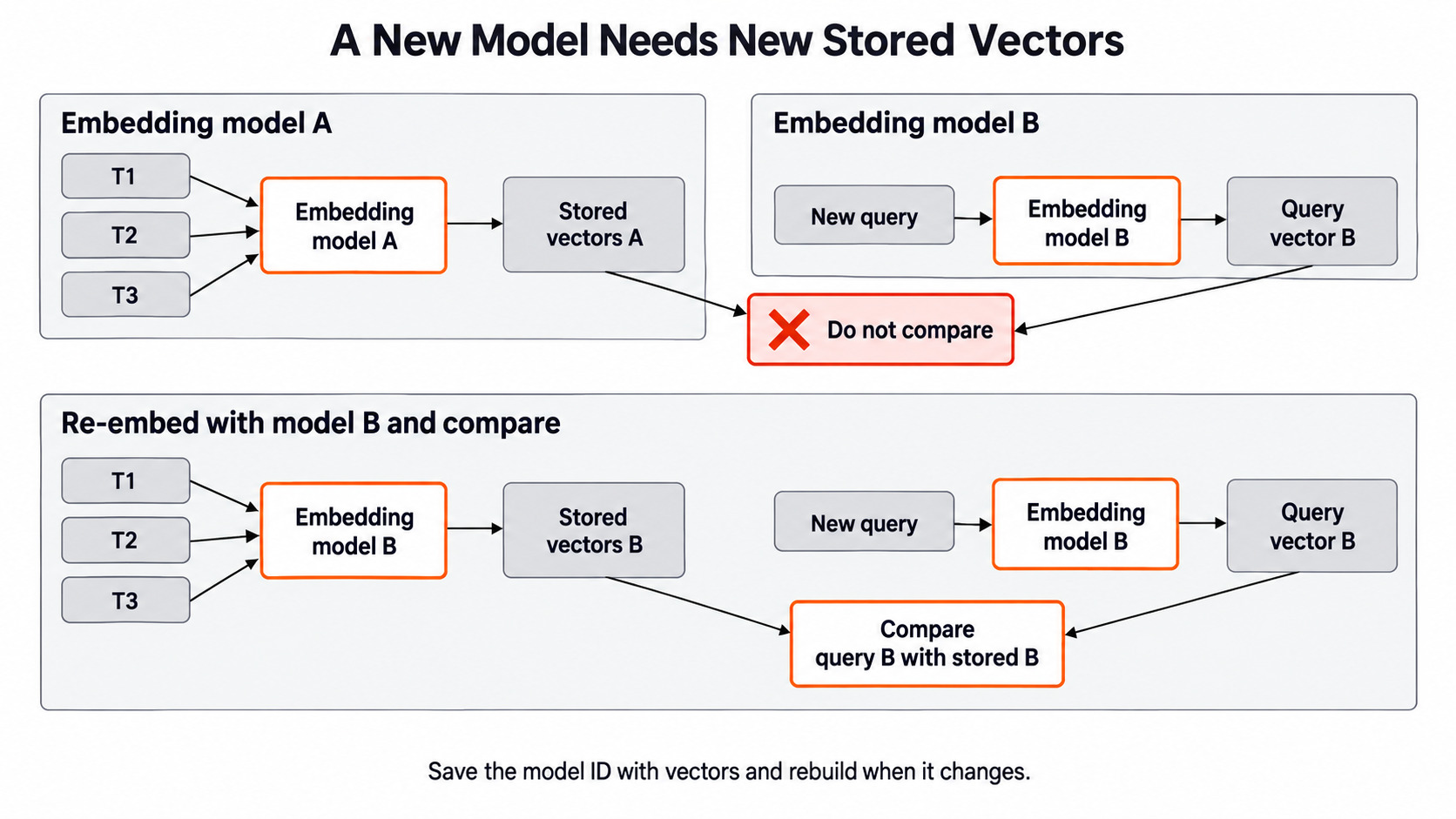
The query and the saved tickets must come from the same embedding model. A vector made by one model means nothing next to a vector made by another.
Where Similarity Goes Wrong
A close match can be close for the wrong reason. "I was charged twice" and "I was not charged twice" share almost every word. Yet they ask for opposite things. Their vectors may still sit near each other.
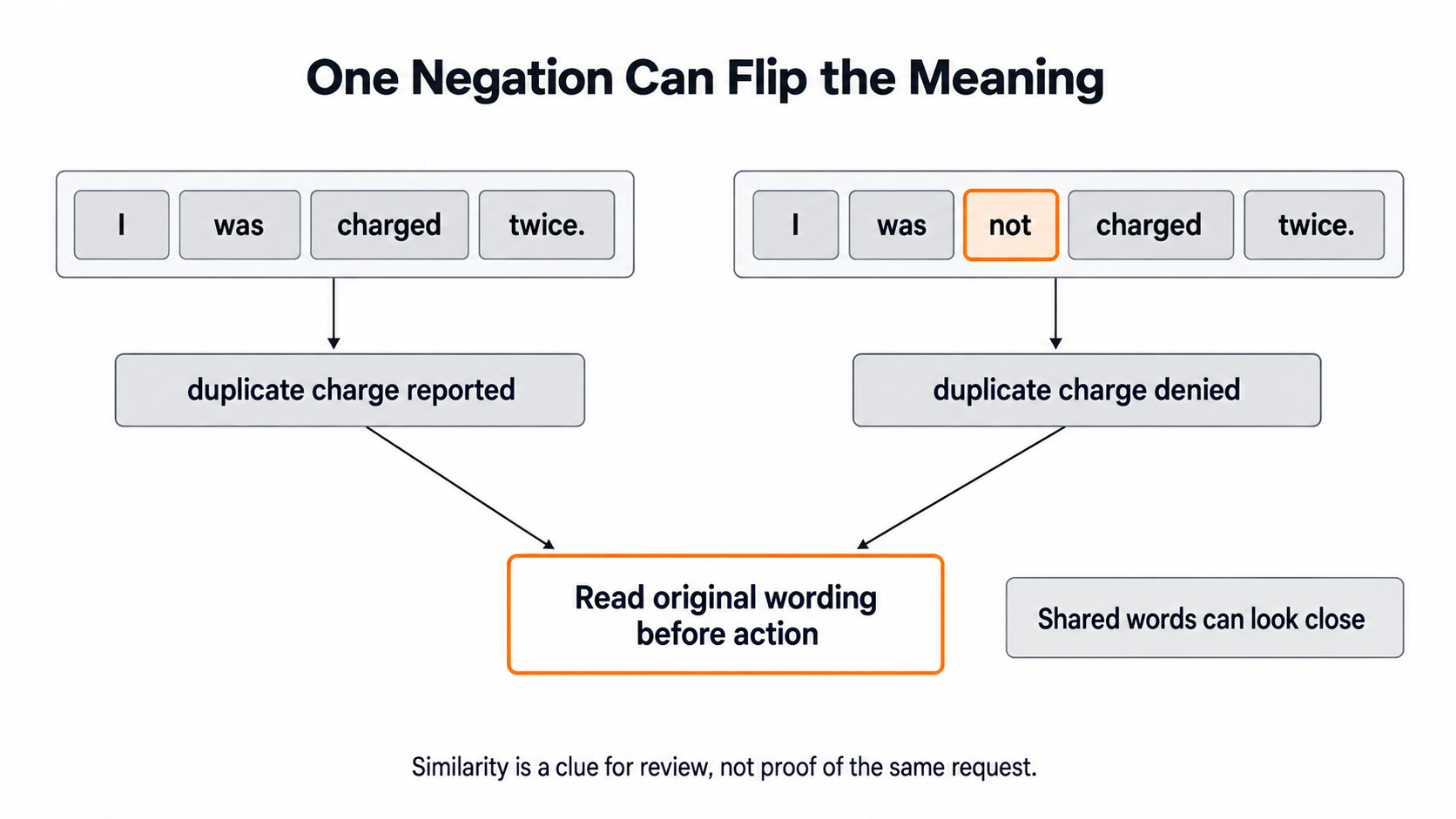
So we use the ranking to put likely matches in front of a person. The person then reads the exact words before acting. We also do not pick a fixed score cutoff, like 0.8, from three made-up tickets. A cutoff needs many ticket pairs that people have marked as helpful or not helpful.
A simple way to test search is a top-three check. For a few new tickets, a person marks which saved tickets would really help. Then we ask one question per ticket: does a helpful ticket appear in the top three results? We save the ticket IDs, not just the rank positions, so the result stays readable later.
When Tickets or Models Change
Saved vectors only match the text and model that made them. Let me tabulate the three cases for your better understanding.
| What changed | What we do |
|---|---|
| A new ticket arrives | Call transform on it with the same vectorizer |
| An old ticket is edited | Make a new vector for that ticket |
| The embedding model changes | Rebuild every saved vector from the original text |
This is why we save the model name next to every stored vector.
Caution
Two embedding models can return vectors of the same length and still place meaning in different positions. Never mix old vectors from one model with new vectors from another. The ranking will look normal, but it will be wrong.
Try It: Add a Negated Ticket
Let's add the negated ticket to our saved list. Adding it to texts is not enough. The old vectors array still has only three rows. So we embed the list again, then rank with the same query vector.
texts.append("I was not charged twice; I only need the invoice.")
vectors = vectorizer.fit_transform(texts)
print(vectors.shape)

similarities = cosine_similarity(query_vector, vectors)[0]
for position in similarities.argsort()[::-1]:
    print(texts[position], float(similarities[position]))
The shape is now (4, 768), and the loop prints four lines. We look at where the negated ticket lands. If it ranks near the top for a real double-charge query, the score is high, but the match is not useful. That is exactly the case a person must catch.
Conclusion
This is how text embeddings work. We turned each ticket into 768 numbers with GPTVectorizer and a local nomic-embed-text model. We used cosine similarity, first on hand-made arrows and then on real vectors, to rank saved tickets against a new one. Finally, we saw how one word like "not" can fool the ranking.
- An embedding is a list of numbers, not a support label.
- Cosine similarity compares direction, so and score 1.
- Query and saved vectors must come from the same embedding model.
- New or edited text needs a new
transformcall, and a model change means rebuilding every vector. - A close match is a clue for a person to read, not a final answer.
Next steps:


