
In Day 7, we turned support tickets into vectors and compared them. But our support desk still needs a category for each ticket. In this blog, we will learn how to train a small classifier on top of those vectors.
We will join a Scikit-LLM embedding step and a scikit-learn classifier into one pipeline. Then we will follow a new ticket through it, from raw text to a predicted label. We will also find out what each step learns, and what it does not.
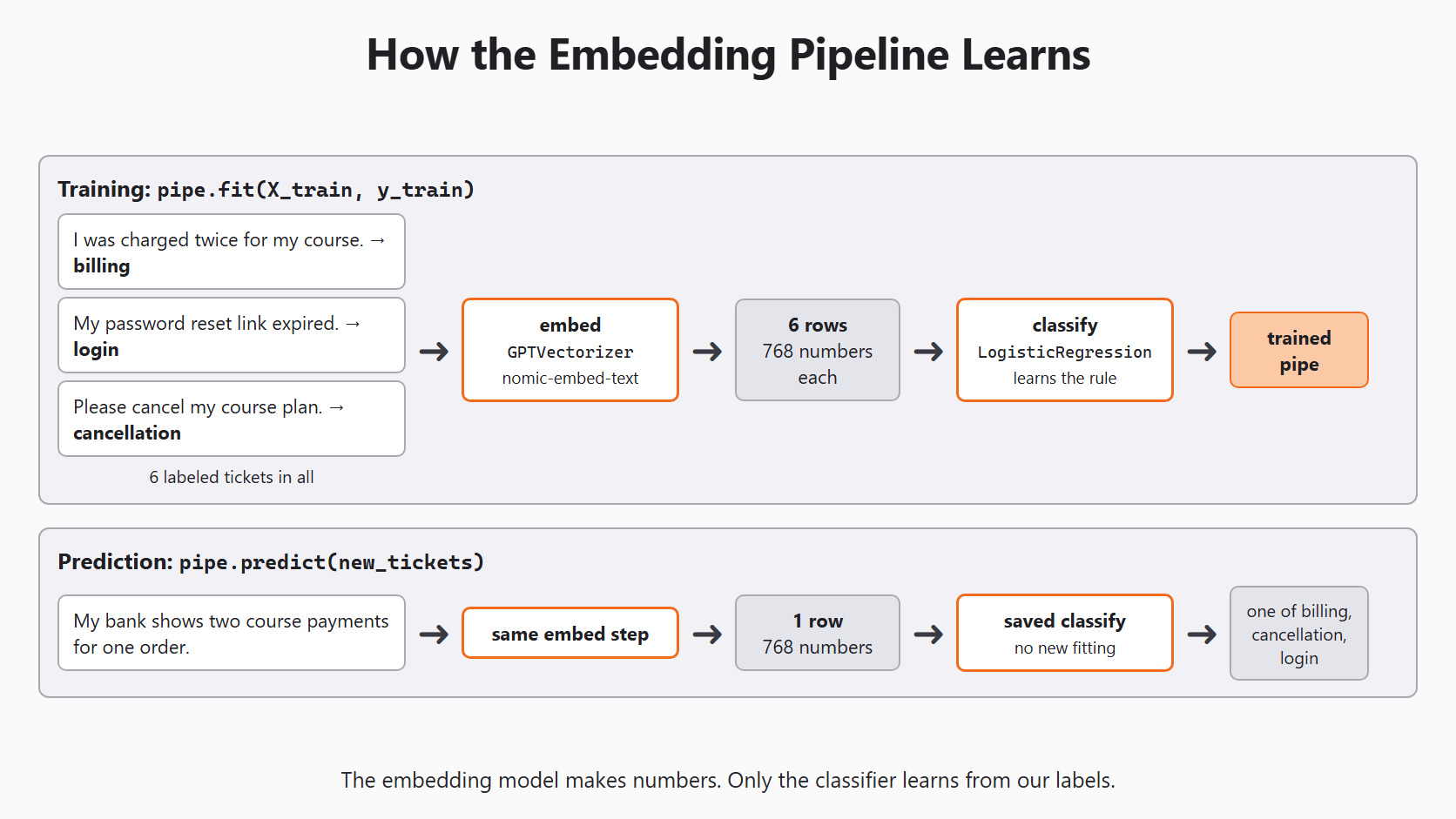
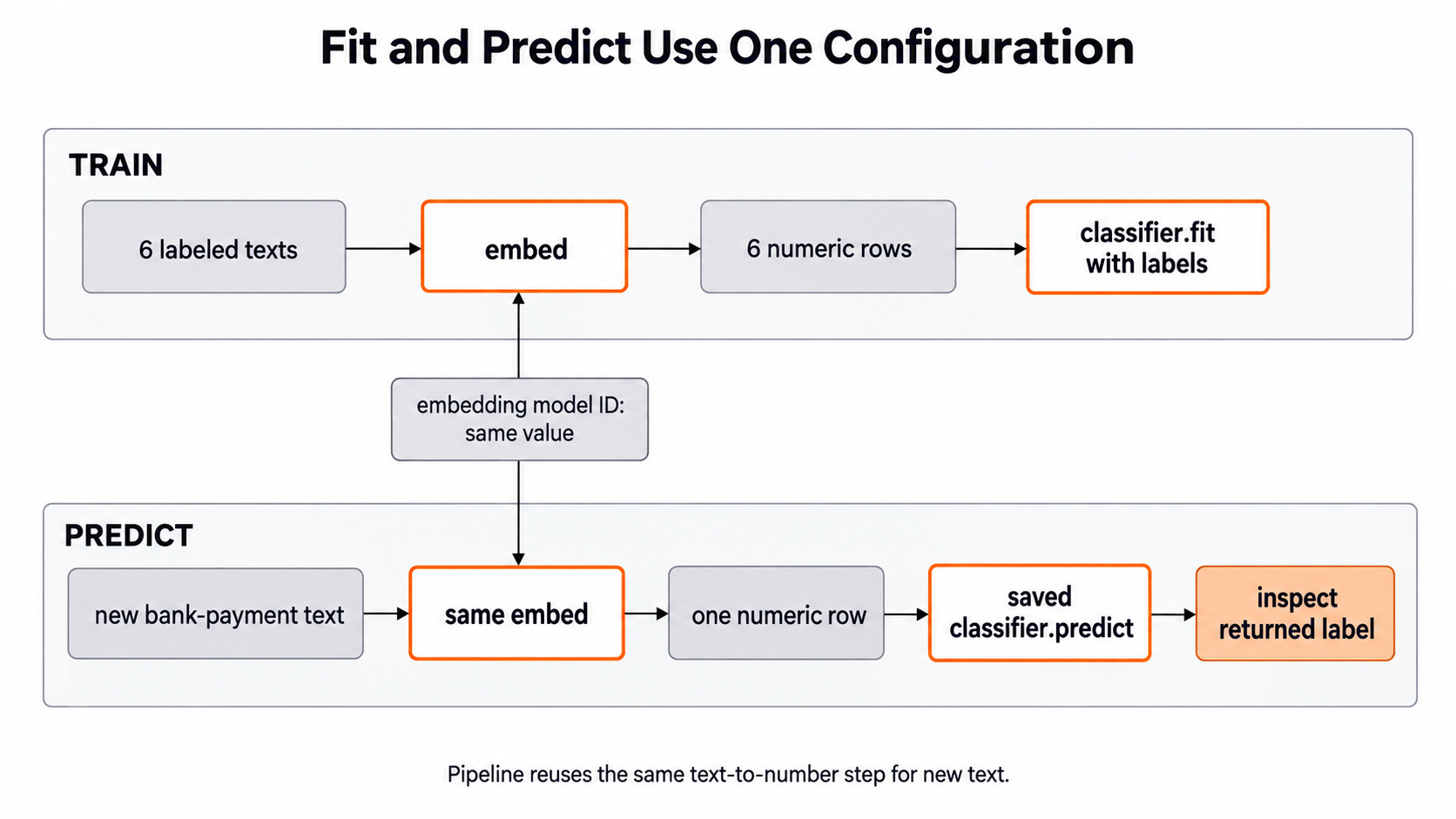
Here is the full path: training on top, prediction below.
Two Steps With Two Different Jobs
Picture two workers. The first worker turns each sentence into a row of numbers. The second worker looks at rows with known labels and learns a rule. Then the second worker uses that rule on new rows.
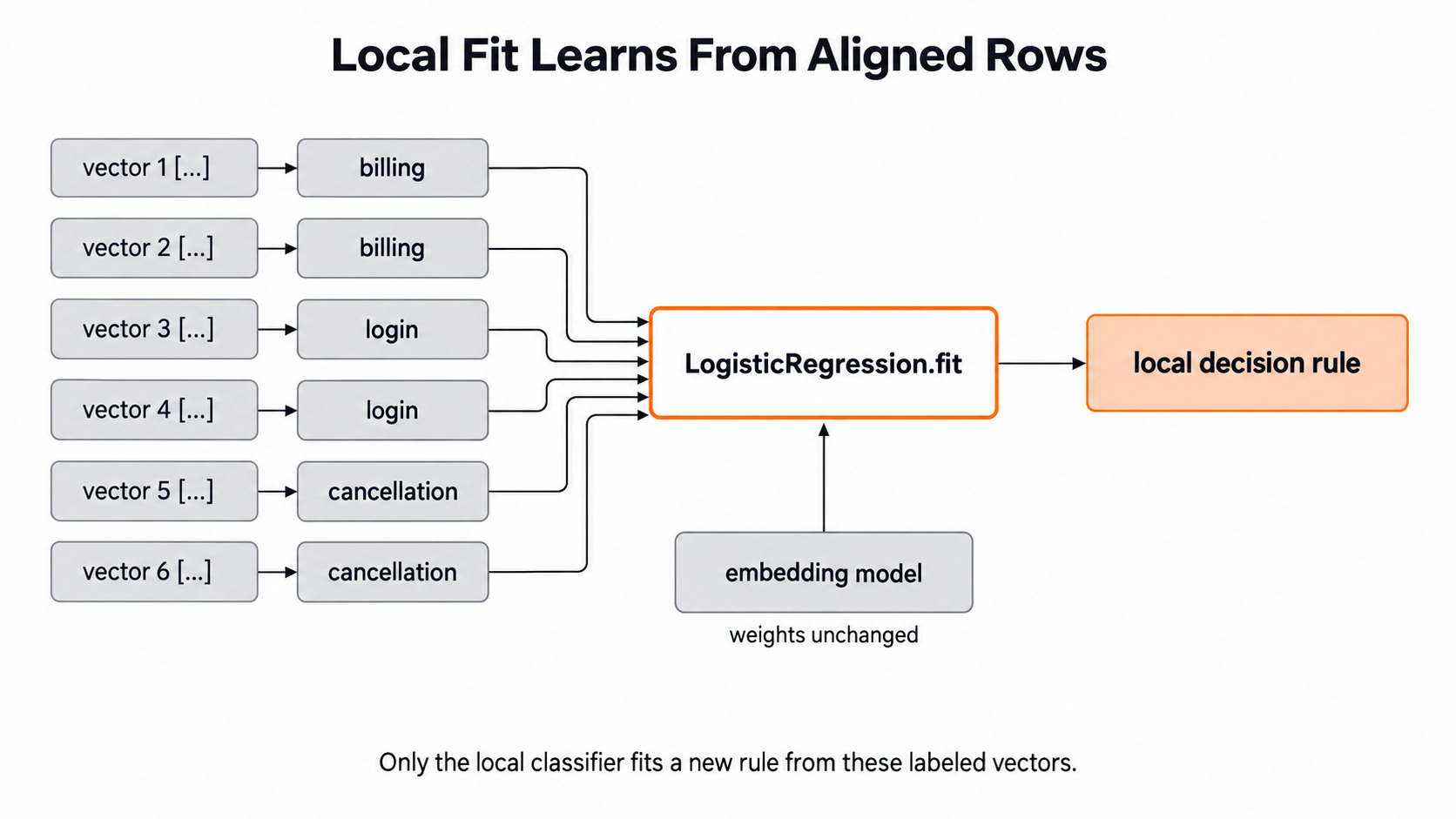
In our code, the first worker is GPTVectorizer. It uses an embedding model that was trained somewhere else, long before this lesson. It does not learn anything from our tickets. The second worker is LogisticRegression. It really does learn, from our labeled vectors.
The word fit can hide this difference. GPTVectorizer.fit() does nothing at all. Its transform() asks the embedding model for vectors. LogisticRegression.fit() learns which number patterns go with billing, login and cancellation.
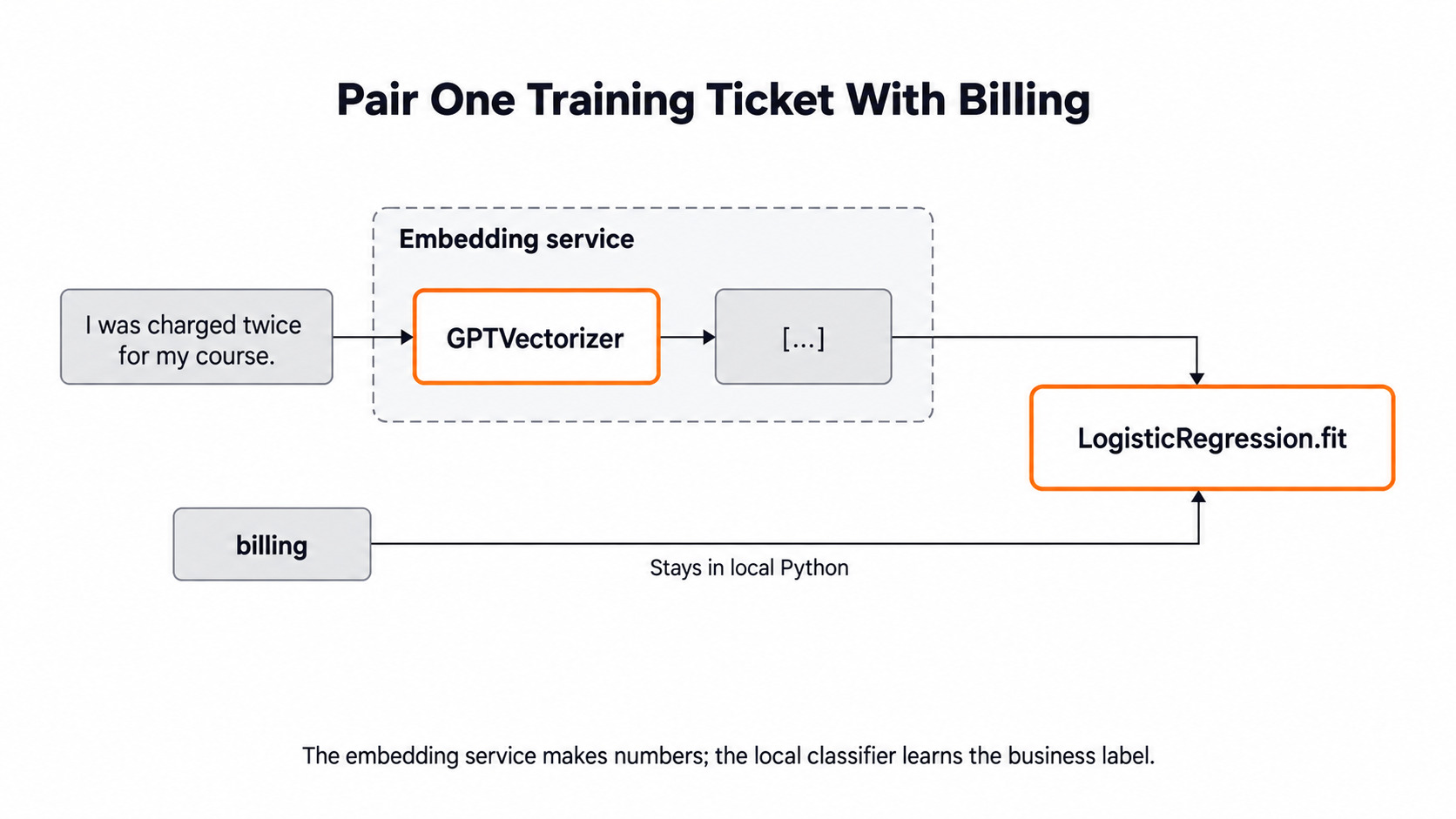
A pipeline joins the two workers in a fixed order. When we call predict(), the new text goes through the same embedding step first. Then the saved rule reads the new row. The rule is never fitted again on the new ticket.
Setup
We use the same setup as every day of this series. Day 2 explains each line. Today we only need EMBEDDING_MODEL, the local nomic-embed-text model from Day 7.
import os

from skllm.config import SKLLMConfig

# Default: local models through Ollama
SKLLMConfig.set_gpt_url("http://localhost:11434/v1")
SKLLMConfig.set_gpt_key("ollama")
MODEL = "custom_url::qwen3.8:27b"
EMBEDDING_MODEL = "custom_url::nomic-embed-text"

# Option: free models on OpenRouter (uncomment these lines)
# SKLLMConfig.set_gpt_url("https://openrouter.ai/api/v1")
# SKLLMConfig.set_gpt_key(os.environ["OPENROUTER_API_KEY"])
# MODEL = "custom_url::qwen/qwen3.8-27b:free"
# EMBEDDING_MODEL = "custom_url::nvidia/nemotron-3-embed-1b:free"
If the embedding model is not on our machine yet, we pull it once with ollama pull nomic-embed-text.
Build a Small Training Set
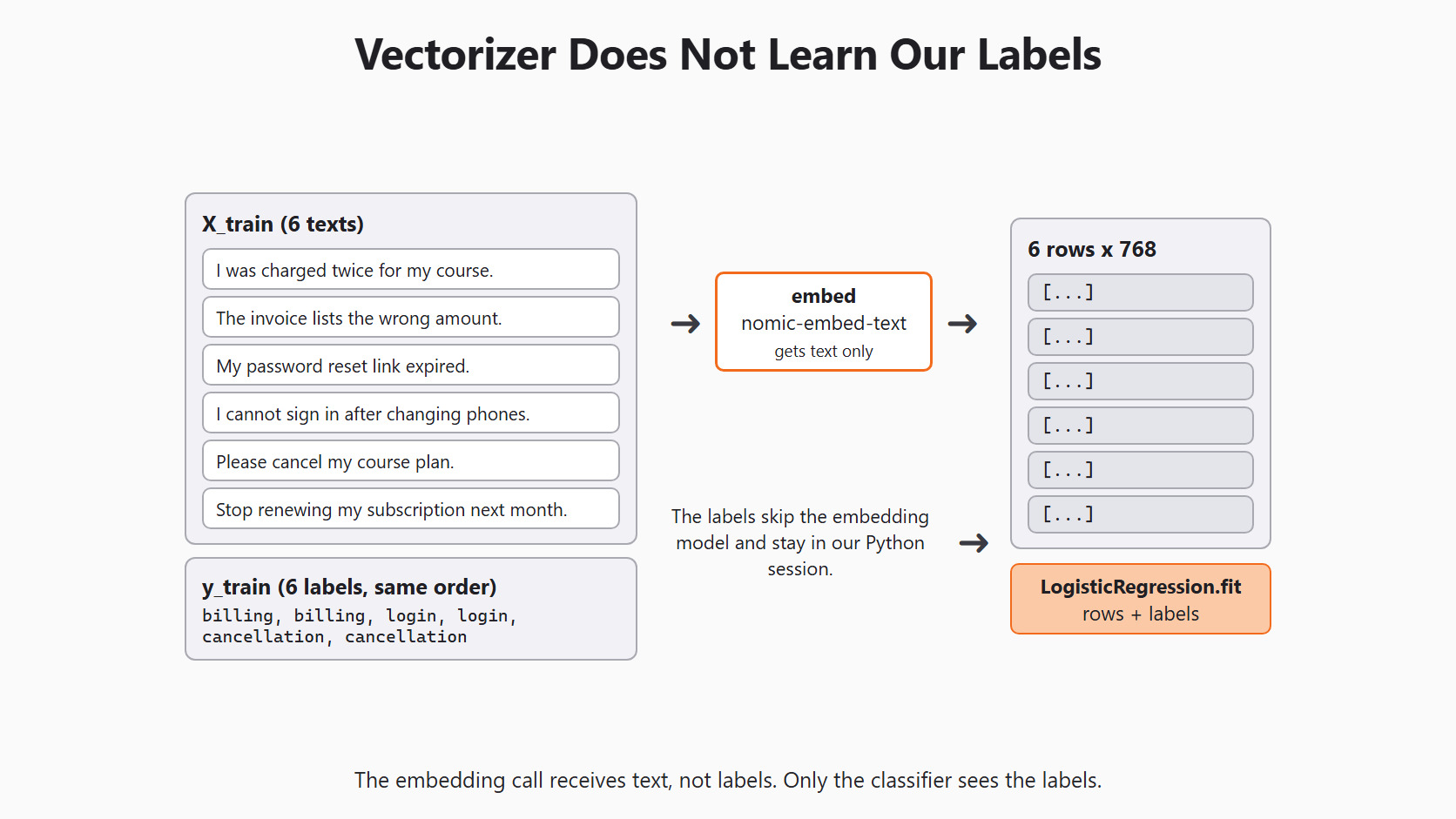
We use six made-up tickets, two for each category. Each label in y_train belongs to the text at the same position in X_train. Six tickets are enough to follow the code, but far too few to judge a real support desk.
X_train = [
    "I was charged twice for my course.",
    "The invoice lists the wrong amount.",
    "My password reset link expired.",
    "I cannot sign in after changing phones.",
    "Please cancel my course plan.",
    "Stop renewing my subscription next month.",
]
y_train = [
    "billing", "billing", "login", "login",
    "cancellation", "cancellation",
]
If one label list shifts by a single place, every ticket teaches the wrong answer. The code would still run. So we check the lengths and the label counts before anything else:
from collections import Counter

print(len(X_train), len(y_train))
print(Counter(y_train))6 6
Counter({'billing': 2, 'login': 2, 'cancellation': 2})Here, we can see six texts, six labels, and two tickets for each category. A length check cannot catch a swapped pair, so we also read a few text and label pairs by eye.
Join the Vectorizer and the Classifier
We import the vectorizer, the classifier and the pipeline. We use logistic regression because it is a small, easy-to-read model for picking one category.
from skllm.models.gpt.vectorization import GPTVectorizer
from sklearn.linear_model import LogisticRegression
from sklearn.pipeline import Pipeline
Now we build the pipeline. We give each step a name, so we can look at it later:
pipe = Pipeline([
    ("embed", GPTVectorizer(model=EMBEDDING_MODEL, batch_size=2)),
    ("classify", LogisticRegression(max_iter=1000)),
])
print(list(pipe.named_steps))['embed', 'classify']Here, we can see the two steps in order: embed first, then classify. Nothing has called the model yet. Building a pipeline only stores the steps.
A few choices in this block need a reason:
model=EMBEDDING_MODELis required. Without it,GPTVectorizerasks for an OpenAI model name that Ollama does not have.batch_size=2sends two texts per request. Our six tickets need three requests. It has nothing to do with the vector length.max_iter=1000gives logistic regression more steps to finish learning. It does not change the embedding at all.
Now we train the whole pipeline with one call:
pipe.fit(X_train, y_train)During fit, the pipeline sends the six texts to the embedding model. The library prints Batch size: 2 and shows a progress bar. We get back six rows of 768 numbers. Then the pipeline hands those rows and the six labels to logistic regression, which learns its rule.
The labels never go to the embedding model. They stay in our Python session and only reach the classifier.
Predict a New Ticket
Now we try a ticket that was not in the training set. A person would label it billing. We print the real result instead of assuming it:
new_tickets = ["My bank shows two course payments for one order."]
predicted = pipe.predict(new_tickets)
print(predicted)
The pipeline embeds the new ticket with the same embed step. Then the saved classify step reads that row. It prints a NumPy array with one label. Logistic regression always picks one of its three trained classes, so the label is billing, cancellation or login. Unlike the Day 3 classifier, this path never returns needs_review.
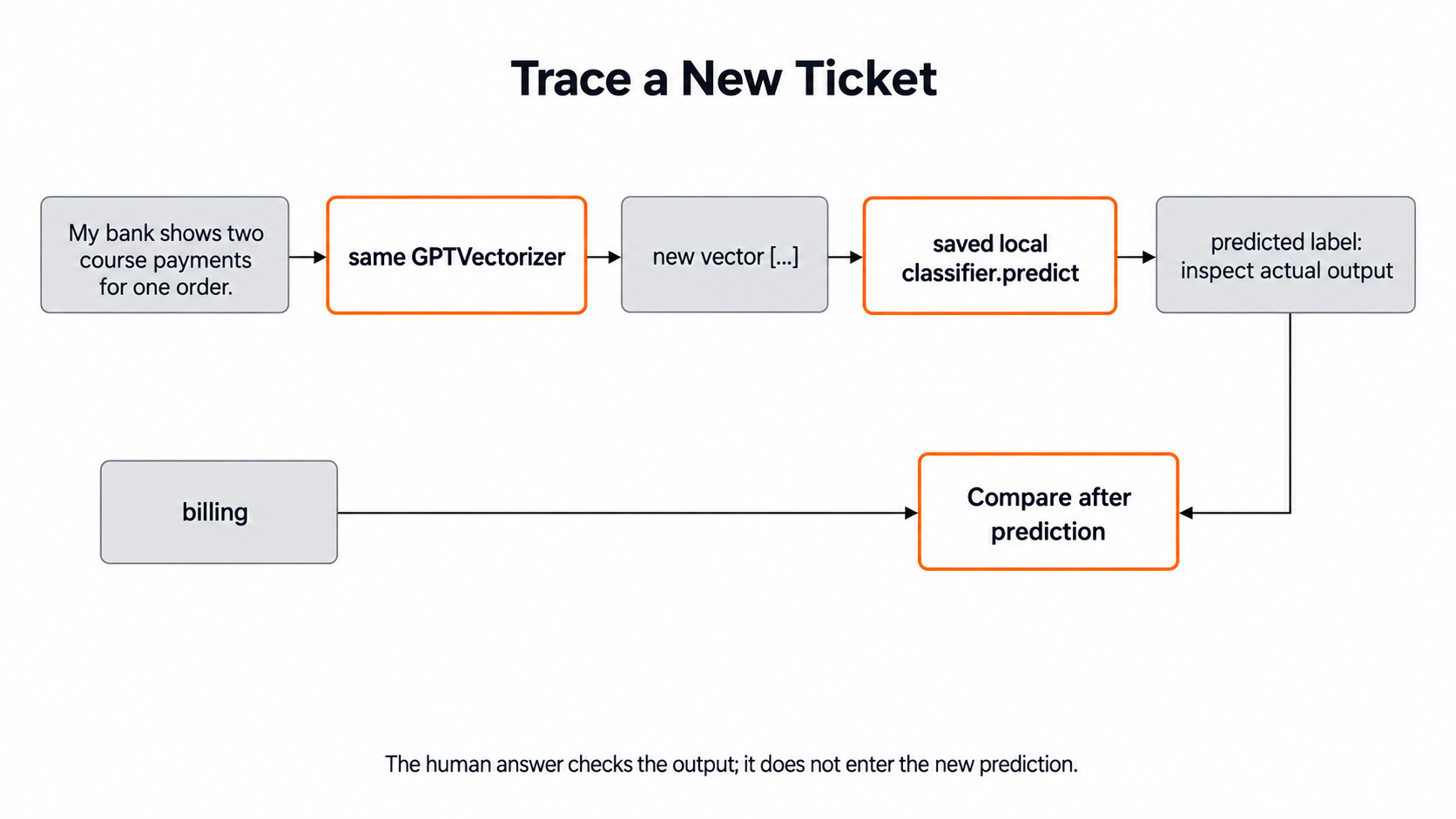
If the label is wrong, we do not fix it by hand and count it as correct. We check the chain instead: the input text, the embedding model, and the training examples.
We can also ask the trained classifier which classes it learned:
print(pipe.named_steps["classify"].classes_)scikit-learn stores the classes in sorted order. So this prints the same array as np.unique(y_train), which we can check without any model:
import numpy as np

print(np.unique(y_train))['billing' 'cancellation' 'login']Here, we can see the three labels in alphabetical order. If a category were missing from this list, it would mean it had no training examples. A class cannot be learned from zero examples.
Compare With the Day 4 Word Baseline
In Day 4, we built a baseline with TfidfVectorizer and the same kind of classifier. TF-IDF gives each word a weight. A word gets more weight when it is common in one ticket but rare across all tickets. So both pipelines end with logistic regression. The only change is how text becomes numbers.
To compare them fairly, we train both on the same training conversations. We test both on the same held-out conversations. We save one prediction per ticket for each method, not just one overall score.
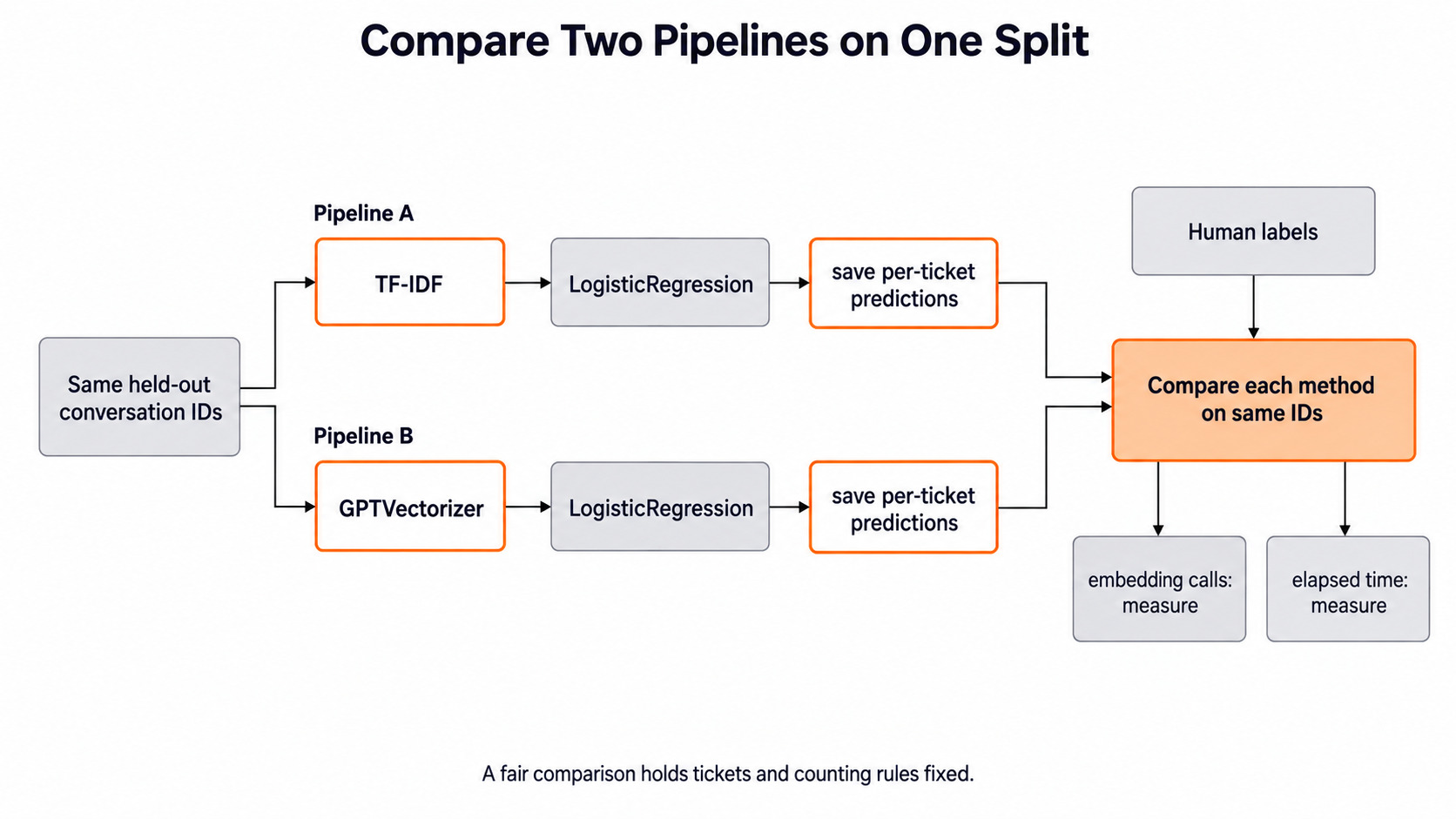
We also count the extra work. The TF-IDF path runs fully offline and fast. The embedding path makes a model call for every batch of texts. When we time a prediction, we include the embedding call. Timing only the logistic regression step would make the app look faster than it is. The embedding path earns its place only if it fixes errors that matter, such as paraphrases the word baseline misses.
Warning
Keep every check ticket out of every fit call. TfidfVectorizer learns its vocabulary during fit, so fitting it on test text leaks the test words. The safe habit is to put every learning step inside the pipeline and fit the pipeline on training conversations only.
Cache Vectors Safely
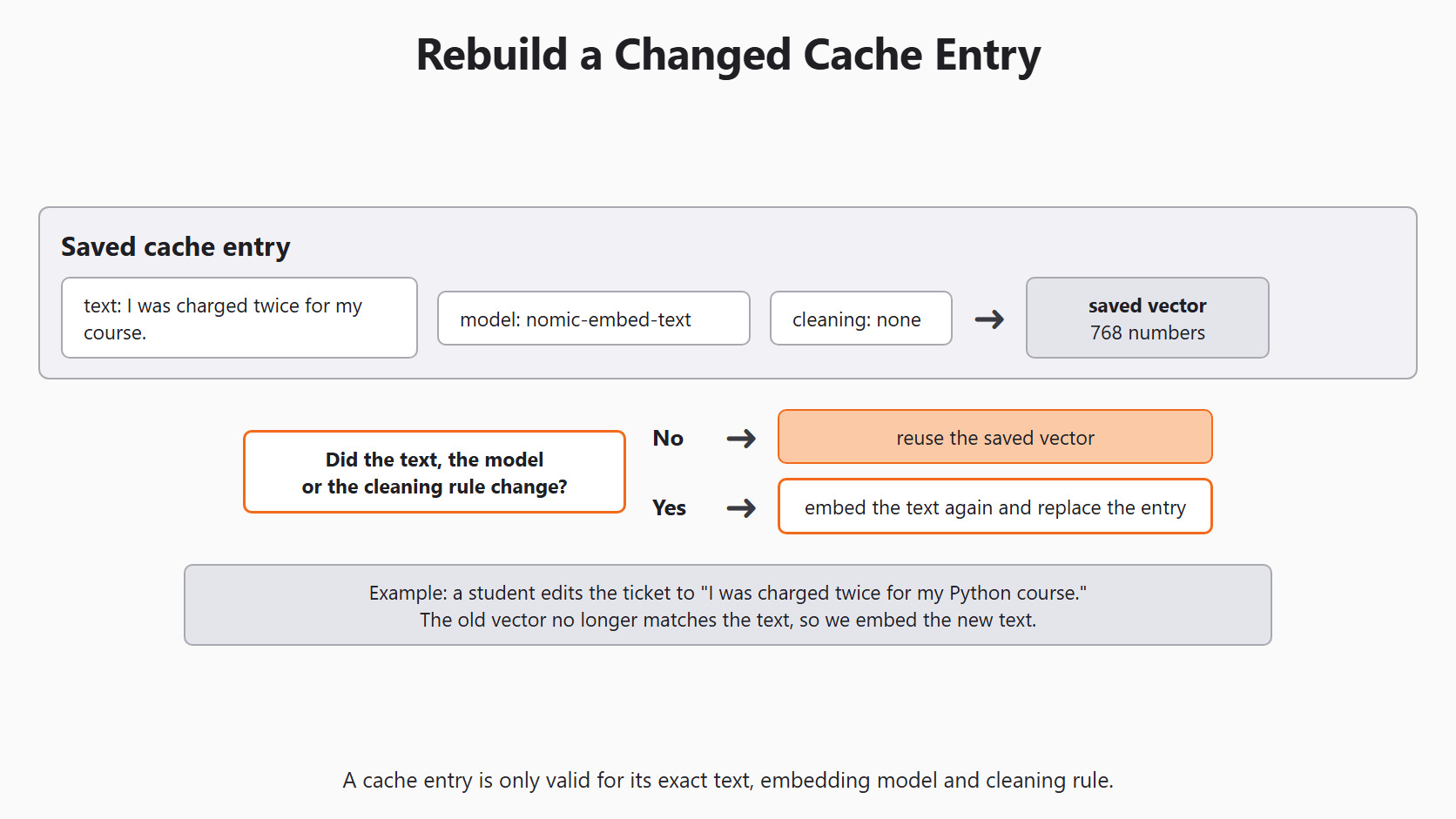
If we embed the same text many times, we repeat the same work. So we may save each vector and reuse it. A saved vector is called a cache entry. Its key must record three things: the exact text, the embedding model name, and any text-cleaning rule. For example, lowercasing text before embedding is a different rule from sending the original text.
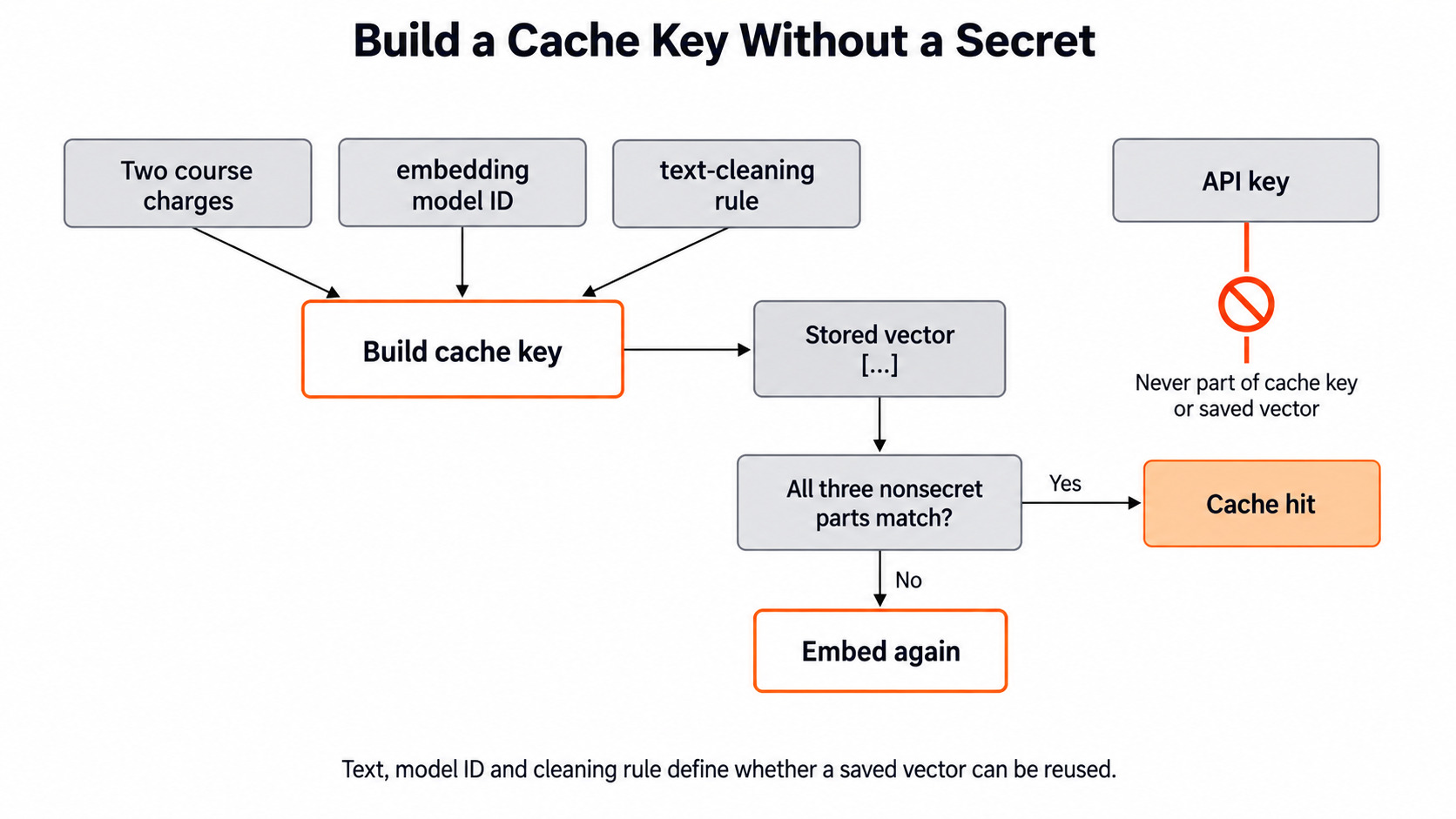
The key never holds an API key. The cache also holds data made from student messages, so it needs the same care as the tickets themselves. When a ticket is edited, or the cleaning rule changes, its old cache entry is stale. We make a new vector for it.
When the Embedding Model Changes
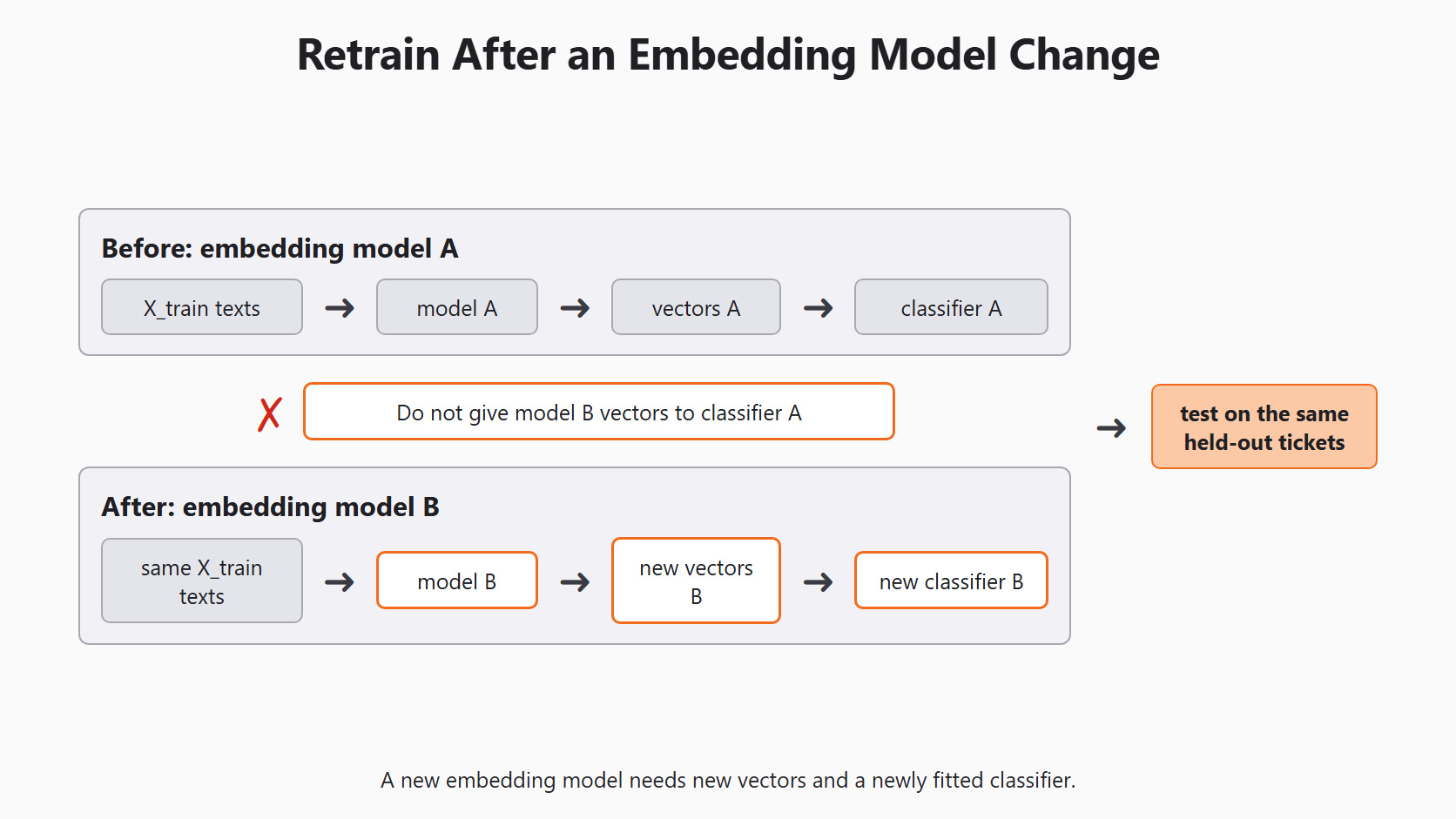
The trained classifier learned from one number space. If we switch embedding models, the new vectors may have a different length. Even with the same length, the positions can mean different things. So the old classifier cannot read the new rows.
The fix is to rebuild both steps. We embed the original training texts again with the new model. Then we fit a new classifier on those new vectors. This is why we always keep the original texts and labels. Then we test on the same untouched tickets as before.
Caution
Never mix vectors from two embedding models in one training set or one cache. The code will often run without an error, and the predictions will quietly be wrong.
Conclusion
This is how an embedding pipeline works. We built six labeled tickets and checked that texts and labels line up. We joined GPTVectorizer and LogisticRegression in one pipeline, trained it, and traced a new ticket through both steps. Then we saw how to compare it with the Day 4 baseline and when to rebuild vectors.
- The embedding model makes numbers. Only the classifier learns from our labels.
GPTVectorizer.fit()does nothing. The model call happens intransform().- A pipeline applies the same embedding step at training time and at prediction time.
- Compare with the TF-IDF baseline on the same held-out tickets, and count the embedding calls.
- A new embedding model needs new vectors and a newly trained classifier.
Next steps:


