
In Day 5, every new ticket got the same solved examples in its prompt. But a password question and a double charge are very different tickets. What if each ticket could get the examples that look most like it? That is the idea behind dynamic few-shot classification.
In this blog, we will learn how Scikit-LLM picks examples for each ticket with embeddings. We will build the classifier, print the exact prompt it sends, and add a new example to give the lookup a real choice. We will also see the one rule that makes this method crash.
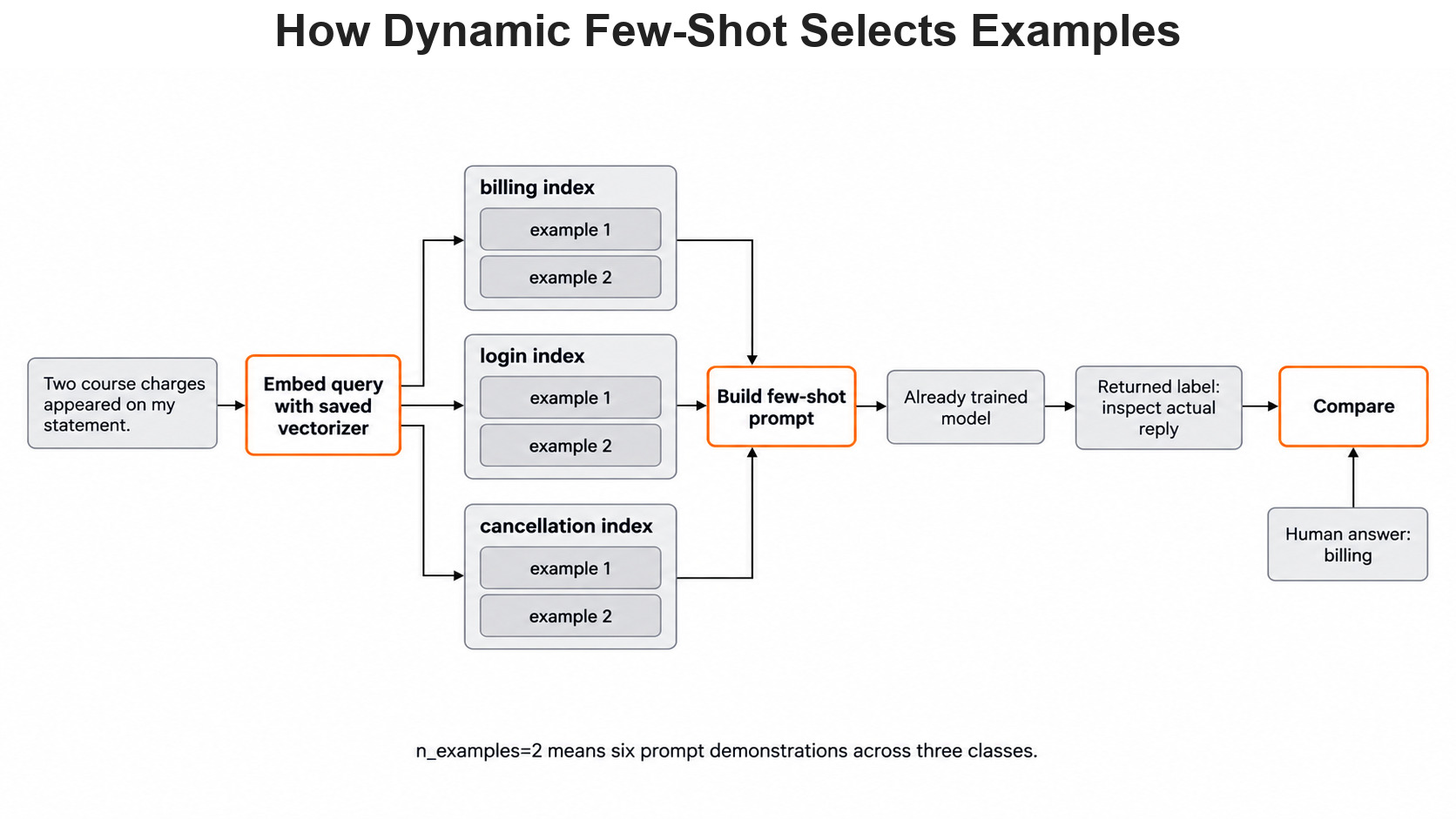
Here is the full path of one new ticket, from lookup to answer.
Why Pick Examples for Each Ticket
A fixed prompt shows every ticket the same solved cases. Let's say a student writes about two payments for one order. Examples about double charges will help the model more than examples about an expired password. But a fixed prompt cannot know that in advance.
So, here comes dynamic few-shot to the rescue. Before each request, it searches our labeled examples and picks the ones closest to the new ticket. It uses the embeddings from Day 7 to measure how close two texts are.
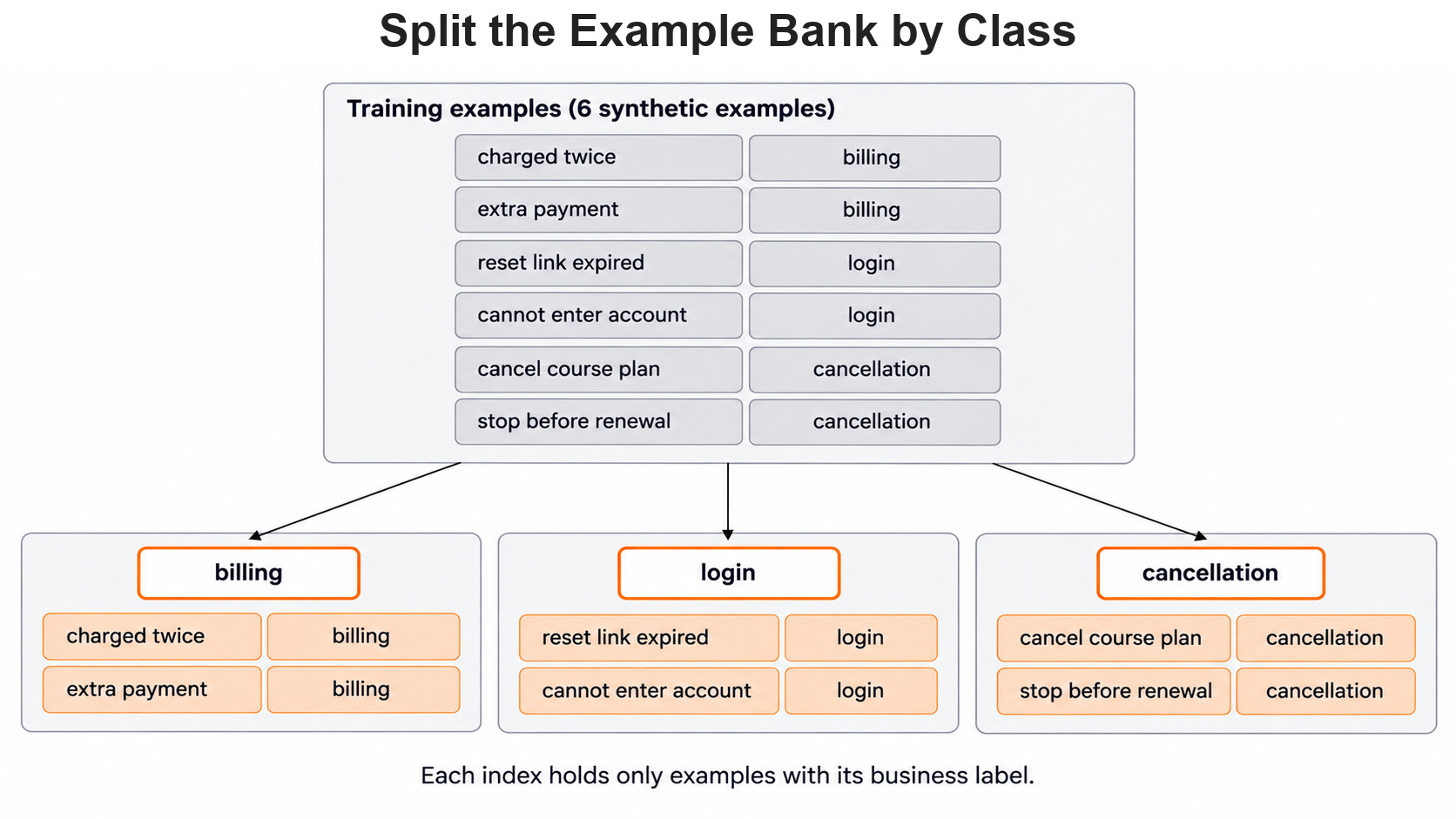
The search does not run over all examples at once. Scikit-LLM keeps one small index for each class. It then picks the closest examples from every class, so each label is always shown in the prompt.
How the Lookup Works
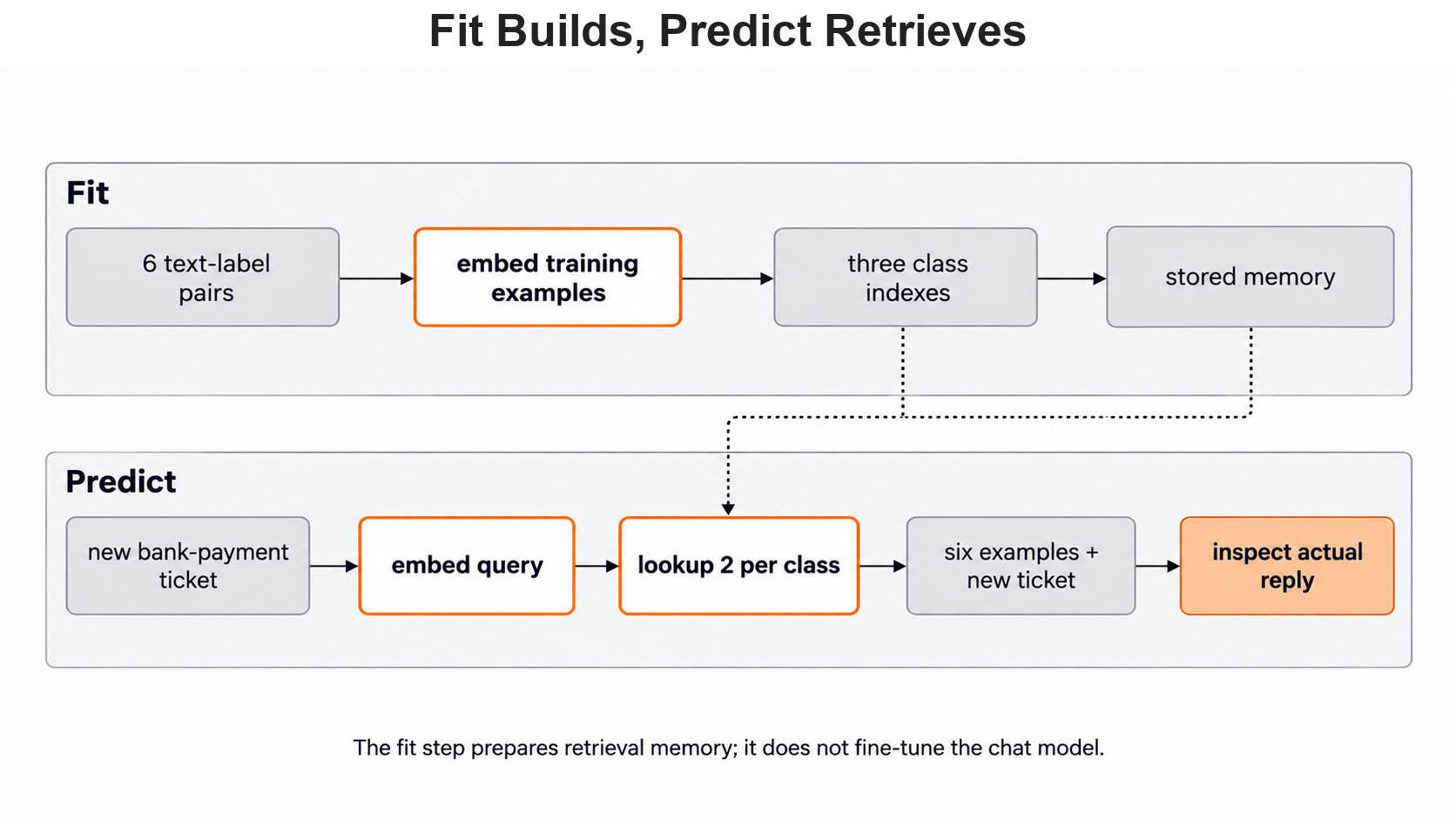
When we call fit, Scikit-LLM embeds our examples one class at a time. Each class gets its own index of vectors. When a new ticket arrives, it is embedded with the same embedding model. Vectors from two different models cannot be compared.
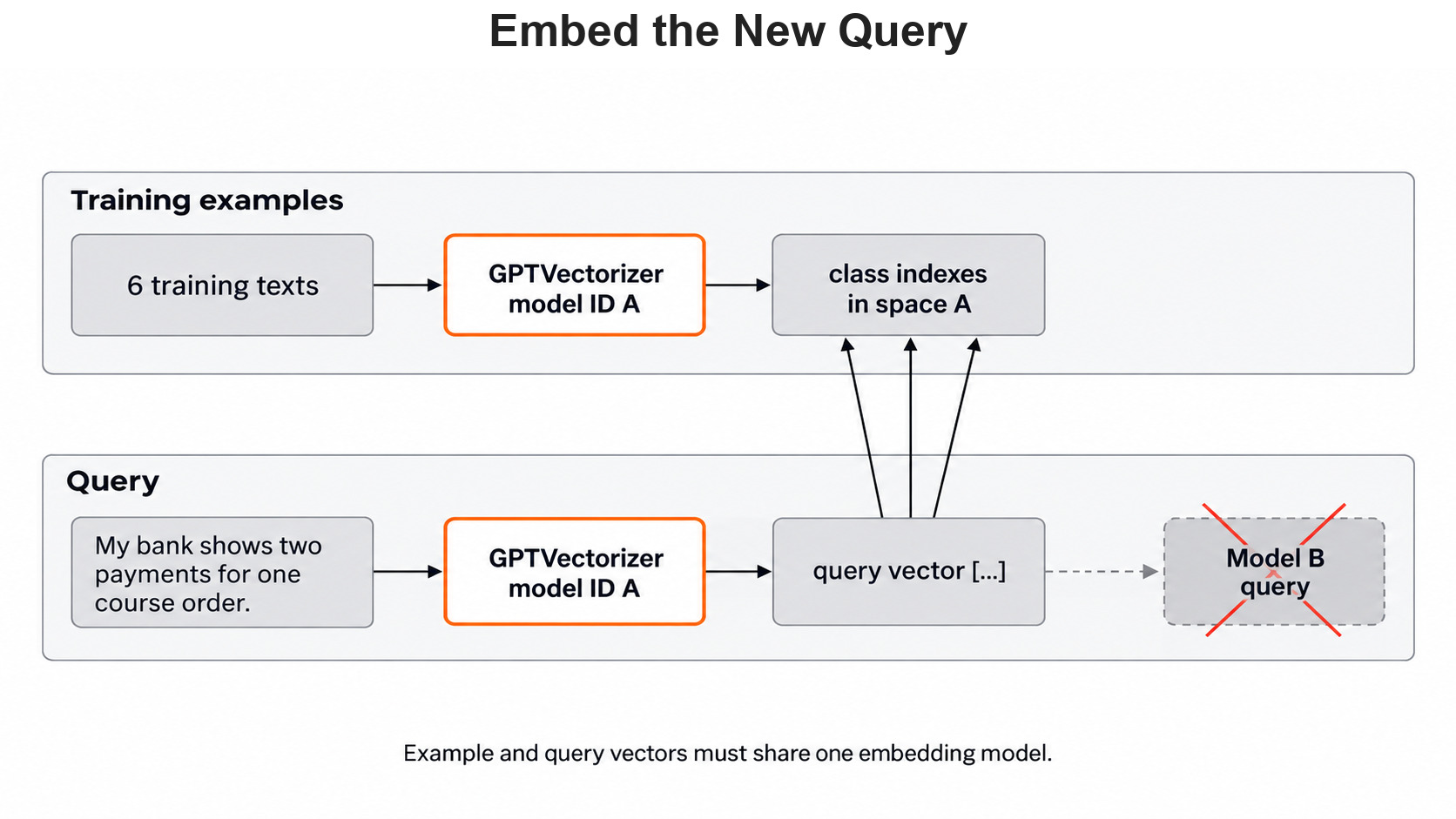
Next, the classifier searches each class index for the nearest vectors. By default it measures Euclidean distance, which is the straight-line gap between two vectors. A smaller distance means the texts are closer. The search returns the positions of the nearest examples, not a score.
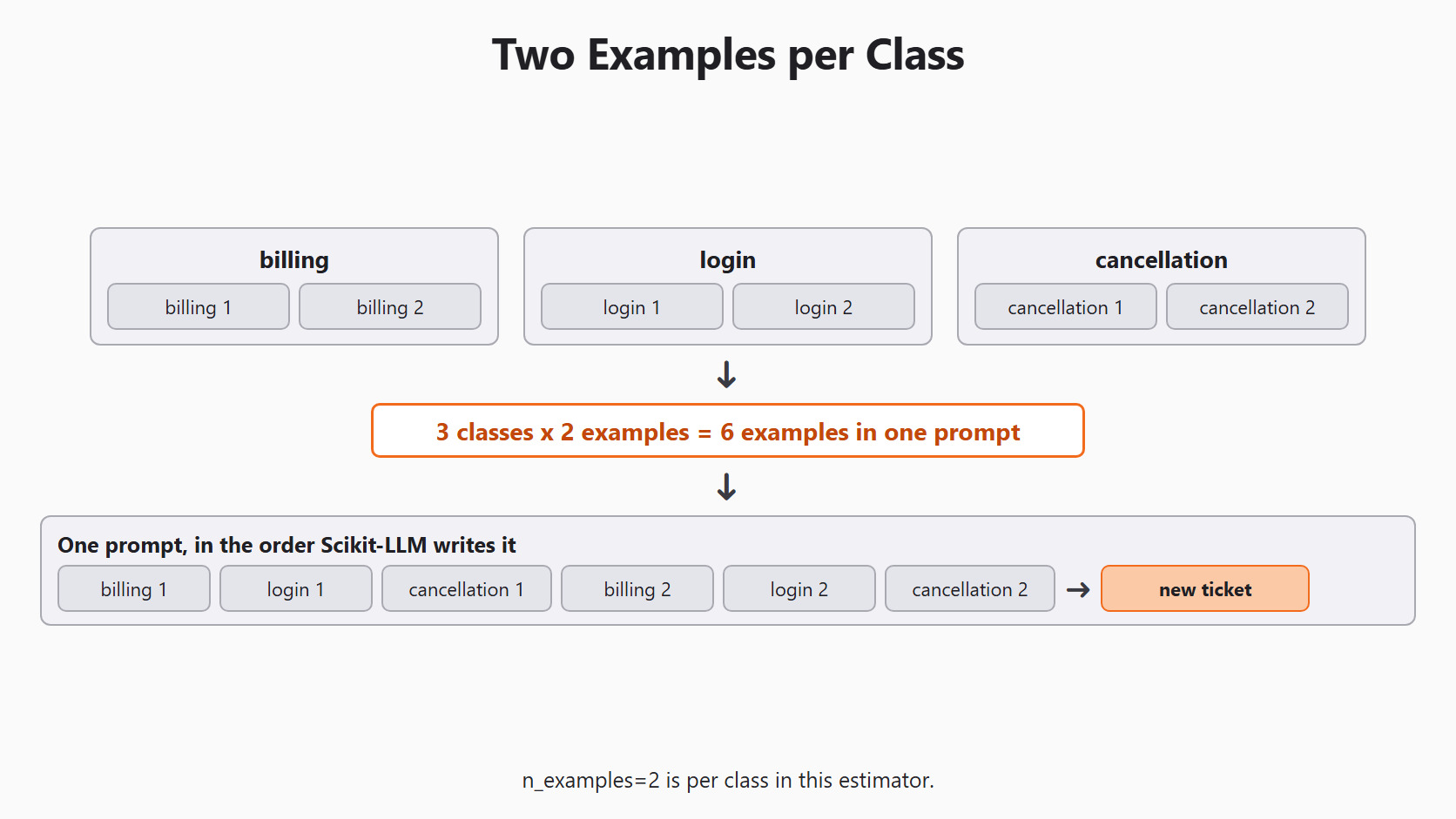
The setting n_examples counts examples per class, not per prompt. With n_examples=2 and three classes, each prompt holds six solved examples.
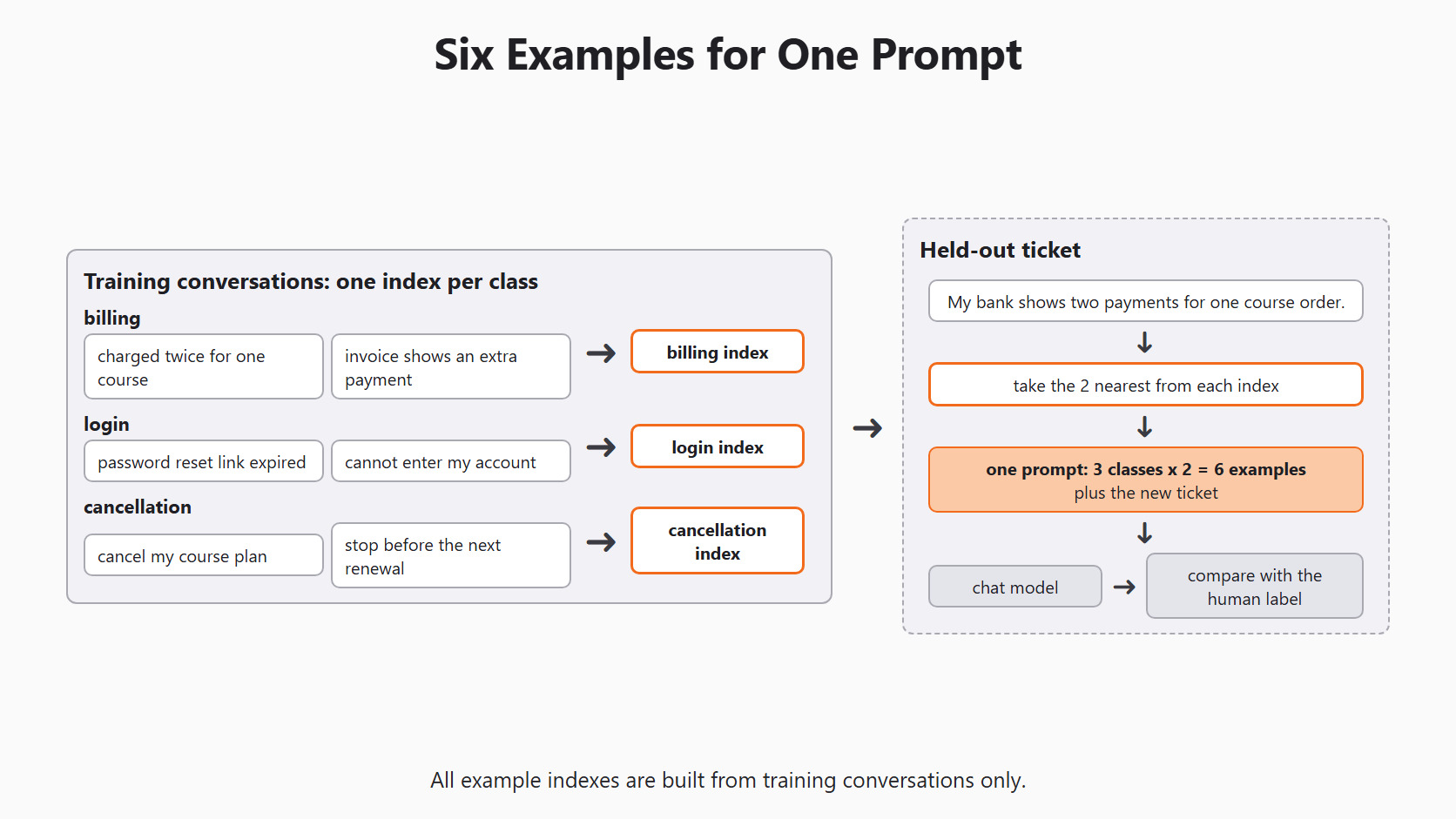
Why search every class? If we took the six closest examples overall, they might all be billing tickets. Then the model would see no login or cancellation example to compare against. Searching each class keeps every label in view. The cost is that some chosen examples will be only loosely related to the ticket.
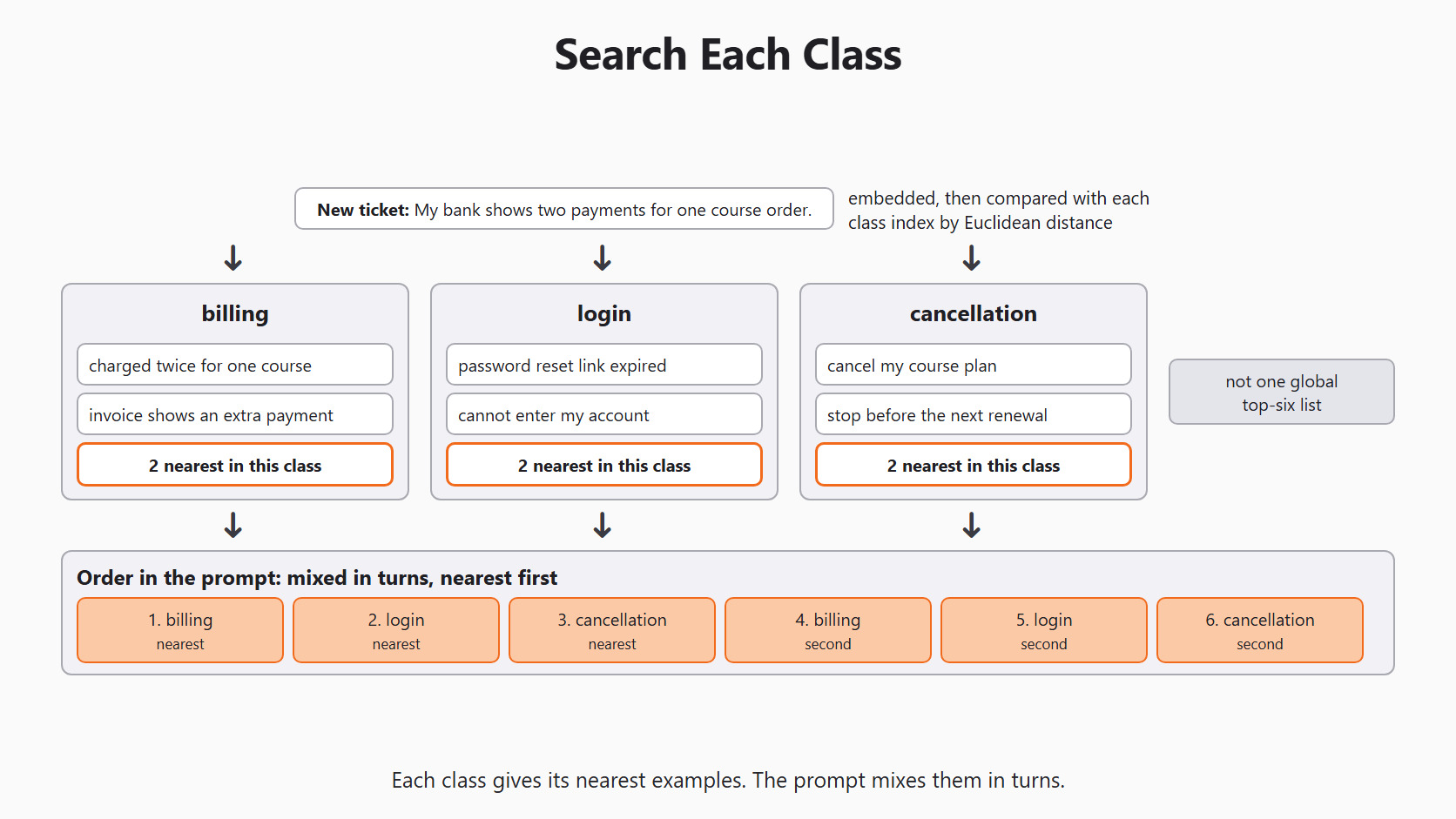
The six examples are not grouped by class in the prompt. Scikit-LLM mixes them in turns: the first billing example, the first login example, the first cancellation example, then the second of each. Within a class, the closer example comes first.
Setup
We use the same setup as every day of this series. Day 2 explains each line. Today we need both names: MODEL answers the question, and EMBEDDING_MODEL finds the examples.
import os

from skllm.config import SKLLMConfig

# Default: local models through Ollama
SKLLMConfig.set_gpt_url("http://localhost:11434/v1")
SKLLMConfig.set_gpt_key("ollama")
MODEL = "custom_url::qwen3.8:27b"
EMBEDDING_MODEL = "custom_url::nomic-embed-text"

# Option: free models on OpenRouter (uncomment these lines)
# SKLLMConfig.set_gpt_url("https://openrouter.ai/api/v1")
# SKLLMConfig.set_gpt_key(os.environ["OPENROUTER_API_KEY"])
# MODEL = "custom_url::qwen/qwen3.8-27b:free"
# EMBEDDING_MODEL = "custom_url::nvidia/nemotron-3-embed-1b:free"
Both models must be on our machine first. We pull them once with ollama pull qwen3.8:27b and ollama pull nomic-embed-text. The embedding model gives 768 numbers for each text.
Note
Free OpenRouter models allow 20 requests per minute and 50 requests per day. Fitting makes one embedding request per example. Then every ticket we classify needs two requests, one embedding and one chat, so 50 requests cover at most 25 tickets.
Build the Example Bank
We use six made-up tickets, two for each category. Each label in y_examples belongs to the text at the same position in X_examples.
X_examples = [
    "I was charged twice for one course.",
    "My invoice shows an extra payment.",
    "My password reset link expired.",
    "I cannot enter my account after changing phones.",
    "Please cancel my course plan.",
    "Stop my plan before the next renewal.",
]
y_examples = [
    "billing", "billing", "login", "login",
    "cancellation", "cancellation",
]
The lookup needs enough examples in every class, so we count them before we build anything:
from collections import Counter

print(len(X_examples), len(y_examples))
print(Counter(y_examples))6 6
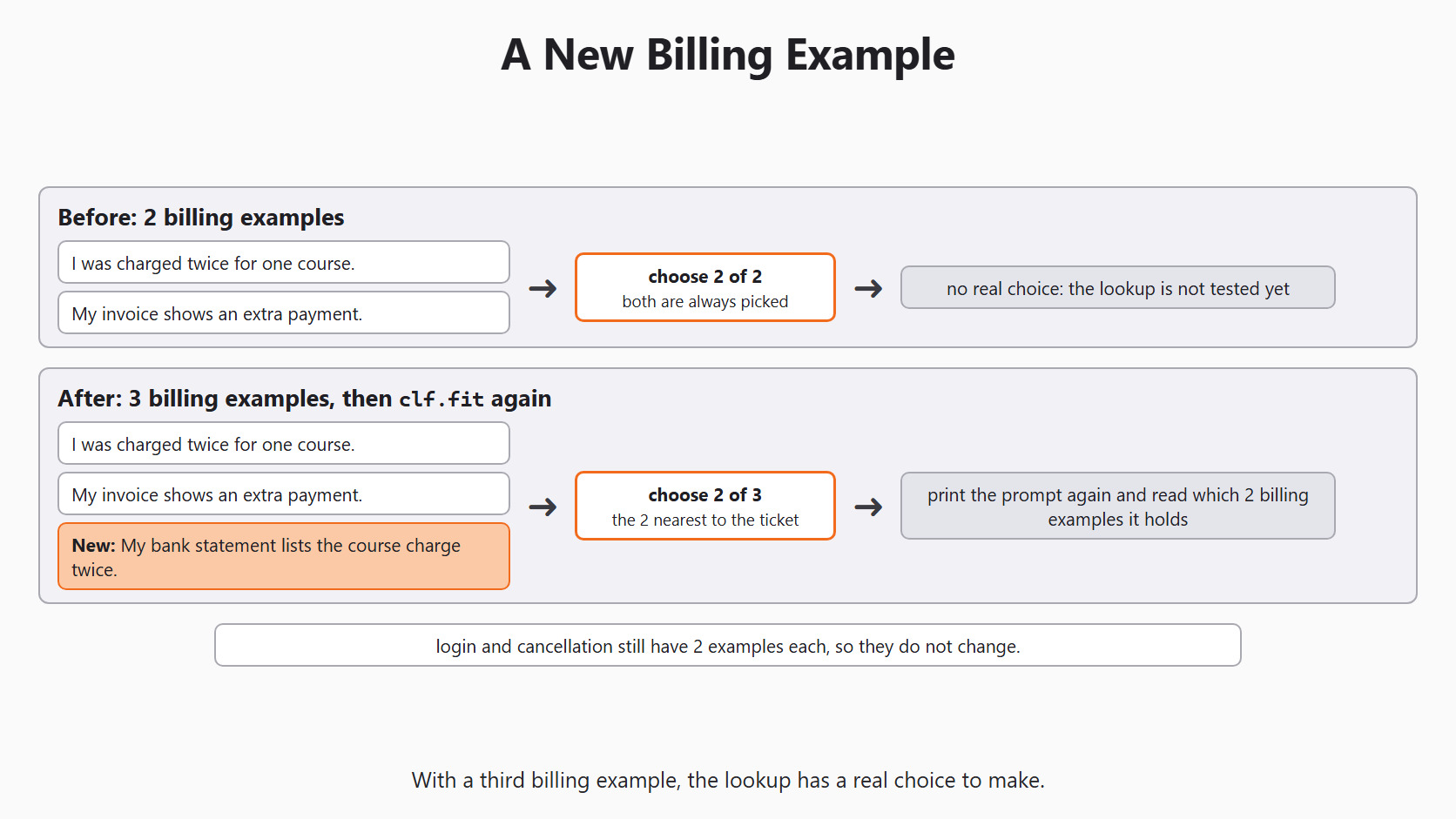
Counter({'billing': 2, 'login': 2, 'cancellation': 2})Here, we can see six texts, six labels and two examples in each class. With n_examples=2, this bank has no real choice yet. Each class has exactly two examples, so both are always picked. This first run shows the shape of the prompt. Later we add a third billing example to test the lookup.
Fit the Dynamic Few-Shot Classifier
We import the classifier and the vectorizer:
from skllm.models.gpt.classification.few_shot import (
    DynamicFewShotGPTClassifier,
)
from skllm.models.gpt.vectorization import GPTVectorizer
Now we build the classifier and fit it on our example bank:
clf = DynamicFewShotGPTClassifier(
    model=MODEL,
    vectorizer=GPTVectorizer(model=EMBEDDING_MODEL),
    n_examples=2,
    default_label="needs_review",
)
clf.fit(X_examples, y_examples)
Each setting has a job:
model=MODELis the chat model that picks the label.vectorizer=GPTVectorizer(model=EMBEDDING_MODEL)is the embedding model that finds the examples.n_examples=2asks for two examples from each class.default_label="needs_review"is used when the reply is not one of our three labels.
Important
Always pass the vectorizer. Without it, Scikit-LLM builds a GPTVectorizer for text-embedding-ada-002, an OpenAI model name. Ollama does not have that model, so the lookup fails.
During fit, the library prints Building index for class ... once for each class, followed by a progress bar. It embeds the six examples and stores one index per class. The chat model is not called, and nothing about it is trained. Fitting only builds the lookup memory.
Predict a New Ticket
Now we classify a ticket that is not in the bank. A person would label it billing. We print the real result instead of assuming it:
new_ticket = ["My bank shows two payments for one course order."]
prediction = clf.predict(new_ticket)
print(prediction)
For this ticket, the classifier makes two calls. First, it embeds the ticket and picks two examples per class. Then it sends the six examples and the ticket to the chat model. It prints a NumPy array with one label. If the reply is not billing, login or cancellation, the label becomes needs_review.
Note
Qwen 3.8 27B thinks before it answers, so each chat call on a local machine can take a while.
See Which Examples Went Into the Prompt
We should not guess which examples the model saw. The official Scikit-LLM guide shows a helper that builds the prompt for one ticket. Let's see the code as below:
prompt = clf._get_prompt(new_ticket[0])
print(prompt["messages"])
The name starts with an underscore, so it is a private helper. It may change in a later version, so we use it only for checking. It still makes one embedding call, but it does not call the chat model.
The printed prompt has four parts, in this order:
- The instructions, which ask for JSON with one key,
label. - The list of categories:
['billing', 'login', 'cancellation']. - The six solved examples, mixed in turns by class.
- The new ticket, followed by
Your JSON response:.
Here, we can see that the examples come before the ticket. We will also see a line with a single s after each example text. That line comes from the prompt template inside Scikit-LLM 1.4.3, not from our code.
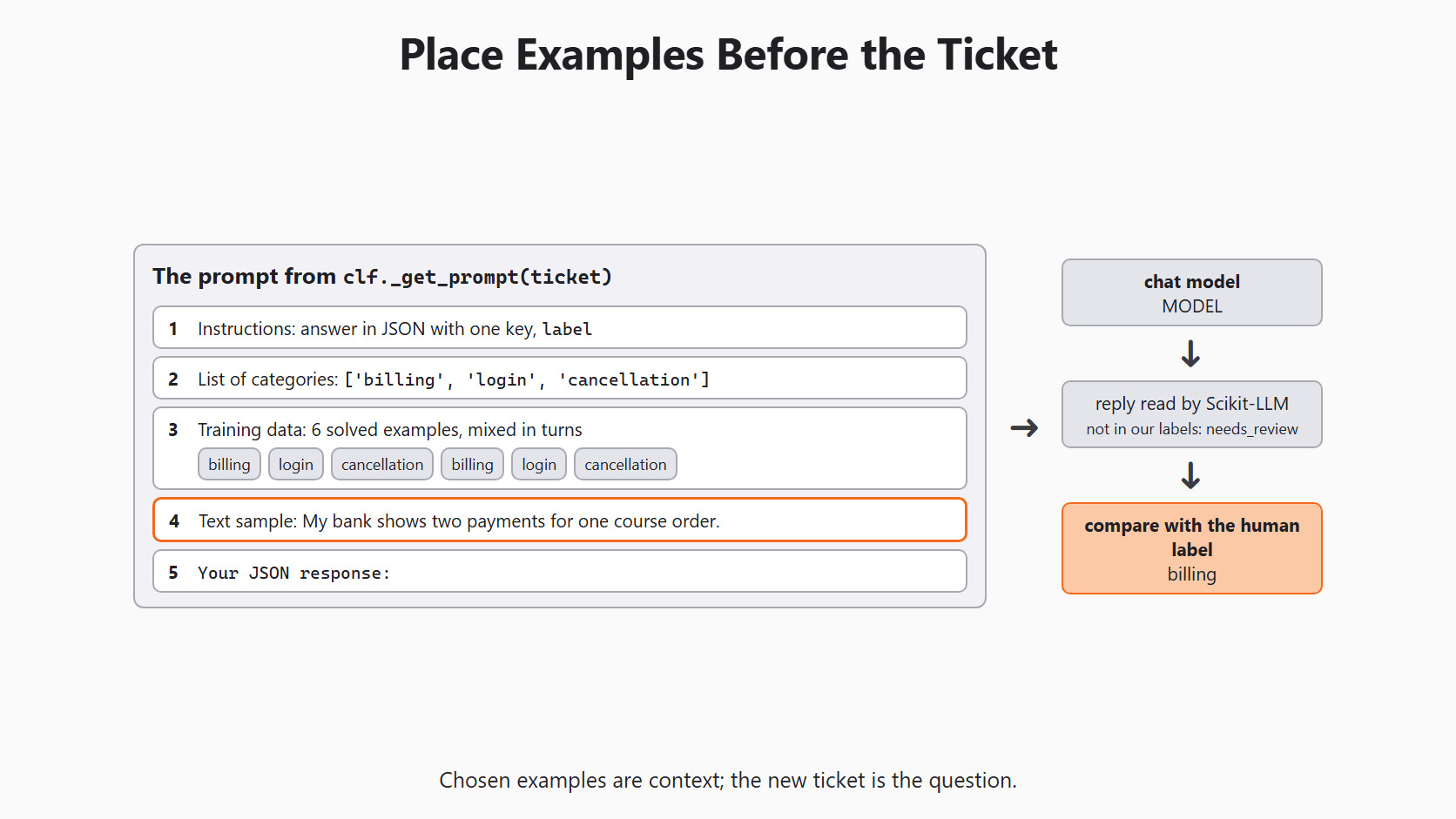
The categories follow the order of their first appearance in y_examples, not alphabetical order. That is why billing comes first.
Add a Third Billing Example
Now we give the lookup a real choice. We add a billing ticket with new wording and fit again:
X_examples.append("My bank statement lists the course charge twice.")
y_examples.append("billing")

clf.fit(X_examples, y_examples)
prompt = clf._get_prompt(new_ticket[0])
print(prompt["messages"])
The billing index now holds three examples, so the lookup keeps only the two closest. We read the two billing examples in the new prompt. If the new one is picked, it is because its vector is close to the ticket. The login and cancellation examples stay the same, since those classes still have two each.
One ticket cannot tell us if this makes the classifier more accurate. It only shows us what the lookup did. To measure accuracy, we need many held-out tickets with human labels.
Warning
Every class needs at least n_examples examples. If a class has fewer, fit still works, but predict raises IndexError: list index out of range. For example, n_examples=3 with only two login examples crashes on the first prediction. We fix it by adding checked examples or by lowering n_examples. We never copy one example twice to fill the gap.
Where the Lookup Goes Wrong
The closest text is not always the best example. "I was not charged twice" shares almost every word with "I was charged twice", but it says the opposite. The lookup may place them side by side.
A wrong label in the bank is another risk. If a billing ticket is marked login, it can land in many billing prompts with the wrong answer attached. So we check the texts and labels of the bank by hand before we fit.
When a label looks strange, we save a small record: the ticket ID, the chosen examples, their labels and the embedding model name. Then we can tell a bad example apart from a bad reply. These records may hold student messages, so they follow the same privacy rules as the tickets.
Keep Check Tickets Out of the Example Bank
The example bank is built from training tickets only. If a test ticket sits in the bank, the lookup can show the model its own answer. A second message from the same student can do the same thing. So we split whole conversations before we build the bank.
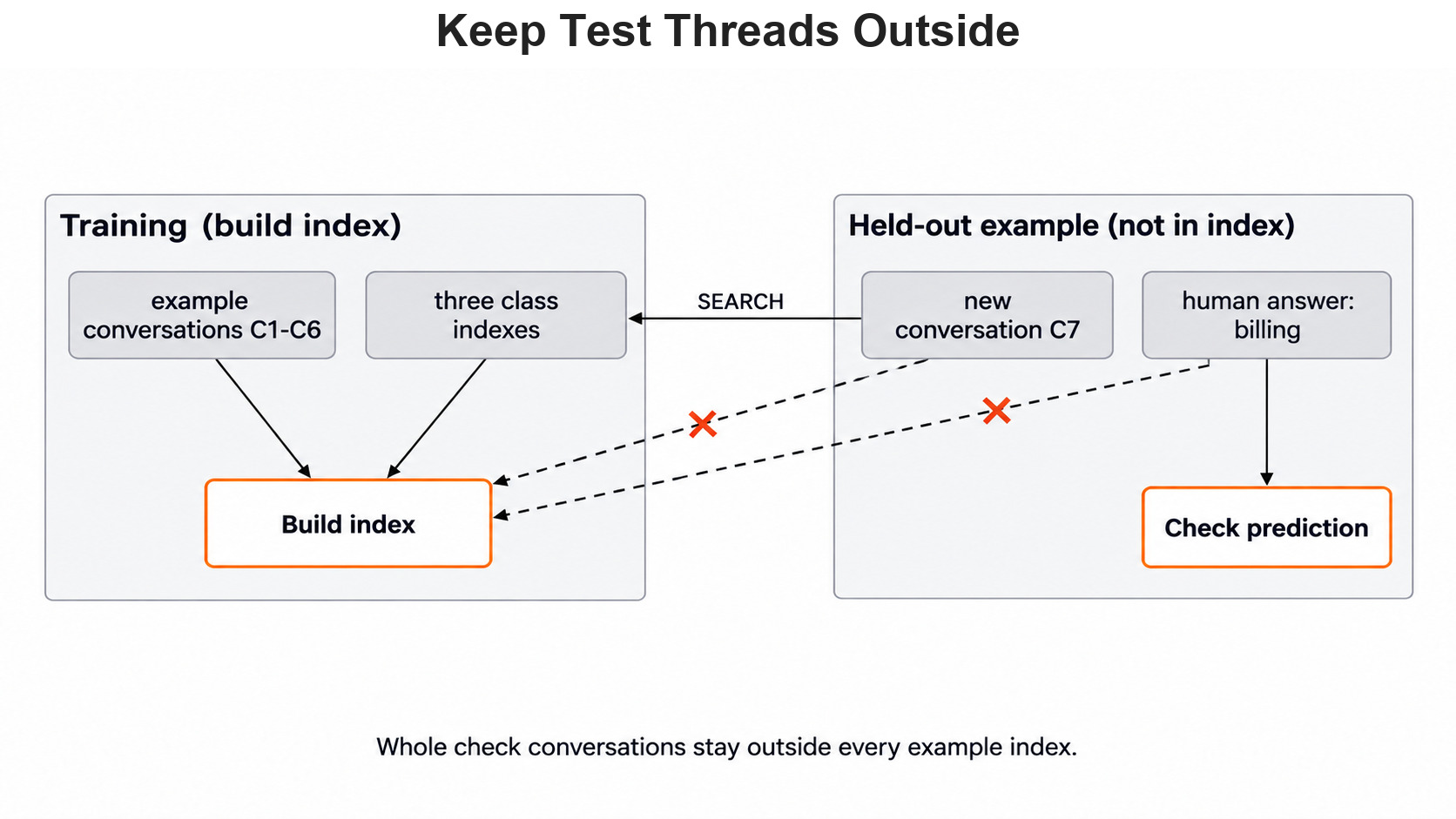
We use development conversations to choose n_examples and to study errors. We keep the final test conversations closed until those choices are fixed.
Compare With Fixed Few-Shot From Day 5
To compare the two methods fairly, we keep the chat model, the labels and the held-out tickets the same. For each ticket, we save both labels and the examples the dynamic method chose. We also count its extra embedding calls, since they add time and can fail.
If dynamic selection fixes errors that matter on independent tickets, it earns its extra step. If it only adds work, the fixed bank from Day 5 is simpler to read and check.
This method finds labeled examples to show a classifier. It does not look up policy documents to answer a question. So the model suggests a category, and a person still checks the account before any refund.
Conclusion
This is how dynamic few-shot classification works. We built a small example bank and checked its counts. We fit DynamicFewShotGPTClassifier with our own embedding model, classified a new ticket and printed the exact prompt. Then we added a third billing example so the lookup had a real choice.
n_examplescounts examples per class, so three classes withn_examples=2give six examples per prompt.- Always pass
vectorizer=GPTVectorizer(model=EMBEDDING_MODEL), or the lookup asks for an OpenAI model. - The prompt mixes the examples in turns by class, and they come before the new ticket.
- A class with fewer than
n_examplesexamples makespredictraiseIndexError. - Test tickets and their conversations stay out of the example bank.
Next steps:


