
If a model gets one duplicate-charge ticket right, should we trust it with every support message? No. In this blog, we will build a small offline baseline and run the zero-shot classifier from Day 3 on the same held-out tickets.
We will find out how to split tickets fairly and how to count every answer in the right bucket. We will also see why a perfect 3 out of 3 can still be luck.
Decide What Counts as a Fair Test
A fair test needs three groups of tickets. This figure shows the path from raw conversations to those three groups.
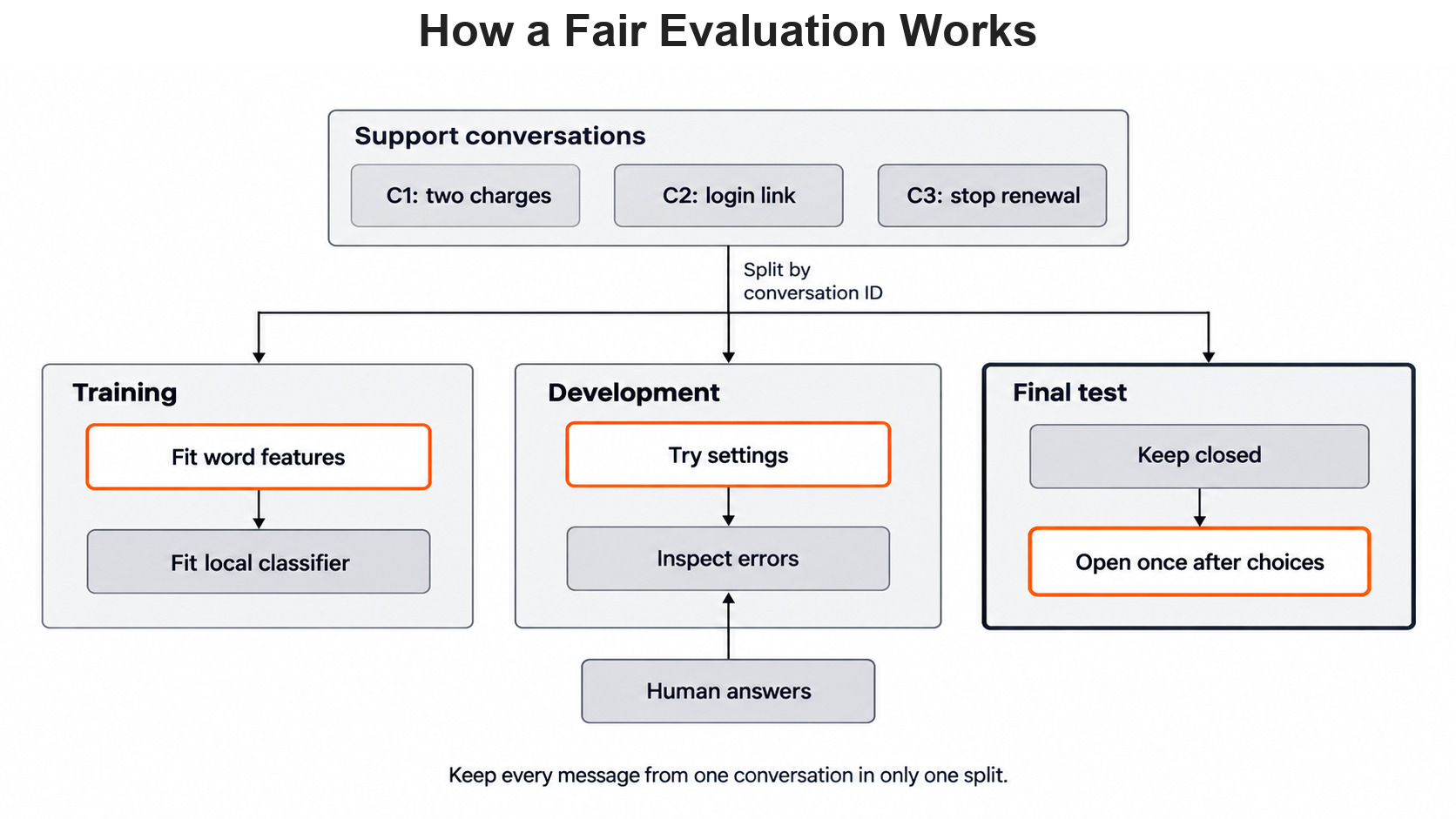
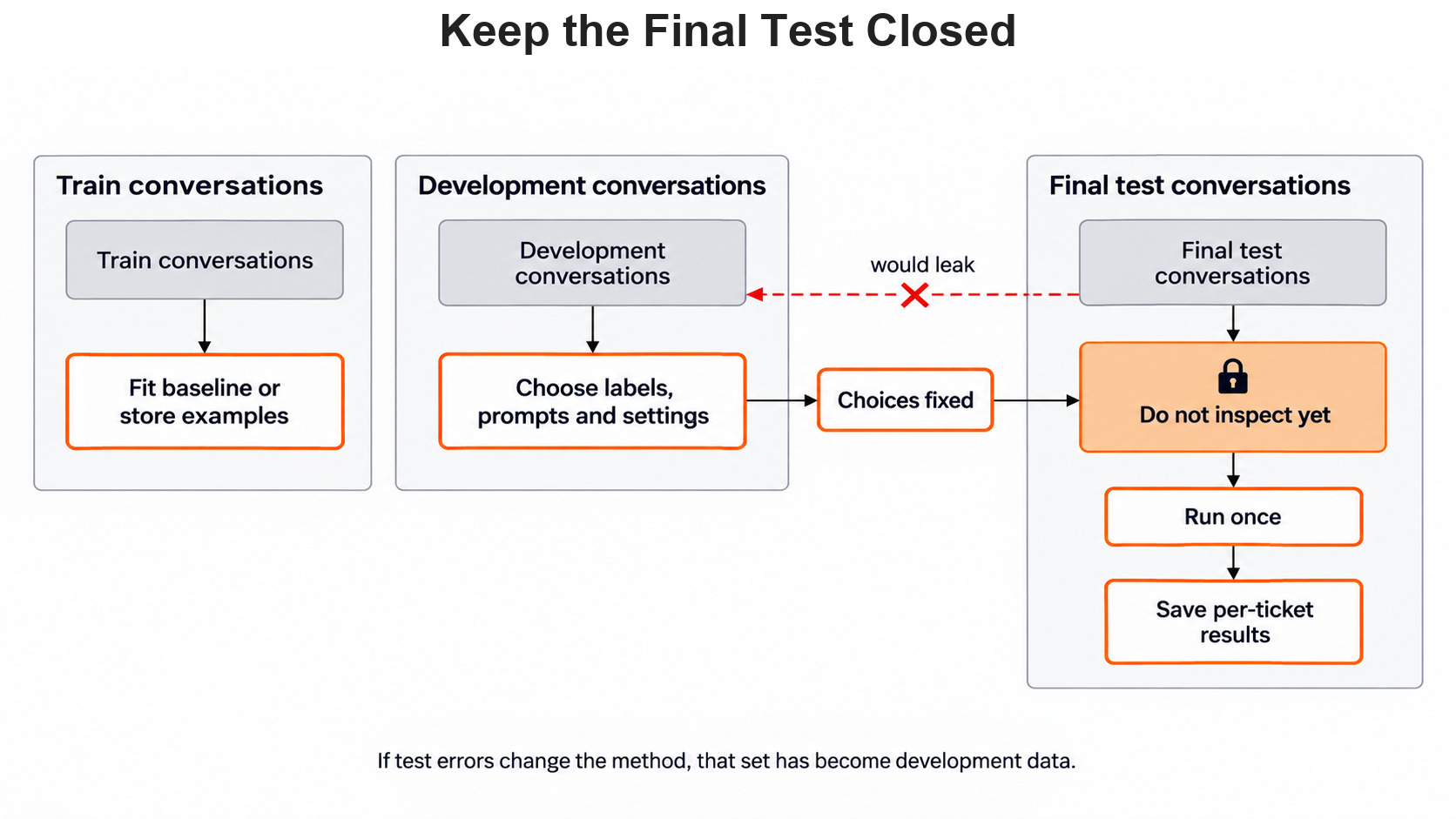
The training group teaches a local classifier or supplies few-shot examples. The development group is where we try label names, prompts and model settings. The final test group stays closed until those choices are fixed. If we read its errors and then change the system, it has become development data.
Why do we split by conversation and not by message? Because one student may write three messages about the same double charge. If one message trains the system and another tests it, the test repeats words the system has already seen. So we give every message a conversation ID, and all messages with one ID stay in one group.
We divide the IDs before building a vectorizer or choosing prompt examples. A random seed helps us repeat the split. But a seed alone does not stop two messages from one conversation from landing on both sides. After the split, we check the label counts. A tiny final group may hold no cancellation ticket at all, and then we cannot judge cancellation.
The final group gets opened once, after every choice is made.
Make a Tiny Baseline That Runs Offline
A baseline is a simple method we run before adding a language model. In simple words, it is the yardstick. If a cheap method already sorts common tickets well, the model calls must fix a problem we can measure.
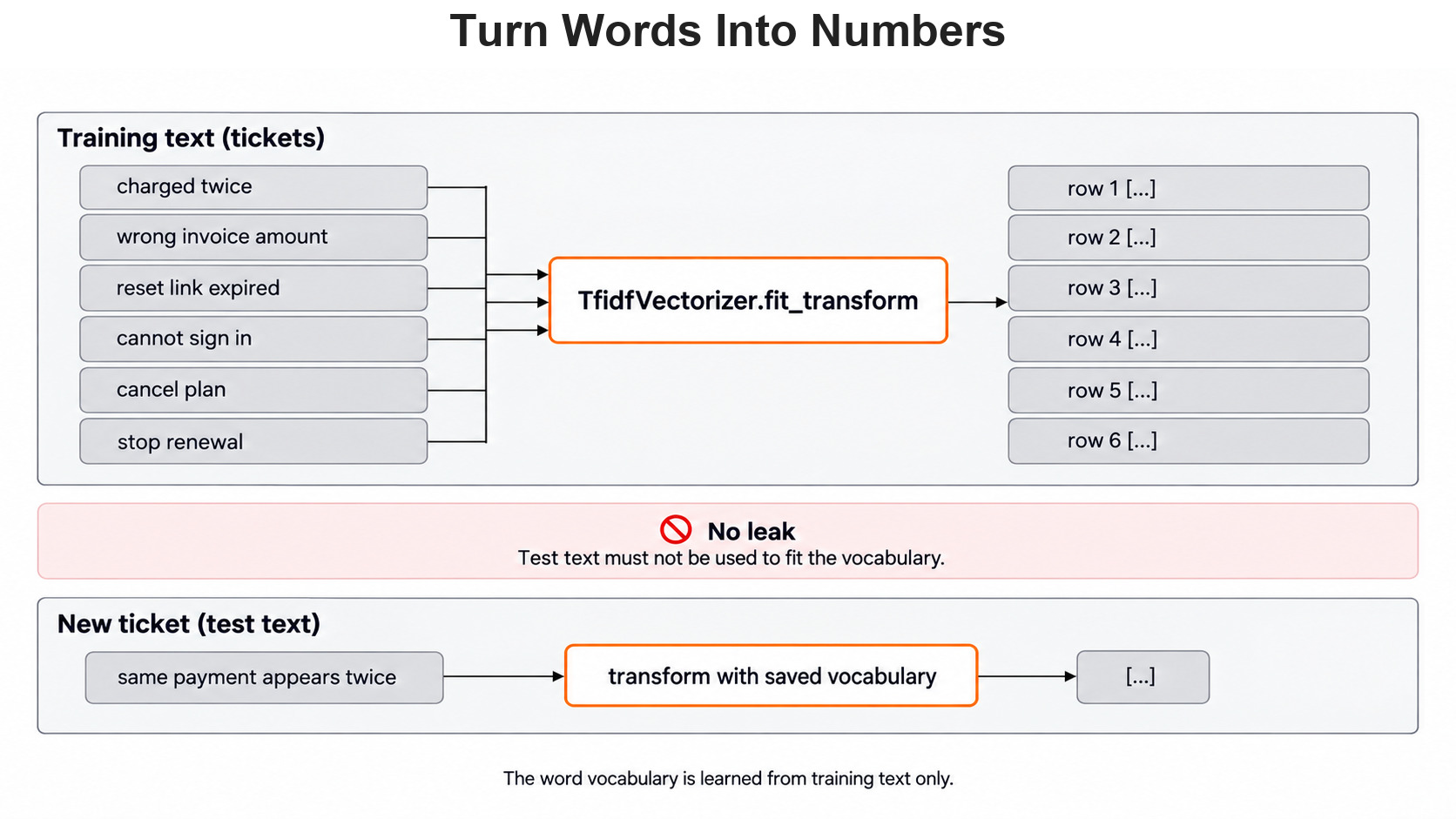
Our baseline has two steps. TfidfVectorizer turns each ticket into a row of numbers, one number per known word. The word list is learned from the training text only.
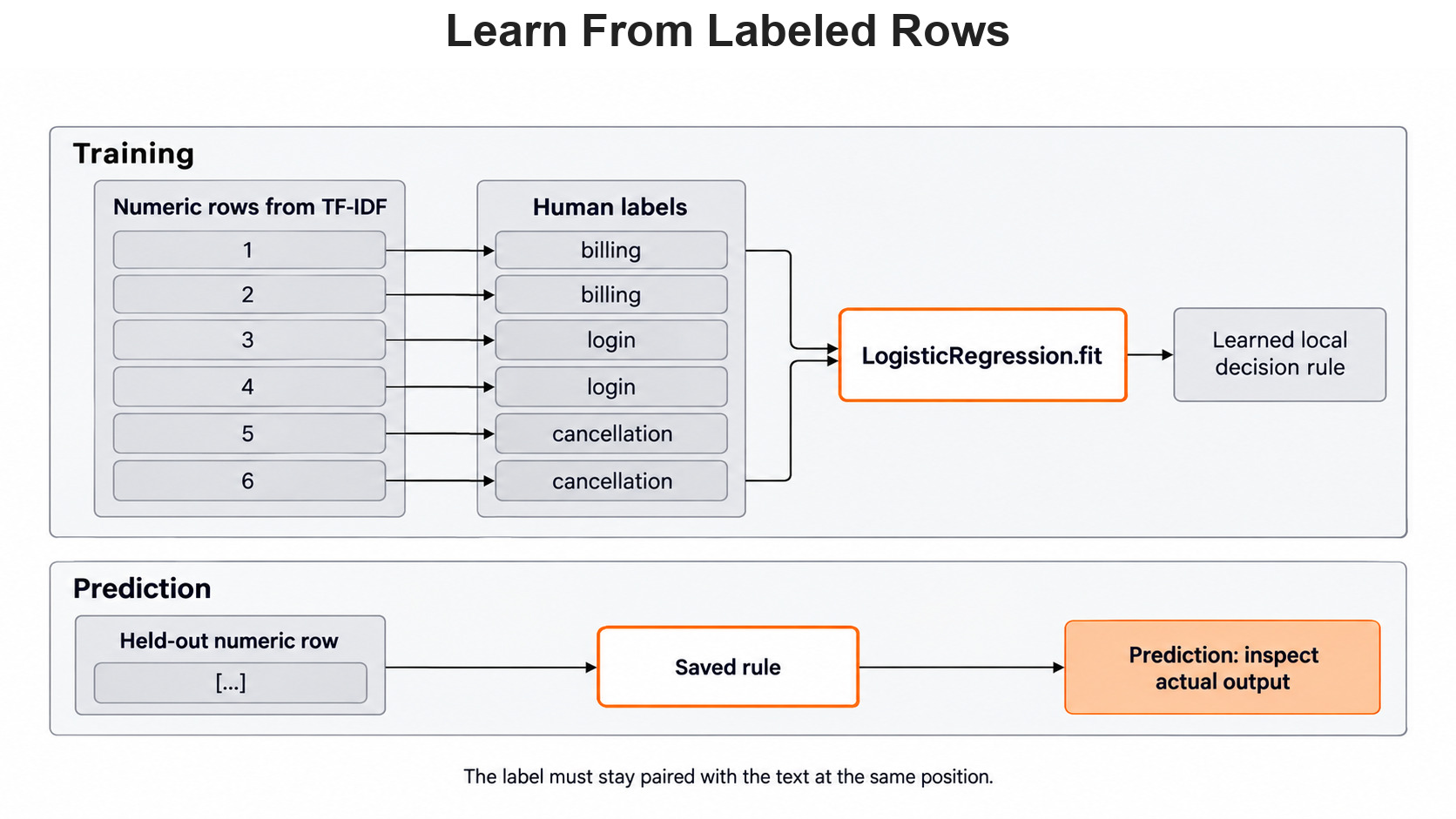
LogisticRegression then learns which number patterns go with each label. The scikit-learn Pipeline guide explains how the two steps are joined.
We import the vectorizer, the classifier and the pipeline that joins them:
from sklearn.feature_extraction.text import TfidfVectorizer
from sklearn.linear_model import LogisticRegression
from sklearn.pipeline import Pipeline
Each training text has one human label at the same list position. Six messages are far too few for a real estimate, but they let us trace every step:
X_train = [
    "I was charged twice for the course.",
    "My invoice shows the wrong amount.",
    "My password reset link has expired.",
    "I cannot sign in to my account.",
    "Please cancel my course plan.",
    "Stop renewing my subscription.",
]
y_train = [
    "billing", "billing", "login", "login",
    "cancellation", "cancellation",
]
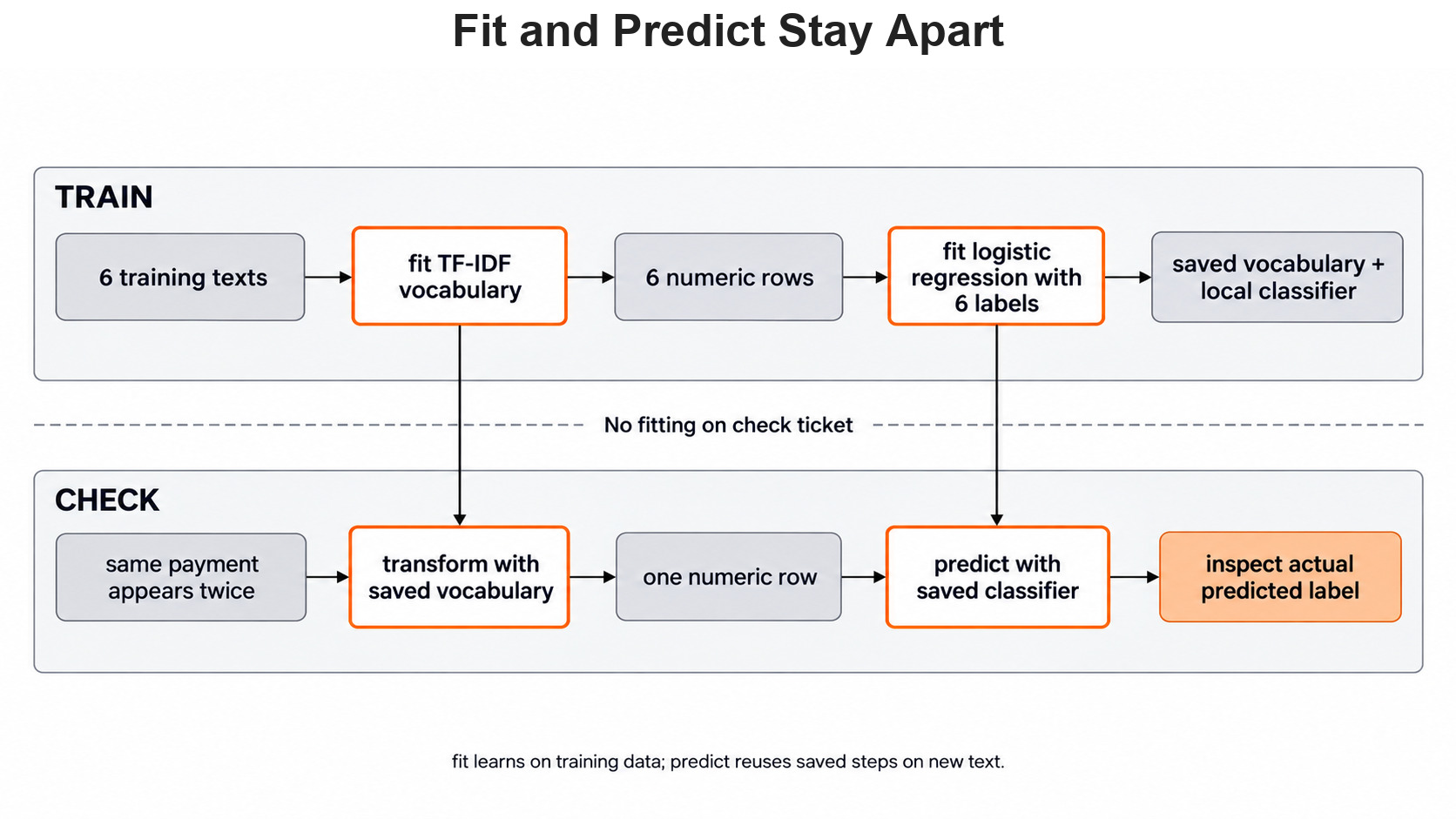
The vectorizer comes first because the classifier needs numbers, not sentences. We fit the whole pipeline on the training tickets only. max_iter=1000 simply gives the optimizer enough steps to finish on this data.
baseline = Pipeline([
    ("words", TfidfVectorizer()),
    ("classifier", LogisticRegression(max_iter=1000)),
])
baseline.fit(X_train, y_train)
Later, predict reuses the saved word list and the saved classifier. Nothing is fitted again on the check text.
Count Answers on Held-Out Tickets
These three check tickets are not in X_train. We write their human answers before any method sees them. Every method we compare gets exactly these tickets.
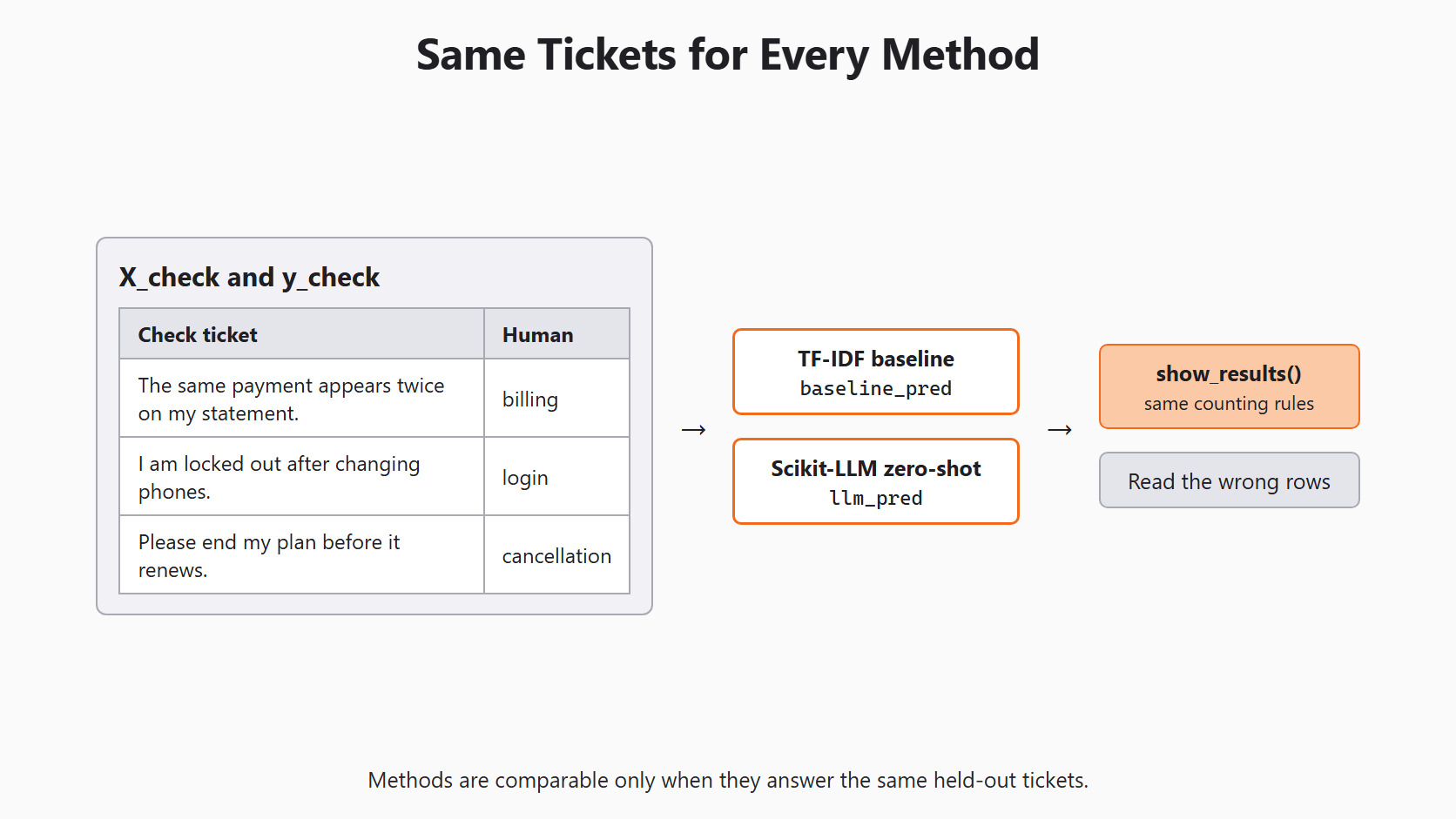
Let's see the code as below:
X_check = [
    "The same payment appears twice on my statement.",
    "I am locked out after changing phones.",
    "Please end my plan before it renews.",
]
y_check = ["billing", "login", "cancellation"]
baseline_pred = baseline.predict(X_check)
A single exact-match number is not enough. Each answer belongs in one of four buckets: correct, wrong_label, needs_review or request_failed. A review marker is not a wrong category, and a failed request is neither. We write the counting once as a function, so both methods use the same rules:
from collections import Counter


def outcome(expected, found):
    if found == "request_failed":
        return "request_failed"
    if found == "needs_review":
        return "needs_review"
    return "correct" if found == expected else "wrong_label"


def show_results(name, predictions):
    matches = sum(a == b for a, b in zip(predictions, y_check))
    print(f"{name} exact matches: {matches}/{len(y_check)}")
    for text, expected, found in zip(X_check, y_check, predictions):
        print(text, "| human:", expected, "|", name + ":", found)
    buckets = Counter(outcome(e, f) for e, f in zip(y_check, predictions))
    print(dict(buckets))


show_results("baseline", baseline_pred)baseline exact matches: 3/3
The same payment appears twice on my statement. | human: billing | baseline: billing
I am locked out after changing phones. | human: login | baseline: login
Please end my plan before it renews. | human: cancellation | baseline: cancellation
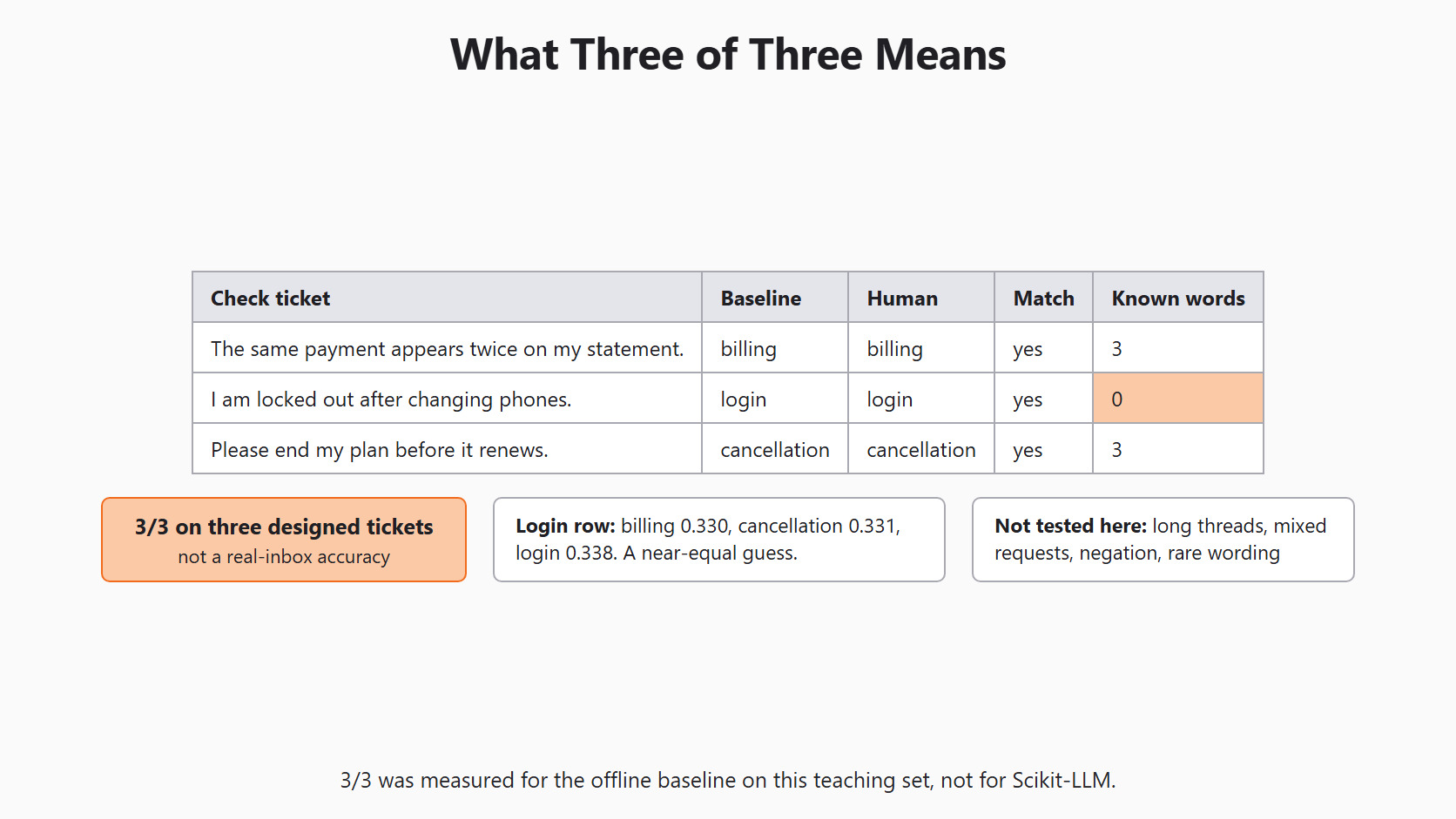
{'correct': 3}Here, we can see that the baseline matched all three human labels. The bucket counts add up to three, one per ticket. If the total ever differs from the number of tickets, the report has a bug.
Warning
We wrote these tickets ourselves to teach the steps. So 3/3 describes three designed examples only. It is not an accuracy claim for a real support inbox.
Why the Login Answer Was Luck
A correct label can hide a weak guess. predict_proba shows how sure the baseline was about each label. We also count how many words of each ticket the vectorizer knows:
print(baseline.classes_)
print(baseline.predict_proba(X_check).round(3))
words = baseline.named_steps["words"]
print(words.transform(X_check).getnnz(axis=1))['billing' 'cancellation' 'login']
[[0.44 0.28 0.28 ]
[0.33 0.331 0.338]
[0.257 0.464 0.279]]
[3 0 3]Here, we can see the problem in the second row. The login ticket got 0.330 for billing, 0.331 for cancellation and 0.338 for login. The last line explains why: the vectorizer knows zero words from "I am locked out after changing phones." Its row of numbers is all zeros.
So the baseline did not read the ticket at all. With no known words, only the classifier's intercepts decide. These are small starting scores it learned for each label. Login won by less than one percentage point, and a different training set could flip that guess. This is exactly why we read the per-ticket rows and not only the total.
This figure puts the whole 3/3 result together, including the weak login row.
Setup
The model run needs the same setup as every Scikit-LLM lesson. Day 2 explains each line.
import os

from skllm.config import SKLLMConfig

# Default: Qwen 3.8 27B running on our own machine through Ollama
SKLLMConfig.set_gpt_url("http://localhost:11434/v1")
SKLLMConfig.set_gpt_key("ollama")
MODEL = "custom_url::qwen3.8:27b"

# Option: the free Qwen 3.8 27B on OpenRouter (uncomment these lines)
# SKLLMConfig.set_gpt_url("https://openrouter.ai/api/v1")
# SKLLMConfig.set_gpt_key(os.environ["OPENROUTER_API_KEY"])
# MODEL = "custom_url::qwen/qwen3.8-27b:free"
Note
The local route has no API bill and needs no real key. The OpenRouter route needs OPENROUTER_API_KEY in the environment. Its free models allow 20 requests per minute and 50 per day, or 1,000 per day after buying at least $10 of credits.
Run Day 3's Classifier on the Same Tickets
Now we put Scikit-LLM on the same check set. We build the same zero-shot classifier as Day 3. It gets the three business labels, and needs_review catches any reply outside them.
from skllm.models.gpt.classification.zero_shot import ZeroShotGPTClassifier

labels = ["billing", "login", "cancellation"]
clf = ZeroShotGPTClassifier(model=MODEL, default_label="needs_review")
clf.fit(None, labels)
This figure follows one check ticket through both methods to the same comparison.
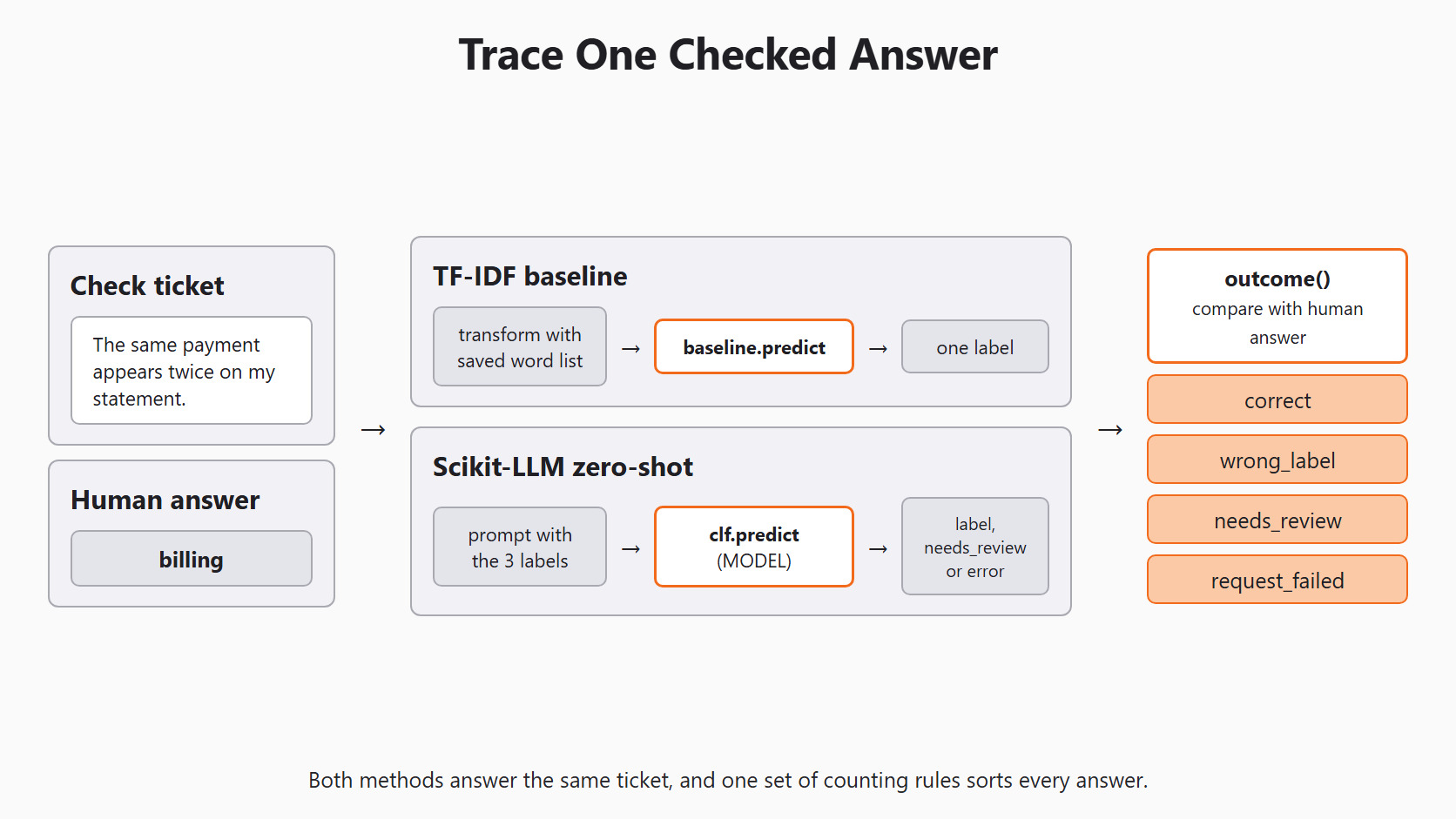
We send one ticket per call. If one request fails, Scikit-LLM raises a RuntimeError after its retries. We catch it and record request_failed for that ticket only. The other tickets still get their answers.
llm_pred = []
for text in X_check:
    try:
        llm_pred.append(clf.predict([text])[0])
    except RuntimeError:
        llm_pred.append("request_failed")

show_results("scikit-llm", llm_pred)
This prints the same report as the baseline. Each row shows one of billing, login, cancellation, needs_review or request_failed. The bucket counts again add up to three. We keep failed calls in the total, because dropping them would let a method look good by answering only its easy cases.
Warning
If Ollama is not running, each ticket waits through three retries before the RuntimeError. Scikit-LLM also prints a line that starts with Could not complete the operation after 3 retries. On our PC, that took about 50 seconds per ticket. Start Ollama before running this block.
Qwen 3.8 is a thinking model, so each call takes longer than the local baseline. The baseline predicts on our CPU with no network call. If speed matters, we time both on the same machine with the same tickets.
Here are the four outcomes one ticket can land in.
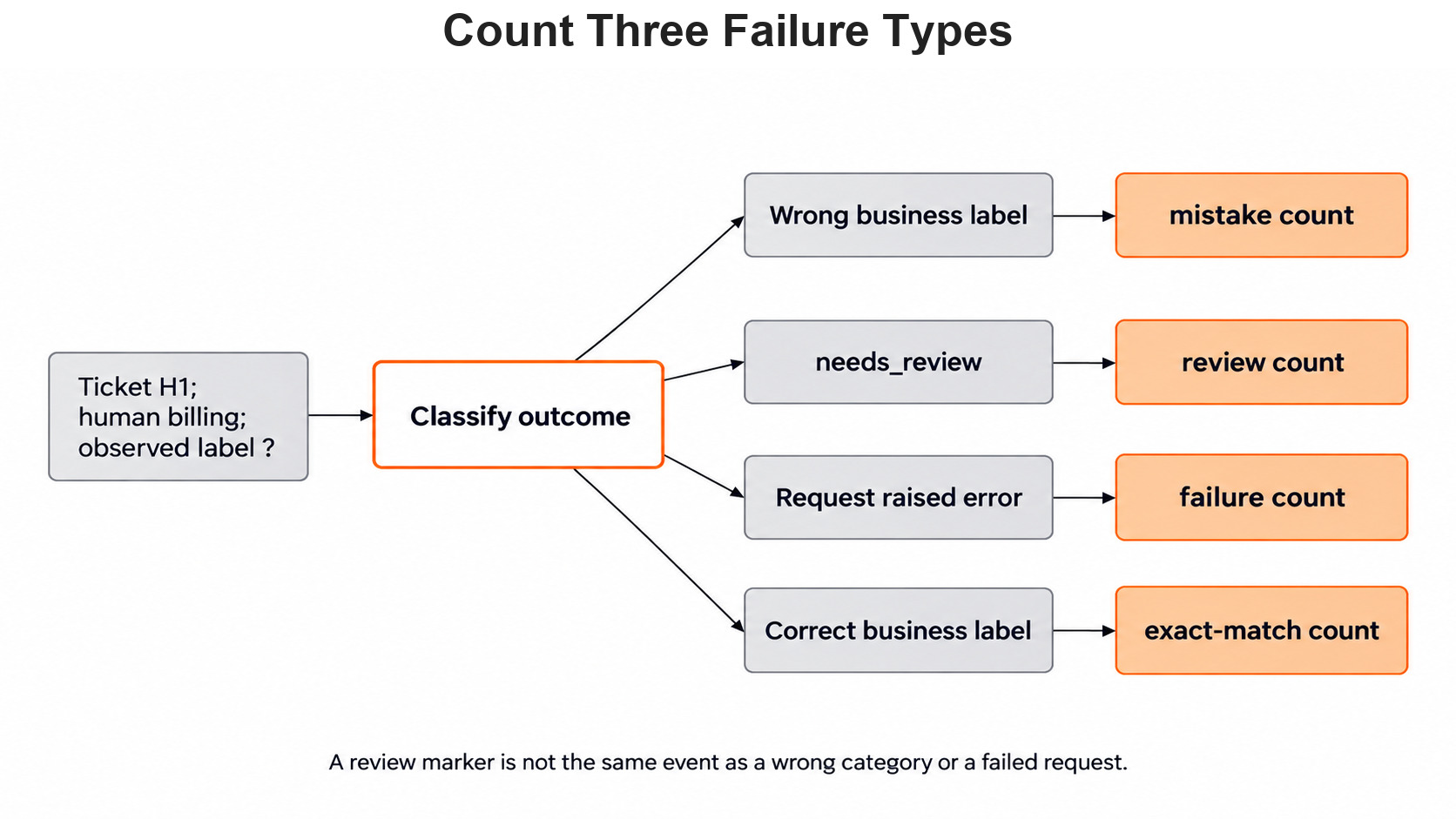
For each disagreement, we ask a plain question. Did the model understand a paraphrase the baseline missed? Did the baseline guess from a word that will not hold in new tickets? The classifier comparison article asks when an LLM earns its extra work. Only results on our own tickets can answer that for us.
Count Precision and Recall by Hand
Accuracy counts all correct answers together, and that can hide a weak category. Let's say we have ten new tickets: six billing, two login and two cancellation. A system that says billing every time gets six right. That is 60 percent accuracy, yet it finds no login or cancellation ticket.
So we look at one category at a time. Suppose the classifier predicts billing for five tickets. Four are truly billing, and one is login. Two real billing tickets were sent somewhere else.
- True positives: the four correct billing predictions.
- False positive: the one login ticket sent to billing.
- False negatives: the two billing tickets sent elsewhere.
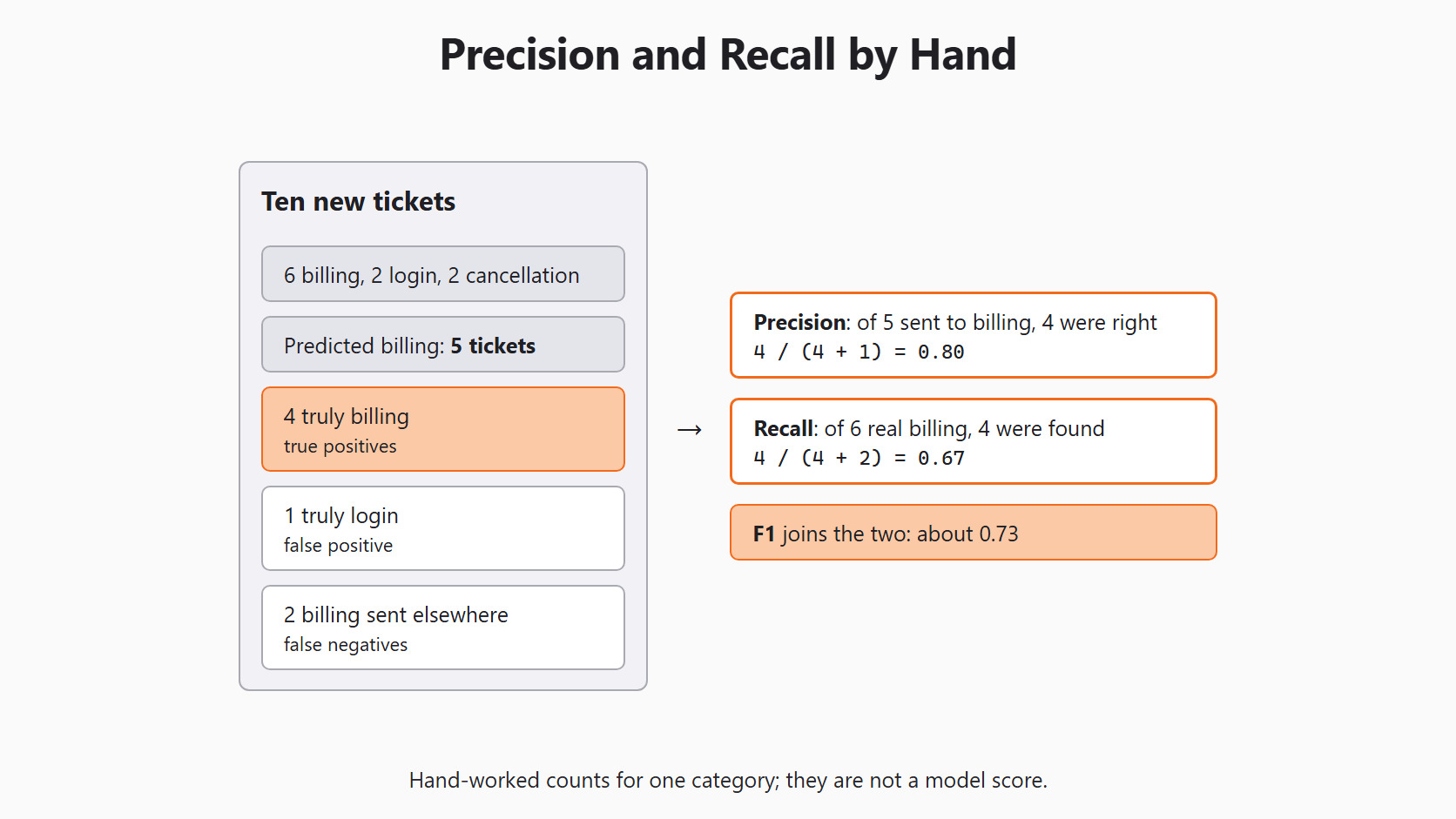
Precision asks, "When we said billing, how often was that right?" Here it is 4 / (4 + 1) = 0.80. Recall asks, "Of all billing tickets, how many did we find?" Here it is 4 / (4 + 2) = 0.67. The F1 score joins the two with 2 * precision * recall / (precision + recall), which is about 0.73. These are hand-worked numbers, not a result from our code.
A macro average scores billing, login and cancellation separately, then gives each one equal weight. So a missed cancellation class cannot hide behind many easy billing tickets. We still show each class row, because an average can hide which category needs work.
Decide What Error Hurts Most
Different mistakes cost different things. A wrong billing label sends a ticket to the wrong queue. A missed login problem leaves a student locked out of a lesson. A needs_review result costs a person some reading time, but it avoids a wrong automatic route.
Let's say two methods each label 80 of 100 tickets correctly. One sends 15 to people and routes 5 wrongly. The other sends 5 to people and routes 15 wrongly. The same correct count hides a very different workload. These numbers are a planning example, not results from our code. The support team decides which mistake costs more.
Let me tabulate the per-ticket record we keep for every run, for your better understanding:
| Field | Why we keep it |
|---|---|
| Conversation ID | Finds the row again and proves the split was clean. |
| Human label | The answer every method is checked against. |
| Baseline answer | The yardstick result for the same ticket. |
| Scikit-LLM answer | One of the three labels, needs_review or request_failed. |
| Model name | MODEL from the setup block, so the run can be repeated. |
A good final test also has different wording and longer threads, not only short phrases. We can then read error groups such as negation, mixed requests and rare wording. For practice, we can write a billing paraphrase with none of the words charged, invoice or payment. We write its human label first, then run both methods on it.
Conclusion
This is how a fair Scikit-LLM evaluation works. We split tickets by conversation and kept the final group closed. We built a TF-IDF baseline, then ran Day 3's zero-shot classifier on the same three check tickets with the same counting code. Along the way, the probabilities showed that the baseline's login answer was a near-equal guess.
- Split by conversation before choosing examples, prompts or settings.
- Count
correct,wrong_label,needs_reviewandrequest_failedseparately, and keep failed calls in the total. - Read per-ticket rows and probabilities, because a correct label can be luck.
- Precision, recall and a macro average show weak categories that accuracy hides.
- Three designed tickets teach the method but cannot estimate real inbox quality.
Next steps:
- Go back to Day 3: zero-shot classification to review the label policy we just tested.
- Continue with Day 5: few-shot learning, where labeled examples join the prompt and must stay away from these check tickets.
- Revisit Day 2: setup, models and backends to switch between Ollama and OpenRouter.


