
Our support desk receives "The same course payment appears twice on my bank statement." The word billing is nowhere in the message, yet a person knows at once that it is about payment. Can a model make the same call with no examples at all?
In this blog, we will learn how zero-shot classification works in Scikit-LLM. We will write clear label meanings and look at the exact prompt the library builds. Then we will find the two kinds of mistake a valid-looking answer can hide.
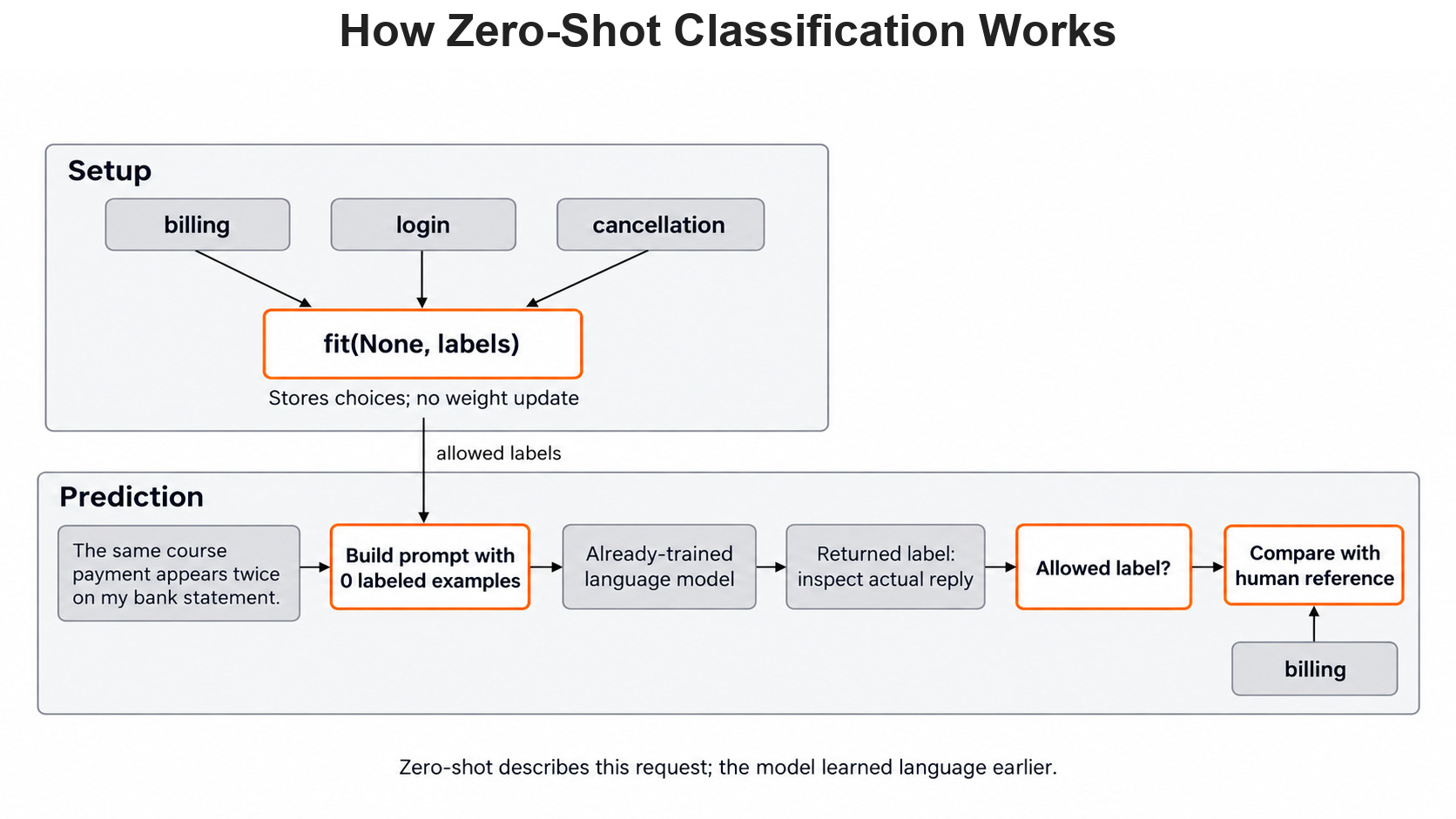
Here is the whole path, from our labels to a checked answer.
What Zero-Shot Means
Zero-shot means we give the model no labeled tickets from our task in the request. We still tell it which categories it may choose. In simple words, we hand over a list of labels and one new ticket, and ask the model to pick.
This works because the model is not blank. Qwen 3.8 27B learned a lot of language during its earlier training. So it already knows that "charged twice" is about money. We are only asking it to use that knowledge on our labels.
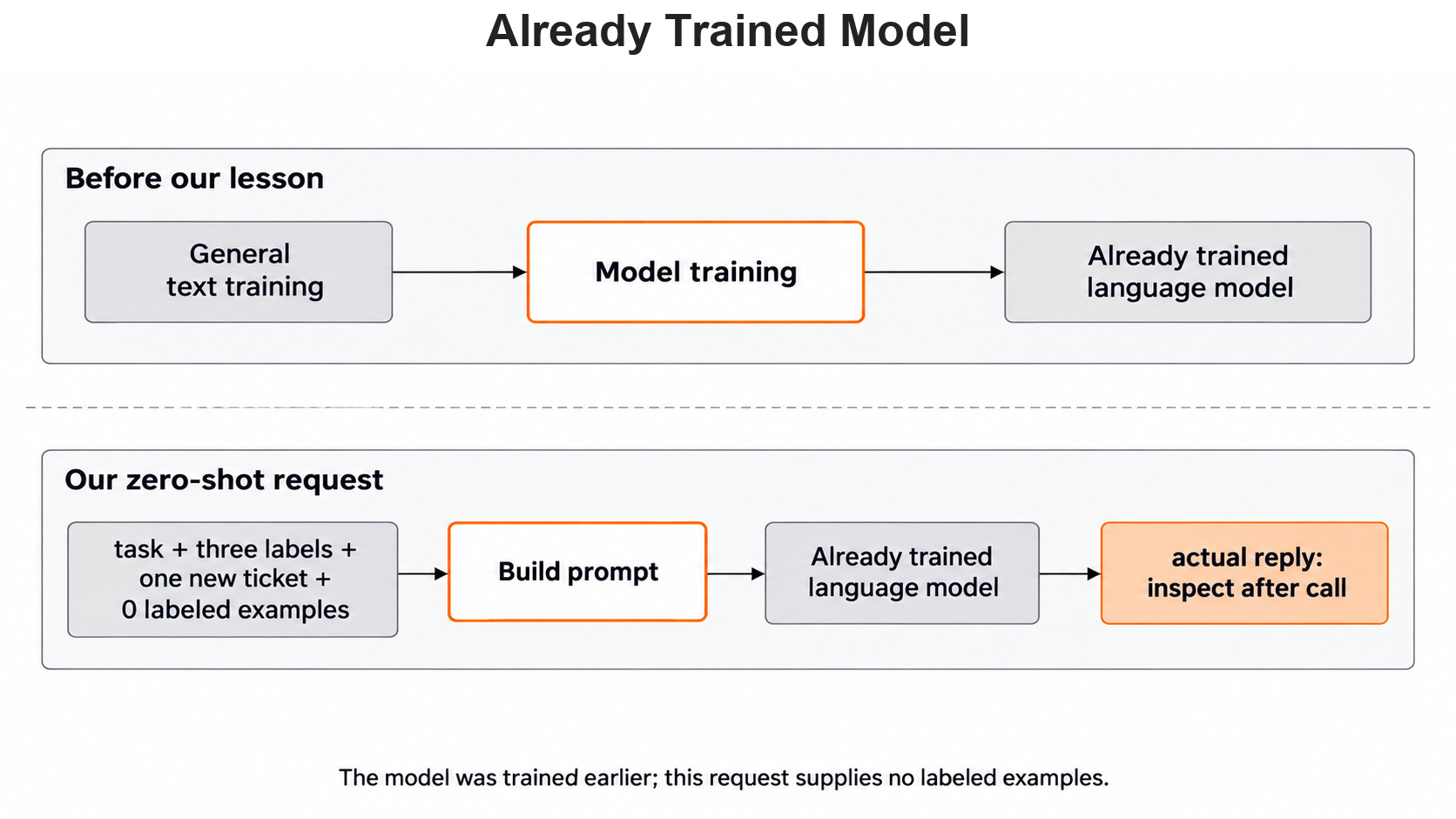
That is also the weak spot. Our support team may give a label a special meaning that the model cannot guess. Writing those meanings down is part of building the task, not an extra.
Write a Label Policy First
The Scikit-LLM zero-shot guide points out that label wording matters. A label such as misc gives the model almost no clue.
So before any code, we agree on what each label covers:
billing: a charge, payment, invoice or refund question.login: trouble entering an account.cancellation: stopping a plan or its renewal.
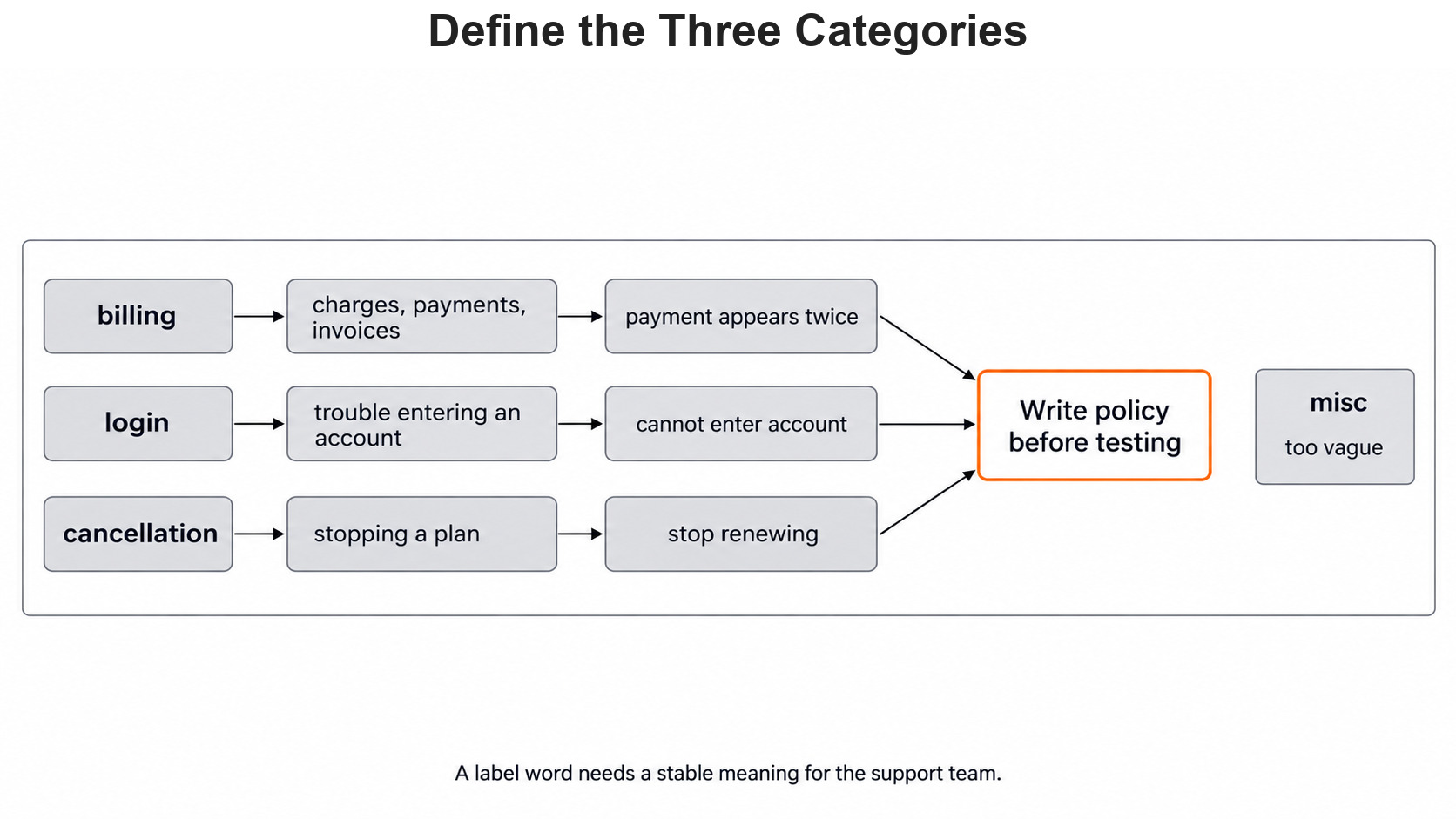
Some tickets touch two labels. Take "Cancel my plan and refund the duplicate charge." It asks for a cancellation and a refund. A one-label task must still pick one, so we add a primary-topic rule. When a ticket reports a payment problem, billing comes first, even if the ticket also asks for something else.
With this rule, the mixed ticket is billing. So is "I want my money back after ending my plan", because the refund is the problem to solve. The rule is our policy, not something the library knows. Another team could pick a different rule, and that would change the correct answers.
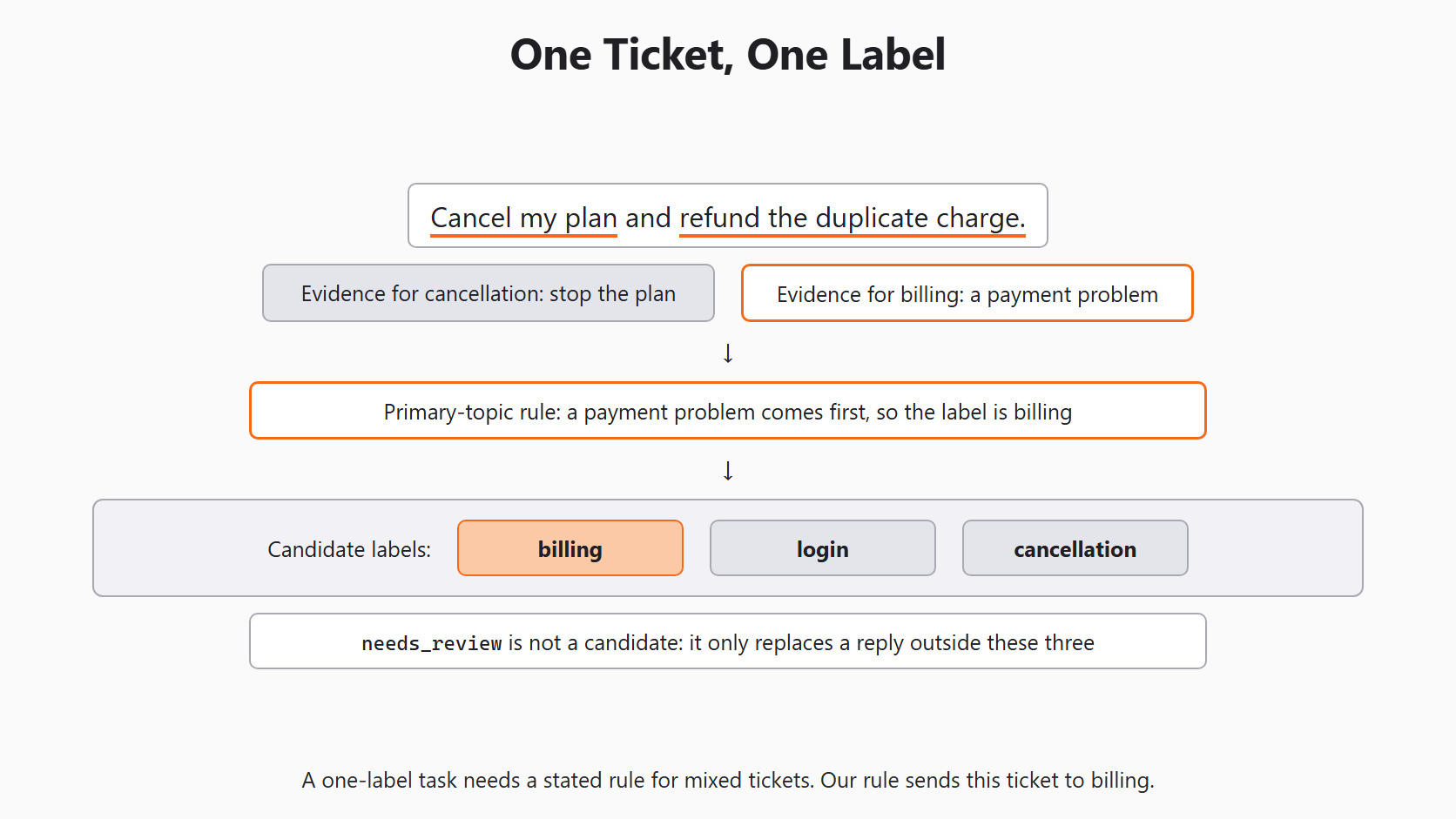
The candidate labels stay billing, login and cancellation. Later we will add needs_review, but only as the default_label for a reply outside that set. It is never a correct answer for a ticket. When agents need to see both requests in one ticket, Day 6 allows more than one label.
Build a Small, Fixed Check Set
We start with three made-up tickets, so no private support data reaches the model. Next to them, we write the human answers, before we see any model reply. That way we cannot move a hard case into a more convenient label afterwards.
tickets = [
    "The same course payment appears twice on my bank statement.",
    "I cannot enter my account after changing phones.",
    "Please stop renewing my plan next month.",
]
reference = ["billing", "login", "cancellation"]
Position matters here: the first answer belongs to the first ticket. The reference list is only for checking. A reply is not correct just because it comes back in a valid shape.
Set Up the Classifier
We use the setup block from Day 2. It sends every request to Qwen 3.8 27B through Ollama on our own machine:
import os

from skllm.config import SKLLMConfig

# Default: Qwen 3.8 27B running on our own machine through Ollama
SKLLMConfig.set_gpt_url("http://localhost:11434/v1")
SKLLMConfig.set_gpt_key("ollama")
MODEL = "custom_url::qwen3.8:27b"

# Option: the free Qwen 3.8 27B on OpenRouter (uncomment these lines)
# SKLLMConfig.set_gpt_url("https://openrouter.ai/api/v1")
# SKLLMConfig.set_gpt_key(os.environ["OPENROUTER_API_KEY"])
# MODEL = "custom_url::qwen/qwen3.8-27b:free"
Now we create the classifier and store our labels:
from skllm.models.gpt.classification.zero_shot import ZeroShotGPTClassifier

clf = ZeroShotGPTClassifier(model=MODEL, default_label="needs_review")
labels = ["billing", "login", "cancellation"]
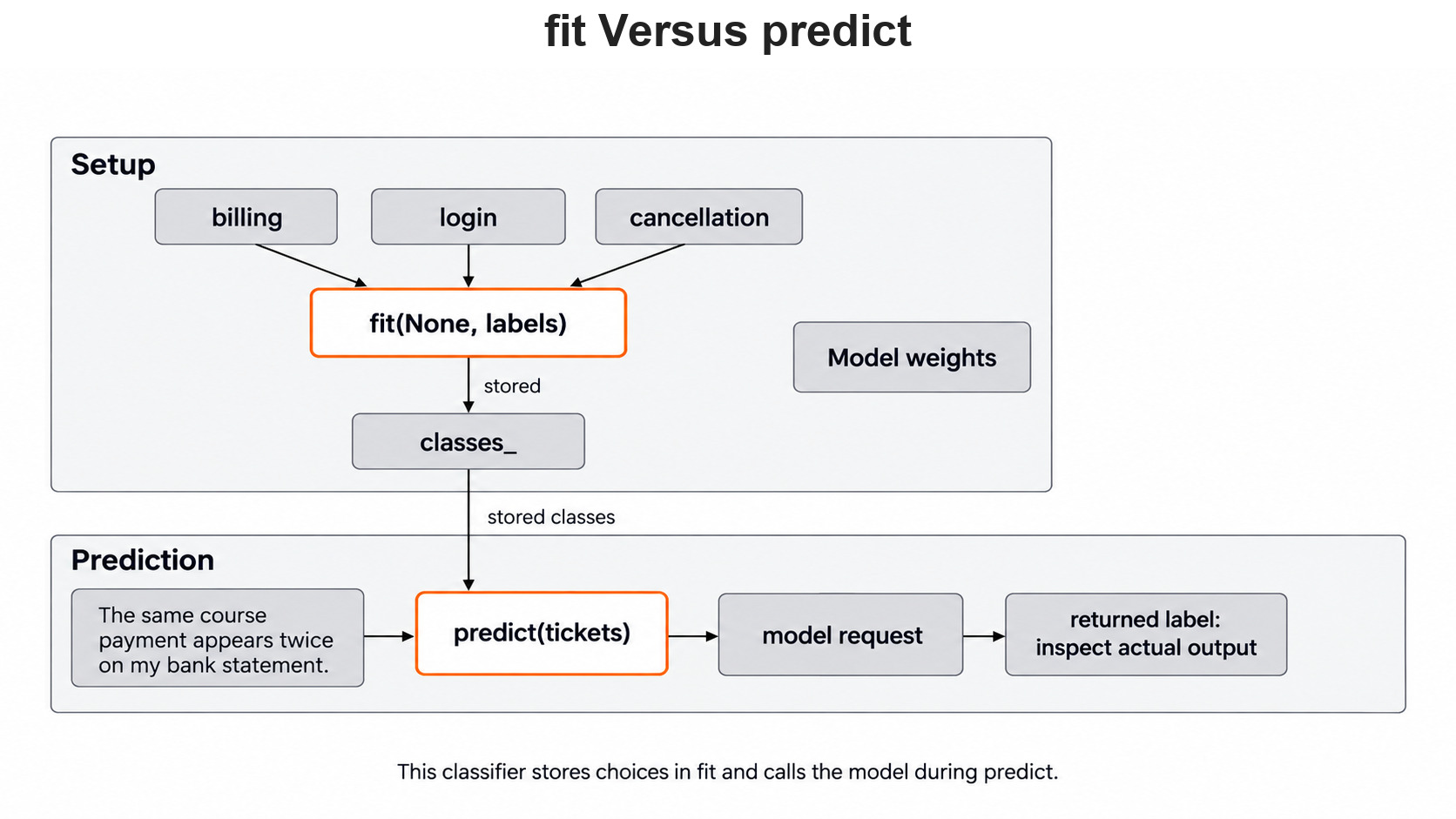
clf.fit(None, labels)
print(clf.classes_)['billing', 'login', 'cancellation']Here, we can see the three candidate labels stored in classes_. For this class, fit() records the choices and nothing else. It does not change the model's weights.
Look at the Prompt Before Calling the Model
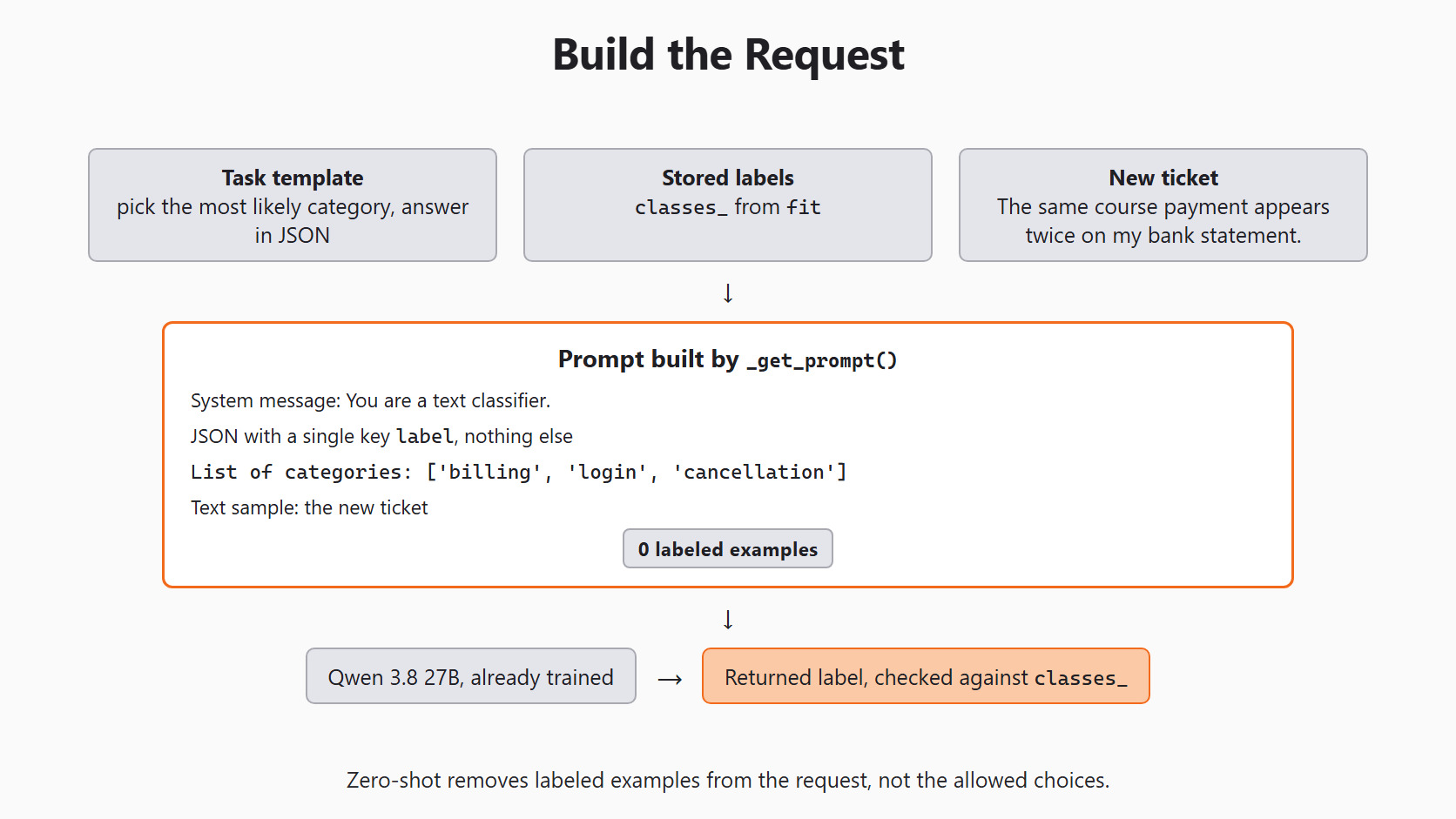
What does the model actually receive? Scikit-LLM builds the prompt from a template, the stored labels and one ticket. We can print parts of it without calling the model. The method _get_prompt() starts with an underscore, which marks it as internal, so we use it only to look:
prompt = clf._get_prompt(tickets[0])["messages"]
for line in prompt.splitlines():
    if line.startswith(("List of categories", "3.")):
print(line)3. Provide your response in a JSON format containing a single key `label` and a value corresponding to the assigned category. Do not provide any additional information except the JSON.
List of categories: ['billing', 'login', 'cancellation']Here, we can see the two lines that matter most. The model must answer in JSON with one key, label, and the value should be one of our three words. The prompt holds no labeled example, which is exactly what zero-shot means. Only the bare label words carry our policy, so their wording matters.
Classify the Three Tickets
Now we send the tickets to the model and print each result next to the human answer:
predicted = clf.predict(tickets)
for text, expected, found in zip(tickets, reference, predicted):
    print(text, "| human:", expected, "| model:", found)
This prints three lines, one per ticket. Each model: value is always one of billing, login, cancellation or needs_review, because the library checks every reply against classes_. Whether each value matches the human answer depends on the model's reply, so we read every row.
Find Two Different Kinds of Mistake
Let's say the model returns login for the duplicate payment. That word is in our allowed set, so it passes the library's check. Only the human answer, billing, shows it is wrong. This is the harder mistake, because the output looks perfectly fine.
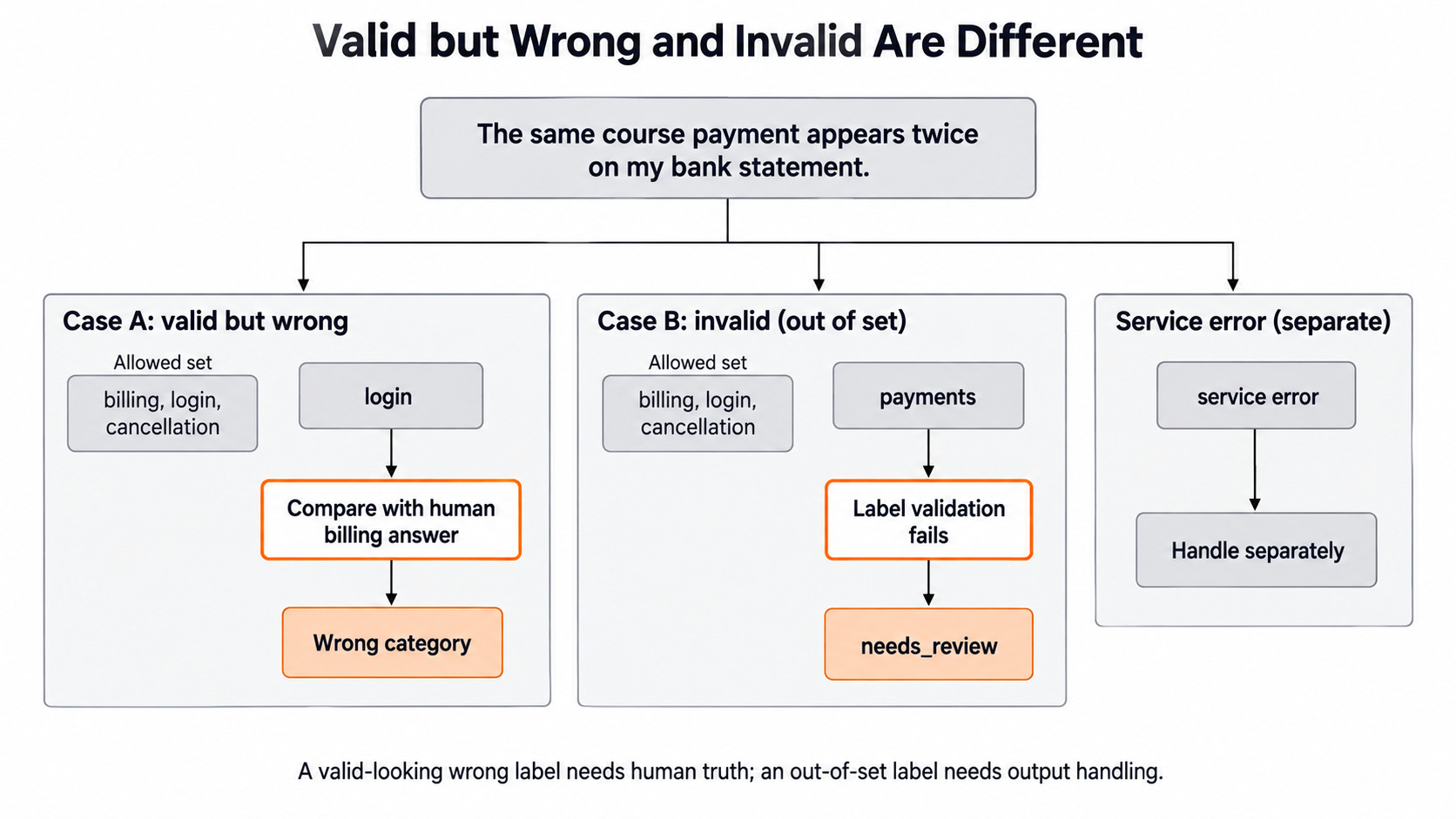
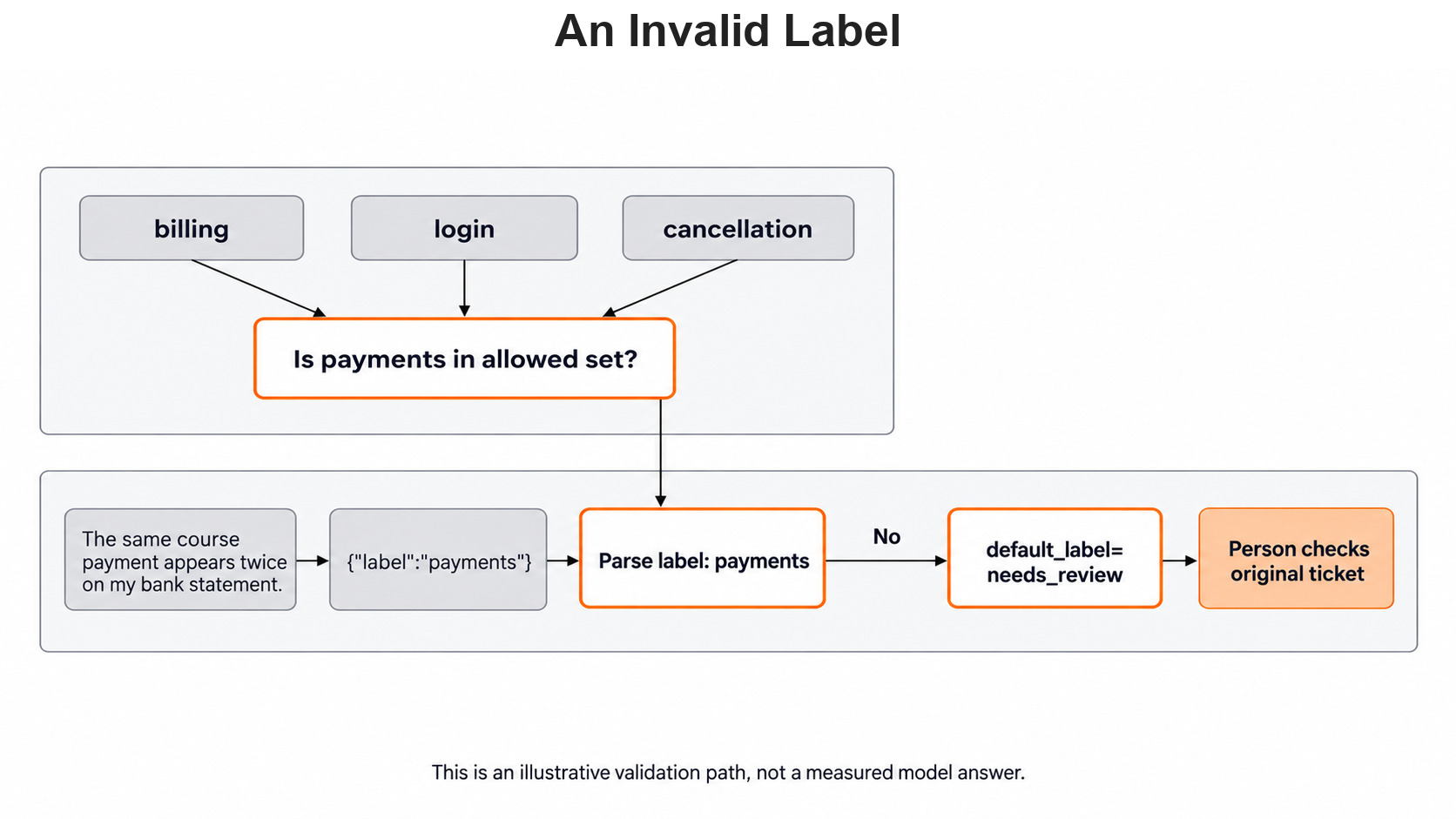
Now let's say the reply is {"label": "payments"}. That word is not one of our three choices. So the library replaces it with our default_label, and the result is needs_review. This mistake is easy to see and easy to count.
A service failure is a third case. If Ollama is not running, no reply arrives at all. The library tries 3 times and then raises a RuntimeError, so the whole predict call stops. default_label does not catch this. We count it apart from label mistakes, because the model never saw the ticket.
Let me tabulate the three cases:
| What happens | What we see | How we find it |
|---|---|---|
| Allowed but wrong label | login for a payment ticket |
Compare with the human answer |
| Reply outside the label set | needs_review |
Count it directly |
| No reply at all | RuntimeError after 3 tries |
Catch it around predict |
Make a Check Set That Can Reveal a Problem
Our three tickets each have one obvious issue. They prove the call works, but they test little else. So we add four development tickets that probe the edges of our policy:
dev_tickets = [
    "My card shows two course charges.",
    "I can sign in; where is my invoice?",
    "Cancel my plan and return the extra charge.",
    "Where is my course certificate?",
]
dev_reference = ["billing", "billing", "billing", "out_of_scope"]| Ticket | Human decision | Why it is useful |
|---|---|---|
| "My card shows two course charges." | billing |
Tests a payment paraphrase. |
| "I can sign in; where is my invoice?" | billing |
Says "sign in" but asks about an invoice. |
| "Cancel my plan and return the extra charge." | billing |
Tests the primary-topic rule. |
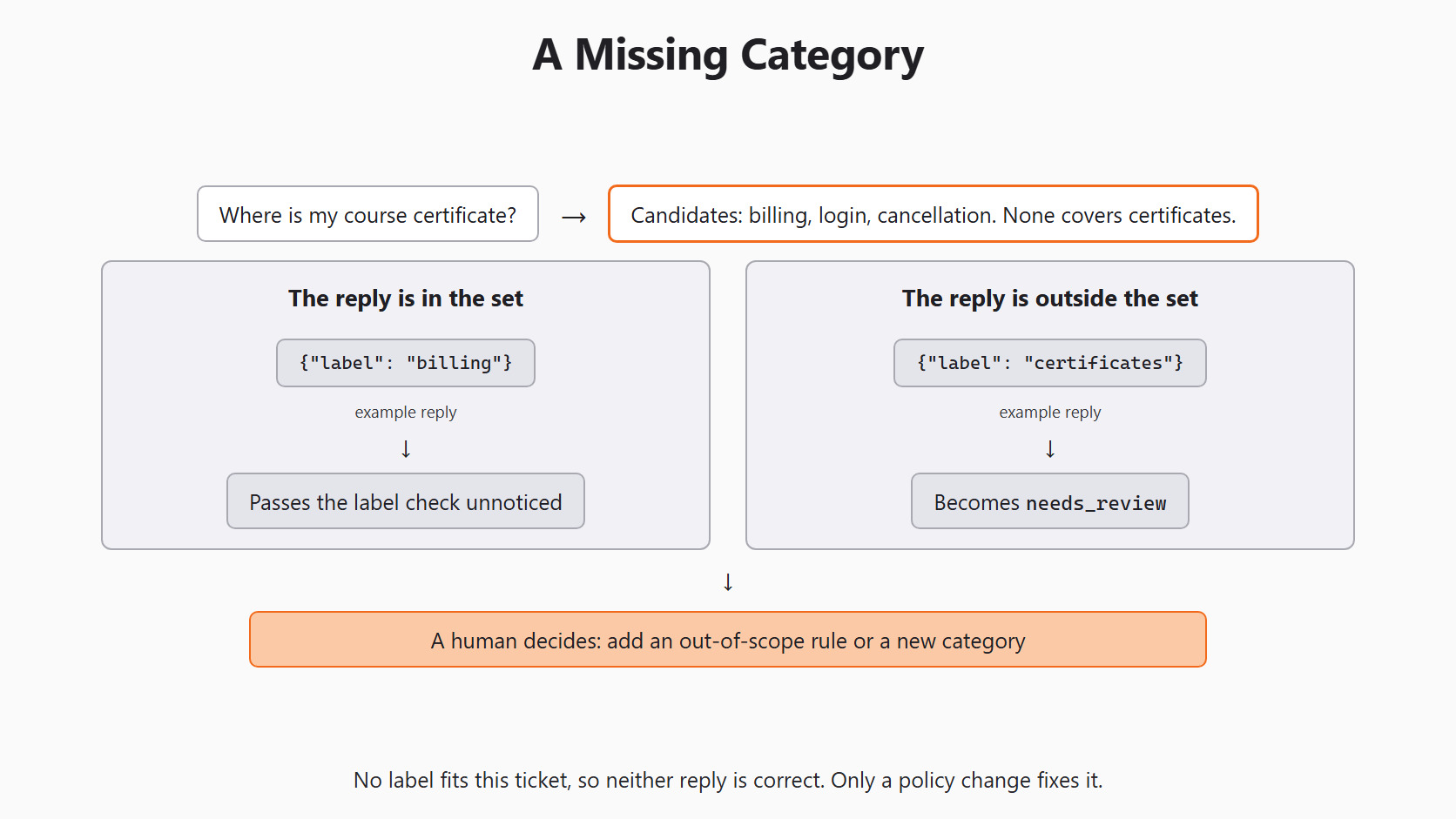
| "Where is my course certificate?" | out_of_scope |
Exposes a missing category. |
The second ticket is a trap for keyword thinking. It contains "sign in", yet it says sign-in works. The real request is the missing invoice, so our rule says billing.
The last ticket needs a closer look. No label covers certificates, so out_of_scope is a note for humans, not a class. The model can never return it. If the model picks one of our three labels, the reply passes the check unnoticed. If it writes something outside the set, the library turns it into needs_review. Either way, only a human can fix this, by adding an out-of-scope rule or a new category.
Change One Label Wording at a Time
Short words like billing carry little meaning. So what if we describe each label instead? Let's say Version A keeps the short codes, and Version B uses short descriptions. We keep a mapping from each description back to its stable code:
label_map = {
    "payment or invoice issue": "billing",
    "cannot enter account": "login",
    "stop plan renewal": "cancellation",
}
clf_b = ZeroShotGPTClassifier(model=MODEL, default_label="needs_review")
clf_b.fit(None, list(label_map))

prompt_b = clf_b._get_prompt(dev_tickets[0])["messages"]
for line in prompt_b.splitlines():
    if line.startswith("List of categories"):
print(line)List of categories: ['payment or invoice issue', 'cannot enter account', 'stop plan renewal']Here, we can see that the model now gets the descriptions as its choices. So a reply comes back as a description, such as payment or invoice issue, and we map it to billing ourselves. A reply outside the set is still needs_review, which the mapping leaves unchanged.
Now we run both versions on the same four tickets and compare them row by row:
found_a = clf.predict(dev_tickets)
found_b = [label_map.get(label, label) for label in clf_b.predict(dev_tickets)]
for text, expected, a, b in zip(dev_tickets, dev_reference, found_a, found_b):
    print(text, "| human:", expected, "| A:", a, "| B:", b)
This prints four rows. Each A: value is a short code or needs_review. Each B: value is a mapped code or needs_review. The certificate row can never match out_of_scope, and that is the point: it shows the gap in our label set.
A fair test changes only the label wording. The tickets, the model, the route and the human answers all stay the same.
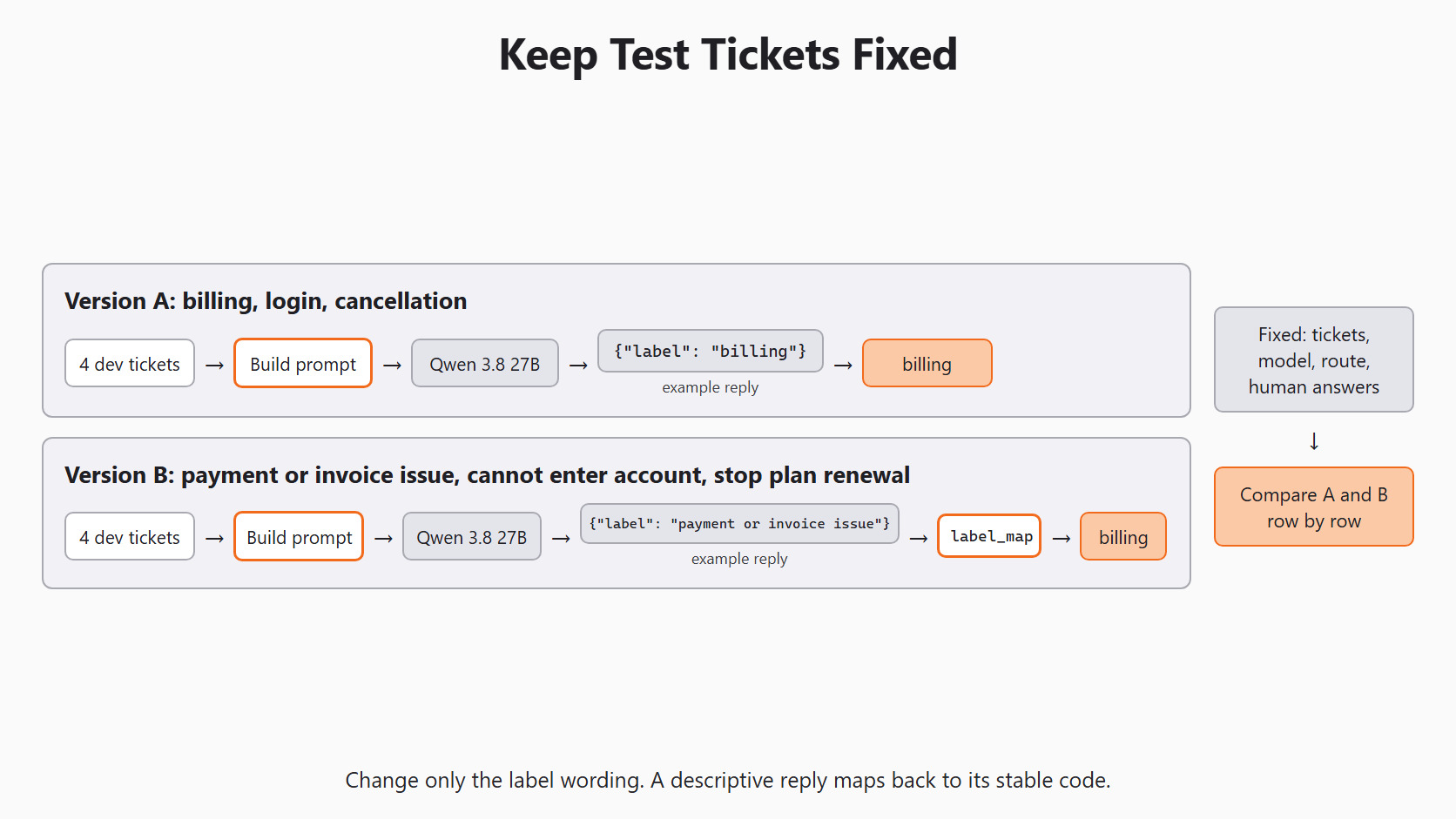
Why not change all three labels at once? If the invoice ticket changes its answer, we would not know which edit caused it. One change at a time lets us ask one clear question. Did the payment description help on payment tickets, without hurting login or cancellation?
A difference between A and B is a finding to inspect, not proof of improvement. Four tickets are far too few to estimate accuracy. We can also run the same set twice and note any row that changes. The zero-shot and few-shot walkthrough shows both ways of giving the model task information. When descriptions cannot show our policy well enough, Day 5 adds labeled examples.
Keep an Error Ledger
For each saved ticket, we record the human decision, the returned label and whether a service error happened. Then we note the cause we can see: wrong choice, reply outside the set, mixed request, missing category or no reply. A row can stay "unclear" when the evidence does not show why the model chose a label.
Let's say the invoice ticket gets login. We can say the prediction broke our written policy. We may suspect that "sign in" pulled the model the wrong way, but we have not proved it. To test the idea, we change only that phrase and run the ticket again, keeping the original row for comparison.
While our set is tiny, this ledger tells us more than one accuracy number. It shows which new examples to collect and which decisions the support team must settle. Day 4 then counts errors on a larger, held-out set.
Conclusion
This is how zero-shot classification works in Scikit-LLM. We store the candidate labels with fit(). The library puts them into a fixed prompt with one ticket. The model then picks a label using what it learned before. The label words and our written policy decide what a correct answer means.
- Zero-shot removes task examples from the request, not the model's earlier training.
- A primary-topic rule settles mixed tickets: a payment problem makes the ticket
billing. needs_reviewonly marks a reply outside the label set; it is never a correct answer.- An allowed but wrong label needs a human answer to catch it, and a service failure is a
RuntimeError, not a label. - A label-wording test changes only the wording and keeps the tickets, model and answers fixed.
Next steps:


