
Our support team has tried clearer labels and a small example bank. Some tickets still land in the wrong queue. Should we now fine-tune the model itself? In Day 13, we checked labels and explanations one ticket at a time. Today we look at the biggest change we could make: training the model on our own tickets.
In this blog, we will learn when fine-tuning is worth trying and how to prepare and check training data on our own machine. We will also find out why the tunable classes in Scikit-LLM 1.4.3 do not work with our local setup, and what we can do instead.
The figure below shows the questions we ask before any training job.
What Changes During Fine-Tuning
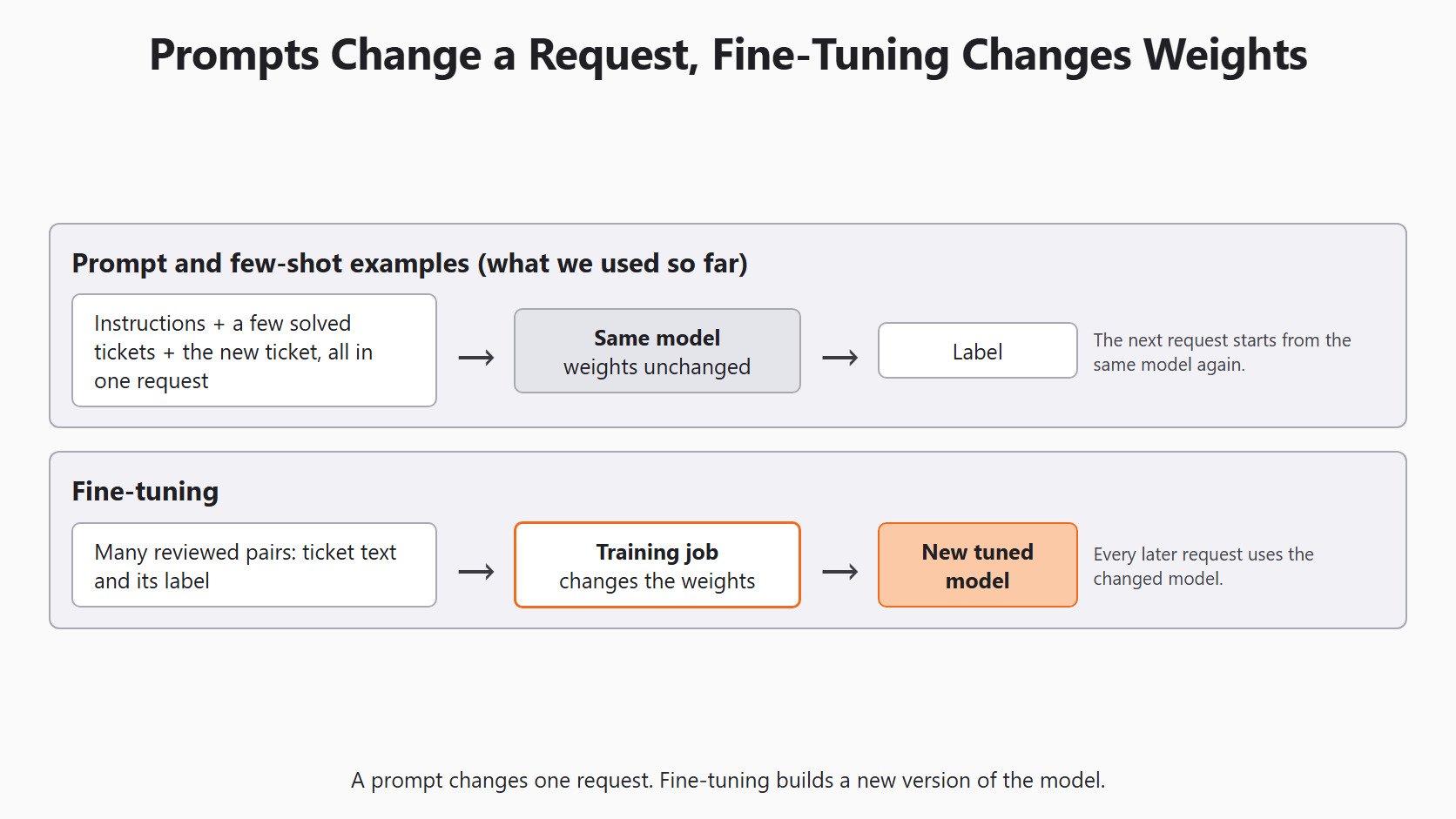
A model's weights are the huge set of numbers it learned during training. Fine-tuning changes those numbers using our own examples. In simple words, fine-tuning builds a new version of the model that has practised our task.
Everything we did so far left the weights alone. A prompt gives the model instructions for one request. Few-shot examples show it a few solved tickets inside that request. The next request starts from the same model again.
The word fit hides this difference. In a zero-shot classifier, fit stores the allowed labels. In a few-shot classifier, it stores the examples that go into later prompts. In a tunable classifier, fit uploads our pairs and starts a training job that changes weights. The figure below puts the two paths side by side.
When Fine-Tuning Is Worth Trying
Fine-tuning is a late step, not a first one.
We consider it only when all of these are true:
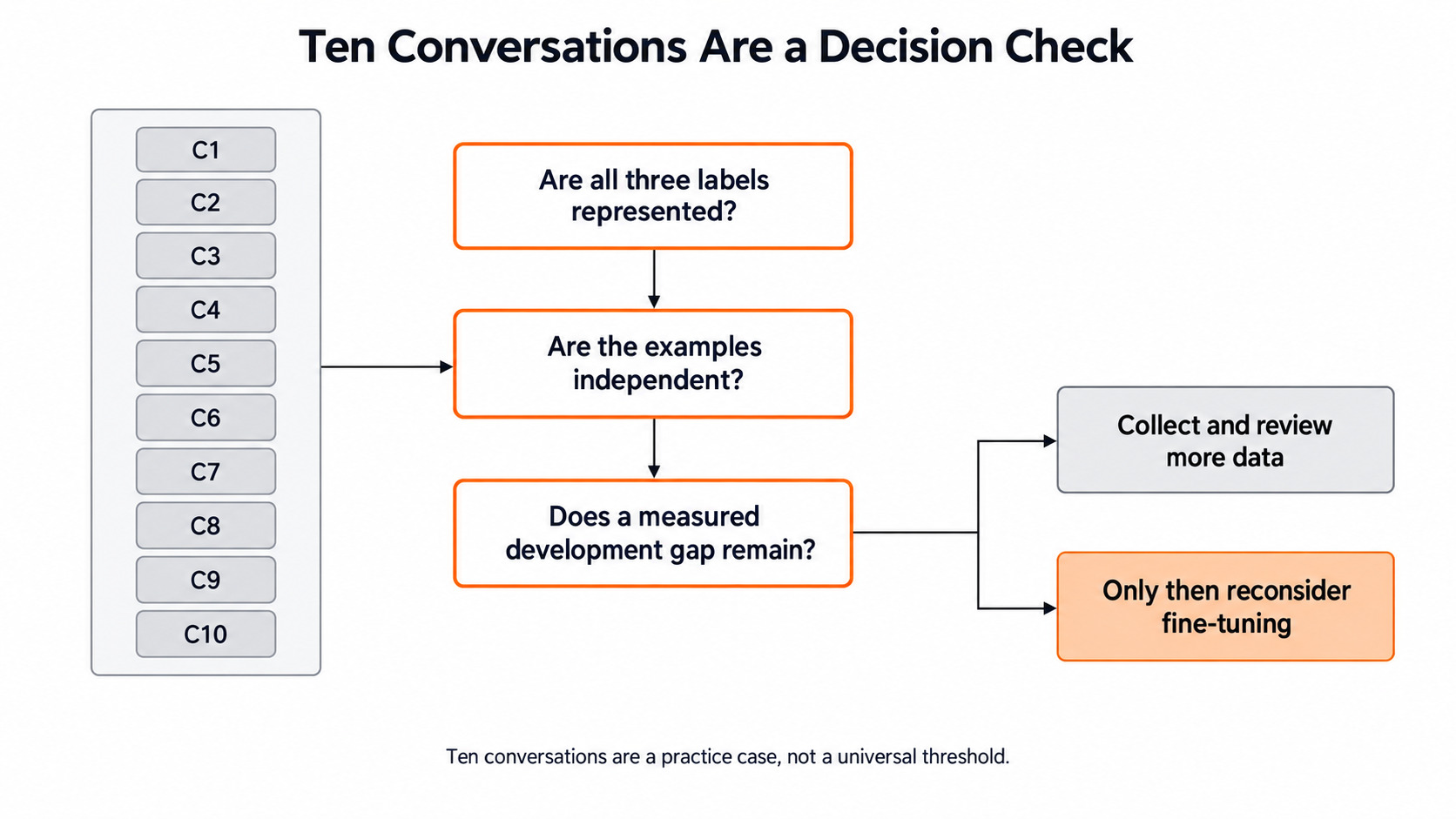
- A measured gap remains on development tickets after clearer labels and better examples.
- We have many reviewed examples for every class, not a handful.
- The categories are stable, so we will not retrain every month.
- The label policy is clear, so humans agree on the answers.
The last point matters most. Fine-tuning learns from our examples exactly as they are. If the answer key is inconsistent, the model learns that inconsistency too.
Let's say billing and cancellation get confused only when a ticket asks for both. Training a one-label classifier cannot decide whether the answer is billing, cancellation or both. The policy must change first, and the multi-label method from Day 6 may fit better.
Now let's say many different billing tickets are still missed after the policy is clear and the examples are checked. That is a real, measured gap. Only then is a training job worth testing against the simpler methods.
Prepare Separate Groups First
Training data needs the same care as the evaluation data from Day 4.
We keep three groups:
- Training tickets teach the model.
- Development tickets help us choose settings.
- Final test tickets stay closed until every choice is made.
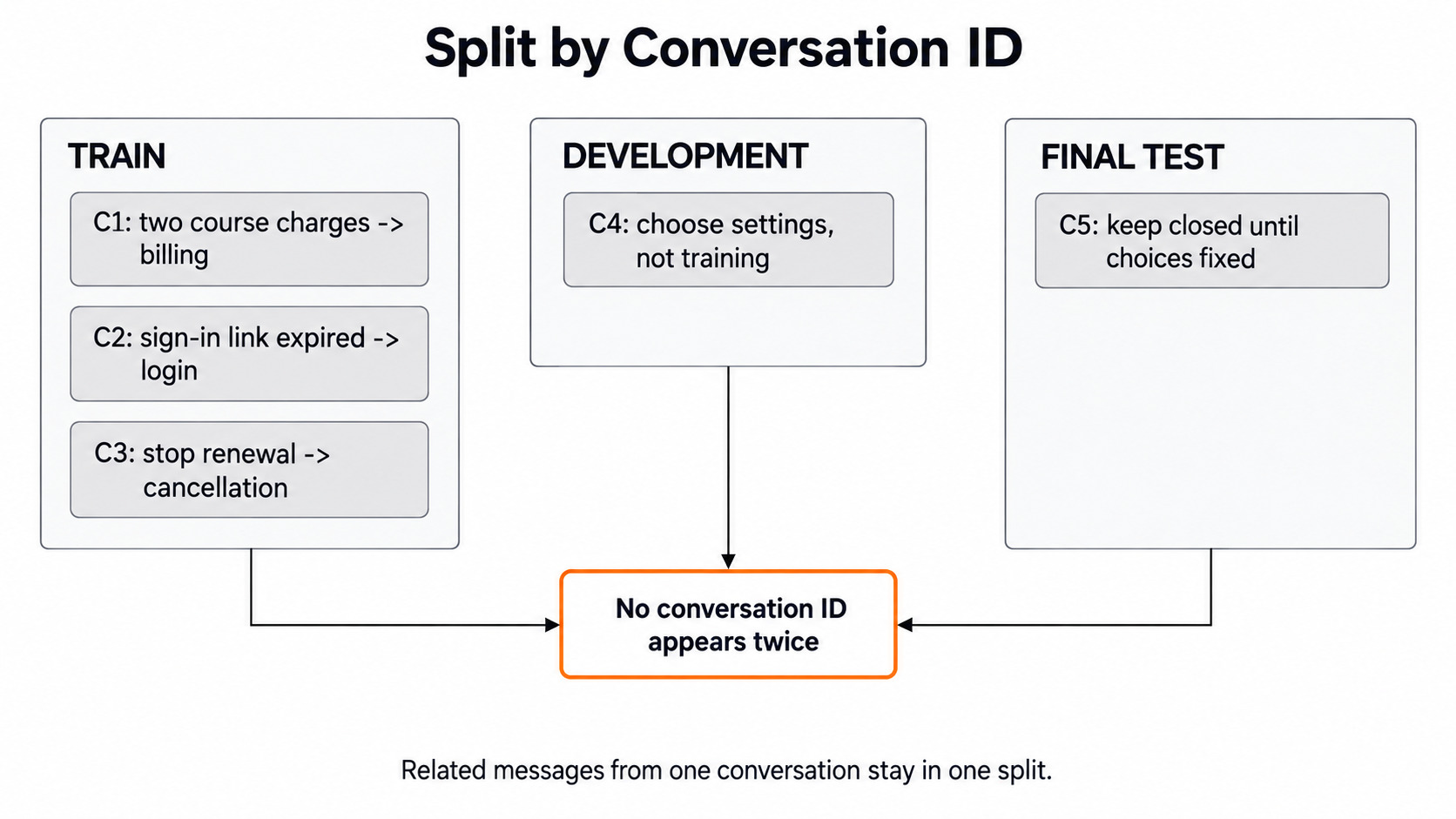
Messages from one conversation often repeat the same facts. So we split by conversation, not by message. Every message from a conversation goes into one group only.
Here is a tiny synthetic training set. It shows the shape of the data, nowhere near the size a real job needs:
training_rows = [
    {'conversation_id': 'C1', 'text': 'Two course charges appeared.', 'label': 'billing'},
    {'conversation_id': 'C2', 'text': 'The sign-in link expired.', 'label': 'login'},
    {'conversation_id': 'C3', 'text': 'Please stop next month renewal.', 'label': 'cancellation'},
]
development_ids = {'C4'}
test_ids = {'C5'}
training_ids = {row['conversation_id'] for row in training_rows}

print(training_ids.isdisjoint(development_ids))
print(training_ids.isdisjoint(test_ids))
print(development_ids.isdisjoint(test_ids))True
True
TrueHere, we can see three True values. isdisjoint returns True when two sets share no item, so no conversation sits in two groups. The figure below shows the same split.
Check Classification Pairs Locally
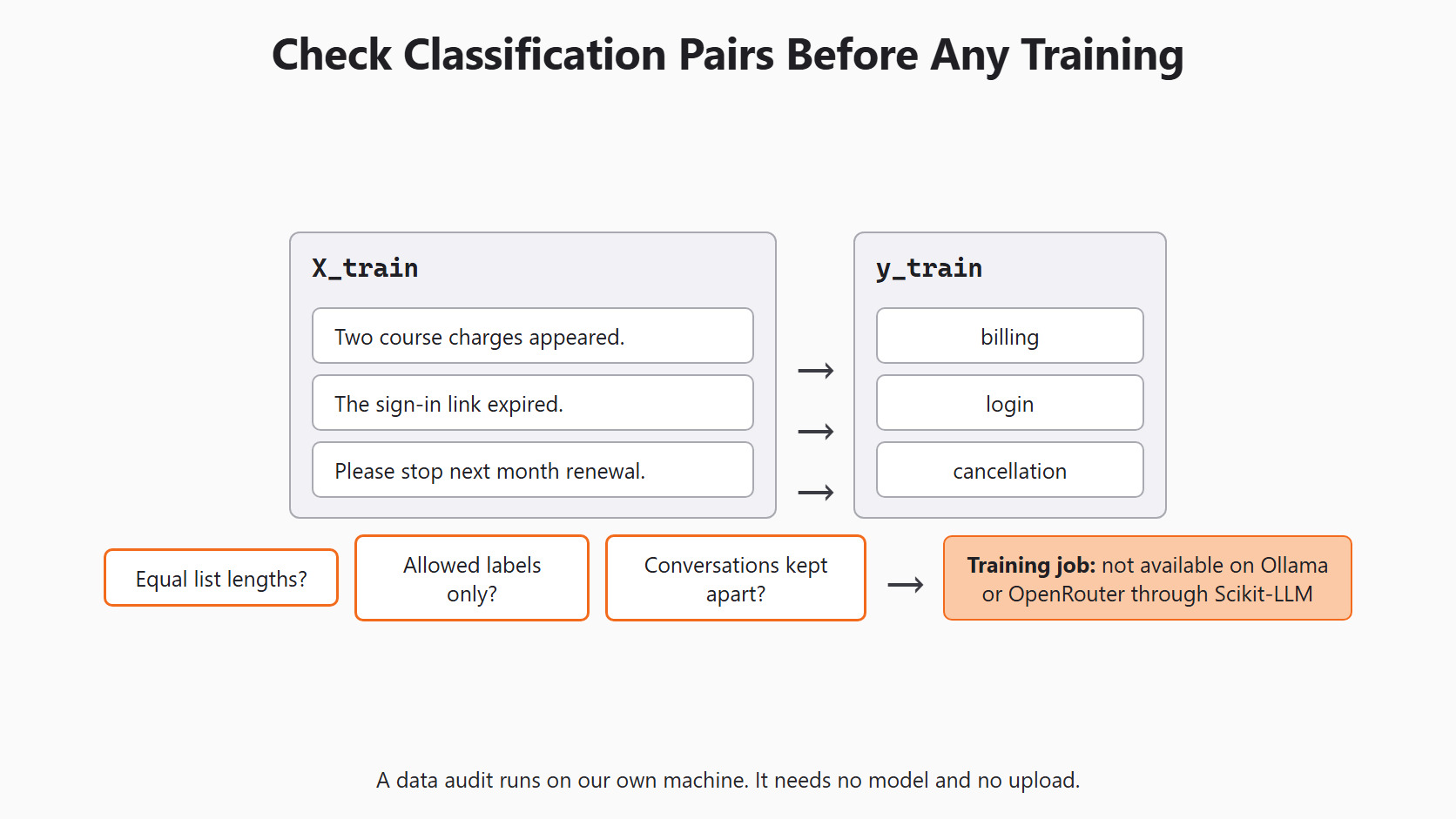
For classification, X_train holds the ticket texts and y_train holds the human labels in the same order. If the two lists slip out of line, we would teach the wrong answer for every ticket. So we check them before anything else:
X_train = [row['text'] for row in training_rows]
y_train = [row['label'] for row in training_rows]
allowed_labels = {'billing', 'login', 'cancellation'}

assert len(X_train) == len(y_train)
assert set(y_train).issubset(allowed_labels)
print('Pairs:', len(X_train))
print('Labels:', sorted(set(y_train)))
print('Missing labels:', sorted(allowed_labels - set(y_train)))Pairs: 3
Labels: ['billing', 'cancellation', 'login']
Missing labels: []Here, we can see 3 pairs, every allowed label used, and no label missing. This is a data check only. Three examples cannot teach a model the many ways students describe a billing problem.
The next figure shows each text lined up with its label, and the checks that run before any training job.
A real set also needs a person to read it. We look for duplicate conversations, wrong labels and private details such as names or card numbers. We also include hard cases, such as "I can sign in, but my invoice is missing." The label should follow the real issue, not the loudest word.
Check Text-to-Text Pairs
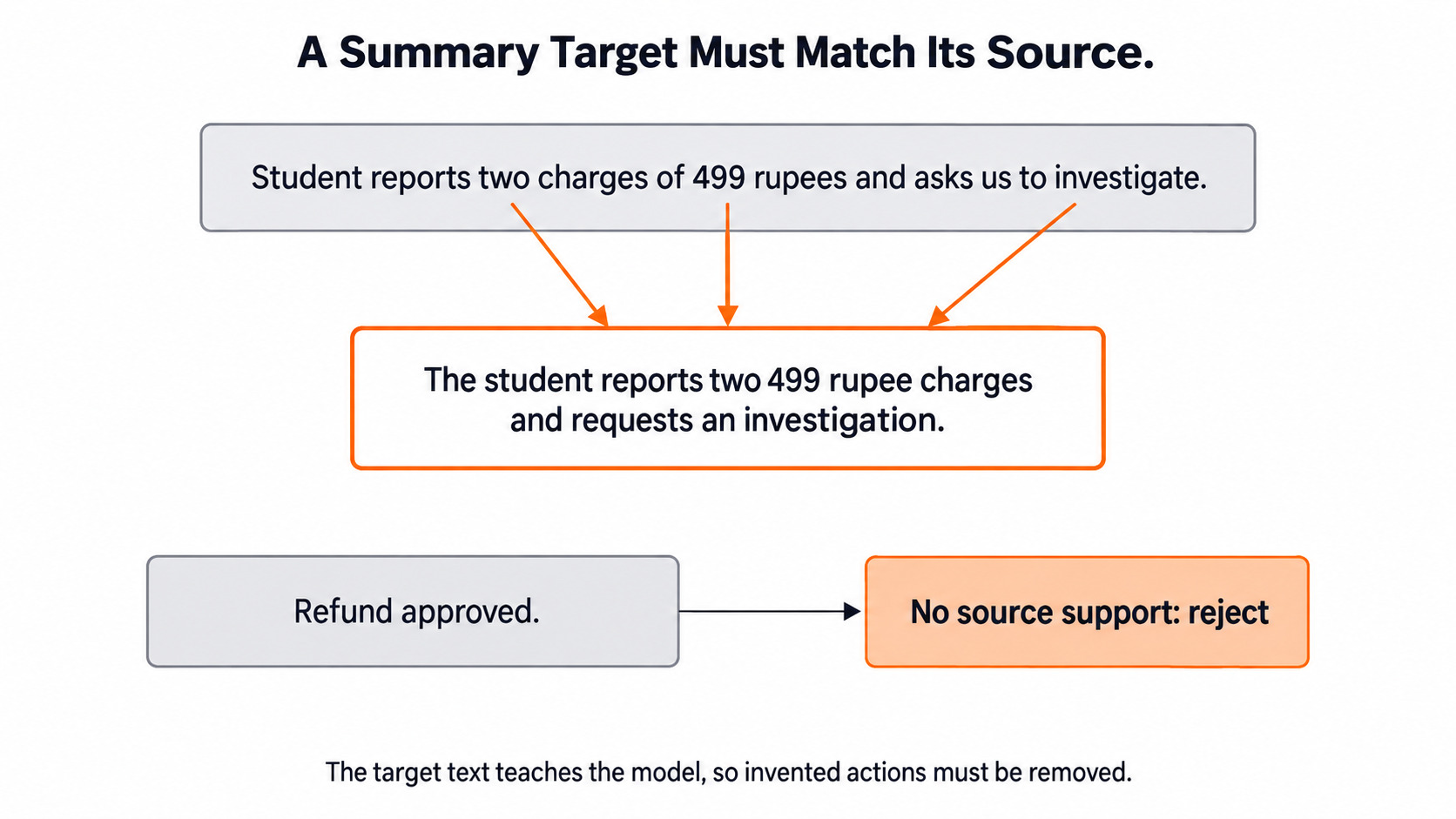
A text-to-text task has an input and a desired output, such as a ticket and its summary. The target teaches the model what a good answer looks like. So a target that adds "refund approved" teaches the model to invent support actions.
The Scikit-LLM text-to-text guide says the estimator uses our data as it is. So the checking is our job. A simple first check looks for action words that appear in the target but not in the source:
summary_inputs = [
    'Student reports two charges of 499 rupees and asks us to investigate.',
]
summary_targets = [
    'The student reports two 499 rupee charges and requests an investigation.',
]
ACTION_WORDS = ['refund', 'approved', 'cancelled', 'reset']

def unsupported_actions(source, target):
    source, target = source.lower(), target.lower()
    return [word for word in ACTION_WORDS if word in target and word not in source]

assert len(summary_inputs) == len(summary_targets)
print(unsupported_actions(summary_inputs[0], summary_targets[0]))
print(unsupported_actions(summary_inputs[0], 'Refund approved for both charges.'))[]
['refund', 'approved']Here, we can see that our real target passes. The hand-written bad target fails on refund and approved, because the source never mentions either. A word list catches only the obvious cases, so a person still reads every pair beside its source. The figure below shows why the bad target must go.
What an Epoch Can and Cannot Fix
An epoch is one full pass through the training pairs. A training job usually makes several passes. The figure below shows one pass over our three pairs.
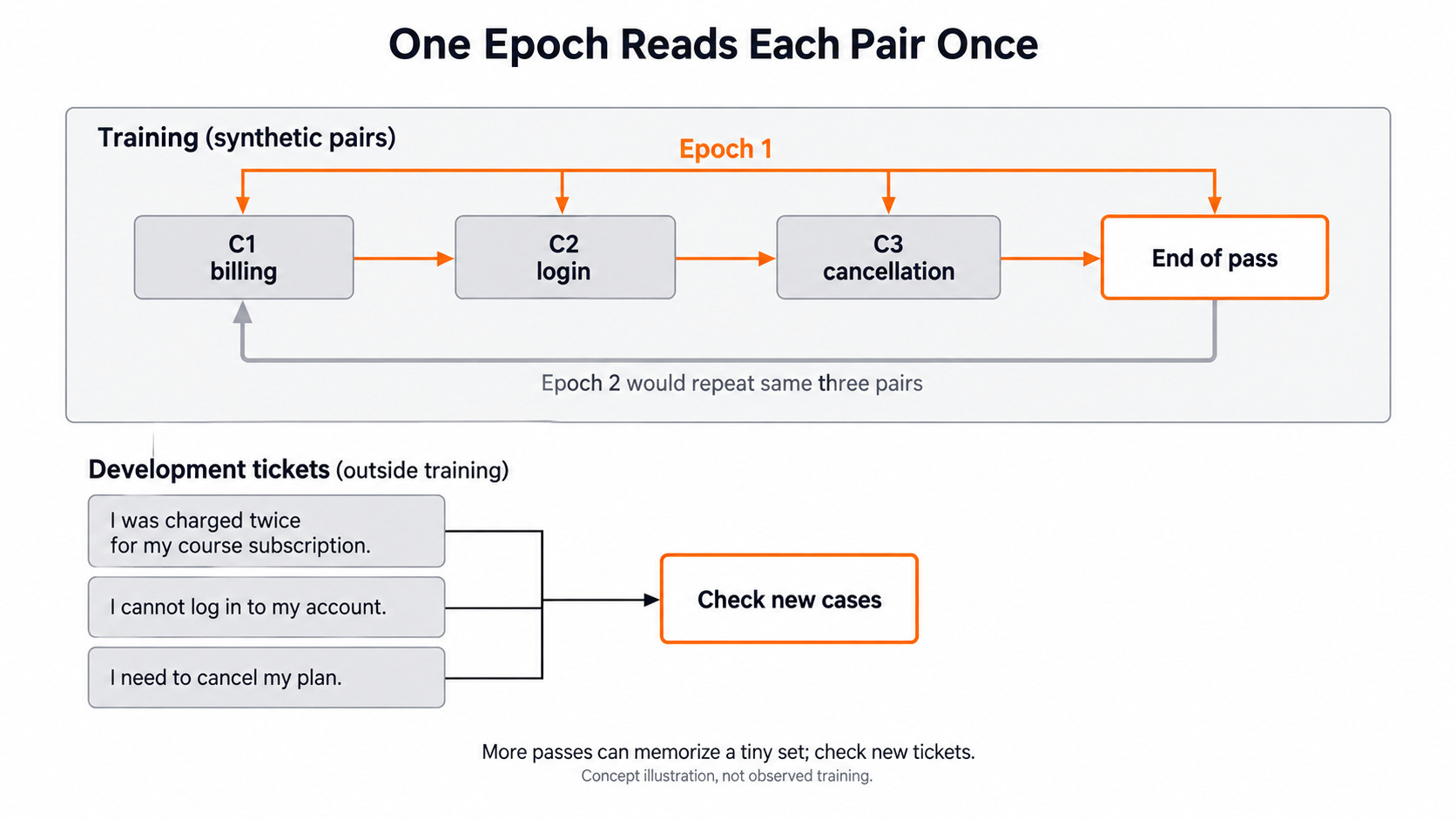
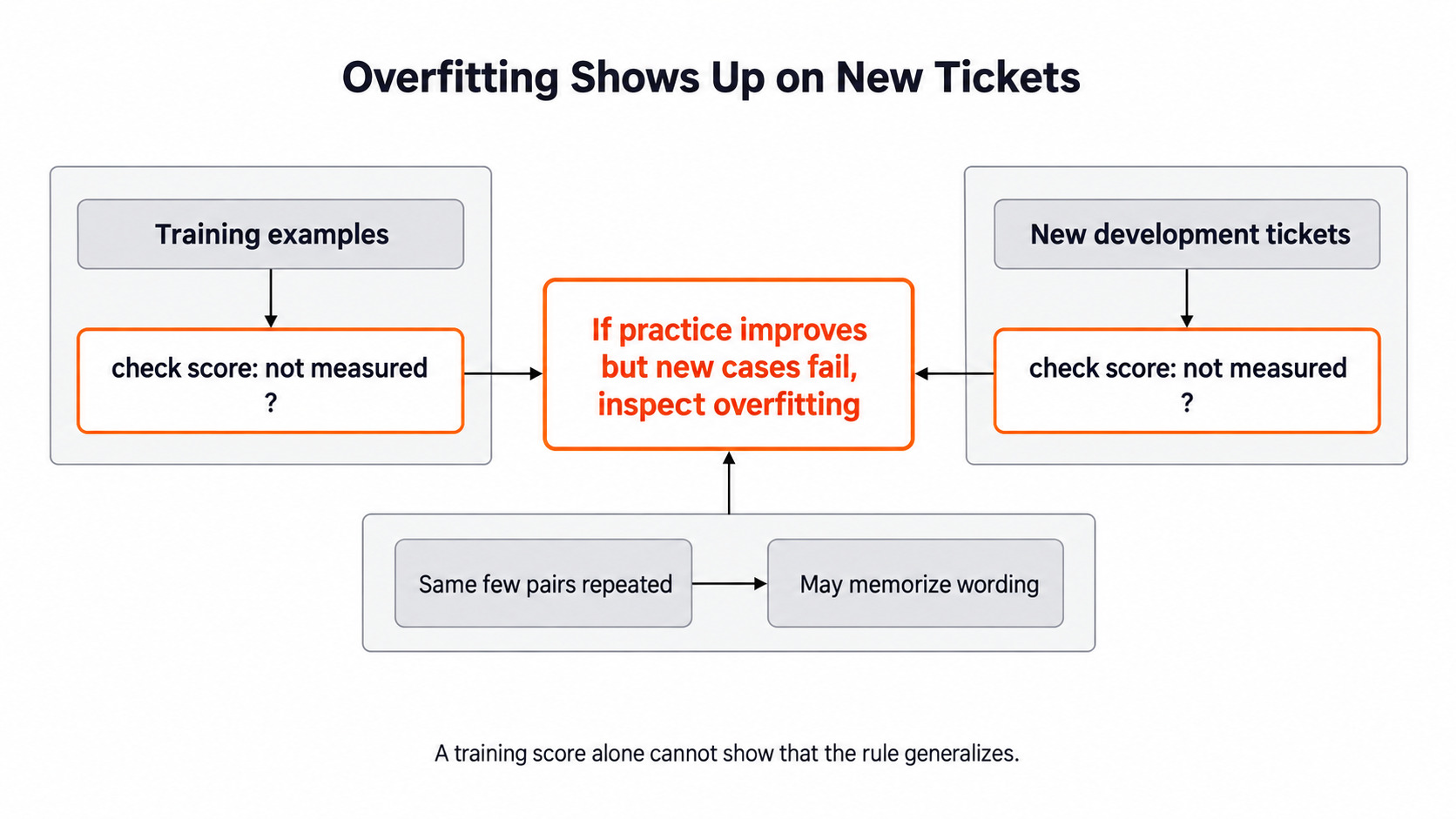
More passes give the model more chances to learn the pattern. But on a small set, it can start to memorize the exact wording of those few tickets. This is called overfitting: the model does well on its practice tickets and poorly on new ones.
So we never judge a job by its training score. We watch the development tickets. If training results improve while development results get worse, the model is overfitting. The next figure shows where overfitting becomes visible.
Changing the number of epochs is one more experiment. We keep the data split and the scoring rule fixed while we compare settings. We also save the base model name, the data version and every setting, so a later run can be compared fairly.
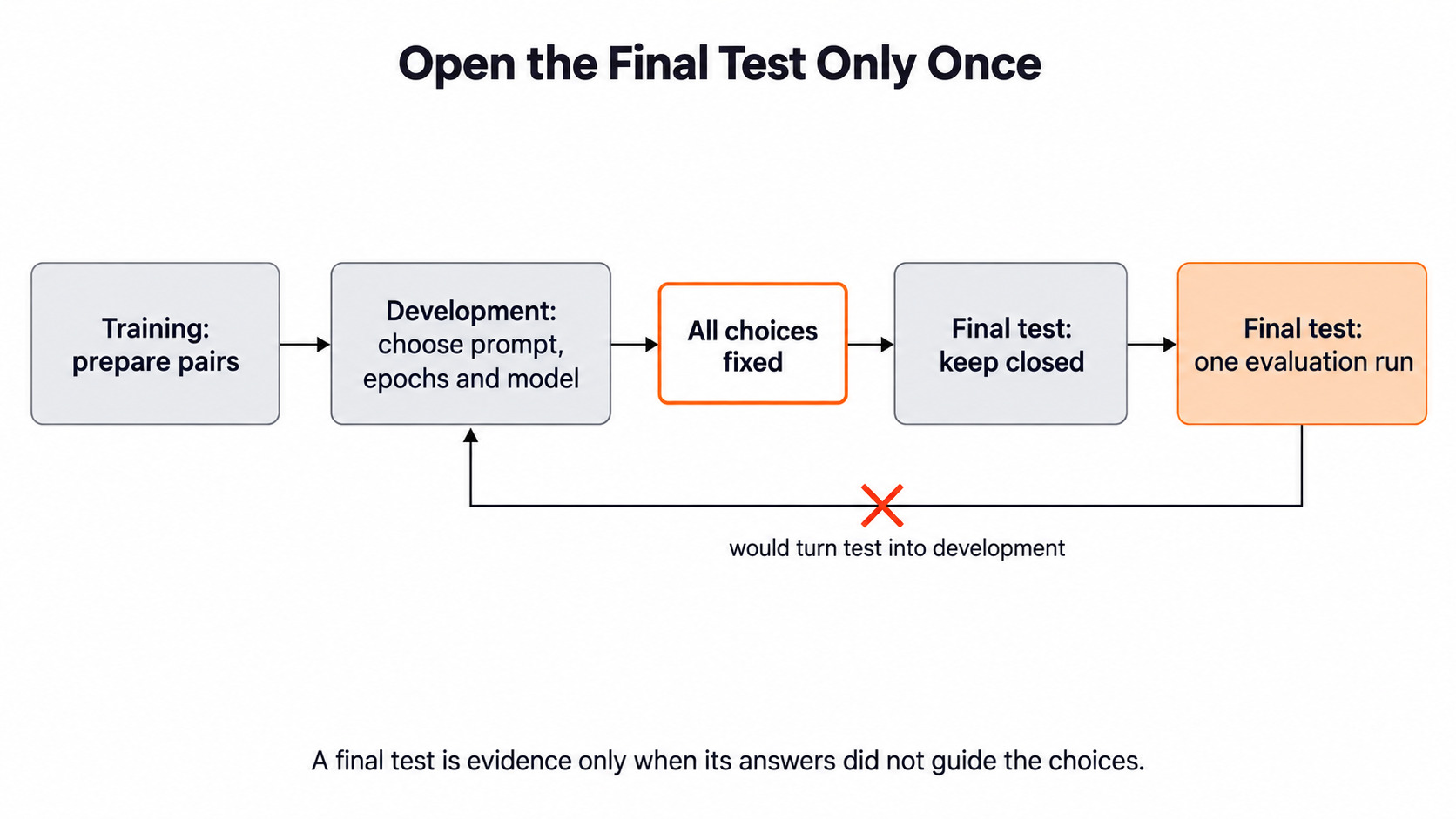
The final test stays closed through all of this. We open it once, after the method and settings are fixed. If we peeked earlier, the test would quietly become a second development set, as the figure below shows.
Why Scikit-LLM Fine-Tuning Does Not Work for Us
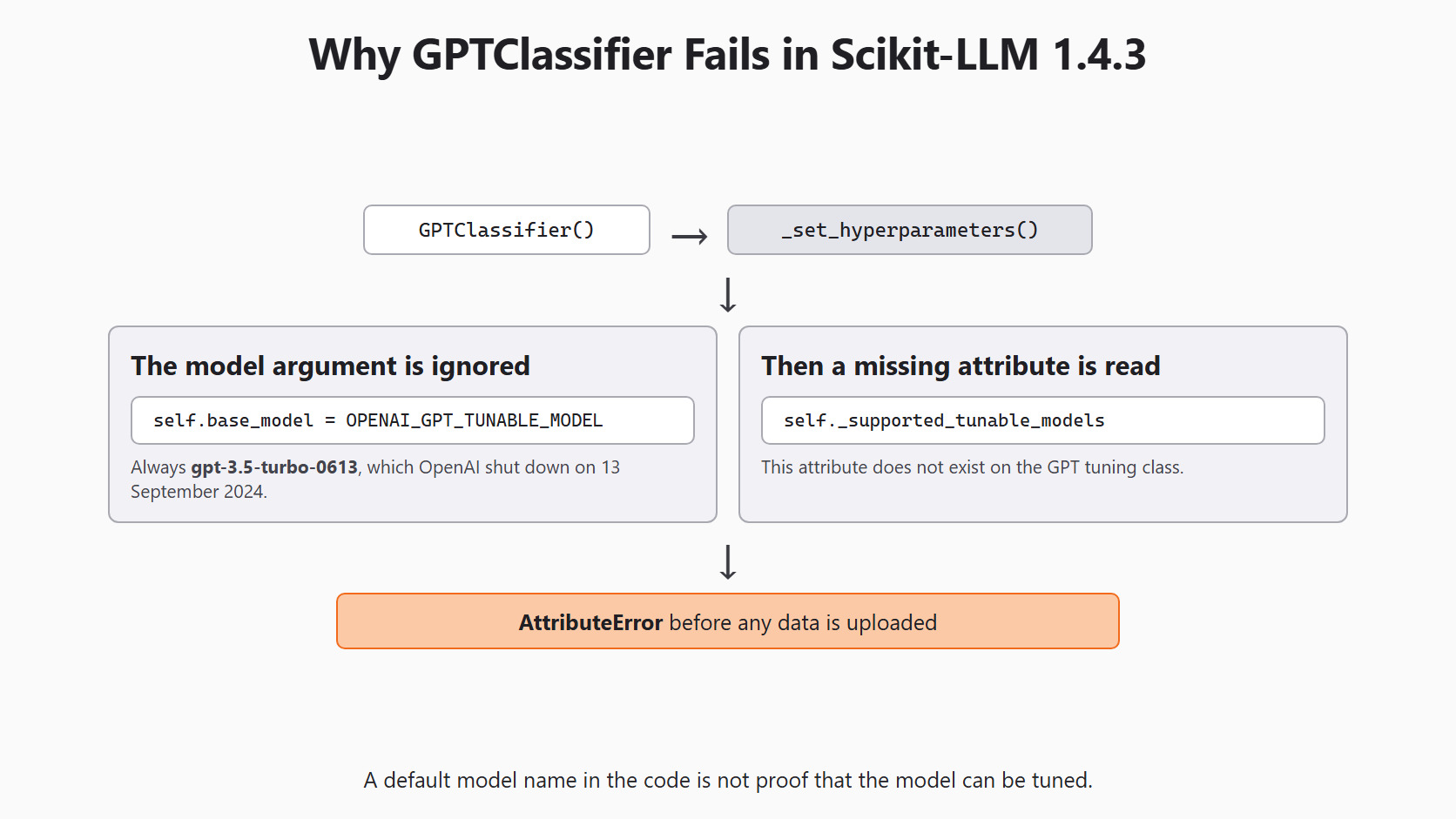
Scikit-LLM 1.4.3 has three tunable GPT classes: GPTClassifier, MultiLabelGPTClassifier and TunableGPTText2Text. They are built for OpenAI's fine-tuning service only. The library's own source says so in a comment above the tuning code. Ollama and OpenRouter, the two backends in this series, offer no fine-tuning jobs through Scikit-LLM.
On top of that, the classes do not work in 1.4.3 because of two bugs. Both live in one small method. We can print its source without any network call:
import inspect

from skllm.llm.gpt.mixin import GPTTunableMixin
from skllm.model_constants import OPENAI_GPT_TUNABLE_MODEL

print(inspect.getsource(GPTTunableMixin._set_hyperparameters))
print(OPENAI_GPT_TUNABLE_MODEL)
print(hasattr(GPTTunableMixin, '_supported_tunable_models')) def _set_hyperparameters(self, base_model: str, n_epochs: int, custom_suffix: str):
self.base_model = OPENAI_GPT_TUNABLE_MODEL
self.n_epochs = n_epochs
self.custom_suffix = custom_suffix
if base_model not in self._supported_tunable_models:
raise ValueError(
f"Model {base_model} is not supported. Supported models are"
)
gpt-3.5-turbo-0613
FalseHere, we can see both bugs:
- Bug 1: the method reads
self._supported_tunable_models, but the last line shows that this attribute does not exist. - Bug 2: the first line sets
self.base_modelto the fixed valuegpt-3.5-turbo-0613. It ignores thebase_modelwe pass in.
OpenAI shut down gpt-3.5-turbo-0613 on 13 September 2024. So even with bug 1 patched, the class would aim at a model that no longer exists.
Let's confirm bug 1 by building the classifier. Building it makes no network call:
from skllm.models.gpt.classification.tunable import GPTClassifier

try:
    GPTClassifier()
except AttributeError as error:
print('AttributeError:', error)AttributeError: 'GPTClassifier' object has no attribute '_supported_tunable_models'Here, we can see that construction fails before any data is uploaded. MultiLabelGPTClassifier and TunableGPTText2Text call the same method, so they fail the same way. The figure below traces this path.
Note
The only other tunable class, VertexClassifier, trains on Google Cloud Vertex AI and accepts only text-bison@002. That is also outside the local setup this series uses.
What We Do Instead
Our checked pairs are not wasted. The same X_train and y_train can go straight into the few-shot classifier from Day 5. It puts the examples into every prompt instead of into the weights.
First, the setup block from Day 2, which explains each line:
import os

from skllm.config import SKLLMConfig

# Default: Qwen 3.8 27B running on our own machine through Ollama
SKLLMConfig.set_gpt_url("http://localhost:11434/v1")
SKLLMConfig.set_gpt_key("ollama")
MODEL = "custom_url::qwen3.8:27b"

# Option: the free Qwen 3.8 27B on OpenRouter (uncomment these lines)
# SKLLMConfig.set_gpt_url("https://openrouter.ai/api/v1")
# SKLLMConfig.set_gpt_key(os.environ["OPENROUTER_API_KEY"])
# MODEL = "custom_url::qwen/qwen3.8-27b:free"
With Ollama, the model runs on our own computer, so there is no API bill and no training job to pay for. Now we fit the few-shot classifier on the same pairs we checked above:
from skllm.models.gpt.classification.few_shot import FewShotGPTClassifier

few_shot = FewShotGPTClassifier(model=MODEL, default_label='needs_review')
few_shot.fit(X_train, y_train)
development_texts = ['I was charged twice for my course subscription.']
print(few_shot.predict(development_texts))
Here, fit stores our three pairs, and no weights change. predict returns one label per ticket: billing, login, cancellation or needs_review.
When a gap remains, we try these steps in order, and score each one on the same development tickets:
- Better examples: replace weak pairs, add hard boundary cases and fix inconsistent labels.
- Dynamic few-shot: with a large example bank, Day 9 picks the closest examples for each ticket instead of sending them all.
- A bigger local model: change
MODELto a larger model that Ollama can run, if our machine has the memory for it.
Each step changes one line or one list, so it is easy to undo. A training job is much harder to undo.
Tip
Write down the decision before any job. Note the error we see now and the simple fixes we already tested. Then note the result a job would need to beat. If one of the three is missing, the case for fine-tuning is not ready.
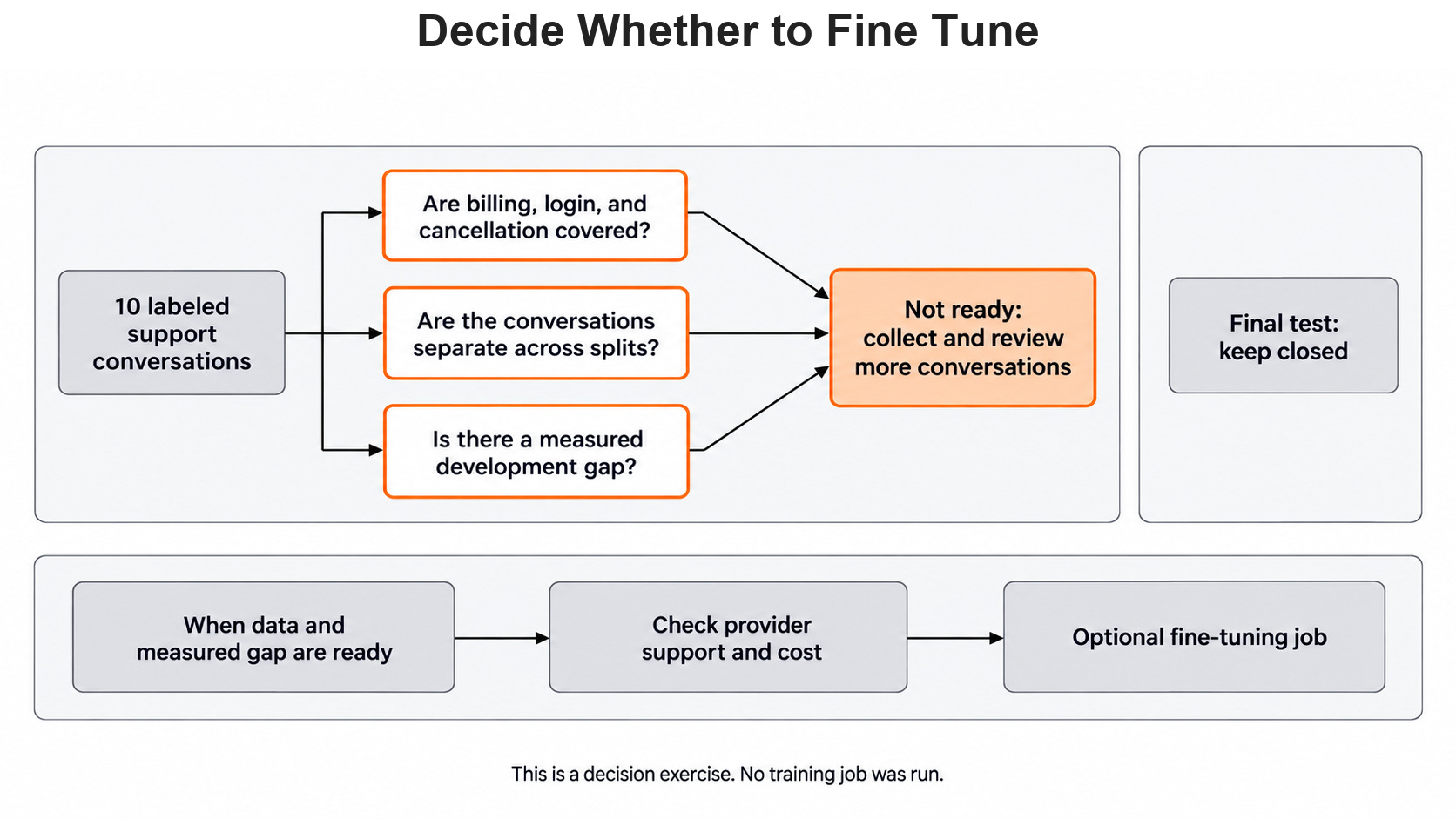
Let's say we have only ten labeled conversations. Is that enough to train on, keep a development set and still hold out a final test? The figure below walks through that check.
Conclusion
This is how fine-tuning fits into our support project. We learned that fine-tuning changes the model's weights, while prompts and examples do not. We split tickets by conversation and checked classification and summary pairs on our own machine. Then we saw that the Scikit-LLM 1.4.3 tunable classes fail on construction, so the same checked pairs go into a few-shot classifier instead.
Key takeaways:
- Fine-tuning is worth testing only after a measured gap survives clearer labels and better examples.
- Split data by conversation and keep the final test closed until every choice is made.
- In Scikit-LLM 1.4.3, the tunable GPT classes support only OpenAI and fail with
AttributeErrorbefore any upload. - Better examples, dynamic few-shot and a bigger local model are the steps we can take on our own machine.
Next steps:
- Go back to Day 13: predictions and explanations to review labels and reasons side by side.
- Grow the example bank with Day 9: dynamic few-shot classification.
- Continue to Day 15: building a support-ticket app, where the earlier lessons come together behind a small screen.


