
Over the last 14 days, starting from Day 1, we learned to label tickets, write summaries and check text against its source. Today we put those pieces behind a small screen. The app suggests a category and drafts a summary for one ticket, and a support person checks both before taking any action.
In this blog, we will learn how to check a ticket before any model call and how to wrap both model calls in one function. We will test every path of that function without a model. Then we will put everything into one app.py file and run it with Streamlit.
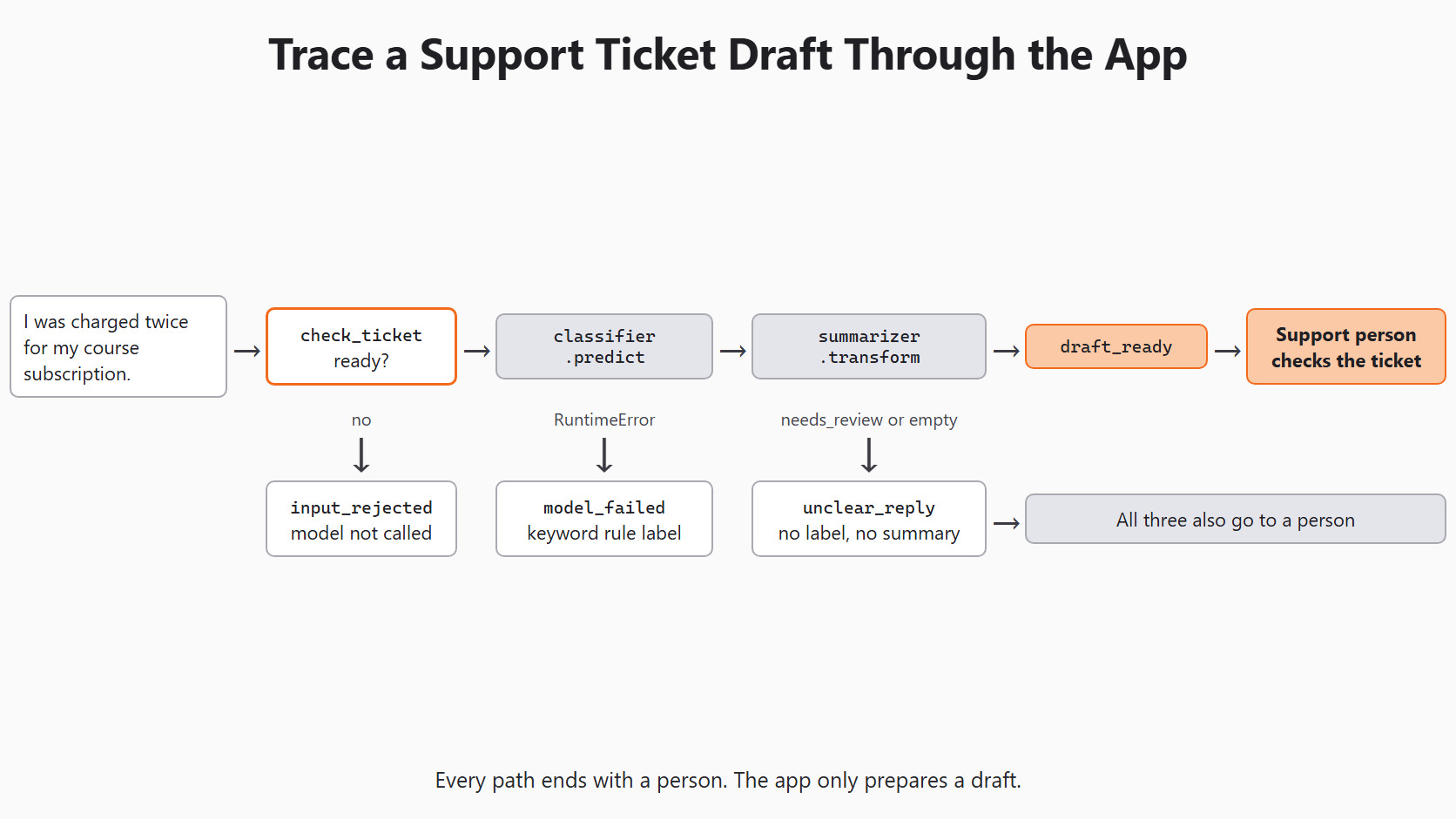
What the App Does and Does Not Do
The app only prepares drafts, and it never cancels a plan, approves a refund or changes an account. Those actions stay with the support team and its normal process.
We use ZeroShotGPTClassifier from Day 3 to keep the example small. In a real app, we pick zero-shot, few-shot or embeddings after comparing them on the same development tickets. Day 4 shows how to run that comparison on held-out tickets. We do not change the method after opening the final test set.
Check the Ticket Before Any Model Call
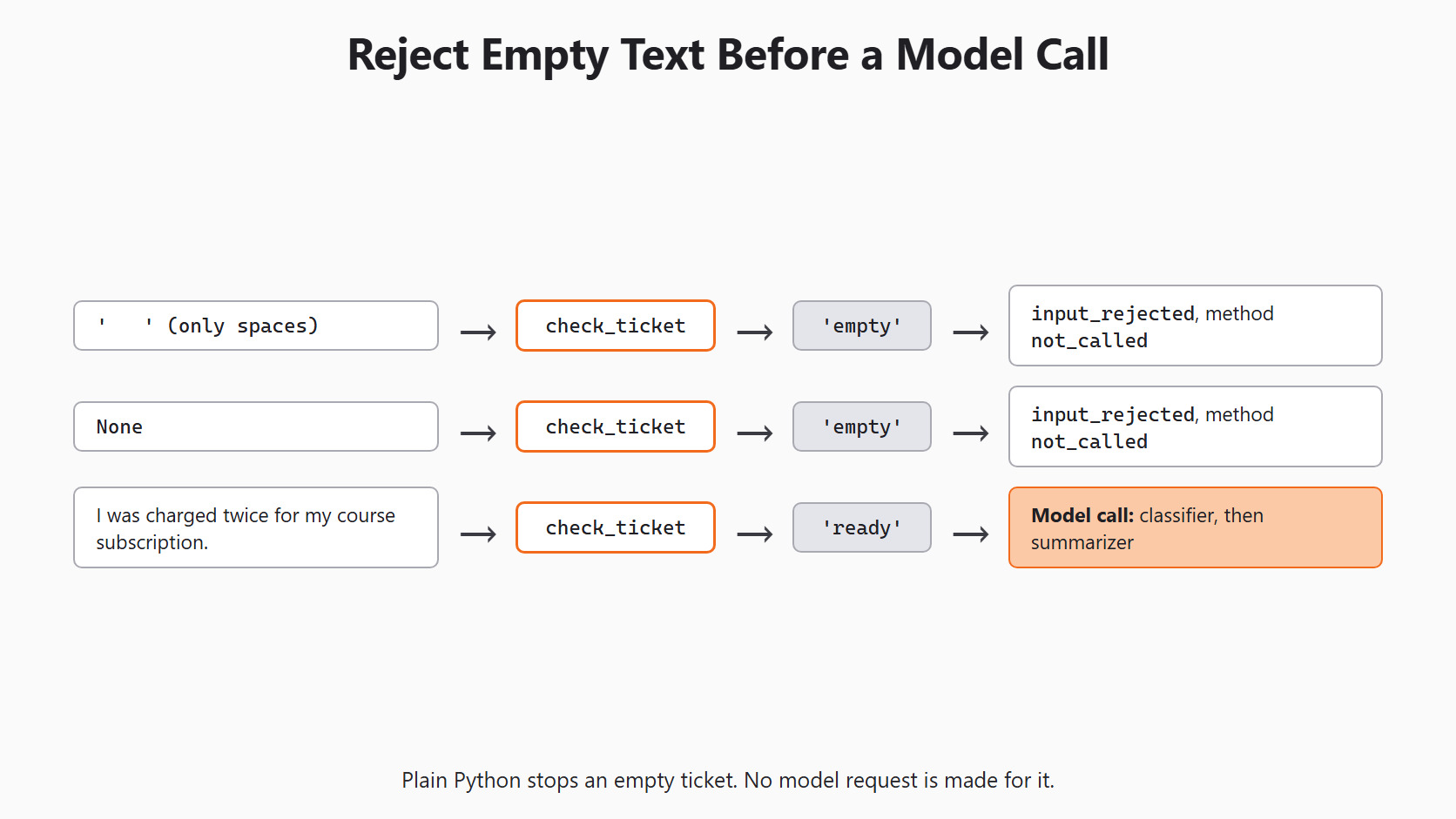
A blank ticket gives the model nothing to sort. A very long ticket can hide the student's main request and makes the call slower. So we reject both cases in plain Python, before any model call.
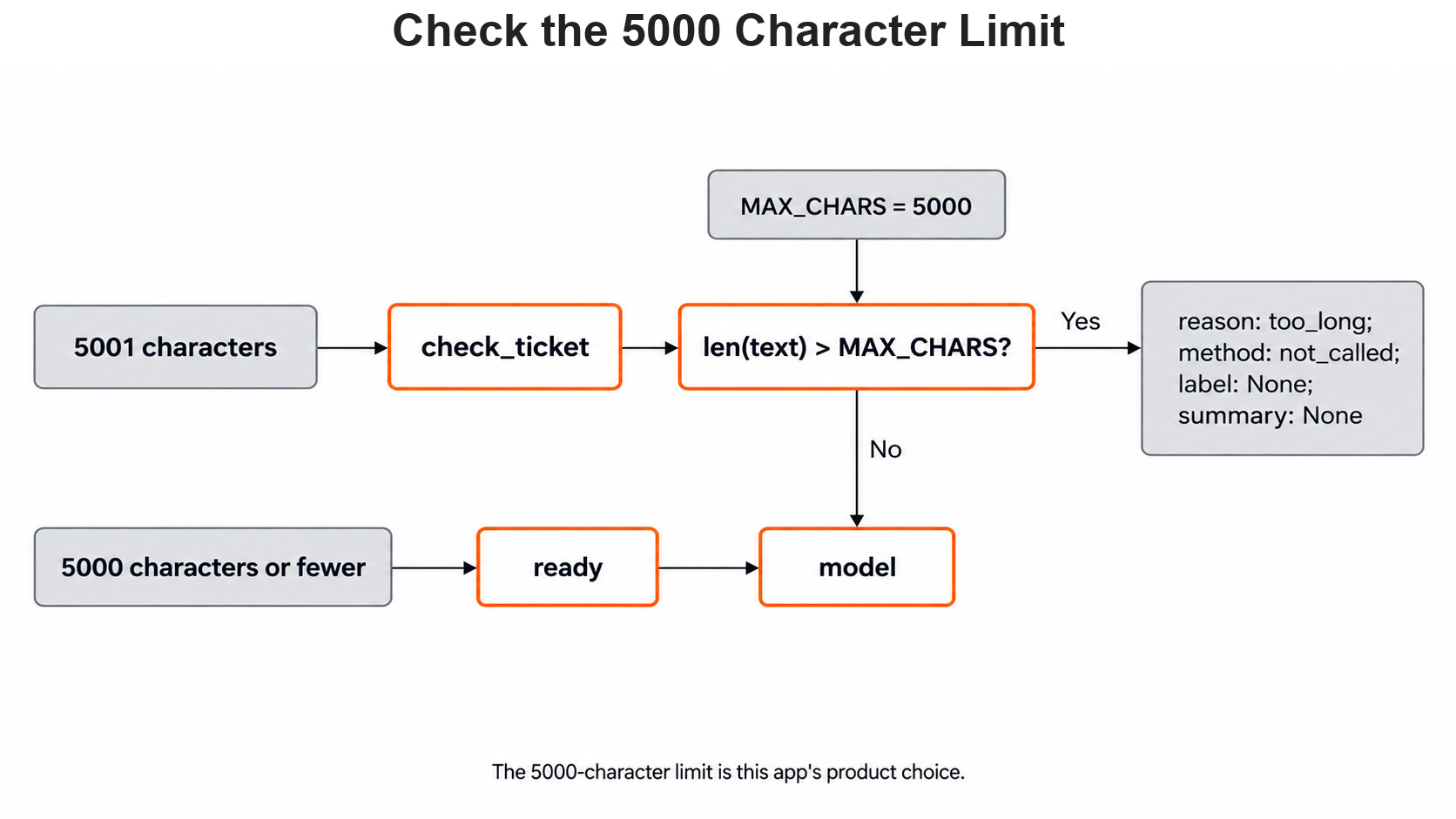
We set the limit at 5,000 characters as a product choice for our example app, not as a rule from Scikit-LLM. Let's see the code as below:
MAX_CHARS = 5000
LABELS = ['billing', 'login', 'cancellation']

def check_ticket(text):
    if not isinstance(text, str) or not text.strip():
        return 'empty'
    if len(text) > MAX_CHARS:
        return 'too_long'
    return 'ready'

print(check_ticket('   '))
print(check_ticket(None))
print(check_ticket('I was charged twice for my course subscription.'))
print(check_ticket('a' * 5001))empty
empty
ready
too_longHere, we can see that spaces and None both return empty. A normal ticket is ready, and 5,001 characters is too_long. Only a ready ticket goes on to the model.
The next figure follows an overlong ticket through the same check.
Setup
Every model call in this series goes through the same setup block. Day 2 explains each line:
import os

from skllm.config import SKLLMConfig

# Default: Qwen 3.8 27B running on our own machine through Ollama
SKLLMConfig.set_gpt_url("http://localhost:11434/v1")
SKLLMConfig.set_gpt_key("ollama")
MODEL = "custom_url::qwen3.8:27b"

# Option: the free Qwen 3.8 27B on OpenRouter (uncomment these lines)
# SKLLMConfig.set_gpt_url("https://openrouter.ai/api/v1")
# SKLLMConfig.set_gpt_key(os.environ["OPENROUTER_API_KEY"])
# MODEL = "custom_url::qwen/qwen3.8-27b:free"
With Ollama, the model runs on our own computer, so there is no API bill. The key "ollama" is only a placeholder that Ollama ignores.
Tip
On the OpenRouter option, free models allow 20 requests per minute and 50 per day. Each ticket in this app makes 2 requests, so that is about 25 tickets a day. Keep the key in the OPENROUTER_API_KEY environment variable and never print it.
Build the Two Model Tools
Our app needs a classifier that picks a category. It also needs the summarizer from Day 10, which writes a short summary. We build both inside one function, so the app can build them once and reuse them:
from skllm.models.gpt.classification.zero_shot import ZeroShotGPTClassifier
from skllm.models.gpt.text2text.summarization import GPTSummarizer

def load_tools():
    classifier = ZeroShotGPTClassifier(model=MODEL, default_label='needs_review')
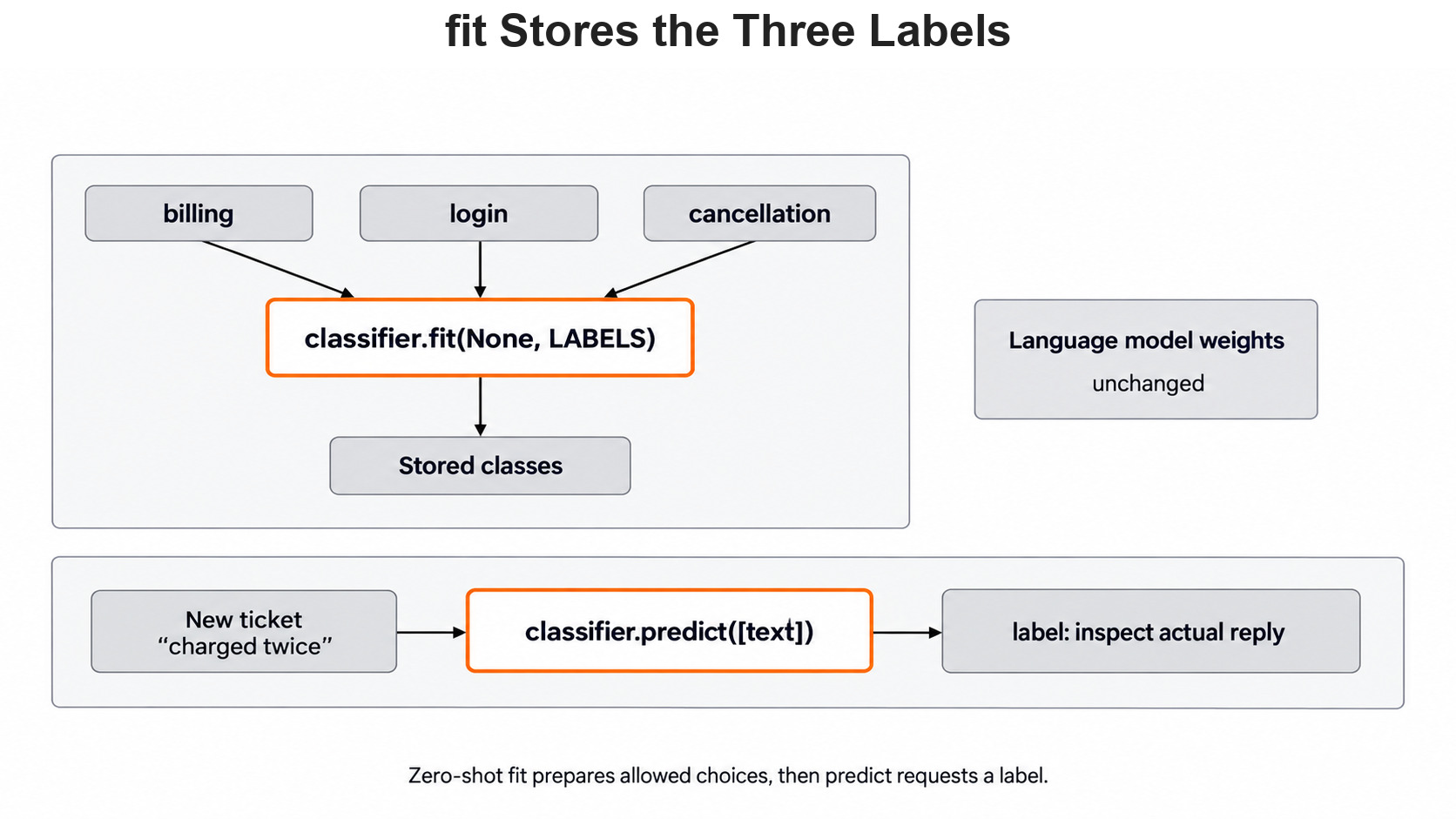
    classifier.fit(None, LABELS)
    summarizer = GPTSummarizer(model=MODEL, max_words=35)
    return classifier, summarizer

classifier, summarizer = load_tools()
print(classifier.classes_)['billing', 'login', 'cancellation']Here, we can see our three labels, because fit() only stores this list. It does not train the model, and it makes no model call.
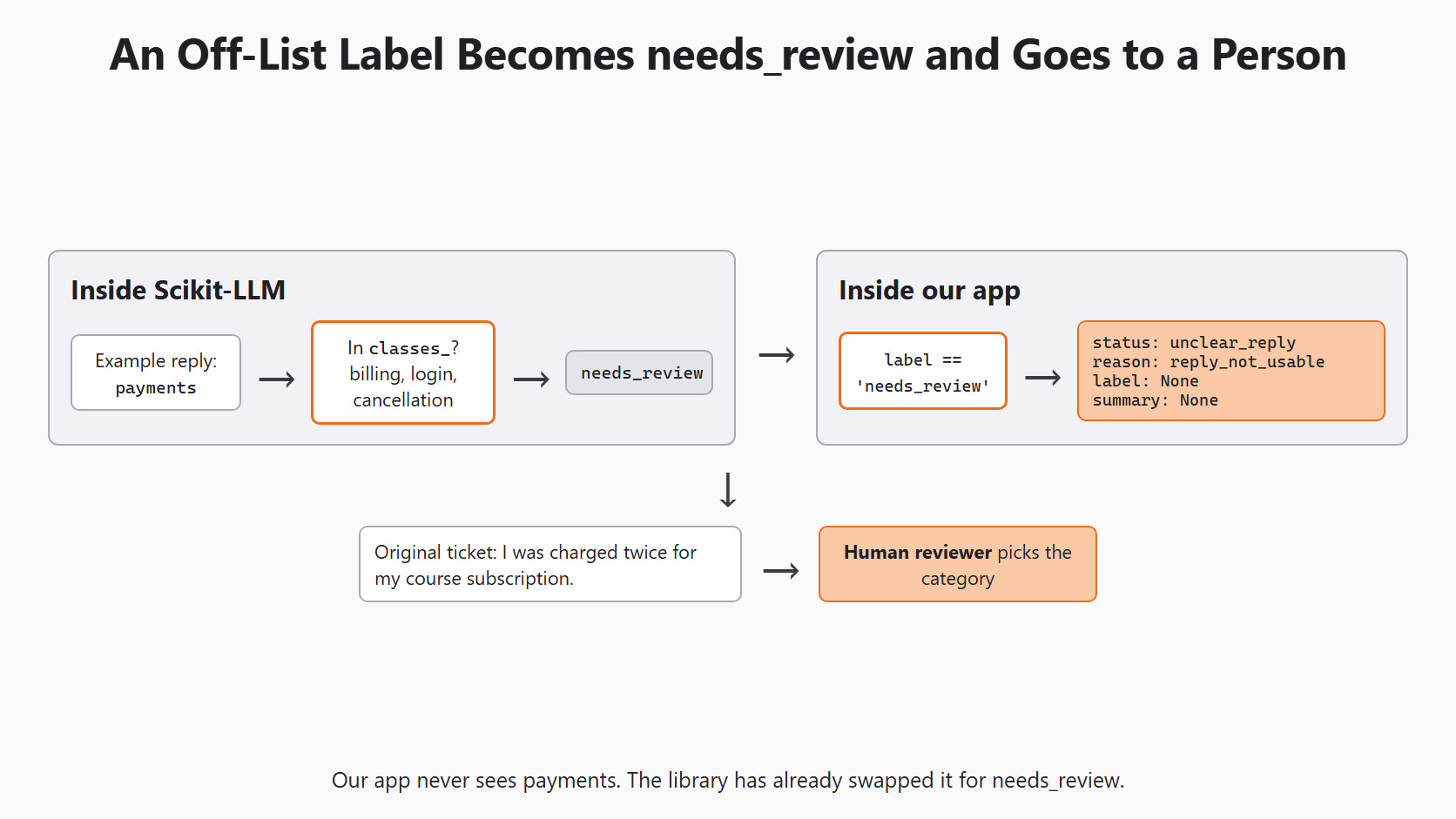
default_label='needs_review' matters here, because Scikit-LLM swaps any label outside our list for needs_review. So a reply like payments never reaches our app code.
max_words=35 puts "in at most 35 words" into the prompt. It is only a soft limit, so the model can still write more and a reviewer reads the summary anyway.
Plan for a Failed Model Call
Sometimes the model cannot answer at all, for example when Ollama is not running.
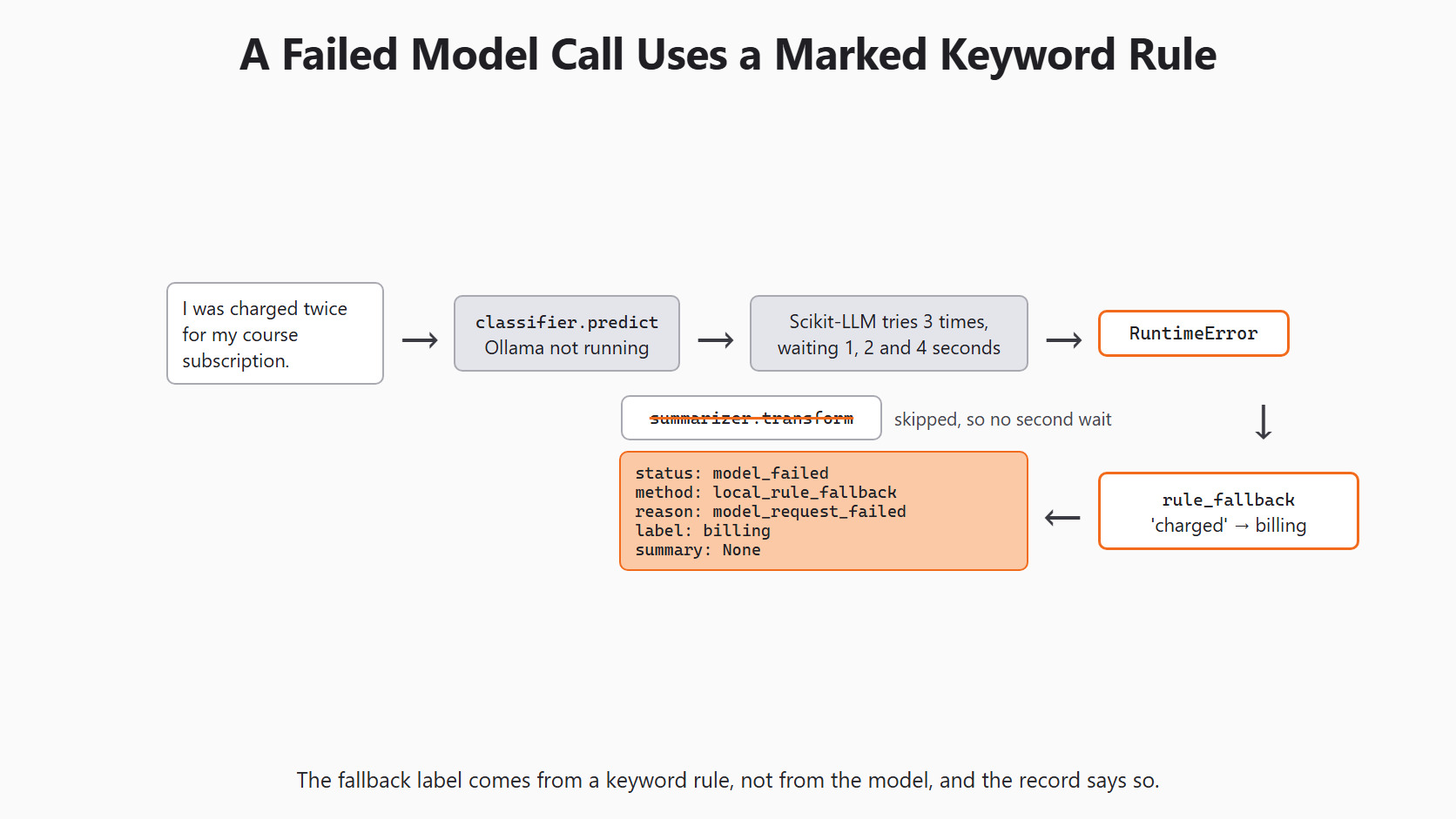
Scikit-LLM already retries each call for us, 3 times in total. After each failed try it waits 1, 2 and then 4 seconds, and at the end it raises a RuntimeError. So we do not add our own retry loop, because that would only make the student wait longer.
Note
With Ollama stopped, one failed call took 49.5 seconds on our PC before the RuntimeError. Our function calls the classifier first, so when it fails, the summarizer is never called and we do not wait twice.
When the model fails, we still want to give the support person a hint. So here comes a tiny keyword rule to the rescue, and it needs no model at all:
RULE_WORDS = {
    'billing': ['charged', 'payment', 'refund'],
    'login': ['sign in', 'sign-in', 'log in', 'login', 'password'],
    'cancellation': ['cancel', 'renew'],
}

def rule_fallback(text):
    lower = text.lower()
    for label, words in RULE_WORDS.items():
        if any(word in lower for word in words):
            return label
    return 'needs_review'

print(rule_fallback('I was charged twice for my course subscription.'))
print(rule_fallback('The sign-in link expired.'))
print(rule_fallback('Please stop next month renewal.'))
print(rule_fallback('Where is my certificate?'))billing
login
cancellation
needs_reviewHere, we can see that each keyword leads to its label. A ticket with no keyword gets needs_review. This rule is only a hint for a person, and we never tested it like a classifier. So we never mix its answers into model scores.
Wrap Both Calls in One Function
Now we join the pieces into one function, and every path returns a dictionary with the same five keys. A small helper builds it, so no key is ever missing:
def make_result(status, method, reason, label=None, summary=None):
    return {
        'status': status,
        'method': method,
        'reason': reason,
        'label': label,
        'summary': summary,
    }

def analyze_ticket(text, classifier, summarizer):
    state = check_ticket(text)
    if state != 'ready':
        return make_result('input_rejected', 'not_called', state)

    try:
        label = str(classifier.predict([text])[0])
        summary = str(summarizer.transform([text])[0]).strip()
    except RuntimeError:
        return make_result(
            'model_failed', 'local_rule_fallback', 'model_request_failed',
            label=rule_fallback(text),
        )

    if label == 'needs_review' or not summary:
        return make_result('unclear_reply', 'scikit-llm', 'reply_not_usable')

    return make_result(
        'draft_ready', 'scikit-llm', 'check_source_before_action',
        label=label, summary=summary,
    )
Let's go through the decisions one by one:
statushas four values:input_rejected,model_failed,unclear_replyanddraft_ready. None of them looks like the labelneeds_review, so a status is never confused with a category.methodsays where the label came from.local_rule_fallbacktells the reviewer that a keyword rule chose it, not the model.- We catch only
RuntimeError, the error Scikit-LLM raises after its retries. A bug in our own code should still crash loudly, so we can find it and fix it. str()turns the numpy string frompredictinto a plain Python string..strip()removes extra spaces around the summary.- We do not check for a label outside our list. The library already turned it into
needs_review, so checking forneeds_reviewcovers both cases. - Even
draft_readyis only a draft, and its reason,check_source_before_action, reminds the reviewer to read the ticket.
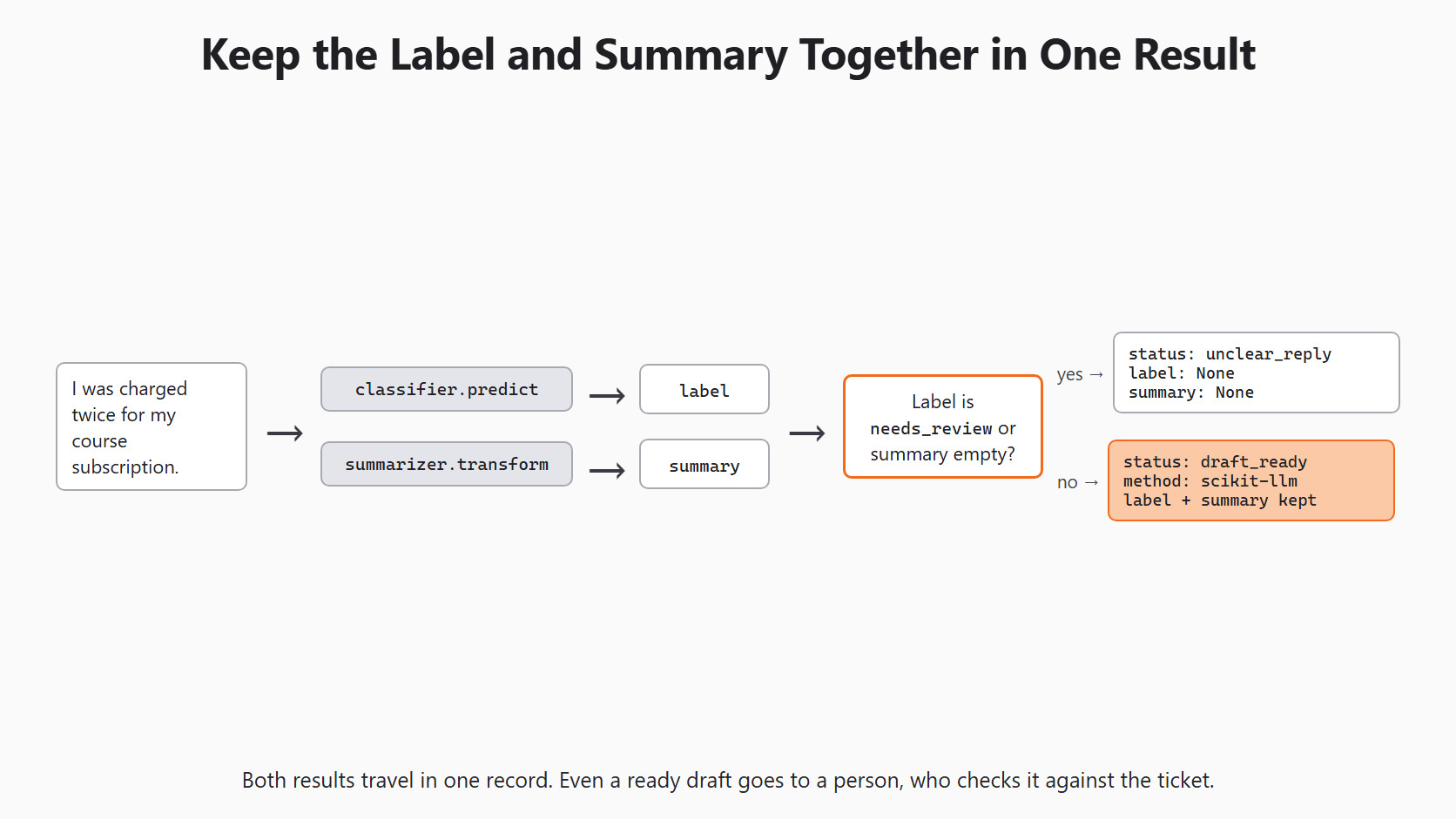
Now we can send a real ticket through the function:
ticket = 'I was charged twice for my course subscription.'
result = analyze_ticket(ticket, classifier, summarizer)
print(result['status'], result['method'], result['label'])
The status is draft_ready when both replies can be used. It is unclear_reply when the label comes back as needs_review or the summary is empty. If Ollama is not running, it is model_failed, and the label comes from the keyword rule.
The figure below follows an off-list label through the library and our function.
Test Every Path Without a Model
A real model call is slow, and we cannot make it fail on purpose. So we test our function with two small stand-in objects. They have the same method names as the real tools, but they return values we choose:
class StandInClassifier:
    def __init__(self, label=None, fail=False):
        self.label = label
        self.fail = fail

    def predict(self, texts):
        if self.fail:
            raise RuntimeError('Could not complete the operation after 3 retries')
        return [self.label for _ in texts]

class StandInSummarizer:
    def __init__(self, summary):
        self.summary = summary

    def transform(self, texts):
        return [self.summary for _ in texts]

good_summary = StandInSummarizer('The student was charged twice for one course.')
cases = [
    ('blank ticket', '   ', StandInClassifier('billing'), good_summary),
    ('good reply', ticket, StandInClassifier('billing'), good_summary),
    ('model down', ticket, StandInClassifier(fail=True), good_summary),
    ('unclear label', ticket, StandInClassifier('needs_review'), good_summary),
    ('empty summary', ticket, StandInClassifier('billing'), StandInSummarizer('  ')),
]

for name, text, fake_classifier, fake_summarizer in cases:
    result = analyze_ticket(text, fake_classifier, fake_summarizer)
print(f"{name:14} {result['status']:15} {result['method']:20} {result['label']}")blank ticket input_rejected not_called None
good reply draft_ready scikit-llm billing
model down model_failed local_rule_fallback billing
unclear label unclear_reply scikit-llm None
empty summary unclear_reply scikit-llm NoneHere, we can see all four statuses, and the blank ticket never reaches a model. The good reply becomes a draft_ready draft. The failed call gets billing from the keyword rule, marked as local_rule_fallback. An unclear label and an empty summary both go to a person with no label.
If a later code change breaks one of these paths, this test shows which one.
Save a Run Record
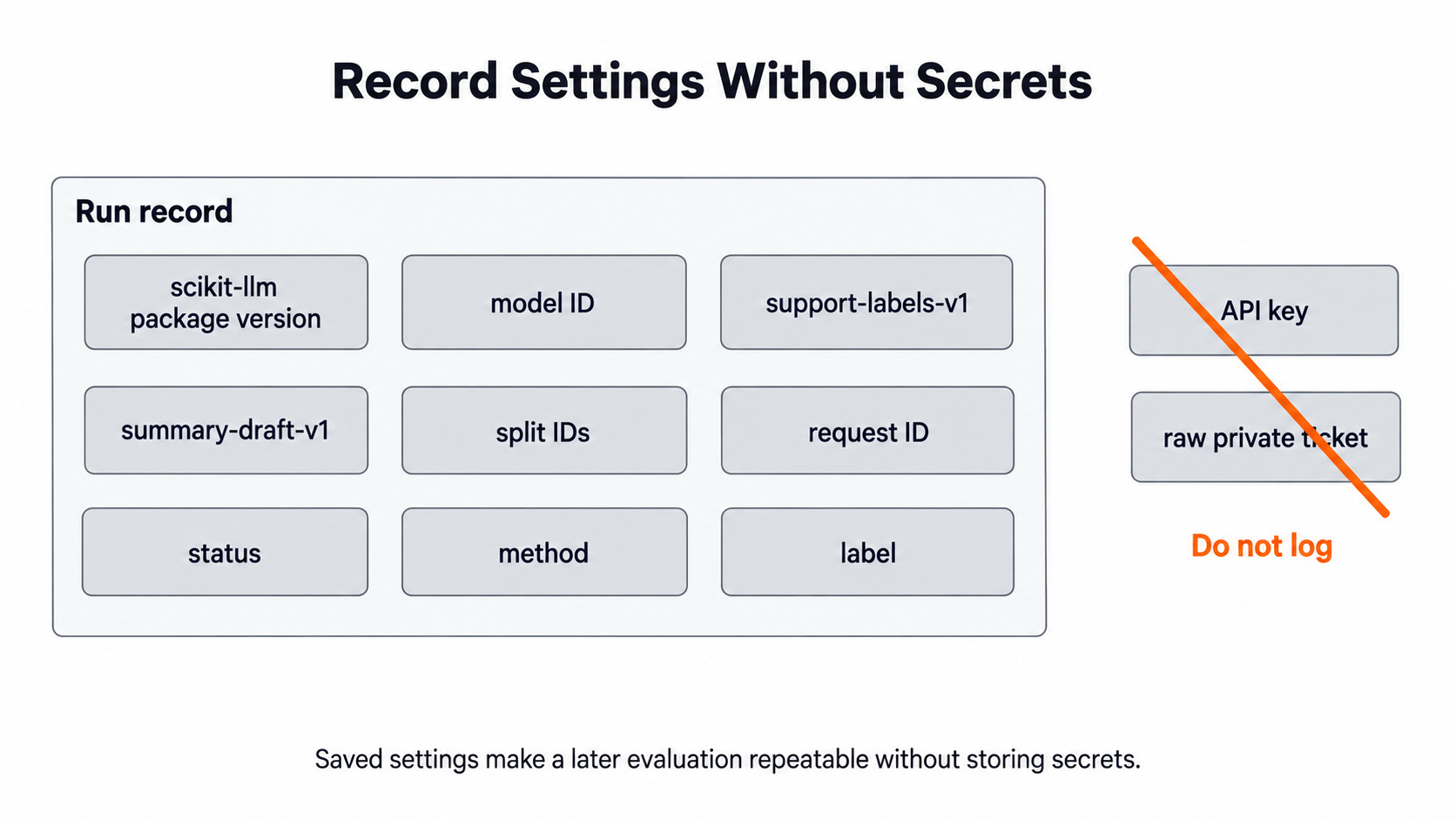
To compare two runs later, we must know what each run used. So for every ticket we save a small record. It holds the package version, the model and the version names of our labels and prompt.
It also holds a random request_id, the split the ticket came from, and the result fields. It never holds the ticket text or any key. Let's see the code as below:
import json
import uuid
from importlib.metadata import version

def make_run_record(result, split_id):
    return {
        'package_version': version('scikit-llm'),
        'model': MODEL,
        'label_policy': 'support-labels-v1',
        'prompt_version': 'summary-draft-v1',
        'split_id': split_id,
        'request_id': str(uuid.uuid4()),
        'status': result['status'],
        'method': result['method'],
        'label': result['label'],
    }

def save_run_record(record, path='runs.jsonl'):
    with open(path, 'a', encoding='utf-8') as file:
        file.write(json.dumps(record) + '\n')

failed = analyze_ticket(ticket, StandInClassifier(fail=True), good_summary)
record = make_run_record(failed, 'development')
save_run_record(record)
print(json.dumps(record, indent=2)){"package_version": "1.4.3", "model": "custom_url::qwen3.8:27b", "label_policy": "support-labels-v1", "prompt_version": "summary-draft-v1", "split_id": "development", "request_id": "2d8d370f-7c54-4746-a1dc-746c2c2331b9", "status": "model_failed", "method": "local_rule_fallback", "label": "billing"}Here, we can see every field, and no ticket text. The request_id will be different on each run, because uuid4() makes a new random ID every time.
save_run_record adds one line to runs.jsonl and keeps the old lines. We change support-labels-v1 whenever we change the labels, and summary-draft-v1 whenever we change max_words. Then old and new runs never get mixed up.
Put a Screen on the Functions
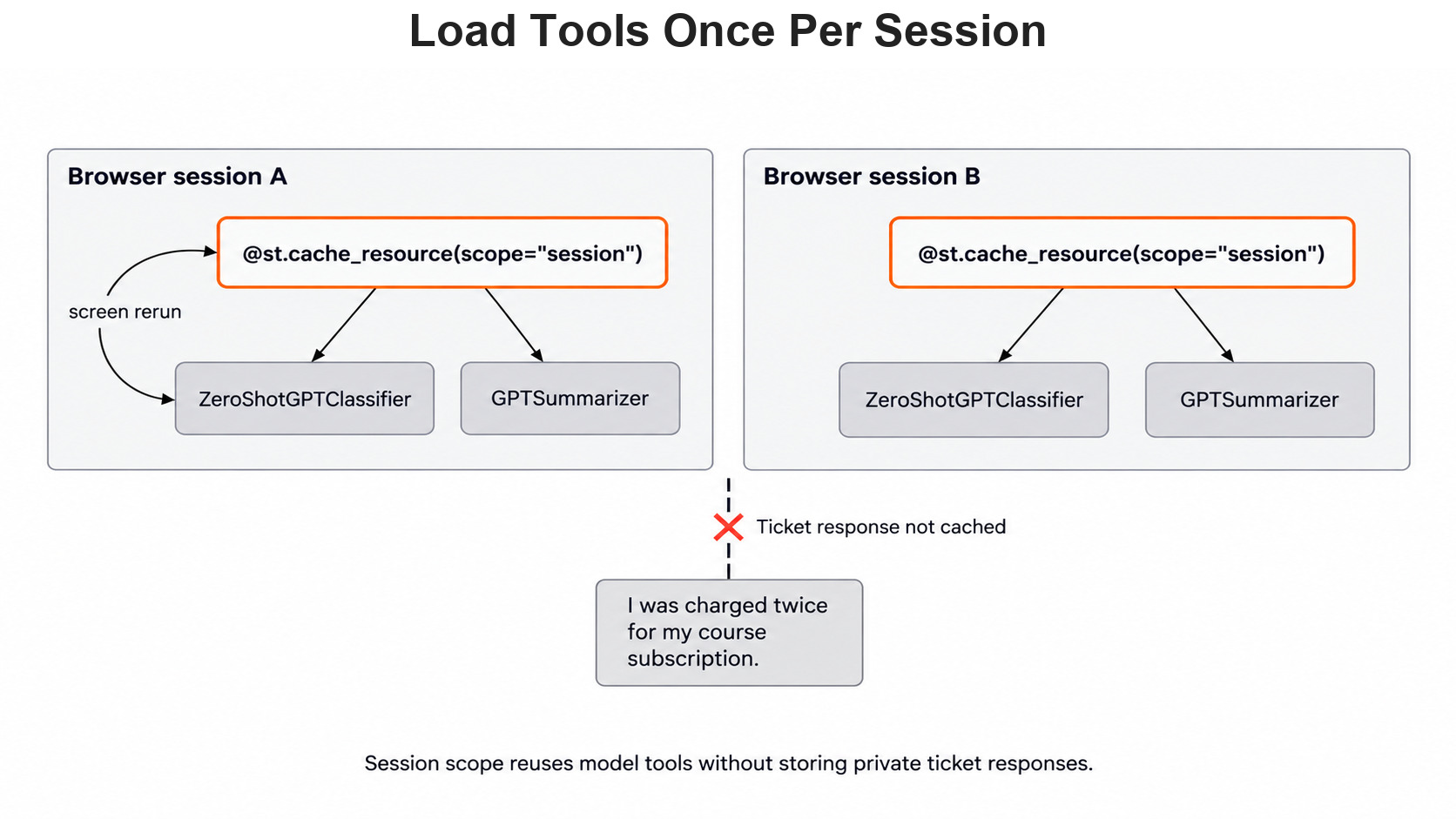
Streamlit turns a Python file into a web page. It runs the whole file again every time someone clicks a button. We do not want to rebuild the model tools on every click. So we wrap load_tools() with @st.cache_resource(scope='session') to keep the tools between clicks.
In simple words, each browser session builds the tools once and then reuses them, so two users never share one classifier object. The ticket text and its result are not cached. The Streamlit cache guide explains the options.
Here is the complete app.py, which repeats the imports, the backend lines and the functions from above so the file runs on its own:
import json
import os
import uuid
from importlib.metadata import version

import streamlit as st
from skllm.config import SKLLMConfig
from skllm.models.gpt.classification.zero_shot import ZeroShotGPTClassifier
from skllm.models.gpt.text2text.summarization import GPTSummarizer

# Default: Qwen 3.8 27B running on our own machine through Ollama
SKLLMConfig.set_gpt_url("http://localhost:11434/v1")
SKLLMConfig.set_gpt_key("ollama")
MODEL = "custom_url::qwen3.8:27b"

# Option: the free Qwen 3.8 27B on OpenRouter (uncomment these lines)
# SKLLMConfig.set_gpt_url("https://openrouter.ai/api/v1")
# SKLLMConfig.set_gpt_key(os.environ["OPENROUTER_API_KEY"])
# MODEL = "custom_url::qwen/qwen3.8-27b:free"

MAX_CHARS = 5000
LABELS = ['billing', 'login', 'cancellation']
RULE_WORDS = {
    'billing': ['charged', 'payment', 'refund'],
    'login': ['sign in', 'sign-in', 'log in', 'login', 'password'],
    'cancellation': ['cancel', 'renew'],
}


def check_ticket(text):
    if not isinstance(text, str) or not text.strip():
        return 'empty'
    if len(text) > MAX_CHARS:
        return 'too_long'
    return 'ready'


def rule_fallback(text):
    lower = text.lower()
    for label, words in RULE_WORDS.items():
        if any(word in lower for word in words):
            return label
    return 'needs_review'


def make_result(status, method, reason, label=None, summary=None):
    return {
        'status': status,
        'method': method,
        'reason': reason,
        'label': label,
        'summary': summary,
    }


def analyze_ticket(text, classifier, summarizer):
    state = check_ticket(text)
    if state != 'ready':
        return make_result('input_rejected', 'not_called', state)

    try:
        label = str(classifier.predict([text])[0])
        summary = str(summarizer.transform([text])[0]).strip()
    except RuntimeError:
        return make_result(
            'model_failed', 'local_rule_fallback', 'model_request_failed',
            label=rule_fallback(text),
        )

    if label == 'needs_review' or not summary:
        return make_result('unclear_reply', 'scikit-llm', 'reply_not_usable')

    return make_result(
        'draft_ready', 'scikit-llm', 'check_source_before_action',
        label=label, summary=summary,
    )


def make_run_record(result, split_id):
    return {
        'package_version': version('scikit-llm'),
        'model': MODEL,
        'label_policy': 'support-labels-v1',
        'prompt_version': 'summary-draft-v1',
        'split_id': split_id,
        'request_id': str(uuid.uuid4()),
        'status': result['status'],
        'method': result['method'],
        'label': result['label'],
    }


def save_run_record(record, path='runs.jsonl'):
    with open(path, 'a', encoding='utf-8') as file:
        file.write(json.dumps(record) + '\n')


@st.cache_resource(scope='session')
def load_tools():
    classifier = ZeroShotGPTClassifier(model=MODEL, default_label='needs_review')
    classifier.fit(None, LABELS)
    summarizer = GPTSummarizer(model=MODEL, max_words=35)
    return classifier, summarizer


classifier, summarizer = load_tools()

st.title('Support Ticket Helper')
ticket_text = st.text_area('Paste a synthetic ticket')

if st.button('Prepare a draft'):
    with st.spinner('Asking the local model...'):
        result = analyze_ticket(ticket_text, classifier, summarizer)
    save_run_record(make_run_record(result, 'development'))

    st.write('Status:', result['status'])
    st.write('Method:', result['method'])
    st.write('Reason:', result['reason'])
    if result['label'] is not None:
        st.write('Suggested category:', result['label'])
    if result['summary'] is not None:
        st.write('Draft summary:', result['summary'])
    st.info('Check the category and summary against the ticket before any action.')
Let's see what the screen part does:
st.text_areagives a box for the ticket, andst.buttongives the button.st.spinnershows a waiting message, because a local 27B model can take a while to answer.- The button handler builds the run record and saves it at once. So every click leaves one line in
runs.jsonl. - The words "Suggested" and "Draft" tell the reviewer that nothing has been decided yet.
We install Streamlit in the same virtual environment from Day 1:
python -m pip install streamlitThen we start the app with streamlit run app.py, as the Streamlit command-line guide shows. The app opens in the browser, and we try it with made-up tickets first. Before using real support messages, we check the company's privacy rules.
If our inbox has tickets in other languages, we can add translation from Day 11 before the classifier. Day 12 can pull names and amounts out for the reviewer, and both of these steps are optional.
Keep the Person in Charge
The reviewer should always see the original ticket beside the draft. In our app, the ticket stays in the text box above the result. Let's say the summary claims a refund was approved, but the ticket only asks about a double charge. The reviewer can spot this only with the ticket in view.
In a fuller app, the reviewer could accept the category, change it or move the ticket to another queue. We would save that human decision apart from the model suggestion. A corrected ticket can become a labeled example later, but it must never go into the final test set.
Report Only What We Measured
A local page that opens is a working demo, not proof that the model is right for our students. To show that, we need a real evaluation run on labeled tickets.
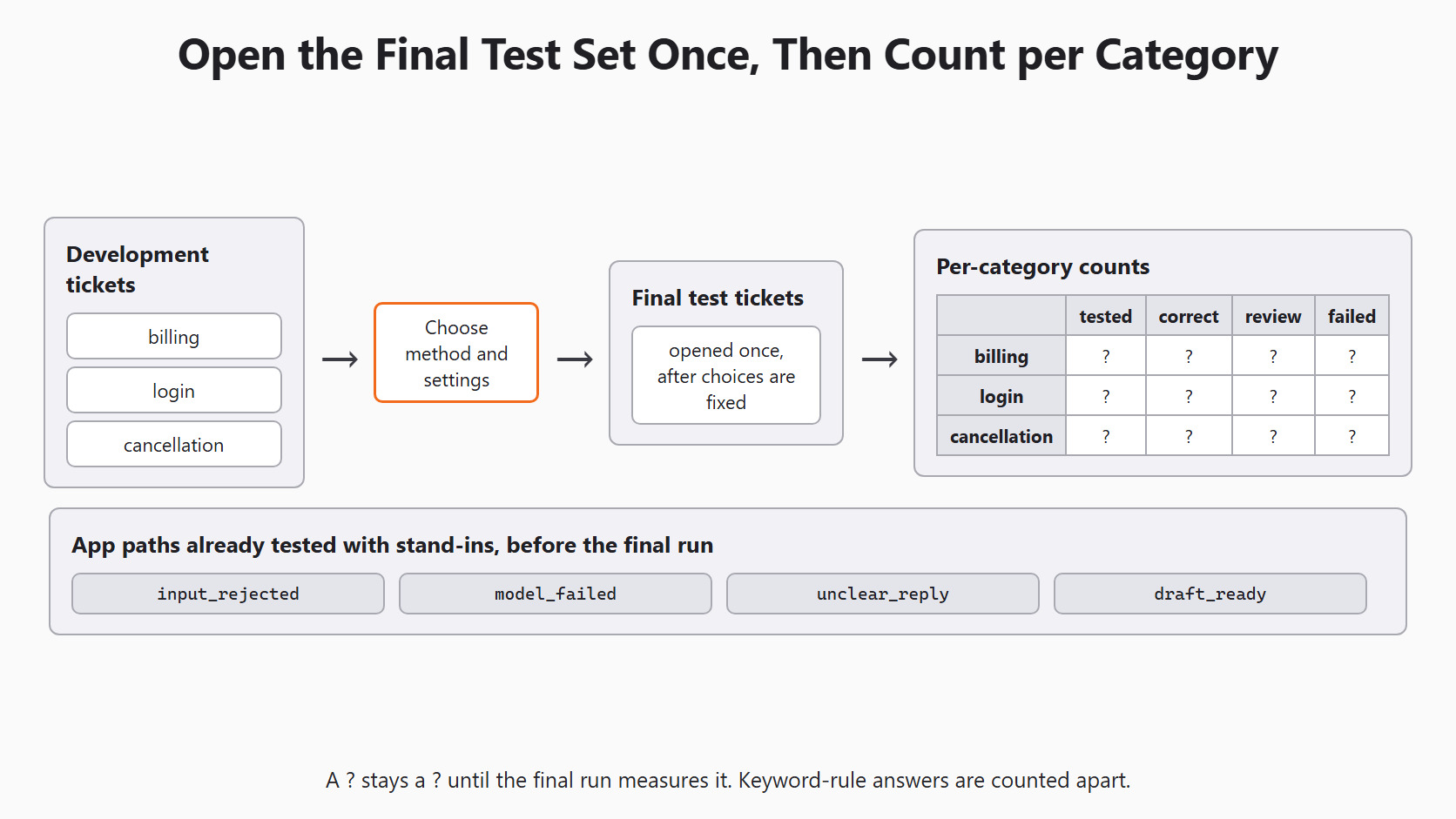
We choose the method and settings on development tickets first. Then we open the final test tickets only once, after every choice is fixed. The report gives plain counts for each category: tickets tested, correct labels, review cases and failed calls. A good total can hide a weak category, so we never report only the total. We also keep the keyword-rule answers apart from the model answers in every count.
We add response time only if we measured it. Any number the run did not collect stays blank.
Conclusion
This is how our support-ticket app works. We check each ticket in plain Python and then ask the classifier and the summarizer. A failed call falls back to a marked keyword rule, and an unclear reply goes to a person. Every click saves a run record, and a small Streamlit screen shows the draft.
Key takeaways:
- Reject empty and overlong tickets before any model call.
- Scikit-LLM already retries 3 times and maps off-list labels to
needs_review, so our app does not repeat that work. - Stand-in objects let us test every app path without a model.
- A run record with versions and a request ID, but no ticket text, makes a later run comparable.
Next steps:
- Revisit Day 14: fine-tuning with Scikit-LLM to see why we improve examples instead of tuning the model.
- Go back to Day 1: introduction to Scikit-LLM to see how the whole series fits together.
- Use Day 4: evaluating Scikit-LLM classifiers to measure the app on held-out tickets.


